
Table of Contents
Some links on The Justifiable are affiliate links, meaning we may earn a small commission at no extra cost to you. Read full disclaimer.
Finding the right ecommerce website builder can feel overwhelming when you’re just starting out. There are so many platforms, each claiming to be the best—so how do you actually know which one is right for you in 2025?
The key is choosing a builder that’s easy to use, beginner-friendly, and powerful enough to grow with your business.
In this guide, I’ll break down the top options and what makes each one a smart choice for new store owners.
1. Shopify: The Most Beginner-Friendly Ecommerce Website Builder
Shopify is often the first name people hear when they’re searching for the easiest way to start selling online.
What I like about Shopify is that it takes away the stress of learning code or messing with complex hosting setups. Everything you need to open a store is ready from the moment you sign up.
Simple Store Setup Without Technical Knowledge
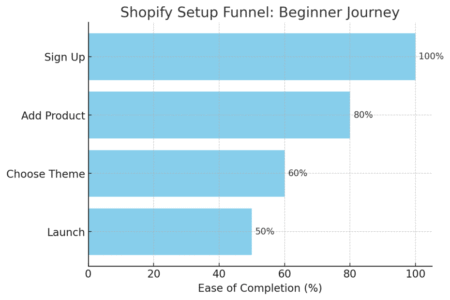
When you log into Shopify for the first time, you’ll land in a dashboard that feels almost like a to-do list for beginners. There’s a step-by-step checklist: “Add your first product,” “Customize your theme,” “Set up payments.” It guides you so you’re never staring at a blank screen wondering what to do next.
The theme store is where most people start. I’ve used it to pick a clean template, then headed straight into the editor to tweak the logo, fonts, and colors.
You don’t need design skills here — it’s drag-and-drop, and if you mess something up, there’s always the “undo” button.
For beginners, this simplicity matters. You can literally launch a functioning store in a single weekend.
My advice: Start small. Upload three products first, get the feel of it, and only then expand. Shopify’s magic is that it grows with you.
Built-In Tools for Payments, Shipping, and Inventory
Shopify isn’t just about making your store look nice — it handles the complicated parts of ecommerce too. Payments are often a headache, but with Shopify Payments, you can accept credit cards, Apple Pay, Google Pay, and even PayPal without bolting on extra services.
For shipping, you’ll see options like discounted USPS, UPS, and DHL rates baked right into the checkout setup. I’ve had people tell me it saved them hours of chasing third-party tools.
Inventory is equally straightforward. From the Products tab, you can set stock levels, create variants (like color and size), and get alerts when items are running low.
The system updates automatically when someone places an order, which prevents the nightmare of overselling.
App Marketplace to Expand Store Features Easily
Here’s where Shopify really shines for beginners: The App Store. Think of it like the App Store on your phone, but for your online shop.
Let’s say you want to add reviews, upsell pop-ups, or integrate email marketing. You just search, click install, and it’s running inside your store.
Some apps are free, while others charge monthly. A few personal favorites:
- Judge.me for product reviews.
- Klaviyo for email marketing automation.
- Oberlo (when it was around) for dropshipping.
I suggest being cautious, though. Don’t install everything just because it looks cool. Start with one or two essentials, or you’ll end up with app overload that slows your store down.
Affordable Plans That Scale as You Grow
One of the biggest beginner fears is getting trapped in a tool that becomes too expensive too quickly. Shopify’s pricing is refreshingly simple.
The Basic plan gives you everything to launch for around the cost of a nice dinner each month.
As your sales grow, you can move up to higher plans that lower transaction fees and add advanced reports.
I’ve seen stores go from zero sales to thousands a month and never need to leave Shopify. It’s flexible enough to handle both small side hustles and serious businesses.
If you’re starting from scratch in 2025, Shopify is the safest “no regrets” option. It balances ease of use with growth potential better than any other ecommerce website builder I’ve tried.
2. Wix: A Flexible Ecommerce Website Builder With Creative Control
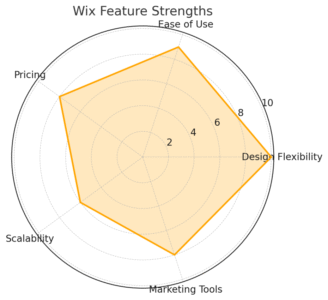
Wix is a fantastic option if you want freedom over design while still keeping things beginner-friendly.
Where Shopify focuses on function, Wix shines when you want your store to look unique and not just “cookie cutter.”
Drag-and-Drop Editor That Anyone Can Use
The Wix editor feels like playing with building blocks. You literally click, drag, and drop text, images, and buttons exactly where you want them. If you’ve ever fiddled with a PowerPoint slide, you’ll feel right at home here.
I remember testing Wix with someone who had never built a website before — within two hours, they had a landing page with product images, a working cart, and even a video header. That kind of freedom is rare in ecommerce platforms.
From the left-hand menu, you can add new sections like “Gallery,” “Testimonials,” or “Shop.” Everything updates in real time, so you’re never wondering how your changes will look live.
Customizable Templates Designed for Online Stores
Wix offers hundreds of templates, and unlike some platforms, they’re not buried in clunky menus. You can browse “Online Store” themes, preview how they look on mobile, and then click “Edit” to make it yours.
A detail I like: Templates aren’t locked. You can move elements around or delete sections you don’t need. For instance, I once stripped a heavy homepage template down to just a hero banner, product grid, and buy button — it looked clean and loaded lightning-fast.
Just note: Once you publish a template, you can’t switch to a new one without starting over. So pick carefully at the start.
Integrated Marketing and SEO Features for Growth
Wix doesn’t just help you design; it wants your store to be found too. Its SEO Wiz tool is a step-by-step checklist that suggests page titles, meta descriptions, and keyword placement. It’s beginner-friendly, even if you’ve never heard of SEO before.
Marketing tools come baked in as well. From the dashboard, click Marketing & SEO > Email Marketing, and you can send newsletters directly to customers.
Automations like “send a coupon when someone abandons their cart” are just a couple of clicks away.
I’ve seen beginners lean heavily on these built-ins instead of juggling third-party apps, which keeps things simple while still effective.
Limitations to Watch Out for With Larger Stores
Here’s where Wix shows its limits. While it’s brilliant for smaller shops (say 10–50 products), it can feel sluggish with very large inventories. The product management system isn’t as robust as Shopify’s, and reporting tools are more basic.
Payment gateways are also a bit more limited, depending on your region. If you’re planning to sell internationally, double-check the supported payment methods before committing.
That said, Wix is perfect if your main focus is a beautiful, unique storefront and you don’t plan to manage thousands of products.
I’d say it’s best for creatives, boutiques, and niche sellers who value design as much as function.
3. Squarespace: Sleek Ecommerce Website Builder for Design Lovers
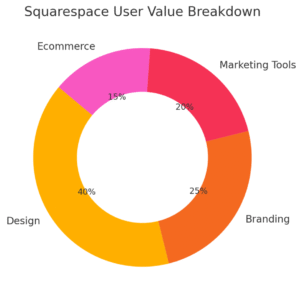
Squarespace is often the go-to for people who care deeply about aesthetics.
If you want your store to look like it was designed by a professional, even if you’ve never touched design software, Squarespace makes that possible.
Professional Templates That Look Polished From Day One
Squarespace’s templates are hands down some of the best-looking in the industry. They’re clean, minimal, and modern. You’ll notice right away that they don’t feel cluttered or outdated.
When you browse the template gallery, you can filter by “Online Stores” to see themes tailored for ecommerce. Once you choose one, the editing process is simple: Hover over any block, click “Edit,” and swap out placeholder images or text for your own.
I once helped a friend set up a small jewelry store on Squarespace. The template alone made it look like a luxury brand, even though she was selling handmade pieces out of her home.
That kind of instant polish is what makes Squarespace stand out.
Easy-to-Use Dashboard for Managing Products and Sales
Squarespace’s backend is streamlined. When you log in, the Commerce panel gives you tabs for “Orders,” “Inventory,” “Customers,” and “Discounts.” Everything feels laid out logically, which helps beginners avoid confusion.
Adding a product is as simple as clicking Commerce > Inventory > Add Product. You can upload photos, set price variations (like small, medium, large), and track stock. The system automatically updates when someone buys, so you don’t have to worry about overselling.
For payments, Squarespace integrates with Stripe, PayPal, and Afterpay. That covers most beginner needs without the headache of setting up third-party gateways manually.
Built-In Blogging and Marketing Tools for Brand Growth
This is where Squarespace has a unique advantage. Unlike many ecommerce builders that focus only on selling, Squarespace is also fantastic for content marketing.
You can create a blog directly in your store to share updates, product launches, or helpful guides. I recommend this because Google loves fresh content — and it gives your brand personality.
Marketing tools are also built in:
- Email campaigns that you can design inside Squarespace.
- Pop-ups for discounts or sign-up offers.
- SEO features that guide you to optimize product pages with keywords and meta tags.
I’ve seen small stores double their organic traffic just by posting one blog a week and using Squarespace’s built-in email blasts.
Pricing Considerations for Budget-Conscious Beginners
Squarespace pricing is straightforward: You pay monthly for the website plan, and the Business or Commerce tiers unlock ecommerce features.
While it’s not the cheapest option, it’s still competitive compared to hiring a designer or juggling third-party tools.
For someone starting small, I recommend the Business plan to test the waters. Once sales pick up, upgrading to the Basic Commerce plan removes transaction fees, which saves you money long term.
If budget is your top concern, Squarespace might not be the cheapest ecommerce website builder. But if your goal is a polished brand with strong design and built-in marketing, it’s worth the investment.
4. HostGator: Affordable Ecommerce Website Builder for Starters
HostGator is best known as a web host, but its ecommerce builder is surprisingly beginner-friendly and affordable.
If you’re just starting out and want to keep costs low, this is one of the most straightforward ways to launch a store.
Quick Setup With Pre-Built Store Layouts
When you sign up for HostGator’s website builder, it starts with a short quiz asking about your business type and style preferences. Based on your answers, it generates a pre-built store layout with text, images, and sections already filled in.
From there, you just customize it: Swap out the placeholder products, change the color scheme, and upload your logo.
The drag-and-drop editor is simple — not as flexible as Wix, but easy enough to learn in an hour.
I tested it for a mock coffee store once. Within 45 minutes, I had a functional homepage, a product page, and checkout ready. That’s the level of speed beginners love.
Free Domain and SSL for a Professional Launch
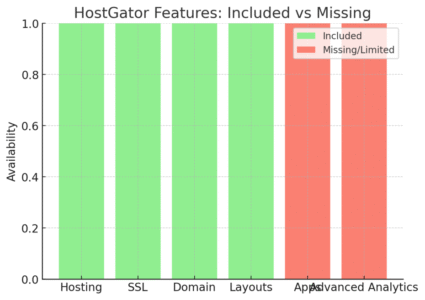
What makes HostGator appealing is that it bundles essentials. You get a free domain (yourstorename.com) and SSL certificate, which gives your site the “https” security badge in the browser.
That little padlock icon builds customer trust right away. Without SSL, many people won’t even enter their credit card info. I like that HostGator doesn’t make you figure this out separately — it’s included from day one.
Hosting Bundled With Ecommerce Features
Unlike platforms like Shopify, where hosting is included but hidden, HostGator actually gives you both website hosting and the builder together. This means you’re not juggling multiple services or extra payments.
You get unlimited storage and bandwidth, which is rare at this price point. Beginners don’t usually run into these limits, but it’s nice knowing your site won’t slow down just because you uploaded too many product photos.
Where HostGator Falls Short for Advanced Needs
Here’s the trade-off: HostGator is excellent for small, simple stores, but it doesn’t scale as well as Shopify or BigCommerce.
The app ecosystem is limited, so if you want advanced features like AI product recommendations, detailed analytics, or custom integrations, you may feel stuck. Reporting is also more basic — you’ll see sales and traffic, but not deep customer insights.
I’d recommend HostGator if your goal is to get online quickly and affordably with 5–20 products.
But if you’re dreaming bigger — international shipping, advanced marketing, or scaling into thousands of sales — you’ll likely outgrow it within a year or two.
5. BigCommerce: Scalable Ecommerce Website Builder for Fast Growth
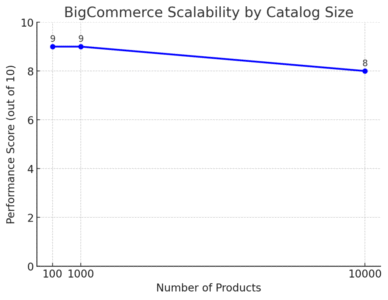
BigCommerce is designed for ambitious sellers who want a platform that can handle growth without needing to switch later.
It’s less about looking fancy and more about giving you serious selling power.
Tools to Manage Larger Product Catalogs Easily
If you’re planning on selling hundreds or even thousands of products, BigCommerce is built for that. From the dashboard, go to Products > Add, and you’ll see bulk upload tools where you can import spreadsheets with product details.
I once worked with a client who had over 3,000 SKUs, and they managed them smoothly thanks to bulk editing.
You can set categories, variants, and custom filters that make browsing easier for shoppers. Shopify can do this too, but BigCommerce handles huge catalogs without slowing down.
Inventory management is centralized, so updates flow across all sales channels. If you sell on Amazon or eBay, BigCommerce syncs automatically — no need to juggle stock in multiple places.
No Transaction Fees on Sales to Maximize Profits
This is a big deal: unlike Shopify, BigCommerce doesn’t take a cut of your sales. You only pay credit card processing fees to your chosen payment gateway.
For stores doing larger volumes, that adds up quickly. Imagine processing $50,000 in sales — avoiding extra platform fees means you keep more of your profit.
Payment integrations are also plentiful: PayPal, Stripe, Square, and regional gateways are all supported. You just connect them once in the Payments tab and you’re ready.
Advanced SEO and Marketing Options for Visibility
BigCommerce doesn’t leave you hanging when it comes to traffic. Its SEO setup is more advanced than most beginner-friendly builders.
You can customize URLs, meta descriptions, and schema markup (that’s the technical info Google uses to understand your products).
Marketing tools are built in, but the real strength is integrations. You can connect directly with Google Shopping, Facebook Ads, and email platforms. From the Channel Manager, you can activate these with just a few clicks.
I’d recommend this platform if you’re serious about getting visibility fast and don’t mind learning a slightly more complex system.
Why Beginners Might Find It Slightly Overwhelming
The downside is that BigCommerce isn’t as “plug-and-play” as Shopify or Wix. The dashboard has more tabs, more data, and more settings. If you’re brand new, it might feel like too much too soon.
That said, if your plan is to scale aggressively — think wholesale catalogs, multiple channels, or international reach — it’s worth the learning curve.
Beginners who want simplicity might struggle, but strategic sellers will appreciate the power.
6. Zyro (now Merget into Hostinger): Budget-Friendly Ecommerce Website Builder for Small Stores
Zyro is one of the newer players in the ecommerce space, but it’s made a name for itself by being lightweight, affordable, and ridiculously easy to set up.
Templates Built for Speed and Simplicity
Zyro’s templates are streamlined — no bloated code or complicated layouts. They’re built to load fast, which I’ve noticed makes a real difference when customers are browsing on mobile.
When you pick a template, editing is simple: Drag, drop, click to edit text. It’s not as customizable as Wix, but that’s not a bad thing for beginners. You won’t get lost tweaking details for hours.
I set up a test store for digital downloads, and it took under 30 minutes from sign-up to checkout-ready. That’s Zyro’s appeal: Quick and simple.
AI-Powered Tools for Content and Branding
This is where Zyro surprises me. It includes AI tools to help beginners who might not be comfortable writing product descriptions or coming up with logos.
Inside the dashboard, you’ll find tools like:
- AI Writer: generates product copy or blog content ideas.
- AI Logo Maker: quick logos if you don’t have design skills.
- AI Heatmap: shows where people are most likely to click on your site.
I wouldn’t rely 100% on AI-generated content, but it’s a great shortcut if you’re stuck. I suggest using it as a draft, then editing in your own voice.
Affordable Plans That Compete With Bigger Platforms
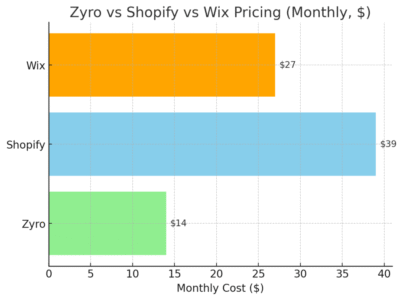
Pricing is where Zyro shines. It’s often cheaper than Shopify or Squarespace, sometimes less than a cup of coffee per week. Plans include hosting, SSL, and ecommerce features, so you don’t have hidden extras creeping in later.
For someone just testing ecommerce, this low barrier makes Zyro attractive. You can experiment without worrying about wasting hundreds of dollars.
When to Upgrade Beyond Zyro’s Features
Here’s the catch: Zyro is fantastic for small stores (under 100 products), but once you start growing, its limitations show.
The app ecosystem is limited, reporting is basic, and advanced features like abandoned cart recovery or complex inventory tracking aren’t as strong.
If you outgrow Zyro, you can migrate to a bigger platform later. I think of Zyro as training wheels — perfect for starting out, but not the bike you’ll ride forever.
7. WooCommerce: Ecommerce Builder for WordPress Beginners
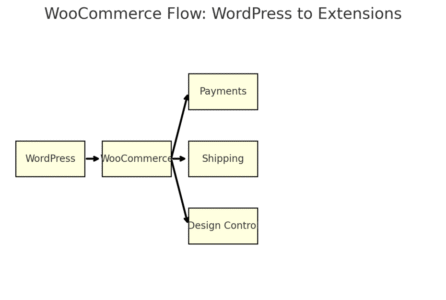
WooCommerce is a free plugin that transforms a WordPress site into a fully functioning ecommerce store.
It’s one of the most flexible options out there, but it requires more tinkering than Shopify or Wix.
Free Plugin That Turns WordPress Into an Online Store
Installing WooCommerce is simple if you already have a WordPress site. From your dashboard, go to Plugins > Add New > Search “WooCommerce” > Install Now. In minutes, your site has a store tab with products, orders, and settings.
I like that it’s free to start. You don’t pay for WooCommerce itself, just for hosting and optional extensions. This makes it budget-friendly while still powerful.
Wide Range of Extensions for Payments and Shipping
Where WooCommerce really shines is flexibility. Want Stripe, PayPal, or even niche regional payment gateways? There’s an extension for it. Need shipping calculators for UPS or FedEx? Same story.
From the WooCommerce Marketplace, you can browse hundreds of extensions. Some are free, others cost a one-time fee or subscription. It’s like Shopify’s app store, but more open-ended.
I once built a store selling digital products, and WooCommerce made it simple to add instant download links after purchase — something not every builder offers.
Full Control Over Store Design and Functionality
Because WooCommerce runs on WordPress, you can control every detail. Themes, plugins, and custom code mean your store can look and behave exactly how you want.
For example, you can use Elementor to drag-and-drop design your product pages. Or add plugins for memberships, subscriptions, or booking systems.
It’s like Lego — you can keep stacking until you’ve built exactly what you need.
That flexibility is why WooCommerce powers millions of stores worldwide.
Learning Curve That Beginners Should Keep in Mind
The trade-off is complexity. Unlike Shopify, WooCommerce doesn’t hold your hand. You’re responsible for hosting, security updates, and backups. If something breaks, you have to troubleshoot or hire help.
I advise WooCommerce only if you’re already comfortable with WordPress or willing to learn. If you want total control and don’t mind a steeper climb, it’s unbeatable.
But if you just want to sell quickly with no fuss, Shopify or Wix might suit you better.
Squarespace vs Wix vs Shopify: Choosing the Right Fit
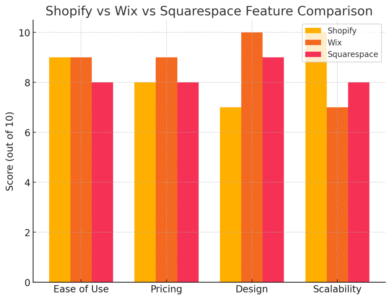
When people ask me, “Which ecommerce website builder is best for beginners?” I always answer with, “It depends on what kind of beginner you are.”
Squarespace, Wix, and Shopify all shine in different areas, so the best choice comes down to how you want to grow.
Compare Ease of Use for True Beginners
For absolute beginners, Wix feels the friendliest. Its drag-and-drop editor works almost like moving puzzle pieces around, and the learning curve is minimal. You see your changes live, which gives instant feedback and confidence.
Shopify, on the other hand, feels structured. It guides you with a checklist: add products, set up payments, launch.
This works beautifully if you want someone to hold your hand through the process, but you sacrifice some design freedom.
Squarespace sits in the middle — cleaner than Wix, more polished than Shopify out of the box, but not quite as forgiving if you want total creative freedom.
If you’re comfortable with a little design tinkering, it won’t take long to master.
Evaluate Pricing and Hidden Costs Over Time
Upfront costs can be misleading. Shopify’s plans look affordable, but add in apps and transaction fees, and the bill creeps up.
Wix is cheaper early on but can feel limited unless you upgrade to higher plans.
Squarespace pricing is straightforward, but you’ll want the Commerce plan to avoid transaction fees.
A realistic example:
- Shopify Basic: $39 + app costs.
- Wix Business: $27, but fewer built-ins
- Squarespace Commerce Basic: $36, with more marketing tools included.
It’s less about which is cheapest and more about which gives you the most value for your store’s needs.
Look at Marketing Tools and Growth Potential
Shopify is unmatched for scaling — from dropshipping to international sales, it has an app for everything. Wix’s marketing features (like SEO Wiz and built-in email) are simple but effective for smaller stores.
Squarespace’s edge is branding: its design, content marketing, and blog features help build authority over time.
If your goal is rapid growth, Shopify wins. For creative control and visual branding, Squarespace or Wix are better.
Decide Based on Store Size and Long-Term Goals
Here’s how I’d sum it up:
- Start small, test the waters → Wix.
- Care deeply about branding and design → Squarespace.
- Want a business that can scale for years → Shopify.
Think of it less as “which is best” and more as “which is best for you right now.”
Key Features Beginners Should Look for in an Ecommerce Website Builder
No matter which ecommerce website builder you’re drawn to, there are a few must-have features every beginner should prioritize. Without these, your store will feel harder than it needs to be.
Simple Drag-and-Drop Store Setup
You don’t need coding skills to launch a store in 2025. A builder should let you drag and drop sections, swap out images, and rearrange layouts with ease.
I always suggest testing the editor before committing. If you’re lost in the first 10 minutes, that’s a red flag.
Platforms like Wix and Squarespace excel here. Shopify is less flexible visually but makes up for it with guided setup.
Built-In Payment Gateways Without Extra Hassle
Payments are the heart of ecommerce. Look for a builder that includes secure, easy-to-activate gateways.
Shopify Payments is the smoothest setup, while Squarespace and Wix both integrate Stripe and PayPal in a couple of clicks.
The key: Avoid platforms that force you to set up third-party tools manually. It adds stress, and for beginners, simplicity beats complexity.
Mobile-Friendly Templates That Convert Better
Most shoppers browse and buy from their phones. A builder should give you mobile-responsive templates that look polished automatically.
From my experience, Squarespace has the most reliable mobile layouts — you don’t have to touch anything, and it looks great.
Wix sometimes needs extra tweaking in the mobile view editor, while Shopify themes usually get it right out of the box.
Customer Support That Helps You Get Unstuck Fast
Support matters more than you think. The first time you hit a roadblock at midnight, you’ll be grateful for 24/7 live chat.
Shopify’s support is strong, Wix is improving, and Squarespace offers responsive email and chat help.
Pro tip: check the help docs too. Beginners need clear, step-by-step tutorials, not vague jargon. If the help center feels like gibberish, walk away.
Expert Tip: Start Simple and Grow Into Advanced Features
Here’s the mistake I see most often: beginners overcomplicate things. They install every app, design ten-page sites, and try to master SEO before selling a single product.
My advice? Keep it simple.
Avoid Overcomplicating Your Store at the Beginning
Your first goal isn’t perfection — it’s proof of concept. Can you sell one product, to one customer, through one checkout? If yes, you can build from there.
Focus on:
- Clean homepage.
- Clear product page.
- Easy checkout.
Everything else can wait.
Focus on Selling Your First Products Quickly
Nothing teaches you faster than your first sale. Instead of obsessing over features, get a product online and tell friends, family, or a small audience. You’ll learn what works and what doesn’t in real time.
I’ve seen people waste months polishing their store only to realize their product wasn’t what buyers wanted. Speed matters.
Upgrade to More Advanced Tools Only When Needed
As sales grow, you’ll naturally outgrow the basics. That’s when it makes sense to add advanced features like abandoned cart recovery, email automation, or SEO integrations.
Until then, keep costs low. Use only what you need to launch and learn.
Choose the Platform That Fits Your Learning Style
Some people thrive with drag-and-drop freedom (Wix). Others prefer guided structure (Shopify). And some love design control (Squarespace). There’s no wrong answer — only the right fit for your personality and goals.
My closing advice: Treat your ecommerce website builder as a stepping stone, not a permanent marriage. Start simple, learn the ropes, then grow into advanced features when you’re ready.

I’m Juxhin, the voice behind The Justifiable.
I’ve spent 6+ years building blogs, managing affiliate campaigns, and testing the messy world of online business. Here, I cut the fluff and share the strategies that actually move the needle — so you can build income that’s sustainable, not speculative.
Related posts:
 How To Start A Dropshipping Business With No Money
 Debutify Theme Free Download Guide: Safe & Easy Installation
 The Best Way to Dropship Without Wasting Money
 How to Become a Dropshipper With No Experience
 Dropshipping How to Start: Your Complete Beginner’s Guide
 How to Start Dropshipping for Free and Still Make a Profit