Table of Contents
Some links on The Justifiable are affiliate links, meaning we may earn a small commission at no extra cost to you. Read full disclaimer.
When it comes to Freshworks pricing, the options can feel like a buffet—tempting, varied, and a little overwhelming.
Each product—Freshdesk, Freshsales, Freshmarketer, Freshcaller, and Freshservice—has multiple plans tailored for different business sizes and goals. But how do you know which plan gives you the most value without overpaying?
In this guide, we’ll break down every Freshworks pricing plan, explain what’s included, and help you decide where your money is best spent so you can choose smart and save effectively.
Understanding Freshworks Pricing and Product Structure
Freshworks pricing is designed to give flexibility without overwhelming you with unnecessary complexity.
Whether you’re running a small startup or managing a full-scale enterprise operation, the platform offers modular tools—each priced separately—so you can choose exactly what you need and scale as you grow.
How Freshworks Organizes Its Tools
Freshworks splits its ecosystem into clear, purpose-built products:
- Freshdesk – For customer support and ticketing management.
- Freshsales – For CRM and sales automation.
- Freshmarketer – For marketing automation and campaign tracking.
- Freshcaller – For call center and telephony management.
- Freshservice – For IT service management and internal helpdesks.
Each tool functions independently, but they’re designed to integrate seamlessly under the Freshworks Suite. This modular design allows teams to pay for only what they need, instead of being locked into a large, expensive package.
For instance, if your company only needs a helpdesk tool, Freshdesk Growth Plan at $15 per agent per month (billed annually) gives you everything from ticketing to customer portals.
But if you also need marketing automation later, you can simply add Freshmarketer Enterprise for $15 per month with 500 contacts.
This approach not only simplifies budgeting—it also means you can scale organically.
The Role of AI in Freshworks Pricing Plans
AI plays a central role in Freshworks’ pricing strategy. You’ll notice many plans mentioning Freddy AI or AI Copilot. These are built-in automation layers that help teams save time through intelligent suggestions, predictive analytics, and automated actions.
For example:
- In Freshdesk Pro + AI Copilot, AI assists agents by summarizing tickets and suggesting replies.
- In Freshsales Pro, Freddy AI predicts deal closures, generates follow-up suggestions, and writes personalized email templates.
- In Freshmarketer Enterprise, it optimizes email send times automatically (a feature called STO – Send Time Optimization).
I believe this AI integration is where Freshworks quietly shines—it’s not about flashy automation, but about time saved per agent. If you calculate the cost of AI add-ons, you’ll often find that upgrading to a plan that includes Freddy AI is more economical than buying it separately.
Choosing Between Individual Products and the Freshworks Suite
Here’s the trade-off: individual products offer specialized depth, while the Freshworks Suite delivers unified simplicity.
If your support and sales teams are tightly connected, going with the Suite may actually cost less in the long run. It centralizes customer data across tools like Freshdesk, Freshsales, and Freshmarketer, helping teams share insights in real time.
But for small businesses, I’d recommend starting with one or two standalone tools.
For example:
- Start with Freshdesk Growth for customer support.
- Add Freshsales Growth for sales pipeline management when needed.
- Integrate Freddy AI later for automation once your team starts scaling.
In short, Freshworks’ modular structure lets you build your own ecosystem at your pace and price—an approach that’s smart for both startups and large enterprises seeking cost control and agility.
Freshdesk Pricing Plans: AI-Boosted Customer Support
Freshdesk is the crown jewel of Freshworks’ lineup, designed to make customer service easier, faster, and smarter.
Its pricing reflects both flexibility and growth potential—ideal whether you’re just getting started or running a full-fledged support center.
Growth Plan: Affordable Ticketing for Small Teams
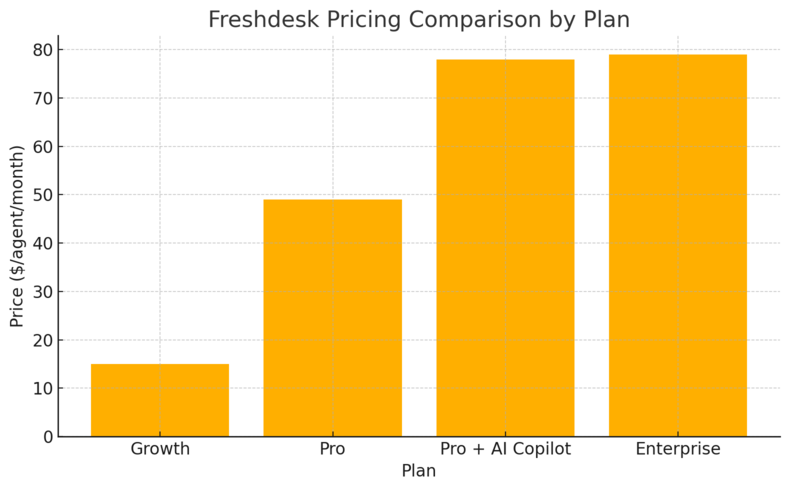
The Growth Plan starts at $15 per agent/month, billed annually. It’s perfect for small businesses looking to move from shared inboxes to structured customer support.
Here’s what it includes:
- Ticketing system – Organizes incoming requests from multiple channels into a single dashboard.
- Customer portal – Lets users track ticket progress themselves.
- Shared inbox – Ensures team members collaborate without overlapping responses.
- Basic reports – Provides simple analytics on response times and resolution rates.
If you’re running a small e-commerce business, this plan helps you stay organized without the overhead of enterprise systems.
You’ll also get 5,000 free collaborators—great for bringing in external vendors or subject-matter experts without extra cost.
Pro Plan: Advanced Customization and Routing Features
At $49 per agent/month (billed annually), the Pro Plan adds serious muscle to your support system.
You get:
- Custom objects – Create data structures tailored to your business (e.g., tracking warranties or service levels).
- Advanced ticket routing – Automatically assign tickets based on skills or priorities.
- Multilingual support – Perfect for global teams handling tickets in different languages.
- Custom reports and analytics – Build dashboards to track KPIs like agent productivity or SLA compliance.
I recommend this plan for growing teams that are starting to handle more complex workflows and need more control. If your team juggles multiple departments or languages, this plan pays for itself in efficiency.
Pro + AI Copilot: AI Add-On for Smart Ticket Resolution
The Pro + AI Copilot Bundle costs $78 per agent/month, billed annually. It combines everything from the Pro Plan plus the Freddy AI Copilot add-on.
This is where the magic happens:
- AI summaries – Freddy automatically condenses long customer conversations.
- Response suggestions – Drafts reply options your agents can edit and send.
- Smart classification – Categorizes tickets based on intent and urgency.
If you’re dealing with high ticket volumes or want to cut agent handling time, this plan is a strategic investment.
In my experience, teams using the AI Copilot often report time savings of 20–30% per ticket.
Enterprise Plan: Complete Support Automation and Security
At $79 per agent/month (billed annually), the Enterprise Plan delivers top-tier automation, security, and control for large organizations.
You’ll find:
- Audit logs – Track every configuration and user change for compliance.
- Skill-based routing – Automatically send tickets to the most qualified agent.
- Advanced workflows – Automate multi-step processes like refunds or approvals.
- Custom roles and permissions – Maintain strict data access control across departments.
The Enterprise Plan is for teams managing sensitive or high-volume customer data—think healthcare, SaaS, or finance sectors.
It’s also ideal for businesses that need auditability and governance alongside AI efficiency.
Freshdesk Omni Pricing: Multichannel Customer Engagement
Freshdesk Omni brings all your customer communication—email, chat, phone, SMS, and social media—into one place.
It’s designed for teams that want to deliver faster, more consistent support without juggling multiple tools.
Growth Plan: Unified Conversations Across Channels
The Growth Plan starts at $29 per agent per month, billed annually, and it’s a great entry point for businesses stepping into multichannel support.
It includes everything small teams need to handle conversations from different platforms in one dashboard.
- Unified inbox: Manage customer messages from web, SMS, and email in one view. No more switching between tabs or losing track of replies.
- Ticketing and threads: Every message automatically becomes a ticket, making it easy to assign, track, and resolve issues.
- Freshcaller integration: You can connect your phone support directly into the Omni platform (starting at $15 per agent/month).
- Team inbox and collaboration tools: Agents can tag teammates or share notes directly inside a ticket to speed up responses.
If you’re managing customers across chat, email, and phone, I recommend starting here. It’s simple to set up and immediately improves your team’s visibility across channels.
Pro Plan: Custom Objects and Reporting for Mid-Level Teams
The Pro Plan at $69 per agent per month, billed annually, takes everything in Growth and adds customization and analytics muscle.
Here’s where it gets smarter:
- Custom objects: You can track specific data unique to your business, like subscription levels or loyalty tiers.
- Advanced reports: Build detailed performance dashboards for team metrics, customer satisfaction, and SLA compliance.
- Multilingual helpdesk: Perfect for global teams needing localized support.
- Workflow automation: Create “if-this-then-that” rules to automatically categorize or escalate tickets.
In my experience, this plan suits mid-sized teams that already have structured workflows and want to scale intelligently. It’s also where you start seeing the benefits of AI features like Freddy’s smart suggestions for agents.
Enterprise Plan: High-Level Security and Workflow Automation
The Enterprise Plan comes in at $109 per agent per month, billed annually, and is designed for organizations that manage complex or regulated customer data.
It includes:
- Audit logs: Track every system change for accountability and compliance.
- Skill-based routing: Automatically assign tickets to the right expert based on their skill set.
- Advanced security: Features like IP whitelisting, custom roles, and secure data storage.
- Comprehensive automation: Set up intricate workflows that can handle multi-step processes, such as escalations or approvals.
If your company operates in industries like fintech, insurance, or SaaS where data handling and compliance are critical, this plan is the safest bet. It combines control, visibility, and security while giving your support agents AI-powered efficiency.
Freshcaller Pricing: Cloud-Based Call Center Solutions
Freshcaller transforms customer calls into manageable digital workflows. It’s a cloud-based phone system built for modern teams that need scalability without expensive infrastructure.
Free Plan: Essential Calling Tools to Get Started
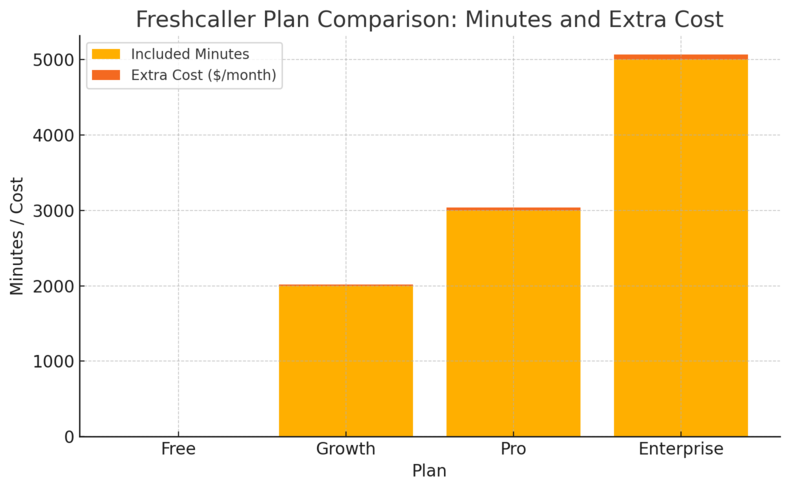
The Free Plan is perfect for businesses testing out call center operations.
It includes:
- Inbound caller ID – So you always know who’s calling before answering.
- Custom greetings and call notes – Personalize every interaction and keep records easily accessible.
- Call metrics dashboard – Track inbound and outbound call volume, duration, and response times.
However, you’ll need to buy local or toll-free numbers separately and pay per minute for calls. It’s a smart starting point for freelancers or micro teams wanting a professional phone setup without monthly costs.
Growth Plan: Basic Call Queues and Voicemail Features
The Growth Plan, priced at $15 per agent per month plus pay-per-minute rates (billed annually), adds scalability and structure to your customer call handling.
- Up to 2,000 included minutes per account – Ideal for moderate call volumes.
- Number porting and voicemail – Keep existing numbers and ensure customers can always leave a message.
- Warm and cold transfer options – Smooth handoffs between agents for better customer experience.
- Queue and wait management – Customers stay informed about their position in line, reducing drop-offs.
This plan fits growing teams that want to add professionalism and control to their call management.
Pro Plan: Call Monitoring and Routing Automation
The Pro Plan, at $39 per agent per month plus pay-per-minute, introduces serious control and analytics for high-performance support teams.
You get:
- Up to 3,000 included minutes per account – For teams handling high daily call volumes.
- Advanced call routing – Automatically direct calls based on business hours, region, or team availability.
- Call monitoring and barge-in – Supervisors can listen in or join live calls for coaching or escalation.
- Queue callback – Lets customers request a callback instead of waiting on hold.
I’d suggest this plan if your business relies heavily on phone communication or if you’re managing a distributed support team. It helps maintain quality while giving managers deep visibility into operations.
Enterprise Plan: Advanced IVR and Service-Level Monitoring
The Enterprise Plan costs $69 per agent per month plus pay-per-minute, offering enterprise-grade tools for call management at scale.
Key inclusions:
- Up to 5,000 included minutes per account – Sufficient for large-scale support centers.
- Speech-enabled IVR (Interactive Voice Response) – Customers can self-navigate menus using voice commands.
- Service level monitoring – Automatically measures and reports adherence to SLAs.
- Advanced reporting – Track abandoned calls, response speed, and peak hours to optimize resources.
This is ideal for businesses with 24/7 support or compliance needs—especially in industries where every call counts.
Freshsales Pricing: Smart CRM for Growing Businesses
Freshsales is Freshworks’ CRM platform, built to help sales teams manage leads, automate outreach, and close deals faster. The pricing scales based on how much automation and AI assistance you want.
Growth Plan: Streamlined CRM with Chat, Email, and Phone
The Growth Plan, at $9 per user per month (billed annually), is ideal for startups or small sales teams that want a centralized view of customer interactions.
You get:
- Kanban view for contacts and deals – A drag-and-drop pipeline for tracking progress.
- Built-in chat, email, and phone – Handle all communication without switching tools.
- Email templates and tracking – See when prospects open your emails.
- Basic workflows and reports – Automate repetitive tasks and measure conversions.
It’s straightforward, visual, and built for efficiency. I often suggest this plan to early-stage companies wanting professional CRM capabilities without complexity.
Pro Plan: AI-Driven Insights with Freddy AI Tools
At $39 per user per month (billed annually), the Pro Plan adds depth through AI insights and advanced automation.
You’ll benefit from:
- Freddy AI predictions – Identify which deals are most likely to close.
- Sales sequences – Automate follow-ups and reminders.
- AI-generated email suggestions – Write faster with content tailored to your customer’s behavior.
- Custom sales activities and pipelines – Adjust your CRM to fit your unique sales process.
This plan is ideal if you’re scaling your sales operations and need visibility into what’s working (and what isn’t). I personally find the AI-powered deal insights one of the most time-saving features—it helps prioritize leads that truly matter.
Enterprise Plan: Full Customization for Large Sales Teams
The Enterprise Plan, at $59 per user per month (billed annually), is built for mature teams that demand precision and governance.
It includes:
- Advanced permissions and field-level control – Securely manage who sees what data.
- Custom modules and workflows – Tailor Freshsales around your sales structure.
- Forecasting insights – AI-driven revenue and performance predictions.
- Sandbox environment – Safely test new automations before deploying them live.
If your team has multiple territories or product lines, this plan lets you bring structure to chaos while keeping insights unified.
Freshmarketer Pricing: AI-Powered Marketing Automation
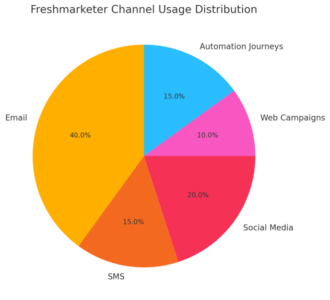
Freshmarketer is Freshworks’ marketing automation platform built for teams that want smarter campaigns without the steep learning curve of traditional CRMs.
Its pricing reflects that simplicity—offering clear, scalable plans that suit both startups and growing enterprises.
Free Plan: Basic Email and Contact Management
The Free Plan gives you everything you need to start nurturing leads and sending professional campaigns, without spending a dime. It’s ideal for early-stage businesses or marketers testing automation tools for the first time.
Here’s what you get:
- Up to 500 monthly email sends and 100 marketing contacts to stay connected with your top leads.
- Contact and list management to organize subscribers and segment audiences.
- Web tracking and forms that capture visitor activity and form submissions.
- Basic email campaigns for newsletters and promotions.
- Social media campaigns and integrations with platforms like Facebook and Instagram.
In practice, this plan helps you build foundational email marketing habits.
For example, you can track how many people click your links or fill out your forms—no coding required. I’d say this plan is a solid first step if you’re just starting to grow your marketing list.
Enterprise Plan: Advanced Multichannel Marketing Campaigns
The Enterprise Plan, priced at $15 per month (billed annually) for 500 marketing contacts, expands Freshmarketer into a fully integrated marketing hub.
It includes everything from the Free Plan plus:
- Up to 20x monthly email sends, allowing you to scale campaigns without limits.
- Custom audience creation for Facebook and Instagram ads, letting you retarget leads automatically.
- Automated customer journeys that trigger messages based on user behavior—like sending a follow-up email after a website visit.
- Landing page builder for quick campaign launches.
- Conversion and revenue attribution, showing which campaigns drive real sales.
- Send Time Optimization (STO) by Freddy AI, ensuring emails reach inboxes when users are most active.
I suggest this plan for businesses ready to centralize all their marketing channels in one place.
It’s particularly powerful when combined with Freshsales, as it syncs contact and deal data for seamless marketing-to-sales handoffs.
How Freddy AI Enhances Conversion and Attribution
Freddy AI isn’t just a buzzword—it’s your digital marketing assistant. It uses behavioral data to help you send the right message, at the right time, to the right audience.
- Send Time Optimization (STO) ensures your emails land in inboxes when recipients are most likely to open them.
- Conversion prediction highlights leads that are closest to converting, so you can prioritize outreach.
- Attribution modeling breaks down which campaigns or touchpoints had the greatest impact on revenue.
I believe Freddy AI’s biggest advantage lies in clarity. Instead of guessing which campaign worked, it gives you actionable insights—helping marketers shift from reactive to proactive.
Freshservice Pricing: IT and Employee Service Management
Freshservice is Freshworks’ IT Service Management (ITSM) solution.
It helps IT and operations teams handle internal requests, manage assets, and automate repetitive support tasks—all without complex setup.
Starter Plan: Affordable IT Service Setup for Small Teams
The Starter Plan starts at $19 per agent per month, billed annually, making it ideal for teams setting up their first service desk.
You’ll get:
- Email, chat, and widget channels to manage employee requests.
- Incident and task management to track issues through to resolution.
- Knowledge management for internal FAQs and guides.
- Basic SLA (Service Level Agreement) management to ensure timely resolutions.
I often recommend this plan for small businesses moving away from shared inboxes—it’s simple, visual, and easy to onboard your team within a day.
Growth Plan: Streamlined ITSM for Scaling Operations
At $49 per agent per month (billed annually), the Growth Plan helps IT teams build reliable, standardized service processes.
This plan includes:
- Service catalog management for on-demand services like software access or hardware requests.
- Problem and change management to document recurring issues and minimize disruption.
- Managed Service Provider (MSP) mode for businesses offering IT support to multiple clients.
- Improved automation and approvals for routine workflows.
It’s the sweet spot for growing companies needing structure without complexity. You can even integrate with Microsoft Teams or Slack for faster communication.
Pro Plan: Unified Service Management with AI Insights
The Pro Plan, priced at $99 per agent per month, transforms Freshservice into a centralized ITSM powerhouse.
You’ll find:
- Freddy AI assistance for intelligent ticket classification and solution recommendations.
- Release and change management for tracking software deployments.
- Service analytics dashboards to monitor performance in real time.
- Workload and project management tools to manage team capacity efficiently.
I like to think of this plan as an “operational control center.” It’s designed for IT departments managing cross-functional projects and multiple service channels simultaneously.
Enterprise Plan: Fully Customized IT Governance and Automation
The Enterprise Plan is a custom-tier option, designed for mature IT organizations.
It includes everything in Pro, plus:
- Advanced automation workflows for end-to-end service orchestration.
- Field-level permissions to secure sensitive data.
- Sandbox environment for testing configurations safely.
- Audit logs and custom modules to support compliance and governance.
This plan is perfect for enterprises requiring deep customization and strict oversight. I recommend it for IT departments managing hundreds of agents or supporting complex infrastructures.
Comparing Freshworks Suite vs. Individual Products
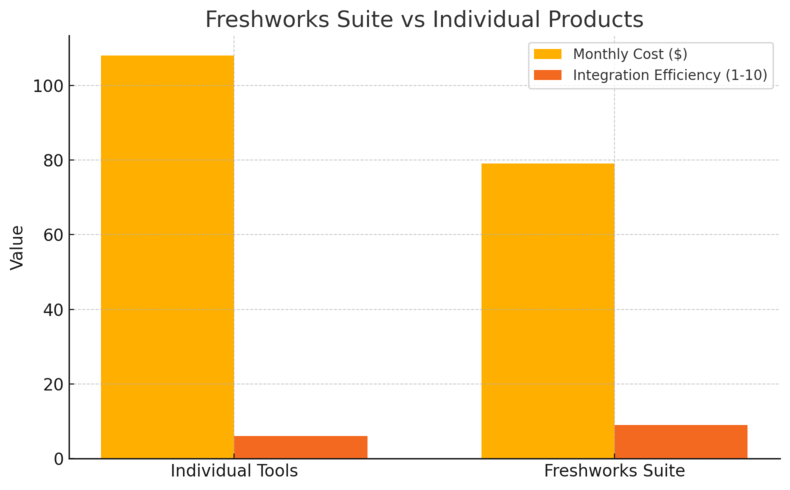
Freshworks offers its tools both individually and as part of the Freshworks Suite—a bundle designed to unify sales, marketing, and customer service.
The choice depends on your business size, team structure, and integration needs.
Cost Advantage of the Freshworks Suite
When you combine tools under the Freshworks Suite, you often pay less overall compared to subscribing to each product individually.
For example:
- Purchasing Freshdesk Pro and Freshsales Pro separately can cost around $88 per user per month.
- The Freshworks Suite Pro, on the other hand, combines those features for about $39 per user per month (depending on configuration).
I find the Suite especially cost-effective for businesses that want to unify CRM, support, and marketing data in one ecosystem. It cuts down manual syncing and subscription clutter.
When It Makes Sense to Combine Tools
It’s smart to combine Freshworks tools when you:
- Manage both customer support and sales pipelines.
- Need marketing automation to feed into CRM leads.
- Want shared AI insights across departments (Freddy AI connects all products).
For example, pairing Freshsales with Freshmarketer helps your sales team see which campaigns generated their leads. Add Freshdesk, and customer issues are linked directly to CRM records for better context.
Potential Drawbacks of Product Overlap
However, combining tools isn’t always the best route. Some teams may find overlapping features—for instance, both Freshsales and Freshmarketer offer email campaign tools.
Potential drawbacks include:
- Duplicate features that increase learning curves.
- Higher costs if you’re not using all available modules.
- Integration management—while Freshworks tools connect easily, syncing large datasets may require ongoing adjustments.
In my opinion, the Freshworks Suite is best suited for medium to large businesses ready for cross-departmental collaboration.
Smaller teams, however, can get excellent value by starting with one or two core tools—then expanding into the suite as operations mature.
How to Choose the Right Freshworks Plan for Your Business
Choosing the right Freshworks plan isn’t about finding the cheapest option—it’s about finding the smartest fit for your team’s size, workload, and growth goals.
I’ve found that businesses that choose strategically, not reactively, end up saving more and scaling faster.
Assessing Your Company Size and Customer Volume
Start by looking at the scale of your operations. The size of your team and customer base directly influences which Freshworks pricing tier makes sense.
- Small teams (1–10 users) usually benefit from Growth or Pro plans. These include essential tools like ticketing, CRM, and automation without overwhelming complexity.
- Medium-sized teams (10–100 users) often find the Pro plans the sweet spot. They provide analytics, reporting, and AI features that help teams move from reactive to proactive.
- Enterprises (100+ users) will likely need the Enterprise tier for features like audit logs, advanced permissions, and enterprise-level security compliance.
Here’s a quick example:
If your support team handles around 1,000–2,000 tickets a month, Freshdesk Pro + AI Copilot will automate enough tasks to cut response times by 20–30%. But if you’re only managing a few dozen inquiries a week, Freshdesk Growth might be more than enough.
It’s all about matching plan power with team workload.
Identifying Key Integrations and AI Needs
One of Freshworks’ greatest strengths is its modular structure. But that flexibility can also lead to confusion when choosing plans. I always advise clients to start by identifying which integrations are must-haves.
- If your sales and marketing teams rely heavily on CRM data, Freshsales + Freshmarketer integration is key.
- If your customer support runs through multiple channels (chat, phone, email), Freshdesk Omni or Freshcaller should be part of your plan.
- If you’re managing both internal and customer-facing IT requests, Freshservice integrates seamlessly with Freshdesk.
AI needs should also guide your decision. Freddy AI is included in higher plans and helps automate repetitive actions.
For instance, if your support agents spend hours categorizing tickets, the Pro + AI Copilot tier can do it automatically.
I suggest listing your “daily frustrations” first—then mapping those to Freshworks AI features that fix them.
Calculating True Value: Cost vs. Features
Price alone doesn’t show you value. What matters is ROI—how much time, money, and effort each feature saves.
A quick way to evaluate is by calculating Cost per Agent per Benefit:
| Plan | Monthly Cost (Annual Billing) | Key Benefit | Estimated ROI |
| Freshdesk Growth | $15/agent | Basic ticketing & reports | 10–15% faster support response |
| Freshdesk Pro | $49/agent | Advanced routing, reports | 25–35% faster resolution |
| Freshdesk Pro + AI | $78/agent | AI-assisted support | 40% or more efficiency gain |
| Freshsales Pro | $39/user | AI-powered deal insights | Higher lead-to-close ratio |
| Freshservice Growth | $49/agent | IT process automation | Reduced manual IT requests |
When comparing plans, consider both visible savings (like lower costs) and invisible savings (like agent productivity or customer satisfaction). That’s where the real value of Freshworks pricing becomes clear.
Ways to Save Money on Freshworks Pricing
Freshworks already offers solid value, but there are a few insider tricks I’ve seen businesses use to stretch their budgets further—without compromising on functionality.
Opting for Annual Billing Over Monthly Plans
This one’s simple but powerful: Freshworks gives a significant discount when you choose annual billing. For most tools, you save roughly 17–20% compared to month-to-month payments.
For example, Freshdesk Pro at $49 monthly becomes effectively cheaper when billed annually, compared to paying month-by-month. Over a year, those savings easily cover the cost of add-ons like Freddy AI.
If you’re sure you’ll be using the platform long-term (and let’s be honest, most teams do), I highly recommend locking into the annual rate.
Leveraging Free Trials and AI Add-Ons
Every Freshworks product offers a 21-day free trial—use this period strategically. Instead of simply exploring features, set clear goals.
Here’s what I suggest testing during your trial:
- Workflow automation – Create sample tickets or leads to see how routing rules work.
- AI insights – Test how Freddy AI summarizes tickets or suggests sales follow-ups.
- Reporting – Generate a few dashboards to check if metrics align with your KPIs.
Many businesses don’t realize you can start with the Growth Plan and later activate Freddy AI separately. This add-on model is ideal if you’re experimenting with automation before fully committing to higher tiers.
Using Freddy AI Strategically for Maximum ROI
Freddy AI isn’t just a cool feature—it’s a cost-saver when used smartly.
- In Freshdesk, it reduces ticket handling time by automatically categorizing and prioritizing queries.
- In Freshsales, it identifies which leads are worth pursuing.
- In Freshmarketer, it finds the best time to send campaigns to maximize open rates.
If your team spends hours on manual tasks like data entry or follow-ups, Freddy AI can easily free up 10–15% of their time. I often tell managers: measure the AI’s impact after a month. You’ll usually see tangible improvements in workload efficiency and response speed.
Pro Tip: Customizing Your Freshworks Stack for Long-Term Growth
Once you’ve chosen your ideal Freshworks pricing plan, the next step is making sure your tools actually grow with your business. The beauty of Freshworks lies in how easily you can mix and match modules.
How to Combine Freshdesk, Freshsales, and Freshmarketer Effectively
Here’s a practical setup I’ve seen work brilliantly for many small-to-mid businesses:
- Freshdesk for customer service and support ticketing.
- Freshsales for lead tracking and deal management.
- Freshmarketer for automated email campaigns and engagement tracking.
When combined, these three tools form a complete customer lifecycle system—from marketing to sales to support.
For example:
- Leads captured in Freshmarketer flow automatically into Freshsales.
- Once converted, customer interactions sync with Freshdesk.
- AI insights from Freddy then help teams anticipate customer needs and improve retention.
You can connect them directly via the Freshworks Marketplace or through native integration options under Admin → Integrations.
Scaling with AI and Automation Tools
I believe automation is what truly differentiates average teams from high-performing ones. Freddy AI and workflow automations are designed to scale effortlessly with your team.
Some smart automations to consider:
- Auto-assigning tickets in Freshdesk based on keywords (e.g., “refund,” “shipping delay”).
- Triggering follow-up sequences in Freshsales after a lead download or event sign-up.
- Scheduling recurring IT tasks in Freshservice using rule-based workflows.
These may sound minor, but collectively they save teams hundreds of hours annually.
Building a Data-Driven Support and Sales Ecosystem
Long-term success with Freshworks comes from connecting the dots between data, people, and process.
- Centralize analytics: Use unified dashboards to track performance across all modules.
- Share insights: Let sales teams see common support issues, and vice versa.
- Review regularly: Revisit reports monthly to identify automation opportunities.
I suggest setting up a “Monthly Insights Review” within your Freshworks dashboard. It’s a simple ritual but helps you stay proactive about trends instead of reacting to them.

I’m Juxhin, the voice behind The Justifiable.
I’ve spent 6+ years building blogs, managing affiliate campaigns, and testing the messy world of online business. Here, I cut the fluff and share the strategies that actually move the needle — so you can build income that’s sustainable, not speculative.