
Table of Contents
Some links on The Justifiable are affiliate links, meaning we may earn a small commission at no extra cost to you. Read full disclaimer.
How to use Semrush for keyword research gets much easier once you stop treating it like a giant SEO dashboard and start using it like a filter.
You are not there to collect thousands of keywords. You are there to find the small set of terms you can actually rank for, publish around, and turn into traffic or revenue.
In my experience, Semrush becomes fast when you follow the same order every time: validate the topic, expand the list, sort by intent, check competition, then turn the winners into a content plan.
What Semrush Does In Keyword Research
Semrush helps you move from a vague topic idea to a usable list of keywords by combining search volume, keyword difficulty, search intent, CPC, keyword variations, and competitor rankings in one place.
Semrush says its keyword database now exceeds 28 billion keywords, and its data coverage spans 142 geographic databases, which matters because better coverage usually means better topic expansion and more reliable long-tail discovery.
Understand The Main Tools Before You Touch Any Filters
Most people waste time in Semrush because they open everything at once. I suggest learning five tools first and ignoring the rest until your workflow feels natural.
- Keyword Overview: Use this when you want a quick read on one keyword, including search volume, keyword difficulty, search intent, CPC, and SERP behavior. Semrush describes it as a snapshot tool for monthly volume, ranking difficulty, intent, and CPC.
- Keyword Magic Tool: Use this to expand one seed keyword into many related ideas and grouped variations. Semrush positions it as the main way to generate thousands of combinations from a seed term.
- Organic Research / Organic Rankings: Use this to see what competitors already rank for and where traffic is likely coming from. Semrush specifically highlights competitor keyword discovery here.
- Keyword Gap: Use this to compare your site against competitors side by side and pull missed opportunities.
- Keyword Strategy Builder: Use this to organize keywords into clusters and a more publishable strategy instead of a random spreadsheet.
What matters most is not the number of tools. It is knowing the job of each tool. Keyword Overview tells you whether an idea deserves attention. Keyword Magic Tool helps you scale.
Competitor tools help you shortcut the discovery phase. Strategy Builder helps you turn research into content.
Know Which Metrics Actually Matter
Semrush gives you a lot of numbers, but not all of them deserve equal attention. For SEO, I believe five metrics do most of the heavy lifting.
- Search Volume: Estimated average monthly searches. This tells you demand, not guaranteed traffic.
- Keyword Difficulty: A relative measure of how hard it may be to rank organically. Good for prioritization, not for blind decision-making.
- Intent: Whether the query appears informational, commercial, navigational, or transactional. This saves you from writing the wrong page type.
- CPC: Cost per click can hint at commercial value. High CPC often means the keyword matters to advertisers, which can also signal business intent.
- SERP Features: Things like featured snippets, videos, shopping boxes, local packs, or AI search elements can reduce clicks or change the kind of content you need.
A beginner mistake is choosing only by volume. A smarter move is choosing by the mix: realistic difficulty, clear intent, and enough demand to justify the page. That balance is where fast keyword research becomes useful instead of noisy.
How The Core Keyword Research Workflow Works
If you want speed, you need a sequence. Semrush becomes overwhelming when you bounce between tools randomly.
The fastest path is to run the same process every time.
Follow This Five-Step Sequence
Here is the workflow I recommend for almost any site, whether you run a blog, SaaS company, local business, or ecommerce store.
- Start With One Seed Topic: Pick a real product, problem, service, or category.
- Validate It In Keyword Overview: Check demand, intent, trend, and SERP behavior.
- Expand It In Keyword Magic Tool: Pull variants, questions, and subtopics.
- Pressure-Test With Competitor Research: See whether competitors already get traffic from the topic.
- Turn Winners Into Clusters: Group related keywords into one page or a small topic hub.
This order is fast because each step eliminates bad ideas early. You do not want to export 2,000 keywords and then realize the whole topic is too competitive or mismatched to your site.
Imagine you run a small store that sells reusable water bottles. Instead of starting with “water bottle” and drowning in broad terms, you start with “insulated water bottle,” validate the commercial intent, expand into long-tail variants, then review competitors ranking for “best insulated water bottle for hiking,” “stainless steel gym bottle,” and “dishwasher safe insulated bottle.”
Suddenly the research is useful because every keyword points toward a page you could actually create.
Match The Page Type Before You Save Any Keyword
This is the part many guides skip, and it is why content teams publish pages that never rank. A keyword is only valuable if it matches the page type Google seems to want.
- Informational intent: Usually needs a blog post, guide, tutorial, or FAQ page.
- Commercial intent: Often needs a comparison page, list post, or category page.
- Transactional intent: Usually works best on product, service, or landing pages.
- Navigational intent: Often belongs to branded pages, not your new article.
I suggest checking the live SERP pattern every time. If the top results are product pages, do not write a pure blog post. If the results are beginner guides, do not push a hard sales page.
Semrush’s intent data is a great shortcut, but your final decision should still come from what search results are rewarding right now. That one habit will save you from building pages around the wrong format.
How To Start With A Seed Keyword
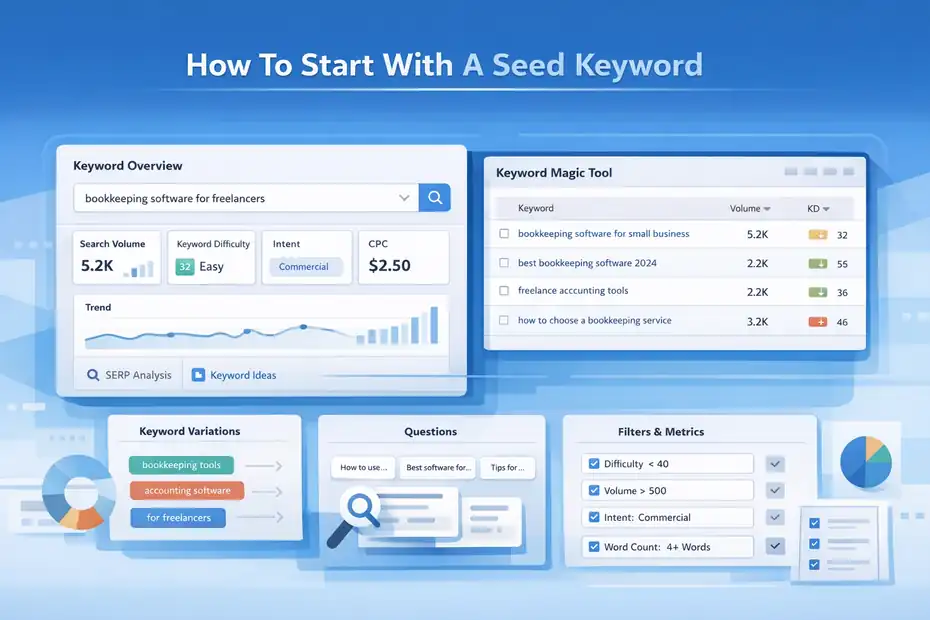
Every fast workflow starts with a clean seed keyword. This is not your final keyword.
It is the starting topic that opens the door to variations, questions, modifiers, and related subtopics.
Pick Seed Keywords That Reflect Real Business Value
I usually tell people to choose seed keywords from one of four places:
- Products or services you actually sell
- Problems your audience wants solved
- Topics competitors already own
- Category terms that map to money pages
That matters because not every keyword deserves your time. A seed keyword should connect to traffic, revenue, leads, or authority. If it does none of those, it probably becomes content clutter.
For example, if you sell bookkeeping software, “bookkeeping software for freelancers” is a stronger seed than “what is accounting.” The first term is narrower, closer to buying intent, and likely easier to map to a landing page or bottom-funnel guide. The second may have volume, but it is broader and often harder to monetize.
Open Keyword Overview first. Semrush’s official documentation notes that this tool shows search volume, difficulty, intent, CPC, and other snapshot metrics for a keyword. That makes it the fastest place to decide whether a seed is worth expanding.
Use Keyword Overview To Kill Weak Ideas Early
When you enter a seed keyword, do not just stare at the volume. Check these signals in order:
- Intent: Does this keyword match the kind of page you want to build?
- Difficulty: Is this realistic for your site’s current authority?
- Trend: Is interest stable, seasonal, rising, or fading?
- SERP Features: Are there things stealing clicks?
- Variations and Questions: Do you see enough nearby terms to justify a cluster?
In my experience, this stage is where speed happens. A lot of bad ideas fail fast here. A keyword may look attractive, but if the intent is off, the SERP is packed with giant brands, or the trend is highly seasonal, it may not be worth deeper work.
A simple rule I use is this: If I cannot picture the page I would publish after seeing Keyword Overview, I do not keep the keyword. Good seed keywords create obvious next steps.
How To Expand Keywords Fast With Keyword Magic Tool
This is where Semrush becomes fun. Keyword Magic Tool is built to turn one topic into a structured pool of possibilities.
Semrush says the tool helps generate thousands of keyword combinations from a single seed and lets you explore groups, filters, and related terms at scale.
Build A Bigger List Without Building A Mess
Start with one seed term and then filter aggressively. I recommend thinking in layers instead of trying to collect everything.
- Core variations: Close versions of the same term
- Modifiers: Words like best, cheap, near me, for beginners, software, services
- Questions: Great for blog content and FAQ sections
- Use cases: By audience, industry, problem, or scenario
- Attributes: Size, color, price, speed, type, location, and feature-based keywords
Let me give you a realistic example. Say your seed is “email marketing software.” Inside Keyword Magic Tool, you might quickly branch into “email marketing software for small business,” “best email marketing software for ecommerce,” “cheap email marketing platform,” and “how to choose email marketing software.” Those are not duplicates. They serve different intents and different page types.
The real shortcut is filtering early. Do not export first and clean later. Apply volume ranges, difficulty thresholds, question filters, and word-count filters inside the tool. That shrinks noise immediately.
Use Filters Like A Real SEO, Not A Collector
Here is a filter setup I often recommend when speed matters:
- Set a maximum keyword difficulty: This depends on your site, but newer sites often do better starting lower.
- Set a minimum search volume: Even 20 to 100 monthly searches can be worthwhile for high-intent long-tail terms.
- Filter by intent: Informational for blog ideas, commercial or transactional for money pages.
- Filter for questions: Perfect for answer-style posts, FAQ sections, and featured snippet opportunities.
- Filter by word count: Four-plus words often reveals more specific long-tail opportunities.
I believe this is the biggest difference between efficient research and busywork. You are not trying to prove how many keywords you found. You are trying to leave the tool with a usable set of page ideas.
A healthy keyword list is usually smaller than people expect. Sometimes 20 strong keywords beat 500 weak ones because each has a clear role in your content or sales funnel.
How To Judge Keyword Quality Without Guessing
Once you have a list, the real work begins. This is where many people either overtrust Semrush metrics or ignore them entirely.
The smart move is somewhere in the middle.
Read Metrics As Signals, Not Absolute Truth
Semrush metrics are useful, but they are estimates. I say that because people often treat keyword difficulty or volume like law. It is better to treat them like directional signals that help you prioritize.
Use this simple scoring lens:
- Demand: Is there enough search volume or business value?
- Fit: Does the keyword align with your product, expertise, or audience?
- Competition: Can your site realistically compete?
- Intent clarity: Do you know exactly what kind of page should rank?
- Monetization or strategic value: Will this keyword lead to revenue, leads, or topic authority?
A keyword with moderate volume and low competition can beat a high-volume trophy keyword for months or even years. I have seen small sites get more total traffic by publishing 20 tightly matched long-tail pages than by chasing one giant head term.
This is also where CPC can be helpful. Semrush includes CPC in its keyword reports, and while CPC is an advertising metric, it often hints at commercial value. A keyword with low volume but strong CPC can still be worth targeting if one conversion is valuable enough.
Check The SERP Before You Finalize Anything
This is the manual step that separates thoughtful research from automated exports. Before you finalize a keyword, inspect the search results.
Look for these clues:
- Are top-ranking pages giant brands only?
- Are results mostly forums, videos, product pages, or guides?
- Are titles tightly aligned with one angle or mixed?
- Is Google rewarding freshness, depth, or direct answers?
- Are SERP features reducing clicks?
For example, a keyword may show nice volume in Semrush, but if the SERP is dominated by Reddit threads, YouTube videos, and a massive featured snippet, a standard blog post may underperform. Another keyword may have lower reported volume but cleaner blog-style results and weaker competitors. That second keyword is often the better play.
My rule is simple: Trust the metrics enough to shortlist, then trust the SERP enough to choose.
How To Use Competitor Data To Find Easier Wins
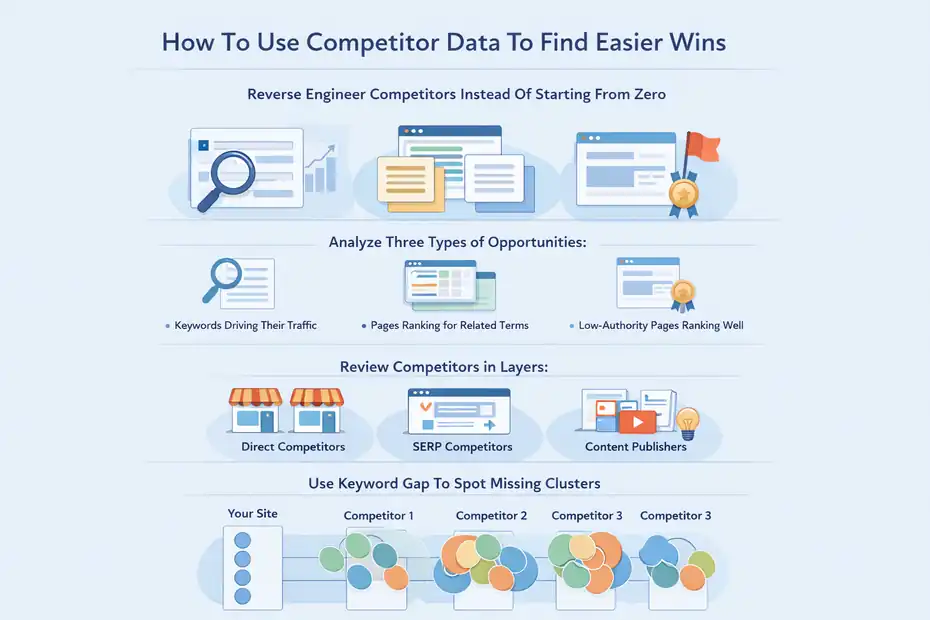
Competitor research is one of the fastest ways to remove guesswork.
Semrush specifically highlights Organic Rankings for competitor keyword discovery and Keyword Gap for side-by-side comparison.
Reverse Engineer Competitors Instead Of Starting From Zero
Open a competitor domain in Organic Research or Organic Rankings and look for three kinds of opportunities:
- Keywords driving their traffic
- Pages ranking for multiple related terms
- Low-authority pages ranking surprisingly well
That last one is gold. If a competitor has a thin article ranking for a useful long-tail term, you may be able to outrank it with something better structured and more complete.
I suggest reviewing competitors in layers:
- Direct business competitors: Sites selling similar offers
- SERP competitors: Sites ranking for the same topics, even if they sell something different
- Content-heavy publishers: Strong sites that reveal topic architecture and cluster strategy
Imagine you run a project management SaaS. You may think your competitors are only other SaaS brands, but in the SERPs you might also compete with software review sites, productivity blogs, and even templates marketplaces. Semrush helps you see all of those patterns faster.
Use Keyword Gap To Spot Missing Clusters
Keyword Gap is especially useful when you already have a site with some content but want to find what is missing. Semrush describes it as a way to compare multiple competitors’ keywords side by side and uncover opportunities.
What I like to do is compare your domain with three competitors and look for:
- Keywords they rank for that you do not
- Topics where two or three competitors overlap
- Commercial terms you have ignored
- Informational keywords that could support money pages
This often reveals missing clusters, not just missing keywords. For example, if competitors all rank for terms around “crm migration checklist,” “crm setup cost,” and “crm onboarding process,” that suggests a broader topic hub you have not built yet.
That is the shift I want you to make: do not think only in single keywords. Think in content systems. One missed cluster can represent five to ten useful pages, internal links, and a cleaner customer journey.
How To Turn Keyword Lists Into A Content Plan
This is the part most people skip, and then they wonder why their “research” never turns into traffic. Keywords are not the end product. Pages are.
Group Keywords By Intent And Page Type
Once you have a strong list, start grouping by what the user wants and what kind of page should satisfy that need.
Here is a simple planning table you can use:
| Keyword Type | Typical Intent | Best Page Type | Example |
|---|---|---|---|
| Broad informational | Learn | Ultimate guide or tutorial | how to choose a crm |
| Question keyword | Quick answer | FAQ, blog post section, support content | what is crm onboarding |
| Comparison keyword | Evaluate options | Comparison or list post | best crm for consultants |
| Category keyword | Browse options | Category or collection page | crm software for freelancers |
| Bottom-funnel keyword | Buy or sign up | Product, service, or landing page | crm for freelancers pricing |
This step prevents keyword cannibalization, which happens when multiple pages on your site fight for the same term. In my experience, that problem starts during planning, not after publishing.
If five keywords show the same SERP intent, they often belong on one page, not five separate pages. If the SERP angles differ, split them.
Build Clusters, Not Random Articles
Semrush’s Keyword Strategy Builder is designed to help organize keyword lists into a strategy instead of leaving them as isolated terms. Even if you do this manually, the principle matters.
A basic cluster looks like this:
- Pillar page: The broad core topic
- Supporting pages: Narrower subtopics linked back to the pillar
- Commercial pages: Product or service pages connected to informational content
- FAQ support: Question-based sections that strengthen topical relevance
Let’s say your business sells payroll software for small businesses. A strong cluster might include:
- Payroll software for small business
- How payroll software works
- Payroll software pricing explained
- Payroll setup checklist
- Best payroll software for restaurants
- Payroll tax reporting guide
That cluster is stronger than six random payroll articles because it creates context. It helps search engines understand your expertise and helps readers move from learning to buying.
I recommend assigning each keyword group a primary page, a secondary keyword set, internal links, and a conversion goal before writing anything.
Common Mistakes That Slow People Down
You can save a huge amount of time just by avoiding predictable mistakes. Most slow keyword research is not caused by Semrush. It is caused by poor process.
The Most Common Semrush Keyword Research Mistakes
- Mistake 1: Chasing only high-volume terms. This usually leads to impossible targets and weak ROI.
- Mistake 2: Ignoring intent. Good metrics do not matter if the page type is wrong.
- Mistake 3: Exporting too much too early. Big exports create cleanup work and decision fatigue.
- Mistake 4: Treating every variation as a separate page. This causes cannibalization.
- Mistake 5: Skipping competitor analysis. You lose easy shortcuts and proven topic ideas.
- Mistake 6: Trusting one metric too much. Volume, difficulty, or CPC alone will mislead you.
- Mistake 7: Not localizing research. Semrush has broad geographic database coverage, so use the correct country database instead of assuming all markets behave the same way.
I also think many people overcomplicate tool usage. You do not need every feature open. For a lot of projects, 80 percent of the result comes from Keyword Overview, Keyword Magic Tool, Organic Research, and Keyword Gap.
Know When A Keyword Is Not Worth Targeting
This sounds obvious, but it is one of the best time-saving skills you can build.
Walk away when:
- The SERP intent does not match your business
- The ranking pages are far stronger than your site can challenge
- The topic has no commercial or strategic relevance
- The query is too vague to map to a clear page
- The keyword belongs inside another page instead of as a standalone topic
For example, “marketing” may look exciting on paper. In practice, it is too broad for most sites and too hard to turn into a focused page. “email marketing automation for dentists” is much smaller, but for the right business it is dramatically more useful.
Fast keyword research is really fast keyword rejection. The sooner you eliminate poor-fit terms, the more time you spend on pages that can actually rank and convert.
How To Optimize And Scale Your Research Process
Once you understand the basic workflow, the next step is making it repeatable. That is where Semrush starts to save real time.
Create A Repeatable Keyword Research Template
I strongly recommend working from a template, whether that lives in a spreadsheet, project management tool, or content brief system.
Your template should include:
- Primary keyword
- Secondary keywords
- Search intent
- Page type
- Estimated difficulty
- Estimated value or funnel stage
- Competitor pages
- Internal link targets
- Content angle
- Status: Research, briefed, writing, published, updating
This sounds simple, but it changes everything. Instead of researching from scratch every time, you are filling in the same decision framework again and again. That cuts research time and keeps quality consistent across your content team.
A good template also helps you avoid duplicate topics. If someone proposes a new keyword and you already have a matching intent page, you can merge it instead of creating content overlap.
Use Semrush For Ongoing Refreshes, Not Just New Topics
A lot of people use Semrush only when they need fresh article ideas. I think that leaves easy gains on the table.
Use it to refresh old pages too:
- Find declining keywords
- Spot pages ranking in positions 6 to 20
- Add missing subtopics competitors now cover
- Expand outdated articles with question keywords
- Align content with current SERP expectations
Semrush’s broader ecosystem also supports tracking performance after publication. Its educational and product materials highlight keyword tracking and visibility workflows, including position tracking capabilities.
Here is a practical scenario. Suppose one of your articles ranks at position 9 for a valuable keyword cluster. Instead of publishing a brand-new article, you use Semrush to find adjacent terms, add missing sections, strengthen internal links, and better match the current SERP format.
In many cases, that refresh produces faster results than starting from zero.
Final Workflow You Can Reuse Every Time
By this point, you do not need more theory. You need a clean workflow you can repeat in under an hour for most topics.
The Fast Semrush Workflow I Recommend
- Step 1: Choose a seed keyword from a real product, problem, or service.
- Step 2: Validate it in Keyword Overview by checking intent, volume, difficulty, CPC, and SERP behavior. Semrush’s Keyword Overview is built exactly for that snapshot analysis.
- Step 3: Expand in Keyword Magic Tool and apply filters early so you keep only realistic, relevant terms.
- Step 4: Analyze competitors using Organic Research and Keyword Gap to uncover proven opportunities and missing clusters.
- Step 5: Group keywords by intent so each page has one clear job.
- Step 6: Build clusters and assign page types before anyone starts writing.
- Step 7: Publish, track, and refresh instead of treating keyword research as a one-time task.
If you follow that order, Semrush stops feeling like a giant SEO platform and starts working like a decision engine.
What “Fast” Really Means In Keyword Research
I want to end here because this is where a lot of people get misled. Fast keyword research does not mean rushing. It means removing waste.
It means:
- Not researching keywords you will never target
- Not building pages around mismatched intent
- Not exporting giant lists you do not need
- Not guessing what competitors already proved
- Not publishing articles without a cluster plan
In my experience, the fastest Semrush users are not the people clicking around the most. They are the ones asking sharper questions. What is the search intent? Can I realistically win? Does this keyword lead to a page that helps the reader and supports the business?
That is really the answer to how to use Semrush for keyword research fast. Use the tool to narrow decisions, not inflate options. Start with a strong seed, validate quickly, expand carefully, compare against competitors, and turn the winners into a focused content plan.
Do that consistently, and Semrush becomes less of a research tool and more of a growth tool.
FAQ
What is Semrush keyword research used for?
Semrush keyword research is used to find search terms people actively type into Google so you can create content that matches demand. It helps you analyze search volume, competition, and intent, allowing you to prioritize keywords that can realistically bring traffic and conversions.
How to use Semrush for keyword research step by step?
To use Semrush for keyword research, start with a seed keyword in Keyword Overview, expand ideas using Keyword Magic Tool, filter by difficulty and intent, analyze competitors, then group keywords into content clusters. This process helps you move from idea to publishable topics quickly.
Is Semrush good for beginners in keyword research?
Yes, Semrush is beginner-friendly because it provides clear keyword metrics like volume, difficulty, and intent in one place. Even if you are new, you can follow a structured workflow to identify low-competition keywords and build a content strategy without advanced SEO knowledge.
What is a good keyword difficulty in Semrush?
A good keyword difficulty depends on your website’s authority, but generally lower difficulty keywords are easier to rank for. New websites should focus on low to medium difficulty keywords, while more established sites can target higher difficulty terms with stronger competition.
How do I find low competition keywords in Semrush fast?
To find low competition keywords fast in Semrush, use Keyword Magic Tool and apply filters for lower keyword difficulty and specific search intent. Focus on long-tail keywords with clear intent, as they are easier to rank for and often convert better.

I’m Juxhin, the voice behind The Justifiable.
I’ve spent 6+ years building blogs, managing affiliate campaigns, and testing the messy world of online business. Here, I cut the fluff and share the strategies that actually move the needle — so you can build income that’s sustainable, not speculative.
Related posts:
 Website SEO Marketing: Easy Way
 How to Do SEO for eCommerce Website and Increase Sales
 How to Create SEO Strategy for Your Business Without Hassle
 SEO for My Website Made Easy – Rank Like a Pro
 Engine Optimization Explained: Simple Guide for Beginners.
 Avoid 7 Duplicate Content Blunders That Hurt SEO!