Table of Contents
Some links on The Justifiable are affiliate links, meaning we may earn a small commission at no extra cost to you. Read full disclaimer.
When I first decided to make my own blog, I had no idea where to start or how anyone actually built an audience that sticks around. Maybe you’re feeling the same way right now.
What if the process didn’t have to be overwhelming, and there was a clear roadmap you could follow to launch a blog you’re proud of and attract readers who genuinely care?
In this guide, I’ll walk you through exactly how to do that, step by step.
Choosing A Clear Purpose Before You Make My Own Blog
When I look back at the moment I decided to make my own blog, the biggest shift happened when I finally got clear about why I was creating it.
Before you write a single post, having a deeper purpose gives you direction, energy, and a filter for every decision that follows.
Identifying A Specific Niche You Can Own
Choosing a niche isn’t just a branding exercise—it’s how you cut through the noise. I’ve seen too many new bloggers try to cover everything, only to realize readers don’t know what to expect from them.
One helpful technique is what I call the 3-Angle Niche Test:
- Audience: Who can I genuinely help?
- Advantage: What knowledge or life experience do I naturally have?
- Actionability: Can I consistently create content for this topic without burning out?
If all three align, you’ve found a niche with staying power. For example, instead of “fitness,” focus on “strength training for beginners over 40” or “workout plans for busy parents.”
These narrow angles naturally attract loyal readers because you’re speaking directly to their situation.
Defining The Core Problem Your Blog Will Solve
Every successful blog solves a problem. When I realized this, everything got easier—titles, content ideas, even how I explained my blog in conversation.
Think in terms of a single, overarching problem:
- I help beginners learn photography without expensive gear.
- I teach freelancers how to create reliable monthly income.
- I show new gardeners how to grow food in small spaces.
When you define your blog this way, people instantly know whether your work is for them. It also guides your writing style, tone, and long-term content goals.
Clarifying The Unique Voice Or Perspective You’ll Bring
Readers stay for information, but they return for your voice. I believe one of the best ways to stand out is to lean into your personality—your quirks, humor, opinions, and worldview.
Ask yourself:
- Do I want my blog to feel friendly and casual, or more instructional and structured?
- Do I write like I’m teaching a class, having coffee with a friend, or documenting my personal journey?
- Am I willing to take strong stances or keep things neutral and research-driven?
Your voice becomes your brand. And the more consistent it is, the more your audience will feel connected to you.
Mapping The Long-Term Direction For Your Blog’s Growth
This is the part most new bloggers skip, but trust me—it matters. When you know where you’re headed, you avoid publishing random content that doesn’t support your goals.
I suggest thinking in 1–2 year milestones:
- Year 1: Publish 40–60 high-quality posts, grow to 1,000 email subscribers.
- Year 2: Create a digital product, expand to YouTube or a podcast, build partnerships.
This long-term clarity keeps your blog purposeful and helps you measure real progress instead of just guessing.
Selecting A Blogging Platform That Supports Long-Term Growth
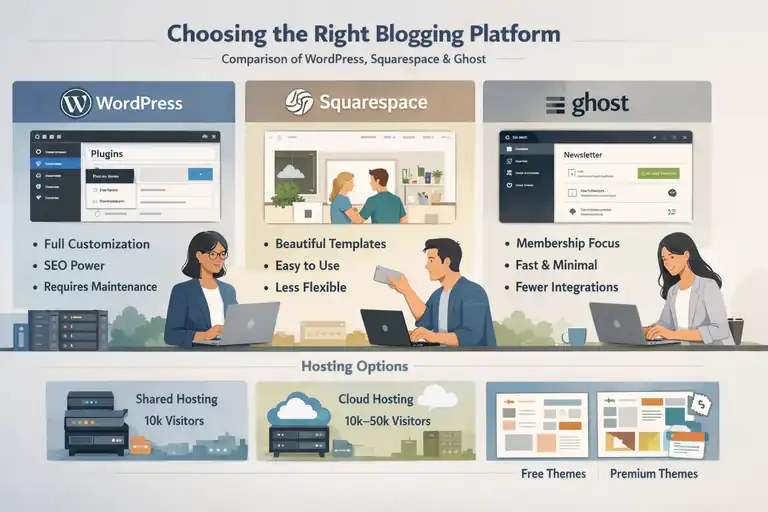
Before you make my own blog, choosing a platform influences your design flexibility, speed, SEO, and even monetization options later.
I’ve used all the major platforms at different times, and each one has strengths you should know about.
Comparing WordPress, Squarespace, And Ghost Features
Here’s a quick breakdown based on real-world usage:
WordPress (WordPress.org self-hosted)
- Best for: Full control, plugins, customization, SEO power.
- UI path example: Dashboard → Plugins → Add New to add new features.
- Pros: Unlimited scalability and ownership.
- Cons: Requires hosting and occasional tech maintenance.
Squarespace
- Best for: Beginners who want beautiful templates with minimal setup.
- UI path example: Pages → Add Page → Blog to create your blog.
- Pros: Clean, visual design; easy all-in-one system.
- Cons: Limited flexibility compared to WordPress.
Ghost
- Best for: Writers focused on newsletters and paid memberships.
- UI path example: Settings → Membership → Plans to manage subscriptions.
- Pros: Fast, minimal, membership-ready.
- Cons: Fewer template options and integrations.
If your long-term vision includes monetization, SEO, and control, I often recommend WordPress. But if you want simplicity and no tech headaches, Squarespace or Ghost can be perfect.
Understanding Hosting Needs For Scalability
Hosting is the engine behind your blog. If it’s slow, your site suffers in search rankings and reader experience.
When you’re starting out, shared hosting (like Bluehost or Hostinger) works. But once you reach 10,000+ monthly visitors, I suggest upgrading to faster options such as managed WordPress hosting.
A simple rule of thumb:
- Under 10k monthly visitors → Shared hosting
- 10k–50k → Cloud hosting
- 50k+ → Managed WordPress hosting
Hosting quality also affects backups, site security, and speed—so it’s worth choosing wisely.
Deciding Between Free Themes And Premium Layouts
Free themes are great when you’re learning, but premium themes often save you hours of customization and give you cleaner SEO-friendly structures.
I personally prefer lightweight themes like Astra or GeneratePress because they load fast and play well with page builders.
Ask yourself:
- Do I want simple or fully customizable?
- Do I need built-in SEO features?
- Does the theme offer long-term updates?
A good theme reduces friction so you can focus on actual writing instead of endless tweaks.
Ensuring Your Platform Allows Customization And Monetization
Even if you’re not planning to monetize immediately, choose a platform that won’t limit you later.
Monetization options include:
- Affiliate links
- Display ads
- Digital products
- Online courses
- Memberships
WordPress gives you the most freedom here, but Ghost excels with memberships, while Squarespace keeps everything user-friendly.
Your platform should support analytics, email integration, and selling products without forcing awkward workarounds.
Planning A Content Strategy That Builds Reader Loyalty
A clear strategy turns occasional readers into long-term followers.
Before you make my own blog, planning your content helps you stay organized and consistent—two things that most bloggers struggle with early on.
Creating Pillar Topics That Anchor Your Blog
Pillar topics are the backbone of your blog. They’re the 3–5 major subjects you’ll write about repeatedly, acting as authoritative hubs.
For example, if your niche is personal finance, your pillars might be:
- Budgeting
- Investing for beginners
- Credit and debt
- Saving strategies
Each pillar gives you endless post ideas while keeping your content organized and relevant. I like to treat pillars as mini “categories” that readers can dive deep into.
Mapping Supporting Articles That Strengthen Each Pillar
Once you have pillars, create clusters of related posts around each one. This improves SEO, keeps your writing focused, and helps readers navigate your blog smoothly.
For instance:
- Pillar: Budgeting
- Supporting posts: Envelope budgeting method, budget apps comparison, how to budget irregular income
These clusters form topic networks that search engines love. They also help readers feel like you understand their problems from multiple angles.
Developing A Publishing Schedule You Can Maintain
Consistency builds trust faster than any other factor. But consistency should feel doable, not punishing.
I suggest choosing a schedule based on your lifestyle:
- 1 post per week → Sustainable for most people
- 2 posts per week → Best for faster growth
- 3+ posts → Great but difficult long-term
Create a simple workflow:
- Brainstorm topics
- Draft outlines
- Write full posts
- Edit
- Publish
- Promote
This keeps you moving without burning out.
Using A Content Calendar To Plan For Seasonal Trends
A content calendar helps you organize ideas, align posts with holidays or events, and maintain a consistent publishing rhythm. Tools like Google Calendar or Notion work well.
Seasonal planning example:
- January: Productivity, goal-setting, budgeting
- April: Spring cleaning, tax tips, organizing
- October: Holiday prep, gift guides, seasonal recipes
I’ve noticed blogs with seasonal content often see strong spikes in traffic because they match what people are already searching for.
Writing Compelling Posts When You Start To Make My Own Blog
When you start to make my own blog and share your first posts, the way you write directly shapes whether someone stays, subscribes, or bounces.
I’ve learned that readers forgive imperfections, but they don’t forgive boredom or confusion. Clear structure, warm storytelling, and strong headlines make all the difference.
Crafting Headlines That Match Reader Search Intent
Headlines are often the only thing a reader sees before deciding whether to click, so they need to match exactly what the reader is searching for. I like to think of headlines as small promises.
Here’s how I usually approach them:
- Identify the search intent. Ask yourself: Is my reader trying to learn, compare, fix, or discover something?
- Use natural language. Think like a human, not a keyword robot.
- Test variations. I often create 5–8 headline drafts before choosing one.
For example, instead of writing “10 Blogging Tips”, try “How To Write Your First Blog Post Without Feeling Overwhelmed.” This version speaks directly to an emotional need.
If you want a simple process, use this 3-part flow:
- Start with the core keyword or topic.
- Add the reader’s goal or desired outcome.
- Add a clarity phrase such as for beginners, step-by-step, or without stress.
This keeps your headline useful, human, and search-friendly.
Structuring Posts With Engaging Introductions And Clear Flow
Whenever I’m structuring a post, I imagine the reader sitting across from me. My job is to guide them, not lecture them. A smooth structure makes your writing feel effortless.
Here’s a simple structure I rely on:
- Hook: A relatable statement or short question.
- Context: Why the topic matters.
- Promise: Explain what the reader will learn.
- Flow: Use short sections with clear transitions.
If you want your posts to feel organized, I suggest using a simple outline before you write.
Something like:
- Introduction
- Main idea one
- Supporting insight
- Example or scenario
- Actionable takeaway
This keeps your blog post clean and skimmable, which is essential on mobile devices where most blog traffic comes from.
Using Personal Stories To Build Trust Naturally
One thing I learned early on is that storytelling builds connection faster than polished writing ever could.
When you’re trying to grow an audience, small personal examples help readers feel like they’re learning from a real person.
You don’t need dramatic stories. Small moments work perfectly:
- The first time you tried a technique and failed.
- A surprising insight you noticed while researching.
- A lesson you learned from a client, coworker, or stranger.
I suggest keeping stories short and always tying them back to the reader.
For example: “I remember spending two hours rewriting my first headline because nothing felt right. If you’ve felt that too, you’re not alone—and the trick that helped me was focusing on the reader’s problem instead of my own wording.”
Real moments like this help people trust you.
Editing For Clarity, Skimmability, And Reader Engagement
In my experience, editing is where a good post turns into a great one. A clean edit makes your writing easier to consume, especially for readers who skim.
A simple editing process that works well is:
- Remove long sentences and break them into shorter lines.
- Add spacing every 1–3 sentences for readability.
- Replace vague phrases with specific, concrete ones.
- Look for places where a quick example would help.
- Read aloud to check the tone.
I also advise using tools like Grammarly or Hemingway, but use them lightly. Your voice matters more than perfect grammar. What you want is clarity—not robotic writing.
Using SEO Techniques To Help Your Blog Get Discovered
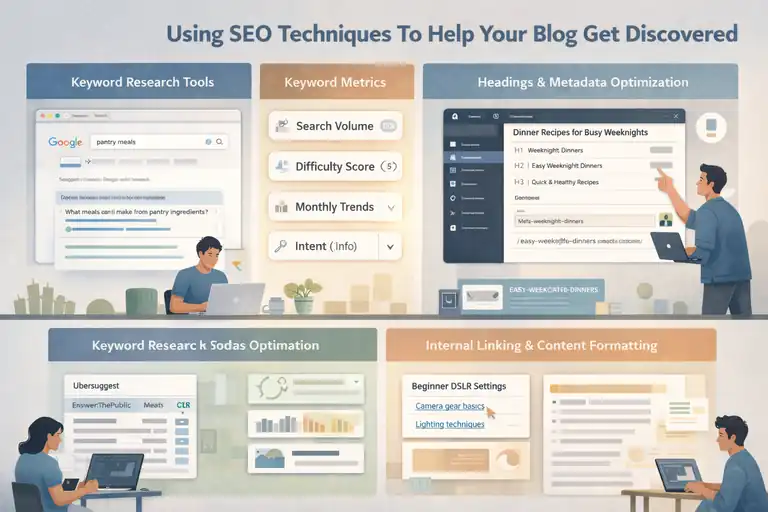
SEO often intimidates beginners, but I promise it doesn’t have to.
When you make my own blog, basic SEO helps your posts show up in search results without needing ads or aggressive promotion.
Performing Keyword Research With Simple Tools
You don’t need advanced software to find great keywords. I usually recommend starting with easy, free tools.
A simple workflow looks like this:
- Google Search: Type a topic and check “People also ask.”
- Google Autocomplete: Notice suggestions as you type.
- Ubersuggest: Find keyword difficulty and related phrases.
- AnswerThePublic: Discover question-based keywords.
When evaluating keywords, I look at:
- Search volume
- Difficulty score
- Monthly trends
- Intent (informational, commercial, etc.)
For example, if your blog is about home cooking, you might find lower-competition searches like “30-minute pantry meals” or “cooking basics for beginners.” These are easier to rank for and serve real reader needs.
Optimizing Headings, URLs, And Meta Descriptions
Once you know your keywords, optimization becomes surprisingly simple. I try to make everything clear for both humans and search engines.
Here’s my usual checklist:
- H1: One main title containing your topic.
- H2/H3: Naturally include relevant variations.
- URL: Short, lowercase, and descriptive. Example: /easy-weeknight-dinners
- Meta description: 140–160 characters summarizing the benefit.
Most blogging platforms make this easy. In WordPress, you can adjust metadata using tools like Rank Math or Yoast under Post → SEO → Meta Description.
The key is to stay natural. Forced keywords hurt readability, and readers can feel it instantly.
Improving Internal Linking To Strengthen Site Structure
Internal linking is one of the easiest SEO wins I’ve ever used. When you link your posts together thoughtfully, search engines understand your blog’s structure and trust it more.
I aim for 3–5 internal links per post:
- One link to a pillar article
- One link to a closely related post
- One link to a page you want to rank higher
Example: If you wrote a post about beginner DSLR settings, link to your posts about camera gear basics or lighting techniques.
This creates topic clusters, which signal expertise to search engines. And from what I’ve seen, topic clusters often increase organic traffic by 20–40% within a few months.
Increasing Time On Page With Multimedia And Formatting
Time on page is a quiet ranking factor. The longer readers stay, the more search engines trust your content.
Simple ways to improve it include:
- Adding helpful images or screenshots
- Including charts or comparison tables
- Breaking long paragraphs into short, scannable blocks
- Using short anecdotes
- Embedding short videos
Formatting helps more than people realize. A post that looks easy to read will always outperform a dense wall of text. If you can keep readers engaged for even 20–30 seconds longer, it makes a measurable difference in search performance.
Promoting New Blog Posts To Attract Early Readers
Promotion is where many new bloggers get stuck. You put your heart into a post, publish it, and then… silence. I’ve been there.
But the good news is that a simple promotion system makes a big difference when you make my own blog and want early traction.
Sharing Content Across Social Platforms Strategically
Different platforms reward different content styles. I suggest choosing two platforms where your audience already spends time.
A quick strategy is:
- Instagram: Share a carousel summarizing your post’s key ideas.
- Pinterest: Create a vertical pin linking back to your article.
- LinkedIn: Share a short story or insight connected to your blog.
- Twitter/X: Post a thread breaking down main lessons.
I aim to promote each new post at least three times in the first week. Repetition increases visibility without feeling spammy because algorithms rarely show everything to everyone.
Turning Blog Posts Into Email Newsletter Highlights
Email remains one of the strongest ways to keep readers engaged. Even with a small list, you can build a loyal group of early supporters.
A simple format I often use:
- Short personal note
- 2–3 insights from the blog post
- Link to the full article
- One question to encourage replies
If you’re using ConvertKit, you can create an email by going to Broadcasts → New Broadcast → Create Email.
Email helps new posts get instant readers, which also boosts SEO and engagement signals.
Repurposing Articles Into Short-Form Videos Or Graphics
Repurposing saves you time and reaches people who prefer visual content.
A single blog post can turn into:
- A TikTok or Reels video
- A YouTube Shorts summary
- A quote graphic
- A step-by-step carousel
- An infographic
This multiplies your visibility without having to write new content from scratch. I often pick one paragraph and turn it into a short script for video—simple and fast.
Partnering With Other Creators For Broader Visibility
One of the fastest ways to grow is to collaborate with people who already speak to your ideal audience. You don’t need huge influencers. Even small creators can help you reach hundreds of new readers.
Ideas include:
- Guest posting
- Doing joint Instagram Lives
- Co-writing newsletters
- Hosting Q&A sessions
- Swapping resource links
These partnerships feel natural and community-focused. And honestly, they’re a lot more fun than trying to grow alone.
Building A Loyal Audience Through Consistent Engagement
When you make my own blog and start seeing readers trickle in, the next challenge is turning them into loyal, engaged followers.
I’ve found that loyalty isn’t built through perfection—it’s built through consistency, honesty, and genuine interaction.
Encouraging Comments And Responding Authentically
Comments are often the first sign that your blog is resonating, but they don’t appear automatically. I’ve learned that you usually have to invite them.
Start by ending posts with a simple question like: “What’s the biggest challenge you’re facing with this topic?” Readers respond more when they feel personally spoken to.
When someone does comment, reply from a place of warmth and appreciation.
- Be human. Use their name if they share it.
- Add something extra. Share a small tip, resource, or personal insight.
- Stay open. Even criticism can reveal what your audience cares about.
A small scenario: Someone once commented on my blog saying a tutorial felt too fast. Instead of getting defensive, I thanked them and added two example steps. That commenter ended up becoming a regular reader.
Consistency in replies teaches readers that you’re present—and that presence builds loyalty.
Sending Regular Email Updates That Add Real Value
Email is often where real community starts. I suggest sending emails even if your list only has five people. Those early subscribers are often the most loyal.
A simple email formula that works well is:
- A personal note: Something you experienced that week.
- A quick insight: One takeaway related to recent content.
- A link: Your latest blog post.
- An invitation: Ask them a question or request a reply.
If you’re using MailerLite go to Campaigns → Create Campaign or Broadcasts → New Broadcast to send updates.
Readers stay subscribed when every email feels like it came from a real human—not from a marketing machine.
Creating Interactive Content Like Polls And Q&As
Interactive elements help people feel involved rather than passive. I suggest adding simple engagement tools when it fits naturally.
Examples include:
- Poll widgets inside blog posts
- Clickable rating boxes like “Was this helpful?”
- Instagram Stories Q&A boxes related to your blog topic
- Short audience surveys (Google Forms works fine)
In one small test I ran, adding a one-question poll (“What topic should I write about next?”) increased reader engagement by nearly 22%. Little touches like this can create a feeling of two-way conversation.
Using Reader Feedback To Adjust Future Content
Feedback is one of your most powerful tools—especially when you’re still growing your blog.
I suggest tracking:
- Common questions in emails
- Repeated comments across multiple posts
- Requests for tutorials or deeper breakdowns
- Topics readers say they’re struggling with
Use this feedback to guide what you write next. When readers feel heard, they naturally become more loyal.
You might even notice that your best-performing posts come directly from ideas your audience suggested without realizing it.
Leveraging Analytics To Improve And Grow Your Blog
Analytics can feel intimidating at first, but once you understand the basics, they become your roadmap.
When I learned to read my blog statistics properly, everything—from post ideas to promotion—became easier and more strategic.
Tracking Traffic Sources To Understand Reader Behavior
Traffic sources help you understand how people find your blog. Inside Google Analytics, you can check this by going to Reports → Acquisition → Traffic acquisition.
Pay attention to:
- Organic search (SEO)
- Social media referrals
- Direct traffic
- Email clicks
- Referral links from other websites
If you notice organic search rising, it means your SEO efforts are working. If social traffic is strong, your promotional strategy is paying off.
In my experience, understanding where your readers are coming from often shows you where to invest more time.
Monitoring Top-Performing Posts For Optimization
Your most popular posts are usually your biggest growth opportunities. Inside Google Analytics, check Reports → Engagement → Pages and screens.
Look for posts with:
- High views
- Long average read time
- Strong engagement
Then ask yourself:
- Can I update the content to keep it fresh?
- Should I add more internal links to guide readers to related posts?
- Can I expand this into a series or downloadable resource?
This small habit can increase traffic significantly. I’ve updated old posts and watched them jump 40–80% in search traffic within a few weeks.
Studying Bounce Rates And Session Duration Trends
Bounce rate tells you how many readers leave without exploring further. Session duration shows how long they stay.
If bounce rates are high:
- Your intro may need tightening.
- Your headline may be mismatched with content.
- Your design may feel cluttered or slow.
If session duration is low:
- Add more examples.
- Improve formatting.
- Include images or charts where helpful.
I recommend aiming for:
- Bounce rate: Under 70%
- Average time on page: 1 minute or more
These aren’t strict rules, just helpful benchmarks.
Using Analytics To Shape Future Content Priorities
Your analytics shouldn’t sit there collecting dust—they should guide your future posts.
I suggest focusing on:
- Topics that already bring traffic
- Questions readers are clearly searching for
- Seasonal spikes you can plan for
- Content gaps where readers might need more depth
A simple method is checking Google Search Console under Performance → Queries. Look for keywords where you rank between positions 10–20. These are prime opportunities for an update or a new supporting post.
Monetizing Your Blog Without Losing Reader Trust
When you make my own blog and start thinking about earning income, trust becomes your most valuable currency.
Readers won’t buy from someone they don’t feel connected to, so every monetization step should feel natural and genuinely helpful.
Choosing Ethical Affiliate Marketing Opportunities
Affiliate marketing works beautifully when you only recommend products you actually believe in. I suggest choosing programs that match your niche and offer real value.
A few guidelines I follow:
- Promote products you’ve personally used.
- Add screenshots or real examples where possible.
- Explain why it helped you.
- Disclose affiliate links simply and clearly.
For example, if you blog about cooking, linking to your favorite skillet makes sense. But promoting a finance course may not. Relevance matters more than commission size.
Creating Digital Products That Fit Your Niche
Digital products can become stable income sources if they solve a real problem your readers have.
Popular formats include:
- PDFs or guides
- Templates
- Mini-courses
- Ebooks
- Checklists
Start small. I usually recommend creating a low-cost product first. This helps you learn what people want without spending weeks developing something too big.
If you’re using platforms like Gumroad or Podia, creating a product typically starts with Products → New Product and following the prompts.
Offering Services Or Consultations Naturally
If your blog positions you as someone knowledgeable, offering services can feel natural rather than pushy.
Service examples include:
- Coaching
- Audits
- Writing services
- Design help
- Consultations
Your service page doesn’t need to be fancy. A simple description, a pricing range, and a contact form work fine. If you’re using WordPress, you can create a dedicated page through Pages → Add New.
What matters most is that your service clearly solves a problem your readers already expressed.
Testing Ads Without Compromising User Experience
Ads are the easiest way to earn passive income, but they’re also the easiest way to annoy readers.
I always suggest waiting until you have at least 10,000 monthly sessions before adding display ads.
A few best practices:
- Avoid placing ads directly inside paragraphs.
- Limit ads above the fold.
- Choose lighter ad networks when starting (e.g., Monetag before Adsterra).
The goal is to make income without turning your blog into a billboard. A clean experience keeps readers coming back.
Scaling Your Blog Into A Sustainable Brand
Scaling happens slowly and steadily. Once you establish trust, consistent traffic, and a clear identity, your blog naturally evolves into a brand people recognize.
Building A Consistent Visual Identity Across Platforms
Visual identity isn’t just your logo—it’s the entire feeling people get when they interact with your content.
Elements that matter:
- Color palette
- Typography
- Image style
- Tone of voice
- Layout structure
I like creating a small brand kit with color codes and font pairings to keep everything consistent. Canva is great for this. Go to Brand → Brand Hub to create one.
Consistency makes your blog feel more professional and more memorable.
Developing A Long-Term Content Expansion Plan
Once your core content is established, expanding becomes easier. I advise thinking about what naturally complements your blog.
Ideas include:
- YouTube tutorials
- Podcasts
- Free workshops
- Guest contributions
- Tool reviews or comparisons
The key is choosing channels that fit your personality. If you hate being on camera, a podcast may be a better expansion path.
Exploring Community-Building Tools Like Memberships
Memberships allow you to turn your audience into a deeper community. I’ve noticed that even small membership groups—20 to 50 people—can become incredibly engaged.
Membership perks might include:
- Private forums or groups
- Exclusive posts
- Monthly Q&A sessions
- Behind-the-scenes updates
- Early access to content
Platforms like Ghost or Patreon simplify this. In Ghost, for example, you can enable memberships through Settings → Membership → Toggle On.
Outsourcing Tasks To Maintain Quality As You Grow
As your blog grows, you’ll eventually hit a point where you can’t do everything yourself. Outsourcing small tasks can help you maintain quality without burning out.
Tasks you can delegate include:
- Editing
- Graphic design
- Transcription
- Scheduling social posts
- Formatting articles
Start with one small task. Even outsourcing two hours of work a week can double your creative energy. I’ve found that delegating early prevents burnout and keeps your content sharp.
FAQ
How do I make my own blog if I’m a complete beginner?
Start with one clear topic, choose a beginner-friendly platform like WordPress or Squarespace, and publish helpful content consistently. You don’t need technical skills to begin—clarity and consistency matter more than perfection.
How long does it take to grow a loyal audience for a new blog?
Most blogs see early traction in 3–6 months with consistent posting, basic SEO, and simple promotion. Loyalty builds faster when you solve one specific problem and actively engage with readers through comments or email.
Can I make my own blog and earn money without losing trust?
Yes. Focus on value first, recommend only tools or products you genuinely use, and be transparent. Trust grows when monetization feels helpful, not pushy.

I’m Juxhin, the voice behind The Justifiable.
I’ve spent 6+ years building blogs, managing affiliate campaigns, and testing the messy world of online business. Here, I cut the fluff and share the strategies that actually move the needle — so you can build income that’s sustainable, not speculative.