Table of Contents
Ever wondered why your beautifully crafted marketing emails aren’t converting the way they should? Omnisend email might be the missing link.
With its automation, segmentation, and personalized messaging tools, Omnisend helps brands turn clicks into customers and browsers into buyers. But how exactly does it do that—and why does it outperform traditional email marketing platforms?
Let’s break down how Omnisend email can genuinely boost your conversions.
Understanding How Omnisend Email Drives Conversions
Omnisend email is built to help businesses go beyond basic marketing blasts. It transforms your campaigns into conversations—combining email, SMS, and automation to keep customers engaged at every touchpoint.
Let’s explore how these key elements actually drive higher conversions.
How Omnisend Combines Email and SMS for Better Engagement
Omnisend brings email and SMS together in a single workflow so you can reach customers wherever they’re most active. This isn’t just convenient—it’s conversion gold.
Why it works:
- Cross-channel visibility: When an email goes unopened, an SMS can nudge the customer instantly.
- Real-time communication: SMS delivers time-sensitive updates, like flash sales or cart reminders, while email handles long-form storytelling and product launches.
- Higher open rates: According to Omnisend data, campaigns that combine both channels can see up to a 47% higher purchase rate compared to email-only campaigns.
Example: In your Omnisend dashboard, go to Automations > Create Workflow > Email + SMS Sequence. You can set an abandoned cart email to trigger first, followed by a short text reminder if the user doesn’t act within 12 hours.
I suggest using this combo especially during promotions or limited-time offers—it keeps the momentum alive without feeling pushy.
The Role of Omnichannel Marketing in Customer Retention
Omnisend’s strength lies in its omnichannel marketing—email, SMS, and push notifications all working together. Customers today jump between devices and platforms constantly. Having a unified presence keeps your brand consistent and top of mind.
In practice: A customer might browse your store on their laptop, abandon a cart, then later receive a push notification or SMS reminder on their phone. That continuity feels seamless and natural, which builds trust.
Research backs this up: brands using three or more channels in an automation workflow experience up to a 287% higher purchase rate. It’s not just about reaching people—it’s about staying connected across their journey.
Explore automation, SMS+email workflows, and omnichannel tools that help you convert more customers without extra effort.
Why Consistent Messaging Across Platforms Matters
Imagine you send an elegant promo email, but your SMS follow-up uses a different tone or offer. That small inconsistency can confuse customers and weaken trust.
Omnisend helps solve that by letting you sync your message templates and timing across every channel. When your tone, visuals, and offer align, you create a single narrative that reinforces value.
Quick tip: In Omnisend, under Campaigns > Templates > Brand Assets, store your preferred tone, color scheme, and message snippets. It saves time and ensures your brand always “speaks” the same way.
Behavioral Triggers and Real-Time Automation Explained
Behavioral triggers are the heart of what makes Omnisend powerful. They allow you to react instantly to customer actions—like clicking a link, browsing a page, or leaving a cart behind.
Here’s how it plays out:
- A user views a product but doesn’t buy → Trigger: send a “Still thinking?” email with a discount code.
- A repeat buyer places another order → Trigger: send a loyalty “Thank you” message with product recommendations.
Omnisend’s real-time automation ensures these emails go out exactly when they matter most.
I’ve found that timing alone can raise conversion rates by 20–25% because you’re catching customers in their moment of intent.
Personalization Features That Increase Click-Through Rates
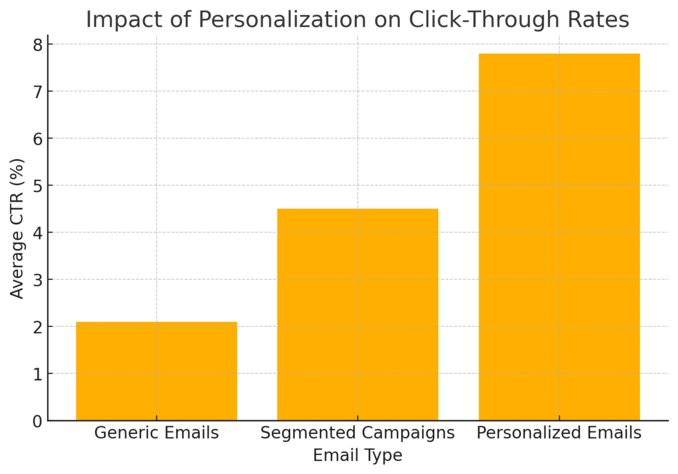
Omnisend isn’t just about sending messages—it’s about sending the right message to the right person at the right time. Let’s look at how its personalization features lift engagement and drive clicks.
Using Segmentation to Target High-Intent Customers
Segmentation in Omnisend lets you divide your audience by purchase history, engagement, location, or behavior. Instead of treating everyone the same, you talk directly to those ready to act.
Example setup: Navigate to Audience > Segments > Create Segment. Choose filters like “Added to Cart but Not Purchased in 7 Days.” Then, send a reminder email or limited discount only to them.
I recommend testing small segments first—like your most loyal buyers or frequent browsers. These often yield higher click-through and conversion rates since the messages feel tailor-made.
Dynamic Content Blocks and Product Recommendations
Dynamic content in Omnisend means your email changes automatically based on each recipient’s data—no manual edits required.
How to use it effectively:
- Add Dynamic Product Blocks under Email Builder > Content Blocks > Product Recommendation.
- Link it to your store catalog, and Omnisend will show products based on past browsing or purchase behavior.
This approach can lift engagement by up to 33%. It’s like having a personal shopper inside every email.
How Personalized Workflows Build Loyalty and Trust
Workflows let you build automated sequences that mimic human attentiveness. For example:
- Welcome email after signup.
- Product education follow-up three days later.
- Exclusive offer email after the first purchase.
Each message strengthens the customer relationship without extra manual effort. I suggest using Omnisend’s Prebuilt Ecommerce Workflows if you’re just starting—they’re tested and optimized for conversions.
Personalized automation like this doesn’t just sell—it builds loyalty. Customers start recognizing your brand as helpful, not pushy.
Case for A/B Testing: Refining Subject Lines and Copy
Even with automation, testing is everything. Omnisend makes it simple to run A/B tests directly inside your email campaign setup.
Why it matters: Small tweaks—like adding the customer’s name in the subject line or testing a shorter email layout—can dramatically change open and click rates.
Go to Campaigns > Create Email > A/B Test, and test:
- Subject line styles (questions vs. statements)
- CTA wording (“Shop Now” vs. “Claim Offer”)
- Image-heavy vs. text-focused layouts
From what I’ve seen, brands that run regular A/B tests typically see 10–15% higher conversions long-term because they’re constantly learning what resonates.
Automation That Turns Abandoned Carts into Sales
Few things hurt more than an abandoned cart. But with Omnisend, it’s not the end—it’s an opportunity.
Smart automation sequences can gently remind, re-engage, and recover those lost sales automatically.
Cart Recovery Emails and Their Impact on Conversion Rates
Abandoned cart emails are where Omnisend really shines. These emails trigger automatically when a customer leaves items in their cart without checking out.
Best practice workflow:
- Email #1: Sent 1 hour after abandonment – gentle reminder with product image.
- Email #2: Sent 12 hours later – include a small incentive or testimonial.
- Email #3: Sent after 24 hours – a “last chance” reminder with urgency.
Omnisend reports that automated cart recovery campaigns can recover up to 20% of lost carts. I’ve personally seen businesses reclaim thousands monthly just from this one workflow.
Activate ready-made Omnisend cart recovery workflows that bring shoppers back automatically.
Building Automated Journeys for Repeat Customers
Once someone buys, don’t stop there. Omnisend’s Customer Lifecycle Automation helps nurture post-purchase relationships.
Create sequences like:
- Order confirmation → shipping update → product review request.
- Reorder reminders for consumables.
- Loyalty offers after multiple purchases.
These workflows not only boost repeat sales but also reinforce brand loyalty by staying relevant beyond the first purchase.
Checkout Abandonment vs. Cart Abandonment Workflows
While they sound similar, they’re not the same. Cart abandonment happens when items are added but checkout isn’t started. Checkout abandonment occurs when a customer starts the checkout process but doesn’t finish payment.
Omnisend lets you create different automations for each, ensuring messaging precision.
For example, checkout abandonment emails might focus on payment assistance or security reassurance, while cart abandonment might highlight product desirability.
That nuance is what keeps emails feeling personal, not robotic.
Time-Delay Triggers and Multi-Message Sequences That Work
Timing makes or breaks automation success. Send reminders too soon and you risk annoyance; too late and you lose interest.
Omnisend’s Delay feature helps you fine-tune message timing. In your workflow builder, you can set time gaps like Wait for 6 hours or Wait for 1 day before the next step triggers.
I usually suggest:
- Shorter delays for impulse buys (6–12 hours).
- Longer delays for high-ticket items (24–48 hours).
Multi-step sequences outperform one-off reminders by up to 69% in conversion lift. That’s the power of persistence—automated, but human in tone.
Advanced Reporting and Insights That Refine Your Strategy
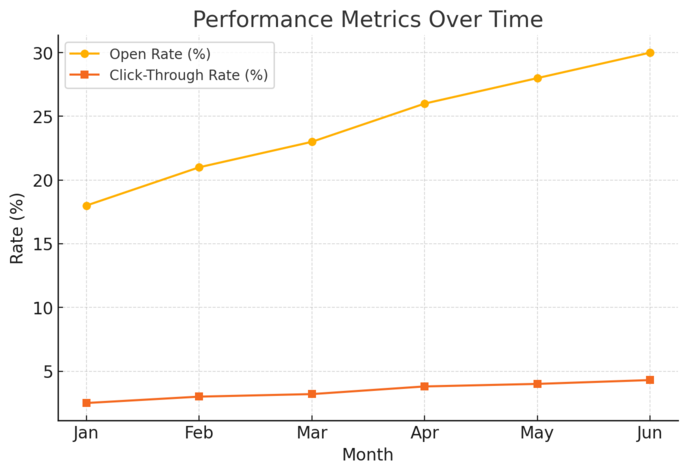
Omnisend email goes beyond just sending campaigns—it helps you understand them.
The platform’s built-in analytics and reporting tools turn every click, open, and conversion into a roadmap for smarter marketing decisions.
Real-Time Analytics and Campaign Tracking
One of my favorite parts about Omnisend email is that you don’t have to guess how your campaign is performing.
The platform gives you real-time analytics—literally minute-by-minute data on how your emails are being opened, clicked, and converted.
Here’s how it works:
- Instant feedback: The moment you send a campaign, Omnisend starts collecting performance data like open rates, click-through rates (CTR), and conversion rates.
- Visual dashboards: Go to Reports > Campaigns in your Omnisend dashboard. You’ll see a breakdown of performance by device, location, and even engagement time.
- Heatmaps: These show where people are clicking inside your email. You can spot underperforming buttons or links and adjust your design or call-to-action.
I suggest checking these metrics within the first 24 hours after sending a campaign. It’s often enough to tweak your next send and double your impact without starting from scratch.
Using A/B Split Testing to Identify Winning Elements
A/B split testing is one of the easiest and smartest ways to improve your Omnisend email results. It’s like running a mini experiment to see which version performs better—no guesswork required.
How to set it up:
- Go to Campaigns > Create Campaign > A/B Test.
- Choose what to test: subject line, sender name, email content, or timing.
- Omnisend automatically sends both versions to small audience samples.
- The winning version (based on open or click rate) is then sent to the rest of your audience.
Here’s a small tip: Start by testing one variable at a time.
For example, test subject lines first—like “Your offer expires soon” vs. “Did you forget something in your cart?” Once you find the winner, lock it in and move on to testing CTA buttons or images.
Brands using A/B testing through Omnisend typically see up to a 15% increase in open rates over time. The key is consistency—test often and always document your learnings.
How Data-Driven Decisions Improve ROI
Marketing intuition is great, but data turns instincts into reliable strategies. Omnisend email’s analytics help you pinpoint what’s working—and more importantly, what’s wasting your budget.
For instance:
- Identify underperforming segments: If you see low engagement from a specific segment, it might be time to re-engage them with a new offer or clean your list.
- Spot content fatigue: If open rates drop over time, refresh your templates or subject lines.
- Track revenue attribution: Under Reports > Sales Performance, you can trace which campaigns directly generated sales.
I’ve seen businesses reduce their email frequency by 20% and still increase conversions, simply by focusing on high-performing segments revealed in Omnisend’s analytics.
That’s the magic of data-driven marketing—you do less, but earn more.
Conversion Funnels: Measuring What Truly Matters
Clicks and opens are nice, but conversions are where the real story lies. Omnisend’s Conversion Funnels feature lets you track a customer’s journey from first interaction to purchase.
You can visualize every step:
- Email sent
- Email opened
- Link clicked
- Checkout started
- Purchase completed
By viewing drop-off points, you’ll instantly know where customers lose interest. If many drop off after clicking but before purchasing, maybe your landing page or offer needs tweaking.
Pro insight: Tag your campaigns with specific UTM parameters (small bits of tracking code) to connect Omnisend data with Google Analytics. You’ll see not just who clicked, but what they did next—and that’s where strategy refinement truly happens.
Integrations That Simplify and Amplify Marketing Results
Omnisend isn’t meant to live in a silo. Its integrations connect your email marketing to platforms like Shopify, Wix, and WordPress—making it the command center of your ecommerce growth.
Connecting Omnisend Email with Shopify, Wix, and WordPress
Connecting your store to Omnisend takes just a few clicks, and it opens up a world of automation and personalization.
Here’s a quick guide:
- Shopify: Go to Shopify App Store > Omnisend > Add App. Your customer, product, and order data sync automatically within minutes.
- Wix: From your Wix dashboard, head to Apps > Omnisend for Wix > Connect. You’ll instantly get access to automation templates built specifically for Wix stores.
- WordPress: Install the Omnisend plugin from Plugins > Add New > Omnisend. This integration is perfect for content-driven stores or blogs that nurture leads over time.
Once connected, Omnisend automatically tracks customer actions (like purchases or page visits) so your campaigns stay contextually relevant.
Streamlining Data Between Platforms for Seamless Automation
Integrations aren’t just for convenience—they ensure your marketing runs like a well-oiled machine.
With synced data, Omnisend can send messages triggered by real actions across platforms.
Example scenario:
- A customer signs up on your WordPress site.
- Their details sync to Shopify via Omnisend.
- They receive a welcome email, a discount SMS, and later, a product recommendation.
That’s seamless automation without you manually importing lists or juggling CSV files. I recommend setting up “real-time sync” in Omnisend’s settings to keep your contact data always fresh.
Using CRM Integrations to Unify Customer Data
Customer Relationship Management (CRM) tools store all your customer interactions.
Omnisend’s integrations with CRMs like HubSpot and Salesforce mean every email, SMS, and purchase is recorded in one place.
Why this matters:
- You can see a full timeline of each customer’s engagement.
- Your sales and marketing teams stay aligned.
- Automation rules can trigger based on CRM updates.
For example, when a lead changes from “interested” to “qualified” in your CRM, Omnisend can automatically send a personalized offer. It’s the perfect blend of sales and marketing synergy.
How Integrations Help Maintain Consistent Branding
Consistency across channels builds trust. With integrations, Omnisend ensures your visuals, tone, and messages look identical across email, SMS, and your website.
Inside the Brand Assets section, upload your logos, fonts, and color palettes. Omnisend applies these automatically across your templates—so your emails, popups, and landing pages always look cohesive.
From what I’ve seen, consistent branding can improve recognition by up to 80%. It’s subtle but powerful—your customers feel like they’re interacting with one unified brand, not disconnected messages.
Maximizing Engagement with Omnisend’s Visual Email Builder
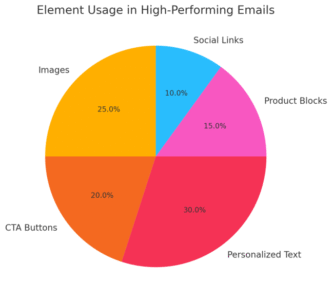
Designing emails in Omnisend feels less like “work” and more like storytelling. You don’t need coding skills—just a sense of what your brand stands for.
Creating High-Impact Emails Without Coding Skills
The Omnisend Visual Email Builder is drag-and-drop simple. You can add text blocks, images, CTAs, and product feeds in minutes.
Example path: Campaigns > Create Campaign > Email Builder. Choose a pre-built layout or start from scratch.
I suggest focusing on:
- Hierarchy: Keep your key message and CTA visible without scrolling.
- Contrast: Use brand colors strategically to draw attention.
- Clarity: One goal per email—don’t overwhelm.
You don’t need to be a designer to create beautiful, high-converting emails here.
Leveraging Templates That Match Your Brand Identity
Omnisend offers over 250 pre-made templates categorized by purpose—like product launches, holiday promos, or newsletters.
Each can be customized to your fonts, colors, and tone. Head to Templates > Prebuilt Layouts and preview options before selecting.
If you’re short on time, I advise saving your top-performing email as a reusable custom template. It keeps consistency and speeds up future campaign creation.
Using Conditional Content to Personalize at Scale
Conditional content is where personalization meets efficiency. It lets you show different blocks of content to different audiences within the same email.
For example:
- Loyal customers see a “Thank You” discount.
- New subscribers see an intro offer.
Set this up under Email Builder > Content Block Settings > Display Conditions.
This feature can raise click-through rates significantly because every subscriber sees content that actually applies to them.
Drag-and-Drop Editing for Faster Campaign Launches
The drag-and-drop editor is Omnisend’s secret weapon for marketers who value both creativity and speed.
You can:
- Rearrange elements instantly.
- Add dynamic product recommendations.
- Preview how your email looks on mobile vs. desktop.
From experience, I recommend building mobile-first since over 70% of users open emails on their phones. Omnisend’s live preview ensures your design adapts perfectly.
Utilizing Omnisend’s SMS and Push Notifications for Multi-Channel Conversions
Omnisend email isn’t just about sending emails—it’s about connecting with your audience wherever they are.
By combining SMS and push notifications with email, you can create a truly multi-channel experience that feels personal, timely, and natural.
Why Email Alone Isn’t Enough in 2025
Email marketing is still powerful, but it’s no longer enough on its own. People are busier than ever, and inboxes are overflowing.
This is where Omnisend’s SMS and push notifications come in—they help you cut through the noise.
Think about it:
- SMS messages have a 98% open rate, often read within minutes.
- Push notifications reach users instantly on both desktop and mobile, even when they’re not in their inbox.
When you connect these with Omnisend’s email campaigns, you’re building a communication ecosystem.
I usually advise using SMS for time-sensitive updates (like flash sales) and email for longer storytelling or brand education. It’s not about replacing email—it’s about strengthening it.
Combining SMS, Push, and Email for Higher Open Rates
Omnisend makes it easy to combine all three channels in a single workflow.
For example, you can set up an automation like this:
- Email → “Your cart is waiting!”
- Wait 6 hours → SMS → “Still thinking it over? Your discount expires soon.”
- Wait 24 hours → Push notification → “Your items are about to sell out.”
You can build this by going to Automation > Create Workflow > Email + SMS + Push Sequence.
This layered approach works because it meets customers where they’re active. According to Omnisend data, workflows that include three channels see 250–300% higher engagement than those using email alone.
How Urgency and Timeliness Boost Sales
I believe urgency is one of the simplest, most effective triggers for conversions. The key, though, is authenticity—urgency should never feel forced.
Here’s how Omnisend helps you use it well:
- Countdown timers in emails create visual urgency.
- SMS reminders send quick prompts during limited-time offers.
- Push alerts can notify customers when stock is low or an offer is expiring.
An example: Send an SMS that says, “Your 20% off ends in 2 hours—grab it before it’s gone!” It’s short, direct, and action-focused. These micro-interactions drive immediate responses because they tap into genuine time sensitivity.
Cross-Device Targeting for Abandoned Cart Recovery
One of Omnisend’s smartest advantages is cross-device tracking.
If someone adds a product to their cart on a laptop and abandons it, Omnisend can trigger a reminder on their phone via SMS or push.
That’s real cross-device recovery.
Example workflow:
- Cart abandoned on desktop → Email reminder sent.
- If unopened in 6 hours → SMS follow-up sent to the same user.
From what I’ve seen, this type of automation can recover up to 20–30% of otherwise lost carts. It’s not about being pushy—it’s about being present on the right device at the right time.
Pricing Plans That Fit Growth and Conversion Goals
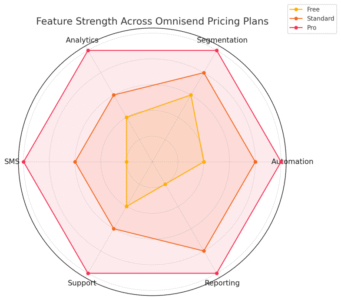
Omnisend’s pricing is built to scale with your business. Whether you’re just starting or managing thousands of contacts, there’s a plan that fits your conversion goals and growth stage.
What Each Omnisend Email Plan Offers for Conversions
All Omnisend plans come with core conversion tools—email automation, segmentation, and analytics—but each tier adds more power.
- Free Plan: Great for beginners testing the platform. Includes 500 emails/month and basic automation.
- Standard Plan ($11.20/month): Adds advanced email campaigns, audience segmentation, and reporting.
- Pro Plan ($41.30/month): Unlocks unlimited emails, SMS messaging, web push notifications, and advanced analytics.
I usually suggest starting with Standard to build traction, then upgrading to Pro once you’re ready to scale automations and SMS campaigns.
Comparing Free, Standard, and Pro Features
Here’s a quick comparison of how each plan supports conversions:
| Feature | Free | Standard | Pro |
| Email sends per month | 500 | 12x contact list | Unlimited |
| SMS credits | $1 trial | Optional add-on | Monthly bonus credits |
| Web push notifications | Limited | Unlimited | Unlimited |
| A/B testing | No | Yes | Yes |
| Advanced reporting | No | Yes | Yes |
| Account expert | No | Optional | Included |
If you’re serious about multi-channel marketing, the Pro plan is where Omnisend truly shines—it integrates everything: email, SMS, and push.
Choosing the Right Plan for Your Business Stage
Here’s how I usually guide businesses:
- Startups: Begin with the Free plan to explore automations and collect early data.
- Growing brands: Move to Standard for better segmentation and consistent campaign scheduling.
- Established stores: Use Pro to leverage full automation, advanced analytics, and SMS for maximum conversions.
The beauty of Omnisend’s structure is that you can switch plans anytime without losing data—your workflows and contacts stay intact.
ROI Potential Based on Plan Capabilities
The ROI from Omnisend often outweighs the cost within a few months. For every $1 spent, users reportedly make an average of $68 in revenue (source: Omnisend benchmark data).
Pro users typically see the highest ROI because they’re using every available automation and communication channel. I’ve seen ecommerce stores double revenue in under six months simply by adding SMS and personalized workflows.
If you treat each feature like an investment—automation, segmentation, analytics—they start working together like compounding interest for your conversions.
Best Practices to Get the Most Out of Omnisend Email
Using Omnisend effectively isn’t just about the tools—it’s about how you use them. Here are strategies I’ve found that consistently improve conversions and engagement.
Setting Up Automated Welcome and Thank-You Sequences
First impressions count. A welcome email or thank-you message sets the tone for your customer relationship.
Best practices:
- Send your welcome email instantly after signup using Automation > Welcome Workflow.
- Include a small incentive, like a discount code or helpful resource.
- Follow up a few days later with product recommendations or stories about your brand.
This two-step approach creates familiarity and shows that you value the customer, not just the sale.
Aligning Email Frequency with Customer Expectations
Sending too many emails can hurt engagement, while sending too few risks being forgotten. Omnisend’s analytics help you find the balance.
I suggest starting with two campaigns per week and tracking your unsubscribe rate under Reports > Engagement Metrics.
If unsubscribes rise, reduce frequency. If open rates drop, try adjusting send times or content themes. Consistency matters more than volume.
Maintaining Deliverability and List Hygiene
Even the best emails won’t convert if they land in spam. Clean your list regularly to keep your deliverability rates healthy.
Here’s what I do:
- Remove inactive subscribers after 90 days.
- Use Omnisend’s List Cleaning Tool under Audience > Segments > Inactive Contacts.
- Re-engage dormant subscribers with a simple “Do you still want to hear from us?” email.
Healthy lists mean higher open rates, better sender reputation, and more conversions.
Tracking and Iterating Based on Performance Data
Omnisend’s real-time analytics let you spot trends before they become problems. Review campaign reports weekly to identify what’s improving and what’s slipping.
Metrics to watch:
- Open rate (above 20% is healthy)
- Click-through rate (aim for 2–5%)
- Conversion rate (average 1–3%)
I like to create a small “learning log” to note what subject lines, visuals, or segments performed best. Over time, these patterns form your own marketing playbook.
Pro Tip: Build Conversion-Centric Campaigns with Smart Automation
The real magic of Omnisend email lies in automation. When done right, it’s like having a full-time marketer working 24/7—without burning out your audience.
How to Map the Perfect Email Journey in Omnisend
Start by identifying key customer touchpoints: signup, purchase, repeat visit, and inactivity. Then, build automations around those.
Example path:
- Signup → Welcome email
- Product view → Follow-up with recommendations
- Purchase → Thank-you + review request
- Inactivity (30 days) → Re-engagement email
You can create this under Automation > Customer Journey Builder. It’s visual, intuitive, and surprisingly quick once you get the hang of it.
Using Purchase Behavior to Trigger Upsells and Cross-Sells
Omnisend can automatically recommend products based on what someone has already bought.
Example:
- Customer buys skincare → Trigger email with complementary products like a moisturizer or serum.
- Customer buys shoes → Send an upsell email for socks or care kits.
Go to Email Builder > Product Recommendation Block and set conditions like “Show related items.”
These small touches feel personal and significantly increase average order value.
Why Consistent Testing Keeps Conversions Growing
Even the best automations need regular tuning. A/B test different timing, messages, and visuals to keep your campaigns fresh.
I suggest running one new test every two weeks—nothing complex, just small tweaks. You’ll learn faster and keep your campaigns performing at their best.
Expert Tip: Focus on Relevance Over Frequency for Long-Term Success
More emails don’t equal more sales. What really matters is sending relevant messages that respect your audience’s time.
Omnisend’s segmentation tools and behavioral triggers make this easy.
When your emails match what your customers actually care about, conversions grow naturally—and your relationship with your audience strengthens long term.