
Table of Contents
Some links on The Justifiable are affiliate links, meaning we may earn a small commission at no extra cost to you. Read full disclaimer.
If you’ve been wondering whether Omnisend free is worth your time, you’re not alone.
Many small business owners and ecommerce brands are searching for a marketing automation tool that delivers real value without the upfront cost.
But what do you actually get with the Omnisend free plan—and where are the limits hiding?
In this review, we’ll break down the key features, benefits, and trade-offs so you can decide whether it’s truly the right fit for your business growth strategy.
Overview Of The Omnisend Free Plan
If you’ve ever tested multiple marketing tools, you know most “free” plans come with a catch.
The Omnisend free plan, though, gives a surprisingly generous starting point for small stores or creators trying to automate their customer outreach without paying upfront.
Here’s what it actually includes and how it stacks up against competitors.
What The Omnisend Free Plan Includes
Omnisend’s free plan is designed to let you experience core automation and email marketing tools without financial risk. It’s not a stripped-down demo — you can genuinely run real campaigns.
Here’s what you get right away:
- 500 emails per month: You can send up to 500 total emails to your contacts. That means, for example, 100 subscribers can each receive five emails monthly.
- Up to 250 contacts: Perfect for testing your early audience without upgrading too fast.
- Automations and workflows: Access pre-built flows like welcome series, abandoned cart reminders, and birthday messages.
- Signup forms and popups: These capture leads directly on your store or site.
- Reports and analytics: Track open rates, clicks, and conversions for every campaign.
I like how Omnisend includes automation and segmentation from the start — that’s something many free plans hold back. It feels like they’re letting you see the real product in action before committing.
Who The Free Plan Is Best Suited For
From what I’ve seen, Omnisend’s free plan works best for small ecommerce brands or new store owners testing their marketing automation systems.
If you’re running a Shopify or WooCommerce store with fewer than 200 subscribers, this plan lets you:
- Set up basic automated emails without cost.
- Test whether your audience engages with newsletters or promotional flows.
- Get comfortable with Omnisend’s interface and workflow builder.
I suggest using the free plan as your sandbox. Build real campaigns, learn the interface, and understand what automations bring in sales before you decide to scale up.
Limitations Compared To Paid Omnisend Plans
While generous, the free tier does come with boundaries you’ll feel once your marketing ramps up.
- Email send limits: 500 monthly emails run out quickly once you gain subscribers.
- SMS credits: You get a one-time $1 credit for SMS (around 67 texts in the U.S.), but that’s it.
- No A/B testing: You can’t experiment with subject lines or design variations.
- Limited support: Priority and live chat support are reserved for paid users.
In practice, these limits won’t hurt a very small list, but once you start making consistent sales, you’ll need to upgrade.
How The Free Plan Compares To Competing Email Tools
Here’s where Omnisend stands out compared to its rivals:
| Feature | Omnisend Free | Mailchimp Free | Klaviyo Free |
| Monthly Emails | 500 | 1,000 | 500 |
| Contact Limit | 250 | 500 | 250 |
| Automation Workflows | Yes | Limited | Yes |
| SMS Included | $1 Credit | No | None |
| Ecommerce Integration | Full | Partial | Full |
Mailchimp may let you send more emails, but Omnisend’s ecommerce-focused automation and integrated SMS give it a practical edge for online stores.
If you sell physical products, I believe Omnisend’s setup feels more intuitive right out of the gate.
Key Email Marketing Features In Omnisend Free
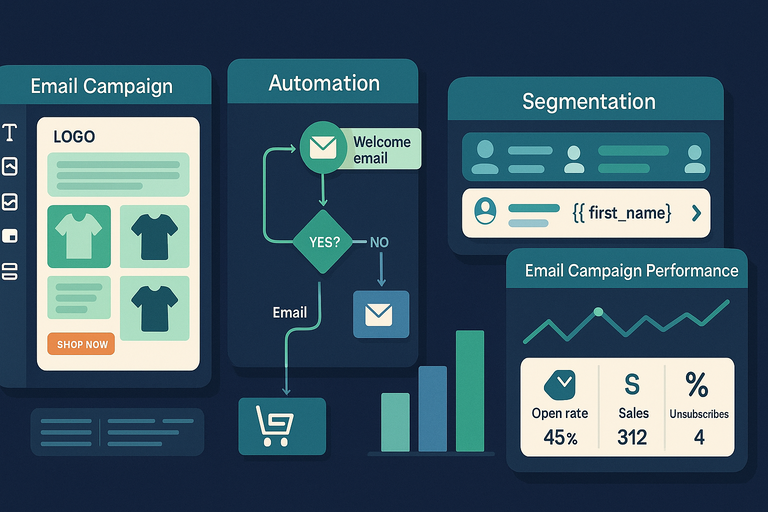
Omnisend’s free tools cover all the essentials you need to start sending automated and manual email campaigns.
Even though it’s free, the feature set feels crafted for ecommerce rather than just newsletter sending.
Access To Email Campaign Creation And Templates
When you click Campaigns > Create Campaign > Email inside Omnisend, you’ll find a library of drag-and-drop templates ready to customize.
Here’s what makes it smooth:
- Pre-built ecommerce layouts: Product grids, discount banners, and call-to-action blocks designed for online stores.
- Drag-and-drop builder: No code required — you just move blocks around visually.
- Mobile responsiveness: Every email automatically adjusts for smartphones.
For small stores, this setup saves hours. I’d suggest starting with a Product Highlight template and swapping in your logo, top sellers, and discount offers.
It’s fast and looks professional even with zero design experience.
How Email Automation Works In The Free Plan
Automation is where Omnisend really outshines generic tools. Even on the free plan, you can set up key workflows under Automation > New Workflow:
- Welcome Series: Automatically greets new subscribers and introduces your brand.
- Abandoned Cart: Nudges shoppers who left items behind.
- Product Re-Engagement: Encourages repeat visits after inactivity.
Each workflow can include conditional splits, which let you personalize based on customer behavior (like “opened last email” or “added product to cart”).
It’s impressive that Omnisend doesn’t hide automation behind a paywall — it’s genuinely functional from day one.
The Role Of Email Segmentation And Personalization
Segmentation in Omnisend free lets you send targeted messages based on contact behavior or profile data.
For example, you can create a segment for:
- “Customers who purchased in the last 30 days.”
- “Subscribers who opened at least two campaigns.”
- “Users who clicked a discount link.”
Adding personalization tokens like {{ first_name }} or {{ last_product }} inside emails makes your messages feel specific and human.
I recommend experimenting with one-to-one language — it often doubles engagement compared to generic blasts.
Tracking Campaign Performance With Built-In Analytics
Omnisend’s reporting dashboard gives clear, visual metrics:
- Open rate and click-through rate (CTR) show engagement quality.
- Sales attribution reveals how much revenue each campaign generated.
- Delivery rate and unsubscribes help fine-tune list health.
For quick access, go to Reports > Campaign Reports in your dashboard. Even free users get access to these insights, which is rare — many platforms restrict detailed analytics to paid tiers.
These stats aren’t just vanity metrics. Watching open rates drop or CTR rise helps you adapt your subject lines, timing, and offers with data instead of guesswork.
SMS And Push Notifications: What’s Actually Free
Omnisend’s free plan isn’t just about email — it also introduces SMS and push notifications, though with clear usage caps.
For ecommerce users, this gives a taste of multi-channel automation without committing early.
Availability Of SMS Credits In The Free Plan
Omnisend gives new users a one-time $1 SMS credit upon signup. That’s roughly 60–70 text messages in the U.S.
You can access this under My Account > Billing > SMS Credits. After the free balance runs out, SMS messages require top-up or a paid plan.
I like using that initial credit to test whether SMS works for your audience — maybe a flash sale alert or shipping update. It’s a low-risk experiment to gauge effectiveness.
Using Web Push Notifications Without Extra Costs
Unlike SMS, web push notifications are completely free and unlimited on the Omnisend free plan.
They appear as small pop-ups in the browser, even when users aren’t on your website.
Setup path: Forms > Push Notifications > Create Notification.
Common uses include:
- Back-in-stock alerts
- Discount announcements
- Abandoned cart reminders
I find push notifications incredibly useful for recapturing visitors who aren’t checking their inbox. Plus, since they’re free, there’s zero downside to activating them early.
When To Upgrade For Full Multi-Channel Automation
If you’re running multiple campaigns and want emails, SMS, and push notifications to work together, you’ll quickly outgrow the free tier.
Omnisend’s paid plans unlock:
- Unlimited SMS sends with dedicated country rates
- Advanced workflows that mix email + SMS + push in one flow
- More detailed segmentation (like by device or purchase history)
A realistic upgrade point is when your contact list crosses 250 subscribers or you rely on automation for consistent sales.
From there, the paid tier’s extra reach pays for itself through higher conversion rates.
Signup Forms And Popups For Lead Generation
One of the most powerful parts of Omnisend free is how easily you can collect subscribers through forms and popups without needing extra tools.
This is crucial for growing your email list organically, especially if you’re starting out with an ecommerce store or personal brand.
Customizing Forms And Popups In Omnisend Free
Omnisend gives you several ways to design and launch signup forms — all available under Forms > Create Form inside your dashboard.
You can choose from:
- Popup forms that appear after a few seconds or on exit intent.
- Embedded forms that stay fixed on your homepage or footer.
- Landing pages (even on the free plan) that can collect leads outside your main site.
Every element is drag-and-drop, so no coding is needed. You can edit text, colors, and button labels directly in the visual editor.
If you’re on Shopify or WooCommerce, Omnisend automatically installs tracking snippets — meaning you don’t have to manually copy-paste form code.
I recommend testing a simple popup with a 10% discount incentive; in my experience, that kind of offer increases signups by up to 3–4x.
For best results, keep your popup timing to around 5–7 seconds after a visitor lands. That delay gives them time to see your brand before you ask for their email.
Capturing And Managing Subscriber Data Efficiently
Once your forms are active, every new signup is stored under Audience > Contacts. You can view subscriber details like email, signup source, and engagement activity right from this tab.
Here’s what stands out in Omnisend free:
- Automatic tagging: Subscribers are tagged based on where they signed up (e.g., “popup form” or “footer form”).
- Custom fields: You can collect more than just emails — such as birthdays, product preferences, or gender — and use those to personalize future campaigns.
- Consent management: The platform is GDPR-compliant, meaning it stores consent information automatically for each subscriber.
If you segment subscribers early based on form source or interest, you’ll be able to send more relevant emails later — and I’ve seen this approach double engagement rates even for small lists.
Integrating Signup Forms With Ecommerce Platforms
This is one area where Omnisend shines for ecommerce users.
When you connect Omnisend to Shopify, WooCommerce, or BigCommerce (via Integrations > Connect Store), your signup forms instantly sync with your store database.
That means:
- Every new subscriber appears both in Omnisend and your ecommerce platform.
- Data like “last product viewed” or “total spent” becomes available for targeting campaigns.
- You can trigger automated workflows (like a “welcome coupon” email) the moment someone signs up.
I believe this seamless connection is one of Omnisend’s most practical advantages over tools like Mailchimp or Kit (formerly ConvertKit). You don’t need to juggle APIs or plugins; it just works out of the box.
Ecommerce Integrations That Work On Omnisend Free
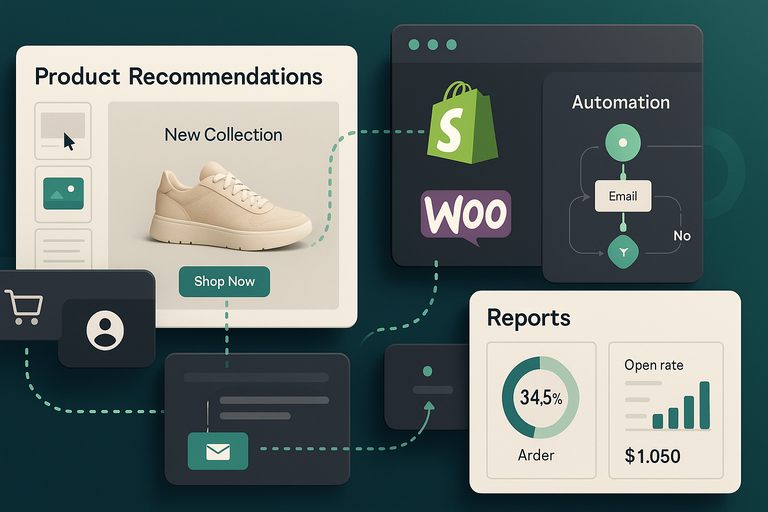
Omnisend’s biggest strength — even in the free version — is its deep, native integration with ecommerce platforms.
If you’re selling through Shopify, WooCommerce, or BigCommerce, the setup process takes minutes and opens doors to powerful automation.
Shopify And WooCommerce Integration Capabilities
Connecting your store to Omnisend is as simple as going to Integrations > Shopify/WooCommerce > Connect. After authorization, your store data starts syncing automatically.
What’s included on the free plan:
- Product and customer sync: All items and buyer details are imported automatically.
- Order tracking: You can send order confirmation and shipping updates.
- Behavior tracking: Omnisend records browsing and cart behavior for automation triggers.
For example, if a Shopify visitor adds a product to their cart but doesn’t complete the checkout, Omnisend automatically logs that event — even on the free tier.
I often suggest users test a welcome series with product recommendations to see how accurately Omnisend pulls store data; it’s impressively smooth even at zero cost.
Syncing Product Data And Customer Information
Omnisend continuously updates your contact and product data in real time. This makes personalization incredibly easy.
You can:
- Insert product recommendations directly into emails (like “You might also like…”).
- Filter customers based on past purchases or spend amount.
- Target VIP buyers with early access promotions.
For example, if you sell handmade candles, you can create a segment for “Customers who purchased lavender scent” and send them an exclusive early look at your new fall line. That kind of micro-targeting builds loyalty fast.
The syncing works automatically; you don’t need to upload CSV files or worry about version mismatches.
How Omnisend Supports Abandoned Cart Emails On Free Plan
Abandoned cart automation is often a paid feature elsewhere — but not in Omnisend free. You can find it under Automation > Pre-Built Workflows > Abandoned Cart.
Once you enable it, Omnisend automatically sends a follow-up email if a visitor adds items to their cart but doesn’t check out. You can customize:
- Timing (e.g., 1 hour or 24 hours after abandonment).
- Content (add a discount code or personalized reminder).
- Subject lines and sender names.
In my experience, even a simple abandoned cart flow recovers around 10–15% of lost sales. It’s a huge benefit to have this feature available without upgrading.
Limitations You Should Know Before Relying On Omnisend Free
Despite all its strengths, Omnisend free does have boundaries that you’ll start to feel once your store scales or your campaigns grow more complex.
Knowing these ahead of time helps you plan smarter.
The Monthly Sending Cap And Contact Limits Explained
On the free plan, Omnisend lets you:
- Store up to 250 contacts.
- Send up to 500 emails per month total.
For perspective, that’s enough for a small store testing automation, but not for consistent weekly campaigns. Once you hit the limit, Omnisend pauses sending until your next billing cycle or upgrade.
I advise using automation strategically — prioritize high-impact flows like welcome and abandoned cart series instead of mass newsletters. This ensures every email counts.
Missing Features Like A/B Testing And Advanced Workflows
The free version doesn’t include A/B testing (split testing) or advanced multi-step workflows. That means you can’t test two subject lines or create complex sequences that branch based on user behavior.
Still, I’d argue that most beginners don’t need those tools immediately. Focus on perfecting your main automations first. When your campaigns start generating consistent traffic and conversions, then you’ll benefit from testing features.
If you’re craving experimentation, you can manually test subject lines by sending two different campaigns to separate segments. It’s not automated, but it’s a decent workaround.
Impact Of Limited Support Options On Free Users
Free plan users don’t get live chat or priority support. Instead, you rely on Omnisend’s Help Center and email-based support, which are actually well-documented and fairly responsive.
If you’re hands-on and comfortable following tutorials, this isn’t a deal-breaker. But for larger teams or busy store owners, real-time chat can save hours when troubleshooting.
My suggestion: Explore the Omnisend Academy videos — they’re simple, free, and cover real campaign setups. They’ve helped me troubleshoot workflows faster than waiting for an email response.
Ease Of Use And Dashboard Experience
Omnisend has built its reputation on simplicity. Even the Omnisend free plan uses the same clean interface as paid tiers, which makes it beginner-friendly from day one.
Let’s look at what it’s like to navigate, create your first campaign, and how steep (or not) the learning curve really is.
Navigating The Omnisend Interface As A Beginner
When you log into Omnisend, you’ll land on the Dashboard. This is your control hub where you can see quick stats like campaign performance, revenue from automations, and list growth.
The left-hand sidebar includes clear menu sections: Campaigns, Automation, Forms, Audience, Reports, and Integrations. Each label is intuitive, so you never feel lost.
If you’re new, I suggest clicking Campaigns > Create Campaign > Email as your first step. The layout gently guides you with prompts like “Add recipients,” “Choose template,” and “Design message.”
What I like is that Omnisend doesn’t overwhelm you with jargon.
Everything from setup to reporting feels logical and beginner-safe. Even if you’ve never used a marketing platform before, you’ll probably get comfortable within an hour.
How Quickly You Can Launch Your First Campaign
Omnisend is designed for speed — and you can have your first campaign live within minutes.
Here’s the typical flow I use:
- Go to Campaigns > Create Campaign.
- Choose Email as the type.
- Pick a pre-built template.
- Customize your design and message.
- Set your audience and schedule.
The drag-and-drop editor works like a visual puzzle: move text boxes, images, and buttons around as you please. If you’ve used Canva or any website builder, it’ll feel instantly familiar.
Most first-time users send their first campaign in under 30 minutes.
That’s because Omnisend removes friction — there’s no coding, and most of the heavy lifting (like email responsiveness and layout design) happens automatically.
I suggest starting with a “Welcome” or “Product Update” email. It’s low pressure and helps you test how Omnisend tracks open and click data right after your first send.
Performance And Learning Curve For New Users
From my experience, Omnisend sits in that sweet spot between simplicity and capability. It’s not as stripped down as Mailchimp’s free version, but not as overwhelming as Klaviyo can be for beginners.
The dashboard loads quickly, even with automations running, and reports generate in real time. On a practical note, I’ve noticed that Omnisend tends to run smoother on Chrome and Edge than on Safari — something worth keeping in mind.
The Help Center and Omnisend Academy videos are surprisingly clear. You can watch a quick 2-minute tutorial on building an abandoned cart flow or creating your first automation.
If I had to describe the learning curve, I’d call it “gentle but layered.” You’ll get the basics fast, but you can keep discovering smarter features as you grow.
Comparing Omnisend Free To Other Free Email Marketing Tools
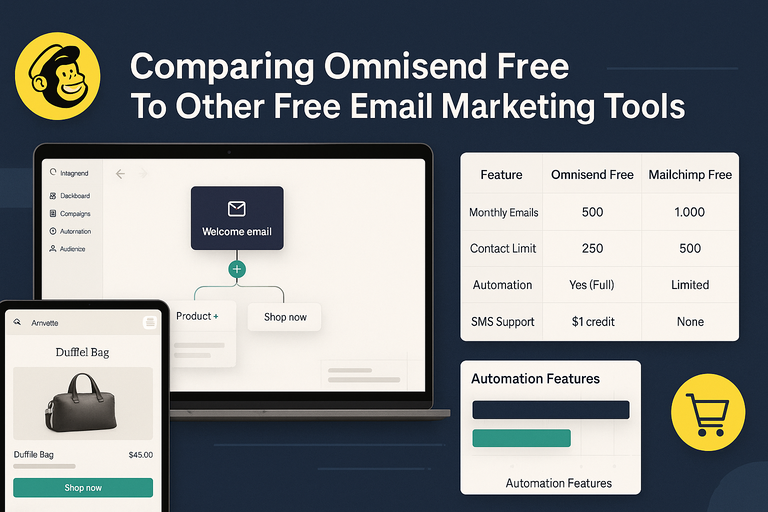
Comparing Omnisend free to its rivals helps you see where it shines — and where it still falls short.
Let’s walk through how it stacks up against Mailchimp and Klaviyo, two of the most common alternatives.
How Omnisend Free Stacks Up Against Mailchimp Free
Mailchimp’s free plan has been around for years, but it’s slowly lost ground in the ecommerce space.
Here’s a quick side-by-side look:
| Feature | Omnisend Free | Mailchimp Free |
| Monthly Emails | 500 | 1,000 |
| Contact Limit | 250 | 500 |
| Automation | Yes (Full) | Limited |
| SMS Support | $1 credit | None |
| Ecommerce Focus | Strong | Moderate |
Mailchimp still gives you more email sends, but its automations are much more limited. You’ll need a paid plan to create multi-step workflows or integrate product data easily.
If your goal is to sell online — not just send newsletters — I’d argue Omnisend gives you a more modern setup.
Mailchimp feels better suited for bloggers, while Omnisend’s free tools feel built for ecommerce sellers.
Comparing Automation Features To Klaviyo Free Tier
Klaviyo’s free plan is also popular with ecommerce stores, but it limits you to 250 contacts and 500 email sends per month — the same as Omnisend free.
Where they differ:
- Klaviyo offers slightly deeper analytics and predictive metrics (like expected churn rate).
- Omnisend includes SMS and push notifications, which Klaviyo doesn’t offer for free.
- Klaviyo’s interface feels more technical — better for data-heavy marketers, but steeper for beginners.
I’ve used both, and Omnisend wins for usability. Klaviyo’s setup can take a few hours to master; Omnisend gets you sending in under 30 minutes.
Unless you need advanced segmentation right away, Omnisend feels more balanced for early-stage businesses.
Why Omnisend May Be Better For Ecommerce Users
Omnisend’s entire structure is built around ecommerce workflows. The templates, triggers, and integrations are all tailored for store owners.
For example:
- Pre-built automations like Abandoned Cart and Product Replenishment are ready to go.
- You can pull product images directly into emails.
- Sales tracking shows real revenue, not just clicks.
Mailchimp and Klaviyo can both do this — but not on their free tiers. Omnisend gives you these tools from the start, which is rare.
If you run a Shopify or WooCommerce store, I’d recommend starting with Omnisend free to test your automations before deciding whether to invest in something more advanced later.
Upgrading From Omnisend Free: When It Makes Sense
Eventually, most users outgrow the Omnisend free plan.
That’s not a flaw — it’s a sign your business is scaling. But the key is knowing when the timing is right to upgrade.
Signs It’s Time To Move To A Paid Omnisend Plan
You’ll know you’ve hit the ceiling when:
- You reach the 250 contact limit.
- You run out of 500 monthly emails.
- You want to test multiple subject lines or visuals.
- Your automations generate consistent revenue, and you want to expand them.
When that happens, the paid plans open up A/B testing, unlimited email sends, and advanced segmentation.
From what I’ve seen, users usually upgrade around the time they hit 500–1,000 subscribers — that’s when automation ROI starts becoming measurable.
Key Features Unlocked After Upgrading
Upgrading unlocks several features that make a big difference:
- A/B testing for campaigns and workflows.
- Advanced workflows with conditional logic.
- Priority support and live chat help.
- Higher send limits and SMS automation.
The jump from free to paid isn’t just about volume — it’s about insight. Paid plans let you measure which subject lines convert best and how automation steps influence sales.
I believe this is where Omnisend really matures. The free version teaches you the system; the paid version helps you scale it profitably.
Cost vs. Value: Evaluating Return On Investment
Omnisend’s paid plans start around $16/month, and prices scale with your contact list. If you’re generating even a few extra sales per month from automations, the plan often pays for itself.
A small example:
Let’s say your abandoned cart flow recovers just two $50 orders monthly. That’s $100 in regained revenue — far more than the cost of upgrading.
I advise users to track sales attribution in Reports > Automation Reports for a few weeks. Once you see consistent returns, that’s your signal the upgrade will be a net gain, not a cost.
Final Verdict: Is Omnisend Free Worth Using Long-Term?
At this point, you’ve probably realized Omnisend free offers more than most free email tools.
But is it worth staying on long-term, or just a stepping stone?
Pros And Cons Summarized Based On Real Use
Pros:
- Easy setup and intuitive dashboard.
- Real ecommerce automation on the free plan.
- Push notifications and limited SMS access included.
- Solid analytics and segmentation tools.
Cons:
- 500-email monthly limit feels tight for active stores.
- No A/B testing or advanced workflow branching.
- Support options limited to self-help and email.
It’s incredibly capable for early growth stages but naturally capped for scale.
Who Should Stick With Free And Who Should Upgrade
If you’re still testing your marketing setup or have a small subscriber list, stick with the free plan. It’s a great way to learn Omnisend without spending anything.
If you’re already generating steady traffic, upgrading unlocks powerful time-saving tools. Once your store’s email flows start driving consistent revenue, the paid plan quickly becomes a no-brainer.
Expert Tip To Maximize The Omnisend Free Experience
Here’s what I personally recommend:
- Set up Welcome Series and Abandoned Cart workflows first — they’re proven to convert best.
- Use push notifications to complement your emails.
- Track automation revenue weekly to gauge ROI.
Omnisend free is best seen as a launchpad. It gives you everything you need to build solid foundations — and when you’re ready, the upgrade feels like a natural next step rather than a forced one.
In short, if you’re serious about ecommerce marketing, Omnisend free is one of the smartest starting points available today.

I’m Juxhin, the voice behind The Justifiable.
I’ve spent 6+ years building blogs, managing affiliate campaigns, and testing the messy world of online business. Here, I cut the fluff and share the strategies that actually move the needle — so you can build income that’s sustainable, not speculative.
Related posts:
 The Ultimate Guide to Using Templates for Email Marketing
 How to Integrate Aweber with ClickFunnels
 Top 5 Email Marketing Platforms: Boost Your ROI Now!
 Constant Contact Pricing: Which Plan Is Right for You?
 How Much Does Omnisend Cost? Honest Pricing Breakdown
 How Do I Create An Email Newsletter And What Should It Include?