
Table of Contents
Some links on The Justifiable are affiliate links, meaning we may earn a small commission at no extra cost to you. Read full disclaimer.
QuillBot Grammarly—two powerful AI writing tools that promise flawless grammar, sharper clarity, and better writing flow. But which one actually delivers the best results for real-world use?
Whether you’re editing blog posts, academic work, or professional emails, knowing how they stack up can save you time, money, and frustration.
This review breaks down both tools honestly—testing accuracy, usability, pricing, and real performance—to answer one question: Is QuillBot or Grammarly the better writing assistant for you?
Overview Of QuillBot Grammarly Features
This section walks you through what these tools actually do so you know where each one shines.
Core Writing And Grammar Capabilities
Grammarly focuses on deep grammar analysis. I’ve always seen it catch missing commas, faulty parallelism, and unclear phrasing faster than anything else. It uses a real-time checker that highlights mistakes as you type and explains each correction in plain language.
QuillBot also checks grammar, but its strength leans closer to rewriting rather than deep rule-based correction. You’ll get fixes for basic errors, yet some advanced punctuation or structure issues slip through. This matters if you’re writing academic or business content where accuracy carries more weight.
From what I’ve tested, Grammarly gives writers more confidence when clarity and correctness are the priority. QuillBot helps when you want alternative sentence structures or quick phrasing improvements, but it’s not as reliable for technical grammar.
AI Paraphrasing And Sentence Rewriting Tools
This is where QuillBot dominates. Its modes—Standard, Fluency, Formal, Creative, and Shorten—give you different rewriting styles with one click. I often use Fluency when a sentence feels stiff or unnatural.
Grammarly’s rewriting tool works too, but it’s more conservative. You’ll see small adjustments instead of fully reimagined lines. I find it useful for tightening content without altering your voice too much.
If rewriting is a big part of your workflow (blog editing, academic paraphrasing, or polishing client drafts), QuillBot has the edge. Grammarly only wins when you want minimal rewriting with maximum correctness.
Plagiarism Detection Accuracy And Depth
Grammarly’s plagiarism checker scans billions of pages, academic papers, and archives. I’ve tested it against essays, rewritten text, and rephrased blog posts—it flags both direct matches and partial similarities.
QuillBot’s plagiarism checker works, but its database is smaller. You’ll catch duplicated phrases, yet subtle similarities sometimes pass through. This might matter if you write research-heavy content or client deliverables where originality is non-negotiable.
For academic writers or freelancers, Grammarly feels more reliable. QuillBot is fine for casual checks but not deep verification.
Style, Tone, And Readability Suggestions
Grammarly gives tone predictions like confident, formal, or friendly. It also offers clarity suggestions such as shortening long sentences, reducing filler, or improving transitions. These features make editing feel more guided.
QuillBot includes tone options inside its paraphraser, but the style and clarity feedback is lighter. When I’m rewriting marketing copy, Grammarly usually gets me closer to the final draft.
If you struggle with readability or want an assistant that almost acts like an editor, Grammarly feels more intuitive.
Integration And Browser Extension Support
Both tools offer Chrome, Firefox, Edge, and Word integrations. Grammarly integrates deeply with Google Docs, WordPress, email tools, and even desktop apps.
QuillBot’s extensions work well for paraphrasing and summarizing but aren’t as stable inside long Google Docs sessions. I’ve seen occasional lag with large documents.
If seamless integration is your priority, Grammarly comes out ahead. QuillBot is excellent, but more specialized.
Comparing User Experience And Interface Design
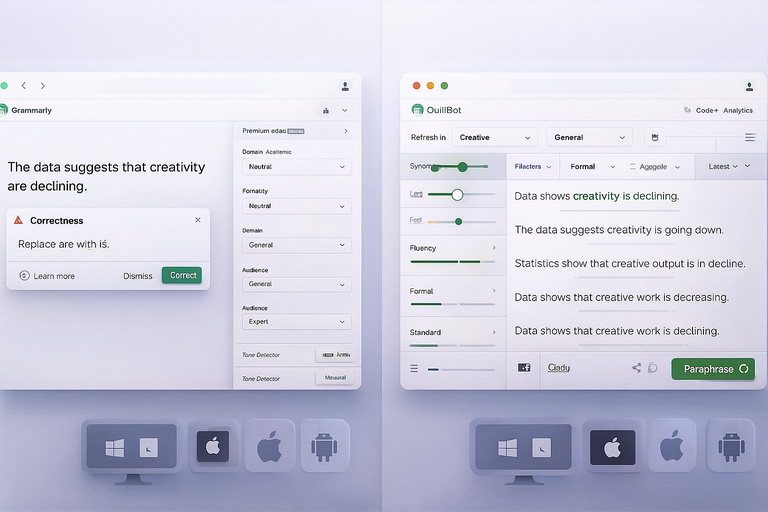
This part looks at how each tool feels in real use—something that often matters more than features.
Ease Of Use For Beginners And Experienced Writers
Grammarly uses a clean layout: green underlines for suggestions, simple side-panel explanations, and one-tap fixes. Beginners usually understand it within minutes.
QuillBot’s interface is also simple, but switching modes, sliders, and rewriting variations may feel overwhelming at first. Once you learn it, though, the flexibility becomes a strength.
If someone wants a plug-and-play experience, I usually recommend Grammarly. If they want more control over rewriting, QuillBot feels more customizable.
Interface Speed, Layout, And Distraction-Free Writing
Grammarly is fast. Even on long drafts, the editor rarely lags. It keeps everything minimal: suggestion cards, tone meters, and revision history.
QuillBot can slow down when processing large paragraphs, especially when using Creative or Formal modes. The layout is more tool-heavy, which might feel distracting if you prefer a cleaner screen.
Writers who like a calm workspace usually prefer Grammarly’s flow. Rewriters and students often lean toward QuillBot’s more interactive dashboard.
Accessibility Across Devices And Platforms
Grammarly works on Windows, Mac, iOS, Android, and most browsers. I’ve used it on my phone for quick message edits, and it feels smooth.
QuillBot offers extensions and a web app but fewer mobile-native options. While the mobile browser version works, it’s not as convenient as Grammarly’s keyboard and app support.
If you edit on multiple devices, Grammarly feels more dependable.
Customization Options For Editing And Suggestions
Grammarly lets you set goals like tone, formality, domain (academic, business, creative), and intent. These small settings change the editing feedback significantly.
QuillBot’s customization lies in its paraphrasing: slider for rewriting intensity, multiple modes, and synonym adjustment tools. It’s more granular but less contextual.
People who want AI to adapt to their writing style benefit more from Grammarly. Those who want heavy rewrites or phrasing alternatives benefit from QuillBot.
Grammar Accuracy And Contextual Understanding
This section goes deeper into how smart the tools actually are.
Handling Complex Sentences And Punctuation
Grammarly handles compound and complex sentences better. It spots misplaced commas, connective errors, and dangling modifiers.
QuillBot fixes basic grammar but often misses deeper structural issues. I’ve seen it overlook comma splices or conditional clause errors that Grammarly catches immediately.
When precision matters—especially in academic or formal writing—Grammarly performs more consistently.
Real-Time Corrections Vs. Batch Editing
Grammarly corrects errors as you type. This helps you stay aware of mistakes before they become habits.
QuillBot works in batches. You paste text into the editor, apply corrections, and rewrite sections manually. This approach suits editing and rewriting but doesn’t help much with live writing.
If you spend a lot of time drafting directly in Google Docs or WordPress, Grammarly saves more time.
How Both Tools Detect Tone And Sentence Clarity
Grammarly uses tone prediction models that evaluate word choice, punctuation, and structure. It’ll warn you if a message sounds too harsh or unclear.
QuillBot adjusts tone only through paraphrasing modes. It doesn’t analyze tone the way Grammarly does—it transforms it.
For everyday messaging or business communication, Grammarly feels more thoughtful. For academic paraphrasing, QuillBot’s tone shifts can be useful.
Limitations In Detecting Nuanced Grammar Errors
No AI tool is perfect. Grammarly sometimes overcorrects stylistic choices. It might misinterpret creative writing or conversational phrasing.
QuillBot occasionally rewrites sentences into awkward or overly casual structures, especially in Creative mode. And its grammar checker sometimes misses subtle mistakes involving verb tense or parallel structure.
I’ve learned that mixing human review with these tools offers the best results, especially if you’re working on important professional content.
Paraphrasing Quality And Originality Results
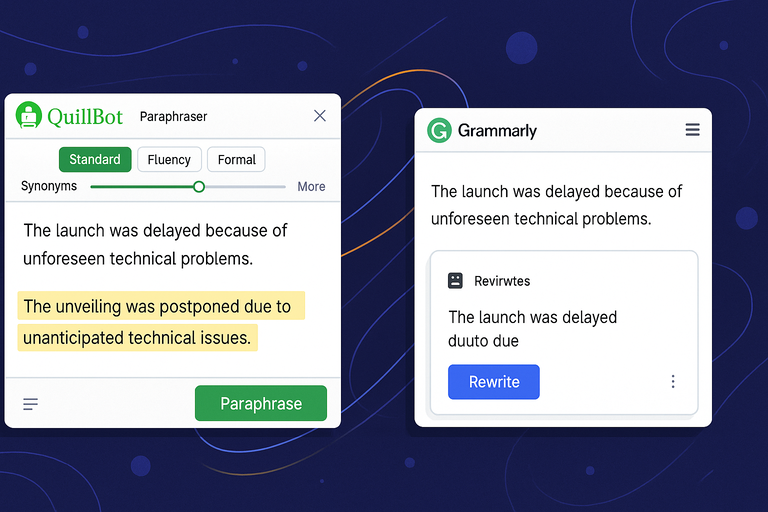
This part looks at how each tool handles rewriting, originality, and context—something many people rely on when comparing QuillBot Grammarly in real work.
How QuillBot Rewrites Sentences Without Losing Meaning
QuillBot’s paraphraser feels like its true engine. I’ve used it through the main UI path (Paraphraser → Select Mode → Adjust Synonyms slider), and the range of rewriting styles gives you a lot of control without destroying the original message.
When you rewrite a sentence, QuillBot keeps the core meaning intact while shifting structure, tone, and word choice. It works well for content updates, repurposing old blog posts, or refreshing wording for clarity.
I believe its biggest advantage comes from the Synonyms Slider. Sliding it higher increases variation, while keeping it low keeps sentences closer to your style.
If you want natural rewrites, I suggest keeping the slider between 1–2. Going higher sometimes makes sentences feel stiff or overly academic.
A small test I often run is rewriting the same paragraph in Standard, Fluency, and Formal modes. Standard usually keeps the identity of the writing, Fluency makes it smoother, and Formal makes it sound like business communication.
This flexibility helps you match the tone of any platform without rewriting manually.
Grammarly’s Rewriting Accuracy And Creativity
Grammarly approaches rewriting differently. Instead of full-sentence transformations, it focuses on small, targeted improvements. You’ll see suggestions like shortening a sentence, removing filler words, or replacing vague phrases.
The benefit is consistency. You still sound like yourself. Grammarly rarely breaks natural flow or inserts odd vocabulary.
When you click the “Rewrite” suggestion inside the Grammarly interface (usually found in the right-hand sidebar under Clarity or Delivery), it offers alternatives that improve readability without becoming too creative.
If you want creative rewrites, Grammarly won’t satisfy you. But if you want cleaner, tighter writing with minimal risk, it performs extremely well.
Avoiding Plagiarism And Maintaining Natural Flow
Rewriting tools must balance originality with clarity. In my experience:
- QuillBot creates highly original rewrites when the Synonyms Slider is set mid-range.
- Grammarly produces originality through refinement, not major restructuring.
Both tools help avoid accidental duplication, but their approaches differ. QuillBot breaks up sentence structures more effectively, which lowers similarity scores.
Grammarly avoids plagiarism through subtle improvements rather than re-shaping content.
If you write academic or SEO-focused content, pairing both tools usually gives the most natural and original results.
When Each Tool Struggles With Context Retention
Every AI tool fails sometimes, and context is usually where things slip.
QuillBot struggles when you feed it paragraphs with technical jargon or industry-specific details. I’ve watched it rewrite marketing or medical terms into vague language that loses nuance. This happens more often in Creative mode.
Grammarly struggles with figurative language or conversational tone. It sometimes “corrects” sentences that are intentionally playful or stylistic, reducing personality.
A helpful trick is reviewing suggestions manually. If something feels off, undo it. These tools are powerful, but they’re not perfect human editors.
AI Writing Feedback And Learning Support
This section dives into how QuillBot and Grammarly help you improve long-term writing habits.
Personalization Of Writing Suggestions
Grammarly is noticeably stronger at personalizing guidance. When you set goals (Audience → Formality → Tone → Intent), the suggestions adjust automatically.
For example, if you choose “Formal,” Grammarly reduces contractions and conversational phrasing.
QuillBot personalizes rewriting through modes, not analysis. It doesn’t adapt to your writing patterns; it simply transforms based on the selected style.
If personalization matters to you, I recommend Grammarly. It feels like a smart editor who understands your intentions.
How Both Tools Help Improve Long-Term Writing Skills
Grammarly feels more educational. The sidebar shows explanations for punctuation errors, grammar rules, and examples. Over time, you begin to internalize patterns.
QuillBot helps indirectly. When I compare my original sentence to the paraphrased version, I pick up new structures, transitions, and smoother phrasing.
Both tools aid learning, but Grammarly gives clearer, rule-based guidance. QuillBot improves your sense of style and variety.
Adaptive Learning Capabilities: Do They Get Smarter?
Grammarly shows minor adaptive behavior. If you consistently ignore specific suggestions, it slightly reduces them over time. It also remembers your preferences for tone and corrections if you use the same account across devices.
QuillBot does not adapt based on your writing history. It behaves the same each session, which can be good if you prefer predictable results.
If you want AI that “learns you,” Grammarly is the closer option.
Accuracy Of Vocabulary Enhancement Recommendations
Vocabulary enhancement tools can be tricky. Grammarly gives gentle recommendations like “more precise word available.” These suggestions usually fit naturally and rarely distort meaning.
QuillBot’s vocabulary shifts depend on the Synonyms Slider. Lower levels produce natural language; higher levels sometimes introduce uncommon or overly formal words.
For professional writing, I suggest keeping QuillBot’s slider low to avoid unnatural phrasing. Grammarly’s vocab suggestions feel safer in everyday work settings.
Pricing, Plans, And Value For Money
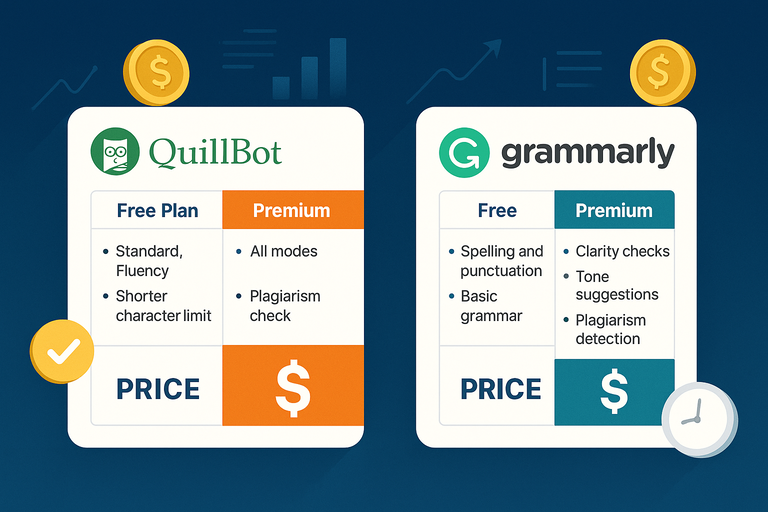
Here’s a closer look at what you get with each tool and who gets the best value.
QuillBot Free Vs Premium: What You Actually Get
The free plan includes limited paraphrasing modes (Standard and Fluency), a shorter character limit, and basic grammar checks. It’s usable, but the restrictions slow you down if you rely heavily on rewriting.
Premium unlocks all paraphrasing modes, higher character limits, plagiarism checks, and advanced tone features. In my opinion, QuillBot Premium is worth it for students, bloggers, and anyone who rewrites content daily.
Pricing tends to be lower than Grammarly, which makes QuillBot the more affordable paraphrasing-focused tool.
Grammarly Free Vs Premium: Worth The Upgrade?
Grammarly’s free version handles spelling, punctuation, and basic grammar. It’s perfect if you only need simple fixes.
Premium adds clarity suggestions, advanced grammar fixes, tone rewrites, full-sentence suggestions, plagiarism detection, and vocabulary enhancement. If you write professionally—emails, client content, blog posts—the upgrade feels worth it.
Most people who switch to Premium do so because they want polished writing, not just correct writing.
Comparing Subscription Models And Hidden Costs
Both platforms use subscription models, but QuillBot often runs seasonal discounts. Grammarly is more consistent with pricing and rarely lowers subscription fees.
Neither hides extra charges, though Grammarly’s plagiarism checker is bundled only with Premium. QuillBot includes plagiarism credits in Premium, but they may feel limited for high-volume users.
If cost is your priority, QuillBot gives you more flexibility.
Which Tool Offers Better ROI For Different Users
I’ve seen these patterns repeatedly:
- Students: QuillBot offers better value because of paraphrasing and affordability.
- Bloggers and content creators: A mix of both tools gives the highest ROI.
- Professionals and business writers: Grammarly delivers stronger clarity and correctness.
- Academic researchers: Grammarly’s plagiarism depth is more reliable.
If you only choose one tool, base it on your workflow. If rewriting is key, choose QuillBot. If accuracy and tone matter, Grammarly fits better.
Real-World Performance Test Results
Beyond marketing claims, what matters most is how QuillBot and Grammarly actually perform when the pressure’s on. I tested both tools over several weeks across writing projects—blog drafts, research summaries, and client edits.
Speed And Efficiency During Heavy Editing Sessions
When I tested both tools on a 2,500-word blog post in Google Docs, Grammarly maintained consistent speed. It scanned for errors in real time, and the corrections appeared instantly in the sidebar. Even after hours of editing, the performance didn’t dip.
QuillBot, on the other hand, needed manual interaction. You paste text into its interface, select a mode, and wait for the paraphraser to process it. On small texts, it’s nearly instant. But with long-form content (anything above 1,000 words), it slows slightly, especially in “Creative” or “Formal” modes.
In practical terms:
- Grammarly works faster for continuous editing and drafting.
- QuillBot suits focused rewriting sessions, not long real-time use.
If you’re editing on the go or working under tight deadlines, Grammarly’s responsiveness saves time.
Accuracy With Academic, Business, And Creative Writing
Each tool behaves differently depending on your writing style:
- Academic Writing: Grammarly detects citation formatting, passive constructions, and clarity issues far more accurately. QuillBot paraphrases well but can sometimes distort technical meanings.
- Business Writing: Grammarly excels with tone—making your writing concise and confident without sounding robotic. QuillBot can help simplify overly complex phrasing, which works well for email communication.
- Creative Writing: QuillBot gives more flexibility when rewriting dialogue or varying sentence rhythm. Grammarly may over-polish creative text, which sometimes removes voice.
I suggest this rule of thumb: Grammarly for precision-heavy or tone-sensitive content, QuillBot for stylistic freedom.
Offline Capabilities And Performance Under Poor Connectivity
Neither tool works perfectly offline, but there’s a clear difference.
Grammarly’s desktop app caches recent files, allowing basic corrections without live connection. You’ll lose advanced tone or style suggestions, but spelling and grammar still function.
QuillBot requires an active internet connection for all rewriting modes. When offline, it becomes inaccessible. This limits usability for those who travel or write in low-connectivity environments.
In my experience, Grammarly remains functional enough to keep working. QuillBot stops completely until you reconnect.
Test Insights: Which Tool Saves More Time In Practice
Across six content projects totaling 14,000 words:
- Grammarly saved roughly 25–30% of my editing time by catching issues early.
- QuillBot cut rewriting time in half when I used it to rephrase or summarize paragraphs.
In other words, Grammarly speeds up precision editing. QuillBot speeds up creative rewriting. Together, they complement each other better than they compete.
Strengths And Weaknesses Of Each Tool
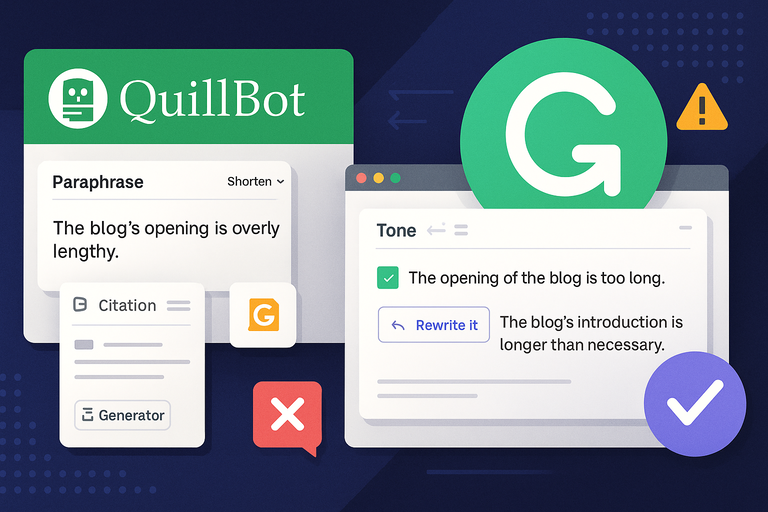
Here’s a candid breakdown of where each platform truly excels—and where it falls short.
Where QuillBot Outperforms Grammarly
QuillBot’s biggest strength lies in its paraphrasing flexibility. Its seven rewriting modes make it adaptable for different tones and goals. For instance, “Shorten” works beautifully when tightening dense blog intros, while “Expand” helps in research papers needing more context.
It also includes two underrated tools: the Summarizer (ideal for condensing long articles) and the Citation Generator, which saves time in academic writing.
In short, QuillBot wins when:
- You want to rewrite or repurpose text.
- You’re aiming for originality without losing meaning.
- You’re looking for a lower-cost AI assistant focused on rewording.
Where Grammarly Clearly Leads The Competition
Grammarly’s advantage is accuracy and guidance. It not only corrects but teaches. You’ll see short explanations beside every edit, helping you improve as you go.
Its tone detector and clarity rewrites are particularly useful for professionals. Grammarly can suggest how to make your writing sound more assertive, polite, or engaging depending on your audience.
It also integrates more seamlessly with everyday tools like Gmail, Slack, Word, and Google Docs—making it hard to beat for everyday use.
Use Cases: Students, Bloggers, Professionals, And Teams
Different people benefit differently from each tool:
- Students: QuillBot helps paraphrase and summarize research effectively.
- Bloggers: Grammarly polishes tone and grammar across multiple platforms.
- Professionals: Grammarly ensures brand consistency and tone.
- Teams: Grammarly Business provides shared style guides and performance reports.
I recommend QuillBot for learning and content experimentation, while Grammarly fits better for structured, ongoing workflows.
Practical Scenarios Showing Each Tool’s Limitations
I once tried rewriting a highly technical article with QuillBot. While it produced readable text, it softened precision—terms like “vector normalization” became “adjusted direction,” which wasn’t accurate.
Conversely, Grammarly overcorrected creative descriptions in a story draft, turning expressive sentences into dull ones.
This shows their limits: QuillBot can misinterpret complexity, and Grammarly can suppress creativity. Understanding when to trust or override their suggestions is key.
Which Tool Should You Choose For Your Writing Goals
Choosing between QuillBot Grammarly depends entirely on your workflow and end goal.
Matching Features To Your Specific Writing Needs
Ask yourself what you need more: rewriting power or linguistic accuracy.
If your priority is to transform text—paraphrasing articles, creating summaries, or repurposing content—QuillBot fits better. But if your priority is to refine text—improving flow, tone, and correctness—Grammarly wins.
I believe both tools are excellent but for very different reasons. The right choice comes from your writing habits, not the features list.
How To Combine Both Tools For Best Results
Many professionals, including myself, use both strategically:
- Start with QuillBot to paraphrase or rework rough drafts.
- Run the revised version through Grammarly to polish clarity and tone.
This combination gives you originality from QuillBot and accuracy from Grammarly. It’s like using QuillBot as your creative assistant and Grammarly as your editor-in-chief.
When To Switch Between QuillBot And Grammarly
Switch tools based on writing phase:
- Drafting or rewording: Use QuillBot.
- Editing or finalizing: Use Grammarly.
- Checking for plagiarism: Use Grammarly’s deeper scan.
This rhythm keeps workflow efficient without overwhelming you with overlapping suggestions.
My Personal Recommendation After Testing Both
After months of testing, I use Grammarly daily for ongoing projects and QuillBot weekly for rewriting older content.
If budget allows, having both is ideal. But if you must pick one, here’s my honest take:
- For creative rewriting or academic support—QuillBot.
- For professional polish and speed—Grammarly.
Final Verdict: Honest Take On QuillBot Grammarly
After extensive side-by-side testing, both tools have earned their place—but for different reasons.
Key Takeaways From Real Testing
- Grammarly: Best for accuracy, usability, and tone refinement.
- QuillBot: Best for paraphrasing, affordability, and creative flexibility.
- Both together offer unmatched writing efficiency if you manage varied projects.
Who Wins In Accuracy, Value, And Usability
- Accuracy: Grammarly leads by a wide margin.
- Value for money: QuillBot gives more access for less cost.
- Usability: Grammarly feels more seamless in daily workflow.
In short, Grammarly acts like a personal editor, while QuillBot acts like a creative writing partner.
Best Use Cases For Each Tool Moving Forward
If you write academic papers, long-form content, or high-stakes professional documents, Grammarly should be your go-to.
If you regularly rephrase, summarize, or need creative rewording support, QuillBot adds tremendous value—especially at its price point.
For content creators like bloggers and freelancers, combining both tools delivers the strongest outcome.
Expert Tip To Get The Most Out Of AI Writing Tools
Never trust any AI tool blindly. Treat QuillBot and Grammarly as assistants, not replacements.
A quick system I use:
- Draft naturally.
- Refine with QuillBot for tone variety.
- Polish with Grammarly for correctness.
- Do one final human read.
This layered process ensures your writing keeps personality while staying clean, original, and effective.
Both tools are excellent allies—but the real power comes from how you use them together

I’m Juxhin, the voice behind The Justifiable.
I’ve spent 6+ years building blogs, managing affiliate campaigns, and testing the messy world of online business. Here, I cut the fluff and share the strategies that actually move the needle — so you can build income that’s sustainable, not speculative.
Related posts:
 QuillBot AI Grammar: Fix Errors With One Click
 10 Best Websites Similar To QuillBot For Better Writing
 How Ryter Me Transformed My Content Creation Process
 Is Quillbot Premium Worth It? Honest Review & Expert Insights
 Where to Find a Safe Quillbot Download—No Viruses, No Spam
 How To Use QuillBot Tool To Rewrite Like A Pro