
Table of Contents
Some links on The Justifiable are affiliate links, meaning we may earn a small commission at no extra cost to you. Read full disclaimer.
SurveyMonkey pros and cons for freelancers become a lot more interesting once you stop looking at the tool like a big-company research platform and start judging it like a solo business expense.
If you are a freelancer sending client feedback forms, project intake questionnaires, testimonial requests, or light market research surveys, SurveyMonkey can feel polished and fast.
But it can also feel expensive the minute you need better branding, higher response limits, or advanced logic.
In my experience, whether it is worth paying for depends less on features alone and more on how often your surveys directly support revenue.
What SurveyMonkey Actually Is For Freelancers
SurveyMonkey is not just a “make a form” app.
For freelancers, it sits somewhere between a simple form builder and a lightweight research platform, which is why the value can feel either excellent or wildly overpriced depending on your workflow.
What You Can Realistically Use It For As A Solo Business
If you freelance in marketing, design, coaching, consulting, UX, or content, SurveyMonkey can handle more than a basic contact form.
You can use it for onboarding questionnaires, post-project feedback, customer satisfaction checks, event registrations, lead qualification, pricing research, and brand perception surveys.
SurveyMonkey also supports quizzes, forms, templates, payments, file uploads, and logic-based question flows, which makes it more flexible than people often assume at first glance.
That matters because freelancers rarely need one massive survey program. We usually need a tool that can switch roles quickly. One week you might be collecting a client brief. The next week you might be asking former customers why they did or did not renew.
A tool that handles both can reduce stack sprawl and keep your process cleaner. SurveyMonkey’s paid plans also allow unlimited surveys and unlimited questions, so you are not boxed into one tiny use case once you upgrade.
I believe this is where SurveyMonkey is strongest for freelancers: not as a glamorous “all-in-one business OS,” but as a dependable feedback engine. That is especially true if your work depends on decisions you can improve with structured responses instead of random email replies.
Why Freelancers Even Consider It Instead Of Simpler Form Tools
Most freelancers do not start with SurveyMonkey because they want enterprise research. They start because they want cleaner data.
SurveyMonkey offers logic features such as skip logic, answer randomization, piping, carry-forward responses, dashboards, exports, tagging, and multi-survey analysis on higher plans.
Those are not just fancy extras. They help you ask smarter questions and reduce messy responses that are hard to act on later.
Imagine you are a conversion copywriter qualifying leads. A simple form tool can collect names and project details. SurveyMonkey can go further by routing e-commerce prospects, SaaS founders, and local service businesses into different question paths.
That means less irrelevant data, fewer back-and-forth emails, and a better chance of spotting which client types are most profitable.
There is also a trust factor. SurveyMonkey has been around long enough that many respondents recognize it instantly, and the company says its platform is used by more than 260,000 organizations worldwide. That does not automatically make it the best tool, but it does signal maturity, stability, and a product that has gone beyond hobby-level usage.
The Biggest Pros Of SurveyMonkey For Freelancers
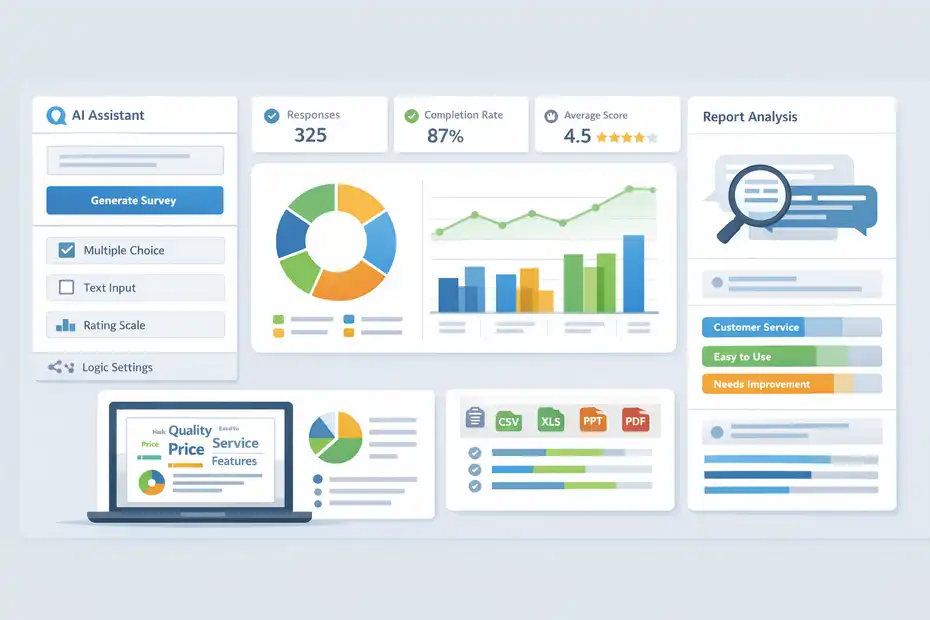
The upside of SurveyMonkey is not that it does everything.
The upside is that it does several important things very efficiently, especially if your freelance business relies on repeatable data collection.
Pro 1: It Is Fast To Launch Professional Surveys
One of the clearest advantages is speed. SurveyMonkey now leans heavily into AI-assisted survey creation, and its official product pages say you can generate a survey from a prompt, import drafts, get help selecting question types, and receive survey tips that help identify possible bias or structural issues before launch.
Build with AI is available on Basic and Individual plans in supported regions.
For a freelancer, that speed is not a small perk. It can easily save one to two hours per survey when you are creating repetitive assets like client intake forms, testimonial requests, workshop feedback surveys, or pre-call qualification questionnaires. That time saving compounds if you work with multiple clients or run recurring surveys every month.
I also like that SurveyMonkey gives you a more “finished” feeling out of the box than many stripped-down form builders. Templates, question types, and analytics are built around getting usable responses quickly. You are not forced to engineer every workflow from scratch.
For a solo operator, that can be the difference between actually launching a survey today and endlessly tweaking one this week. SurveyMonkey also advertises 500+ expert templates, which reinforces that speed-first advantage.
Pro 2: The Survey Logic Is Useful Before You Ever Need Enterprise Features
A lot of freelancers underbuy survey tools, then run into problems the second they want smarter segmentation. SurveyMonkey’s logic options include skip logic, question and answer piping, randomization, carry-forward responses, and custom variables.
In simple terms, that means you can change what a person sees based on how they answered earlier questions.
That matters in real life. Imagine you are a freelance web designer using one intake survey for three services: landing pages, Shopify stores, and full custom sites.
With logic, you can keep one master form and show each lead only the relevant questions. That cuts form fatigue, improves completion rate, and gives you more useful project details.
This is one area where SurveyMonkey feels more like a research tool than a basic form tool. It is not just collecting information; it is shaping the respondent experience so the data becomes cleaner.
In my experience, that is one of the most underrated benefits for freelancers who want better-fit leads and less admin work.
Pro 3: Reporting, Exports, And Analysis Are Strong Enough For Client Work
SurveyMonkey becomes more valuable when you need to present findings, not just gather answers. The platform supports dashboards, real-time data, filtering and comparisons, shared result links, exports to CSV, XLS, PPT, and PDF, custom columns, word clouds, and response tagging.
Higher tiers also include AI analysis features such as thematic analysis and chat-based summaries.
That is a real advantage if you are a freelancer who packages insights as part of your service. A consultant can run a customer feedback survey and quickly turn results into slides. A UX freelancer can tag qualitative feedback themes.
A marketing strategist can compare how different audience groups responded. Those are billable outcomes, not just nice dashboard features.
Here is the practical shortcut I would use: do not buy SurveyMonkey merely to collect responses. Buy it when you need to convert responses into deliverables.
Once your survey results are feeding proposals, reports, audits, strategy decks, or retention recommendations, the value equation changes in SurveyMonkey’s favor.
The Biggest Cons Of SurveyMonkey For Freelancers
This is the part many reviews soften too much.
SurveyMonkey has genuine strengths, but freelancers can feel the pain faster than larger teams because every subscription line item is personal.
Con 1: Pricing Can Feel Awkwardly High For Solo Operators
The current individual pricing is where the “overpriced?” question starts to feel fair.
SurveyMonkey’s official pricing page lists Basic at $0, Standard Monthly at $99 per month, Advantage Annual at $39 per month billed annually ($468 per year), and Premier Annual at $139 per month billed annually ($1,668 per year).
Team plans start at three users, so they are usually outside the realistic range for most solo freelancers.
For a freelancer, that pricing structure can feel strange. The monthly individual plan is expensive, while the more sensible annual option requires commitment. In plain English, SurveyMonkey pushes you toward an annual relationship before you may be fully sure the tool earns its place in your business.
I think that is the platform’s biggest weakness for freelancers. If you only run occasional client surveys, seasonal feedback campaigns, or one-off research projects, $468 a year may still feel heavy.
And $99 for a single month is hard to love unless you know you are about to use it aggressively during that billing period.
Con 2: Response Limits And Overage Fees Need More Attention Than Most Freelancers Expect
SurveyMonkey’s paid plans are not simply “pay once and forget it.” Official plan details show response limits by tier, and the help documentation explains that if you exceed your response limit, extra responses can trigger an additional charge of up to $0.15 per response. Unused responses also do not roll over.
That matters more than it sounds. A freelancer running low-volume client work may never notice. But a creator, coach, or consultant with an engaged email list can hit a response ceiling faster than expected if they run multiple surveys in a cycle.
And since deleted responses still count toward overages, sloppy testing or duplicate submissions can get more expensive than you planned.
Here is the hidden problem: Response-based pricing punishes success. If your survey performs well, your cost can rise. For freelancers with tight margins, that is uncomfortable. I would not call that unethical or unusual in SaaS, but I would absolutely call it something you should model before you buy.
Con 3: Branding And Premium Feel Improve Only After You Pay
The free plan is useful for testing, but it is intentionally limited. SurveyMonkey says Basic users can create unlimited surveys but can view only 25 responses per survey and add up to 10 questions per survey. Paid plans unlock unlimited questions, more response capacity, branding options, exports, and deeper analysis.
This is where some freelancers get frustrated. The platform’s polished reputation mostly lives behind the paywall.
Features that make a survey feel more client-ready, like removing SurveyMonkey branding, adding your logo, using premium themes, customizing end pages, exporting reports, and applying more advanced logic, are part of the value story that often requires upgrading.
So yes, SurveyMonkey can look professional. But the version that feels truly professional is not the version most freelancers test first. If you evaluate it only on the free plan, you may underestimate its strengths. If you upgrade too quickly, you may overpay for polish you do not fully need. That tension is the core of the freelancer dilemma.
Which Freelancers Benefit Most From SurveyMonkey
SurveyMonkey is not equally good for every freelance model. Whether it feels smart or overpriced usually depends on how closely your income is tied to structured feedback, segmentation, and reporting.
Best Fit: Consultants, Researchers, Strategists, And Service Providers Selling Insight
SurveyMonkey makes the most sense for freelancers who are paid to interpret responses, not just collect them. That includes brand strategists, UX researchers, market research contractors, business consultants, coaches, workshop facilitators, and client service providers who run feedback loops regularly.
The platform’s strength in templates, logic, analysis, exports, and dashboards lines up well with those use cases.
For these freelancers, the subscription can be attached to billable value. A consultant might use it to run onboarding diagnostics, quarterly client satisfaction surveys, and pricing perception studies.
A UX freelancer might turn survey findings into usability recommendations. A workshop host might collect registration data, post-event feedback, and follow-up sentiment in one tool.
When the survey output becomes part of your deliverable, SurveyMonkey starts looking less like a software cost and more like production infrastructure.
I recommend judging it that way. Ask yourself whether the platform helps you sell, diagnose, present, or retain business more effectively. If yes, the price can become much easier to justify.
Weak Fit: Freelancers Who Only Need Basic Intake Or Contact Forms
If your main need is a straightforward contact form, file request, booking questionnaire, or short lead form, SurveyMonkey is usually more tool than you need. It can do those things, but that does not mean it is the smartest spend.
A freelance photographer who only wants a wedding inquiry form probably will not use SurveyMonkey’s reporting depth. A solo copywriter who just needs a project brief form may not benefit enough from thematic analysis, logic branching, or benchmarking.
Even a coach collecting a few discovery-call applications per month might find that the free plan’s limitations push them toward a paid tier they still do not fully use.
This is where I think a lot of “SurveyMonkey is overpriced” complaints come from. The complaint is often not wrong. It is just mismatched. People buy a research-grade survey platform for a form-builder problem. If that is your situation, the issue is not necessarily the software.
It is that your workflow does not need the horsepower you are paying for.
How To Decide If The Price Is Worth It
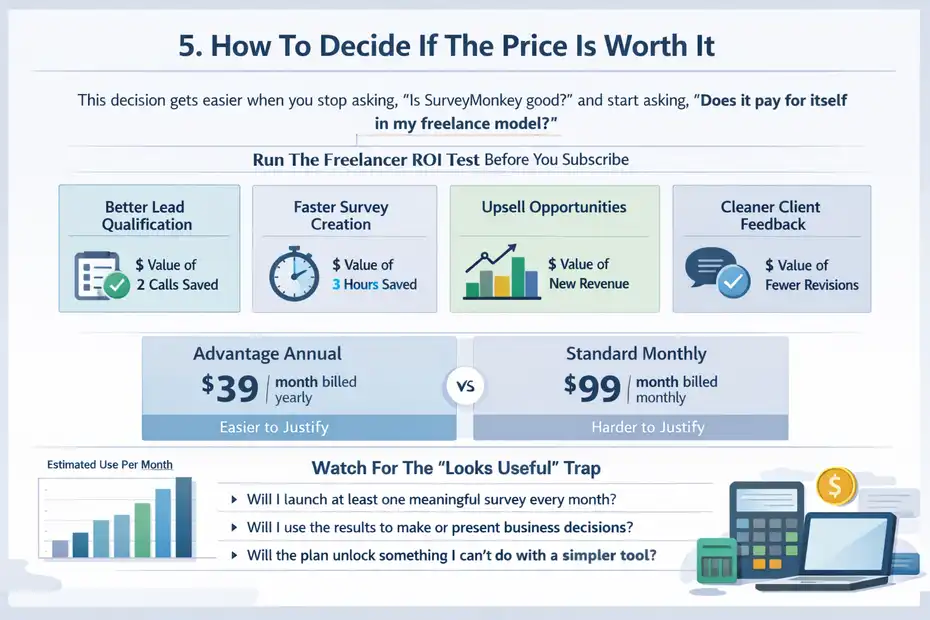
This decision gets easier when you stop asking, “Is SurveyMonkey good?” and start asking, “Does it pay for itself in my freelance model?”
Run The Freelancer ROI Test Before You Subscribe
Here is the simplest way I would evaluate it. Estimate how many times per month you will use the tool in a way that affects revenue, delivery speed, or client retention. Then assign value.
A quick framework:
- Use case 1: Better lead qualification that saves two unpaid calls per month.
- Use case 2: Faster survey creation that saves three admin hours per month.
- Use case 3: Better reporting that helps you upsell audits, workshops, or strategy packages.
- Use case 4: Cleaner client feedback that reduces revision loops.
Now compare that value to the plan cost. Advantage Annual at $39 per month billed yearly is far easier to defend if it saves even one hour of admin time each week or helps close one additional client across a quarter.
Standard Monthly at $99 is much harder to defend unless you are running a short, intense project that genuinely needs the platform immediately.
In my experience, freelancers should not buy SurveyMonkey hoping they will eventually find uses for it. They should buy it because they already have repeated, revenue-adjacent survey workflows waiting for a better system.
Watch For The “Looks Useful” Trap
SurveyMonkey is a classic example of a platform that can feel obviously valuable during a demo. The interface is polished. The templates are credible. The AI features sound efficient. The exports and dashboards make you picture cleaner deliverables.
All of that is real. But real features still can be bad purchases if your workflow is too light.
I suggest asking three blunt questions before buying:
- Will I launch at least one meaningful survey every month?
- Will I use the results to make or present business decisions?
- Will the plan unlock something I cannot do comfortably with a simpler tool?
If the answer is “no” to two or three of those, SurveyMonkey probably feels overpriced for your situation. If the answer is “yes” to all three, it may actually be a smart buy that prevents a lot of manual work and messy data handling.
Features That Matter Most Before You Upgrade
Not every premium feature matters equally. For freelancers, a few features do most of the heavy lifting, while others sound impressive but rarely change outcomes.
The High-Impact Features Freelancers Should Prioritize
The features I would prioritize first are logic, exports, branding, dashboards, and response tagging. Logic reduces wasted questions. Exports let you actually work with the data. Branding helps the survey feel client-ready.
Dashboards make results easier to present. Tagging helps turn open-text responses into patterns. SurveyMonkey’s official feature pages support all of those capabilities across its paid stack, with additional advanced analysis and AI options on higher plans.
A smart freelancer setup might look like this: one onboarding survey with logic, one project feedback survey with a branded end page, one testimonial request survey, and one quarterly insights survey for retained clients. You do not need every premium capability to get strong value. You need the handful that remove friction from your most repeated workflows.
This is where I recommend being selective instead of aspirational. Buy for the few features you will use weekly, not the twenty you might use twice a year.
The Fancy Features That Are Nice But Often Nonessential
SurveyMonkey also includes more advanced capabilities like A/B testing, image click maps, benchmarking, accepting payments, file upload, and white-label surveys through research.net. These are legitimate features, and for some freelancers they are excellent. But for many solo businesses, they are not the reason to upgrade first.
For example, a course creator testing registration page messaging might love A/B testing. A product consultant might use image click maps. A freelancer charging for workshop tickets could use payment collection through Stripe or PayPal. Those are strong use cases. But most solo operators should treat them as secondary value, not primary justification.
I say that because shiny features can inflate your sense of need. The goal is not to own the most capable survey tool. The goal is to solve your actual data-collection problem without dragging unnecessary software cost behind you.
Common Mistakes Freelancers Make With SurveyMonkey
A good tool can still produce bad results if you use it casually. SurveyMonkey’s flexibility is helpful, but it also makes it easy to overcomplicate simple workflows.
Mistake 1: Building Research-Style Surveys For Small Client Decisions
Freelancers often create surveys that are too long, too academic, or too broad for the decision they are actually trying to make. That leads to lower completion rates and muddy insights.
SurveyMonkey’s logic and templates help, but they do not automatically fix poor survey design. Its own AI survey tools even emphasize bias checks and structure guidance, which is basically a quiet admission that bad survey design is common.
Here is the better approach. Start with one decision. Do not ask ten questions when three will do. If you are gathering post-project feedback, focus on clarity, satisfaction, perceived value, and next-step intent. If you are qualifying leads, focus on business type, budget range, goals, and urgency. Keep every question tied to a decision you will actually make.
In my experience, freelancers get better results from shorter, more purposeful surveys than from “comprehensive” ones. SurveyMonkey is powerful, but the win usually comes from sharper thinking, not longer questionnaires.
Mistake 2: Ignoring Response Economics Until After A Survey Takes Off
Another mistake is treating response volume like an afterthought. SurveyMonkey’s response limits and overage billing mean you need to think ahead, especially if you have an audience, email list, event registration push, or social campaign that could outperform expectations.
A simple preventive habit is to set response limits at the collector level when appropriate. SurveyMonkey’s help center explains that you can automatically close a survey after a certain number of responses, which can help manage account response limits.
That is the kind of practical step many freelancers miss. They focus on launch and forget cost control. If you know your ideal sample size is 100 responses, set the survey to close there. If you are testing a small audience, do not leave a form open indefinitely.
Good survey management is part methodology and part budget protection.
Final Verdict: Smart Tool Or Overpriced?
For freelancers, SurveyMonkey is both a smart tool and potentially overpriced. The trick is knowing which version of that truth applies to you.
When I Would Recommend It Without Much Hesitation
I would recommend SurveyMonkey to freelancers who do at least one of these things regularly: collect structured client feedback, run recurring research, qualify leads with logic-heavy forms, package survey findings into deliverables, or need presentable reporting and exports.
In those cases, the platform’s AI-assisted creation, templates, logic, analysis tools, dashboards, exports, and integrations can save time and elevate the quality of your client work.
SurveyMonkey also offers more than 200 native integrations and positions itself as a broader insights platform rather than just a simple form builder.
For this type of freelancer, I think the right question is not “Is it cheap?” It is “Does it make my work cleaner, faster, and more valuable?” Sometimes the answer is clearly yes.
When I Think It Is Overpriced
I think SurveyMonkey is overpriced for freelancers who mainly need lightweight forms, occasional questionnaires, or basic intake without meaningful analysis.
The jump from free limitations to paid value can be steep, and the pricing structure puts real pressure on solo operators to commit annually or tolerate a very expensive monthly plan.
Response caps and possible overage charges also make the platform feel less forgiving than many freelancers expect.
My honest take is this: SurveyMonkey is worth paying for when survey data is part of how you earn, sell, report, or optimize. It feels overpriced when it is just a nicer-looking way to ask a few questions.
If you want the cleanest one-line answer, here it is: SurveyMonkey is a smart freelancer tool when insights are part of your service, and an overpriced one when forms are only a side task.
FAQ
Is SurveyMonkey worth it for freelancers?
SurveyMonkey is worth it for freelancers who rely on surveys for client work, feedback, or research. If surveys directly impact your income or help improve services, the tool can justify its cost. However, for basic forms or occasional use, it may feel overpriced.
What are the main disadvantages of SurveyMonkey for freelancers?
The biggest disadvantages include high pricing for solo users, response limits, and paid feature restrictions. Many essential features like branding, exports, and advanced logic are locked behind paid plans, making it less budget-friendly for freelancers with light survey needs.
Can freelancers use SurveyMonkey for free?
Yes, freelancers can use SurveyMonkey’s free plan, but it has limitations such as a 10-question cap and only 25 visible responses per survey. It works for testing or small tasks, but most freelancers outgrow it quickly when handling real client projects.
What makes SurveyMonkey better than simple form tools?
SurveyMonkey stands out with advanced logic, better analytics, and professional reporting features. It allows freelancers to create smarter surveys, segment responses, and present insights clearly, which is especially useful for consultants, marketers, and researchers.
Who should not use SurveyMonkey as a freelancer?
Freelancers who only need basic contact forms, simple questionnaires, or occasional surveys may not benefit from SurveyMonkey. In these cases, the cost and feature depth can outweigh the value, making simpler and cheaper tools a better choice.

I’m Juxhin, the voice behind The Justifiable.
I’ve spent 6+ years building blogs, managing affiliate campaigns, and testing the messy world of online business. Here, I cut the fluff and share the strategies that actually move the needle — so you can build income that’s sustainable, not speculative.
Related posts:
 SurveyMonkey Review For Small Business Surveys: Worth It Or Waste?
 SurveyMonkey Review For Affiliate Marketers: Can It Boost Conversions?
 Adsterra Advertising: Boost Your Online Business with High-Quality Traffic
 Online Business Courses: Start Your Entrepreneurial Journey Today
 YouTube CPM Rates: How to Maximize your Profit
 Affiliate Tools: Tips for Selecting the Right Platform