
Table of Contents
Some links on The Justifiable are affiliate links, meaning we may earn a small commission at no extra cost to you. Read full disclaimer.
Why spocket is not working for my store is usually not a one-problem question.
In my experience, store owners say this when sales are flat, products are not syncing, margins disappear, shipping feels off, or the app technically works but the business still does not. That difference matters.
Spocket is built to connect with stores, import products, sync inventory, and help with order fulfillment across platforms like Shopify, WooCommerce, Wix, BigCommerce, and more, so when it “fails,” the real issue is often fit, setup, or expectations rather than total platform failure.
What “Spocket Is Not Working” Usually Really Means
When people search for why spocket is not working for my store, they often expect a technical fix. Sometimes that is true.
But just as often, the problem is commercial, operational, or strategic.
Your Store Is Running, But The Model Is Breaking
A lot of stores install Spocket expecting instant traction. That is where frustration starts. Spocket can help with sourcing, importing, syncing inventory, and routing orders, but it does not solve product-market fit, weak offers, poor traffic, or bad positioning by itself.
Even Spocket’s own materials frame it as a logistics and sourcing layer, not a magic growth engine.
Here is what that looks like in real life:
- Scenario 1: Your products import correctly, but nobody buys because the offer is generic.
- Scenario 2: Your store gets sales, but profit disappears after product cost, shipping, app fees, payment fees, and refunds.
- Scenario 3: Your product pages look fine, but shipping expectations and actual delivery windows do not match.
- Scenario 4: Orders appear in the system, but your operations are too loose to keep customers informed.
I believe this is the biggest mindset shift: Spocket can automate parts of dropshipping, but automation does not replace judgment. You still need a strong niche, believable pricing, clear messaging, and products that make sense for your audience.
The Word “Working” Covers Several Different Problems
Most store owners bundle multiple issues under one sentence. That makes troubleshooting slower because the real problem stays fuzzy.
Usually, “not working” means one of these:
- Technical: The store is not connected correctly, products are not importing, or orders are not syncing.
- Operational: Variants, shipping times, supplier communication, and stock changes create friction.
- Financial: Your margin is too thin for paid ads, refunds, or discounts.
- Customer-facing: Your product pages overpromise and your checkout experience creates doubt.
- Strategic: The products are easy to copy, too broad, or not compelling enough for your market.
From what I’ve seen, technical issues are often the easiest to fix. Business-model issues take longer, but they matter more.
Check The Connection Before You Blame The App
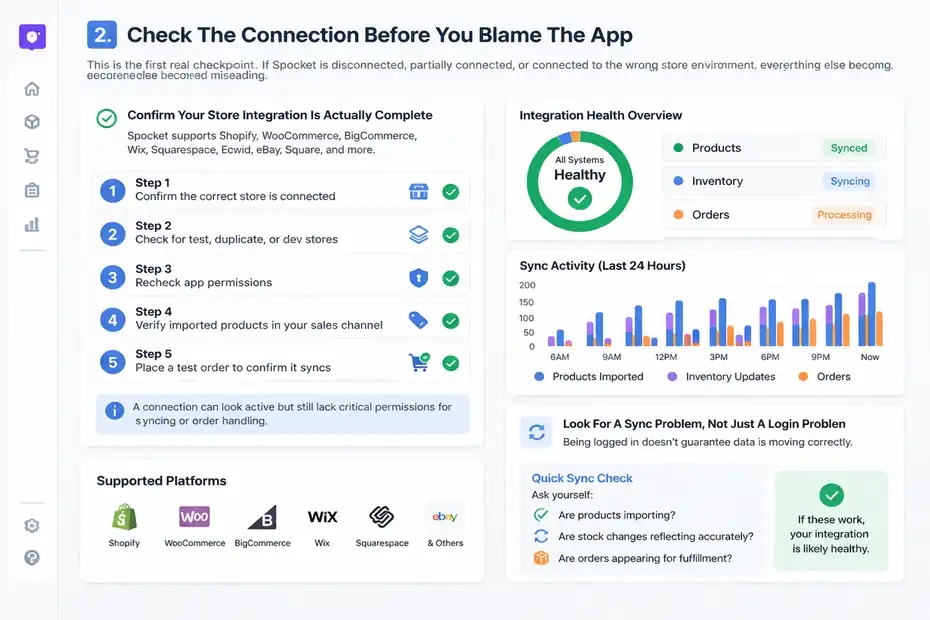
This is the first real checkpoint. If Spocket is disconnected, partially connected, or connected to the wrong store environment, everything else becomes misleading.
Confirm Your Store Integration Is Actually Complete
Spocket officially supports integrations with major ecommerce platforms including Shopify, WooCommerce, BigCommerce, Wix, Squarespace, Ecwid, eBay, Square, and others, and its setup guidance is platform-specific.
That sounds simple, but partial integrations happen all the time when a store owner installs the app without finishing permissions, platform setup, or account linking.
Here is how I would sanity-check the setup:
- Step 1: Open your Spocket dashboard and confirm the correct store is connected.
- Step 2: Make sure you did not connect a test store, duplicate store, or development environment by mistake.
- Step 3: Recheck app permissions inside your ecommerce platform.
- Step 4: Verify that imported products are appearing in the actual sales channel you use.
- Step 5: Place a test order flow on a low-risk product to see whether the order shows up where it should.
This matters because a connection can look active while still missing the permissions needed for product syncing or order handling.
For Shopify, for example, Spocket’s help docs show the connection flow directly from either the Spocket account or the Shopify app install path. WooCommerce has its own plugin-based setup path, which creates extra room for missed steps if the plugin upload or WordPress-side setup is incomplete.
Look For A Sync Problem, Not Just A Login Problem
Many people think, “I’m logged in, so the integration is fine.” That is not always true.
Spocket positions itself around inventory, product sourcing, and order tracking, and several official pages emphasize syncing and automated workflows. So the real test is not whether you can access the dashboard. The test is whether your catalog, variants, inventory levels, and orders are moving correctly between systems.
A practical way to diagnose this is to ask three questions:
- Are products importing?
- Are stock changes reflecting accurately?
- Are orders appearing for fulfillment without manual patchwork?
If one of those breaks, your issue is no longer “Spocket isn’t working.” It becomes a narrower and fixable sync issue.
Product Import Problems Usually Start With Catalog Decisions
A lot of frustration starts before the product even goes live. The catalog may be technically available, but that does not mean it belongs in your store.
You Imported A Product That Looks Good In The App But Weak In Your Store
Spocket promotes one-click imports and a curated product catalog, especially around US and EU suppliers. That can save time, but quick importing can create lazy merchandising if you do not adapt the product for your market.
Here is the trap: a product can look promising inside a marketplace dashboard because the wholesale angle feels exciting. But once it lands on your storefront, it might fail for simple reasons:
- The product title sounds generic.
- The images do not match your brand style.
- The value proposition is unclear.
- The niche is too crowded.
- The price does not feel justified to your customer.
Imagine you run a minimalist home store and import a kitchen tool that technically fits the category. On the supplier side, it looks fine. On your storefront, it clashes with the brand, feels random, and sits beside products with a totally different aesthetic. That is not a sync issue. That is a merchandising issue.
I suggest judging every Spocket product by storefront performance, not supplier dashboard excitement.
Variants, Descriptions, And Pricing Rules Can Quietly Break Conversion
Even when the product imports properly, details can sabotage sales.
Common weak points include:
- Variant confusion: Sizes or colors import in a way that feels messy on the product page.
- Thin descriptions: Supplier copy explains features but not buyer outcomes.
- Margin drift: Your markup looks okay until shipping and discounts eat it alive.
- Image mismatch: The visuals set one expectation while the description sets another.
Spocket content repeatedly highlights pricing rules, automated imports, and stock syncing, but those features only help if your offer is built intentionally.
My rule is simple: Never publish a product straight from import without rewriting the page. Clean up the title, simplify the variant structure, rewrite the copy in customer language, and stress-test the margin before you send traffic.
Shipping Expectations Are Often The Real Problem
This is one of the biggest reasons people say why spocket is not working for my store.
The platform may be functioning, but the delivery experience is creating customer distrust.
Faster Than Some Marketplaces Does Not Mean Fast Enough For Your Audience
Spocket is known for emphasizing US and EU suppliers and promoting faster shipping relative to many overseas marketplace-based models. That can absolutely help. But “faster” is not the same as “fast enough for your customer promise.”
If your store design feels premium and your copy sounds like a polished domestic brand, buyers may expect near-Amazon speed even if you never promised it. That gap creates support tickets, refund pressure, and chargeback risk.
Here is the real issue: your audience judges delivery by brand perception, not just by the supplier location.
A simple example:
- A product delivered in 5 to 8 business days may feel reasonable in a niche boutique.
- The same timeline may feel disappointing in a highly competitive gadget store with aggressive ads and impulse-buy traffic.
So if sales are shaky or complaints are rising, audit your shipping promise against the emotional expectation your site creates.
Supplier Location, Processing Time, And Store Messaging Must Match
Shipping problems often come from three layers stacking together:
- Supplier location: Where the item actually ships from.
- Processing time: How long it takes before dispatch.
- Store messaging: What the customer believes before buying.
Spocket also offers order processing workflows, sample ordering, and order status visibility through its help center for dropshippers. That is useful, but it does not automatically rewrite your shipping page or set realistic expectations for shoppers.
I recommend this quick fix:
- Step 1: Audit your top 10 products and list actual supplier location and processing windows.
- Step 2: Rewrite delivery messaging on product pages, not just the shipping policy page.
- Step 3: Add post-purchase email language that confirms expected timelines clearly.
- Step 4: Remove products with timelines that clash with your brand promise.
This alone can make Spocket feel like it “started working,” even though the app never changed.
Thin Margins Make A Good App Feel Like A Bad App
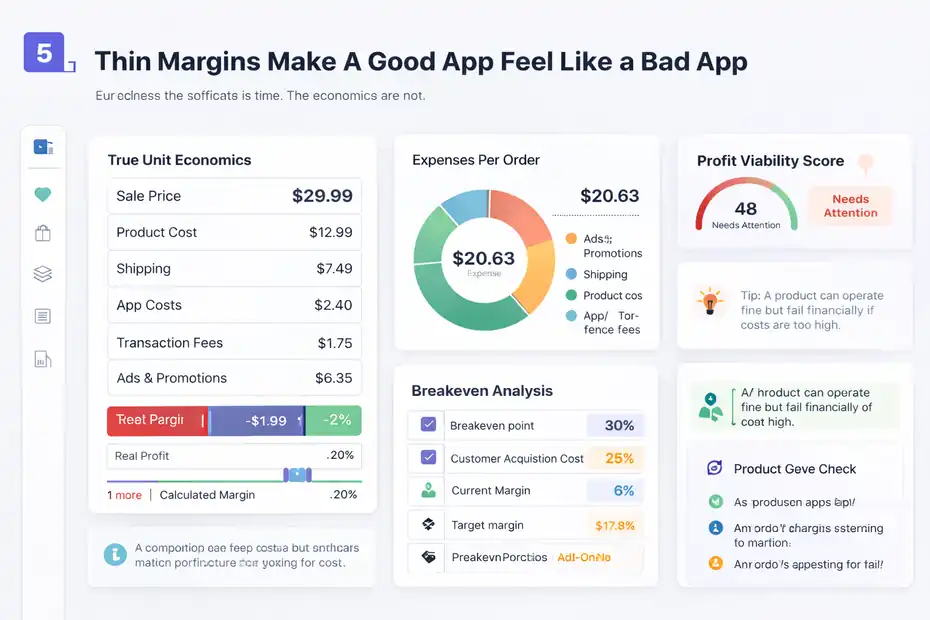
Sometimes the software is fine. The economics are not.
Your Store May Be Losing On Unit Economics, Not On Technology
Spocket has pricing plans, feature tiers, and plan-based limits, and official pricing pages make clear that not every workflow is equal across all account levels. Paid tiers expand what you can do, but your real issue may still be margin structure rather than missing features.
I see this mistake constantly: a store owner calculates profit like this:
sale price minus product cost equals profit.
That is not real profit. You also need to account for:
- Shipping
- Transaction fees
- App costs
- Discounts
- Refunds or reships
- Ad spend
- Currency movement, in some cases
A product with a “nice margin” on the dashboard can become a terrible product once you include the full operating picture.
Here is the uncomfortable truth: If your store needs heavy discounting or expensive paid traffic to move inventory, some Spocket products will not leave enough room.
A Product Can Be Viable Operationally And Still Wrong Financially
This is why some people say the platform “doesn’t work” after the first month. The products import fine. Orders process. But the store feels fragile.
A good financial check looks like this:
- Target margin: Know your minimum acceptable gross margin before ads.
- Breakeven point: Know the most you can spend to acquire a customer.
- Refund cushion: Build a small buffer for delivery issues and customer service mistakes.
- Bundle potential: Some products only work financially when paired with add-ons.
In my experience, if a product cannot survive modest returns, one promotion, and normal platform costs, it is not ready. That is not Spocket failing. That is product economics failing.
Order Flow Problems Damage Trust Fast
Once orders start coming in, the store shifts from catalog management to customer experience. This is where small cracks become visible.
Orders Need To Move Cleanly From Store To Fulfillment
Spocket’s official materials repeatedly mention one-click fulfillment, automatic order appearance in the app, tracking, and order management features. That tells you the platform is designed to reduce manual handling.
But here is what I have learned: “designed to reduce manual handling” does not mean “safe to ignore.”
You still need operational habits:
- Check incoming orders daily
- Watch for payment issues or address errors
- Confirm supplier responsiveness on your bestsellers
- Monitor tracking updates before customers ask
A lot of stores get lazy once automation is in place. Then a delayed order, missing update, or bad supplier response makes the whole system feel broken.
Automation works best when you actively supervise it.
Customer Communication Often Matters More Than The Delay Itself
Most customers can tolerate some waiting. What they hate is uncertainty.
That is why I suggest building a simple communication framework:
- Order confirmation: Tell them what happens next.
- Processing update: Tell them when fulfillment begins.
- Shipping update: Share tracking and realistic timeline language.
- Delay notice: Address issues before the customer chases you.
If you do not do this, even a manageable delay feels suspicious. This is especially true for new stores without much brand trust yet.
One practical fix is to treat every order as a trust event, not just a transaction. When you do that, a small operations issue stops turning into “Spocket is ruining my store.”
Your Offer May Be Too Easy To Ignore
This is the part many tutorials skip because it is less technical and more honest.
Spocket Cannot Fix A Weak Niche Or Generic Product Strategy
Spocket gives access to products, suppliers, and automation. It does not automatically create differentiation. Its own educational content emphasizes supplier quality, shipping speed, and automation advantages, but those advantages only matter if the end offer is compelling enough to buy.
A weak offer usually looks like one of these:
- You sell broad “trending” items with no clear audience.
- Your site looks like a generic dropshipping template.
- Your pricing is higher than buyers expect with no story behind it.
- Your product solves a minor problem, not a strong one.
- Your product page explains features without creating desire.
I believe this is where many stores quietly fail. The owner blames the platform because it is easier than confronting a weak product strategy.
The Better Question Is Whether Spocket Fits Your Brand Positioning
Not every store should use the same sourcing model.
Spocket tends to make more sense when your strategy depends on:
- Cleaner supplier discovery
- Better perceived quality
- Faster shipping than long-tail marketplace sourcing
- A more branded customer experience
- A narrower and more curated catalog
It may be a worse fit if your entire model depends on ultra-cheap, high-volume, trend-chasing product tests with razor-thin emotional branding.
That does not make Spocket bad. It means your business model and your sourcing model may be misaligned.
When that happens, the app can feel “wrong” even while doing exactly what it was built to do.
Common Technical And Operational Mistakes That Make Spocket Look Broken
This section is where most quick wins live. You do not need a full rebuild. You need cleaner execution.
The Most Common Mistakes I Would Check First
Here are the mistakes I would inspect before changing platforms:
- Mistake 1: Publishing products without rewriting supplier descriptions.
- Mistake 2: Ignoring real shipping timelines and relying on vague promises.
- Mistake 3: Marking up products without checking final margin after all costs.
- Mistake 4: Leaving variant structures messy and confusing on the storefront.
- Mistake 5: Using too many unrelated products in one store.
- Mistake 6: Failing to order samples for potential winners, even though Spocket supports sample ordering through its workflow.
- Mistake 7: Assuming automation means no manual review is needed.
- Mistake 8: Choosing products because they seem available, not because they suit the audience.
This is boring advice, but boring fixes usually produce the biggest gains.
A Fast Diagnostic Framework You Can Use Today
Let me break it down in a way that is actually useful.
Score your store from 1 to 5 in each area:
- Integration health: Is the correct store connected and syncing?
- Catalog quality: Do your products feel curated and brand-consistent?
- Page quality: Do titles, images, copy, and variants make buying easy?
- Shipping clarity: Would a first-time buyer clearly understand delivery expectations?
- Margin strength: Can each sale survive fees, refunds, and promotion?
- Operations: Are you proactively managing order flow and communication?
Any score below 3 is probably where your “Spocket problem” really lives.
A Step-By-Step Fix Plan For A Store That Feels Stuck
Now let’s move from diagnosis to action. This is the part I would follow myself.
Week 1: Stabilize The Basics
Do not touch everything at once. Fix the foundation first.
- Step 1: Reconfirm the store connection and permissions.
- Step 2: Test one full order from product page to fulfillment visibility.
- Step 3: Audit your top 20 products for shipping time, supplier location, and real margin.
- Step 4: Remove weak-fit products that confuse your niche.
- Step 5: Rewrite the top 5 product pages completely.
Your goal this week is not growth. It is clarity.
By the end of this phase, you should know whether the issue is technical, operational, or commercial.
Week 2: Improve The Buyer Experience
Next, tighten the storefront around trust.
- Step 1: Rewrite shipping language on product pages.
- Step 2: Simplify confusing variants.
- Step 3: Improve product images where the supplier visuals look inconsistent.
- Step 4: Add FAQ content to reduce hesitation.
- Step 5: Create a basic post-purchase update sequence.
This is where many stores recover. Not because Spocket changed, but because the customer experience finally made sense.
Week 3: Test Smarter, Not Bigger
Only after the basics are stable should you scale testing.
- Step 1: Pick 3 to 5 products with strong margins and believable shipping.
- Step 2: Build focused product angles for each.
- Step 3: Track conversion rate, add-to-cart rate, refund rate, and support volume.
- Step 4: Drop the losers quickly.
- Step 5: Order samples for anything that shows real promise.
Spocket is far more useful when you use it like a curated sourcing layer, not a random product buffet.
When You Should Keep Spocket, Change Your Setup, Or Move On
This is the honest close. Not every store should stick with the same stack forever.
Keep Spocket If The Core Fit Is Good But Execution Is Weak
You should probably stay with Spocket if these are true:
- Your store niche benefits from more curated products.
- Faster shipping relative to long overseas sourcing matters to your customers.
- You value cleaner operations and a more branded experience.
- Your issue is mostly page quality, margins, or messaging.
- The integration works, but the merchandising and offer need work.
Spocket’s official pages consistently emphasize curated suppliers, product importing, inventory sync, fulfillment support, branded invoicing, and platform integrations. If those features match your model, then the platform likely is not the main problem.
Change Your Setup If The Store Is Fighting The Platform
You may need a different approach if:
- Your entire strategy depends on ultra-cheap mass testing.
- Your audience is extremely delivery-sensitive and expects near-instant fulfillment.
- Your margins are too thin for the products you want to sell.
- Your niche needs more control than a standard dropshipping workflow allows.
- You keep solving one issue only to hit another because the business model itself is misaligned.
In my opinion, the best decision is rarely emotional. It comes from the diagnostic questions we covered earlier.
If your store is technically connected, products are syncing, orders are manageable, and the real pain is weak conversion or poor product economics, switching platforms may only hide the deeper issue for a few weeks.
Final Thoughts
Why spocket is not working for my store is really a question about fit, execution, and expectations.
Yes, technical issues can happen. But for many stores, the bigger problem is that the storefront, product selection, shipping promise, and margin structure are not strong enough to turn automation into a stable business.
Spocket can connect your store, import products, sync inventory, support fulfillment, and help structure operations across major ecommerce platforms. But it cannot choose your niche, fix weak copy, or protect a bad margin.
If I were fixing this today, I would not start by asking whether Spocket is broken. I would start by asking where the store is leaking trust, money, or clarity. That is usually where the real answer lives.
FAQ
Why is Spocket not working for my store?
Spocket may appear not to work when your store has setup issues, weak product selection, or poor margins. In most cases, the problem is not the app itself but mismatched expectations, incorrect integration, or low-converting product pages that fail to generate consistent sales.
How do I fix Spocket integration issues?
To fix integration issues, reconnect your store, verify permissions, and ensure products and orders sync correctly. Test a full order flow to confirm everything works. Most problems come from incomplete setup steps rather than actual platform errors or system failures.
Can Spocket cause low sales in my store?
Spocket itself does not cause low sales, but poor product choices, unclear offers, and weak branding can. If your store lacks a strong value proposition or targets the wrong audience, even properly imported products will struggle to convert into consistent revenue.
Why are my Spocket products not selling?
Products may not sell if they are too generic, overpriced, or poorly presented. Weak descriptions, unclear benefits, and slow perceived shipping can reduce trust. Improving your product pages and aligning them with your audience usually increases conversions significantly.
Is Spocket good for beginners in dropshipping?
Spocket can be good for beginners because it simplifies product sourcing and order fulfillment. However, success still depends on choosing the right niche, building a trustworthy store, and understanding pricing, shipping expectations, and customer experience.

I’m Juxhin, the voice behind The Justifiable.
I’ve spent 6+ years building blogs, managing affiliate campaigns, and testing the messy world of online business. Here, I cut the fluff and share the strategies that actually move the needle — so you can build income that’s sustainable, not speculative.
Related posts:
 How to Make Money Dropshipping: 7 Secrets to a $10K/Month
 Affiliate Advertising vs. Dropshipping: Which One Wins?
 Dropshipping Guide: Build a Store That Actually Sells
 How to Make Money Dropshipping Without Huge Upfront Costs
 Ecommerce Platform Comparison: Which One Fits Your Brand?
 Why the Salehoo Wholesale Directory Helps You Scale