
Table of Contents
Some links on The Justifiable are affiliate links, meaning we may earn a small commission at no extra cost to you. Read full disclaimer.
If you’ve ever researched managed WordPress hosting, you’ve probably come across WP Engine. But when you dig into WP Engine hosting cost, the different plans and prices can get confusing fast.
Are you really getting what you pay for? And how do those monthly fees translate into real value for your website’s growth, performance, and security?
In this guide, I’ll break down exactly what’s behind WP Engine’s pricing structure so you can decide whether it’s worth the investment for your needs.
Understanding WP Engine Hosting Cost Structure
Before deciding if WP Engine is worth the price, it’s important to understand how their hosting cost structure is built.
Unlike generic shared hosts, WP Engine charges based on website performance, security level, and support quality—not just server space.
What Determines WP Engine Pricing
WP Engine pricing isn’t just about how many sites you host; it’s shaped by multiple performance and scalability factors.
- Number of Sites: Each plan defines how many WordPress installs you can manage—from one site on Startup to thirty on Scale.
- Monthly Visits: Plans are capped by monthly traffic limits (like 25,000 visits on Startup or 400,000 on Scale). Once your site surpasses these limits, WP Engine automatically adjusts or bills overages to maintain performance.
- Server Resources: WP Engine provides dedicated RAM and CPU for optimized WordPress speed, unlike shared hosting providers that cram multiple sites on one server.
- Support Level: Higher plans include faster priority support and advanced features, like dedicated account managers for Growth and Scale users.
I suggest thinking of WP Engine’s pricing less as a “server rental” and more as a managed performance and security subscription. You’re paying for peace of mind and reliability.
The Difference Between Monthly and Annual Plans
WP Engine offers both monthly and annual billing, and the pricing difference can add up quickly.
- Monthly plans are flexible—you can cancel anytime.
- Annual plans save roughly two months of hosting costs per year (around 16%–20% off, depending on the plan).
For instance, the Professional plan costs $45 per month, but when billed annually, you effectively pay closer to $37.50/month. Plus, WP Engine often runs promotions like “3 months free” when you pay yearly.
I personally recommend going annual if you’re committed to your site long-term—it’s one of the easiest ways to save without compromising features.
How WP Engine Compares to Other Premium Hosts
When stacked against premium WordPress hosts like Kinsta or Flywheel, WP Engine sits in the mid-to-upper range of pricing—but with a few advantages.
Here’s a quick snapshot:
| Host | Starting Price (Monthly) | Traffic Limit | Key Differentiator |
| WP Engine | $23 | 25,000 visits | StudioPress themes + robust dev tools |
| Kinsta | $30 | 25,000 visits | Google Cloud-based speed |
| Flywheel | $15 | 5,000 visits | Designer-focused simplicity |
In my experience, WP Engine strikes the best balance between performance, developer features, and customer support.
Kinsta might be faster on Google Cloud, but WP Engine’s included features—like staging environments and free StudioPress themes—often provide more overall value for small and mid-size site owners.
Breaking Down Each WP Engine Plan and Cost
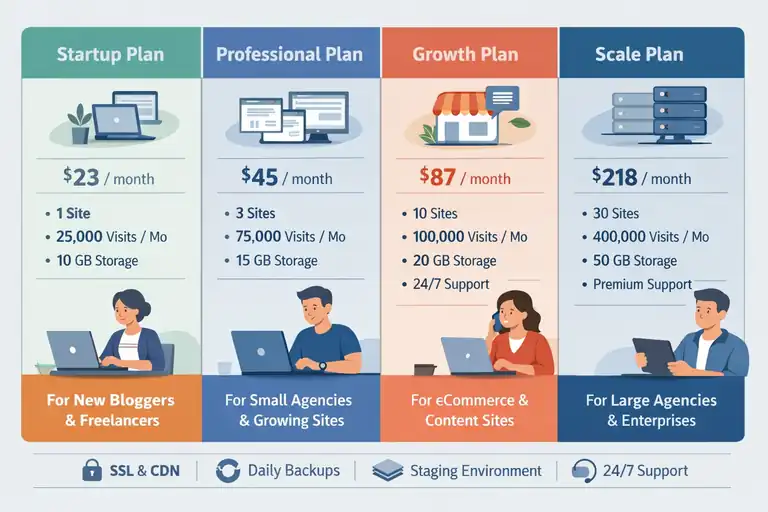
Each WP Engine plan targets a specific type of user—from first-time bloggers to full-scale digital agencies. Let’s break them down so you can find the right fit.
Startup Plan: The Best Option for Beginners
The Startup plan starts at $23 per month and covers:
- 1 site
- 25,000 monthly visits
- 10 GB storage
It’s best suited for small business owners, freelancers, or anyone just launching their first professional site.
You still get WP Engine’s core features—like free SSL, CDN, and daily backups—but the limited traffic cap means you’ll need to upgrade as your site grows.
I usually recommend Startup for portfolio sites or service-based businesses that don’t rely on high daily traffic.
Professional Plan: Balancing Cost and Capability
The Professional plan, priced at $45 per month, is where most users find the best balance of features and flexibility.
It includes:
- 3 sites
- 75,000 visits per month
- 15 GB local storage
This plan suits small agencies, growing blogs, or online entrepreneurs managing multiple brands. You can also access automated site staging for safer testing and plugin updates.
From what I’ve seen, this plan gives you the “sweet spot” between performance and price—it’s the one I use most often for client projects.
Growth Plan: Designed for Expanding Businesses
The Growth plan jumps to $87 per month but significantly boosts scalability.
You’ll get:
- 10 sites
- 100,000 visits per month
- 20 GB storage
- 24/7 chat and phone support
This plan works well for eCommerce sites or content-heavy blogs that attract consistent traffic. The added support level and higher traffic allowance justify the price, especially if downtime or performance issues could cost your business real money.
If your business depends on leads or online sales, I believe this plan pays for itself through uptime stability alone.
Scale Plan: Built for High-Traffic and Agency-Level Sites
The Scale plan costs $218 per month and is designed for agencies or large businesses managing multiple high-volume sites.
It offers:
- 30 sites
- 400,000 visits per month
- 50 GB storage
- Premium support with dedicated technical experts
At this level, WP Engine becomes a full-fledged managed hosting partner. It’s a strong fit for marketing agencies, enterprise-level content networks, or SaaS companies running complex WordPress setups.
I’d only suggest Scale if your business is already established and needs guaranteed performance and redundancy across many client projects.
What You Really Pay for Beyond Hosting
WP Engine isn’t just about hosting—it’s about what’s included that makes it premium. Let’s break down those hidden value layers.
Advanced Security and Threat Protection
WP Engine includes enterprise-level security that goes far beyond a basic firewall.
Key protections include:
- Real-time threat detection
- Managed WordPress updates with vulnerability patches
- Automatic malware removal and DDoS protection
In simple terms, WP Engine acts like your site’s bodyguard—catching and fixing threats before they reach you.
I’ve personally seen it prevent brute-force login attempts that brought down sites on cheaper hosts.
Daily Backups, CDN, and SSL Certificates
Every plan includes daily site backups, a free SSL certificate, and integrated CDN (content delivery network).
- Daily backups ensure your data can be restored in minutes if anything goes wrong.
- SSL certificates encrypt your site for security and SEO ranking benefits.
- CDN boosts global speed by delivering content from the nearest server to the visitor.
These tools are typically paid add-ons with most hosting providers, but WP Engine bundles them in at no extra charge—saving an estimated $20–$40 monthly if you bought them separately.
Access to StudioPress Themes and Genesis Framework
One of WP Engine’s standout perks is full access to StudioPress Themes and the Genesis Framework—a powerful theme engine for clean, SEO-optimized WordPress sites.
This gives you:
- 35+ premium StudioPress themes worth over $2,000
- Faster, more secure code framework
- Mobile-responsive design right out of the box
If you’re building multiple sites, this alone offsets much of your yearly hosting cost. I’ve used Genesis for years—it’s lightweight, secure, and perfect for long-term WordPress scalability.
Developer Tools and Staging Environments
WP Engine also caters to developers and power users with staging environments—a safe copy of your site where you can test changes before going live.
Other tools include:
- One-click site cloning for new builds
- SSH Gateway for advanced file access
- Git version control integration
These features make WP Engine not just a host but a complete development ecosystem. It’s what I rely on for building and testing client sites without risking downtime or data loss.
Factors That Affect Your Final WP Engine Bill
Even after you choose your WP Engine plan, your actual bill can shift depending on how your site performs and what optional features you use.
Understanding these variables helps you plan better and avoid surprises at the end of the month.
Traffic Overages and Visitor Limits
Each WP Engine plan has a built-in visitor cap. For example, the Startup plan supports 25,000 visits per month, while the Professional plan allows 75,000. Once your site exceeds this limit, WP Engine applies overage fees to keep your site running smoothly.
These overages typically cost a few dollars per thousand extra visits. It’s WP Engine’s way of scaling resources dynamically to maintain speed and uptime, even when your traffic spikes unexpectedly.
From experience, I suggest regularly checking your traffic usage in the WP Engine dashboard.
You can find it by navigating to: Dashboard → Sites → Overview → Usage
If you notice traffic climbing close to your limit, it’s usually more cost-effective to upgrade your plan rather than paying for overages.
I’ve seen many site owners save $20–$50 monthly just by switching up a tier before heavy campaigns or seasonal peaks.
Add-Ons Like Site Monitoring and Performance Tools
WP Engine includes powerful core features, but there are optional add-ons that can affect your total monthly cost. These tools are designed for advanced users who want deeper performance insights or security layers.
Common add-ons include:
- Site Monitoring: Provides uptime and performance tracking with instant alerts if your site slows down or goes offline.
- Smart Plugin Manager: Automatically updates your WordPress plugins safely after testing compatibility.
- Global Edge Security (GES): Adds an enterprise-grade firewall and DDoS protection, ideal for eCommerce or high-profile sites.
- Advanced Network: Improves global loading times with additional CDN routing optimizations.
Most of these add-ons range from $10–$50 per month. Personally, I only recommend Smart Plugin Manager and Site Monitoring for small to mid-size businesses—they provide tangible protection and time savings without inflating your bill unnecessarily.
Regional Pricing and Data Center Selection
Another subtle cost factor is data center location. WP Engine lets you choose where your site’s data is hosted—North America, Europe, Asia-Pacific, or other regions.
While the base hosting cost stays the same, some regions may have slightly different operational fees due to server provider partnerships.
The bigger difference, though, comes in performance. Hosting your site closer to your primary audience reduces latency, which means faster page loads and potentially better SEO performance.
For example, if most of your customers are in London, selecting a UK data center can improve load speed by up to 40%.
You can change this in your WP Engine dashboard during site setup under: Add Site → Environment → Data Center Selection.
If your business operates internationally, you might consider enabling CDN (content delivery network) to handle multiple regions efficiently rather than paying for separate hosting locations.
Is WP Engine Hosting Worth the Cost?
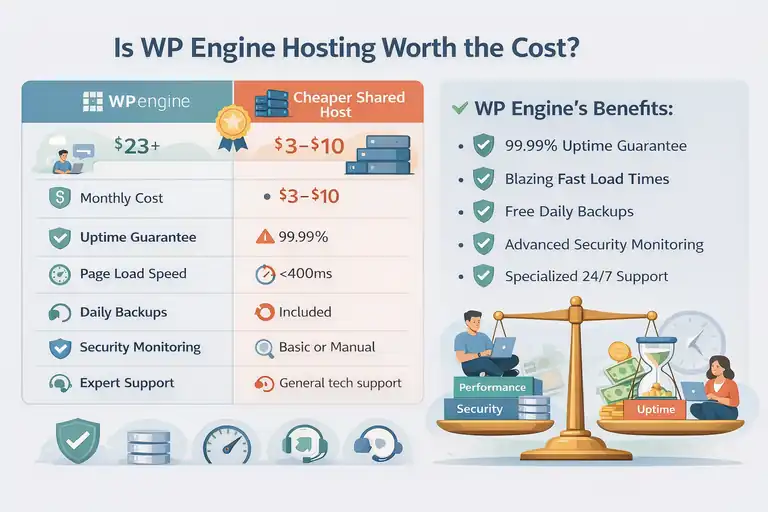
When you look at the numbers alone, WP Engine hosting costs more than average WordPress hosts.
But once you factor in performance, security, and peace of mind, the value becomes clear.
When Paying More Saves You Time and Headaches
In my opinion, the real benefit of WP Engine is time saved. With automatic backups, managed updates, and high-speed caching, you don’t need to spend hours troubleshooting performance issues or recovering lost data.
Here’s how it plays out in practice:
- A small business site that goes down for just two hours could lose hundreds in potential leads. WP Engine’s uptime reliability (99.99%) practically eliminates that risk.
- Daily automatic backups mean you can restore your site in minutes after a plugin crash—something cheaper hosts rarely offer at this level.
So yes, you’re paying more upfront, but you’re saving countless hours (and possibly revenue) down the line. I’ve learned this firsthand managing client sites—WP Engine’s stability often pays for itself after the first issue it prevents.
Comparing WP Engine Value to Cheaper Hosts
Let’s take a practical look at cost versus value:
| Feature | WP Engine | Cheaper Shared Host (e.g., Bluehost, HostGator) |
| Monthly Cost | $23+ | $3–$10 |
| Uptime Guarantee | 99.99% | 99% |
| Page Load Speed | <400ms | 1–3s |
| Daily Backups | Included | Paid Add-on |
| Security Monitoring | Advanced | Basic or Manual |
| Expert Support | 24/7 WP specialists | General tech support |
If your site is small, low-traffic, and non-commercial, a shared host might suffice.
But for professional or revenue-generating sites, the difference in reliability, security, and speed directly affects user experience—and that’s where WP Engine shines.
Who Should and Shouldn’t Choose WP Engine
I believe WP Engine is ideal for:
- Small to mid-sized businesses that rely on website performance for leads or sales.
- Agencies managing multiple WordPress sites needing reliability and staging tools.
- Content creators or eCommerce store owners scaling their operations.
However, it may not be necessary for:
- Personal blogs or hobby sites with minimal traffic.
- Beginners testing WordPress without business goals yet.
In short, if uptime, security, and peace of mind are worth real money to you, WP Engine delivers unmatched value. But if you’re still experimenting, you might start smaller and upgrade once your site proves its potential.
Tips to Get the Best WP Engine Pricing
You can absolutely make WP Engine more affordable with the right strategy.
These quick tips can help you save money or get more value from the same plan.
Taking Advantage of WP Engine Discounts and Promotions
WP Engine frequently runs promotions that offer up to three months free when you commit annually. You’ll often see banners like “3 months free saves $177!” during sign-up.
You can also find limited-time discounts around events like Black Friday or WordPress anniversaries.
Pro tip: If you’re on the monthly plan, reach out to support before upgrading to annual billing—they sometimes apply promotional credits manually if you ask politely. I’ve done this twice for clients, and it worked both times.
How Annual Billing Saves You Money
Annual billing isn’t just convenient—it’s cheaper. WP Engine offers around a 16% discount for paying yearly, which adds up over time.
Here’s a quick cost example:
| Plan | Monthly | Annual Equivalent | Savings |
| Startup | $23 | ~$19/mo | ~$48/year |
| Professional | $45 | ~$37.50/mo | ~$90/year |
| Growth | $87 | ~$72/mo | ~$180/year |
If you’re planning to stick with WP Engine for at least a year, annual billing is a smart move. It locks in your rate and shields you from potential price increases.
When to Upgrade or Downgrade Your Plan Smartly
One of WP Engine’s advantages is flexible scaling—you can upgrade or downgrade anytime from your account dashboard.
I recommend these strategies:
- Upgrade Temporarily: Before major traffic events (like a sale or viral campaign), move to the next tier for a month to avoid overage charges.
- Downgrade After Peak Season: Once traffic normalizes, revert to your previous plan to cut costs.
- Track Your Usage: Visit Dashboard → Billing → Resource Usage monthly to identify patterns before they become costly surprises.
From what I’ve seen, this proactive approach can save businesses 10–20% annually without sacrificing site performance.
Real-World Cost Scenarios for Different Users
Understanding WP Engine hosting cost becomes much clearer when you see how it plays out in real-world use cases.
Let me walk you through three different user types—freelancers, small business owners, and agencies—so you can see how the pricing actually fits their needs and goals.
Freelancers Running Client Sites
For freelancers, WP Engine is both a professional asset and a productivity tool. If you manage multiple small client sites, the Professional or Growth plan usually fits best because it allows you to host several WordPress installs under one dashboard.
Here’s how that cost breaks down:
- Professional plan: $45/month for 3 sites
- Growth plan: $87/month for 10 sites
That means if you manage three client sites on the Professional plan, it costs about $15 per site monthly. Considering that each site gets daily backups, free SSL, and staging environments, that’s a strong value compared to buying separate shared hosting for each client.
Example scenario: Let’s say you design websites for local businesses. You charge clients $50 per month for maintenance and updates, but your hosting cost is just $15 per site through WP Engine. That’s a $35 margin per site for ongoing services—all while offering premium hosting that boosts your reputation for reliability.
From my experience, WP Engine also makes life easier for freelancers because it lets you create transferable installs.
You can build a client’s site on your plan and then easily transfer ownership once it’s ready, without migrating files or databases manually. It’s one of those features that quietly saves hours of work per project.
Small Businesses Managing Online Stores
For small businesses or eCommerce stores, reliability and speed directly impact revenue. That’s why many small business owners choose WP Engine’s Growth plan, priced at $87/month, which handles up to 100,000 visits monthly.
This plan supports WooCommerce stores smoothly, offering fast load times and built-in caching optimized for dynamic pages. That’s a big deal for online stores where every second of delay can affect conversion rates.
Here’s how it adds up:
- Hosting cost: $87/month
- Included value: automatic backups, SSL, CDN, threat protection
- Add-ons (optional): Smart Plugin Manager ($10/month)
So roughly $100 per month gives your business enterprise-level reliability—something that would easily cost triple if you hired a developer or external security team.
I worked with a client who ran a boutique clothing store online. After switching to WP Engine, their site load time dropped from 3.5 seconds to under 1 second, and checkout abandonment decreased noticeably.
That’s a clear example of cost translating into measurable results.
If your site generates consistent sales or relies on SEO for traffic, that $87 investment isn’t just hosting—it’s protection for your income stream.
Agencies Handling Multiple High-Traffic Sites
For agencies managing multiple client sites or content-heavy projects, the Scale plan ($218/month) is where WP Engine truly shines.
With capacity for up to 30 sites and 400,000 visits per month, it provides the bandwidth and tools agencies need to maintain high-traffic sites without worrying about downtime.
Agency-level benefits include:
- Dedicated technical support and performance optimization guidance
- Staging and development environments for every site
- Bulk site management under one intuitive dashboard
- Priority performance tools like Global Edge Security for enterprise clients
Here’s a quick value breakdown:
| Metric | Scale Plan | Shared Hosting (Equivalent Setup) |
| Number of Sites | 30 | 30 (Separate Accounts) |
| Total Monthly Cost | $218 | $300+ |
| Support Level | WP-specialized | General |
| Security & CDN | Included | Paid Add-on |
If your agency hosts multiple clients, you could easily allocate costs at about $7–$10 per site monthly—far cheaper than individual premium accounts.
In my view, WP Engine’s biggest strength for agencies is stability. You can confidently promise uptime and security to your clients, knowing the platform will deliver.
That consistency helps build long-term trust and justifies a higher service fee for managed hosting and maintenance.
Final Thoughts on WP Engine Hosting Cost
After breaking everything down, it’s clear that WP Engine hosting cost reflects far more than server space.
You’re paying for a reliable, fully managed environment that takes care of performance, backups, security, and scalability—all essential for serious WordPress users.
Balancing Price, Performance, and Peace of Mind
From what I’ve seen, the real decision isn’t just whether WP Engine is expensive—it’s whether the value it delivers outweighs the extra cost compared to budget hosts.
If you value:
- Consistent site speed under heavy traffic
- Proactive security and automatic fixes
- Expert WordPress support, 24/7
- Easy site management and development tools
Then WP Engine’s pricing becomes a smart investment rather than a luxury.
I always tell clients this: Cheap hosting feels affordable until something breaks. Then you spend double fixing what could’ve been prevented. WP Engine helps you avoid that stress entirely, giving you performance and peace of mind from day one.
Pro Tip: How to Calculate True Value Before You Commit
If you’re unsure whether WP Engine is worth it, here’s a simple formula I use to evaluate hosting ROI:
- (Estimated monthly revenue or client value) ÷ (Total monthly hosting cost) = ROI factor
For example: If your site earns $1,000 a month and WP Engine costs $45, your ROI factor is 22x—meaning every dollar spent on hosting supports $22 in site value.
Another quick way is to estimate time saved. If WP Engine’s automation saves you just 3 hours a month of maintenance or troubleshooting, and your time is worth $50/hour, that’s $150 in saved effort—already triple the hosting fee.
In short, WP Engine hosting cost pays for itself if your website is an essential business asset, not just a hobby. I believe it’s one of the most balanced hosting investments available—reliable, secure, and built for growth.
FAQ
What is the average WP Engine hosting cost per month?
The average WP Engine hosting cost starts at $23 per month for the Startup plan and goes up to $218 per month for the Scale plan, depending on site traffic and resources.
Why is WP Engine hosting more expensive than other hosts?
WP Engine costs more because it’s fully managed, offering faster site performance, advanced security, daily backups, and expert WordPress support—all included in the price.
How can I reduce my WP Engine hosting cost?
You can lower your WP Engine hosting cost by choosing annual billing, using limited-time discounts, and upgrading plans only when your site traffic increases.

I’m Juxhin, the voice behind The Justifiable.
I’ve spent 6+ years building blogs, managing affiliate campaigns, and testing the messy world of online business. Here, I cut the fluff and share the strategies that actually move the needle — so you can build income that’s sustainable, not speculative.
Related posts:
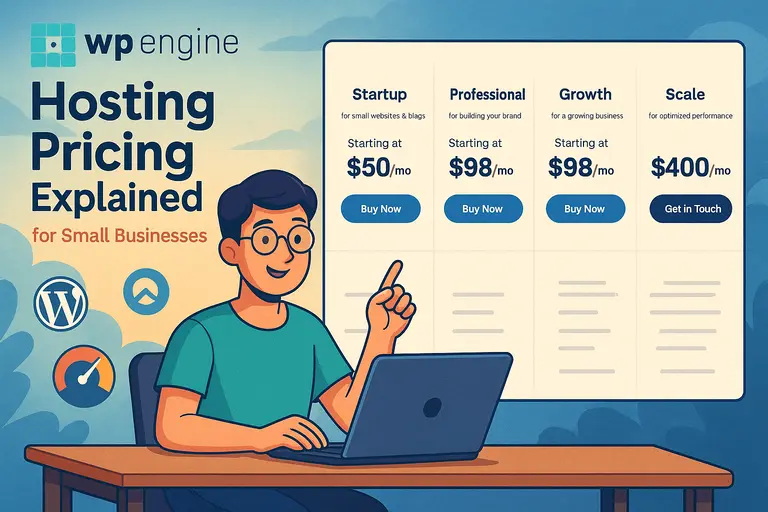 WPEngine Hosting Pricing Explained for Small Businesses
 How to Host a Website: A Step-by-Step Guide for Beginners
 WP Engine Dedicated Server: Best Choice for Large Sites?
 Bluehost Reviews You Can Trust Before Signing Up
 Cloudways WordPress Pros & Cons: What You Need to Know
 WPEngine Migration Guide: Move WordPress Without Stress