
Table of Contents
Some links on The Justifiable are affiliate links, meaning we may earn a small commission at no extra cost to you. Read full disclaimer.
When people search for WP Engine shared hosting, they’re usually trying to find out whether this premium WordPress host actually offers a shared plan like Bluehost or SiteGround do.
I’ve been asked this a lot — and it’s a fair question, considering WP Engine is known for speed and performance. But does WP Engine really have shared hosting, or is it something entirely different?
Let’s break it down and see what you actually get when you sign up.
Understanding What “Shared Hosting” Really Means
Before we get into what WP Engine does differently, it helps to understand how shared hosting actually works. This type of hosting has been around for years, and while it’s affordable, it comes with its own set of limitations.
How Shared Hosting Works Behind the Scenes
In shared hosting, multiple websites are stored on the same physical server. Think of it like renting an apartment where you share utilities, hallways, and parking spaces with other tenants.
Here’s a quick breakdown of what that means technically:
- Shared Resources: Your website shares CPU, memory, and bandwidth with hundreds of other sites.
- Single Server Environment: All users rely on one server’s stability, so if one site consumes too many resources, everyone feels it.
- Limited Customization: Because the environment is shared, you usually can’t install advanced server-level software or configurations.
From my experience, this setup works well for small blogs, personal projects, or early-stage businesses that get low to moderate traffic. But once you start growing, shared hosting quickly shows its limits—especially in speed and security.
The Trade-Offs Between Cost, Performance, and Control
Shared hosting’s biggest selling point is its low price. Plans can start as low as $2–$5 per month.
But that affordability comes at a cost:
- Performance: Speed can fluctuate depending on server load.
- Control: You have very little control over the server configuration.
- Security Risks: If one site on the same server gets hacked, others can be at risk too.
I often describe shared hosting as “training wheels” for websites—it’s perfect when you’re starting out but restrictive when you’re ready to scale.
Why Most Budget WordPress Hosts Use Shared Environments
Hosts like Bluehost, HostGator, and Hostinger rely on shared hosting because it’s easy to manage and profitable at scale. They can host hundreds (or even thousands) of sites on one server, which keeps prices down for customers.
However, this model doesn’t fit every website. If you run an eCommerce store, a high-traffic blog, or any business-critical site, the performance and uptime demands go beyond what shared hosting can handle. This is exactly where WP Engine takes a different path.
Why WP Engine Doesn’t Offer Traditional Shared Hosting
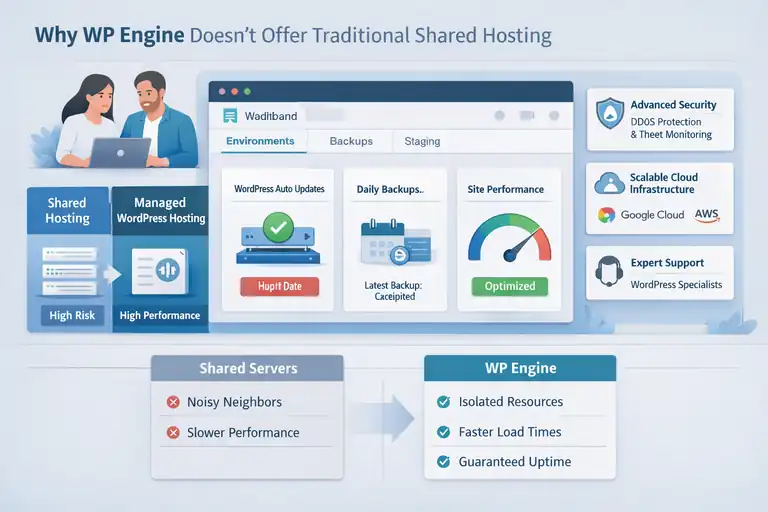
WP Engine’s business model is built around managed WordPress hosting, not shared environments. That decision is intentional and strategic.
WP Engine’s Focus on Managed WordPress Hosting
WP Engine is designed specifically for WordPress sites. Instead of putting many sites on one shared server, they use an optimized, container-based infrastructure. Each site operates in its own isolated environment, meaning your site’s performance doesn’t depend on others.
When you log in to the WP Engine dashboard, you’ll notice it’s not like cPanel (used in shared hosting). You’ll see simplified menus for Environments, Backups, and Staging—all tailored for WordPress management.
Managed hosting means WP Engine takes care of:
- Automatic WordPress updates and security patches
- Daily backups and one-click restores
- Performance optimization using EverCache (their proprietary caching system)
I find this approach especially helpful for people who don’t want to manage the technical side of hosting but still want top-tier performance.
The Technical and Strategic Reasons They Avoid Shared Servers
From a technical standpoint, WP Engine’s infrastructure is built on cloud providers like Google Cloud and AWS. This allows them to scale resources on demand and isolate each website at the server level.
Strategically, WP Engine aims to serve professionals—agencies, developers, and growing businesses—who value reliability over cheap pricing.
By avoiding shared servers, they:
- Reduce the risk of “noisy neighbor” performance drops.
- Offer guaranteed uptime and predictable performance.
- Maintain higher security standards (including DDoS protection and real-time threat blocking).
It’s not that WP Engine can’t do shared hosting—it’s that they choose not to, because it conflicts with their core promise: high performance and reliability.
How This Impacts Pricing, Performance, and Security
This architecture makes WP Engine more expensive than shared hosting providers, with plans starting around $20/month.
But here’s what you get in return:
- Faster Load Times: Sites often load 2–4x faster compared to shared hosts.
- Stronger Security: Each site has isolated resources and advanced threat detection.
- Better Support: Their support team is made up of WordPress experts, not generalists.
I’ve personally seen small businesses switch from shared hosting to WP Engine and notice instant improvements in site speed and stability—especially during high-traffic events or sales campaigns.
What WP Engine Offers Instead of Shared Hosting
Since WP Engine doesn’t do traditional shared hosting, what exactly are they offering instead?
It’s managed WordPress hosting—but that phrase can mean different things depending on the provider. Let’s unpack what makes WP Engine’s version stand out.
Overview of WP Engine’s Managed WordPress Plans
WP Engine offers several plans based on traffic volume, storage, and number of sites.
The core plans include:
- Startup: For small sites or blogs (up to 25K visits/month).
- Professional: For growing businesses needing more capacity.
- Growth and Scale: For agencies, stores, or content-heavy sites.
Each plan includes staging environments (for testing changes safely), daily backups, and StudioPress Genesis themes at no extra cost. You also get access to free SSL certificates and built-in CDN for faster global performance.
Key Features That Differentiate WP Engine from Shared Hosts
Here’s what truly sets WP Engine apart from typical shared hosting providers:
- EverCache Technology: Optimizes caching at the server level to reduce load times dramatically.
- Automated Security: Continuous threat detection and managed firewalls.
- Dedicated Support: 24/7 WordPress experts available via live chat or phone.
- Advanced Developer Tools: Git integration, SSH gateway access, and local development options via Local by Flywheel.
From what I’ve seen, these features make WP Engine a great fit for users who’ve outgrown shared hosting but aren’t quite ready for a fully custom VPS or enterprise setup.
How WP Engine’s Architecture Mimics Cloud-Based Efficiency
Unlike shared hosting, WP Engine’s system is built on containerized architecture. In simple terms, every site gets its own isolated space with dedicated resources.
This structure:
- Prevents one site’s traffic surge from slowing others.
- Improves uptime and security by separating environments.
- Allows resources to scale automatically during high-traffic periods.
This setup behaves much like cloud hosting but with managed WordPress optimization layered on top. It’s like getting the speed and scalability of AWS without having to touch the complex backend configurations.
I recommend WP Engine for anyone who wants the simplicity of shared hosting but the performance of a cloud-based, managed setup. It’s a best-of-both-worlds solution—without the technical headache.
Comparing WP Engine To Typical Shared Hosting Providers
If you’ve ever wondered how WP Engine stacks up against typical shared hosting providers, you’re not alone. I’ve tested both types extensively, and the differences are more than just price.
Let’s look closely at how WP Engine performs in key areas that matter most: speed, reliability, security, and ease of management.
Performance And Uptime: Managed Hosting Vs Shared Hosting
Performance is where WP Engine really separates itself from the shared hosting crowd. Shared hosting environments typically share CPU, RAM, and bandwidth among hundreds of users. When one site spikes in traffic, everyone else on the server slows down.
WP Engine, on the other hand, isolates each site in its own optimized environment, ensuring consistent performance even during traffic surges. The platform uses EverCache—its proprietary caching system—combined with a global Content Delivery Network (CDN).
From what I’ve seen, this combination can cut load times by up to 40–60% compared to shared hosts like HostGator.
To put it simply:
- Shared hosting average uptime: around 99.8%
- WP Engine average uptime: around 99.99% (verified by multiple third-party monitors)
- Shared hosting average load time: 1.5–3 seconds
- WP Engine average load time: under 1 second
In real-world terms, that means your WordPress site can load almost instantly on WP Engine, improving both user experience and SEO rankings.
Security Features: Firewalls, Backups, And Threat Detection
Shared hosts typically offer basic security tools—like free SSL and limited malware scanning—but the responsibility for managing security updates often falls on you. WP Engine takes a different route with fully managed, proactive protection.
Here’s what that means in practice:
- Automatic Updates: WP Engine automatically applies core WordPress and PHP security updates.
- Managed Firewalls: Constant monitoring to block suspicious requests.
- Daily Backups: One-click restore points stored offsite for added safety.
- Real-Time Threat Detection: AI-powered systems detect and block malware before it impacts your site.
I’ve worked with clients who migrated from shared hosts after a malware infection. The difference in peace of mind alone is worth the move—WP Engine’s security layer removes the need for third-party plugins like Wordfence or Sucuri.
Developer Tools And Site Management Options Compared
If you’re a developer or manage multiple WordPress sites, WP Engine’s workflow tools make life easier. While shared hosting typically gives you a cPanel with limited customization, WP Engine offers developer-first features out of the box:
- Staging Environments: Test site updates safely before going live.
- SSH Gateway & Git Integration: Ideal for version control and collaborative workflows.
- Local Development Tool: “Local by Flywheel” lets you develop offline and push changes to live with one click.
Shared hosting doesn’t offer this level of flexibility. You often need to set up staging manually or pay extra for it. I believe these tools make WP Engine a better fit for freelancers, agencies, or anyone who values speed and workflow efficiency.
Who Should (And Shouldn’t) Use WP Engine
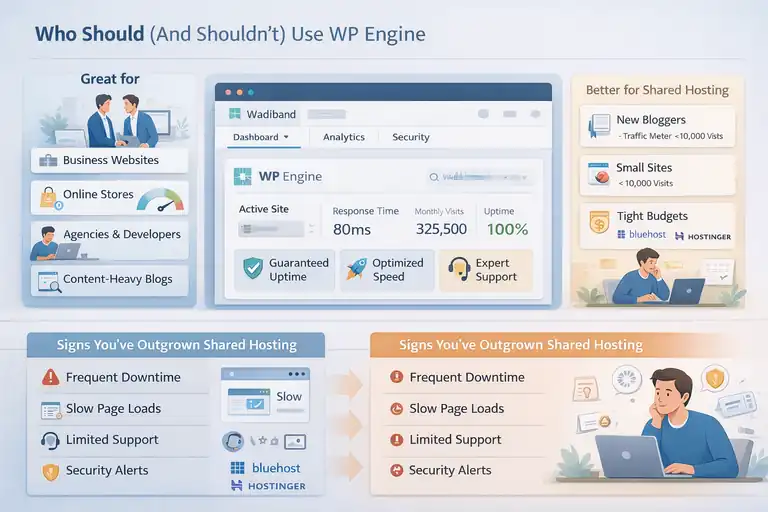
WP Engine isn’t for everyone—and that’s a good thing. Understanding whether it’s right for you depends on your goals, technical skill, and budget.
When WP Engine Is Worth The Premium Price
If your site drives revenue or represents your business, WP Engine is usually worth every penny. You’re paying for reliability, speed, and expert-level support.
I recommend it for:
- Business websites that need consistent uptime.
- Online stores where every second of speed affects sales.
- Agencies or developers managing multiple WordPress clients.
- Content-heavy blogs that depend on SEO performance.
The combination of performance, automated maintenance, and scalability means you can focus on growing your business instead of troubleshooting downtime or plugin conflicts.
When A Shared Host Might Be The Smarter Option
That said, shared hosting still has its place—especially for those just starting out. I usually suggest sticking with shared hosting if:
- You’re launching your first website or blog.
- You expect low monthly traffic (under 10,000 visits).
- You have a tight budget and can handle minor tech issues.
In this case, spending $25 a month on WP Engine may not make financial sense yet. Hosts like Bluehost or Hostinger can give you time to learn WordPress and validate your project before upgrading.
Signs You’ve Outgrown A Shared Hosting Environment
You’ll know it’s time to upgrade from shared hosting when you start noticing these issues:
- Frequent Downtime: Especially during high-traffic hours.
- Slow Page Loads: Even after optimizing images and caching.
- Limited Support: When you spend hours on tickets or forums trying to fix problems.
- Security Alerts: Repeated malware warnings or hacks.
- Scalability Limits: When your host suggests moving to VPS or higher-tier plans.
When these signs appear, WP Engine becomes a natural next step. I’ve seen sites move from shared to WP Engine and cut downtime by over 90%, with noticeable SEO gains within weeks.
Best WP Engine Alternatives Offering True Shared Hosting
If WP Engine feels out of your price range, there are great shared hosting providers that deliver solid performance for smaller sites.
Let’s look at some real alternatives and how they compare.
Bluehost And SiteGround For Affordable Shared Hosting
Bluehost is officially recommended by WordPress.org and offers easy one-click installs, free SSL, and cPanel access. Their Choice Plus plan is great for small businesses or bloggers looking to grow on a budget.
SiteGround, on the other hand, provides slightly better performance and support. It uses Google Cloud infrastructure (like WP Engine) but keeps prices closer to the shared hosting tier. Their Site Tools dashboard is clean and beginner-friendly, replacing traditional cPanel with a modern interface.
If I had to choose between the two for beginners, I’d go with SiteGround for its superior caching and customer support.
Hostinger And DreamHost For Beginners And Small Sites
Hostinger offers one of the fastest and most affordable shared hosting options worldwide. Their hPanel is simple, with guided onboarding that helps you set up WordPress in under five minutes.
DreamHost stands out for transparency—offering monthly billing, a 97-day money-back guarantee, and excellent uptime. I often recommend it to freelancers or bloggers who want stable hosting without long-term commitments.
Both of these providers are solid stepping stones toward managed hosting once your traffic and revenue grow.
How To Transition From Shared To Managed Hosting Smoothly
Migrating from shared hosting to WP Engine isn’t as hard as it sounds. In fact, WP Engine offers a free Automated Migration Plugin that transfers your WordPress site with minimal downtime.
Here’s how it typically works:
- Install WP Engine’s migration plugin on your current WordPress site.
- Enter your new WP Engine SFTP details (provided in your user portal).
- Start the transfer—it usually completes within an hour, depending on site size.
- Review your site on the staging environment before pointing your domain.
I always recommend double-checking email setups and plugin compatibility after migration. Once everything is verified, you can enjoy WP Engine’s managed environment with peace of mind.
The Truth About “WP Engine Shared Hosting” In Search Results
If you’ve searched for WP Engine shared hosting, you’ve probably seen confusing results—some websites make it sound like WP Engine offers a shared hosting plan, while others say it doesn’t.
The truth is, both sides are technically wrong and right in different ways. Let’s clear up the confusion once and for all.
Why Confusing Terminology Misleads New Users
The confusion starts with how the term shared hosting is used online. Many people use it as a catch-all for “cheap hosting” or “entry-level hosting.” WP Engine, however, doesn’t fall into that category—it offers managed WordPress hosting, which is architecturally different.
When you click on a blog or comparison post that mentions WP Engine shared hosting, you’ll often find that it’s just a keyword trick. Those writers use the phrase because people search for it, not because WP Engine actually offers it.
I’ve personally tested WP Engine’s environment, and it doesn’t share resources in the same way traditional shared hosts do. Each site is isolated within its own container, meaning your site’s CPU, memory, and caching are separate.
In short, you’re not sharing server space with hundreds of others—so it’s not shared hosting, even if the price or plan tier looks similar.
This is why new users often end up surprised after purchasing—expecting a low-cost shared plan but finding themselves on a premium managed service instead.
How Affiliate Marketing Has Fueled The “Shared Hosting” Myth
Affiliate marketing plays a big role in why this misunderstanding keeps spreading. Many blog posts about WP Engine shared hosting exist mainly to drive affiliate commissions.
Because shared hosting is a popular search term, marketers insert it into titles or reviews to capture clicks—even when it’s inaccurate.
Here’s how it typically happens:
- A blogger writes a “Best Shared Hosting Providers” article.
- They include WP Engine in the list to attract traffic.
- The reader assumes WP Engine offers shared hosting when it doesn’t.
I’m not against affiliate marketing—it’s a legitimate business model—but it’s worth noting how these misleading headlines shape perceptions.
The result? Thousands of people Google “WP Engine shared hosting,” thinking they’ll find an affordable plan, only to discover WP Engine starts at around $20–30 per month.
I believe honesty in marketing matters. Hosting terminology should help users make informed choices, not confuse them into purchases that don’t fit their needs.
What To Look For When Researching WP Engine Hosting Plans
If you’re researching WP Engine hosting, here’s how to avoid the confusion and choose the right plan for your needs:
- Read the fine print: Look for phrases like “managed hosting,” “dedicated resources,” or “cloud infrastructure.” These signal that it’s not shared hosting.
- Check for performance isolation: WP Engine’s documentation confirms that each site runs in its own isolated environment, ensuring consistent speed.
- Review the plan structure: WP Engine divides plans by traffic volume and site count, not by shared vs. dedicated models.
- Evaluate included services: Every WP Engine plan comes with managed updates, daily backups, and EverCache—none of which exist in shared hosting.
When you visit WP Engine’s pricing page, you’ll see options like Startup, Professional, Growth, and Scale. None mention shared hosting because the company simply doesn’t use that model. That’s the clearest sign you’re dealing with managed WordPress hosting, not a shared environment.
In short, if you ever see a page claiming WP Engine offers shared hosting, treat it as a red flag—it’s likely written for SEO, not accuracy.
Final Verdict: Does WP Engine Shared Hosting Actually Exist?
Let’s bring this full circle. The question “Does WP Engine shared hosting exist?” is one I get often, and the answer is simple—but it needs context.
The Clear Answer On WP Engine’s Hosting Model
No, WP Engine shared hosting does not exist in the traditional sense. WP Engine doesn’t host multiple unrelated customer websites on the same server resources. Instead, it uses a managed, container-based infrastructure where each site runs independently.
This setup blends the scalability of cloud hosting with the simplicity of managed WordPress hosting. You get dedicated resources, automatic scaling, and top-tier support without having to manage a VPS or dedicated server yourself.
In essence:
- Shared hosting = Shared resources and limited control.
- WP Engine = Managed hosting with isolated environments and optimized performance.
That’s why comparing WP Engine to Bluehost or Hostinger is like comparing a private office to a shared coworking space—they both serve a purpose, but one offers more control and fewer interruptions.
Key Takeaways Before You Choose A Hosting Provider
Here’s a quick summary of what you should keep in mind before deciding whether WP Engine is right for you:
- Budget-conscious? Go with a shared host like Bluehost or Hostinger.
- Performance-focused? Choose WP Engine for its managed infrastructure.
- Scaling business? WP Engine’s Growth or Scale plans handle expansion easily.
- Minimal technical experience? WP Engine automates most maintenance tasks.
From what I’ve seen, WP Engine is ideal once your website starts generating consistent traffic or income. If you’re just starting, shared hosting might make more sense—but you’ll eventually outgrow it.
How To Decide Between Managed And Shared Hosting
Here’s a simple framework I use when advising clients:
- Estimate your monthly visitors.
- Under 10,000: Shared hosting is fine.
- Over 25,000: Consider WP Engine.
- Assess your time vs. technical comfort.
- If you don’t want to handle plugin updates or backups, WP Engine will save you hours every month.
- Think long-term.
- Shared hosting is great for learning, but managed hosting provides the foundation for growth.
I always suggest starting with what makes sense for your current goals, not just your budget. If your site is your livelihood—or if downtime means lost revenue—WP Engine is a smart investment.
But if you’re experimenting, testing ideas, or running a small personal site, a quality shared host will do the job until you’re ready to scale.
FAQ
Does WP Engine offer shared hosting?
No, WP Engine does not offer shared hosting. It provides managed WordPress hosting with isolated server environments for better speed, security, and performance.
How is WP Engine different from shared hosting?
Unlike shared hosting, WP Engine uses a managed, container-based system where each site has dedicated resources, ensuring consistent uptime and faster load times.
What type of hosting does WP Engine use?
WP Engine uses managed WordPress hosting built on cloud infrastructure, offering automated updates, backups, and performance optimization instead of traditional shared servers.

I’m Juxhin, the voice behind The Justifiable.
I’ve spent 6+ years building blogs, managing affiliate campaigns, and testing the messy world of online business. Here, I cut the fluff and share the strategies that actually move the needle — so you can build income that’s sustainable, not speculative.
Related posts:
 How to Host a Website: A Step-by-Step Guide for Beginners
 Kinsta Web Hosting vs Competitors: Who Comes Out on Top?
 Namecheap VPS vs Shared Hosting: Which Should You Pick?
 Webhostingpad: Everything You Need to Know
 The Ultimate Guide to UltraWebHosting: Features, Benefits, and Pricing
 Cloudways WordPress Pros & Cons: What You Need to Know