
Table of Contents
Some links on The Justifiable are affiliate links, meaning we may earn a small commission at no extra cost to you. Read full disclaimer.
The ManyChat app has become one of the most talked-about tools for automating chat experiences across social media and messaging platforms.
But is it really worth the hype? Whether you’re a marketer trying to improve customer engagement or a business owner looking to boost conversions, you’ve probably heard that ManyChat can “do it all.”
But how well does it actually perform in real-world use? In this review, we’ll dig into everything you need to know about the ManyChat app — its features, usability, pricing, and how it compares to other chatbot tools — to help you decide if it’s the right fit for your business.
What Is ManyChat App and How It Works
The ManyChat app is a chatbot builder that lets you automate conversations on social media and messaging platforms like Facebook Messenger, Instagram, and WhatsApp.
It’s designed for marketers, creators, and business owners who want to handle customer interactions efficiently without losing that “personal touch.” In other words, it helps you respond faster and smarter — even while you’re asleep.
Understanding ManyChat’s Core Purpose
At its core, ManyChat’s purpose is to simplify communication between businesses and their audiences. Instead of manually responding to every message, you can build automated conversation paths (known as flows) that reply instantly to common questions.
For example: If someone messages your Facebook page asking, “Do you deliver internationally?” you can create a flow that automatically replies, “Yes, we ship worldwide! Here’s our delivery policy: [link].”
In my experience, the biggest strength of ManyChat lies in how easy it makes automation feel personal. You don’t need to know code or AI scripting — the drag-and-drop interface lets you map conversations visually.
How ManyChat Connects With Facebook Messenger and Instagram
ManyChat has deep, native integrations with both Facebook Messenger and Instagram Direct, making it one of the most popular chatbot platforms for social media automation.
Once you connect your Facebook or Instagram business account (via the Settings > Channels > Instagram path in the dashboard), you can start automating:
- Welcome messages when someone first DMs your page.
- Comment triggers, like automatically sending a message when a user comments on a post.
- Sales and product inquiries, where the chatbot can guide users to a checkout page or website.
For Instagram especially, the “Comment Growth Tool” is gold — it lets you DM users automatically when they comment with specific keywords like “info” or “price.”
This saves time while boosting engagement, which explains why ManyChat is widely used by eCommerce brands and influencers.
Exploring ManyChat’s Integration With WhatsApp and SMS
In recent years, ManyChat expanded beyond social media into WhatsApp and SMS marketing, which opened up new possibilities for direct communication.
Here’s what’s neat: you can manage all channels from one dashboard. For instance, you could set up a flow that starts on Instagram, collects a phone number, and then continues the conversation over WhatsApp or SMS for faster replies.
A typical path might look like this: Instagram DM → Collect phone number → Send order confirmation via WhatsApp.
It’s seamless. And because WhatsApp boasts an open rate of over 90%, you’re ensuring messages are actually seen — not buried under emails.
Who Should Use the ManyChat App
ManyChat is built for entrepreneurs, marketers, and customer support teams who need to communicate efficiently with large audiences.
You’ll find it especially useful if you:
- Run an eCommerce store and want to automate abandoned cart reminders or product updates.
- Manage a local business that takes bookings or appointments.
- Work in marketing and need to generate leads through Messenger campaigns.
- Operate as a content creator or coach, using ManyChat to share links, collect emails, and build relationships with followers.
If you’ve ever felt overwhelmed by endless DMs or customer questions, ManyChat is like hiring a 24/7 assistant — only faster and more consistent.
Key Features That Make ManyChat App Stand Out
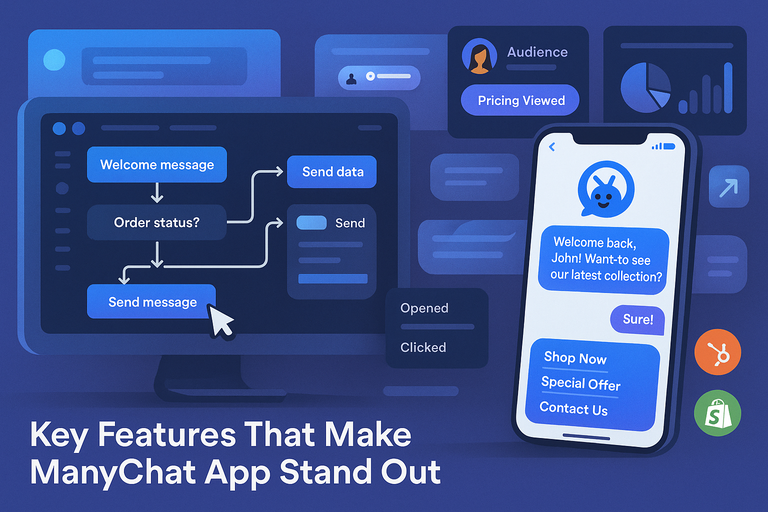
The ManyChat app offers a wide range of automation tools designed to save time, boost engagement, and improve conversions. Let’s explore the core features that make it such a powerful platform.
Automated Chat Flows for Seamless Customer Interaction
The Flow Builder is ManyChat’s crown jewel. It’s a visual, drag-and-drop editor that lets you create conversation paths without any coding knowledge.
Here’s a quick example: From the dashboard, go to Automation > Flows > +New Flow. You’ll see a blank canvas where you can design interactions like:
- Welcome messages for new subscribers.
- FAQ-style responses (e.g., “What are your business hours?”).
- Guided sales conversations that lead to checkout links.
The best part is how easy it is to preview and test these flows in real-time — no publishing guesswork.
AI-Powered Chatbots for Personalized Messaging
ManyChat’s newer AI features make chatbots feel less robotic. Using conditional logic and custom fields, you can personalize messages based on user data — name, purchase history, or behavior.
Example: If a returning customer asks about a product, your bot can greet them with, “Welcome back, John! Want to see our latest collection?”
From what I’ve seen, these personalized touches dramatically increase engagement rates and make automation feel genuinely human.
Audience Segmentation and Targeting Options
Under Audience > Segments, you can organize users based on actions or interests.
For instance, you could create a segment for people who clicked “View Pricing” but didn’t purchase — and later send them a special offer.
Segmentation is powerful because it lets you send relevant messages instead of blasting the same content to everyone. It’s like email marketing, but more immediate and conversational.
Integration With Popular Tools Like Shopify and HubSpot
ManyChat connects seamlessly with third-party apps such as Shopify, HubSpot, Mailchimp, and Google Sheets.
For eCommerce, this means you can automatically:
- Update customers on order status.
- Send personalized product recommendations.
- Capture abandoned carts directly in Messenger.
If you’re using Shopify, the setup is straightforward: go to Settings > Integrations > Shopify > Connect, and ManyChat will sync your product catalog for automated suggestions.
Real-Time Analytics and Performance Tracking
The Analytics dashboard shows how your automations are performing — including open rates, click rates, and subscriber growth.
From Analytics > Overview, you can quickly see which flows convert best and where users drop off.
This real-time data helps refine your approach. I’ve found that even small adjustments (like rephrasing a message or adding a delay between steps) can improve conversion rates noticeably.
Ease of Use: How User-Friendly Is ManyChat App?
ManyChat is often praised for being beginner-friendly, and I completely agree. You can build functional chatbots within minutes, even if you’ve never touched automation software before.
Setting Up Your First Chatbot Step by Step
Let me break it down simply:
- Sign up at ManyChat.com and connect your Facebook or Instagram Business account.
- Navigate to Automation > Flows > +New Flow.
- Use the visual builder to create your messages and actions.
- Hit Publish, and your bot goes live instantly.
It’s that intuitive. You don’t need technical expertise — just a clear idea of what conversation you want to automate.
Understanding the ManyChat Dashboard and Navigation
The dashboard is divided into easy-to-understand sections:
- Home: Overview of performance and audience size.
- Automation: Where you build and manage flows.
- Audience: A contact list with tags and filters.
- Broadcasting: For sending one-time messages to all or segmented users.
Everything is laid out clearly, with tooltips that explain features as you hover — a small but thoughtful touch.
Pre-Built Templates for Faster Bot Creation
ManyChat offers ready-to-use templates for common use cases like:
- Lead generation.
- Appointment booking.
- Product recommendations.
If you’re new, start by visiting Templates > Browse Templates. Pick one that fits your business type, customize it, and go live in minutes.
It’s a huge time-saver, especially for small business owners who can’t spend hours building from scratch.
Learning Curve: How Much Time Does It Take to Master?
From what I’ve experienced and seen with clients, you can get comfortable with ManyChat in just a few hours.
Here’s how the learning curve typically looks:
- Day 1: Build a simple FAQ or welcome flow.
- Day 2–3: Experiment with triggers, tags, and conditions.
- Week 1: Confidently automate conversations and segment audiences.
ManyChat also provides an academy with tutorials and certification courses, which I highly recommend if you want to master advanced automation.
ManyChat App Pricing Plans Explained
The ManyChat app pricing model is designed to be flexible — you can start for free, then scale as your business grows.
I’ve personally tested both the free and paid versions, and the difference in capability is pretty striking once you start managing real customer conversations.
Let’s break down exactly what you get.
Free vs. Paid Versions: What You Actually Get
ManyChat’s Free Plan is a solid starting point if you’re just experimenting with chat automation. You get access to the basic Flow Builder (the drag-and-drop tool where you create automated conversations), along with Messenger, Instagram, and WhatsApp support.
What you can do for free:
- Automate simple welcome messages or FAQs.
- Use growth tools like comment triggers and QR codes.
- Send up to 1,000 messages per month.
However, you’ll quickly feel the ceiling if you’re running a growing business. The free version doesn’t include advanced features like audience segmentation, conditional logic, or analytics tracking — tools that become essential once you want to personalize conversations or track ROI.
That’s where the Pro Plan comes in.
Pro Plan Benefits for Businesses and Marketers
The Pro Plan (starting around $15/month and scaling with subscriber count) unlocks everything ManyChat has to offer — it’s the real deal for marketers and business owners who need automation that converts.
Here’s what you get:
- Unlimited Flows and Messages: No more worrying about limits.
- Audience Segmentation: Target users based on actions or preferences.
- Advanced Integrations: Connect with Shopify, Google Sheets, or HubSpot.
- Smart Triggers: Automate conversations when users click, view, or buy.
- Detailed Analytics: Track message performance, conversions, and engagement in real time.
For example, you can create a rule like:
“If a user clicks ‘Buy Now’ but doesn’t complete checkout, send a follow-up message 1 hour later with a discount code.”
This level of automation is where you start seeing real results — faster responses, more conversions, and less time wasted on manual messaging.
I suggest starting with the free version for a week or two, then upgrading once you see how your audience interacts. The difference in efficiency alone makes the Pro Plan worth every penny.
Is the ManyChat App Worth the Price Compared to Competitors?
In my opinion — yes, absolutely. Compared to other chatbot builders like Chatfuel or MobileMonkey, ManyChat offers a more polished user experience and more integrations for the price.
Here’s a quick comparison table:
| Feature | ManyChat (Pro) | Chatfuel | MobileMonkey |
| Facebook & Instagram Integration | ✅ | ✅ | ✅ |
| WhatsApp Support | ✅ | Limited | ✅ |
| Visual Flow Builder | ✅ | ✅ | ❌ (Text-based) |
| Shopify Integration | ✅ | ✅ | ✅ |
| AI Personalization | ✅ | Partial | ✅ |
| Starting Price | $15/month | $15/month | $19/month |
If you’re a beginner or small business owner, ManyChat’s pricing is one of the most accessible in its category — especially considering how fast it can start producing results.
Pros and Cons of Using ManyChat App
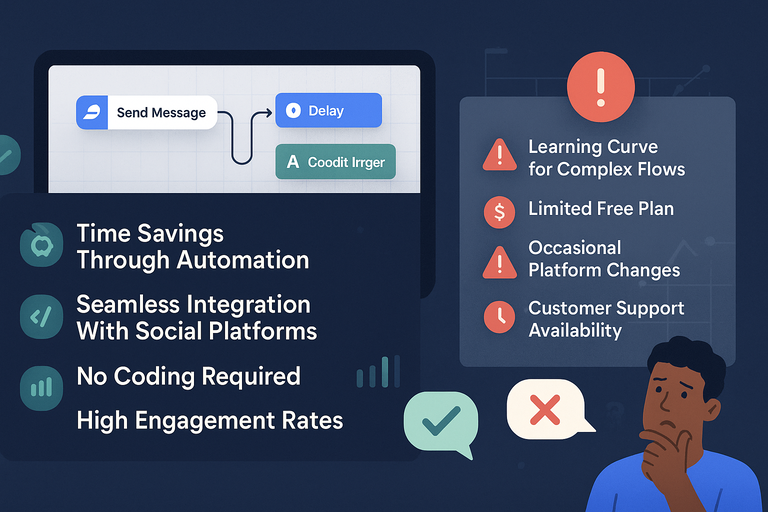
Every tool has its strengths and weaknesses, and the ManyChat app is no different.
After years of using it in marketing campaigns, I’ve come to appreciate its flexibility — but also recognize a few limitations you should be aware of before diving in.
The Biggest Advantages of ManyChat for Automation
- Time Savings Through Automation. Once your flows are set up, ManyChat handles conversations 24/7. I’ve seen businesses reduce manual replies by up to 80% after just a few weeks of automation.
- Seamless Integration With Social Platforms. Because it’s officially partnered with Meta (Facebook and Instagram), setup is smooth and updates rarely break integrations. You just connect via Settings > Channels > Instagram, and you’re ready to roll.
- No Coding Required. The visual Flow Builder means anyone can build a chatbot — literally by dragging message blocks onto a canvas.
- High Engagement Rates. Chat messages have an open rate of over 80%, compared to around 20% for email. ManyChat leverages this beautifully with tools like comment triggers and story replies.
- Multi-Channel Reach. You can automate across Messenger, Instagram, WhatsApp, and SMS from one dashboard. That unified control is incredibly convenient.
Common Limitations and Issues You Might Encounter
Despite all the power, ManyChat isn’t flawless. Here are the most common hurdles I’ve run into:
- Learning Curve for Complex Flows. While basic bots are easy to build, advanced sequences with conditions or external APIs take time to master.
- Limited Free Plan. The free version feels restrictive once you start scaling. You’ll likely upgrade quickly if you’re serious about marketing automation.
- Occasional Platform Changes. Since ManyChat relies on Meta’s API, sudden updates on Facebook or Instagram can temporarily affect functionality.
- Customer Support Availability. Support is mostly through email and the help center. It’s reliable, but not instant — which can be tricky during campaigns.
Still, none of these are deal-breakers. The app continues to evolve rapidly, and the community-driven tutorials make up for most shortcomings.
Real-World Scenarios: When ManyChat Works Best
From what I’ve seen, ManyChat shines in these situations:
- E-commerce Stores: Send order confirmations, upsells, and abandoned cart reminders automatically.
- Local Businesses: Use it to schedule appointments or send directions through Messenger.
- Content Creators: Automate link sharing, lead collection, and fan engagement.
- Event Organizers: Send event reminders and updates directly to attendees’ phones.
For instance, one of my clients — a small clothing boutique — used ManyChat to run a giveaway on Instagram. Every comment with the word “enter” triggered a DM with the contest link. Engagement skyrocketed by 300% in two days.
That’s the kind of magic ManyChat can create when used strategically.
Comparing ManyChat App to Other Chatbot Platforms
There’s no shortage of chatbot builders, but ManyChat consistently ranks among the top for usability and performance.
Let’s see how it stacks up against a few of its closest competitors.
ManyChat vs. Chatfuel: Which Is More Powerful?
Both are major players, but they cater to slightly different users.
- Ease of Use: ManyChat’s visual Flow Builder is simpler and more intuitive than Chatfuel’s block-style editor.
- AI & Personalization: ManyChat leads with conditional logic and user data tagging, which Chatfuel lacks at the same depth.
- Integrations: ManyChat integrates natively with Shopify, HubSpot, and Google Sheets — Chatfuel requires third-party connectors for some of these.
- Support: Chatfuel offers faster support for enterprise plans, while ManyChat focuses more on community learning.
If you’re new to chatbots or want fast deployment, I’d recommend ManyChat. Chatfuel can work better for developers who prefer manual control.
ManyChat vs. MobileMonkey: Which Offers Better Integrations?
MobileMonkey is another strong contender, especially for agencies managing multiple clients.
However, ManyChat wins in terms of user interface and social media depth. MobileMonkey feels more text-heavy, while ManyChat gives a clear, visual workspace.
Integration-wise:
- ManyChat connects directly to Shopify, Meta, and WhatsApp.
- MobileMonkey leans toward web chat and SMS marketing.
If your main audience is on Facebook or Instagram, ManyChat is the stronger option. If you’re doing high-volume lead generation via web forms and SMS, MobileMonkey might suit you better.
How ManyChat Competes With Meta’s Native Automation Tools
Meta has introduced its own basic automation tools for Instagram and Messenger. However, these are minimal — mostly for autoresponders or FAQs.
ManyChat, on the other hand, offers:
- Advanced flows with branching logic.
- Multi-channel automation (Instagram, WhatsApp, SMS).
- Deep analytics and integrations.
Essentially, Meta’s tools are like training wheels, while ManyChat gives you the full bike — with gears, speed, and a turbo button.
Best Use Cases for ManyChat App
The ManyChat app isn’t just for tech-savvy marketers. It’s built for anyone who wants to automate repetitive conversations, nurture leads, and boost engagement without losing the personal touch.
Over the years, I’ve seen businesses — from small shops to large eCommerce brands — use ManyChat in creative and profitable ways. Let’s explore the best scenarios where it really shines.
Growing an Email List With Chat Automation
One of the smartest ways to use ManyChat is for lead generation and email capture. Instead of pushing users to long forms, you can collect emails naturally through conversations.
Here’s how it works:
- Set up a Flow that welcomes new users when they message your page.
- Include a prompt like: “Can I send you our exclusive guide? Just drop your email here.”
- Use the User Input feature to store that email address directly into ManyChat or sync it with your email provider (via Integrations > Mailchimp/HubSpot).
I’ve personally seen conversion rates jump from 3% on web forms to nearly 40% when using this conversational approach. It’s friendlier, faster, and fits perfectly with how people prefer to interact online.
Pro tip: Offer a lead magnet — like a discount or eBook — in exchange for an email. It works wonders for engagement.
Driving Sales Through Messenger and Instagram
If you’re running an online store, this is where the ManyChat app can seriously boost your bottom line. It lets you drive sales directly through Messenger and Instagram DMs, creating frictionless buying experiences.
Here’s a quick example:
- From the dashboard, go to Automation > Flows > New Flow.
- Create a “Product Recommendation” flow with options like “Browse Products” or “View Discounts.”
- Link your Shopify catalog so users can browse and purchase without ever leaving Messenger.
What’s amazing is how human this feels — customers get real-time help, personalized recommendations, and instant checkout links.
One of my clients, a boutique skincare brand, used ManyChat for DM-driven sales campaigns. Within a week, they saw a 25% lift in conversion rates simply because users could shop directly through the conversation.
Providing Instant Customer Support With AI Chatbots
ManyChat’s AI-powered chatbots can instantly reply to FAQs like shipping times, pricing, or returns — saving hours of manual work.
Set it up by going to Automation > Default Reply, then program responses for common queries. You can also add smart conditions like:
“If user mentions ‘refund’ → send refund policy link.”
The best part? You can add a human handover rule that notifies your support team when the question needs a real person’s input.
In practice, I’ve found this hybrid model — bot plus human — cuts response time by over 60%. It’s fast, consistent, and scalable.
Running Giveaways and Promotions Through Chat Campaigns
Giveaways and contests are a fantastic way to grow followers and engagement — and ManyChat automates the entire process.
A simple setup could look like this:
- Use a Comment Growth Tool that triggers when someone comments “enter” on a post.
- ManyChat automatically sends a DM confirming their entry and collects extra details like email or phone.
- You can follow up later with promo codes or product announcements.
It’s fast, transparent, and fun — plus, you’ll collect high-quality leads. During one campaign I ran, a brand grew its subscriber list by 3,200 people in three days using this exact strategy.
How to Maximize Results With ManyChat App
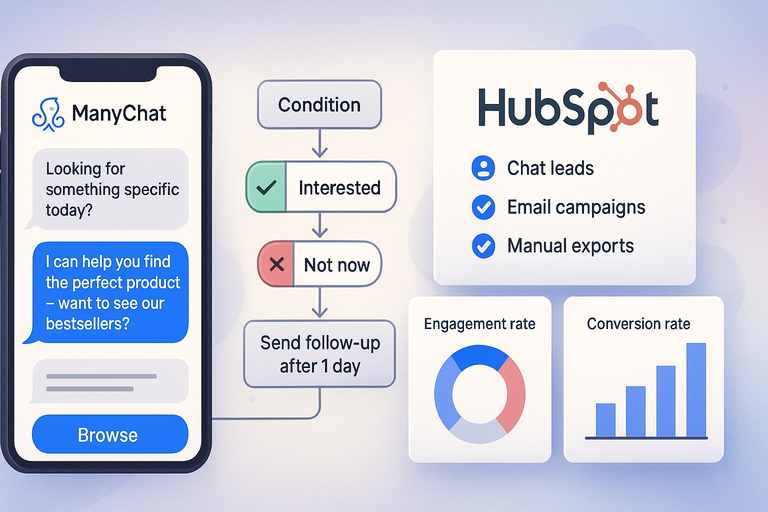
Once your chatbot is live, the next challenge is optimizing it. The ManyChat app gives you plenty of tools to refine, personalize, and measure your automations so they deliver real business value.
Crafting Effective Chat Sequences That Convert
Great chat sequences feel like conversations, not sales pitches. I recommend keeping your flows short, engaging, and action-driven.
Here’s a structure that consistently performs well:
- Hook: Ask a quick, friendly question (e.g., “Looking for something specific today?”).
- Offer: Present a solution or incentive (“I can help you find the perfect product — want to see our bestsellers?”).
- Action: End with a clear CTA (“Tap below to browse.”).
Keep your tone natural — write like you talk. People can tell when a message sounds robotic, and it kills engagement.
Using Conditional Logic for Smarter Conversations
Conditional logic is ManyChat’s secret weapon. It lets your bot respond differently based on what users say or do.
Example path:
“If user clicks ‘Interested’ → send discount code.”
“If user clicks ‘Not now’ → send friendly follow-up after 24 hours.”
You can set this up under Automation > Flows > Add Condition.
This approach gives your automation a “memory.” It makes your bot behave more like a human assistant that learns and adapts over time — which dramatically boosts conversions.
Integrating ManyChat With Email and CRM Tools for Growth
ManyChat integrates seamlessly with marketing tools like HubSpot, Klaviyo, Mailchimp, and Google Sheets.
Why it matters:
- You can sync chat leads to your CRM automatically.
- Email campaigns stay consistent with chatbot messages
- You avoid manual exports, saving hours of admin work.
Here’s how to do it: Go to Settings > Integrations > Choose your platform, then map your fields (like name, email, or product interest).
I advise syncing customer data weekly to ensure everything stays fresh across platforms. It’s one of the easiest ways to scale personalized marketing.
Tracking Data to Continuously Improve Your Campaigns
What gets measured gets improved. ManyChat’s Analytics dashboard shows your open rates, click rates, and subscriber growth.
You’ll find it under Analytics > Overview.
I like to track three key metrics:
- Engagement rate: How many users reply or click.
- Conversion rate: How many complete the desired action (like purchase or signup).
- Drop-off points: Where people stop interacting.
Once you identify weak points, tweak the message tone or flow length. Even small refinements — like shortening delays or rewording CTAs — can raise engagement by 10–20%.
Security, Privacy, and Compliance in ManyChat App
With automation comes responsibility. The ManyChat app takes privacy seriously, but it’s still important to understand how to handle customer data safely and ethically.
How ManyChat Handles User Data and GDPR Compliance
ManyChat complies with GDPR, CCPA, and other major data protection laws.
Practically speaking, this means:
- Users can unsubscribe anytime by typing “stop.”
- All data is stored securely on ManyChat’s servers.
- You can export or delete user data upon request under Audience > Select User > Delete.
If your audience includes European users, I suggest adding a brief privacy message in your flows (“We use this data only to improve your experience”). Transparency builds trust and keeps you compliant.
Ensuring Privacy When Using Customer Information
When automating messages, it’s easy to overstep boundaries. Here are a few practices I follow:
- Never collect more data than necessary (usually name, email, and preferences are enough).
- Avoid sending spammy follow-ups — limit to 1–2 per week.
- Always include an opt-out message like “Reply STOP to unsubscribe.”
This not only keeps you compliant but also improves your engagement rates. Respectful automation earns loyalty.
Steps to Keep Your Chat Automations Safe and Ethical
To maintain safety and integrity:
- Use official integrations only. Avoid shady third-party plugins that access customer data.
- Update permissions regularly. Check your Meta connections in Settings > Channels to avoid expired tokens.
- Limit team access. Give role-based permissions only to necessary users.
- Test your flows privately before launching to the public.
Ethical automation isn’t just a best practice — it’s a brand reputation builder.
Final Verdict: Is ManyChat App Right for You?
After years of testing and consulting with businesses on chat marketing, I can confidently say the ManyChat app is one of the most well-rounded chatbot platforms available today.
Who Benefits Most From ManyChat App
ManyChat is perfect for:
- Small and medium businesses looking to automate customer engagement.
- E-commerce stores needing automated product recommendations and reminders.
- Marketers who want to sync chat data with CRM or email campaigns.
- Content creators and coaches who use Instagram and Messenger to engage followers.
If you want to scale communication without sacrificing authenticity, this tool delivers.
Situations Where You Might Need a Different Solution
ManyChat might not be ideal if:
- Your audience primarily uses LinkedIn or Discord (which ManyChat doesn’t support).
- You require advanced AI conversation design beyond predefined flows.
- You prefer full developer control — in that case, Chatfuel or Dialogflow may suit better.
Still, for 90% of businesses, ManyChat strikes the right balance between simplicity and power.
Expert Tip: How to Test ManyChat Before Committing
I recommend this simple test plan:
- Sign up for the Free Plan.
- Create a basic flow — for example, a “Welcome” message or FAQ reply.
- Run it for 5–7 days and monitor engagement in Analytics > Overview.
- Upgrade to Pro once you see consistent replies or conversions.
You’ll quickly know whether it fits your business needs — and you’ll learn more in a week of hands-on use than in hours of research.

I’m Juxhin, the voice behind The Justifiable.
I’ve spent 6+ years building blogs, managing affiliate campaigns, and testing the messy world of online business. Here, I cut the fluff and share the strategies that actually move the needle — so you can build income that’s sustainable, not speculative.
Related posts:
 Online Marketing Agency: The Essential Tools and Techniques for Success
 Marketing Materials: Best Practices for Increasing Conversions
 ManyChat Bot Benefits No One Talks About
 CallRail Call Tracking: How It Works and Why It Matters
 Why ManyChat Facebook Integration Can Backfire
 Best Ways to Automate ManyChat SMS Campaigns