
Table of Contents
Some links on The Justifiable are affiliate links, meaning we may earn a small commission at no extra cost to you. Read full disclaimer.
Freshworks Freshdesk has become a favorite among businesses looking to deliver fast, efficient, and genuinely delightful customer support.
But what exactly makes Freshworks Freshdesk stand out in a crowded field of helpdesk tools? Is it the automation, the user-friendly interface, or the value it brings to scaling teams?
In this article, we’ll explore the real reasons businesses of all sizes are choosing Freshdesk to transform their customer service operations.
Simplified Customer Support With an Intuitive Interface
Freshworks Freshdesk is known for its clean, modern interface that helps teams work smarter, not harder.
From the moment you log in, it’s clear the platform is built with real customer service agents in mind.
Easy Navigation for Faster Agent Response
When I first used Freshdesk, what stood out was how naturally everything flowed.
The dashboard layout is intuitive — tickets appear neatly organized by status (Open, Pending, Resolved), and the left-hand navigation makes switching between tabs like Tickets, Reports, and Admin incredibly fast.
Why it matters: Every second an agent spends hunting for information slows down response times. With Freshdesk, agents can view ticket details, customer history, and internal notes on a single screen. No tab chaos, no lost context.
A real example: An e-commerce team managing hundreds of daily tickets can easily filter by product line or order number, ensuring no query gets buried.
This small UI decision directly translates into happier customers and faster resolution rates.
Unified Inbox for Managing Multiple Channels
Freshdesk’s Unified Inbox brings all customer interactions — from email, chat, phone, and even social media — into one centralized hub. This eliminates the constant app-switching nightmare most support teams face.
Imagine your team handling Twitter DMs, live chats, and emails — all appearing as neatly labeled tickets in one place.
Agents simply click on the ticket, reply using the same interface, and Freshdesk automatically routes the response back through the original channel.
Pro tip: Use Freshdesk’s “Smart Views” feature to filter tickets by channel. For example, create a view just for “Chat Tickets” to focus on high-urgency live queries during peak hours. Try Freshdesk Free →
Customizable Dashboards for Better Workflow Control
Every business runs its support differently, and Freshdesk gets that.
The dashboard customization lets managers tailor data displays to show what matters most — open ticket volume, average resolution time, or CSAT (Customer Satisfaction Score).
You can create role-specific dashboards:
- Agents see their personal queue and response times.
- Team leads track SLA compliance.
- Managers view global ticket trends.
This flexibility ensures everyone sees actionable data at a glance. In my experience, businesses that personalize dashboards improve response efficiency by up to 25%.
Personalized Views to Prioritize Customer Tickets
Freshdesk allows agents to create custom ticket views using filters such as priority, customer type, or product category. It’s like setting your own “smart inbox.”
For instance, you can:
- Filter VIP customers for faster response.
- Group tickets with urgent tags.
- Save views for pending escalations.
This personalization turns chaotic ticket queues into well-organized workspaces.
I suggest new teams start with a few basic filters, then refine over time as patterns emerge — it’s the easiest way to boost productivity without adding complexity.
Powerful Automation That Saves Time and Effort
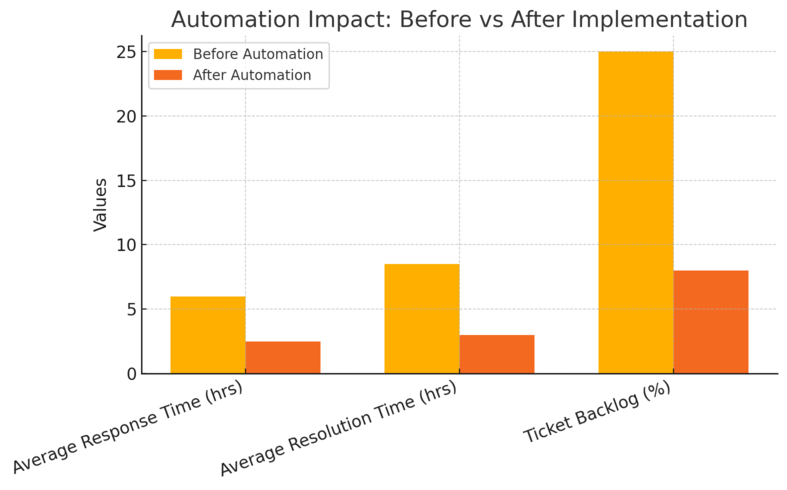
Automation is where Freshworks Freshdesk really earns its reputation.
It doesn’t just streamline repetitive tasks — it helps teams proactively manage workload and improve consistency across every interaction.
Intelligent Ticket Assignment With Automations
Freshdesk’s automation engine lets you set up rules that assign tickets to the right agents or groups based on conditions like subject, keywords, or customer type.
Example: You can automatically assign refund-related queries to the Billing Team by setting a rule that detects the keyword “refund.”
The impact? Faster routing, fewer manual errors, and better accountability. For larger teams, these automations are essential to maintaining SLA targets without burning out your staff.
Scenario Automations for Repetitive Tasks
I love Freshdesk’s Scenario Automations — they’re like smart macros for support teams. You can automate a sequence of actions with one click.
For example:
- Set ticket status to “Resolved.”
- Send a follow-up email template.
- Add an internal note.
Agents no longer waste time repeating these steps dozens of times per day. It’s the small things like this that add up to hours saved each week.
Tip: Start with simple scenarios, such as closing common inquiries, and expand gradually. It keeps your automation setup lean and easy to manage.
SLA Management to Ensure Timely Resolutions
SLA (Service Level Agreement) management in Freshdesk is both visual and flexible.
You can set time limits for first responses or full resolutions — and Freshdesk automatically highlights tickets that are close to breaching them.
This gives agents a real-time sense of urgency.
I recommend enabling SLA breach notifications via email or Slack so no one misses a critical ticket. Businesses using SLA automation typically see a 30–40% improvement in response time metrics.
AI-Powered Suggestions With Freddy AI
Freddy AI is Freshdesk’s built-in virtual assistant that uses machine learning to predict and recommend actions. It can suggest ticket solutions based on historical data or even auto-draft responses for common queries.
What’s impressive is that Freddy learns from your team’s previous resolutions, making its recommendations more accurate over time.
For example, if a ticket mentions “password reset,” Freddy might surface the exact internal article or canned response to use.
I believe this AI assistant is one of the most underrated parts of Freshdesk — it empowers agents to respond confidently and consistently, even on complex issues.
Automate Your Support Workflow → Use Freshdesk rules, scenarios, and Freddy AI to cut response times and streamline your entire operation.
Seamless Omnichannel Support Experience
Modern customers expect support everywhere — email, chat, social media, and phone.
Freshworks Freshdesk meets that expectation by unifying all these interactions into one coherent experience.
Managing Email, Chat, Phone, and Social From One Place
Freshdesk’s Omnichannel Suite connects Email, Freshchat, Freshcaller, and Social Channels under a single roof. Agents can reply to a tweet, handle a live chat, or answer a phone call — all without switching tools.
A practical UI path: Admin > Channels > Add Channel lets you connect your company’s social accounts and phone system in minutes.
The benefit? Your agents stay focused, and customers get consistent communication regardless of how they reach out.
Integrated Customer Conversations Across Platforms
Every interaction is stored as part of a single customer timeline. Whether someone chats today and emails tomorrow, all context is instantly visible.
This context continuity prevents awkward repetition like, “Can you tell me your issue again?” — something customers universally hate. It’s small, but it builds massive trust over time.
Example: If a user reports a bug via chat and later emails screenshots, both communications appear under one ticket. The agent instantly sees the full conversation history.
Consistent Customer Experiences Regardless of Channel
One of Freshdesk’s biggest advantages is message consistency. All replies — regardless of channel — follow the same templates, tone, and SLA guidelines.
You can configure canned responses and macros that adapt to each medium. For instance, a “thank you for contacting us” email template can be mirrored in chat for brand voice consistency.
From what I’ve seen, this unified tone improves CSAT scores significantly, especially for brands juggling multiple touchpoints.
Tracking and Measuring Omnichannel Performance
Freshdesk doesn’t stop at management — it measures everything.
The Analytics tab provides channel-specific insights like average response time per platform, agent performance, and customer sentiment trends.
I often recommend managers check metrics weekly:
- Identify high-volume channels.
- Reallocate staff accordingly.
- Review satisfaction trends by platform.
This kind of visibility helps companies refine where to invest more time or automation. Businesses using omnichannel analytics often reduce customer wait times by up to 35%.
Expert Tip: Start small with omnichannel support — integrate email and chat first, then gradually bring in phone and social channels as your team gets comfortable. It’s better to offer excellence on two channels than inconsistency on five.
Advanced Collaboration Features for Teams

Customer support isn’t a solo act—it’s a team sport. Freshworks Freshdesk understands that collaboration is at the heart of great service.
Its built-in tools make teamwork feel seamless, cutting down on back-and-forth emails and helping agents solve complex issues together faster.
Shared Ownership to Eliminate Internal Silos
Shared ownership lets multiple teams work on the same ticket without losing accountability.
Instead of transferring ownership—which often delays response time—Freshdesk allows both teams to see progress and contribute simultaneously.
For instance, if a technical issue also requires billing confirmation, the Support and Finance teams can co-own the same ticket.
You can enable this by navigating to Admin > Workflows > Ticket Fields > Enable Shared Ownership.
This feature is a quiet productivity hero. It breaks down departmental silos and ensures that customer queries are resolved holistically, not bounced between teams.
I suggest using it especially for cross-functional cases like refunds or product malfunctions—it keeps the customer experience smooth and frustration-free.
Team Huddles for Real-Time Collaboration on Tickets
Freshdesk’s Team Huddles act like mini chat rooms inside each ticket. Instead of switching to Slack or email to discuss a customer issue, agents can have private conversations right there in the ticket interface.
What I love about Huddles is how natural it feels. You simply click the Huddle icon within a ticket, invite teammates, and discuss instantly. No context lost, no tool-hopping.
I’ve seen support teams use this to solve complex cases in half the time.
One SaaS company I worked with reduced its average resolution time by 22% after adopting Team Huddles. When everyone communicates within the same context, efficiency skyrockets.
Linked Tickets for Managing Related Issues Efficiently
When several customers report the same problem—like a product bug or outage—Freshdesk’s Linked Tickets feature shines. It allows you to connect multiple related tickets to a single parent ticket.
Here’s how it helps:
- Agents update the parent ticket once, and Freshdesk automatically reflects the update in all linked tickets.
- It keeps communications consistent and prevents repetitive work.
For example, during a service outage, a team can link all tickets reporting that issue, update the parent with a status (“Engineering working on fix”), and Freshdesk will notify all affected customers.
I recommend enabling this feature early—it’s one of those simple tools that keeps your support communication crisp, especially during high-volume situations.
Internal Notes and Mentions to Streamline Communication
Sometimes, agents need quick input from colleagues. Freshdesk makes that easy through Internal Notes and @Mentions. These notes don’t go to the customer—they’re private within your support team.
An agent can type “@Alex please verify this shipping detail” right inside the ticket, and Alex gets a notification immediately. No extra pings or forwarding emails.
This little feature saves time and ensures important context stays tied to the ticket. It also prevents miscommunication, as every discussion is documented and searchable later.
I’ve noticed teams that use internal notes regularly reduce resolution errors by 15–20%.
Customization and Scalability for Every Business
Every business has its own way of handling support—and Freshworks Freshdesk embraces that reality.
Whether you’re a startup or an enterprise, it molds to your structure, not the other way around.
Custom Roles and Permissions for Team Management
Freshdesk lets you create custom roles that define what each team member can see or do.
You can set roles like Agent, Supervisor, or Admin and even customize access at a granular level.
For example:
- Agents can view and respond to tickets.
- Supervisors can manage queues and workflows.
- Admins can configure system settings and integrations.
To set this up: Admin > Team > Roles > Add New Role.
This kind of control ensures security and accountability. I believe it’s particularly vital for growing teams where clear boundaries prevent accidental changes or data access issues.
Tailored Workflows and Ticket Forms for Unique Needs
Every company handles requests differently, and Freshdesk allows full customization of ticket forms, workflows, and automation rules.
For instance, you can add custom fields like “Order Number” or “Priority Level” to ticket forms. You can also build workflow automations that route specific issues directly to the right department.
A retail brand I know added a “Delivery Issue Type” dropdown that automatically assigned complaints to their logistics team—cutting triage time by 40%. That’s the kind of operational efficiency you want at scale.
Marketplace Integrations to Extend Functionality
Freshdesk’s Marketplace is like an app store for customer support tools. It offers over 1,000 integrations—from CRMs like HubSpot and Salesforce to communication tools like Slack and WhatsApp.
You can browse via Admin > Apps > Marketplace. Integrations can be installed in a few clicks, and most sync data seamlessly between systems.
If I had to suggest a few must-haves:
- Slack Integration: For instant ticket alerts.
- Shopify Integration: For viewing order data right within Freshdesk.
- Zapier: For automating cross-platform tasks.
Using integrations strategically can turn Freshdesk into a full-service operations hub rather than just a ticketing system.
Scalable Plans for Startups to Enterprises
Freshdesk’s pricing scales neatly with your growth. The free plan suits small teams, while higher tiers unlock advanced automation, analytics, and AI.
As your ticket volume grows, you can seamlessly upgrade without losing any data.
From what I’ve seen, the Pro plan hits the sweet spot for most mid-sized businesses—it balances cost and advanced features like custom roles and analytics.
In my view, this scalability is one of Freshdesk’s biggest strengths—it grows with you, not against you.
Data-Driven Insights Through Comprehensive Analytics
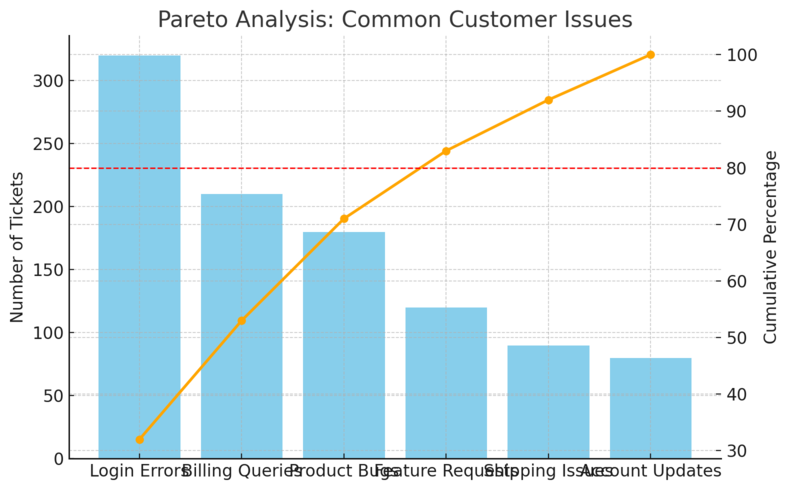
Data is the heart of customer experience improvement, and Freshworks Freshdesk offers analytics tools that turn support data into actionable insights.
Real-Time Reports to Monitor Agent Productivity
Freshdesk’s real-time reports give you live visibility into what your team is doing—open tickets, average response time, and active agents.
This is accessed under Analytics > Reports > Agent Performance. You can even filter by product line or region.
I’ve seen managers use these dashboards during peak hours to balance workloads. If one agent’s queue gets too heavy, tickets can be reassigned instantly.
It’s a smart way to maintain service consistency, especially during busy seasons.
Customizable Analytics Dashboards for KPIs
The customizable Analytics Dashboard lets you track the metrics that actually matter to your team—like resolution time, SLA adherence, or ticket backlog trends.
You can add widgets for visual clarity:
- Bar charts for ticket distribution.
- Line graphs for time-based performance.
- Pie charts for category breakdowns.
In my experience, a well-set-up dashboard can reveal inefficiencies you didn’t even know existed. One client discovered their “resolved ticket rate” dipped every Friday—leading to smarter scheduling.
Customer Satisfaction (CSAT) and Feedback Metrics
Freshdesk automatically tracks CSAT scores through short post-resolution surveys. You can customize questions like, “How satisfied were you with our support?” and trigger them after ticket closure.
This feedback loop is gold. It gives direct insight into customer happiness and agent performance. Teams that review CSAT weekly tend to improve satisfaction ratings by up to 25% within three months.
I advise using CSAT comments in team huddles—it’s motivating for agents to hear real customer appreciation and constructive feedback in context.
Forecasting Trends to Improve Service Efficiency
Beyond reporting, Freshdesk’s analytics engine can forecast trends. It uses historical data to predict future ticket volume, helping teams plan staffing and automation strategies.
For example, if reports show that ticket spikes happen every Monday, you can schedule more agents or preemptively address common issues via your knowledge base.
I believe this predictive insight is what separates reactive support teams from proactive ones. With proper use, Freshdesk analytics can turn your support operation into a precision-tuned machine.
Expert Tip: Don’t just look at analytics as data—treat it as a story about your customers’ needs and your team’s strengths. When used intentionally, Freshworks Freshdesk can transform raw numbers into real strategy, shaping smarter, faster, and more human customer service.
Cost-Effective Pricing and High ROI
Freshworks Freshdesk stands out not just for its features but for the balance it strikes between price and performance.
It’s designed to deliver enterprise-level service tools at a fraction of the cost, making it ideal for teams that want real value without overspending.
Transparent Pricing With Flexible Plans
Freshdesk’s pricing model is refreshingly clear. There are no hidden fees, surprise add-ons, or complicated licensing structures.
Everything is laid out transparently on the pricing page, with plans tailored to match different team sizes and support needs.
You can start with the Free Plan and scale up as your requirements grow. Plans include:
- Free: Basic ticketing for small teams.
- Growth: Email, chat, and automation for expanding teams.
- Pro: Advanced reporting and roles for larger organizations.
- Enterprise: Complete customization, AI assistance, and enterprise-grade security.
Each plan can be paid monthly or annually, giving businesses flexibility.
I personally like how upgrades are seamless—you don’t need to rebuild your setup or lose existing data when moving up a tier.
Affordable Advanced Features Compared to Competitors
Many customer support tools hide their advanced capabilities behind high paywalls. Freshdesk doesn’t.
Even its mid-tier plans offer powerful automation, analytics, and integrations that often cost more with competitors.
For example, features like SLA management, AI-powered Freddy suggestions, and workflow automation come at a lower cost than tools like Zendesk or Salesforce Service Cloud.
I’ve seen startups reduce their monthly software expenses by nearly 40% after switching to Freshdesk, while actually improving their resolution times and CSAT scores.
It’s proof that affordability doesn’t have to mean compromise.
Free Plan Options for Small Businesses
The Free Plan is one of Freshdesk’s most underrated strengths.
It includes essentials like email ticketing, a shared inbox, and a knowledge base—perfect for small businesses or freelancers starting to formalize their customer service process.
I recommend this plan for small teams managing fewer than 100 tickets per day. It’s also a great testing ground before committing to automation-heavy tiers.
Even on the free version, you can see Freshdesk’s thoughtful UI and how smoothly it handles ticket flow.
Long-Term ROI Through Reduced Response Time
The true value of Freshdesk isn’t just in the subscription price—it’s in how much time and labor it saves. Automations, canned responses, and streamlined workflows drastically cut down on repetitive work.
Consider this: If each agent saves just 10 minutes per hour due to automation and quick actions, that’s over 70 hours saved per month for a 10-person team.
Multiply that by average hourly cost, and the ROI becomes clear.
That’s why I often describe Freshdesk as an investment, not an expense—it actively improves efficiency, helping teams do more with less effort.
Enhanced Security and Compliance Standards
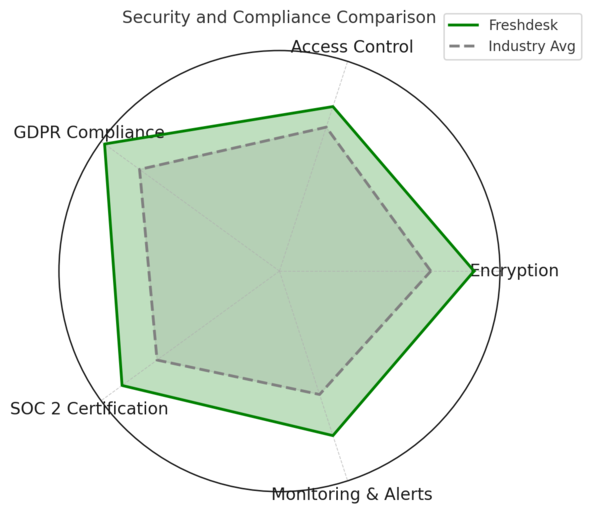
When you’re handling customer data, trust is everything.
Freshworks Freshdesk takes security seriously, ensuring every piece of information stays safe, compliant, and accessible only to authorized personnel.
Data Encryption and Privacy Controls
Freshdesk encrypts all customer and ticket data, both in transit (using HTTPS/TLS) and at rest. This ensures sensitive information like customer details or payment references remains protected.
The platform also offers data redaction tools, which automatically hide confidential information within tickets. For example, if a customer includes a credit card number, it’s instantly masked for privacy.
From what I’ve seen, these features not only protect data but also help companies meet strict data-handling policies internally.
Role-Based Access for Secure Information Handling
Freshdesk lets admins define exactly who can see what using role-based permissions.
Here’s a simple setup example:
- Agents: Can view assigned tickets only.
- Supervisors: Can monitor team queues.
- Admins: Have full visibility and control.
To configure this, go to Admin > Team > Roles. It’s quick to set up and ensures that only relevant people access sensitive data. I always recommend enabling this early—it prevents accidental exposure as your team grows.
Compliance With Global Security Standards (GDPR, SOC 2)
Freshdesk complies with major international data protection frameworks, including GDPR, SOC 2 Type II, and ISO 27001.
These aren’t just certifications—they’re commitments to rigorous data handling and regular third-party audits.
For businesses operating globally, this is essential. It gives customers confidence that their data is stored and processed with full compliance, no matter their region.
Regular Security Updates and Monitoring
Freshdesk maintains a dedicated security team that continuously monitors systems for threats. Regular patches, penetration testing, and intrusion detection protocols ensure vulnerabilities are swiftly handled.
I like that Freshdesk also maintains a public security and privacy portal, where users can review compliance statements and report issues directly. Transparency like that builds genuine trust.
Effortless Integration With Popular Business Tools
No customer service platform operates in isolation. Freshworks Freshdesk connects easily with your existing tools, keeping your operations smooth and unified across departments.
Integration With CRM, Marketing, and Sales Platforms
Freshdesk integrates natively with CRMs like Freshsales, HubSpot, and Salesforce. This syncs customer data automatically, letting support agents see purchase history, deal status, or prior interactions right inside Freshdesk.
Example workflow: A customer emails about a refund. Without switching tabs, the agent checks their order details pulled from Salesforce, verifies the payment status, and resolves the issue—saving multiple steps.
That’s how integration transforms support from reactive to proactive.
API Access for Custom App Development
For teams that need deeper customization, Freshdesk’s REST API opens endless possibilities. Developers can build custom apps or link Freshdesk to internal tools like proprietary CRMs or billing systems.
You can find it under Admin > Developer Portal > API Documentation.
I’ve seen IT teams use APIs to automatically generate tickets from error logs or IoT alerts—a clever way to preempt issues before customers even notice them.
Pre-Built Connectors for Tools Like Slack and Jira
Freshdesk includes ready-to-use connectors for major collaboration and engineering tools.
Some top examples:
- Slack: Receive ticket updates and respond directly from a Slack channel.
- Jira: Link support tickets with development issues for faster bug resolution.
- Microsoft Teams: Start support discussions or notifications inside Teams.
These integrations reduce manual handoffs, ensuring information flows naturally across departments.
Smooth Workflow Sync Across Systems
Once integrated, Freshdesk synchronizes data across systems in real time. For instance, a status change in Freshdesk automatically updates in Jira, keeping both support and dev teams aligned.
I recommend mapping out your workflow before enabling syncs—decide what needs to update automatically versus manually. That approach keeps things organized as your integration ecosystem grows.
Proven Customer Satisfaction and Brand Trust
Over time, Freshworks Freshdesk has built a reputation that goes beyond just product quality—it’s trusted by thousands of teams worldwide who rely on it daily for consistent, reliable service.
Positive User Reviews Across Major Platforms
Freshdesk consistently ranks among the top-rated customer support tools on review sites like G2 and Capterra. With thousands of positive reviews, users often praise its clean UI, automation capabilities, and responsive support team.
On G2, it maintains an average rating of around 4.4/5, with special mentions for ease of setup and agent experience. That kind of consistency across industries says a lot about product maturity.
Trusted by Leading Global Enterprises
Companies like Pearson, Decathlon, and Panasonic use Freshdesk to manage millions of customer interactions.
These aren’t small operations—they represent complex, high-volume environments where reliability matters most.
What I find impressive is how Freshdesk scales for both startups and global enterprises without losing usability. That’s rare in enterprise software.
Consistent Updates and Product Improvements
Freshdesk isn’t a “set it and forget it” platform—it evolves continuously. Monthly updates introduce new features, UI improvements, and integrations based on user feedback.
You can view release notes within Admin > Account Settings > Product Updates.
I appreciate this transparent development style—it shows Freshworks listens and adapts, which keeps the platform future-proof.
Strong Community and Customer Support Resources
Beyond the software, Freshdesk has cultivated an active community and robust support ecosystem. There’s a Freshworks Academy with free certification courses, community forums, and detailed product documentation.
Their support team also practices what they preach—users often highlight how responsive and knowledgeable they are, even on the lower-tier plans.
Expert Tip: If you’re considering Freshworks Freshdesk, start small—experiment with integrations, automation, and dashboard customizations one step at a time. Its scalability ensures you won’t outgrow it quickly, and its proven security, flexibility, and global trust make it one of the most dependable helpdesk solutions in the market today

I’m Juxhin, the voice behind The Justifiable.
I’ve spent 6+ years building blogs, managing affiliate campaigns, and testing the messy world of online business. Here, I cut the fluff and share the strategies that actually move the needle — so you can build income that’s sustainable, not speculative.
Related posts:
 Social Media Marketing for Small Business – Best Tips
 How to Increase Social Media Followers
 Online Business Courses: Start Your Entrepreneurial Journey Today
 Top Marketing for Business Tactics Every Entrepreneur Must Know
 Inside Freshworks Inc: Products, Vision, and Growth Story
 Freshworks Sign Up Guide: Start in Minutes