
Table of Contents
Some links on The Justifiable are affiliate links, meaning we may earn a small commission at no extra cost to you. Read full disclaimer.
Ux design freelance work can feel exciting and unpredictable at the same time, especially when you’re trying to attract clients and build real trust.
I’ve been in that early-stage grind myself, wondering how to stand out in a crowded market. What does it actually take to consistently land clients who value your skills and see you as a reliable partner?
This is exactly what we’ll break down here.
Proven Ways To Attract Clients In UX Design Freelance
People usually hire a UX designer when they feel you can solve a painful problem. I’ve noticed the more clearly you demonstrate this, the faster clients trust you.
Creating A Portfolio That Shows Real Problem-Solving
A portfolio becomes far more persuasive when it explains how you think rather than just showing pretty screens.
I always suggest structuring each project like a story: what was broken, what limited users, and what changed after your redesign.
Clients love clarity, so make it easy to skim. Use section labels like Challenge, Research Insight, Solution, and Outcome.
A strong example is walking people through a real-flow improvement. Maybe you redesigned a checkout, removed two unnecessary steps, and saw reduced drop-offs in user tests. Even a small metric such as a 15% faster task completion time instantly makes your work look tangible.
For tools, Figma works well because you can attach interactive prototypes and comment threads. I often embed a direct link labeled View Prototype so clients immediately see my process.
It builds trust faster than static screenshots. Position each project around one core transformation so clients don’t get lost in details.
Positioning Your Value Clearly For Different Types Of Clients
Different clients hire UX designers for different reasons. A startup founder cares about speed and validation. An enterprise client cares about consistency, accessibility, and reducing internal friction.
I’ve learned that tailoring your value to each type makes outreach far more effective.
One simple method is to create separate landing pages or portfolio sections.
For example: UX for SaaS, Ecommerce UX, Mobile App UX. Each page highlights relevant problems. In SaaS, stress reducing churn or improving onboarding. In ecommerce, stress increasing conversions or improving product discovery.
I’ve found this selective framing works because clients feel “seen.” They’re not hiring a generalist; they’re hiring someone who understands their world.
Even using their language helps, such as onboarding flow, product-market fit, enterprise governance, or ADA compliance.
Using Social Proof To Strengthen Your Personal Brand
Social proof reduces uncertainty. When a client is unsure, testimonials, reviews, and logos often become the deciding factor. If you’re early in your UX design freelance journey, I always recommend collecting feedback after finishing even small projects.
Instead of generic praise, ask clients to mention specifics like: speed, clarity, research insights, or business impact. These details strengthen your narrative.
Social platforms such as LinkedIn allow you to request recommendations that appear directly on your profile.
I’ve seen freelance designers land 4–5 clients simply because a previous client described how the designer simplified a chaotic onboarding process.
If you lack clients, create social proof through public UX critiques, teardown videos, or UX audits. These show you know what you’re doing, even before someone hires you. It’s an easy way to reduce perceived risk.
Building Authority With UX Writing, Case Studies, And Content
Writing builds authority faster than anything else. When you publish practical UX insights, people begin seeing you as a trusted thinker rather than a service provider.
I usually advise choosing one platform—LinkedIn, Medium, or your own website—and posting consistently.
Case studies become even more powerful when combined with UX writing. A short piece like How I Simplified A Dashboard Workflow In 3 Steps not only showcases your work but also gives potential clients something to learn. You’re helping them before they even pay you.
Content also improves search visibility. Someone searching for “improve UX conversion for ecommerce” might land on your article and eventually contact you. That’s how organic demand builds: small proof points accumulating over time.
Leveraging Online Communities Where Clients Search For Designers
Communities carry their own economy of attention. Places like Indie Hackers, Designer Hangout, GrowthHackers, Reddit’s r/Entrepreneur, and Slack groups for founders are where clients often search for someone to solve a UX gap.
The best approach isn’t to pitch immediately. Engage in real problems. Share insights. Offer small wins.
I’ve seen designers land long-term clients simply by answering a question like Why are users abandoning step two of my signup? with a simple breakdown.
I personally like Product Hunt discussions for spotting teams launching new apps. They often need UX help right after launch. Community engagement works because your value becomes visible, not salesy.
Tailoring Proposals That Reflect Client Goals, Not Just Deliverables
Most proposals fail because they feel like menus: wireframes, flows, prototypes, handoff. Clients don’t buy deliverables—they buy outcomes. I recommend rewriting proposals in problem-first language.
Instead of writing “User research and prototype,” write something like:
Reduce user confusion during onboarding and test improved flows within seven days.
A strong proposal includes:
- The problem as the client experiences it
- The risk of not solving it
- Your approach in simple language
- A small timeline with clear checkpoints
- Expected outcome
Short, simple, and client-focused proposals convert more reliably. You’re showing empathy, not selling tasks.
Effective Lead Generation Channels For UX Design Freelancers
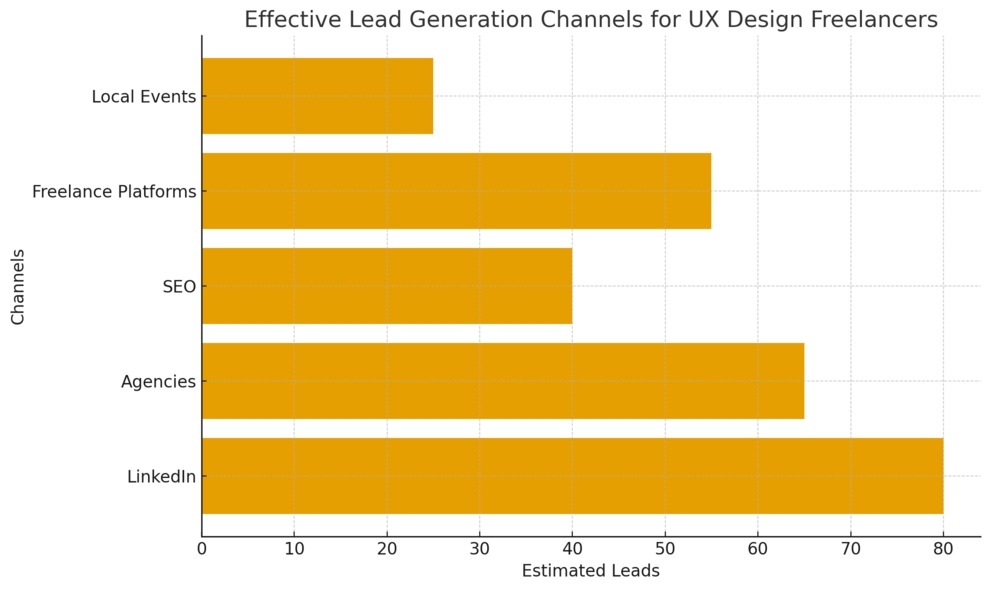
Many freelancers wait for referrals, but proactive lead generation offers more control. Once you understand where clients spend time, you can meet them there naturally.
Using LinkedIn To Spark Conversations And Warm Leads
LinkedIn is where decision-makers already look for talent. Instead of cold messages, focus on building visibility.
I suggest posting UX insights 2–3 times a week. Small lessons from a project, a UI critique, or a research observation can attract founders and product leads.
To start conversations, comment thoughtfully on posts from founders, product managers, or VPs of growth. Ask useful questions or share an example.
Over time, your comments become mini-billboards showing your thinking.
A practical workflow that’s helped me:
- Search “hiring UX” or “need UX” in the LinkedIn search bar
- Filter posts from Past Week
- Respond with a short, helpful note and offer to review their project
This often creates warm leads instead of chilly cold outreach.
Finding High-Value Work On Select Freelance Marketplaces
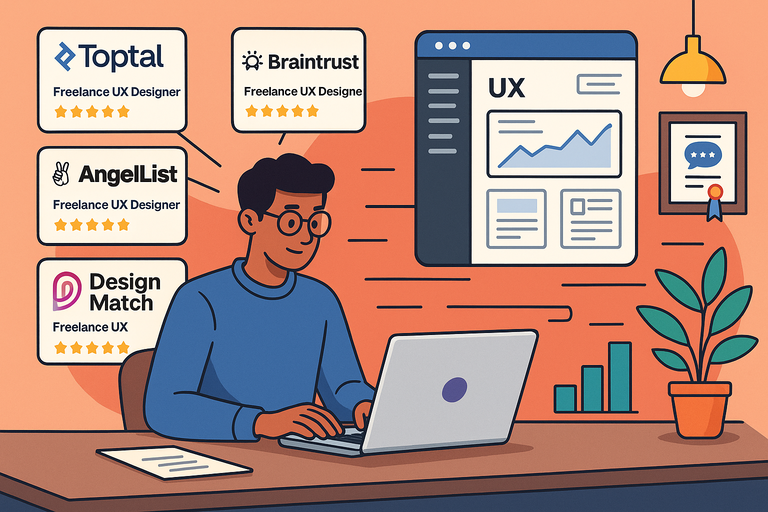
Not all platforms deliver quality clients. I’ve seen the best results from Upwork, Toptal, and Contra because these platforms attract clients who actually value UX design, not low-cost work.
A useful tactic is niching your profile. A profile focused on “UX for SaaS dashboards” or “UX for mobile onboarding flows” stands out. Clients searching for something specific will choose expertise over generalists every time.
Include quick project samples and a short video introduction. Upwork data shows that freelancers with intro videos get up to 40% more client responses.
A simple 30-second clip explaining your process makes the decision easier for clients who are browsing quickly.
Connecting With Agencies That Regularly Outsource UX Projects
Agencies often need extra UX support during busy periods. Partnering with them can create consistent work.
I usually look for branding agencies, front-end development studios, and small product design studios.
A strong outreach email is simple:
- Explain what you specialize in
- Show one relevant project
- Offer availability in a friendly tone
Agencies appreciate freelancers who are consistent and proactive. Once you build trust, they usually return for repeat work. It becomes one of the most stable lead sources for UX design freelance careers.
Applying Content SEO To Attract Clients Organically
Organic search works when you publish content that answers real UX questions. If someone searches “improve app onboarding”, “reduce form abandonment UX”, or “best UX audit checklist”, they find your article and see you as a specialist immediately.
To keep content simple, write guides from your own experience.
For example:
- How I Reduced User Drop-Off In A Signup Flow
- What I Learned From Testing A SaaS Dashboard With 12 Users
- A UX Audit Checklist For Small Teams
Once indexed, these pieces work 24/7. You’re building a passive lead engine that compounds over time. That’s how many freelancers escape feast-or-famine cycles.
Attending Local Events Where Decision-Makers Gather
Offline networking still works because people trust who they’ve met. Design meetups, small-business gatherings, product-management events, and startup pitch nights are perfect places to meet potential clients.
I like to approach these events as learning opportunities, not sales missions. Ask people what they’re building and what they’re struggling with. When UX problems come up, share simple ideas or examples from your work. It naturally leads to follow-ups.
Sometimes a 10-minute conversation at a local meetup turns into a $5k–$10k project. This happens because clients feel connected to you as a person before they evaluate your skills.
Expert Strategies To Build Trust With UX Design Clients
Trust builds faster when a client feels guided, understood, and kept in the loop. I’ve learned that most clients aren’t looking for perfection — they’re looking for clarity and consistency.
Communicating Process Clearly From First Contact
Clients often worry about hiring a UX designer because they don’t understand the process. I’ve found that the moment you explain your steps in simple language, they relax.
Instead of throwing terms like heuristic analysis or interaction models at them, walk them through what actually happens.
Explain your path with simple milestones:
- Discovery: Understanding the product and user goals.
- Research: Interviews, surveys, and usability tests.
- Design: Wireframes, user flows, and prototypes.
- Validation: Testing with users or stakeholders.
- Handoff: Preparing files in tools like Figma, plus documentation.
A short Loom video can help here. Show a 20-second screen recording of your workflow in Figma (Menu → File → Show Version History). It feels real and transparent.
When clients see your plan, they stop worrying about uncertainty, and trust builds naturally.
Setting Expectations And Boundaries To Show Reliability
Boundaries create structure. Without them, projects stretch, communication slips, and clients lose confidence. I suggest starting every project with a clear expectations document. It can be one page. Nothing fancy.
Include things like:
- How often you’ll provide updates
- What deliverables they should expect weekly
- Your typical response time
- Your working hours
- What counts as extra work
When I explain these items upfront, clients usually say they appreciate the clarity. They like knowing what’s normal and what isn’t. It saves you from tough conversations later and signals professionalism.
Imagine a client who messages late at night asking for urgent changes. If you’ve already shared your working hours, you avoid friction and the relationship stays healthy.
Delivering Early Quick Wins To Build Confidence Fast
Quick wins are small but meaningful improvements delivered early. Clients love them because they see immediate progress. It’s the fastest way I know to build trust in the first 72 hours of a project.
A quick win could be something like simplifying a confusing form, cleaning up layout spacing, or restructuring a messy navigation. These don’t require deep research, just expert eyes.
Product teams often sit with these issues for months. When you fix one in a day, they feel relief. They realize you’re not just a designer — you’re a problem-solver who makes their life easier.
Quick wins also create momentum. Once clients see your speed and competence, they stop micromanaging and give you creative freedom.
Using Transparent Pricing To Avoid Misunderstandings
Pricing anxiety is real for clients. When the cost isn’t clear, they fear being overcharged or surprised. I’ve learned that transparency removes most of that tension.
I prefer sending a simple pricing breakdown that shows what’s included and what isn’t.
For example:
- User interviews: 5 sessions of 30 minutes each
- Wireframes: 8–12 screens
- Prototypes: Interactive, desktop or mobile
- Revisions: Two rounds included
The more specific you are, the fewer conflicts you’ll face later. If you use tools like Notion or Trello for project tracking, share them. Clients love seeing progress attached to a timeline.
Transparent pricing also allows you to raise rates more confidently later, because clients understand what they’re paying for.
Sharing Work-In-Progress Updates To Increase Client Buy-In
Sharing work early feels scary, especially if things are rough. But clients appreciate transparency far more than polished perfection.
I suggest weekly or twice-weekly updates, even if it’s just a screenshot or voice note explaining where things are heading.
Small updates create shared ownership. When clients feel involved, they trust you and stop requesting sudden direction changes.
A simple update could include:
- Current screens you’re shaping
- Insights from user tests
- What you’re planning next
- Anything you need from them
Tools like Figma make this easy. Use the Share → View Prototype link so clients can explore without editing. They’ll feel included without disrupting your workflow.
Step-By-Step Ways To Improve Client Retention In UX Freelance Work
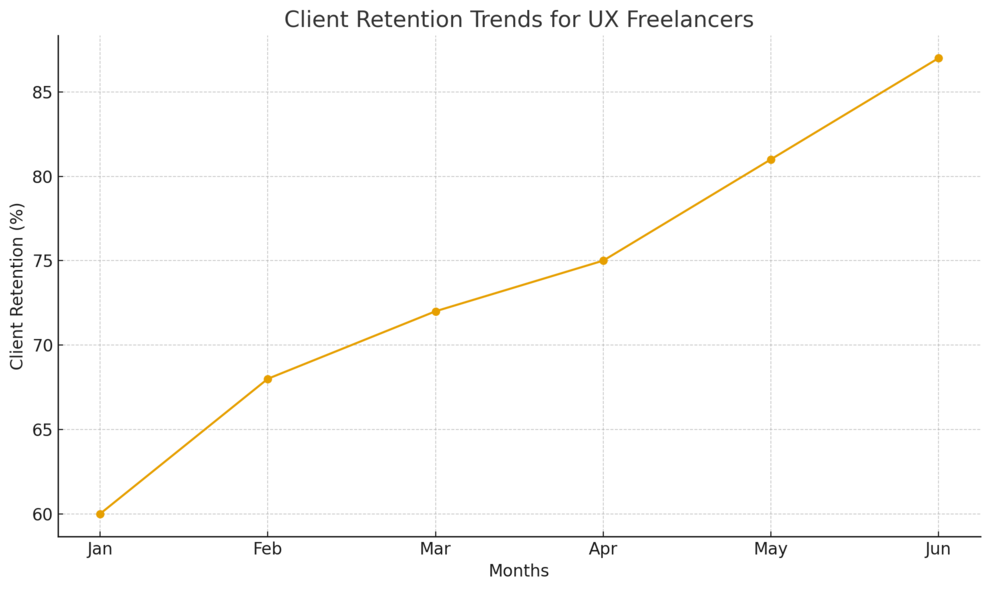
Retention is where freelance stability comes from. The more trust a client has in you, the longer the relationship lasts — and the more predictable your income becomes.
Offering Post-Project Support That Encourages Repeat Work
Clients love knowing you won’t disappear the moment the project ends. I usually offer small post-project support windows, such as 14 days of message-based guidance or minor adjustments.
This doesn’t mean unlimited free work. It’s about reassurance. When you frame it like a safety net, clients feel cared for and often extend the relationship.
You can offer structured support packages too:
- Monthly UX audits
- Quarterly usability testing
- Feature-specific redesigns
If a client sees value in continuous improvement, they keep coming back for months or years. Support becomes a natural retention engine.
Documenting UX Decisions So Clients Feel Secure And Informed
Documentation sounds boring, but it’s a trust multiplier. When clients understand the logic behind each decision, they’re far less likely to question your work or request random changes.
I suggest keeping documentation simple:
- Problem being solved
- Insight driving the decision
- Why this design supports user goals
- What alternatives were considered
When clients present your work to stakeholders, this documentation helps them defend your choices. I’ve had clients say this alone saved them hours of debate in product meetings.
Tools like Notion work well for this because you can create a clean page per feature and embed Figma frames. It becomes a living knowledge base the client can return to.
Gathering Feedback And Turning It Into Visible Improvements
Feedback loops show clients you’re adaptable. I try to schedule short review sessions where the goal isn’t critique — it’s alignment. Clients feel involved, empowered, and respected.
When you apply feedback quickly, trust skyrockets. Even small adjustments like spacing tweaks or button placement help clients feel heard.
Use concise prompts to guide the feedback:
- What feels confusing?
- What needs more clarity?
- What would you want a user to do here?
This keeps conversations focused and prevents endless revisions. It also shows you’re leading the project strategically rather than reacting to random preferences.
Creating A Seamless Onboarding Experience For Long-Term Clients
Strong retention often starts with onboarding. When your onboarding process feels structured, clients sense competence from day one.
I usually include:
- A welcome message with next steps
- A short timeline
- A shared folder (Google Drive or Notion)
- A kickoff questionnaire (about users, product goals, KPIs)
When clients answer these questions, you learn exactly what matters to them. I’ve found that clients who feel understood during onboarding are more likely to stay long-term.
A smooth onboarding also reduces friction, confusion, and guesswork — three things that often push clients away.
Smart Tools That Help Freelance UX Designers Build Credibility
The right tools make you look organized, thoughtful, and genuinely expert.
I’ve seen clients trust me faster when they see structured research, clear wireframes, and smooth project communication.
Using Research Tools Like Hotjar And Maze To Add Depth
Clients love seeing evidence behind your decisions. Research tools like Hotjar and Maze help you show exactly what users struggle with.
Hotjar gives you heatmaps and screen recordings. When I share a Hotjar heatmap with a client, it instantly proves where users pause, rage-click, or abandon a page. You can access it through the dashboard: Hotjar → Insights → Heatmaps.
This level of visibility makes clients feel you’re working with real signals, not assumptions.
Maze is perfect for unmoderated user testing. You can upload a Figma prototype directly (Maze → New Project → Add Prototype), share a link with testers, and gather usability metrics like task success rate or time on task. Maze reports look polished, which makes you look polished too.
A founder seeing side-by-side user flows, complete with drop-off points, will trust your recommendations without hesitation.
Presenting Wireframes With Figma For Clear Client Alignment
Wireframes are easier for clients to digest when they’re interactive. Figma helps you avoid confusion while making the early process feel “real.”
I usually create low-fidelity wireframes first, then connect them with simple interactions: Figma → Prototype → On Click → Navigate To. This lets clients click through the flow instead of imagining it from static images.
Clients often tell me this step reduces anxiety because they finally see how screens connect. It also saves you revision cycles. When a client experiences the flow early, they rarely request major changes later.
If you want to increase alignment even more, record a short walkthrough with Loom showing how the wireframe solves the intended user problem. It’s a tiny effort that builds a huge amount of trust.
Managing Client Projects With Notion Or Trello
Project management tools don’t just keep you organized — they reassure clients that you can handle bigger responsibilities. Notion and Trello work well because they’re simple, visual, and collaborative.
In Notion, I often create a shared project page with sections like:
- Timeline
- Milestones
- Design files
- User research notes
- Pending tasks
Clients love this central hub because they don’t need to hunt for information across email threads.
Trello is perfect if a client prefers a Kanban board. I create lists like To Review, In Progress, and Completed. It helps clients see progress at a glance and reduces “just checking in” messages.
A visible workflow makes your freelance UX services feel mature and reliable.
Using Feedback Platforms To Streamline Revisions And Trust
Feedback tools help you avoid long email chains, misunderstandings, and vague comments. They also show you value collaboration.
I like using Markup.io or Figma Comments. Clients can click directly on the interface and leave context-rich notes. It’s faster and clearer for everyone.
For example, Figma → Comment → Pin lets the client place feedback on a specific button or field. This reduces revision time dramatically.
When clients see you using tools that keep communication clean, it signals professionalism and builds deeper trust quickly.
Common Mistakes That Push UX Freelance Clients Away
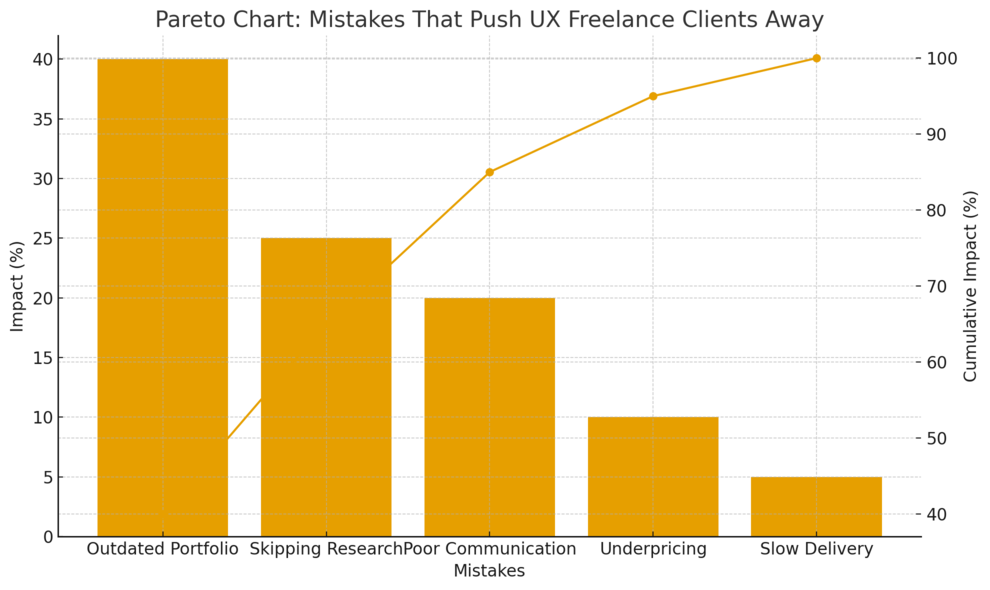
Even skilled designers lose clients because of avoidable mistakes.
I’ve made a few myself, and each one taught me something important about how clients perceive value.
Overloading Portfolios With Unrelated Or Outdated Work
A bloated portfolio confuses clients and makes you look unfocused. Clients want to see relevant projects, not your entire history.
If you’re doing ux design freelance work today, remove old school assignments or unrelated graphic design pieces. Keep 3–5 strong projects that show measurable improvements.
A lean portfolio builds more trust than a chaotic one.
Skipping Research And Jumping Straight Into Visual Design
Some freelancers skip research because they think visuals are more impressive. But clients lose trust when you can’t justify your design choices.
Even light research helps. Interviews, heuristic reviews, and quick user tasks can uncover issues that visuals alone can’t solve.
When you show a client a simple insight like “80% of users couldn’t find the pricing button”, they instantly understand why your redesign is necessary.
Research doesn’t have to be long or expensive — it just has to be thoughtful.
Communicating Too Little During Long Project Phases
Silence scares clients. When they don’t hear from you, they assume something is wrong or delayed.
You don’t need long updates. A weekly message or a two-minute Loom video is enough:
- What you finished
- What’s next
- Any blockers
This simple rhythm prevents distrust and keeps clients feeling supported.
Underpricing Services And Creating Doubt About Quality
Low pricing attracts the wrong clients and creates doubt in the good ones. I’ve noticed that when you price too low, clients assume you lack experience or confidence in your skills.
Instead, tie your price to outcomes: reduced friction, higher conversions, better retention, cleaner workflows. Clients pay more when they understand what they’re getting.
When your pricing is clear and confident, trust follows naturally.
How To Differentiate Your UX Design Freelance Services
The ux design freelance market is crowded, but differentiation doesn’t require flashy branding.
It requires clarity. Clients choose the designer who feels like the best fit for their specific need.
Defining A Niche That Aligns With Your Strengths
Niches make you easier to hire. Clients prefer specialists because they want someone who understands their environment.
I recommend choosing a niche based on what you enjoy or where you’ve had the best results.
Some strong niches include:
- SaaS dashboards
- Ecommerce UX
- Mobile onboarding flows
- Fintech interfaces
When your niche matches your strengths, the work feels lighter and your portfolio becomes more coherent.
Creating Signature Frameworks That Simplify Your Process
Frameworks make your service feel more premium. They also help clients understand your process easily.
You can craft simple frameworks like:
- The 5-Step Onboarding Optimization System
- The Rapid UX Audit Method
- The Usability Insight Loop
I’ve noticed that when clients see a named process, they see expertise rather than generic design steps. It’s a subtle but powerful shift in perceived value.
Using Personal Branding To Show Your Unique Perspective
Personal branding isn’t about being loud. It’s about being clear and consistent. Share what you believe about UX, how you solve problems, and what you think makes user experience meaningful.
Posting short insights on LinkedIn or creating weekly UX breakdowns helps potential clients understand you before they ever speak to you. When they reach out, the trust is already half built.
Your perspective becomes an asset no one else can copy.
Specializing In High-Demand UX Skills That Clients Value
Some UX skills are always in demand because they directly impact business results.
I often advise learning skills like:
- User research and interviews
- Conversion-focused UX
- Information architecture
- Accessibility (WCAG standards)
- Usability testing and analysis
These skills let you solve deeper problems, not just visual ones. Clients who want measurable improvements will immediately prefer you over designers who focus only on UI aesthetics.

I’m Juxhin, the voice behind The Justifiable.
I’ve spent 6+ years building blogs, managing affiliate campaigns, and testing the messy world of online business. Here, I cut the fluff and share the strategies that actually move the needle — so you can build income that’s sustainable, not speculative.
Related posts:
 How to Find High-Paying UX Freelance Clients Online
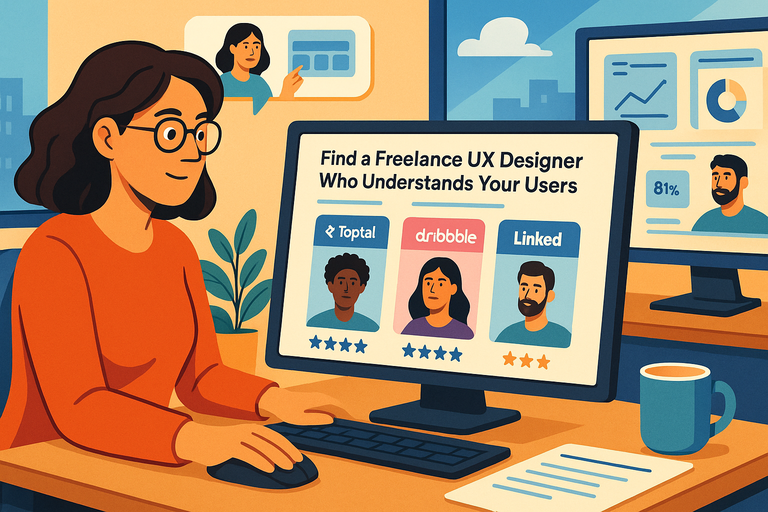 Find a Freelance UX Designer Who Understands Your Users
 Is Freelancer Worth It: Make Good Money
 Legitimate Transcription Work From Home
 How Fiverr Affiliate Program Will Make You Tons Of Cash
 How Does Udemy Work? Your Ultimate Guide to the Online Learning Platform