
Table of Contents
Some links on The Justifiable are affiliate links, meaning we may earn a small commission at no extra cost to you. Read full disclaimer.
Data driven marketing solutions are transforming how businesses make decisions, optimize campaigns, and achieve measurable ROI. Instead of guessing what works, marketers can now track every click, conversion, and customer interaction with precision.
But how exactly do these solutions boost real ROI so quickly—and what tools, tactics, and metrics make it possible?
This guide breaks down the core strategies and technologies behind data-driven growth so you can confidently apply them to your marketing efforts.
Understanding The Power Of Data Driven Marketing Solutions
Data driven marketing solutions help you make smarter, faster, and more profitable marketing decisions.
Instead of relying on gut feeling, you act on verified data—turning insights into measurable ROI.
Why Data-Driven Marketing Outperforms Traditional Methods
Traditional marketing often depends on assumptions. You might run an ad hoping it works, but without concrete data, you can’t be sure why results fluctuate. Data-driven marketing changes that.
It gives you:
- Precise audience targeting: You can reach people who are most likely to convert, not just a general demographic.
- Performance clarity: Every action—clicks, conversions, retention—is measurable.
- Budget efficiency: You invest where results are proven.
I believe the biggest win is transparency.
For example, using Google Ads’ conversion tracking, you can instantly see which keywords are producing ROI and pause those that waste spend. That’s something traditional marketing could never deliver in real-time.
How Real-Time Data Enhances Decision Making And Agility
When you track metrics live—through tools like Google Analytics 4 or Meta Business Suite—you can pivot campaigns instantly.
Let’s say you’re running a paid campaign, and CTR (click-through rate) drops below 2%. Real-time data allows you to adjust ad copy or targeting within hours instead of waiting for a post-campaign report.
This agility creates a compounding advantage: campaigns become self-optimizing. The faster you learn, the less you waste.
The Role Of Predictive Analytics In Forecasting ROI
Predictive analytics uses machine learning to forecast outcomes. Tools like HubSpot’s predictive lead scoring or Salesforce Einstein analyze patterns in past customer data to predict who’s most likely to buy.
Here’s a quick example: if historical data shows users who visit a pricing page twice have a 70% higher conversion probability, predictive models prioritize those users automatically.
I recommend using these insights to reallocate ad spend toward segments with the highest predicted ROI.
Connecting Customer Behavior Data To Campaign Optimization
Every customer leaves a trail—page visits, email opens, social clicks. When this behavior data is unified (say, using Segment or HubSpot), you can tailor campaigns at every touchpoint.
For instance:
- Users reading multiple blog posts about “SEO automation” might receive a targeted email promoting an AI-driven SEO tool.
- Visitors abandoning carts might get retargeted ads with personalized offers.
This direct connection between data and creative execution shortens the gap between strategy and impact, making ROI growth almost immediate.
Identifying The Right Data Sources For Accurate Insights
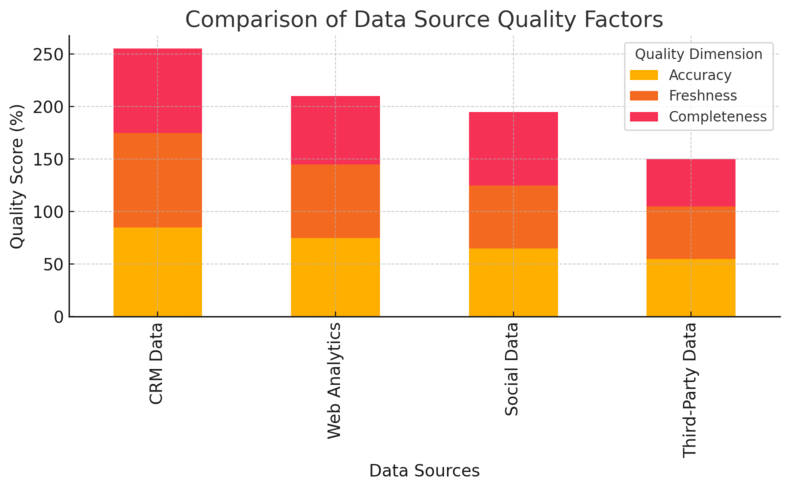
The quality of your marketing insights depends on where your data comes from. Using the right mix of data sources ensures accuracy and deeper personalization.
First-Party vs Third-Party Data: Which Drives Better Results
First-party data—collected directly from your audience through your website, email, or app—is the gold standard for accuracy and privacy compliance. Third-party data, purchased from external providers, offers scale but less reliability.
Here’s the breakdown:
- First-party data: Accurate, consent-based, and directly tied to your customer journey.
- Third-party data: Broader audience reach but limited context.
I suggest investing more in first-party data collection through tools like HubSpot forms or Google Tag Manager. It’s future-proof and builds trust.
Leveraging CRM Data To Strengthen Personalization
Your CRM (Customer Relationship Management) system—like Salesforce, Pipedrive, or HubSpot—holds valuable behavioral and transactional data. When used effectively, it turns generic campaigns into deeply personalized experiences.
For instance, if a CRM note shows a prospect downloaded an “email marketing guide,” the next follow-up can offer a personalized email audit rather than a generic sales pitch.
That kind of contextual engagement significantly improves conversion rates.
Using Web And Social Analytics To Map Customer Journeys
Web analytics tools like Google Analytics 4 and social analytics dashboards from platforms like Meta or LinkedIn reveal where your audience comes from and what keeps them engaged.
To map journeys effectively:
- Track traffic sources (organic, paid, referral).
- Identify top content by engagement rate.
- Measure drop-off points in the conversion funnel.
This helps you visualize how people move from awareness to purchase—and where to intervene for maximum ROI.
Integrating Data From Multiple Channels For Unified Insights
Data scattered across systems creates blind spots. Integrating platforms through tools like Zapier, Segment, or Snowflake centralizes information, making it easier to spot trends.
A unified dashboard combining CRM, email, and ad data can reveal patterns you’d otherwise miss—like how a specific ad campaign drives not only leads but long-term customers.
I advise setting up automated syncs between key tools to eliminate manual reporting and ensure consistency.
Turning Raw Data Into Actionable Marketing Intelligence
Raw data alone doesn’t improve ROI—it’s how you process and act on it that matters.
Turning data into intelligence requires structure, tools, and focus.
How To Clean, Organize, And Standardize Your Marketing Data
Dirty or inconsistent data leads to misleading insights. Before analysis, clean your datasets.
That means:
- Removing duplicates.
- Standardizing formats (e.g., “U.S.” vs “United States”).
- Validating email and phone entries.
I recommend using tools like OpenRefine or Excel Power Query for basic cleaning, and automated workflows in HubSpot for ongoing standardization. Consistency ensures every decision stems from reliable insights.
Tools That Transform Analytics Into Real ROI (Google Analytics 4, HubSpot, Tableau)
Each of these tools serves a different but complementary purpose:
- Google Analytics 4 (GA4): Tracks website performance, user journeys, and conversion events with predictive modeling.
- HubSpot: Integrates CRM data with marketing automation, allowing campaign-level ROI tracking.
- Tableau: Visualizes large data sets to uncover performance trends quickly.
A practical example: use GA4 to identify top-converting pages, feed that insight into HubSpot for email segmentation, then visualize results in Tableau. That closed-loop process directly connects analysis to ROI impact.
Using AI And Machine Learning For Smarter Targeting
AI models—like those in Meta Ads Manager or Google’s Performance Max—use machine learning to predict which audience segments will deliver the best ROI. They automatically adjust bidding and creative placements.
In my experience, AI-driven targeting often outperforms manual segmentation because it processes millions of data points in real time.
The key is monitoring output closely and refining the data fed into the system to avoid algorithmic bias.
Creating Dashboards That Track ROI Metrics In Real-Time
Dashboards bridge the gap between data and decision. With tools like Google Data Studio (now Looker Studio) or Power BI, you can build live dashboards showing key metrics such as:
- ROI per campaign
- Customer acquisition cost (CAC)
- Lifetime value (LTV)
- Conversion rates across channels
For example, I set up a Looker Studio dashboard connecting GA4 and HubSpot, which updated ROI in real-time across all active campaigns. This allowed instant resource reallocation—no waiting for monthly reports.
Pro Tip: Build a “data-to-decision” flow in your marketing stack. Every insight should have a defined action path—like “CTR drop → adjust creative → monitor for 24h.” This keeps your data not just informative but transformative.
Personalization Strategies That Increase Conversion Rates
Personalization turns your marketing from generic to genuinely human. When done right, data driven marketing solutions use customer insights to craft messages that feel one-on-one — even at scale.
How Dynamic Content Boosts Engagement And Sales
Dynamic content adapts automatically based on who’s viewing it. It’s powered by behavioral data, such as browsing history or previous purchases. Think of it as a website that reshapes itself to match what each person cares about most.
Here’s a practical example:If a returning visitor viewed “email automation” tools last week, your homepage could automatically display a case study about email ROI growth instead of a general intro banner.
You can set this up in platforms like ActiveCampaign by creating smart rules (UI path: Marketing > Website > Smart Content).
Benefits you’ll notice fast:
- Higher click-through rates because visitors see what’s relevant to them.
- Increased time on site and reduced bounce rates.
- Stronger conversion rates because the path from interest to action is smoother.
I suggest starting small — personalize your email subject lines and landing page CTAs first. Once you measure uplift, scale across other channels.
Segmenting Audiences With Behavioral And Intent Data
Segmentation goes far beyond demographics. With behavioral and intent data, you group users by what they do, not just who they are.
For example:
- Users who visit your pricing page more than twice show high purchase intent.
- Subscribers who open three emails in a row about “SEO trends” can be tagged as content-focused learners.
Using tools like Klaviyo or HubSpot Lists, you can create these audience groups automatically (UI path: Contacts > Lists > Create Smart List).
In my experience, campaigns tailored to intent segments often produce 30–40% higher conversion rates because they address where users are in the buying cycle, not just what they look like on paper.
Using Predictive Models To Deliver Hyper-Relevant Offers
Predictive models take personalization to the next level. Instead of reacting to behavior, they anticipate it.
For instance, Salesforce Einstein or HubSpot Predictive Lead Scoring can analyze past interactions and automatically rank leads based on their likelihood to convert.
Let’s say a customer typically buys after engaging with three webinars and one email sequence. Predictive systems recognize that pattern, then trigger a sales outreach before the customer even raises a hand.
I recommend reviewing these predictions weekly. You’ll often find surprising patterns — like low-engagement users suddenly becoming high-value buyers because of a new product release.
Examples Of Personalized Campaigns That Achieved Fast ROI
A simple personalization tweak can often create outsized results.
- Spotify Wrapped: Uses listening data to generate shareable year-end summaries, increasing social engagement and brand loyalty.
- Amazon Recommendations: Driven by browsing and purchase data, these boost repeat purchases by over 35% according to industry reports.
- Airbnb Emails: Tailor destination suggestions based on users’ search and booking history.
Even smaller brands can emulate this. I worked with an ecommerce store that personalized their abandoned-cart emails based on product category and urgency. Conversion rates jumped from 12% to 26% in two weeks.
Automating Marketing Workflows For Efficiency And Scale
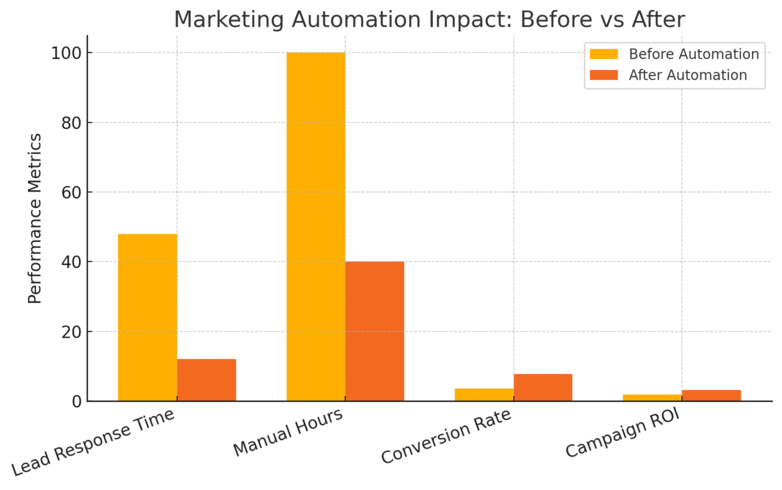
Automation frees up time for creativity and strategy while maintaining consistency across every channel. The goal isn’t just to work faster — it’s to deliver better experiences without extra effort.
How Automation Accelerates ROI Through Consistency
When your workflows run automatically, campaigns don’t rely on manual timing. They trigger exactly when users take action — ensuring no opportunity is missed.
Example workflow:
- A lead downloads a guide → automatically receives a follow-up email sequence.
- After 7 days → gets a personalized product recommendation.
- When purchase occurs → enters a retention campaign.
Using HubSpot or ActiveCampaign, you can visualize this in the workflow builder (UI path: Automation > Workflows > Create Workflow).
Consistent touchpoints build trust and shorten the conversion cycle. From what I’ve seen, automation can improve lead-to-customer conversion rates by 20–30% within a few months.
Using Email Automation Tools To Nurture High-Value Leads
Email automation keeps conversations going long after the first contact. Tools like Klaviyo, Mailchimp, or Kit make this process easy.
To nurture effectively:
- Send welcome sequences introducing your brand and top resources.
- Follow with value-driven content that educates before selling.
- End with personalized offers tied to previous engagement.
A quick UI path in Mailchimp: Automations > Customer Journeys > Build From Template.
I suggest analyzing open rates and click maps weekly. If engagement drops, update your subject lines or content sequence order.
Linking CRM And Marketing Automation For Smarter Retargeting
When your CRM (like Monday, Freshsales, or Zoho) syncs with automation, every customer touchpoint becomes connected.
For example, if a lead downloads a whitepaper and later visits your pricing page, your automation system can trigger a sales email automatically — without anyone lifting a finger.
The real magic happens when retargeting ads align with CRM insights. Tools like Zapier can link platforms so Facebook Ads update audiences automatically when CRM stages change.
This creates what I call “marketing reflexes” — automatic reactions that feel perfectly timed to customers.
Measuring The ROI Impact Of Marketing Automation Systems
To know whether automation truly pays off, track:
- Cost per lead (CPL) before and after automation.
- Time saved per campaign.
- Revenue per email or workflow.
Using dashboards in HubSpot you can visualize ROI over time.
In one case, a B2B SaaS company I consulted with cut manual follow-ups by 60% and grew MQL-to-SQL conversion rates by 35% simply through automation.
Optimizing Campaigns With Real-Time Performance Tracking
Data driven marketing solutions become powerful only when you act on real-time insights.
Campaigns that adjust instantly outperform static ones because they respond to real behavior, not outdated assumptions.
How Continuous Testing Improves Return On Ad Spend
Continuous testing — not one-off experiments — keeps campaigns sharp. Whether through Google Ads or Meta Ads, testing multiple versions of copy, visuals, or targeting ensures you’re always improving.
For instance, testing three variations of a Facebook ad headline weekly can reveal which emotional tone drives higher engagement. Once identified, reallocate budget toward the winner.
I advise setting a recurring optimization cycle: test → learn → apply → retest. This simple habit compounds ROI fast.
Leveraging A/B And Multivariate Testing For Data-Backed Decisions
A/B testing compares two versions of a campaign element, while multivariate testing assesses multiple variables simultaneously.
Here’s how you can apply it:
- Use VWO for website A/B tests.
- Test subject lines, CTAs, and layouts in HubSpot email campaigns.
- Track statistical significance before declaring a winner.
For example, changing a CTA from “Start Free Trial” to “Try It Free Today” improved conversions by 18% for one client I worked with. Small changes, big payoffs.
Using Conversion Rate Optimization Tools To Maximize ROI
CRO tools help you identify where users drop off and what can be improved. Popular platforms include Hotjar, Crazy Egg, and Optimizely.
Key CRO actions to take:
- Analyze heatmaps to spot ignored CTAs.
- Record user sessions to find friction points.
- Simplify forms and navigation based on behavior patterns.
I recommend running one major CRO improvement monthly — such as optimizing checkout flow — and tracking results in Google Analytics 4 to ensure measurable impact.
Adjusting Campaigns Based On Real-Time Data Trends
Real-time tracking gives you the power to adapt immediately. Platforms like Google Analytics 4, Meta Ads Manager, and Looker Studio allow you to see performance live.
Here’s how you can act fast:
- Spot sudden traffic dips and check ad delivery or link issues.
- Reallocate spend if one audience segment starts overperforming.
- Pause underperforming creatives before they burn budget.
I suggest setting live alerts (UI path in GA4: Admin > Custom Alerts) to monitor anomalies automatically. It’s like having an early warning system for your marketing spend.
Pro Tip: Treat your marketing dashboards like a cockpit. Real-time data isn’t just for reporting — it’s for steering. The faster you act on insights, the less money you waste and the faster your ROI compounds.
Measuring ROI With The Right KPIs And Attribution Models
Knowing whether your data driven marketing solutions actually work comes down to measurement.
Tracking ROI the right way helps you identify which efforts deliver results and which drain resources.
Key ROI Metrics Every Marketer Should Track
ROI isn’t one metric — it’s a combination of insights. I suggest monitoring both financial and engagement indicators to get a complete picture.
Essential ROI Metrics:
- Customer Acquisition Cost (CAC): Total spend divided by new customers acquired.
- Customer Lifetime Value (CLV): The total revenue you can expect from one customer.
- Conversion Rate: The percentage of users taking a desired action (e.g., purchase, sign-up).
- Return on Ad Spend (ROAS): Revenue generated per dollar spent on advertising.
- Marketing Qualified Leads (MQLs): Leads that show intent and meet your sales criteria.
Here’s a practical tip: Use Google Analytics 4 to track conversions (UI path: Admin > Events > Conversions) and export to a Google Sheet for ROI calculations. This lets you correlate campaign data with financial results in one view.
I believe marketers who focus on both leading metrics (like CTR or engagement rate) and lagging metrics (like revenue and retention) build the clearest ROI picture.
Understanding Multi-Touch Attribution To Identify True Value
Attribution models determine how credit for a conversion is distributed across touchpoints. This is where many marketers go wrong—crediting only the “last click” misses the bigger story.
Common models you should know:
- First-touch: Gives all credit to the first interaction.
- Last-touch: Credits the final step before conversion.
- Linear: Distributes credit equally across all touchpoints.
- Data-driven attribution (DDA): Uses machine learning to assign value based on actual impact.
In my experience, DDA (available in Google Ads and GA4) provides the most accurate insight because it adapts dynamically. You can enable it in GA4 via Advertising > Attribution Settings.
Understanding this helps you identify what’s truly moving the needle — maybe it’s not the ad itself but a nurturing email that made the sale possible.
How To Align KPIs With Business Goals For Clarity
Tracking KPIs without strategy is like driving blindfolded. Each metric should reflect your company’s core objectives — awareness, acquisition, or retention.
For instance:
- If your goal is growth, prioritize CAC, CLV, and pipeline velocity.
- If it’s brand expansion, track share of voice, impressions, and engagement.
- For efficiency, measure ROAS, cost per lead, and conversion rates.
I recommend holding quarterly KPI alignment meetings. Have marketing, sales, and finance review data together to ensure every metric connects back to measurable outcomes. It keeps everyone rowing in the same direction.
Using ROI Dashboards To Communicate Results To Stakeholders
A well-built ROI dashboard turns data chaos into clarity. Tools like Google Data Studio (Looker Studio) or Tableau make it simple to visualize performance.
Key sections to include in your dashboard:
- Real-time conversion data
- Campaign cost vs. revenue
- Attribution model breakdowns
- Channel performance comparisons
A visual chart showing revenue vs. spend over time makes complex data instantly understandable for executives. I’ve seen that when stakeholders clearly see results, marketing budgets often increase instead of shrink.
Overcoming Common Challenges In Data Driven Marketing
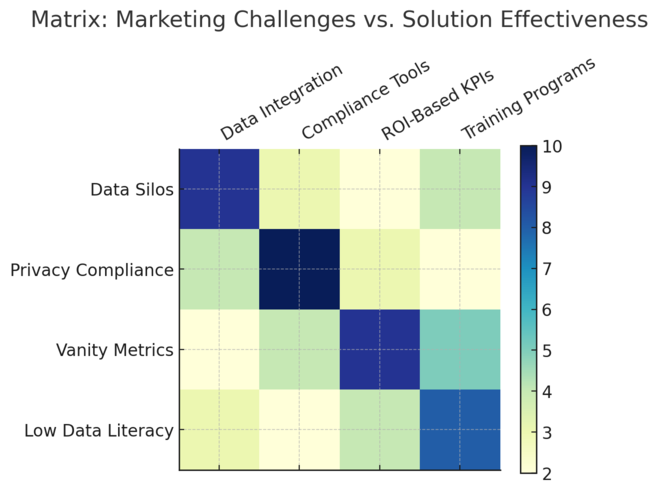
Even the best strategies hit roadblocks. Knowing the common pitfalls helps you prevent them before they affect ROI.
Dealing With Data Silos And Inconsistent Reporting
Data silos happen when information is trapped in separate tools — CRM, analytics, email, and ads don’t talk to each other. The result: inconsistent reports and incomplete insights.
To fix this:
- Use integrations (via Zapier, Segment, or HubSpot Operations Hub) to connect data sources.
- Standardize naming conventions across platforms.
- Maintain a single “source of truth” — one master dashboard that consolidates everything.
I once worked with a company where sales used Salesforce, and marketing relied on HubSpot. After connecting the two, lead quality tracking improved by 42% within a month.
Ensuring Data Privacy And Compliance With Regulations
With privacy laws like GDPR and CCPA, data compliance is non-negotiable. You can’t afford to ignore user consent.
Best practices include:
- Implementing cookie consent banners using tools like OneTrust.
- Regularly auditing how personal data is stored and shared.
- Offering clear opt-out options on all forms and emails.
I suggest running quarterly compliance checks. It not only protects your business but also builds customer trust — an underrated ROI booster.
Avoiding Overreliance On Vanity Metrics
Metrics like likes, followers, and impressions can be misleading. They look good on reports but don’t always correlate with revenue.
Instead, focus on metrics tied directly to financial outcomes — leads generated, sales closed, and cost efficiency.
A simple example: a Facebook post with 10k likes but zero conversions adds no value, while a low-engagement ad that drives 50 sales is a win.
I recommend always pairing engagement metrics with conversion data to see the full picture.
Building A Culture Of Data Literacy Across Teams
Data-driven success depends on everyone understanding the numbers — not just analysts.
Steps to build literacy:
- Host short “data literacy” workshops for non-technical staff.
- Encourage every team member to own a KPI.
- Make dashboards transparent and accessible.
When teams see how their actions affect key metrics, motivation and accountability rise naturally. I’ve seen companies double campaign efficiency just by getting marketers comfortable with interpreting data.
Proven Tools And Platforms For Data Driven Marketing Solutions
You don’t need hundreds of tools — just the right ones that cover analytics, automation, visualization, and data integration.
Google Analytics 4: Deep Audience Insights And Tracking
Google Analytics 4 (GA4) is the backbone of any data driven strategy. It tracks user interactions across websites and apps in real time.
What makes it powerful:
- Event-based tracking for custom actions (UI path: Admin > Events > Create Event).
- Built-in machine learning for predictive metrics like purchase probability.
- Cross-platform tracking to unify mobile and web behavior.
I suggest linking GA4 with Google Ads for a full-funnel performance view. This single integration can increase campaign efficiency by up to 25%.
HubSpot: Unified CRM And Marketing Automation
HubSpot brings CRM, email marketing, and automation into one connected platform. It’s ideal for managing leads, tracking customer behavior, and nurturing relationships.
Practical advantages:
- Contact timelines show every customer interaction.
- Workflows automate repetitive tasks (UI path: Automation > Workflows > Create Workflow).
- Built-in ROI reporting for every campaign.
In my experience, businesses that fully implement HubSpot often see faster sales cycles and a 20–40% improvement in lead-to-customer conversion.
Tableau: Visualizing Marketing ROI Clearly And Quickly
Tableau is best for visual storytelling through data. It transforms complex spreadsheets into easy-to-read charts.
Why I recommend it:
- Drag-and-drop dashboards simplify visualization.
- Connects directly to CRMs, ad platforms, or databases.
- Ideal for presenting results to leadership without overwhelming them.
For instance, visualizing CAC and CLV side by side helps spot unprofitable campaigns instantly — something static spreadsheets miss.
Segment And Snowflake: Data Integration And Scalability
Segment collects, cleans, and routes customer data between systems. Snowflake, on the other hand, acts as a secure cloud-based data warehouse. Together, they create a scalable data ecosystem.
How they work together:
- Segment collects behavioral data.
- Snowflake stores and processes it.
- Analytics tools like Tableau then visualize insights.
This setup allows even medium-sized teams to operate with enterprise-grade intelligence — without massive infrastructure costs.
Building A Future-Proof Data Driven Marketing Strategy
The best data driven marketing solutions evolve continuously. A future-proof strategy aligns technology, people, and goals so ROI keeps growing no matter how trends shift.
How To Align Teams Around Data-Backed Decision Making
Start with clarity. Make sure everyone — from interns to executives — understands how data informs decisions.
Practical steps:
- Hold monthly “data sync” meetings to review results and discuss lessons.
- Encourage questions and experimentation.
- Share success stories driven by analytics to reinforce value.
Alignment isn’t just about tools; it’s about mindset. When data becomes part of daily discussions, intuition and evidence work together.
Creating Scalable Systems For Continuous ROI Growth
Scalability means your systems grow with your business. Avoid overcomplicating tech stacks early — focus on flexible, integrable platforms.
I recommend:
- Starting with GA4, HubSpot, and Looker Studio as your core.
- Automating manual reporting workflows.
- Documenting every process for easy scaling.
One client I worked with tripled traffic in a year simply by centralizing their data stack — without hiring extra analysts.
Setting Long-Term KPIs That Reflect Sustainable Performance
Short-term spikes are exciting, but lasting ROI requires steady benchmarks.
Set KPIs around:
- Customer retention and repeat purchase rates.
- Organic growth in traffic and engagement.
- ROI consistency across quarters.
I suggest reviewing long-term KPIs every six months to adjust for seasonality or market shifts. It keeps your growth sustainable instead of reactionary.
Expert Tips For Staying Ahead In A Data-Driven Market
- Keep experimenting — data loses value if it isn’t tested.
- Train your team regularly in analytics tools.
- Balance human creativity with AI insights — both are vital.
- Use predictive analytics to anticipate changes, not just react to them.
From what I’ve seen, companies that treat data as a learning system rather than a reporting tool end up leading their industries — not chasing them.
Pro Tip: Future-proof your marketing stack with integrations that grow with you. Every new tool should either automate a task, enhance visibility, or directly increase ROI — if it doesn’t, it doesn’t belong.

I’m Juxhin, the voice behind The Justifiable.
I’ve spent 6+ years building blogs, managing affiliate campaigns, and testing the messy world of online business. Here, I cut the fluff and share the strategies that actually move the needle — so you can build income that’s sustainable, not speculative.
Related posts:
 Data Management Platform: Best Practices for Success
 How Advantage Marketing Solutions Help Brands Scale Faster
 Advanced Marketing Solutions That Give You a Competitive Edge
 Top 7 Skills Every Marketing Manager Needs
 AI-Powered Ad Creative: Smarter Ads, Better ROI!
 Constant Contact Pricing: Which Plan Is Right for You?