
Table of Contents
Some links on The Justifiable are affiliate links, meaning we may earn a small commission at no extra cost to you. Read full disclaimer.
If you’ve ever tried setting up an online store website builder and felt overwhelmed by the tech, you’re not alone. I remember staring at endless templates, plugins, and pricing tiers—just wanting to start selling, not coding.
The good news? Today’s builders make it faster and easier than ever to launch, customize, and start selling online in hours, not weeks. The key is choosing a platform designed for speed, conversion, and scalability.
Let’s break down exactly which builders help you sell fast—and why they stand out.
Best Online Store Website Builders For Fast Launch
Finding the right online store website builder can make or break your sales speed. Some platforms are built for simplicity, others for power—and the best ones balance both.
Here’s how each of the top contenders helps you launch quickly and start selling faster.
Shopify: The All-In-One Platform Built For Selling
Shopify is the go-to name for anyone serious about launching fast. What I like most is how everything just works—hosting, payment processing, templates, marketing tools, all under one roof.
Why it helps you sell fast:
- Prebuilt templates: Choose from hundreds of mobile-ready store designs and launch in hours.
- App ecosystem: Over 8,000 apps that let you add upsells, loyalty programs, or social selling tools with one click.
- Speed and reliability: Shopify stores load in under a second on average, according to BuiltWith data.
I’ve seen beginners get their first product live in under a day. The trade-off is cost—Shopify isn’t the cheapest—but if you value time and scalability, it’s worth every dollar.
Wix: Flexible Design With Lightning-Fast Setup
Wix makes store setup surprisingly fun. You drag, drop, and publish. No coding, no tech confusion.
What makes Wix fast:
- ADI (Artificial Design Intelligence): This feature builds your entire site automatically after you answer a few quick questions.
- Integrated ecommerce tools: Add payment gateways, product listings, and automated shipping in minutes.
- Visual freedom: If you’re picky about design, Wix gives you the most creative control out of all major builders.
In my experience, Wix is perfect for creators or small retailers who care about design but don’t want technical headaches.
Squarespace: Sleek Templates For Visual Brands
Squarespace shines when aesthetic and brand storytelling matter most. It’s known for minimalist, high-converting templates that help your products look expensive (even if they aren’t yet).
Where Squarespace wins:
- Image-focused templates: Ideal for fashion, photography, or handmade goods.
- All-in-one dashboard: Manage pages, inventory, SEO, and email marketing in one clean interface.
- Fast setup: You can have a professional-looking store up in a single afternoon.
I often recommend Squarespace for visual-first brands that want to launch quickly without giving up polish.
BigCommerce: Scalable Power For Growing Stores
BigCommerce is the builder that feels like Shopify’s more robust cousin. It’s great for larger inventories or stores expecting high growth.
Key advantages for speed and scale:
- Native integrations: Sell simultaneously on Amazon, eBay, and Google Shopping from one dashboard.
- No transaction fees: Keep more of every sale, unlike some other platforms.
- Enterprise-level features: Advanced SEO, multi-storefront management, and B2B tools built-in.
If you’re already thinking about long-term growth or plan to migrate from another platform, BigCommerce is a top-tier choice.
Ecwid by Lightspeed: Easy Integration With Any Website
Ecwid isn’t a full website builder—it’s a plug-and-sell system that turns any existing site (WordPress, Squarespace, even Instagram) into an online store.
Why it’s so fast to start selling:
- Instant integration: Embed your Ecwid store with a simple copy-paste widget.
- Syncs across platforms: Manage all your sales from one place, even if you sell on social media.
- Zero downtime: You don’t have to rebuild your existing website.
Ecwid is ideal for small businesses that already have a website and just want to start selling quickly without moving platforms.
Key Features That Make A Website Builder Sell Fast
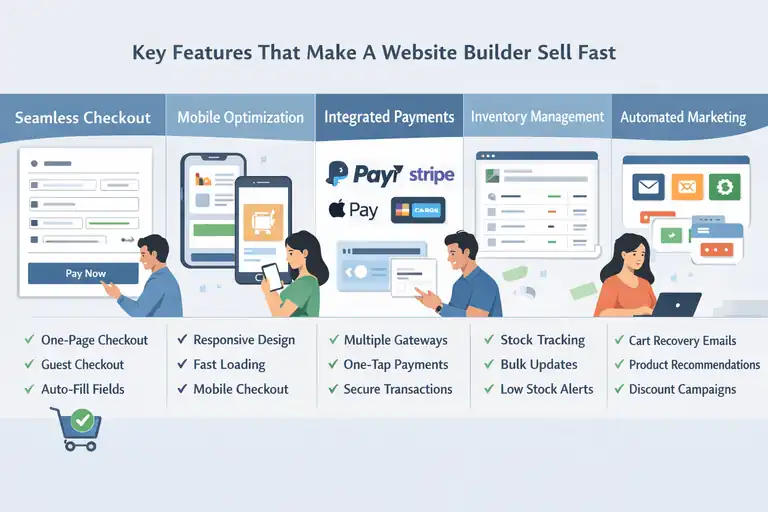
The best online store website builders don’t just help you go live—they help you convert visitors into buyers. These key features are what separate a fast-selling store from a slow one.
Seamless Checkout Experience That Reduces Cart Abandonment
A slow or clunky checkout can kill conversions. In fact, Baymard Institute reports that 70% of online shoppers abandon carts.
Here’s how top builders fix that:
- One-page checkout: Simplifies the buying process.
- Guest checkout options: No forced account creation.
- Auto-filled fields: Speeds up mobile purchases.
I’ve noticed Shopify and BigCommerce handle this best—they’re optimized for quick, frictionless checkouts that keep buyers from dropping off.
Mobile Optimization That Boosts Conversions On The Go
Over 70% of ecommerce traffic comes from mobile. If your site isn’t mobile-friendly, you’re losing sales daily.
Why mobile optimization matters:
- Responsive templates adapt automatically to any screen size.
- Google ranks mobile-friendly stores higher.
- Mobile-optimized checkouts reduce errors and boost conversions.
Platforms like Wix and Squarespace excel here because their drag-and-drop editors let you preview and edit your mobile design instantly.
Integrated Payment Gateways For Faster Transactions
The fewer clicks between browsing and buying, the better. That’s where integrated payment systems come in.
Top gateways include:
- Shopify Payments (no external setup required)
- PayPal and Stripe integrations
- Apple Pay and Google Pay for one-tap checkouts
A great builder gives you flexibility without friction. I always recommend testing payment flow on mobile before launch—tiny glitches can cost big sales.
Product Management Tools That Simplify Inventory Control
A fast-selling store needs smooth backend systems. Manually tracking inventory in spreadsheets? Not sustainable.
What to look for:
- Bulk product uploads via CSV or import tools.
- Real-time stock syncing across channels.
- Automatic alerts when items go out of stock.
BigCommerce and Shopify dominate in inventory automation—they practically run themselves once set up.
Built-In Marketing Automation To Drive Immediate Sales
Automation turns a decent store into a sales machine. Most builders now include tools to nurture customers automatically.
Powerful automations include:
- Abandoned cart recovery emails.
- Personalized product recommendations.
- Discount code triggers after certain actions.
Shopify and Wix both make it simple to set these up within their dashboards—no external software needed.
How To Choose The Right Online Store Website Builder
Choosing the right online store website builder comes down to more than price or design. You need one that fits your business stage, growth goals, and tech comfort.
Identify Your Store’s Goals And Growth Stage
Before diving in, get clear on your priorities. Are you testing a single product idea, or building a long-term brand?
Here’s a simple rule of thumb:
- Just starting out? Try Wix or Squarespace.
- Scaling fast? Go with Shopify or BigCommerce.
- Already have a website? Use Ecwid.
Knowing your end goal saves you from rebuilding your store later—a mistake I’ve made myself.
Compare Pricing Plans Based On Features You’ll Actually Use
Don’t pay for what you don’t need. Builders love offering “advanced” plans full of features you might never touch.
How to compare smartly:
- List your essential tools (email, inventory, checkout, SEO).
- Check which plan actually includes them.
- Watch for transaction fees—they eat into profits fast.
Shopify’s Basic plan often fits most new sellers perfectly, while BigCommerce’s mid-tier plan offers the best scalability per dollar.
Evaluate Ease Of Use And Learning Curve
The best builder is the one you’ll actually use consistently. A beautiful dashboard means nothing if you find it frustrating.
Wix and Squarespace are great for visual learners. Shopify is slightly more complex but worth mastering. If you want total simplicity, Ecwid takes the prize.
Tip: Spend 30 minutes inside each platform’s free trial—you’ll know instantly which one feels right.
Check Available Integrations And Plugin Ecosystem
A strong ecosystem gives your store superpowers. Think email marketing, social ads, analytics, and customer reviews—all connecting seamlessly.
Examples of valuable integrations:
- Klaviyo for automated emails.
- Google Analytics for tracking sales sources.
- Facebook Shops for social commerce.
Shopify wins again here—it’s the only builder with an app store rivaling WordPress in scale and depth.
Consider Customer Support And Scalability Options
When something breaks, you’ll want help—fast. Not all builders are equal here.
What to look for:
- 24/7 live chat or phone support.
- Active community forums.
- Clear upgrade paths as your sales grow.
BigCommerce and Shopify both offer robust support systems. Wix and Squarespace are good, but not as quick in response during high-traffic seasons.
Pro Tip: Before committing, always test your store’s speed and mobile checkout during a free trial. You’ll immediately see which platform feels smoother for customers—and that’s what truly sells fast.
Essential Design Elements For A High-Converting Store
Design isn’t just about how your store looks—it’s about how easily shoppers can buy. A well-designed online store website builder should help you create a flow that feels natural and quick.
Every click should bring customers closer to checkout without distractions.
Use Simple Navigation That Guides Buyers Seamlessly
Think of your store’s navigation like the layout of a well-organized boutique. Shoppers should instantly know where to find what they want.
Here’s what I’ve learned works best:
- Keep your top menu limited to 4–6 key links (Home, Shop, About, Contact, Cart, Login).
- Add drop-down menus only when absolutely necessary.
- Always include a search bar—many visitors skip navigation entirely and search directly.
Shopify and BigCommerce make it especially easy to structure menus with drag-and-drop tools, so you can adjust categories as your store grows. When navigation feels intuitive, people stay longer—and that’s where sales start to multiply.
Optimize Product Pages With Clear CTAs And Visuals
Your product page is where browsers turn into buyers. It’s where trust, clarity, and persuasion collide.
Here’s what separates strong product pages from weak ones:
- Use high-resolution images from multiple angles.
- Include a clear, action-driven CTA like “Add to Cart” or “Buy Now.”
- Add short, benefit-focused descriptions that answer real questions (size, quality, shipping).
- Use short bullet points for quick reading.
Wix and Squarespace both shine when it comes to visuals. Their built-in galleries and hover effects help showcase details beautifully. But I’d recommend pairing visuals with a sense of urgency—like “Only 3 left in stock”—to nudge quick decisions.
Create Trust With Secure Badges And Social Proof
People won’t buy from a store they don’t trust. Simple elements like SSL badges, return policies, and authentic reviews reassure hesitant shoppers.
What to add for credibility:
- Payment trust badges (Visa, PayPal, MasterCard).
- Customer testimonials or product reviews.
- A clear returns and refund policy.
- Visible SSL security icon near the checkout button.
In my experience, Shopify handles this perfectly—it automatically includes SSL certification and integrates review apps easily. Real photos from customers go even further than written reviews, especially for visual products.
Use Conversion-Driven Templates Over Generic Layouts
A conversion-driven template focuses on guiding action—not just looking pretty. Many online store website builders offer templates tested for conversion rates.
Signs of a high-converting template:
- Clean white space that highlights your products.
- Sticky add-to-cart buttons on mobile.
- Minimal distractions (avoid banners and pop-ups during checkout).
Shopify and BigCommerce both feature professional templates built for conversion, while Wix allows you to tweak every section for branding. Choose simplicity over fancy animations—they often slow pages down, and nothing kills sales faster than lag.
Proven Marketing Tools Built Into Top Store Builders
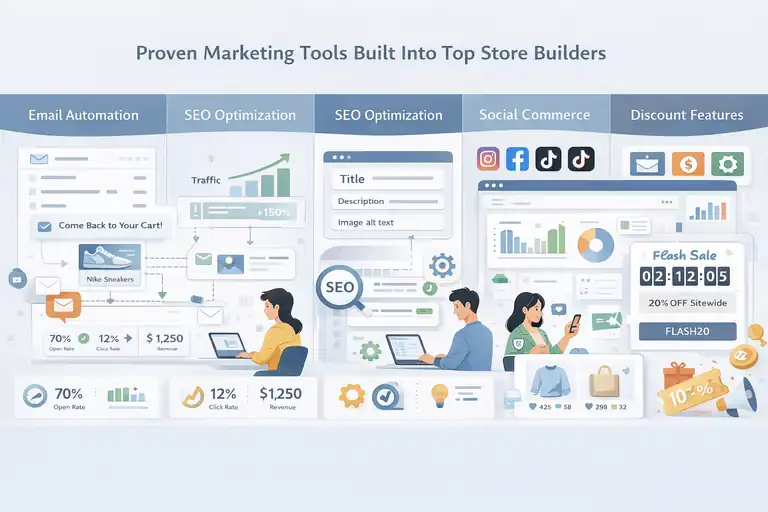
Even the most beautiful store won’t sell without visibility and engagement. That’s where built-in marketing tools matter most.
A good online store website builder doesn’t just host your products—it promotes them for you.
Email Automation And Abandoned Cart Recovery
Email marketing remains one of the most profitable channels for ecommerce. The magic is in automation—where messages go out without you lifting a finger.
Here’s how builders help automate sales:
- Abandoned cart recovery emails that remind shoppers to complete purchases.
- Personalized email recommendations based on browsing history.
- Welcome and re-engagement sequences to nurture relationships.
Shopify Email and Wix Automations make setup effortless. I’ve seen stores recover up to 15% of lost carts simply by enabling this feature. That’s free money, just from follow-ups.
SEO Optimization Tools For Better Organic Reach
SEO (Search Engine Optimization) is how your store shows up when people Google your products. The goal is to make it easy for both search engines and shoppers to find you.
Top SEO features to look for:
- Editable title tags, meta descriptions, and image alt text.
- Automatic sitemap generation.
- Fast load times (Google loves speed).
Squarespace is especially good for SEO beginners—it prompts you to optimize every page as you go. But BigCommerce gives advanced control for larger sites with many SKUs.
From what I’ve seen, optimizing just your product titles can dramatically improve visibility within weeks.
Social Commerce Integrations For Multi-Channel Selling
Shoppers don’t just buy on websites anymore—they buy directly from Instagram, TikTok, and Facebook. The best builders make social selling a one-click connection.
Examples of seamless integrations:
- Syncing your Shopify or Ecwid store to Instagram Shopping.
- Managing Facebook Ads and Google Shopping from the same dashboard.
- Tracking social performance with built-in analytics.
I always suggest enabling social commerce early—it builds trust through social proof and gives you free traffic through organic engagement.
Discount And Coupon Features To Drive Urgency
Discounts and coupons aren’t just sales tactics—they’re powerful psychological triggers.
Ways to use them effectively:
- Flash sales with countdown timers.
- Abandoned cart discounts.
- First-time buyer coupon codes.
- Free shipping thresholds (“Spend $50, get free delivery”).
Most builders, like Shopify and Wix, allow you to automate these easily. I’d recommend running short-term offers instead of constant discounts—it keeps the urgency high without devaluing your brand.
Advanced Features That Speed Up Your Online Sales
Once your store is running, the next step is scaling.
These advanced features separate a good online store website builder from a truly powerful one—helping you sell faster, smarter, and globally.
AI Product Recommendations To Increase Order Value
AI-driven product recommendations are like having a digital salesperson who always knows what to suggest.
Why this matters:
- Personalized upsells boost average order value (AOV).
- AI adapts over time, learning from customer behavior.
- It creates a more natural, helpful shopping experience.
Shopify’s “Shopify Magic” and BigCommerce’s “Personalized Recommendations” are great examples. I’ve seen stores lift revenue by 20% just by enabling these features—no extra ads required.
Instant Analytics Dashboards For Real-Time Decisions
Data is your compass in ecommerce. But raw numbers mean little unless you can interpret them fast.
Good analytics dashboards offer:
- Real-time sales tracking and conversion rates.
- Insights into best-selling products and repeat buyers.
- Channel performance reports (email, social, ads).
Wix Analytics and Shopify’s Dashboard both give visual summaries even non-analysts can understand. Personally, I check my dashboards daily—it helps catch issues early and adjust campaigns before they burn cash.
One-Click Upsells And Cross-Sells For Fast Growth
Upselling and cross-selling are the quiet powerhouses of ecommerce. You’re not chasing new customers—you’re maximizing value from existing ones.
Practical ways to use them:
- Offer a bundle or upgrade after a customer adds an item to cart.
- Suggest complementary products at checkout.
- Use pop-ups triggered by intent (e.g., “Wait! Add this for 20% off”).
Tools like Zipify (for Shopify) and BigCommerce’s built-in upsell features make this simple. The beauty is that these can increase profits by up to 30%—without extra marketing spend.
Multi-Currency And Language Options For Global Reach
Selling internationally shouldn’t require a separate site. Today’s top builders handle localization seamlessly.
Essential global features include:
- Automatic currency conversion based on visitor location.
- Multi-language support with editable translations.
- Local tax and shipping rules integration.
Shopify and Ecwid by Lightspeed excel here. I once helped a store expand from the US to Europe in a single week just by turning on Shopify Markets. Within days, sales started coming in from three new countries—proof that localization really does speed up growth.
Expert Tip: Don’t wait until you “grow big” to activate these advanced features. Turn them on early, even if you’re small. Automation and personalization are what let small stores compete with giants—and win.
Common Mistakes To Avoid When Using A Store Builder
Even the best online store website builder can only do so much if the setup isn’t right.
I’ve seen people waste time (and sales) on mistakes that could’ve been avoided with a little planning. Let’s go over what to steer clear of before you hit “publish.”
Overloading Your Store With Unnecessary Apps
It’s tempting to install every shiny new plugin or app that promises “instant sales.” But too many apps can slow your store, create bugs, and confuse your visitors.
Here’s what I suggest:
- Only install apps that solve a specific problem.
- Regularly audit your apps every few months.
- Delete anything you haven’t used in the last 30 days.
For example, I once worked with a store running 27 apps—half were overlapping functions like pop-ups and email forms. After trimming it down to 10, their page load speed doubled and conversions improved instantly.
Keep your tech stack lean. Less clutter equals faster pages and smoother shopping.
Ignoring Mobile-First Design Principles
Most of your visitors aren’t sitting at a computer—they’re on their phones. A mobile-first design isn’t optional anymore.
To build mobile-first:
- Preview every page in mobile mode before launching.
- Use single-column layouts for better readability.
- Avoid tiny buttons and long forms that frustrate mobile users.
Shopify and Wix both make this simple with mobile previews. I like to check checkout flow directly from my phone before launch—it’s the only way to catch awkward text overlaps or hidden buttons.
Forgetting To Test Checkout Flows Regularly
Even small checkout glitches can cost big revenue. You’d be surprised how often a coupon code doesn’t apply, a payment gateway breaks, or a form field errors out.
Make this a habit:
- Test the entire checkout process monthly (or after big updates).
- Use different devices and browsers.
- Double-check taxes, shipping rates, and payment methods.
Think of checkout testing like a fire drill—it feels tedious until the day you’re glad you did it.
Using Slow-Loading Images That Affect Conversion
Beautiful visuals attract buyers, but large, uncompressed images kill speed. And when your page takes longer than 3 seconds to load, nearly half your visitors may leave (according to Google).
Quick fix checklist:
- Compress images before uploading (use TinyPNG or built-in compression tools).
- Use WebP format for lighter, sharper files.
- Keep hero images under 250 KB if possible.
Platforms like Squarespace and BigCommerce automatically optimize images, but manual checks are still worth it. I’ve personally seen conversion rates jump by 18% just from improving page speed—proof that faster truly equals better.
Step-By-Step Guide To Launch Your Store Fast
Launching a store doesn’t have to take weeks. I’ve helped clients go from concept to sales in under three days. The key is focus—knowing what to skip and what to perfect.
Pick A Builder That Matches Your Niche And Goals
Not every online store website builder fits every business. A dropshipping store and a handmade crafts boutique have completely different needs.
Here’s how to choose fast:
- Shopify for scalability and automation.
- Wix for creative freedom and visual storytelling.
- BigCommerce for large product catalogs.
- Ecwid if you already have a website.
Pick one and commit. The best platform is the one you actually use and master.
Customize A Template Without Overcomplicating It
Your goal is to launch fast, not to design perfection.
What to do:
- Use a pre-designed template close to your vision.
- Swap in your brand colors, logo, and fonts.
- Don’t obsess over every pixel—good enough is great for launch.
Wix’s ADI (Artificial Design Intelligence) can literally build a store layout for you in minutes. I’d recommend focusing on your homepage and product pages first. You can refine the rest later.
Add Essential Pages (Home, Shop, Contact, About)
A professional store isn’t complete without the essentials. You need to give customers confidence and clarity.
Minimum pages to include:
- Home page: Summarize what you sell and why.
- Shop page: Display products clearly by category.
- About page: Tell your story and build connection.
- Contact page: Offer quick ways to reach you (form, email, or chat).
I always like to add a short “Shipping & Returns” section on the footer, too. It builds trust right away.
Test Functionality Before Going Live
Before you celebrate your store launch, make sure everything works.
Checklist before launch:
- Add a test product and complete a full checkout.
- Confirm emails and receipts are being sent correctly.
- Check that all buttons and links work on both desktop and mobile.
I’ve learned to do a “friend test”—send your store link to a friend and watch them use it. You’ll spot things you completely missed.
Launch And Market Using Built-In Tools
Once your store is live, use built-in marketing tools to attract your first sales.
Start simple:
- Connect your Instagram or Facebook Shop.
- Send an email to your existing list.
- Offer a limited-time launch discount.
Platforms like Shopify and Squarespace even let you set up pre-launch email pop-ups or countdown timers. I’ve seen those small touches make a big difference for early traction.
Expert Tips To Keep Sales Growing After Launch
Launching is just the beginning. The real challenge is keeping your momentum going. Luckily, your online store website builder can handle much of that for you—if you know how to use it right.
Continuously Optimize Product Pages Using Heatmaps
Heatmaps show where users click, scroll, or stop. It’s a goldmine for improving conversion rates.
What to do:
- Track where people drop off on product pages.
- Move important buttons (like “Add to Cart”) higher up.
- Remove distractions below the fold.
Tools like Hotjar can integrate with Shopify or Wix easily. I use it monthly—it’s like reading your customers’ minds without guessing.
Run Seasonal Promotions And Flash Sales
Fresh offers keep buyers coming back. Flash sales also create urgency and help move slow stock.
Ideas that work:
- Holiday-themed bundles.
- 24-hour discount codes.
- “Buy one, get one” offers for top products.
Wix and Shopify both make running timed promotions effortless with built-in countdown apps. Just remember to track which campaigns perform best, so you can double down on winners.
Leverage Email Segmentation For Repeat Buyers
Instead of blasting everyone the same email, segment your audience based on their behavior.
Segmentation ideas:
- Repeat customers vs. first-timers.
- Cart abandoners vs. loyal buyers.
- High-value customers who deserve VIP offers.
Platforms like Kit (formerly ConvertKit) and Omnisend make this easy. Personalized messages always outperform generic ones—I’ve seen open rates jump by 30% just by tailoring subject lines.
Collect And Display Reviews For Ongoing Trust
Reviews sell for you when you’re not around. Even a few authentic ones can dramatically improve conversions.
Quick trust builders:
- Request reviews via automated post-purchase emails.
- Display star ratings visibly on product pages.
- Highlight real photos from customers.
Shopify’s Product Reviews app and Wix’s testimonial widgets are perfect for this. I always say: your happiest customers are your best marketers.
Final Thoughts: Choosing A Builder That Helps You Sell Fast
At the end of the day, the best online store website builder isn’t just the one with the most features—it’s the one that fits your pace, your goals, and your audience.
Focus On Builders That Combine Ease, Speed, And Scalability
You want a platform that grows with you. Shopify and BigCommerce shine here because they’re built for expansion, but Wix and Squarespace are unbeatable for simplicity and design freedom.
My advice? Start where you are. You can always upgrade later, but getting started matters most.
Invest Time In Setup Once—Then Let Automation Work For You
Automation is your best friend. From email flows to inventory updates, the right automations free you to focus on marketing and product growth.
Shopify’s built-in automations and Wix’s workflow tools can save hours every week. Think of them as invisible employees working behind the scenes 24/7.
Keep Evolving With Data-Driven Improvements
Your store isn’t a “set it and forget it” project. Data tells you what’s working—and what’s not.
Use analytics to tweak your design, pricing, and marketing strategy over time. Every improvement compounds.
I’ve seen stores double sales within months just by following the data instead of assumptions. Keep learning, testing, and refining. That’s how you build a store that doesn’t just launch fast—but keeps selling long-term.
Pro Tip: Don’t aim for perfection. Aim for progress. Every click, every tweak, every new visitor teaches you something. That’s how you go from launching fast to selling smart.
FAQ
What is the best online store website builder to sell fast?
Shopify is widely considered the best online store website builder for selling fast because it offers built-in payment systems, automated tools, and quick setup templates.
How can I choose the right online store website builder for my business?
Choose based on your goals and store size—Shopify for scalability, Wix for creative control, Squarespace for visual brands, and Ecwid if you already have a website.
What features help an online store website builder boost sales?
Key features include fast checkout, mobile optimization, integrated payments, marketing automation, and analytics dashboards for real-time performance tracking.

I’m Juxhin, the voice behind The Justifiable.
I’ve spent 6+ years building blogs, managing affiliate campaigns, and testing the messy world of online business. Here, I cut the fluff and share the strategies that actually move the needle — so you can build income that’s sustainable, not speculative.
Related posts:
 Best Online Store Builder for Fast, Easy Launches
 Best Online Store Platforms to Launch Your Brand Today
 Best Platform to Sell Online for Fast Growth and Low Fees
 Top Online Store Platforms for Building Income Streams
 Creating a Website to Sell Products That Converts Fast
 Best Ecommerce Website Builder for Small Business Growth