
Table of Contents
Some links on The Justifiable are affiliate links, meaning we may earn a small commission at no extra cost to you. Read full disclaimer.
If you’ve ever tried setting up an online store and felt overwhelmed by all the moving parts—payments, shipping, marketing, and tracking sales— Square Ecommerce makes that whole process surprisingly easy.
I’ve seen many small business owners jumpstart their sales in just a few days using Square’s built-in ecommerce tools.
From intuitive website builders to smart integrations that handle checkout and delivery seamlessly, Square Ecommerce tools are designed to help you make sales quickly—without needing a tech background or big budget.
Square Online Store: Your All-In-One Sales Platform
Square Online Store is like having a digital storefront that does everything for you — from product listings to payment processing — all under one roof.
It’s built for people who want to start selling quickly without hiring developers or learning complex systems.
Easy Store Setup With Customizable Templates
One of the best things about the Square Online Store is how fast you can get started. You can launch a fully functional store in just a few hours using its drag-and-drop builder.
Here’s how you can make it work even faster:
- Pick a template that fits your brand personality. Whether you’re selling food, apparel, or services, Square offers clean, modern layouts that look professional right out of the box.
- Customize colors and fonts directly from the dashboard — no coding required.
- Add your products with descriptions, pricing, and photos. You can even sync your inventory automatically if you already use a Square POS.
From my experience, the biggest time-saver is how Square connects everything for you — inventory, payments, and shipping. It’s all linked seamlessly, so you can focus on what really matters: selling.
Streamlined Checkout for Faster Conversions
A complicated checkout process is the quickest way to lose a sale. Square’s built-in checkout simplifies that completely.
Customers can:
- Pay in just a few clicks using cards, Apple Pay, or Google Pay.
- Save their payment info securely for future purchases.
- See taxes and shipping clearly before paying, reducing cart abandonment.
What I really like is that the checkout process feels effortless. Everything loads quickly and adjusts automatically for mobile devices, which means fewer lost sales from impatient customers.
Mobile-Optimized Design for On-the-Go Shoppers
In 2025, more than 70% of online purchases happen on mobile devices. Square knows that and makes mobile performance a priority.
Here’s why it matters:
- Automatic mobile optimization means every page looks great on any screen size.
- Fast loading speeds reduce bounce rates and keep customers browsing longer.
- Built-in responsive images ensure your products always display crisply.
I’ve seen businesses double their mobile conversion rates simply by moving their stores to Square. The platform handles all the technical details behind the scenes, freeing you to focus on marketing and growth.
Built-In SEO Features to Drive Organic Traffic
Getting your store online is one thing — getting people to find it is another. Square makes SEO surprisingly simple for non-tech users.
You can:
- Customize page titles and meta descriptions directly from your dashboard.
- Create clean URLs that help search engines understand your pages.
- Integrate with Google Merchant Center to display your products on Google Shopping.
Square also automatically generates a sitemap for your store, so search engines can index your pages faster. It’s a small detail, but it makes a big difference when you’re competing for visibility.
Square Payments: Simplify Transactions and Build Trust
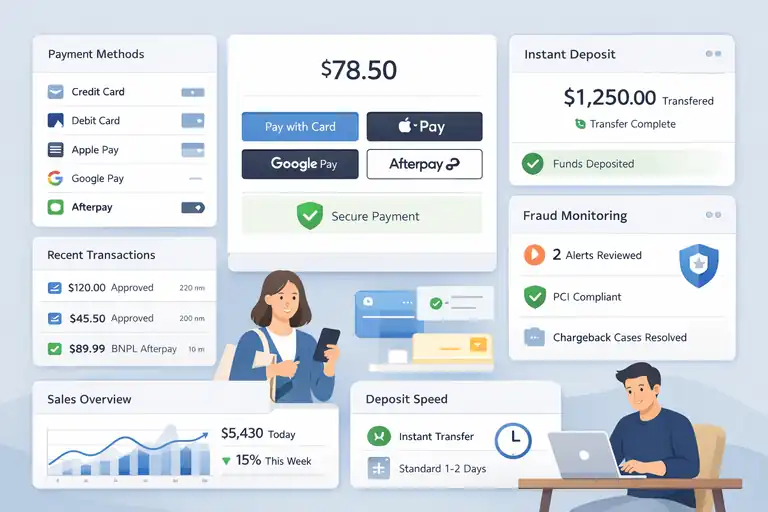
When customers trust your checkout process, they buy more. Square Payments ensures every transaction feels safe, fast, and smooth — which is crucial when you’re trying to make sales quickly.
Multiple Payment Options That Boost Customer Confidence
Customers love flexibility. Square lets them pay however they prefer — credit card, debit card, digital wallet, or even buy-now-pay-later options like Afterpay.
Why this matters:
- More options mean fewer abandoned carts.
- Digital wallet payments make mobile checkout lightning-fast.
- Local payment methods can boost conversions in specific markets.
I often suggest enabling every payment option available within your niche. For example, if you’re targeting Gen Z shoppers, enabling Apple Pay or Cash App Pay is a must — it shortens checkout time and builds trust instantly.
Instant Payment Deposits to Improve Cash Flow
Cash flow is oxygen for any business, and Square handles it beautifully. Instead of waiting days to get paid, you can choose instant deposits to move money into your account within minutes.
Some quick insights:
- Standard transfers happen in 1–2 business days.
- Instant transfers can occur 24/7, even on weekends.
- Low transaction fees make it affordable for small businesses.
For businesses running flash sales or pop-up events, this feature is a lifesaver. You can reinvest your earnings the same day to restock or promote new products.
Security Features That Protect Both You and Your Customers
Square is known for its bank-level security. Every transaction goes through advanced encryption and fraud detection systems.
Here’s how it keeps you safe:
- Automatic fraud monitoring detects suspicious activity in real-time.
- PCI compliance is built-in, so you don’t need to handle complex security paperwork.
- Dispute management tools help resolve chargebacks easily.
In my opinion, this is one of Square’s strongest selling points. You can confidently promote your store knowing your customers’ payment data is protected end-to-end.
Square Marketing: Automated Campaigns That Convert
Marketing is what keeps your ecommerce engine running. Square Marketing helps you stay connected with customers through personalized, automated campaigns that actually drive repeat sales.
Email Campaigns That Personalize Customer Engagement
Square’s email marketing tool is built directly into your dashboard — no third-party software needed.
You can:
- Send tailored emails based on customer behavior (like abandoned carts or repeat purchases).
- Use ready-made templates to launch campaigns in minutes.
- Automatically track opens and clicks to measure success.
I’ve found that personalizing subject lines and timing your emails right after a purchase can increase open rates by over 40%. Square’s automation does this for you effortlessly.
Smart Audience Segmentation for Targeted Promotions
Not all customers are the same, and Square understands that. With its segmentation tools, you can group buyers based on purchase history, spending habits, or location.
Here’s why this works so well:
- Targeted offers resonate more than generic blasts.
- Loyal customers can receive special discounts automatically.
- New buyers can get welcome campaigns that build long-term loyalty.
If you’ve ever felt like your marketing emails were being ignored, segmentation will change that completely.
Performance Tracking to Measure ROI Effectively
Square Marketing includes detailed performance reports that show you what’s working and what’s not.
You’ll see:
- Email open and click-through rates for every campaign.
- Revenue attribution so you know exactly which messages drive sales.
- Customer retention metrics that reveal your most profitable segments.
By tracking these results consistently, you’ll learn which messages convert best and refine your campaigns for even stronger performance.
Square Invoices and Subscriptions: Keep Recurring Sales Flowing
When you start seeing returning customers, you want the process of getting paid to be as smooth as possible.
Square Invoices and Subscriptions make that happen by automating your billing and keeping recurring revenue predictable — which is especially helpful for service-based or subscription-style businesses.
Automated Billing for Repeat Customers
The magic of automation lies in saving time. Square lets you create recurring invoices that send themselves, so you don’t have to chase payments every week or month.
Here’s how it helps:
- Set up once, get paid automatically. Create a recurring invoice template, choose the frequency, and Square handles the rest.
- Automatic reminders. Customers get polite reminders when payments are due, reducing missed or late invoices.
- Stored payment methods. Returning customers can save their payment info securely for frictionless repeat transactions.
I’ve seen small wellness studios and coaches use this feature to turn one-time clients into steady monthly income. The system runs quietly in the background — like an assistant that never forgets a payment date.
Flexible Subscription Options for Products and Services
Not every business sells one-time items. Square’s subscription tools let you turn products or services into reliable revenue streams.
You can:
- Offer tiered subscription plans for different budgets.
- Charge automatically on weekly, monthly, or custom schedules.
- Combine subscriptions with physical products, such as monthly gift boxes or coffee deliveries.
For example, a local bakery I know uses Square subscriptions to deliver “breakfast boxes” to customers every Friday.
Once it’s set up, payments, orders, and even reminders happen automatically — all through the Square Ecommerce system.
Tracking and Managing Invoices From a Single Dashboard
Square’s dashboard keeps every invoice and subscription organized in one place. No juggling spreadsheets or jumping between apps.
You’ll be able to:
- See paid, pending, and overdue invoices at a glance.
- Track revenue trends over time.
- Send follow-ups instantly with pre-filled invoice templates.
It’s one of those small details that makes a big difference — especially when your business starts scaling and managing 50+ clients becomes normal. Having everything centralized saves hours of manual work each week.
Square POS Integration: Connect Your Online and Offline Sales
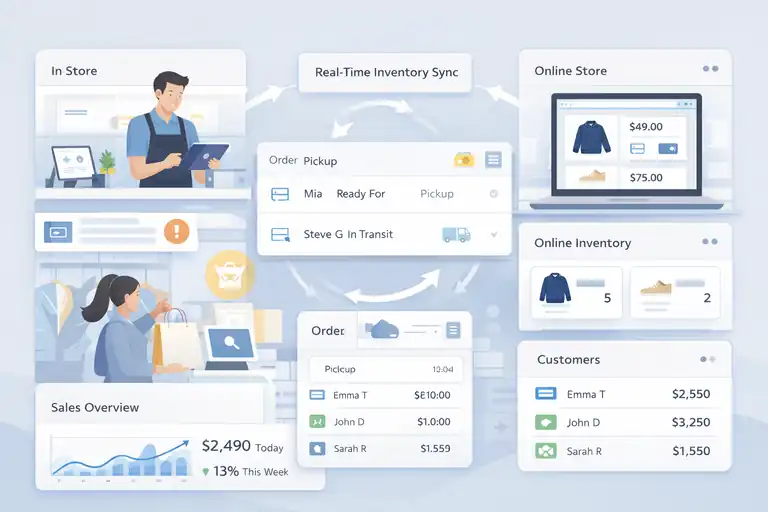
One of the biggest challenges for hybrid businesses — those selling both online and in-store — is keeping inventory and sales data in sync.
Square POS integration bridges that gap perfectly, letting your Square Ecommerce store and physical locations talk to each other in real time.
Real-Time Inventory Sync Between Storefront and Website
Nothing frustrates customers more than buying something online that’s already sold out in-store. Square solves this with automatic inventory syncing.
Here’s how it works:
- Unified inventory system. Every sale, whether it’s online or offline, updates instantly.
- Low-stock alerts. Get notified when items are running low to prevent overselling.
- Easy restocking. Adjust quantities or add new products right from your POS or online dashboard.
I’ve seen boutique owners save hours each week because they no longer have to manually reconcile inventory. It’s one of those behind-the-scenes features that silently keeps your business running smoothly.
Unified Customer Data Across All Sales Channels
When your systems talk to each other, your customer insights become much richer. Square automatically links purchase data from every channel — so you see the full picture of each shopper’s journey.
This means you can:
- Identify top buyers who shop both in-store and online.
- Personalize marketing based on actual buying behavior.
- Track loyalty rewards seamlessly across every touchpoint.
It’s like having your own mini CRM built into your POS. You can greet a customer by name in-store, knowing what they last bought online — a small gesture that builds huge loyalty.
Seamless Order Management for Better Efficiency
With Square’s integration, order management becomes almost effortless. Instead of juggling emails, spreadsheets, and platforms, you handle everything from one place.
Benefits include:
- Centralized fulfillment dashboard. Manage pickups, deliveries, and in-store orders together.
- Real-time order updates. Customers can see the progress of their orders instantly.
- Reduced human error. Automations cut down on manual input and mistakes.
For fast-moving retail shops, this kind of integration can mean fewer delays, happier customers, and less stress. It’s about working smarter, not harder.
Square Loyalty Program: Turn Shoppers Into Repeat Buyers
Customer loyalty is the engine of long-term sales growth.
Square’s Loyalty Program gives you the tools to turn one-time shoppers into repeat customers through simple, rewarding experiences that build trust and excitement.
Reward Points That Motivate Repeat Purchases
Square’s loyalty system is easy to set up and even easier for customers to understand. Shoppers earn points automatically every time they buy — whether online or in-store.
Here’s how you can make it more effective:
- Set clear earning rules. For example, “Earn 1 point for every $10 spent.”
- Offer instant rewards. Redeem points for discounts, freebies, or upgrades.
- Promote it everywhere. Include loyalty details on receipts, checkout pages, and emails.
I’ve watched a local coffee shop use Square Loyalty to boost repeat visits by over 30% in just two months. It’s the kind of simple incentive that keeps people coming back without feeling forced.
Customizable Loyalty Tiers to Match Your Brand Strategy
Square lets you create multiple loyalty levels — perfect for rewarding your best customers differently.
You can:
- Create bronze, silver, and gold tiers with increasing rewards.
- Encourage upselling by offering extra points for higher spending.
- Personalize rewards based on customer preferences.
This tiered approach works beautifully for brands with strong identities. It turns loyalty into a game customers enjoy playing — and that emotional connection often leads to lifelong fans.
Analytics to Identify Your Most Profitable Customers
Data is where the real magic happens. Square’s loyalty analytics show you exactly who your most valuable customers are — and what keeps them buying.
You can see:
- Lifetime value of each customer.
- Average spend per visit.
- Which rewards drive the most redemptions.
Using this data, you can refine your loyalty offers and target high-value customers with personalized deals. It’s one of those rare marketing features that’s both simple and deeply powerful.
Square App Marketplace: Expand Functionality With Integrations
Square’s App Marketplace is where your Square Ecommerce setup really comes alive.
Think of it as your business toolkit — filled with apps that automate tasks, improve data insights, and help you sell smarter without doing more work.
Best Apps to Automate Marketing and Operations
If you’ve ever felt like managing marketing campaigns or day-to-day tasks eats up all your time, this is where Square’s integrations shine.
Here are a few examples worth checking out:
- Mailchimp: Syncs your Square customer list and automates personalized email marketing. You can send post-purchase follow-ups or abandoned cart reminders without lifting a finger.
- QuickBooks: Automatically imports your Square transactions for accurate bookkeeping — no more manual data entry.
- ShipStation: Handles order fulfillment, printing shipping labels, and tracking deliveries all from one dashboard.
These tools help you reclaim your time while keeping your business running smoothly.
In my experience, even integrating just one or two automation tools can save you several hours every week — time you can spend improving products or engaging customers.
Tools for Advanced Analytics and Customer Insights
When you’re growing your store, knowing why people buy (or don’t) is everything. Square’s marketplace includes analytics apps that dig deep into your sales performance.
Some great picks include:
- Google Analytics: Tracks how shoppers find and navigate your Square Online Store.
- Looker Studio: Helps visualize performance trends across all your marketing and sales data.
- Zoho Analytics: Builds advanced dashboards for revenue forecasting and customer segmentation.
These tools are particularly helpful if you want to understand which products are most profitable or which campaigns bring the highest ROI.
I’ve seen businesses pivot entire strategies after discovering which channels truly drive repeat customers.
How to Choose the Right Integrations for Your Business
With so many apps available, it’s easy to feel overwhelmed. Here’s a simple way to decide what to install first:
- Identify bottlenecks. If you’re losing time managing invoices, look for accounting integrations.
- Start small. Add one automation, measure its impact, then expand.
- Check compatibility. Always confirm the app works seamlessly with your current Square setup.
- Track results. After 30 days, ask yourself: “Did this app save me time or increase sales?”
The goal isn’t to add every app you find — it’s to build a lean, efficient system that works for your specific workflow.
Square Analytics: Make Smarter, Data-Driven Decisions
Square Analytics turns your raw sales data into simple insights you can actually use.
Instead of guessing what’s working, you’ll have a clear, visual snapshot of your business performance right inside your dashboard.
Key Metrics to Track Sales and Performance
Every number tells a story. With Square Analytics, you can quickly track the metrics that matter most:
- Gross sales and net revenue: Know your total earnings after refunds or discounts.
- Average transaction size: See how much each customer typically spends.
- Customer frequency: Track how often buyers return.
- Top-performing items: Identify your bestsellers and promote them strategically.
In my experience, reviewing these numbers weekly helps spot trends early — like when certain products start to slow or when promotions actually boost conversions.
Visual Reports That Simplify Complex Data
Square makes analytics simple for non-technical users. Instead of staring at endless spreadsheets, you get visual dashboards that are easy to interpret.
Here’s what stands out:
- Real-time data updates give you an instant snapshot of sales performance.
- Color-coded charts and graphs make trends obvious at a glance.
- Custom reports let you filter by product, category, or channel.
It’s like having a data analyst built into your system. You don’t need to export files or crunch numbers — it’s all visual and intuitive.
How to Use Analytics to Refine Your Ecommerce Strategy
The best way to use Square Analytics is to turn insights into action.
For example:
- If analytics show high traffic but low conversions, you may need to simplify your checkout page.
- If certain products drive repeat purchases, feature them prominently on your homepage.
- If customer frequency drops, launch a loyalty or email re-engagement campaign.
I always tell store owners — data means nothing if it doesn’t lead to action. Square makes that connection easy by putting the insights right where you make decisions.
Square Online Checkout Links: Sell Anywhere Instantly
Sometimes, you don’t need a full online store to make a sale — just a link.
Square Online Checkout Links let you create instant payment pages you can share anywhere: social media, emails, or even text messages.
How to Create One-Click Payment Links
Setting up a checkout link is incredibly fast. You can create one in under a minute.
Here’s how:
- Go to your Square dashboard and select Online Checkout.
- Choose what you’re selling — a product, service, or donation.
- Enter the price and customize the payment page.
- Copy your unique link and share it anywhere.
Once a customer clicks the link, they’re taken directly to a secure payment page. It’s a quick, no-friction way to start selling without a traditional website.
Selling Through Social Media and Email Channels
If you’re active on Instagram, TikTok, or Facebook, these links are a game-changer. You can place them right in your bio or within posts to drive instant purchases.
Some great ways to use them:
- Add a checkout link under every product post.
- Include them in your email newsletters for easy reordering.
- Use them in direct messages or customer support chats for on-the-spot sales.
I’ve seen creators and small brands triple their conversion rates just by making it easier for followers to buy the moment interest strikes.
Tips to Maximize Conversions With Checkout Links
To get the best results, keep things simple and clear:
- Use strong call-to-action phrases. Example: “Buy Now” or “Get Yours Today.”
- Add product photos to build trust.
- Test link placement. The higher it is on your page or post, the more clicks it gets.
If you’re just starting out with ecommerce, this is one of the fastest ways to start selling — no coding, no website, just results.
Expert Tip: Combine Square Tools for Maximum Results
Each Square Ecommerce tool is powerful on its own — but when you connect them, that’s when things really take off.
How to Build a Seamless System That Works Together
Here’s a simple setup that works beautifully:
- Use Square Online Store to manage your website.
- Connect Square Payments for quick, secure transactions.
- Add Square Marketing to automate follow-ups and promotions.
- Integrate Square Analytics to track performance and optimize growth.
This full-circle setup gives you visibility into every part of your customer journey — from first click to repeat purchase.
Common Mistakes to Avoid When Integrating Tools
Even though Square makes integration simple, I’ve seen businesses run into issues by overcomplicating things.
Here are a few pitfalls to skip:
- Adding too many third-party apps too quickly.
- Ignoring analytics after setup — data only helps if you use it.
- Forgetting to test automation flows before going live.
Start small, monitor results, and adjust. The key is smooth operation, not quantity of tools.
Practical Example of an Optimized Square Ecommerce Setup
Let me give you a real-world example. A small handmade jewelry brand I worked with used:
- Square Online Store for product listings,
- Square Payments for checkout,
- Square Marketing to send loyalty offers,
- Square Analytics to track bestsellers, and
- Square Loyalty to reward repeat buyers.
Within three months, their average order value went up 22%, and repeat purchases increased by 35%. The system handled most of the work automatically — they just focused on creating new designs.
FAQ
What is Square Ecommerce and how does it work?
Square Ecommerce is an all-in-one platform that helps you sell online quickly by combining website creation, payment processing, and marketing tools in one system.
Can I integrate Square Ecommerce with my existing website?
Yes, Square Ecommerce integrates easily with existing websites and platforms, letting you add payment links, checkout pages, or full store features without rebuilding your site.
What are the main benefits of using Square Ecommerce tools?
Square Ecommerce tools simplify selling online by automating payments, managing inventory, tracking analytics, and running marketing campaigns—all from a single dashboard.

I’m Juxhin, the voice behind The Justifiable.
I’ve spent 6+ years building blogs, managing affiliate campaigns, and testing the messy world of online business. Here, I cut the fluff and share the strategies that actually move the needle — so you can build income that’s sustainable, not speculative.
Related posts:
 How To Start A Dropshipping Business With No Money
 Viral Launch Chrome Extension: The Ultimate Tool for Sellers
 Ecommerce Marketing Guide: Turn Traffic Into Sales
 Ecommerce Automation That Saves Time Without Breaking Sales
 Salehoo Dropshipping Reviews: Is It Worth Your Money Today?
 How the Salehoo Catalog Helps You Spot Winning Items Quickly