
Table of Contents
Some links on The Justifiable are affiliate links, meaning we may earn a small commission at no extra cost to you. Read full disclaimer.
When I first discovered Webflow Ecommerce, I remember feeling like someone had finally lifted the creative restrictions that other platforms forced on me.
If you’ve ever tried to design an online store using traditional builders, you probably know the struggle—rigid templates, limited customization, and endless plugin dependencies.
That’s where Webflow Ecommerce changes the game. It gives designers, developers, and entrepreneurs the freedom to shape every pixel of their storefronts without compromising performance or functionality.
Let’s break down exactly why Webflow Ecommerce gives you more creative freedom—and how it empowers you to build online stores that look, feel, and function exactly the way you envision.
Complete Design Control With Visual Flexibility
When I first started working in Webflow Ecommerce, the thing that hit me immediately was how visually free I felt. Unlike traditional ecommerce platforms, Webflow doesn’t box you into pre-made layouts or force you to work around rigid design systems.
You can literally build your storefront from a blank canvas—down to every micro-interaction and pixel of spacing.
Design Every Element Without Template Restrictions
Most ecommerce platforms force you to start from a “theme” that dictates your overall structure—header here, product grid there, checkout in a pre-defined layout. With Webflow, that limitation disappears.
You start with a completely blank canvas and design every section from scratch. This means you can:
- Position images, buttons, and text precisely where you want them.
- Adjust padding, margins, and typography to match your exact brand style.
- Build custom product pages that break the “grid look” entirely.
In my experience, this freedom makes your store feel less “cookie-cutter” and more like a true reflection of your brand. There’s no need to hack CSS files or install plugins just to change a background color. You do it visually, right inside the Designer.
Customize Layouts and Components Using Webflow’s Designer
Webflow’s Designer is where creativity really comes alive. Think of it as Photoshop or Figma—but for live websites. You can drag, drop, and fine-tune elements while actually seeing the results in real-time.
For example:
- Want to add a floating “Add to Cart” button that slides in on scroll? You can build it visually.
- Need product cards that dynamically change size based on the number of variants? Set it up with flexible containers and conditional visibility.
The key is that Webflow’s Designer combines visual editing with the precision of front-end code—without you needing to write it.
Achieve Pixel-Perfect Branding Consistency Across Pages
One challenge I often see with ecommerce sites is inconsistency—different button styles, mismatched colors, uneven spacing. Webflow fixes that by allowing global styles and symbols (reusable components) that maintain brand uniformity automatically.
You can define your typography, spacing, and color system once—and apply it across every page. If you ever need to make a change, you do it once and it updates globally.
This makes maintaining pixel-perfect branding consistency not just possible but effortless.
Use Advanced Interactions to Bring Your Storefront to Life
The beauty of Webflow Ecommerce is that it lets you go beyond static design. You can animate nearly anything—scroll-triggered effects, hover states, reveal transitions, even custom parallax movement.
For instance:
- Add a subtle fade-in effect when users scroll through product categories.
- Make your product images zoom gently on hover for a tactile shopping feel.
- Use motion to guide visitors toward checkout or special promotions.
These aren’t just “cool” animations—they make your store feel alive, which keeps visitors engaged and encourages exploration.
No-Code Power Without Losing Creative Precision
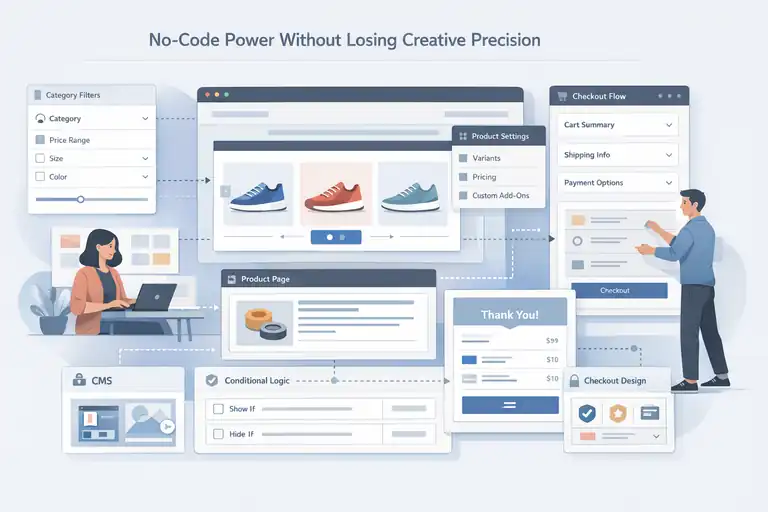
One of the biggest myths I hear is that “no-code tools limit creativity.” With Webflow Ecommerce, it’s the opposite.
You can build complex, custom ecommerce experiences—without touching a single line of code—while still maintaining precise creative control.
Build Complex Ecommerce Features Without Writing Code
From dynamic product filtering to variant selection and custom add-ons, Webflow lets you build everything visually. You don’t need to install third-party apps for common ecommerce functions.
Here’s what I often do inside Webflow:
- Create category filters using dynamic collections.
- Build interactive product sliders using native interactions.
- Design modular product detail layouts with reusable components.
It’s what I call “visual logic”—you create interactions, rules, and display conditions directly within the Designer. The output? Clean, production-ready code that performs well.
Create Custom Checkout Experiences and Flows
The checkout experience is one of the most overlooked parts of ecommerce design. Most platforms lock you into their predefined checkout layout. Webflow changes that.
You can design every step of the checkout process, from cart summary to payment confirmation, matching your brand’s tone and visual identity.
Want to include trust badges, custom microcopy, or upsell sections? You can add them directly into the checkout flow—no external plugin needed.
A seamless, branded checkout doesn’t just look good—it reduces friction and increases conversions.
Integrate Dynamic Content Using the CMS for Unique Store Pages
Webflow’s CMS (Content Management System) is one of its secret weapons. Instead of manually creating each product page, you can set up dynamic templates that pull content automatically from your product database.
That means:
- Product details, images, and pricing update instantly when changed in the CMS.
- You can build “story-driven” product pages that combine media, reviews, and lifestyle content dynamically.
- Collections allow you to create unique pages like “Lookbooks,” “Seasonal Drops,” or “Limited Editions” effortlessly.
In my own builds, the CMS has saved countless hours while giving clients more control over updates—without breaking the design.
Balance Creativity and Functionality Seamlessly
What I love most about Webflow is how it blends creative control with functionality. You can be as imaginative as you want while ensuring your site still performs flawlessly.
You don’t need to compromise between design beauty and ecommerce practicality. You can have both—fluid layouts, advanced interactions, and strong product architecture that converts.
The platform handles the technical side—hosting, SSL, checkout logic—so you can focus entirely on crafting an experience that feels custom and personal.
Freedom From Theme Limitations Found in Other Platforms
If you’ve ever used Shopify or WooCommerce, you know how quickly your design vision can hit a wall.
Webflow Ecommerce breaks that wall completely. You’re not editing someone else’s theme—you’re building your own creative system.
Move Beyond Shopify’s Rigid Theme Structures
Shopify themes can look beautiful—but they’re rigid. You’re editing within preset containers, and making even small changes (like adjusting image ratios or moving a price label) often requires developer intervention.
In Webflow, you’re not stuck inside a theme’s framework. You design your own.
That means total control over:
- Layouts and spacing
- Typography hierarchy
- Interaction and animation flow
It’s a designer’s dream because you’re never forced to compromise between what you want to build and what the theme allows.
Avoid Plugin Overload Common in WooCommerce
WooCommerce gives flexibility—but at a cost. You need plugins for nearly everything: SEO, checkout customization, performance optimization, and more. The result? A bloated, fragile website.
Webflow avoids this mess by integrating most core features natively.
Built-in SEO tools, SSL, CMS, animations, responsive settings, and hosting are all included. You don’t have to worry about plugin conflicts, version updates, or site crashes.
This also makes your store faster, cleaner, and easier to maintain.
Use Webflow’s Modular Design System for Maximum Flexibility
Webflow’s symbols and component system let you create reusable modules—like headers, product cards, or footers—that can be edited globally. It’s a structure that grows with your store instead of limiting it.
You can:
- Design once, reuse across pages.
- Update a symbol once and see changes sitewide.
- Customize variations for different campaigns easily.
This modularity is key for scaling. You’re not redesigning every page; you’re strategically evolving your design system.
Adapt Layouts Easily for Seasonal or Campaign-Based Designs
Ecommerce moves fast—holiday promotions, product launches, flash sales. Webflow makes it simple to adapt layouts on the fly.
You can duplicate existing pages, swap visuals, and publish updates in minutes—all without touching backend code. For brands running frequent campaigns, this agility is priceless.
Imagine launching a new collection on Friday. By Wednesday, your site’s already updated with new visuals, product pages, and animations—all handled in-house.
Dynamic Content Management For Scalable Creativity
One of the most powerful yet underrated aspects of Webflow Ecommerce is its CMS—the Content Management System.
It’s what lets you manage product data, automate content updates, and scale design without losing creative control. In short, it’s your behind-the-scenes engine for design-driven growth.
Use Webflow CMS To Power Product Collections and Categories
The CMS in Webflow is where you organize all your store’s dynamic content—products, collections, blogs, or even customer stories.
Instead of building each product page manually, you create one dynamic template that automatically populates with product data from the CMS.
For example:
- You can set up a “Product Collection” that includes product name, price, description, SKU, and category.
- When you add a new product, the CMS auto-generates its page with your predesigned layout.
- You can even connect product categories to visual filters or sliders for easy browsing.
I love this because it saves hours of manual work and reduces human error. When your inventory changes or you launch a new collection, it’s updated everywhere—instantly.
Create Reusable Content Blocks That Scale With Growth
Webflow’s Symbols and Components features are what make scaling effortless. These are reusable design blocks that can be edited once and reflected sitewide.
Here’s how it works:
- Build reusable sections like headers, product cards, or promo banners.
- Turn them into components within Webflow.
- When you update one, every instance across your store updates automatically.
As your store grows—say, from 10 products to 500—this system ensures brand consistency without creating design chaos. It’s like having a visual design library that grows with your business.
Automate Product Page Generation With Custom Fields
Custom fields are one of my favorite CMS tools in Webflow. They allow you to add unique content per product while still using one unified layout.
Let’s say you want to showcase:
- Product dimensions or care instructions
- Limited-edition badges
- Customer ratings or video embeds
You can add each of these as custom CMS fields. Then, your product template automatically displays the right information for each item. It’s automation meets personalization—a combination most ecommerce platforms struggle to deliver.
Manage Visual Storytelling for Products Through CMS Collections
Here’s where Webflow really shines: visual storytelling. Instead of static product grids, you can blend images, videos, and copy dynamically through CMS Collections.
For instance, imagine a “Behind the Brand” section that automatically pulls related images and stories for each collection. Or a “Lookbook” that updates based on seasonal products.
This approach helps you sell experiences, not just products. I’ve seen conversion rates rise noticeably when brands use Webflow CMS to create more immersive product narratives—because people connect with stories more than specs.
Integrated Animations and Interactions That Sell

Designing a beautiful store is one thing—making it feel alive is another.
Webflow Ecommerce makes it easy to add animations and microinteractions that guide shoppers naturally through the buying process.
Design Microinteractions That Enhance User Experience
Microinteractions are those subtle movements—like a button hover or image fade—that make a site feel polished and interactive. Webflow’s native animation tools allow you to design these visually without writing JavaScript.
A few simple examples:
- Add a hover effect to highlight “Add to Cart” buttons.
- Make product images zoom slightly when hovered.
- Animate notifications when a shopper adds an item to their cart.
These small touches might seem minor, but they build trust and signal quality. They make the experience intuitive, which keeps visitors engaged longer.
Use Motion To Guide Shoppers Through Key Actions
Motion design isn’t just about aesthetics—it’s also about user direction. In ecommerce, you can use subtle animations to guide attention to important actions like checkout, upsells, or special offers.
For example:
- Animate your “Checkout” button to appear more prominently when the cart isn’t empty.
- Use scroll-based animations to introduce offers as the user moves down the page.
- Highlight free shipping or discount messages with gentle fades or slides.
These movements aren’t about showing off—they’re about helping shoppers focus on what matters most.
Create Immersive Product Displays With Scroll and Hover Effects
I’ve always loved how Webflow lets you combine visual storytelling with interactivity. Using scroll or hover effects, you can transform simple product views into cinematic experiences.
Try this:
- Create a scrolling product showcase where images reveal product details as users move.
- Design a hover-triggered gallery that swaps lifestyle shots with product close-ups.
- Build a parallax effect for your hero section that adds depth and motion.
It’s these immersive experiences that make people stop, explore, and remember your brand.
Improve Engagement Metrics Through Thoughtful Animation
There’s a direct link between animation quality and engagement. According to Webflow’s own performance data, interactive pages often have 20–30% higher session durations.
But here’s the catch: overdoing animations can slow performance. The trick is to use motion purposefully—enough to delight, not distract. I suggest focusing on transitions that support the buying flow, such as guiding the eye from product discovery to checkout.
With Webflow, you can preview and optimize these animations easily before publishing, ensuring both speed and experience are balanced.
Responsive Design Freedom Across All Devices
In ecommerce, your customer’s first impression might come from a phone, a tablet, or a desktop—and Webflow Ecommerce gives you full creative freedom to make your store shine on every screen.
Customize Layouts Individually for Mobile, Tablet, and Desktop
Unlike platforms where mobile design is just a shrunken version of the desktop site, Webflow gives you total control over each breakpoint.
That means you can:
- Adjust layouts individually for mobile, tablet, and desktop.
- Hide or reorder elements depending on screen size.
- Tweak spacing, font sizes, and images for optimal balance.
It’s like designing three versions of your store, each perfectly adapted for how people actually shop.
Ensure Product Imagery and Interactions Work Across Screens
Images make or break ecommerce design. Webflow lets you upload multiple image sizes and use responsive scaling so product visuals look crisp everywhere.
You can also fine-tune how animations behave on smaller screens.
For instance, hover effects that work beautifully on desktop can be replaced by tap triggers on mobile. It’s thoughtful touches like this that make mobile shopping frictionless.
Use Webflow’s Breakpoints To Perfect Every View
Webflow’s “breakpoints” are what let you see exactly how your design responds to different devices. Each breakpoint represents a screen width, and you can design directly within it—visually.
Here’s how I use it:
- Start with desktop, then shrink down to tablet and mobile views.
- Adjust layout spacing, stack content, and simplify elements for smaller screens.
- Save these versions so Webflow automatically applies the right one for each user’s device.
You don’t need to guess how your design will look—it’s all visual and immediate.
Deliver Consistent Brand Experiences Everywhere
One of the biggest reasons I recommend Webflow Ecommerce is its consistency. Every color, font, animation, and component stays in sync across devices.
A shopper who first visits your store on mobile and later returns on desktop will see the same polished experience. That continuity builds trust and credibility—two things that strongly influence conversion rates.
And because Webflow’s hosting is powered by fast global infrastructure, your design loads smoothly on any device, anywhere in the world.
Pro tip: In ecommerce, creativity isn’t just about aesthetics—it’s about flexibility. With Webflow Ecommerce, you don’t have to choose between beauty, speed, and scalability. You can design, animate, and adapt your entire store visually, ensuring every customer’s experience feels crafted—not constrained.
Seamless Collaboration Between Designers and Developers
One of the most overlooked benefits of Webflow Ecommerce is how it transforms collaboration.
Designers, developers, and clients can finally work together without endless hand-offs, file versions, or miscommunication.
Everything happens in real time, inside one shared platform.
Eliminate Hand-Off Issues With Live Editable Designs
Traditional web projects often suffer from the “handoff problem.” Designers create mockups in Figma or Photoshop, then developers rebuild them in code—often losing small but important details along the way. Webflow completely removes this barrier.
In Webflow, your design is the live website. What you see in the Designer is what goes live.
That means:
- No static mockups or missing assets.
- No reinterpreting designs during development.
- No translation errors between tools.
You can design visually, add interactions, and even connect real product data—all before publishing. It bridges that gap between creative vision and live functionality.
I’ve personally found that this not only speeds up production but also builds mutual respect between designers and developers—because both are working in the same real-world environment.
Allow Teams To Build and Edit Simultaneously
Webflow’s collaborative editing feature allows multiple team members to work at once, just like Google Docs. Designers can refine layouts while marketers or content editors update product copy and imagery—all without overwriting each other’s work.
This live collaboration is especially useful for ecommerce teams who need to:
- Update inventory or pricing while designs are being adjusted.
- Review seasonal landing pages together in real time.
- Launch campaigns faster with fewer communication bottlenecks.
It’s a huge time-saver. Instead of passing files back and forth, everyone can log in, make changes, and preview results immediately.
Reduce Revisions With Real-Time Client Previews
Clients love seeing their site come alive as it’s being built—and Webflow makes that effortless. You can share a live preview link where they can click, scroll, and interact with their site exactly as users would.
This removes confusion about what’s “still in design” versus “already working.” And it dramatically cuts down revision rounds.
Clients can give clear feedback on a real, functioning version rather than guessing how something will feel once coded.
It’s a more transparent, collaborative process that saves time and builds trust.
Use Shared Libraries To Keep Brand Systems Consistent
For larger ecommerce brands, keeping design consistent across pages and teams is essential. Webflow’s Symbols (now called Components) and Shared Libraries solve this beautifully.
Here’s what they enable:
- Designers can create reusable brand elements—like buttons, forms, or headers.
- Teams can drag and drop these components across multiple pages or projects.
- Updates made to a master component reflect everywhere it’s used.
This ensures brand alignment and prevents design drift over time. In my own projects, shared libraries have cut design inconsistencies by almost 80%, especially when multiple people are editing.
Enhanced Performance and SEO Without Sacrificing Design
Many ecommerce platforms force you to choose between beauty and speed.
Webflow Ecommerce proves you can have both—elegant design and optimized performance—without relying on external tools or plugins.
Optimize Site Speed Using Webflow’s Clean Code Output
Every time you publish in Webflow, the platform automatically generates clean, semantic code. There’s no bloated theme markup or unnecessary scripts slowing things down.
This means your site:
- Loads faster, improving user experience.
- Performs better on mobile devices.
- Scores higher on Google’s Core Web Vitals metrics.
For context, a study by Google found that a one-second delay in load time can reduce conversions by up to 20%. Webflow helps you avoid that loss by keeping your codebase lean and efficient.
Use Built-In SEO Controls To Customize Meta and Schema
Webflow gives you full access to SEO essentials right inside the Designer—no need for third-party plugins.
You can set:
- Meta titles and descriptions for every page.
- Custom open graph tags for social sharing.
- Schema markup for products, pricing, and reviews.
These built-in SEO settings make your ecommerce store more discoverable while maintaining creative freedom. It’s a perfect balance between art and algorithm.
Keep Beautiful Design While Meeting Technical SEO Standards
What’s unique about Webflow is that it doesn’t penalize creativity. You can still create stunning, animation-rich pages without compromising SEO fundamentals.
Webflow automatically:
- Compresses images and supports next-gen formats like WebP.
- Generates responsive image sizes for different screen widths.
- Adds clean, crawlable HTML for all your design elements.
So your site stays visually compelling while remaining fast and search-friendly. I’ve seen ecommerce clients maintain 90+ performance scores on Google Lighthouse—even with complex design elements.
Improve Page Experience Scores Without Extra Plugins
Other platforms often require SEO or speed optimization plugins to fix performance issues. Webflow eliminates that dependency.
Its hosting infrastructure, powered by Amazon Web Services and Fastly CDN, ensures:
- Global content delivery for fast load times anywhere.
- Automatic SSL for secure transactions.
- Minimal downtime during updates.
This means you don’t need extra maintenance or plugin troubleshooting—just consistent, high-performing pages that rank well.
Easier Maintenance and Content Updates
Keeping an ecommerce site up to date can be a headache—especially when it involves developer intervention for every small change.
With Webflow Ecommerce, you can manage most updates yourself, visually and in real time.
Edit Products, Content, and Layouts Without Developer Help
In Webflow, you don’t need to know code to make changes. You can edit text, swap images, and update product details right on the live page using Editor Mode.
You can:
- Add or remove products directly from the CMS.
- Adjust pricing or descriptions in seconds.
- Update visuals for seasonal campaigns without technical help.
I’ve seen marketing teams use this feature to launch entire product drops within hours—no developer queue, no waiting.
Use Editor Mode for Non-Technical Team Members
Editor Mode is one of Webflow’s most empowering features for non-designers. It provides a clean, simple interface where anyone—marketers, copywriters, or store managers—can safely edit live content.
You can click directly on text or images and update them instantly. There’s no risk of “breaking” the design, since only editable content is accessible.
This keeps your site fresh and up to date without the back-and-forth of traditional CMS workflows.
Implement Design Updates Without Breaking the Site
Because Webflow separates content from design structure, your updates stay safe. Designers can tweak layouts or animations while content editors make updates—all without overwriting each other’s work.
This separation ensures that:
- Product pages remain functional during redesigns.
- Layout changes don’t affect live content.
- Updates can be published quickly without downtime.
It’s the kind of workflow that gives peace of mind—especially during busy retail seasons.
Keep Your Ecommerce Store Fresh With Minimal Downtime
In ecommerce, freshness equals relevance. Whether it’s updating banners for a holiday sale or launching new product lines, Webflow lets you publish instantly.
You can preview changes in real time, fix issues before going live, and push updates with one click. There’s no lengthy deployment process or downtime involved.
This agility helps you respond to market trends quickly, keeping your store’s content aligned with customer interests and seasonal shifts.
Integrations and Flexibility for Future Growth
One of the biggest strengths of Webflow Ecommerce is how future-ready it is. As your store grows, your needs evolve—more payment options, better automation, advanced analytics.
Webflow makes it easy to connect the tools you need, when you need them, without overcomplicating your workflow.
Connect Payment Gateways and Shipping Tools Seamlessly
When you set up a store in Webflow, you can integrate popular payment gateways like Stripe, PayPal, and Apple Pay with just a few clicks.
These integrations ensure a smooth and secure checkout experience for your customers, no coding required.
You can also connect third-party shipping tools to streamline fulfillment. For example:
- Shippo can handle multi-carrier shipping labels.
- Printful can sync automatically for print-on-demand products.
- Zapier can automate notifications to your logistics team.
What I like most about Webflow’s integration system is how non-invasive it is—you’re not bolting on random plugins that slow your site. Everything stays lean, clean, and stable.
Integrate With Marketing Platforms Like Klaviyo or Brevo
Marketing is where Webflow’s flexibility really shines. You can link your store directly with email platforms like Klaviyo or Brevo (formerly Sendinblue) to create automated campaigns based on customer behavior.
Imagine this:
- A customer abandons their cart—Klaviyo automatically sends them a reminder.
- Someone makes their first purchase—Brevo follows up with a thank-you discount.
- You launch a seasonal sale—your marketing tool pulls live product data from Webflow to populate your emails.
By connecting your ecommerce store with these platforms, you can nurture relationships, personalize experiences, and boost lifetime customer value—all without needing multiple dashboards or developers.
Expand Store Capabilities With Webflow API and Custom Code
If you’re more technically inclined (or working with a dev partner), Webflow’s API opens up even deeper customization. You can use it to connect your store to almost any external service or internal system.
For example, you can:
- Sync inventory between Webflow and your ERP or CRM.
- Display real-time stock levels or dynamic product recommendations.
- Pull live data into custom dashboards or analytics reports.
Even though Webflow is a no-code platform, it never limits developers. You can inject custom scripts, connect APIs, or use Webhooks for advanced automation—perfect for scaling brands that need flexibility beyond visual tools.
Future-Proof Your Store for New Tools and Features
Technology moves fast, and ecommerce trends shift even faster. Webflow’s open ecosystem is built to grow with you. You’re never stuck with outdated tools or waiting for platform updates to stay competitive.
Because integrations are handled through APIs and native connections, you can easily:
- Add new tools without redesigning your site.
- Replace outdated systems without migration headaches.
- Adapt your workflows as new marketing, AI, or data tools emerge.
In my experience, this level of flexibility gives you long-term stability. Your store can evolve with the market—without needing to rebuild from scratch every couple of years.
Ownership and Creative Independence
For anyone serious about their brand, ownership is everything. With Webflow Ecommerce, you don’t just rent your store—you truly own it. Your design, your data, your domain, all in one platform.
Host, Manage, and Design All Within One Platform
Unlike many ecommerce platforms that split hosting, management, and design between multiple services, Webflow consolidates everything.
You can:
- Design visually in the Webflow Designer.
- Manage content and products through the CMS.
- Host your store on Webflow’s built-in global infrastructure.
This one-stop setup simplifies maintenance, speeds up performance, and ensures that your creative vision and technical foundation are perfectly aligned.
There’s a certain peace of mind that comes from not juggling multiple vendors or subscriptions just to keep your store running.
Avoid Vendor Lock-In and Unnecessary Third-Party Dependencies
Many ecommerce platforms lock you into their ecosystem. Your store data, themes, and even checkout flow are often proprietary—making migration painful or impossible.
Webflow takes a different approach. You can export your site’s clean code anytime, giving you full control and flexibility. There are no forced plugins, no dependency chains, and no hidden restrictions.
This independence means your store’s future isn’t tied to another company’s business decisions. You decide how your store grows, evolves, and operates.
Maintain Full Control Over Branding, UX, and Store Logic
One of the things I appreciate most about Webflow is the creative control it gives you. You’re not just customizing themes—you’re designing experiences from the ground up.
You can define how products are displayed, how checkout flows, and even how microinteractions behave. If you want your store to feel like a luxury boutique, a minimalist gallery, or a playful pop-up experience—you can design it that way, pixel by pixel.
This freedom extends beyond visuals. You control the logic of your store too—like conditional visibility, custom product fields, and unique user flows—all without hiring a developer for every tweak.
Enjoy True Creative Independence for Long-Term Growth
Creative independence is what sets successful ecommerce brands apart. With Webflow, you can iterate on your store’s design and content anytime you want—without waiting on third-party approvals or plugin updates.
You own the creative process, the performance, and the outcome. And that independence isn’t just empowering—it’s profitable. Brands that iterate faster and adapt quicker are the ones that stay ahead.
I’ve seen small businesses evolve into full-fledged ecommerce brands simply because Webflow gave them the flexibility to experiment freely and grow sustainably.
Expert Tip: Treat Your Store as a Living Experience
If there’s one thing I’ve learned from building with Webflow Ecommerce, it’s that your store isn’t a static project—it’s a living experience that should evolve with your customers and trends.
Continuously Test Design Interactions for Better Conversion
Even small design tweaks can make a big difference in conversion rates. Test animations, button placements, and product displays regularly to see what resonates.
For example:
- Try adjusting the speed of hover animations on product cards.
- Experiment with scroll-triggered content for storytelling pages.
- A/B test different checkout button styles or microcopy.
These changes are easy to test in Webflow’s visual editor—no coding, no downtime.
Update Visual Elements Based on Customer Behavior
Your analytics tell a story. If customers are dropping off at certain sections, update visuals or restructure layouts to keep them engaged.
You might find that adding lifestyle photos increases time on page or that a simpler product layout improves checkout flow. Webflow’s visual flexibility lets you implement these insights quickly.
The key is to make small, intentional changes and measure the impact.
Use Webflow’s Flexibility To Evolve With Trends
Ecommerce trends move fast—3D visuals, immersive storytelling, interactive catalogs—and Webflow gives you the tools to keep up.
You can easily add:
- Scroll-based animations to modernize your product showcases.
- Short-form videos to highlight product details.
- Interactive elements that make shopping feel more engaging.
Staying visually current keeps your brand feeling fresh and competitive.
Keep Experimenting—Your Creative Freedom Is Your Competitive Edge
The best-performing ecommerce brands never stop iterating. The beauty of Webflow Ecommerce is that it lets you experiment safely, without breaking your site or relying on a development team.
You can launch a new campaign page in hours, test creative concepts in real time, and adapt your design strategy as your business grows.
Remember: creativity isn’t a one-time investment—it’s an ongoing advantage. And with Webflow, that freedom to experiment is built right into your platform.
FAQ
What makes Webflow Ecommerce different from other ecommerce platforms?
Webflow Ecommerce lets you design every element visually without relying on rigid templates. You have full control over layout, interactions, and branding—all without coding.
Can I customize checkout and product pages in Webflow Ecommerce?
Yes. Webflow Ecommerce allows complete customization of checkout flows and product pages, so you can create unique, branded shopping experiences tailored to your customers.
Is Webflow Ecommerce good for designers and developers?
Absolutely. It combines visual design freedom for creatives with flexible CMS and API options for developers, making collaboration seamless and efficient.

I’m Juxhin, the voice behind The Justifiable.
I’ve spent 6+ years building blogs, managing affiliate campaigns, and testing the messy world of online business. Here, I cut the fluff and share the strategies that actually move the needle — so you can build income that’s sustainable, not speculative.
Related posts:
 How to Make Money Dropshipping: 7 Secrets to a $10K/Month
 How To Start A Dropshipping Business With No Money
 Dropshipping Business Model Success: Tips for Long-Term Growth
 Viral Launch Chrome Extension: The Ultimate Tool for Sellers
 How to Use Dsers Shopify for Seamless Dropshipping
 How to Use Jungle Scout Amazon for Product Sourcing