
Table of Contents
Some links on The Justifiable are affiliate links, meaning we may earn a small commission at no extra cost to you. Read full disclaimer.
When I first looked into doba cost, I had the same question most dropshippers do: is this platform actually worth what you pay each month, or is it just another tool with inflated pricing?
This is for beginners comparing dropshipping platforms, growing sellers watching their margins closely, and anyone considering Doba but unsure about the real value.
I’ll answer one clear question here: how much Doba really costs across plans and whether that pricing is justified for different types of sellers.
Doba Cost Breakdown Across Monthly, Quarterly, Annual Plans
Doba cost changes depending on how you pay and how advanced your business is.
What looks expensive at first can feel reasonable once you understand what each plan is built to support and where discounts actually matter.
Limited Plan Pricing And Entry-Level Feature Access
The Limited plan starts at $29.99 per month, with slight discounts if you pay quarterly or annually. This is Doba’s entry point and it’s clearly designed for people who are still testing the waters.
Here’s how I think about it in real terms.
You’re paying for access, not scale. You get:
- 1 store integration
- 30 one-click product listings
- Very limited inventory capacity
- AI Pickr capped at 30 uses per month
That means you can experiment, but you’ll hit ceilings fast.
If you’re brand new and want to avoid technical headaches like supplier syncing or order forwarding, this plan can feel helpful. But if you’re already listing dozens of products weekly, the doba cost here quickly feels restrictive rather than supportive.
From my experience, this plan works best for:
- First-time dropshippers validating a niche
- Sellers who want to learn Doba’s interface before committing
- People treating Doba as a side experiment, not a main income channel
Once you start uploading products consistently, the limits become friction.
Basic Plan Cost For Early-Stage Scaling Sellers
The Basic plan sits at $59.99 per month, with noticeable savings on annual billing. This is where Doba starts to feel usable for real business activity.
You unlock:
- 2 store integrations
- 250 one-click product listings
- 600 inventory capacity
- 450 product downloads per month
- AI Pickr increased to 100 uses
- AI Auto Lister for 30 automated listings
This tier makes sense if you’re moving from testing into early scaling.
What stands out to me is the jump in product listing volume. Going from 30 to 250 listings changes how you operate day to day. You’re no longer hand-picking everything; you’re building catalogs.
Still, the doba cost at this level assumes you’re intentional. If you’re not actively uploading, researching, and rotating products, you won’t extract the full value.
This plan works best for:
- Sellers running one or two active stores
- People testing multiple product angles
- Store owners who want light automation without full dependency
Standard Plan Pricing For Automation And Volume Growth
At $149.99 per month, the Standard plan is where most serious sellers land. Doba even labels it as their best choice, and honestly, that tracks.
You get:
- 5 store integrations
- 1,000 one-click product listings
- 3,000 inventory capacity
- 2,000 product downloads monthly
- AI Pickr at 300 uses
- AI Auto Lister with 100 auto-listings
- Retailer API access
- Dedicated account manager
This is where doba cost shifts from “tool expense” to “operational investment.”
If you’re managing multiple stores or high SKU counts, the automation alone can save hours every week. I’ve seen sellers justify this cost simply by reducing VA hours or manual CSV uploads.
In practical terms, this plan supports:
- Multi-store dropshipping brands
- Sellers running daily product tests
- Teams relying on automation instead of manual workflows
If you’re serious about scaling, this is the first plan that truly keeps up.
Enterprise Plan Cost For High-Volume Retail Operations
The Enterprise plan starts at $299.99 per month, with discounts for annual billing. This tier is not subtle and it’s not meant for experimentation.
You unlock:
- 15 store integrations
- 2,500 one-click product listings
- 15,000 inventory capacity
- 5,000 product downloads monthly
- AI Pickr at 1,000 uses
- Auto Lister capped at 200 listings
- Higher API request limits
This doba cost only makes sense when volume is already proven.
If you’re running large catalogs, multiple brands, or external systems that rely on API access, the Enterprise tier removes bottlenecks. For smaller sellers, it’s overkill.
I usually tell people this: if the price scares you, you probably don’t need it yet.
What You Actually Get For The Doba Cost Per Plan
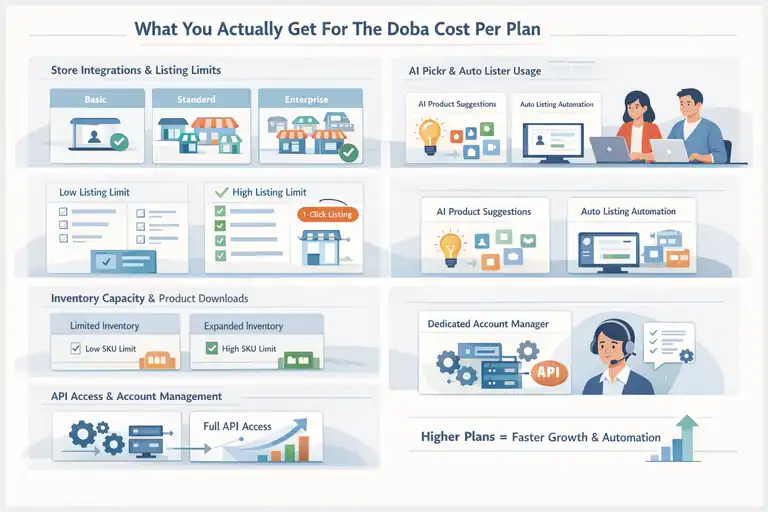
Pricing only tells half the story. The real question is whether the features tied to that doba cost actually change how you run your business.
Store Integrations And Product Listing Limits Explained
Store integrations define how many storefronts Doba can connect to at once, like Shopify or other ecommerce platforms.
Here’s why that matters.
If you run:
- One niche store → Limited or Basic works
- Multiple niche stores → Standard becomes necessary
- Brand networks or client stores → Enterprise is mandatory
Product listing limits directly affect growth speed. One-click listings aren’t just convenience; they reduce errors and save time during scale.
From a workflow standpoint:
- Low limits force manual curation
- High limits enable rapid testing and iteration
This is where cheaper plans quietly slow you down.
Inventory Capacity And Product Download Restrictions
Inventory capacity controls how many products you can actively manage inside Doba. Product downloads determine how many SKUs you can pull into your store monthly.
This impacts:
- How often you refresh catalogs
- How many variations you can test
- Whether you rotate seasonal products efficiently
For example, a seller testing 10 products per week will hit Basic limits quickly. Standard-level capacity supports continuous experimentation without cleanup.
This is one of those features people underestimate until they’re blocked mid-campaign.
AI Pickr And Auto Lister Usage Value By Tier
AI Pickr is Doba’s internal product suggestion engine. In simple terms, it surfaces trending or high-potential products based on internal data.
Auto Lister automatically publishes products to your store with preset rules.
Here’s how I see their value:
- Limited plan usage is educational
- Basic plan usage is experimental
- Standard and Enterprise usage is operational
If you’re relying on automation to maintain momentum, capped AI usage can quietly limit output. Higher tiers reduce that friction.
API Access And Account Management Differences
API access is where Doba shifts from tool to infrastructure.
With API access, you can:
- Sync inventory in real time
- Push data into custom systems
- Reduce order and stock errors at scale
Dedicated account managers also matter more than people expect. When something breaks during scale, response speed protects revenue.
This is why doba cost feels justified only once complexity enters your business.
At lower tiers, you’re managing tasks. At higher tiers, you’re managing systems.
How Doba Cost Compares To Competing Platforms
When people ask whether doba cost is justified, they’re usually comparing it to other dropshipping platforms they’ve heard about.
This section breaks down how Doba stacks up against real alternatives in pricing, features, and day-to-day usability.
Doba Cost Vs Spocket Pricing And Feature Depth
Spocket is often the first comparison because it targets a similar audience: sellers who want vetted suppliers and faster fulfillment.
From a pricing standpoint:
- Spocket plans typically start lower than Doba
- Advanced Spocket tiers can approach or exceed mid-level Doba pricing
The real difference isn’t just price. It’s depth.
Spocket focuses heavily on US and EU suppliers with branded invoicing. That’s great for perception, but product breadth is narrower. Doba, on the other hand, emphasizes volume and automation over branding polish.
In practice:
- Spocket works well for boutique-style stores with fewer SKUs
- Doba suits sellers running larger catalogs and multiple stores
If you’re running 20–50 products and care about packaging aesthetics, Spocket may feel more cost-efficient. If you’re managing hundreds of listings, doba cost often delivers more operational leverage.
Doba Cost Vs Modalyst For Product Sourcing Scale
Modalyst appeals to sellers who want access to brand-name or print-on-demand suppliers. Pricing is generally lower at entry levels, but scaling changes the math.
Modalyst limits:
- Product caps become restrictive fast
- Automation features are lighter
- Multi-store workflows require workarounds
Doba’s higher upfront cost includes:
- Bulk product uploads
- Inventory syncing at scale
- Native automation tools instead of add-ons
I’ve seen sellers outgrow Modalyst within months once testing turns into scaling. Doba feels more expensive early, but less disruptive later when growth accelerates.
Doba Cost Vs SaleHoo For Supplier Access Value
SaleHoo is a different category altogether. It’s primarily a supplier directory, not a full automation platform.
Key differences:
- SaleHoo is cheaper upfront
- You still manage listings, syncing, and orders manually
- No built-in automation or AI tools
If you enjoy hands-on control and manual sourcing, SaleHoo offers value. If your goal is speed and reduced operational load, doba cost reflects a more complete system rather than a research tool.
Doba Cost Vs AliExpress Automation Tools
Many sellers compare Doba to AliExpress paired with automation tools like DSers or AutoDS.
AliExpress setups are:
- Cheaper initially
- Flexible for product testing
- Highly manual at scale
Doba removes several pain points:
- Supplier vetting
- Inventory inconsistencies
- Shipping reliability issues
The hidden cost of AliExpress is time. Once order volume increases, manual fixes, refunds, and supplier issues eat into margins. That’s where doba cost starts to feel like insurance against chaos.
Who Doba Pricing Makes Sense For And Who It Doesn’t
Not everyone should pay for Doba. I say that honestly. The value of doba cost depends entirely on where you are in your dropshipping journey.
New Dropshippers Testing Product Market Fit
If you’re brand new, Doba can feel expensive.
You’re still learning:
- How product research works
- What converts
- How ads behave
In this phase, you might not need automation yet. Lower-cost tools or even manual methods can work while you validate demand.
That said, Doba’s Limited plan can reduce beginner overwhelm by handling supplier logistics for you. It’s a trade-off between cost and simplicity.
Mid-Level Sellers Focused On Speed And Automation
This is where Doba shines.
If you’re:
- Uploading products weekly
- Testing ads consistently
- Managing more than one store
Then doba cost often pays for itself in time saved. Automation replaces repetitive tasks, which lets you focus on creatives, funnels, and scaling decisions.
This is the stage where I see the strongest ROI.
High-Volume Sellers Managing Multiple Storefronts
For advanced sellers, Doba becomes infrastructure.
At scale:
- Manual processes break
- Supplier errors compound
- Inventory mismatches hurt revenue
Enterprise-level doba cost supports systemized growth. It’s not about saving money anymore; it’s about protecting revenue and stability.
Sellers Who Will Overpay Based On Their Use Case
Doba is not ideal if:
- You sell fewer than 20 products total
- You enjoy manual sourcing
- You don’t plan to scale beyond a single store
In those cases, you’re paying for power you won’t use. And unused features are the fastest way to feel like a tool is overpriced.
My honest take: doba cost isn’t cheap, but it’s not arbitrary either. It rewards clarity. If you know what you’re building, it can make sense. If you don’t, it can feel heavy fast.
Is The Doba Cost Justified Based On ROI Potential
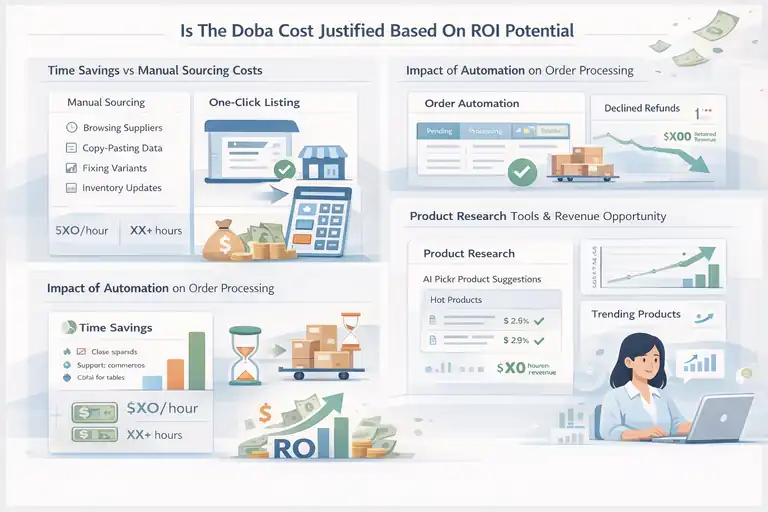
This is the real question behind every pricing comparison. Not whether doba cost is high or low, but whether it gives you something back that actually improves profit, time, or sanity.
Time Savings Versus Manual Product Sourcing Costs
Time is the most underestimated cost in dropshipping.
Manual sourcing usually means:
- Browsing suppliers for hours
- Copy-pasting product data
- Fixing broken variants and pricing errors
- Re-uploading when inventory changes
Doba replaces much of that with one-click listings and supplier sync. That sounds small until you put numbers on it.
A common scenario I’ve seen:
- Manual listing time: 8–12 minutes per product
- 200 products per month = 25–40 hours
Even valuing your time modestly at $15/hour, that’s $375–$600 in labor. Suddenly, a $149 plan doesn’t look so expensive.
If you’re paying a VA, the math still applies. Doba shifts work from people to systems, and systems scale better.
Impact Of Automation On Order Processing Margins
Order automation is boring until it breaks. Then it’s everything.
Without automation:
- Orders get delayed
- Tracking updates lag
- Refunds increase
- Customer support workload explodes
Doba automates order forwarding and inventory updates, reducing failure points. Even a 1–2 percent drop in refunds can materially impact margins.
For example:
- 1,000 monthly orders
- $40 average order value
- 2 percent refund reduction = $800 retained revenue
That alone can justify a large portion of doba cost for mid-level sellers.
Product Research Tools And Revenue Opportunity
AI Pickr isn’t magic, but it’s useful.
It surfaces products based on internal performance signals rather than gut feeling. Think of it as a shortcut, not a strategy.
Where it helps most:
- Spotting trending categories faster
- Avoiding completely dead products
- Reducing “guess-and-hope” testing
Better product choices don’t guarantee success, but they increase odds. Higher odds compound over time.
Hidden Costs And Limitations That Affect Value
Doba isn’t perfect.
Hidden or overlooked factors include:
- Supplier pricing sometimes higher than AliExpress
- Plan limits that force upgrades earlier than expected
- Learning curve if you rely heavily on automation
This is why ROI varies. If you don’t actively use the features you’re paying for, doba cost feels heavy. If you build workflows around them, it often pays for itself quietly.
How To Reduce Doba Cost Without Losing Core Value
You don’t need to overpay to benefit from Doba. A few strategic decisions can dramatically improve the value you get from the platform.
Choosing Monthly Versus Annual Billing Strategically
Annual plans look cheaper on paper, but commitment matters.
My honest recommendation:
- Start monthly while validating fit
- Switch to annual only after consistent usage
Annual billing makes sense when:
- You’re uploading products weekly
- Automation is part of daily operations
- You’ve already hit plan limits at least once
If you’re still experimenting, flexibility beats savings.
Avoiding Overpaying For Unused Plan Features
This is where many sellers go wrong.
Ask yourself:
- Am I actually using all store integrations?
- Am I hitting product or inventory caps?
- Do I rely on API access?
If the answer is no across the board, you’re likely overpaying.
A lower plan used fully often outperforms a higher plan used halfway.
When To Upgrade Or Downgrade Your Doba Plan
Upgrading should be reactive, not aspirational.
Good upgrade signals:
- Hitting listing or download limits consistently
- Managing more than one active store
- Spending too much time on manual fixes
Downgrading makes sense if:
- You paused scaling
- You reduced product testing volume
- One store shut down or consolidated
Doba plans aren’t badges. They’re tools. Use the smallest one that gets the job done.
Leveraging Trials To Validate Real Business Fit
Doba’s low-cost trials are underrated.
Use trial periods to:
- Upload real products, not test data
- Simulate real order flow
- Stress-test limits intentionally
Treat the trial like a business rehearsal. If it doesn’t improve your workflow during the trial, it won’t magically improve it later.
My final take: Doba cost is justified when it replaces friction, not when it replaces thinking. Use it deliberately, and it can quietly strengthen your operation.
Frequently Asked Questions
How much does Doba cost per month?
Doba cost starts at $29.99 per month for the Limited plan and goes up to $299.99 per month for Enterprise, with discounts available on quarterly and annual billing.
Is Doba cost worth it for beginners?
Doba cost is only justified for beginners if they value simplicity and supplier automation; otherwise, lower-cost tools may be better for early product testing.
Why is Doba more expensive than some competitors?
Doba cost is higher because it bundles supplier access, automation, inventory syncing, and multi-store management into one platform rather than relying on separate tools.

I’m Juxhin, the voice behind The Justifiable.
I’ve spent 6+ years building blogs, managing affiliate campaigns, and testing the messy world of online business. Here, I cut the fluff and share the strategies that actually move the needle — so you can build income that’s sustainable, not speculative.
Related posts:
 Salehoo Dropshipping Reviews: Is It Worth Your Money Today?
 Viral Launch Chrome Extension: The Ultimate Tool for Sellers
 Ecommerce Automation That Saves Time Without Breaking Sales
 Salehoo Directory Free: What You Can Access Without Paying
 How the Salehoo Catalog Helps You Spot Winning Items Quickly
 Dropshipping Platforms Ranked: Speed, Fees, and Control