
Table of Contents
Some links on The Justifiable are affiliate links, meaning we may earn a small commission at no extra cost to you. Read full disclaimer.
How to set up Brevo for the first time can feel a little overwhelming when you open the dashboard and see contacts, campaigns, automation, transactional email, forms, and settings all at once.
I’ve seen a lot of first-time users rush into sending a campaign before the foundation is ready, and that usually creates avoidable problems.
This guide walks you through the right setup order so you can build a clean account, protect deliverability, and start sending with confidence instead of fixing messy mistakes later.
What Brevo does and why your first setup matters
Brevo is an all-in-one customer engagement platform built around email marketing, contact management, automation, CRM, forms, and transactional messaging.
In plain English, it gives you one place to collect contacts, organize them, send newsletters, automate follow-ups, and handle emails like welcome messages or order confirmations.
Brevo’s public product pages also position it as an all-in-one platform with email, SMS, automation, CRM, chat, and transactional messaging, while its pricing page highlights a free option and paid tiers that scale with sending needs.
Understand the difference between marketing email and transactional email
Before you click anything, you need to separate two things Brevo handles very differently.
Marketing email is what you send to a list. Think newsletters, promotions, product updates, or educational campaigns. These messages usually go to many contacts at once, and they depend heavily on list quality, segmentation, and unsubscribe compliance.
Transactional email is triggered by an action. Think password resets, checkout confirmations, invoices, shipping notifications, or account verification emails. These are not “campaigns” in the usual sense. They are event-based messages that get sent when a user does something.
Brevo treats transactional email as a core feature, and its own guidance describes transactional messages as automated emails triggered by actions such as purchases, signups, or password resets.
This matters because a lot of beginners make Mistake 1: They build everything in the campaigns area and forget that product or website emails often belong in a separate transactional setup.
I suggest thinking about your setup in two lanes:
- Lane 1: Marketing emails for subscribers and promotions
- Lane 2: Transactional emails for customer actions and system events
When you know which lane you need first, the dashboard becomes much easier to navigate.
Know what “good setup” actually looks like
A proper first-time Brevo setup is not just opening an account and importing contacts. That is the fast route, not the smart route.
A good setup means five things are true:
- Your sender identity is clear.
- Your domain is authenticated.
- Your contact list is permission-based and clean.
- Your first campaign or workflow matches a real business goal.
- Your tracking and testing are in place before sending at scale.
In my experience, beginners often obsess over email design and ignore deliverability. That is backward. A beautiful email nobody receives is useless.
Imagine you run a small online store. You import 4,000 old contacts, skip domain authentication, send a discount campaign, and wonder why open rates are weak and spam complaints appear. The issue is not the design. The issue is setup order.
That is why the rest of this guide follows the sequence I recommend in real life: Account basics first, trust signals second, list hygiene third, sending fourth, optimization fifth.
Start with the right account foundations
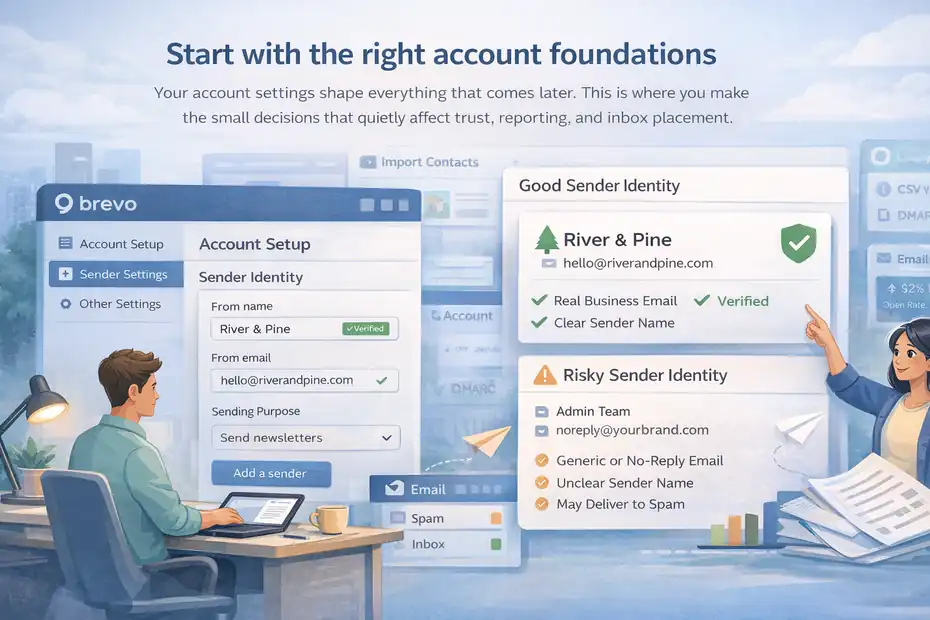
Your account settings shape everything that comes later. This is where you make the small decisions that quietly affect trust, reporting, and inbox placement.
Create your account with a real business identity
When setting up Brevo for the first time, use a real business email tied to your domain, not a generic Gmail address if you can avoid it. A branded address such as hello@yourbrand.com or marketing@yourbrand.com immediately looks more professional and creates a cleaner path for sender verification.
Your “from name” also matters more than many people expect. If recipients do not instantly recognize who emailed them, opens drop. Brevo’s sender setup documentation lets you add a sender by defining a From name and From email under the sender settings area.
Here is the simple rule I use:
- Good example: River & Pine
- Good example: River & Pine Store
- Risky example: Admin Team
- Weak example: No-reply Department
I believe the best sender names are obvious, boring, and trustworthy. Clever branding can wait. Recognition wins.
- Step 1: Choose one primary sender identity for now.
- Step 2: Match the sender name to what customers already know.
- Step 3: Avoid “no-reply” if possible because it discourages engagement and can make your brand feel distant.
If you plan to have multiple teams later, such as marketing, support, and billing, keep your first setup simple. One sender is enough at the beginning. Complexity feels productive, but for most first-time users it just adds confusion.
Set your default business details and sending purpose
Brevo needs your business information, and you need internal clarity on what the account is for. This sounds basic, but it affects compliance, forms, list structure, and reporting.
Ask yourself one practical question: Why am I opening Brevo right now?
Your answer usually falls into one of these:
- I want to send newsletters
- I need welcome emails and lead nurturing
- I need transactional emails from my site or app
- I want both marketing and transactional messaging
That answer should guide your first setup path.
For example, if you are a freelancer building a newsletter, you do not need to overbuild CRM pipelines on day one. If you run SaaS or e-commerce, you may need both campaigns and transactional email from the start.
Brevo’s product pages emphasize these different uses, including campaigns, automation, CRM, and transactional messaging within one platform.
I recommend writing down your first 30-day goal in one sentence. Something like:
- “Collect 200 subscribers and send one weekly newsletter.”
- “Set up welcome automation for new leads.”
- “Connect checkout emails and abandoned cart follow-up.”
- “Move from another tool without hurting deliverability.”
That one sentence will stop you from clicking random features and building a messy account around no real outcome.
Authenticate your domain before you send anything serious
This is the section most beginners skip, and honestly, it is the most expensive mistake in the whole process.
Brevo supports domain authentication using records like DKIM and DMARC, and its help center explicitly recommends domain authentication, including an automatic option where Brevo can detect the provider and add required records.
Its FAQ also explains that you should authenticate the actual sender domain you use to email customers or subscribers.
Verify your sender and authenticate your domain properly
Domain authentication tells inbox providers that Brevo is allowed to send on behalf of your domain. Without it, your emails have a weaker trust profile.
You will usually deal with three terms:
- SPF: A DNS record that helps validate which servers can send email for your domain.
- DKIM: A digital signature that proves the message was authorized and not altered.
- DMARC: A policy layer that tells receiving servers how to handle suspicious messages and helps with reporting.
You do not need to become a DNS expert. You just need to respect that this step matters.
- Step 1: Add your sender address in Brevo.
- Step 2: Add your domain in the domains section.
- Step 3: Use the automatic authentication option if your provider is supported.
- Step 4: If not, add the required DNS records manually.
- Step 5: Wait for verification before large sends.
From what I’ve seen, beginners usually make one of two mistakes here. They either skip authentication entirely, or they authenticate the wrong domain. If your emails come from marketing@news.yourbrand.com, that sender domain needs proper attention, not just the root domain in a vague way.
Warm up your sending habits instead of blasting your whole list
Even with proper authentication, you should not import a giant list and send a full-volume campaign on day one.
Inbox providers watch behavior. Sudden spikes from a fresh setup can trigger filtering, even if your technical settings look fine. This is especially true if your list is old or unengaged.
I suggest a simple ramp-up approach:
- Week 1: Send to your most engaged and recent contacts first
- Week 2: Expand to active subscribers from the last 90 days
- Week 3: Reintroduce older segments carefully
- Week 4: Remove cold contacts that do not engage
Imagine you imported 10,000 subscribers from an old platform. If only 1,800 opened or clicked in the last six months, start there. Those people recognize you. They are less likely to ignore the email or mark it as spam.
This is not about being slow for the sake of it. It is about teaching mailbox providers that your emails create positive engagement.
I’ve seen small brands get better long-term results by sending to 2,000 qualified contacts first than by blasting 20,000 questionable contacts in one afternoon.
Build a clean contact structure before importing anyone
A messy list inside Brevo creates messy automation, messy reporting, and messy targeting. This is the moment to be a little picky.
Organize lists, attributes, and segments the smart way
Brevo lets you work with contacts, lists, segments, and custom attributes. Segments can then be used across campaigns and automations based on conditions you define.
Here is the simplest way to think about it:
- Lists are containers
- Attributes are data fields
- Segments are filtered groups based on behavior or properties
If you are new, do not create fifteen lists for every tiny idea. That becomes painful fast.
I recommend this practical structure:
- One main list per core acquisition source or business unit
- A few useful attributes such as first name, signup source, customer status, or plan type
- Segments for behavior such as opened in 30 days, clicked last campaign, purchased, or inactive
Example: If you run a coaching business, you might have one master list for subscribers, then attributes like interest_topic and customer_stage. Instead of making separate lists for “email tips,” “SEO tips,” and “content tips,” you use segments based on preferences or clicks.
That gives you flexibility later without creating a maintenance nightmare.
The beginner trap is treating lists as strategy. They are not. Strategy is how you segment and message people. Lists are just storage.
Import only permission-based contacts and clean them first
This part is not glamorous, but it saves your account.
Before importing contacts, remove:
- Purchased lists
- Scraped contacts
- Old addresses with no clear consent
- Role-based emails like info@ or sales@ when they were not actual subscribers
- Duplicate records
- Obviously invalid addresses
I know it is tempting to import every contact you have ever collected. Please do not do that.
A smaller, cleaner list almost always performs better. A list of 1,200 subscribers who asked to hear from you will beat a bloated list of 8,000 vague contacts in most cases. Better opens, better clicks, fewer complaints, fewer headaches.
- Step 1: Export your existing list into a spreadsheet.
- Step 2: Remove duplicates and blank fields.
- Step 3: Tag known acquisition sources if possible.
- Step 4: Separate active from inactive contacts.
- Step 5: Import the clean version only.
In my experience, the most useful field you can preserve is signup source. When you know whether someone came from a lead magnet, checkout, webinar, or contact form, your first automation and first campaign get much easier to tailor.
Set up your first campaign, form, or automation in the right order

Now you are finally at the part most people want to start with. Because your foundation is cleaner, this part gets a lot easier.
Create one simple campaign before building advanced workflows
Brevo includes a drag-and-drop campaign editor and ready-made templates, which is helpful, but I still suggest starting with one plain, focused email rather than a highly designed masterpiece.
Your first campaign should have one goal only:
- Introduce your newsletter
- Announce an offer
- Share one useful resource
- Re-engage a recent segment
- Confirm what subscribers will receive from you
Keep the structure simple:
- Clear subject line
- Short opening
- One main message
- One primary call to action
- Clean footer and unsubscribe link
I believe first campaigns should prioritize clarity over creativity. Fancy layout blocks are not inherently better. In fact, overly designed emails can distract from the action you want the reader to take.
Example: If you are a local fitness coach, your first email could say who you are, what subscribers can expect, and link to one “start here” guide. That does more for trust than a crowded design with six sections and three offers.
The main thing you are testing is not just design. You are testing recognition, positioning, and inbox trust.
Set up one core automation that matches your business model
Automation is where Brevo becomes much more powerful. Its automation pages highlight no-code workflows, templates, and event-driven journeys, and its help articles show that behaviors such as email opens can trigger follow-up actions.
But here is my honest opinion: first-time users build too many automations too early.
Start with one of these:
- Welcome series for new subscribers
- Lead magnet delivery sequence
- Customer onboarding sequence
- Post-purchase follow-up
- Re-engagement for inactive contacts
A solid first automation usually has 3 to 5 emails, not 14.
Example welcome flow:
- Email 1: Deliver the promised resource
- Email 2: Explain what kind of emails you send
- Email 3: Share your best starting content or offer
- Email 4: Ask a simple engagement question or direct them to the next step
This works because it meets new-subscriber intent immediately. They signed up for something. Your automation should fulfill that promise fast.
What I like about starting this way is that it creates value from day one. Every new subscriber gets a better experience, even before your weekly campaign rhythm is fully polished.
Use the right tools and settings only when they truly matter
Brevo can do a lot, but not every feature deserves your attention on day one. The goal is not to touch every menu. The goal is to launch a clean, reliable setup.
Decide which Brevo features you actually need first
Brevo offers a wide feature set, including email marketing, automation, segmentation, forms, CRM-style tools, and transactional messaging. Depending on plan and use case, you may also use channels like SMS or WhatsApp later.
For first-time setup, I suggest this priority order:
- First: Senders, domains, and list structure
- Second: One campaign or one automation
- Third: Signup form or website integration
- Fourth: Reporting and segmentation
- Fifth: Transactional setup if your business needs it
- Sixth: Extra channels and advanced features
That order keeps you focused.
If you are a blogger or creator, you may barely touch CRM tools at first. If you are an e-commerce brand, forms and transactional email may matter much sooner. If you run a service business, lead capture and follow-up automation might be your highest priority.
It is worth experimenting later, but first-time setup should solve one real workflow well. That beats having seven half-configured features sitting in your account.
Understand pricing and upgrade timing before you commit
Brevo’s pricing page shows that plans scale based on sending needs and available features, while the free option is designed to help beginners start without immediate cost.
That said, I advise against upgrading too early.
Move to a paid plan when at least one of these is true:
- Your sending volume exceeds the free limits
- You need higher sending capacity for launches
- You need a feature tied to a paid tier
- You have enough subscriber activity to justify more advanced workflows
- Your brand needs a cleaner experience without starter limitations
A lot of people upgrade because they assume paid equals better results. Usually, better setup equals better results.
If your list is still small, your better investment may be time spent improving your signup flow, welcome sequence, and segmentation instead of paying for features you are not using yet.
Avoid the common mistakes that hurt deliverability and results
Most first-time Brevo problems are not technical disasters. They are simple setup mistakes repeated in the wrong order.
The most common setup mistakes I see
Here are the mistakes that create the most trouble:
- Mistake 1: Skipping domain authentication and sending anyway
- Mistake 2: Importing old or low-consent contacts
- Mistake 3: Using too many lists instead of using attributes and segments
- Mistake 4: Sending a heavy first campaign to the full database
- Mistake 5: Building advanced automations before one core sequence works
- Mistake 6: Writing subject lines that sound promotional before trust is established
- Mistake 7: Focusing on templates before focusing on message-market fit
I’ve watched people spend hours adjusting button colors while ignoring the fact that their list came from a three-year-old export. That is the kind of thing that quietly wrecks performance.
If your open rate is weak, do not assume the platform is the problem. More often, the issue is one of three things: poor list quality, weak recognition, or bad setup timing.
A simple troubleshooting checklist for first sends
When something feels off, run through this checklist:
- Check sender verification: Is your domain fully authenticated?
- Check audience quality: Did these people actually ask to hear from you?
- Check segmentation: Did you send to engaged users first?
- Check subject line: Would a real person recognize and trust it?
- Check content: Is there one clear goal in the email?
- Check frequency: Did you suddenly show up after months of silence?
- Check tracking: Are opens, clicks, and unsubscribes behaving normally?
Example: Let’s say your first campaign gets low opens but decent clicks among openers. That often means your email itself is fine, but your subject line, sender recognition, or inbox placement needs work.
I recommend fixing one variable at a time. Do not change subject line, audience, design, offer, and send time all at once or you will have no idea what improved results.
Optimize and scale once the basics are stable
Once Brevo is set up and your first sends are working, now you earn the right to optimize.
Improve performance with segmentation, testing, and timing
This is where real gains start showing up.
Your next level is not “more emails.” It is more relevant emails.
Use segments such as:
- New subscribers in first 14 days
- Engaged subscribers in last 30 days
- Customers vs non-customers
- Leads by interest category
- Inactive contacts needing reactivation
Then test small things with intention:
- Subject line angle
- Send time
- Call-to-action placement
- Email length
- Plain text style vs visual layout
Imagine two groups: recent webinar signups and long-time buyers. Sending the same message to both is easy, but lazy. Tailoring the message to each group almost always improves relevance.
In many accounts, a modest segmentation change can outperform a full template redesign. I have seen simpler, more targeted emails beat more polished generic campaigns again and again.
Scale your Brevo setup without creating chaos
When your core system works, scale by adding layers, not clutter.
Add one thing at a time:
- A second automation for a distinct journey
- Better tracking on key links and conversions
- More detailed custom attributes
- Signup forms for specific content offers
- Transactional email integration with your site or app
- Re-engagement logic for inactive contacts
Brevo also supports integrations and API-based connections for forms, websites, and transactional use cases, which becomes helpful once your fundamentals are stable.
My advice is simple: Do not scale by piling features on top of a shaky setup. Scale by tightening your system.
A good Brevo account feels clean. You know where contacts come from, what each automation does, which segments matter, and what success looks like. That clarity is what lets you grow without breaking things.
Final thoughts on how to set up Brevo for the first time
How to set up Brevo for the first time is really about doing the boring important steps before the exciting visible ones. If you set your sender identity correctly, authenticate your domain, clean your list, start with one focused campaign, and build one useful automation, you are already ahead of most beginners.
I believe the smartest way to use Brevo is to keep it simple until the data tells you what to expand. You do not need a complicated system on day one. You need a reliable one. Get the foundation right, and the rest becomes much easier to optimize.
FAQ
What is the first step when setting up Brevo for the first time?
The first step when setting up Brevo for the first time is creating your account with a verified business email and defining your sender identity. This ensures your emails look trustworthy and prepares your account for proper domain authentication and better deliverability from the beginning.
Do I need to authenticate my domain in Brevo?
Yes, domain authentication is essential when learning how to set up Brevo for the first time. It improves email deliverability by proving your emails are legitimate. Without it, your messages are more likely to land in spam or be blocked by inbox providers.
Can I import contacts directly into Brevo?
You can import contacts into Brevo, but only if they have given clear permission to receive emails from you. Importing unverified or purchased lists can harm your sender reputation and reduce campaign performance, especially during your first setup phase.
What should my first email campaign include?
Your first Brevo campaign should be simple and focused on one goal, such as introducing your brand or delivering value. Include a clear subject line, a short message, and one call to action to build trust and encourage engagement from new subscribers.
How many automations should I create initially in Brevo?
When setting up Brevo for the first time, start with one core automation like a welcome email sequence. This helps you deliver immediate value to new subscribers without overcomplicating your setup or creating unnecessary workflows too early.

I’m Juxhin, the voice behind The Justifiable.
I’ve spent 6+ years building blogs, managing affiliate campaigns, and testing the messy world of online business. Here, I cut the fluff and share the strategies that actually move the needle — so you can build income that’s sustainable, not speculative.
Related posts:
 Aweber Pros And Cons for Marketers Guide
 What is Getresponse: A Brief Introduction
 How Do I Create An Email Newsletter And What Should It Include?
 How to Advertise Your Business: Utilizing Email Marketing Strategies
 Top 10 Email Service Providers: Powerful Tools for Businesses
 Email Platform: 12 Proven Strategies for Higher ROI