
Table of Contents
Some links on The Justifiable are affiliate links, meaning we may earn a small commission at no extra cost to you. Read full disclaimer.
HubSpot pricing for small business looks simple at first, and honestly, that is exactly why it catches so many owners off guard.
You see a low Starter price, assume the platform will stay affordable as you grow, and then discover seat costs, contact thresholds, onboarding fees, and upgrade jumps that were easy to miss on the first pass.
I’ve seen this happen a lot with small teams that just wanted a clean CRM and a few automations. This guide breaks down what you actually pay, where the hidden costs show up, and how to decide whether HubSpot is truly a smart fit for your business.
What HubSpot pricing really means for a small business
Before you compare plans, it helps to understand how HubSpot structures pricing. The platform is not just one tool with one fee.
It is a bundle of hubs, seats, usage limits, and upgrade paths that can change your total cost fast.
Why HubSpot can feel cheap at first and expensive later
The first thing most small business owners notice is the Starter price. Right now, HubSpot’s Starter products commonly begin at $20 per seat per month as a base list price, while the Starter Customer Platform bundle is also positioned at $20 per seat monthly or $15 per seat with annual commitment, with temporary first-year promotional pricing as low as $9 or $15 per seat for new customers. That sounds reasonable, especially if you are moving away from spreadsheets or a patchwork of separate tools.
The catch is that HubSpot pricing is rarely just about the first seat. As your business grows, you may add more users, need better automation, want better reporting, or realize you need a different hub than the one you started with. In real life, that is when the monthly bill starts acting less like a startup tool and more like enterprise software.
I believe this is the biggest mistake small businesses make: they compare HubSpot’s entry price against another tool’s full working price. That is not an apples-to-apples comparison. The real comparison should be your usable cost after six to twelve months.
A simple example: a two-person business might start on Starter for under $50 per month. But if you later need Marketing Hub Professional for more advanced automation, the plan jump alone is dramatic before you even talk about extra contacts or services.
The difference between hubs, seats, and usage-based limits
HubSpot sells different product families, including Marketing Hub, Sales Hub, Service Hub, Content Hub, Data Hub, Commerce Hub, and the Smart CRM. The important thing for a small business is that these are not all billed the same way. Some plans are clearly seat-based, while others also introduce contact-based or capacity-based pricing.
A seat basically means paid user access. If you add another teammate who needs the same paid functionality, that often means another recurring charge. That sounds normal, but it matters because seat costs compound quietly. Five users on a modest per-seat plan can still turn into a meaningful monthly expense.
Then there are limits. Marketing Hub pricing varies by contact volume, and HubSpot explicitly notes that pricing changes based on the number and type of contacts in your database. In plain English, the size of your database can affect your bill, even if your team size stays the same.
This is why I suggest thinking about HubSpot in three layers:
- Layer 1: The subscription tier you choose
- Layer 2: The number of paid seats you need
- Layer 3: The usage thresholds you eventually cross, like marketing contacts, reports, workflows, or add-ons
When you price HubSpot this way, the “hidden” part becomes much easier to see.
Current HubSpot pricing tiers small businesses usually consider
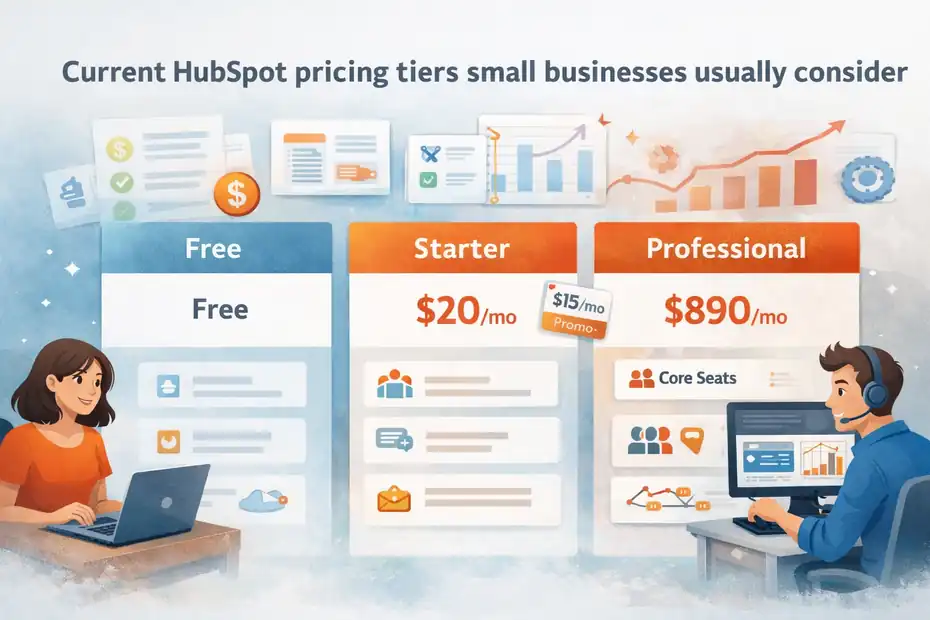
Most small businesses start with Free tools, a Starter hub, or the Starter Customer Platform bundle. The decision becomes harder when automation, reporting, or scaling needs push you toward Professional.
Free tools and Starter plans: where most businesses begin
HubSpot still offers free tools across the platform, and they can be useful for very early-stage businesses that mainly need contact management, basic deal tracking, ticketing, forms, or simple landing pages. Sales Hub Free is listed at $0 per month, and the same pattern appears across other product families.
For paid entry-level use, Starter is where most small businesses land. Current official pages show Starter pricing at a standard $20 per seat per month for products like Sales Hub, Service Hub, and Content Hub, with promotional first-year discounts commonly showing $15 per month.
The Starter Customer Platform bundle is positioned similarly, with temporary offers for new customers as low as $9 monthly with annual prepayment or $15 month to month for the first year.
That bundle is attractive because it combines Starter editions of multiple hubs on one platform. For a small business that wants basic sales, service, content, and CRM tools without stitching together separate apps, that can be a strong value.
But there is one detail I always tell people to watch: promotional pricing is not the same as steady-state pricing. If you buy based on a first-year discount and forget the base price later, your year-two budget may feel very different. HubSpot also says these offers may be discontinued at any time.
Professional plans: the point where “hidden costs” become real
This is the pricing zone where many small businesses get surprised. According to HubSpot’s official product catalog, Marketing Hub Professional starts at $890 per month with 3 Core Seats included, while Content Hub Professional starts at $500 per month with 3 Core Seats included.
Data Hub Professional starts at $800 per month with 1 Core Seat included. Sales Hub Professional is listed on HubSpot’s product page at $100 per seat per month, while Sales Hub Enterprise is $150 per seat per month.
The real shock is not only the monthly jump. Marketing Hub Professional also requires a one-time onboarding fee of $3,000, and Marketing Hub Enterprise requires $7,000 onboarding. HubSpot states that onboarding is required for Professional and Enterprise editions, while Starter does not require onboarding.
That means a small business can go from “we’re paying a few dozen dollars a month” to “we need a four-figure setup plus a high recurring bill” faster than expected.
Here is the practical takeaway: if you know advanced automation, sophisticated reporting, or deeper segmentation is on your roadmap, do not judge HubSpot by Starter pricing alone. Price the likely upgrade path before you commit.
The hidden costs most small businesses miss
The phrase “hidden costs” does not always mean deceptive pricing. More often, it means costs that are technically disclosed but easy to underestimate until you are already inside the system.
Hidden cost 1: seat creep as your team grows
Seat creep is one of the most common budget leaks in SaaS, and HubSpot is no exception. A founder buys one seat. Then a salesperson needs access. Then customer support wants in. Then a contractor needs visibility. Suddenly the plan that looked harmless is supporting four or five paid users.
At Starter level, that may still be manageable. At Professional level, it becomes more serious. HubSpot’s catalog shows additional Core Seats for Marketing Hub Professional at $50 per month per seat, and the same $50 figure appears for Content Hub Professional. Sales Hub Professional is already positioned as per-seat pricing on the public pricing page.
What makes this tricky is that not every user needs every permission. In many small businesses, owners overbuy seats because they have not mapped who actually needs paid functionality versus basic visibility.
Here is the cleaner way to think about it:
- Step 1: Identify who needs daily action access
- Step 2: Separate admins from occasional viewers
- Step 3: Recheck seats every quarter, especially after hiring
I recommend doing this before renewal, not after. One unused paid seat does not feel painful. Four unused seats across multiple hubs absolutely do.
Hidden cost 2: marketing contacts and database growth
If your main use case involves email marketing, lead nurturing, or lifecycle automation, contact pricing matters a lot. HubSpot’s official catalog says Marketing Hub pricing varies based on the number and type of contacts in your database, and Marketing Hub Professional includes 2,000 marketing contacts, while Enterprise includes 10,000. Additional pricing is tied to higher marketing contact volumes.
This matters because many small businesses assume all CRM contacts cost the same. They do not. HubSpot distinguishes between marketing contacts and non-marketing contacts. A contact you actively market to can affect pricing differently than someone stored in your CRM for record-keeping.
That sounds technical, but the practical lesson is simple: bad list hygiene gets expensive. If you keep old leads, dead emails, duplicate records, and unqualified contacts marked as marketing contacts, you may pay more without getting more revenue.
Imagine a local service business importing every lead from five years of forms, chat conversations, and old spreadsheets. If nobody cleans the database, the business can end up paying for list size rather than real opportunity.
In my experience, one of the easiest HubSpot savings moves is this: audit your contact lifecycle every month and remove non-buyers from active marketing status when appropriate. That is not glamorous, but it protects margin.
Hidden cost 3: required onboarding and paid help
A lot of small businesses discover onboarding fees too late because they focused only on monthly pricing. HubSpot says Starter does not require onboarding, but Professional and Enterprise do. For Marketing Hub Professional, the required onboarding fee is $3,000, and for Marketing Hub Enterprise it is $7,000.
For a small business, that is not a small footnote. That is a capital decision.
There is also a softer version of this cost. Even when onboarding is not required, many teams still end up paying for consulting, migration help, partner setup, or internal labor because someone has to configure pipelines, import data, build automations, and clean the CRM. HubSpot notes that additional consulting services are available for a fee.
I do not say this to scare you off. Plenty of businesses get real value from proper implementation. I say it because the true cost of software is never just software. It is software plus setup plus team adoption.
A cheap subscription that nobody configures correctly is expensive in the worst possible way.
How to estimate your real HubSpot cost before buying
If you want to make a smart decision, you need a working budget model. Not a homepage number. A realistic one.
Build a 12-month cost model instead of using the homepage price
I strongly suggest creating a simple 12-month forecast before choosing any paid HubSpot plan. You do not need a finance degree for this. You just need honesty about how your business actually works.
Use these categories:
- Line 1: Base subscription cost
- Line 2: Number of paid seats you need now
- Line 3: Seats you may add within 12 months
- Line 4: Expected contact growth if you do email marketing
- Line 5: One-time setup, migration, or onboarding
- Line 6: Optional training, consulting, or partner help
Let me give you a realistic scenario. Say you run a five-person B2B service company. You start with a discounted Starter bundle for two users, then add two more seats within six months. After proving your outbound process, you want better automation and reporting, so you look at Professional. That path can move from “very affordable” to “this is now one of our bigger software expenses” surprisingly fast.
This is exactly why I believe small businesses should model HubSpot like a growth system, not a static app. If your pipeline grows, the cost structure may grow with it.
Compare “replace multiple tools” value against true all-in cost
HubSpot can still be a great deal when it replaces several separate tools. That part is important. If you are paying for a CRM, email platform, forms builder, meeting scheduler, live chat, ticketing system, and basic CMS across different vendors, consolidating can genuinely save money and reduce chaos. HubSpot’s Starter bundle is built around that idea.
But the comparison only works if you compare complete systems. For example, a small business might say, “HubSpot is expensive.” Maybe. But if it replaces four subscriptions, centralizes customer data, and reduces admin work, it may still be cheaper overall.
On the other hand, if you only need one function, like simple email marketing or a lightweight sales pipeline, HubSpot may be overkill. In that case, the integrated platform becomes a feature you are paying for but not really using.
I usually frame it this way: buy HubSpot when you need connected customer operations, not just one isolated tool. That is where the ROI tends to make sense.
When HubSpot is worth the price for a small business

Not every small business needs HubSpot. But some are exactly the right fit.
Best-fit scenarios where the platform can justify its cost
HubSpot usually makes the most sense for small businesses that need marketing, sales, and service data in one place. Think of a growing agency, SaaS startup, B2B consultancy, home service brand with repeat follow-up, or e-commerce-adjacent company with a longer lead cycle.
The strongest use case is operational clarity. Instead of asking, “Which tool has the lead source?” or “Where did that customer conversation live?” your team sees the full journey in one CRM. That matters more than many owners expect.
I also think HubSpot works well when the founder values process. If you want structure, lifecycle tracking, deal visibility, ticket history, and cleaner reporting, HubSpot can save serious time. The company says more than 288,000 customers in over 135 countries use the platform, which reflects how broadly the system is being adopted across different business types.
The key is simple: HubSpot is worth it when integration reduces friction enough to create measurable gains in speed, conversion, or retention.
Cases where HubSpot is probably too much
Sometimes the honest answer is that HubSpot is more platform than a small business needs.
If you only need a simple contact database, lightweight email sending, and a basic pipeline, you may end up paying for sophistication you will never use. The same is true if you do not have anyone on the team who will maintain the CRM. A powerful platform with no owner quickly becomes an expensive junk drawer.
I would be cautious if your business has one or more of these traits:
- Very short sales cycle: You close most deals in one conversation
- Tiny contact volume: You are not actively nurturing or segmenting leads
- No content engine: You are not using forms, landing pages, or campaigns
- Low process maturity: Nobody will maintain properties, lists, or workflows
From what I’ve seen, HubSpot underperforms most when a business buys it aspirationally. In other words, they buy for the company they hope to become, not the one they actually are today.
How to avoid overpaying for HubSpot
You do not need to avoid HubSpot to avoid wasting money. You just need a smarter buying strategy.
Start lean, define the use case, and delay upgrades
The simplest money-saving move is to start with the smallest plan that solves your current problem. Not your 3-year vision. Your current problem.
If you need organized contacts, basic deal tracking, scheduling, and simple forms, start with Free or Starter. If you do that well, you will learn where the real friction points are. Then upgrades become deliberate, not emotional.
I suggest asking three questions before every upgrade:
- Question 1: What exact problem are we solving?
- Question 2: Is the upgrade cheaper than solving it another way?
- Question 3: Will we actually use the added features within 90 days?
This matters because HubSpot itself notes that when you exceed some Starter limits, it may simply move you up to a higher edition rather than charging a classic overage fee. That means a usage increase can turn into a plan increase.
Small businesses save the most when they treat upgrades as operational investments, not convenience purchases.
Clean your data, audit seats, and watch add-ons
The boring stuff is usually where the savings live. Clean data reduces contact-based waste. Seat audits reduce user-based waste. Add-on discipline reduces surprise invoices.
HubSpot’s catalog also lists paid add-ons and limit increases that can compound cost at higher tiers, including examples such as reporting limit increases at $200 per month, workflow limit increases at $200 per month, and dedicated IP add-ons at $300 per month for applicable plans. These are not starter-level problems, but they become very real if your team scales into advanced usage.
My advice is simple:
- Monthly: Review marketing contacts and remove inactive ones where appropriate
- Quarterly: Audit paid seats and permissions
- Before renewal: Review workflows, reports, add-ons, and partner retainers
- Before any upgrade: Calculate total annual impact, not just the monthly delta
That last point matters more than people think. A plan change that looks like “just a few hundred more per month” can turn into several thousand dollars across a year.
Final verdict: is HubSpot pricing for small business fair?
HubSpot pricing for small business is fair for the right company, but it is not casual software pricing. It is structured pricing. That means the value can be excellent if you use the platform deeply, centralize multiple functions, and manage growth intentionally. It also means the cost can get away from you if you buy based on the entry price and ignore seats, contacts, onboarding, and upgrades.
If I were making the decision today, I would not ask, “Is HubSpot cheap?” I would ask, “Will we use enough of the platform to justify the real 12-month cost?” That one question cuts through most of the marketing noise.
For many small businesses, the smart move is to start small, document your actual needs, and only scale inside HubSpot when the added revenue or time savings are clear. That approach keeps you in control of the software instead of letting the software quietly control your budget.
FAQ
What is HubSpot pricing for small business?
HubSpot pricing for small business typically starts with free tools and low-cost Starter plans, but costs increase with seats, contacts, and upgrades. Small businesses often pay more over time as they need advanced features like automation, reporting, and integrations included in higher-tier plans.
Why does HubSpot pricing increase over time?
HubSpot pricing increases as your business grows because of added users, marketing contacts, and feature upgrades. As you move from Starter to Professional plans, costs can rise significantly, especially with onboarding fees and additional seats required for team expansion.
Are there hidden costs in HubSpot pricing?
Yes, HubSpot pricing includes hidden costs like onboarding fees, extra seats, marketing contact limits, and paid add-ons. These are not always obvious upfront but can significantly impact your total cost once your business scales or needs more advanced features.
Is HubSpot worth it for a small business?
HubSpot can be worth it for small businesses that need an all-in-one platform for marketing, sales, and customer service. However, it is best suited for businesses planning to grow and use advanced features, rather than those needing only basic tools.
How can I reduce HubSpot costs as a small business?
You can reduce HubSpot costs by limiting paid seats, cleaning your contact database, delaying upgrades, and only using features you truly need. Regular audits of your usage help prevent unnecessary expenses and keep your subscription aligned with your business goals.

I’m Juxhin, the voice behind The Justifiable.
I’ve spent 6+ years building blogs, managing affiliate campaigns, and testing the messy world of online business. Here, I cut the fluff and share the strategies that actually move the needle — so you can build income that’s sustainable, not speculative.
Related posts:
 How To Set Up HubSpot For Small Business Fast And Easy
 How Do I Create An Email Newsletter And What Should It Include?
 10 Proven Strategies to Collect Emails and Boost Your Business
 How to Get More Leads: 5 Proven Strategies to Boost Sales Now
 The Top 7 Signup Forms Trends of This Year: Increase Your Signups!
 Constant Contact Pricing: Which Plan Is Right for You?