
Table of Contents
Some links on The Justifiable are affiliate links, meaning we may earn a small commission at no extra cost to you. Read full disclaimer.
If you’re trying to figure out how to set up HubSpot for small business use without wasting days clicking through settings you do not need, you’re in the right place.
I’ve seen a lot of small teams overcomplicate HubSpot at the start, then wonder why the system feels messy a month later.
The good news is that HubSpot can be simple, clean, and genuinely helpful when you build it around your sales process, not around every feature in the menu.
Let me walk you through a setup that is practical, fast, and built for real small business growth.
Why HubSpot makes sense for a small business
HubSpot can feel big when you first log in, but for a small business, its real value is actually pretty simple.
It gives you one place to manage contacts, track deals, organize follow-ups, and understand what is happening in your pipeline.
What HubSpot actually does for a small team
For most small businesses, HubSpot works as a central operating system for customer relationships. Instead of storing leads in a spreadsheet, keeping notes in email, and trying to remember who needs a callback, you manage everything in one system.
That matters more than many people realize. The biggest problem in small business sales usually is not lead generation alone. It is lead leakage.
Someone fills out a form, sends a message, or books a call, and then the follow-up gets delayed or forgotten. HubSpot helps close that gap.
Here is what the platform does in practical terms:
- It stores contacts and companies in one shared database.
- It tracks deal stages so you know where revenue is stuck.
- It lets you log emails, calls, and notes so your team has context.
- It automates repetitive actions like task creation and lead routing.
- It gives you reporting so you can see what is working.
Imagine you run a local service business with two sales reps and one admin person. Without a CRM, one rep might call a prospect twice while another never follows up on a warmer lead.
With HubSpot, every interaction is visible, assigned, and easier to manage. That is the real win. It is not just software. It is operational clarity.
The most common setup mistake small businesses make
The biggest mistake I see is trying to configure everything on day one. Small teams often assume a “proper” HubSpot setup means creating dozens of properties, complicated automations, multiple pipelines, and a reporting dashboard for every possible scenario.
In practice, that usually creates confusion. Your team stops using the CRM because it feels like admin work instead of a helpful tool. Then data quality drops, reports become unreliable, and the whole setup starts feeling like a burden.
A better approach is to start lean. I recommend focusing on five essentials first:
- Contact structure
- Deal pipeline
- Lead capture
- Task management
- Basic reporting
That gives you a working system without overwhelming your team. You can always expand later. In my experience, a small business gets better results from a clean 80 percent setup that people actually use than from a perfect 100 percent setup nobody touches.
This is especially true when you are working with a tiny team where one person may wear multiple hats. Simplicity is not a compromise. It is a strategy.
When HubSpot is a strong fit and when it is not
HubSpot is a strong fit if your business depends on leads, follow-up, and relationship tracking.
That includes agencies, consultants, SaaS startups, home service companies, B2B providers, education businesses, and many e-commerce brands with a sales or support component.
It is especially useful if you are dealing with any of these issues:
- Leads coming in from multiple channels
- Inconsistent follow-up
- No clear sales pipeline
- Poor visibility into conversions
- Too much manual work between marketing and sales
Where it is less ideal is when your business barely uses lead management at all.
For example, if you only sell through marketplaces with no direct customer journey, or if your sales process is extremely transactional and handled fully outside CRM, you may not need much of what HubSpot offers.
Still, for many small businesses, the question is not whether they need a CRM. It is whether they are ready to stop managing growth from memory, inboxes, and scattered spreadsheets. If the answer is yes, HubSpot can be a smart move.
Start with your sales process before touching settings
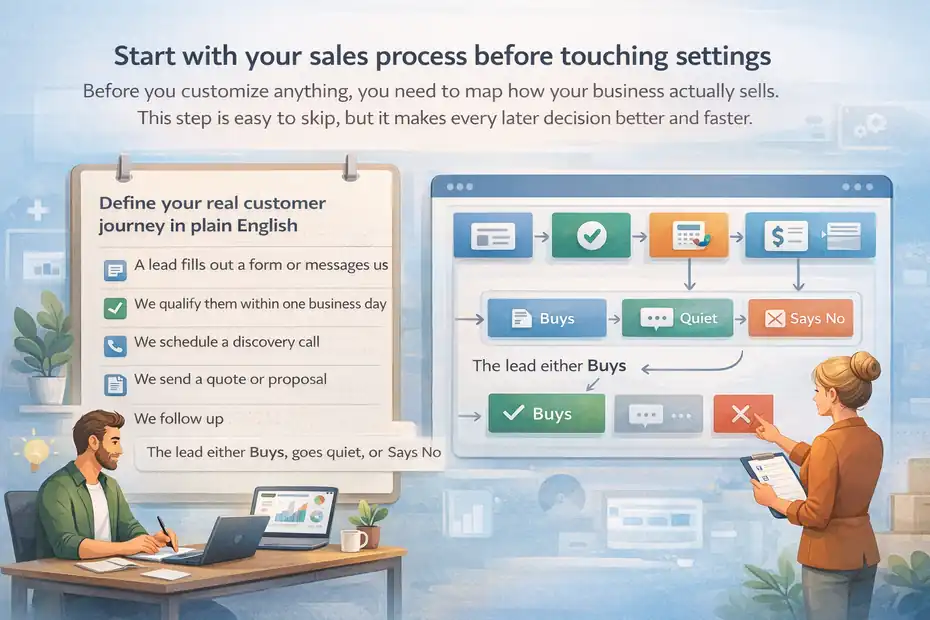
Before you customize anything, you need to map how your business actually sells. This step is easy to skip, but it makes every later decision better and faster.
Define your real customer journey in plain English
A lot of people jump into HubSpot and build a pipeline based on what sounds professional. That is where things go sideways. Your setup should reflect how leads move in real life, not how CRM stages sound in theory.
Start by writing down your customer journey in plain language. Something like this:
- A lead fills out a form or messages us.
- We qualify them within one business day.
- We schedule a discovery call.
- We send a quote or proposal.
- We follow up.
- The lead either buys, goes quiet, or says no.
That is your actual sales motion. Once you can describe it simply, setting up HubSpot becomes much easier because every stage, automation, and property has a purpose.
I suggest keeping this exercise practical. Do not build for edge cases first. Build for the 80 percent of leads that follow your main sales path. If a few deals need custom handling later, you can still manage that without making the whole system harder to use.
Small business CRM success starts with translating your real workflow into a clear process. HubSpot works best when it mirrors your business, not when your business has to bend around the software.
Identify who owns each step in the pipeline
Once the sales journey is clear, the next question is ownership. In many small businesses, this part is blurry.
One person answers inbound leads, another sends quotes, and someone else tries to close the deal. If those handoffs are not clear, HubSpot will expose the confusion quickly.
For each pipeline step, assign one owner. Not a team. Not “sales” in general. One actual role or person responsible for moving the lead forward.
A simple version might look like this:
- New inquiry: Admin or sales coordinator
- Qualified lead: Sales rep
- Proposal sent: Account executive or founder
- Follow-up: Sales rep
- Closed won onboarding handoff: Customer success or operations
Why does this matter? Because CRM automation depends on ownership. Tasks need an assignee. Notifications need a recipient. Reports need accountability. If HubSpot says a deal is stuck in proposal stage for 19 days, someone should know whether that is their job to fix.
I believe this is one of the most valuable parts of setup because it forces operational discipline. A CRM does not just organize your data. It reveals where your business process is vague.
Decide what success should look like in your first 30 days
Before you build dashboards or workflows, decide what “good” looks like in the first month. This gives your setup direction and keeps you from chasing vanity metrics.
For a small business, first-month success usually looks like this:
- All new leads enter HubSpot automatically
- Every contact has an owner
- The pipeline reflects real deal progress
- Follow-up tasks are being completed on time
- You can report on lead volume and closed deals
That is enough for a strong phase-one setup. You do not need ten reports, advanced lead scoring, or multi-touch attribution in the first 30 days. Those features can be useful later, but they are not required to get value.
A good first-month benchmark is consistency, not complexity. If your whole team logs notes, moves deals correctly, and follows tasks in one place, you are already ahead of many businesses that technically “have a CRM” but do not actually use it well.
Set up your HubSpot account the right way
Now that you know your process, it is time to configure HubSpot. This stage should focus on the foundation, not on every extra setting available.
Create users, permissions, and team structure
The first thing to do inside HubSpot is set up your users properly. This sounds basic, but it affects security, reporting, ownership, and workflow automation.
Add each team member who needs access, then think carefully about permissions. Not everyone needs full admin access. In fact, giving everyone admin rights usually leads to accidental changes and messy data.
A small business structure often includes:
- One admin: Usually the founder, operations lead, or CRM manager
- Sales users: People who manage leads and deals
- Marketing user: Someone handling forms, emails, or campaigns
- Support or service user: If customer handoff matters after the sale
Use role-based access where possible. For example, a salesperson may need to edit deals and contacts but not change account-wide settings. A marketing user may need form and email access but not pipeline administration.
I recommend keeping at least one person as the clear HubSpot owner internally. Even if several people use the tool, one person should understand how things are configured and document important setup choices. That alone can save you hours later when something breaks or needs updating.
Connect your business email, domain, and calendar
This is where HubSpot starts becoming useful in daily work. Connecting your email, domain, and calendar allows you to capture activity automatically and create a smoother lead journey.
At a minimum, connect:
- Your business inbox or personal sales inboxes
- Your website domain for forms and tracking
- Your calendar for meeting booking
When email is connected, HubSpot can log communication to contact records. That means you are no longer relying on memory to know whether a lead was contacted. Calendar integration makes meeting scheduling easier and reduces back-and-forth.
Domain connection matters too because it supports forms, landing pages, tracking, and email sending features. If your website already gets traffic, this step helps turn those visits into trackable CRM activity.
Here is the practical benefit: a lead fills out a form, lands in HubSpot, gets assigned to a rep, receives a follow-up email, and books a meeting through your connected calendar. That is a much cleaner experience than copying details from your inbox into a spreadsheet.
Clean up your default settings before importing anything
Before you import contacts or start capturing leads, spend time reviewing your defaults. I know this part is not exciting, but it prevents a lot of future cleanup.
Look at:
- Default deal stages
- Lifecycle stages
- Contact ownership settings
- Required fields
- Date and currency settings
- Notification preferences
For example, if your business only sells one main service, you probably do not need a complicated default pipeline. If your team works in one region, make sure currency and formatting are consistent. If notifications are too aggressive, people will ignore them.
This is also the right moment to decide your naming conventions. Think about how deals should be named, how companies should appear, and whether contacts should be associated with companies by default. Clean structure now leads to cleaner reporting later.
I suggest pausing before any big data import and asking one question: “If we bring in 1,000 contacts today, will the system be ready to organize them correctly?” If the answer is not clearly yes, fix the setup first.
Build a simple CRM structure that your team will actually use
HubSpot becomes powerful when the structure is simple enough to maintain. This is where you decide how records, properties, and pipelines should work in real business use.
Organize contacts, companies, and deals without overcomplicating it
HubSpot has different object types, but for most small businesses, you only need to understand three core ones:
- Contacts: Individual people
- Companies: The businesses they work for
- Deals: Revenue opportunities
This sounds straightforward, but many teams misuse these records. They log everything as a contact or create deals too early. That makes reporting confusing.
A good rule is this: Create a contact when someone engages, create a company when business context matters, and create a deal when there is real sales potential attached to a possible purchase.
For example, if someone downloads a lead magnet, they may only need a contact record. If they request a quote for business services, you likely want a contact, a company, and a deal. That structure allows you to track both the relationship and the revenue opportunity.
The key is consistency. Decide when each record type should be created and document it for your team. A CRM only stays useful when everyone handles records the same way.
Create custom properties that match your actual sales questions
Custom properties are one of the most helpful parts of HubSpot, but they can become a mess fast. A property is just a field used to store information, like budget range, service interest, or lead source.
The right way to create them is to ask: “What information do we repeatedly need in order to qualify, sell, or report?” Start there and nothing more.
Useful small business property examples might include:
- Service type requested
- Lead source detail
- Estimated monthly budget
- Sales priority
- Decision timeline
- Onboarding readiness
Avoid creating fields just because you might need them someday. Every extra property creates more friction for your team and increases the chance of incomplete data.
I recommend making a distinction between must-have and nice-to-have data. If a field affects qualification, assignment, or reporting, it may be worth requiring. If it is just occasionally interesting, leave it optional.
This keeps data collection aligned with real business outcomes instead of turning the CRM into a form-filling exercise.
Set up one clean sales pipeline first
One of the fastest ways to complicate HubSpot is by creating multiple pipelines too soon. Most small businesses should begin with one pipeline that reflects the main path from lead to sale.
A simple pipeline could look like this:
- New lead
- Qualified
- Meeting booked
- Proposal sent
- Follow-up
- Closed won
- Closed lost
That is enough for most teams. It gives visibility into progress without forcing people to choose between too many stages.
The important part is stage definition. Everyone needs to know what each stage actually means. “Qualified” should not mean one thing to a founder and another thing to a sales rep. Write a one-line rule for each stage so deal movement stays accurate.
For example:
- Qualified: The lead matches our service, budget, and timing criteria.
- Proposal sent: A formal price or scope has been shared.
- Follow-up: We are waiting on the prospect after sending the proposal.
That clarity makes reporting trustworthy. Without it, your pipeline becomes guesswork.
Import and organize your existing data safely
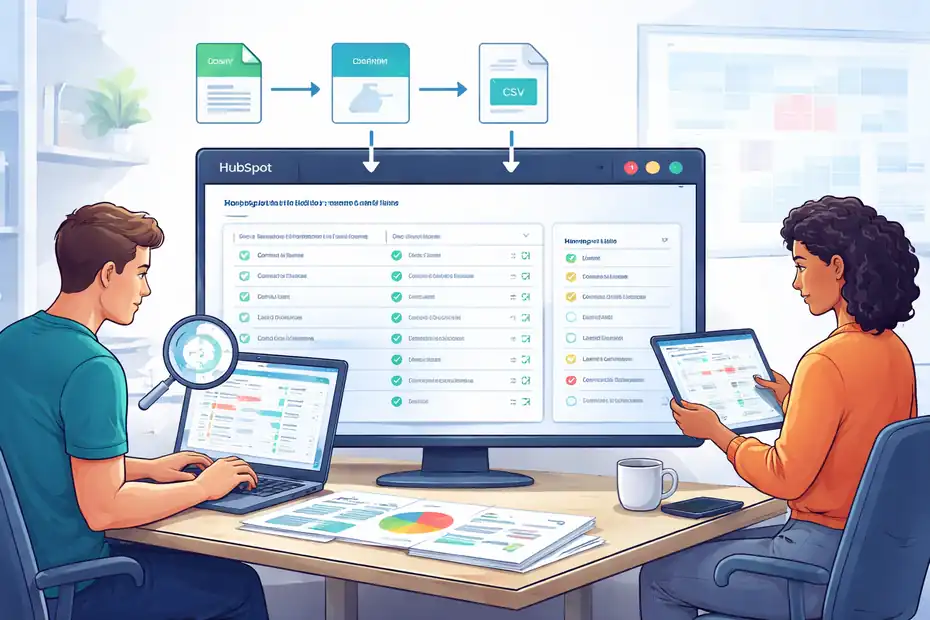
If you already have customer or lead data, bring it into HubSpot carefully. A bad import can create duplicates, missing fields, and a lot of cleanup work.
Audit your current spreadsheet or old CRM before import
Before importing anything, review your existing data source. This might be a spreadsheet, an email marketing platform, or another CRM. Whatever the source, do not assume the data is ready.
Look for common problems:
- Duplicate contacts
- Inconsistent name formatting
- Missing email addresses
- Old or inactive leads
- Mixed data in the wrong columns
- Notes stored in random places
This is your chance to clean house. If a contact has not engaged in years and has no value, you may not need to bring them over. If your “lead source” field contains 25 variations of the same channel, standardize it first.
I suggest creating a simple cleanup sheet where you map each column from your old system to the correct HubSpot property. That reduces confusion and makes the import more predictable.
The best import is not the biggest one. It is the cleanest one.
Use field mapping carefully to avoid bad data structure
Field mapping means telling HubSpot where each column of imported data belongs. This step deserves attention because one wrong match can clutter your records across hundreds or thousands of entries.
For example, “business type” should not accidentally import into “industry” unless those values mean the same thing in your business. Notes should not be pushed into a short text property where they get cut off or become unusable.
A careful mapping process should include:
- Matching source fields to existing HubSpot properties
- Creating new custom properties only when needed
- Checking record associations between contacts and companies
- Testing with a small batch before doing a full import
That last point matters. I strongly recommend importing a sample first, maybe 10 to 20 records, so you can inspect how the data lands. It is much easier to fix a small test than to reverse a large import.
This is one of those quiet setup tasks that pays off later in cleaner filtering, better segmentation, and more reliable reports.
Deduplicate and segment from day one
Once your data is in HubSpot, do not stop at import. Deduplication and segmentation are part of setup, not something to postpone forever.
Deduplication matters because duplicate contacts create confusion, duplicate outreach, and incorrect reporting. Segmentation matters because not all contacts should be treated the same.
Start by creating simple filters such as:
- Existing customers
- Open leads
- Cold or inactive leads
- Partners or referral sources
- Newsletter-only contacts
That makes future marketing and follow-up much more targeted. It also helps your team prioritize where to spend time.
For example, if you import 2,000 contacts but only 150 are active opportunities, your reps should not have to dig through everyone manually. A clean segment solves that immediately.
In my experience, this is where a lot of small businesses begin seeing the value of HubSpot. Once the data is organized, decisions get easier.
Capture and manage leads automatically
The next step is making sure new opportunities enter the system consistently. A CRM only works well when leads flow in without manual patchwork.
Connect forms, chat, and lead sources to one intake flow
Your lead capture setup should answer one question: no matter where a lead comes from, do they enter HubSpot in a predictable way?
For many small businesses, leads may come from:
- Website forms
- Contact pages
- Paid ads
- Live chat
- Social campaigns
- Manual referrals
- Calendar bookings
The goal is not just to collect leads. It is to standardize intake. That means each source should create the right record, trigger the right notification, and capture the key context your team needs.
A practical example: someone fills out a service inquiry form. That submission should create a contact, populate the requested service field, notify the assigned owner, and create a task if follow-up has not happened within a set time.
This is where HubSpot starts reducing manual work. You are not just storing leads. You are creating a consistent operating process around them.
Set up lifecycle stages and lead statuses clearly
Lifecycle stages and lead statuses often confuse new users, but they serve different purposes. Lifecycle stage describes where the contact is in the broader journey. Lead status describes the current sales follow-up state.
A simple approach works best.
Lifecycle stages may include:
- Subscriber
- Lead
- Marketing qualified lead
- Sales qualified lead
- Opportunity
- Customer
Lead statuses may include:
- New
- Attempting contact
- Connected
- Qualified
- Unqualified
- Open deal
You do not need every possible option, but you do need clear definitions. If your team cannot explain the difference between a lead and an opportunity, reporting will get messy quickly.
I recommend using lifecycle stage for strategic journey tracking and lead status for day-to-day sales action. That keeps both fields useful rather than redundant.
Create task automation for fast follow-up
Fast follow-up matters in almost every small business sales process. Even if your close cycle is long, the initial response window often shapes whether the lead stays warm.
HubSpot can automate this in a simple way. When a lead submits a form or enters a certain stage, the system can create a task for the owner to respond, qualify, or book a next step.
Good task automation examples include:
- New inquiry creates a call task due today
- Proposal sent creates a follow-up task in three days
- No reply after meeting creates a check-in task in five days
This does not need to be fancy. The real value is consistency. When follow-up becomes system-driven instead of memory-driven, conversion rates often improve simply because fewer leads get ignored.
For a small team, this can feel like adding operational muscle without hiring another person.
Set up email, meetings, and follow-up systems
Once leads are flowing in, you need a repeatable way to communicate with them. HubSpot can support that without making your outreach feel robotic.
Build simple email templates and snippets for common replies
Most small businesses answer the same questions again and again. Pricing, next steps, availability, proposal follow-up, onboarding timelines. HubSpot templates and snippets can save time here.
Templates are reusable emails. Snippets are short reusable blocks of text. Both help your team respond faster while staying consistent.
Useful examples include:
- New inquiry response
- Discovery call confirmation
- Proposal follow-up
- “Just checking in” re-engagement
- Customer onboarding handoff
The key is to avoid sounding canned. Start with a practical template, then personalize the first sentence or two based on the lead’s situation.
For instance, a generic proposal follow-up becomes much better with one custom line about the contact’s goals or timeline. That small touch keeps the message human.
I suggest building templates around frequent situations, not every possible message. Five strong templates usually outperform twenty mediocre ones.
Use meeting links without making the process impersonal
Meeting scheduling is one of the easiest HubSpot wins for a small business. Instead of endless “What time works for you?” email chains, you can give prospects a booking link tied to your calendar.
That said, I think this only works well when used thoughtfully. Sending a booking link too early can feel lazy. But after a prospect has expressed interest, it removes friction and speeds up conversion.
A good middle ground is this: offer the link as a convenience, not a demand. For example, “Here’s my calendar if it’s easier for you to grab a time.” That feels helpful rather than transactional.
Make sure your meeting settings include:
- Clear meeting title
- Appropriate duration
- Buffer time between calls
- Basic qualifying questions if needed
- Correct confirmation messaging
A smooth booking flow makes your business look organized. It also reduces no-shows when reminders are configured properly.
Track communication so your pipeline stays honest
One underrated benefit of HubSpot is communication visibility. If emails, notes, and calls are logged consistently, your pipeline reflects reality much better.
This matters because many pipelines become overly optimistic when activity is not recorded. A deal may still sit in “proposal sent” even though the lead went cold two weeks ago. Logged communication helps expose that.
I advise creating a team rule: if a meaningful customer interaction happens, it should be visible in the CRM. That includes call notes, objection details, next steps, and decision-maker context.
This does not mean writing novels inside every record. Just enough detail for someone else to understand what is happening.
For small teams, this creates continuity. If a founder jumps into a deal midstream, they can quickly see the story instead of asking everyone for updates.
Build reporting that helps you make decisions
A CRM should not just store information. It should help you spot patterns, bottlenecks, and growth opportunities.
Start with a small dashboard that answers real business questions
In the beginning, keep your dashboard simple. You are not trying to impress anyone with reporting complexity. You are trying to answer practical questions fast.
Your first dashboard might include:
- New leads this month
- Deals created this month
- Deals won this month
- Pipeline value by stage
- Conversion from lead to customer
- Average time in stage
Those numbers already tell an important story. Are enough leads coming in? Are they progressing? Are deals stalling? Are you closing efficiently?
This is where HubSpot becomes more than a record-keeping tool. It becomes a feedback system.
I believe many small businesses underuse this because they think reporting has to be advanced to be useful. It does not. A simple dashboard reviewed weekly can improve decision-making dramatically if the underlying data is clean.
Track pipeline bottlenecks instead of vanity metrics
It is easy to obsess over top-level metrics like website traffic or total contacts. Those numbers can matter, but for a small business, pipeline bottlenecks are usually more valuable.
Ask questions like:
- Are leads being qualified quickly?
- Are proposals going out on time?
- Which stage has the biggest drop-off?
- Which lead source creates the best deals?
- How long does it take to close a typical opportunity?
These questions guide action. If most deals stall after the first meeting, maybe your offer needs tightening. If one lead source generates volume but no wins, maybe your targeting is off.
This is where CRM data becomes strategic. Not because it gives you more charts, but because it helps you make smarter operational choices.
Review data quality every week
Even the best HubSpot setup will drift if nobody maintains data quality. Small errors compound fast. Missing owners, outdated stages, duplicate contacts, and incomplete properties all weaken reporting over time.
I recommend a weekly CRM hygiene review. It does not need to take long. Focus on a few checks:
- Deals with no next activity
- Contacts missing key fields
- Duplicates
- Stale opportunities
- Unassigned new leads
This kind of review prevents minor issues from becoming structural problems. It also keeps adoption high because the system stays trustworthy.
From what I’ve seen, data quality is one of the biggest differences between businesses that “have HubSpot” and businesses that actually get value from HubSpot.
Avoid the most common HubSpot setup mistakes
A lot of CRM frustration comes from avoidable setup choices. Let’s make sure you skip the biggest ones.
Using too many properties, pipelines, and automations too early
This is the classic overbuild problem. Small teams often create lots of fields and workflows because the software makes it possible. But every new element adds maintenance.
A bloated setup usually leads to:
- Confusing data entry
- Lower team adoption
- Inconsistent reporting
- More cleanup later
I suggest using a simple rule: if a property, stage, or workflow does not solve a current problem, do not add it yet.
HubSpot is flexible, but flexibility should support clarity, not complexity.
Treating HubSpot like a database instead of a working system
Another common mistake is using the CRM as a storage box rather than a live operating tool. Contacts get imported, notes get added, but nobody uses tasks, deal stages, or follow-up automation consistently.
That means the system contains information but does not drive action.
A better mindset is this: every important lead should have an owner, a status, and a next step. If that is missing, the record is incomplete no matter how much background data it contains.
That shift changes how the team interacts with HubSpot. It becomes a workflow tool, not just a digital filing cabinet.
Skipping internal rules and documentation
Even small businesses need CRM rules. Otherwise, every user makes their own decisions about stages, properties, and note-taking.
Create a lightweight internal playbook covering:
- When to create a deal
- What each pipeline stage means
- Which fields are required
- How quickly leads should be contacted
- How to log notes and tasks
This does not need to be a huge manual. One or two pages can be enough. But without it, consistency disappears quickly.
Optimize and scale your setup as the business grows
Once your base setup is working, you can improve it gradually. This is where HubSpot starts supporting smarter growth rather than just better organization.
Add automation only after manual process is working
Automation is powerful, but it should reinforce a process you already understand. If your team cannot explain the manual version of a workflow, automating it usually just makes the confusion happen faster.
Good second-phase automations may include:
- Lead routing by source or service type
- Follow-up sequences after quote delivery
- Internal alerts for stuck deals
- Customer onboarding task creation
- Re-engagement for inactive leads
The point is to remove repeatable work, not to automate judgment. Qualification, objection handling, and relationship-building still need human thinking.
Use segmentation to improve conversion quality
As your contact list grows, segmentation becomes more valuable. This helps you separate serious prospects from casual leads and create better messaging for each group.
Useful segments might include:
- High-budget leads
- Fast-moving opportunities
- Referral-based leads
- Past customers ready for upsell
- Cold leads who need nurturing
This lets you tailor follow-up instead of treating everyone the same. Better segmentation usually means better timing, better messaging, and better conversion quality.
Revisit your setup every quarter
Small businesses evolve quickly. Services change, team roles shift, and customer journeys become more complex. A HubSpot setup that worked six months ago may need refining now.
I recommend a quarterly review of:
- Pipeline stages
- Required properties
- Automation effectiveness
- Reporting needs
- Lead source quality
- Team usage habits
This keeps the CRM aligned with reality. And that, more than anything, is what makes HubSpot valuable over time.
Final thoughts on how to set up HubSpot for small business growth
Learning how to set up HubSpot for small business success is really about building a system your team will use consistently, not a perfect technical setup on paper. Start with your real sales process, keep the structure simple, make follow-up automatic where it matters, and only add complexity once the basics are working.
If I were setting up HubSpot for a small business from scratch today, I would focus on one clean pipeline, a handful of useful properties, reliable lead capture, fast task-based follow-up, and a dashboard that answers real revenue questions. That foundation is enough to create momentum fast. Once your team trusts the system, optimization becomes much easier.
FAQ
What is the easiest way to set up HubSpot for a small business?
The easiest way to set up HubSpot for a small business is to start with a simple sales pipeline, basic contact properties, and lead capture forms. Focus on real workflows first, then add automation gradually. Keeping the setup clean helps your team adopt it faster and use it consistently.
How long does it take to set up HubSpot for a small business?
Most small businesses can complete a basic HubSpot setup within one to three days. This includes creating users, setting up a pipeline, connecting email and forms, and importing clean data. Advanced automation and reporting can be added later once the core system is working properly.
What should I set up first in HubSpot?
You should first define your sales process, then set up contacts, deals, and one simple pipeline. After that, connect your email, calendar, and lead capture forms. This ensures new leads flow into the system and your team can manage them without confusion.
Do I need all HubSpot features for a small business?
No, most small businesses only need core features like contact management, deal tracking, and basic automation. Using too many features early can make the system complex and reduce adoption. It is better to start simple and expand as your business grows.
Why is my HubSpot setup not working effectively?
A HubSpot setup usually fails when it is too complex or does not match the real sales process. Common issues include unclear pipeline stages, missing ownership, and poor data quality. Simplifying the structure and aligning it with daily workflows often fixes these problems quickly.

I’m Juxhin, the voice behind The Justifiable.
I’ve spent 6+ years building blogs, managing affiliate campaigns, and testing the messy world of online business. Here, I cut the fluff and share the strategies that actually move the needle — so you can build income that’s sustainable, not speculative.
Related posts:
 HubSpot Review For Small Business: Worth It Or Hype?
 Should I Use HubSpot For My Business Or Avoid It?
 Inside Freshworks Inc: Products, Vision, and Growth Story
 Omnisend for WooCommerce: Boost Store Sales Instantly
 Why Businesses Love Freshworks Freshdesk for Service
 How Automated Marketing Solutions Save Time and Increase Revenue