
Table of Contents
Some links on The Justifiable are affiliate links, meaning we may earn a small commission at no extra cost to you. Read full disclaimer.
How to use Freshworks for customer support gets a lot easier once you stop treating it like “just another ticketing tool” and start using it as a workflow system for your whole support operation.
That is where most teams get stuck. They sign up, connect email, and then wonder why response times still feel messy.
In practice, Freshworks works best when you build the right structure first: inboxes, rules, SLAs, self-service, and reporting.
In this guide, I’ll walk you through the setup step by step so you can support customers faster, stay organized, and avoid the usual beginner mistakes.
What Freshworks Means For Customer Support
Freshworks can refer to the broader Freshworks platform, but for customer support, most teams are really choosing between Freshdesk and Freshdesk Omni.
That difference matters because your setup, channels, and budget depend on it.
Start With The Right Product Choice
If your team mainly handles email tickets and wants a straightforward help desk, Freshdesk is usually the simplest entry point. Freshworks positions it as an AI-powered customer service platform built around ticketing, self-service, analytics, and workflows.
Freshdesk includes essentials like a customer portal, knowledge base, threads, tasks, multilingual support, routing, SLAs, and security controls.
If you need a more connected omnichannel setup, Freshdesk Omni is the better fit. It combines ticketing with conversational support, AI agents, messaging, SMS, and broader channel orchestration in one suite.
In plain English, that means your team is not juggling separate systems for chat, support inboxes, and automation.
I suggest choosing based on channel complexity, not company size alone. A small SaaS team with chat-heavy support may need Omni sooner than a larger B2B team that mostly handles email.
That is one of those practical decisions that saves you a messy migration later.
Understand How Freshworks Actually Handles Support
Freshworks support revolves around a few core ideas. Customer conversations become tickets, tickets move through workflows, workflows trigger assignments and escalations, and reporting tells you whether the system is actually working. That sounds obvious, but many teams only set up the first step.
The useful part is how much context Freshdesk can hold around each request. Agents can collaborate through private notes and threads, use task linking, apply ticket templates, and route work based on business rules, workload, or skills. This is what turns a shared inbox into a real support operation.
Freshworks also layers AI into the experience through Freddy AI. Depending on your plan and setup, that can include AI agents for self-service, copilot-style help for agents, and insight tools for leaders.
Used well, AI here should reduce repetitive work, not replace judgment on complex cases. That is the mindset I recommend from day one.
Set Up Your Support Foundation First
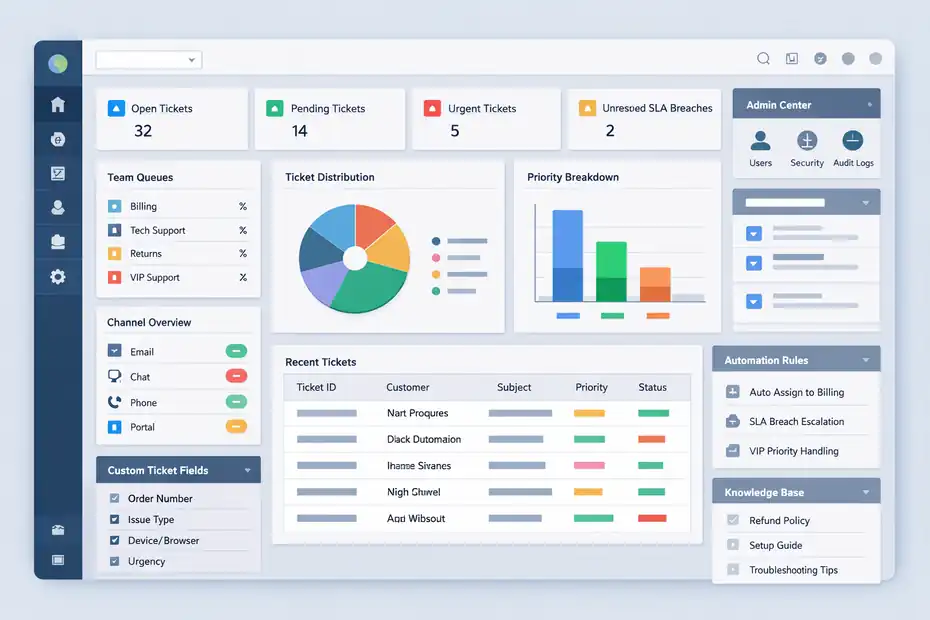
Before you automate anything, you need a clean support structure. This is where pro-level setups separate themselves from rushed ones.
Build the foundation properly, and every later workflow becomes easier.
Create A Clean Account Structure
Your first job is organizing the account around real support responsibilities. In Freshworks, the Neo Admin Center acts as a central place to manage products, security settings, and audit logs.
That matters if you have multiple admins, multiple brands, or plan to expand later.
Start by mapping your support operation before you click around. Decide:
- Teams: Billing, technical support, onboarding, returns, VIP support
- Channels: Email only, or email plus chat, messaging, phone
- Priorities: Urgent revenue-impacting issues versus normal requests
- Ownership Rules: Who handles what, and when it escalates
Imagine you run a mid-sized ecommerce brand. If all requests land in one general queue, refund questions, delivery issues, and account lockouts all compete equally.
That feels “organized” for a week, then turns into backlog chaos. A better setup splits queues by issue type or function so routing rules can actually work.
I believe this is the most underrated part of Freshworks. People want automation first, but automation only amplifies your structure. If the structure is sloppy, the platform just helps you scale confusion faster.
Configure Channels Without Creating Noise
Freshdesk is strongest when you centralize customer contact without overwhelming agents. The platform supports email-based ticketing, portal submissions, and, depending on your product choice, broader omnichannel engagement.
The goal is not to be everywhere. The goal is to be clear about where support starts.
My advice is simple: Begin with your highest-volume support entry points and get those working perfectly before adding more.
For many teams, that means support email plus the customer portal. If you are on Freshdesk Omni, you can then expand into messaging, SMS, or AI-assisted conversational support once the workflows are stable.
A common mistake is turning on every possible channel because it looks impressive in a demo. In real support environments, extra channels create duplicate requests, inconsistent tone, and routing problems unless you have policies behind them. Keep it tight at first.
A practical benchmark helps here: Freshworks says Freshdesk is used by 74,000+ businesses worldwide, which tells you the platform scales, but scale only works when teams reduce noise instead of adding it.
Build Ticket Fields That Match Real Customer Issues
Freshdesk supports custom fields and ticket templates, and this is where you can make the system dramatically more useful for agents. Instead of collecting generic information, ask only for details that affect resolution.
For example, a SaaS support form might include plan tier, affected feature, browser, urgency, and whether the issue blocks work. An ecommerce team might collect order number, delivery status, item SKU, and refund versus replacement preference. These fields make routing and reporting more accurate later.
Here is the shortcut I recommend: Every custom field should answer one of three questions. What team should handle this? How urgent is it? What context will save one back-and-forth email? If a field does not support one of those goals, it probably should not exist.
This sounds small, but it changes everything. Better fields mean cleaner automation, fewer reassignments, better analytics, and faster first replies. From what I’ve seen, most “Freshdesk feels messy” complaints are really data quality problems disguised as software problems.
Build A Workflow That Agents Can Actually Use
Once the structure is in place, the next step is making daily support work smoother.
Freshworks becomes powerful when routing, priorities, and collaboration happen consistently instead of relying on memory.
Set Up Ticket Routing And Assignment Rules
Freshdesk includes ticket dispatch, event and time-based automations, round-robin and load-balanced assignment, and skills-based ticket assignment on higher plans. These features are not just nice extras.
They are how you keep work moving without a manager constantly triaging the queue.
Let me break it down in a practical way:
- Dispatch Rules: Route new tickets by product, issue type, language, or priority
- Round-Robin Assignment: Spread work evenly across available agents
- Load-Balanced Assignment: Prevent one agent from getting buried
- Skill-Based Assignment: Send complex tickets to people who can actually solve them
A strong beginner setup might route billing tickets to finance support, technical issues to product support, and VIP customer tickets to a senior queue.
A more advanced setup can prioritize tickets based on sentiment, skills, or workload, which Freshworks explicitly highlights in its workflow capabilities.
I suggest keeping your first rules simple enough to explain on one screen. If your team cannot understand why a ticket moved, the automation is too clever for its own good.
Use SLAs To Create Accountability, Not Panic
Freshdesk supports multiple SLA policies, business hours, and shift scheduling, which means you can set realistic response and resolution expectations for different customer groups or issue types.
This is where many teams get overly ambitious. They promise a one-hour first response for everything, then quietly miss it all day. That does not make support look fast. It makes reporting meaningless.
A smarter SLA setup might look like this:
- Critical Revenue Issues: 30-minute first response, 4-hour resolution target
- Standard Product Questions: 4-hour first response, 1-business-day resolution target
- Low-Priority Requests: 8-business-hour first response, 2-business-day resolution target
If you support customers across time zones, Freshdesk’s business hours and shifts matter even more. A ticket should not “breach” while your team is asleep. Align SLAs to staffed hours unless you truly provide 24/7 support.
In my experience, good SLA design improves customer trust because it creates predictability. Customers can forgive a slower answer more easily than a vague one.
Improve Internal Collaboration So Tickets Stop Bouncing
Freshdesk’s shared inbox, internal notes, threads, linked tasks, and external collaborator support are especially useful when multiple people touch the same issue.
Here is the pro move: keep the customer-facing thread clean and move problem-solving into internal collaboration. Agents should not be debating next steps in front of the customer.
Instead, use threads and notes to tag teammates, ask engineering for input, or document what has already been checked.
A realistic example: a customer reports a failed payment and an access issue. Support confirms the billing event, finance checks the transaction state, and product support verifies account provisioning.
That can all happen inside the ticket without sending the customer three different emails from three different teams.
This is also where ticket ownership matters. One person should remain clearly responsible for the customer outcome, even if five people contribute behind the scenes. Otherwise, collaboration becomes handoff theater.
Use Self-Service To Reduce Repetitive Volume
Freshworks is not just about answering tickets faster. It is also about preventing unnecessary tickets in the first place.
That is where the knowledge base, portal, community options, and AI self-service can create real leverage.
Build A Knowledge Base That Deflects Tickets
Freshdesk includes a multilingual knowledge base, article versioning, flexible hierarchy, approval workflows, and portal customization. Those features sound administrative, but together they determine whether self-service is actually useful.
The biggest mistake I see is treating the knowledge base like a dumping ground for internal notes. Customers do not want documentation written for your team. They want simple answers that solve one problem quickly.
A better article format usually includes:
- What the problem looks like
- Why it happens
- Exact steps to fix it
- What to do if the fix fails
- When to contact support
For example, “How To Change Your Subscription” will outperform a vague article titled “Billing Settings Overview” because it matches the customer’s task. Organize articles by journey, not by internal department jargon.
Freshworks specifically supports flexible knowledge base hierarchy for this reason.
I recommend reviewing your top 20 ticket types every month and turning the repetitive ones into public articles. That is the fastest route to meaningful ticket deflection.
Combine Portal, Forms, And AI For Faster Resolution
Freshdesk gives customers a portal to submit requests and find answers, while Freshdesk Omni adds AI agents and broader conversational support.
Freshworks says Freddy AI Agent can deliver personalized self-service and that support teams using Freshdesk report outcomes such as up to 80% resolutions with Freddy AI Agent and average conversational resolution times under two minutes, though those figures come from Freshworks customer results and benchmark materials rather than an independent universal standard.
That is still useful directionally. It tells you AI works best on repeatable, structured requests. Think password resets, shipping updates, appointment changes, account checks, or plan comparisons.
It is less reliable for emotionally sensitive or edge-case problems unless your flows are carefully designed.
My recommendation is to layer support like this:
- Customer searches the knowledge base
- Portal form collects structured details
- AI handles simple intent-based requests
- Human agents take over when context or judgment is needed
That sequence is how you reduce ticket load without making support feel robotic.
Keep Self-Service Accurate Or It Will Hurt Trust
Freshworks supports article versioning and approval workflows, and those are more important than they first appear. If self-service content goes stale, it stops being a support asset and becomes a complaint generator.
Set owners for high-traffic articles. Product support should own technical setup guides. Finance should own billing and refund articles. Customer success might own onboarding content.
Then schedule reviews around product releases, policy changes, and recurring complaint patterns.
I also think every knowledge base should track one simple signal: article-assisted ticket reduction. If a help article gets traffic but tickets on that topic stay flat, the article is probably unclear, incomplete, or mismatched to the customer’s search language.
Freshworks’ analytics tools can help you monitor broader trends, but the underlying lesson is human: self-service only works when the content is maintained like a product, not published and forgotten.
Use AI And Automation The Smart Way
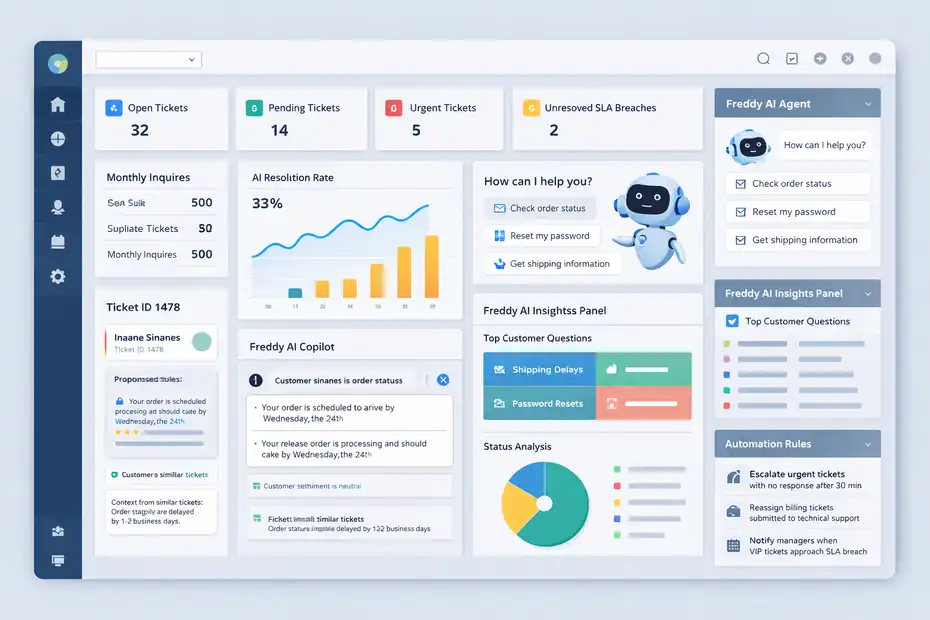
This is the section many people skip ahead to, but AI only performs well when your categories, fields, routing, and content are already clean.
Think of AI in Freshworks as an accelerator, not a cleanup crew.
Where Freddy AI Helps Most In Customer Support
Freshworks offers Freddy AI Agent for automated self-service, Freddy AI Copilot for agent assistance, and Freddy AI Insights for analysis and reporting support.
Copilot features include help such as sentiment analysis, context from similar tickets, live translations, and response assistance. Insights can generate analysis and dashboards, and some analytics features may take time to activate or populate.
The best use cases are usually:
- Repetitive inbound questions
- First-pass classification
- Suggested replies and summaries
- Translation support for multilingual queues
- Faster pattern detection in reporting
Where I would stay cautious is anything with refunds, legal sensitivity, abuse reports, or high-value account exceptions. Those cases need policies, not just AI confidence.
A practical scenario: If your team receives 500 monthly “Where is my order?” tickets, AI can resolve a meaningful share by pulling order status and presenting the right next step. But if a customer claims fraud or a failed cancellation, I would push that to a trained agent quickly.
Control Costs And Expectations Early
Freshdesk Omni pricing starts at $29 per agent per month billed annually for Growth, $79 for Pro, and $119 for Enterprise. Freshdesk’s free program is available for 1–2 agents for six months and includes ticketing, a knowledge base, and pre-built reports.
For Freddy AI Agent in Omni, the first 500 sessions are included on Growth, Pro, and Enterprise, with additional sessions priced at $49 per 100 sessions.
That pricing detail matters because AI experiments can quietly become budget decisions.
I suggest setting a simple pilot target before rollout, such as reducing repetitive ticket volume by 15% or improving first response time by 20%. Without a target, teams either overuse AI because it sounds modern or underuse it because nobody can prove the value.
Freshworks also cites a 225% ROI and payback in under six months for Freshdesk Omni based on a Forrester TEI study commissioned around the product, which is useful as directional business evidence but should still be treated as a modeled study rather than a guarantee for every team.
Automate Repetitive Workflows Before Fancy Ones
The most effective automations are usually boring. That is not a criticism. It is the point.
Freshdesk automations work best when they handle repetitive actions like follow-ups, escalations, assignment updates, tag changes, and reminders. I advise starting there before building anything complicated.
Good early automations include:
- Escalate urgent tickets with no response after 30 minutes
- Reassign billing tickets submitted to technical support
- Notify managers when VIP tickets approach SLA breach
- Tag tickets by issue pattern for reporting
- Send article suggestions after common form submissions
Bad early automations usually try to predict too much. For example, auto-closing every low-activity ticket may clean your queue but annoy customers who were waiting for a reply.
My rule is simple: If the automation saves time and improves customer clarity, keep it. If it only makes dashboards look prettier, rethink it.
Measure What Matters And Optimize Over Time
Freshworks gives you reporting tools, but better reporting does not automatically mean better support.
The real goal is to connect ticket data to customer experience and team workload in a way that changes decisions.
Build Dashboards Around Core Support Outcomes
Freshworks Analytics supports pre-built reports, custom dashboards, multiple visualization types, and shared reporting workflows. Freshdesk also highlights predefined reports, real-time dashboards, and agent availability views.
The mistake is tracking too many metrics at once. I recommend starting with:
- First response time
- Resolution time
- SLA breach rate
- CSAT
- Reopen rate
- Ticket backlog by team
- Ticket volume by issue type
If you are on Freshdesk Omni, unified analytics can combine data from products like Freshdesk, Freshchat, and Freshcaller add-ons in one place. That is especially useful when customers switch channels mid-journey and you want one operational view.
A simple example: If CSAT is stable but resolution time is climbing, you may have loyal customers tolerating slower support for now. That is not a win. It is an early warning.
Use Reporting To Find Root Causes, Not Just Performance Scores
Analytics become valuable when they uncover patterns your team can act on. Freshworks describes analytics as a no-code way to build reports around the metrics and filters that matter to your business.
Here is how I like to use that in practice:
- Rising ticket volume on one feature suggests a product issue or confusing UX
- Long first response times during one shift suggest staffing imbalance
- High reopen rates suggest weak troubleshooting or unclear replies
- Repeated escalations from one queue suggest routing errors or missing skills coverage
That is where support stops being reactive and starts feeding the rest of the business. A good Freshworks setup should help product, operations, and leadership understand customer friction earlier.
Freshworks also notes that Freddy Insights can generate charts and natural-language analytics, though activation and insight generation can take time.
That is helpful for faster exploration, but I would still validate important trends with your core dashboards before making staffing or process decisions.
Optimize Monthly Instead Of Rebuilding Constantly
The best support systems improve through small, regular adjustments. They do not get “relaunched” every quarter.
A strong monthly review inside Freshworks usually covers queue load, SLA misses, top ticket drivers, article gaps, automation failures, and AI containment or assist quality. Then you make a few focused changes instead of rewriting the whole system.
For example:
- Simplify one intake form
- Rewrite two underperforming knowledge base articles
- Adjust one routing rule
- Tighten one SLA policy
- Retrain agents on one recurring issue type
That kind of maintenance compounds. Over six months, it usually beats a dramatic rebuild because the team keeps confidence in the system while the process gets sharper.
Common Mistakes To Avoid In Freshworks
Most Freshworks problems are not caused by the platform. They come from trying to skip the boring setup work that makes the platform useful.
Mistake 1: Treating Freshworks Like Just An Inbox
If you only use Freshdesk as a place where emails arrive, you miss most of the value. Shared inboxes are helpful, but Freshworks is built for routing, SLA management, self-service, analytics, and structured collaboration.
The fix is to think in systems: intake, triage, solve, learn, improve.
Mistake 2: Overcomplicating Automations Too Early
Teams sometimes build ten fragile rules before they have one clean category structure. Then tickets misroute, agents stop trusting the system, and managers revert to manual triage.
Start with obvious rules. Earn trust. Then expand.
Mistake 3: Launching AI Without Good Content
AI agents and copilot features depend on usable workflows and accurate source material. If your help articles are outdated or your forms are vague, AI just scales those weaknesses.
Mistake 4: Ignoring Security And Access Controls
Freshdesk includes role-based access, SSO options, audit logs, allowed domains, IP whitelisting, and other controls. Use them early, especially if contractors, multiple departments, or external collaborators are involved.
Mistake 5: Measuring Activity Instead Of Outcomes
More tickets handled does not always mean better support. Faster closes do not always mean better resolutions. Focus on experience metrics and process health, not vanity numbers.
How To Use Freshworks For Customer Support Like A Pro
At a pro level, Freshworks is less about “working tickets” and more about designing a support engine your team can trust. You choose the right product, structure channels carefully, collect useful data, automate repetitive work, build self-service, and measure what changes the customer experience.
That is the difference between a help desk that feels busy and one that feels genuinely in control.
If I were setting up Freshworks from scratch today, I would do it in this order: channel setup, ticket fields, routing rules, SLAs, knowledge base, analytics, then AI. That sequence is not flashy, but it works.
And once it works, Freshworks becomes much easier to scale without breaking the customer experience.
FAQ
What is Freshworks used for in customer support?
Freshworks is used to manage customer support through ticketing, automation, and self-service tools. It helps teams organize incoming requests, assign tickets, track performance, and respond faster across multiple channels like email, chat, and portals, improving both efficiency and customer experience.
How do I get started with Freshworks for customer support?
To get started, sign up for Freshdesk or Freshdesk Omni, connect your support email, and set up basic ticket categories. Then configure routing rules, SLAs, and a knowledge base so your team can handle requests efficiently from day one without relying on manual processes.
Is Freshworks suitable for small businesses?
Yes, Freshworks is suitable for small businesses because it offers a free plan with essential features like ticketing and a knowledge base. As your business grows, you can upgrade to advanced plans with automation, AI tools, and omnichannel support without switching platforms.
How does automation work in Freshworks?
Automation in Freshworks works by creating rules that trigger actions based on ticket conditions. For example, tickets can be automatically assigned, escalated, or tagged depending on urgency, issue type, or response time, reducing manual work and helping teams stay consistent.
Can Freshworks reduce customer support workload?
Freshworks can reduce workload by combining self-service, automation, and AI tools. Features like knowledge bases, automated responses, and AI agents handle repetitive queries, allowing support teams to focus on complex issues and improve response times without increasing headcount.

I’m Juxhin, the voice behind The Justifiable.
I’ve spent 6+ years building blogs, managing affiliate campaigns, and testing the messy world of online business. Here, I cut the fluff and share the strategies that actually move the needle — so you can build income that’s sustainable, not speculative.
Related posts:
 Freshworks Ticket System Not Working Fix Guide
 Freshworks Pricing Explained: Real Costs And Traps
 Social Media Marketing for Small Business – Best Tips
 How to Start a Blog and Make Money
 Role Of RSS Feeds In Generating Website Traffic: Claim Perfect Backlinks
 7 Monday Alternatives For Small Teams On A Budget That Save Money