
Table of Contents
Some links on The Justifiable are affiliate links, meaning we may earn a small commission at no extra cost to you. Read full disclaimer.
A freshworks crm and support software review matters more than ever if you want one platform for sales and customer service without paying enterprise-level prices.
I’ve looked at Freshworks from the angle most buyers actually care about: what you get, what you miss, how fast you can launch, and whether the value still holds as your team grows.
If you are comparing Freshsales and Freshdesk against bigger names like HubSpot, Zendesk, or Salesforce, this guide will help you see where Freshworks is genuinely smart and where it starts to feel limiting.
What Freshworks Includes
Freshworks is not one single tool. For this review, the core products that matter are Freshsales for CRM and Freshdesk for customer support, with Freddy AI layered across parts of the stack.
Freshworks positions these products as easy-to-use, AI-powered software for sales and service teams, and the company says its products are used by more than 74,000 businesses.
Freshsales Covers The CRM Side
If your main goal is pipeline management, lead tracking, and follow-up automation, Freshsales is the CRM piece you would be looking at.
It includes contact and deal management, built-in email, phone, chat, reporting, and workflow automation, with more advanced AI and forecasting features appearing in the higher plans.
What I like here is the practical packaging. A lot of CRMs talk about “unified customer data” but then push you into third-party calling tools, paid email extensions, or awkward bolt-ons. Freshsales at least tries to keep the sales rep in one workspace.
- At The Entry Level: You get Kanban views, contact lifecycle stages, built-in chat, email, phone, custom fields, basic workflows, and curated reports.
- At The Mid Tier: You add contact scoring, sales sequences, auto-assignment, multiple pipelines, advanced workflows, and custom reports.
- At The Top Tier: You get custom modules, sandbox, audit logs, field-level permissions, and forecasting insights.
In plain English, Freshsales starts off friendly for small teams, but it becomes much more useful once you hit Pro. That is where it starts feeling like a serious operational CRM rather than just a digital address book.
Freshdesk Covers The Support Side
Freshdesk is the support product in the Freshworks lineup. It handles tickets, portals, knowledge base content, reporting, routing, and agent collaboration.
Freshworks also sells Freshdesk Omni for broader omnichannel support, but many buyers comparing value start with standard Freshdesk because it is simpler and cheaper to roll out.
Freshdesk’s positioning is pretty clear: start small, then scale into more advanced workflows and routing. That is a good sign for companies that do not want to overbuy on day one.
- Growth Plan Focus: Ticketing, customer portal, reports, and core help desk workflows.
- Pro Plan Focus: Customized portals, custom objects, advanced ticketing, custom reporting, and more routing options.
- Enterprise Plan Focus: Audit logs, approval workflows, skills-based assignments, and additional security features.
My honest take is that Freshdesk feels strongest when your team wants structure without a painful implementation. It is not trying to be a giant enterprise service platform first. It is trying to help a growing team stop drowning in inbox chaos.
How The CRM And Support Stack Works Together
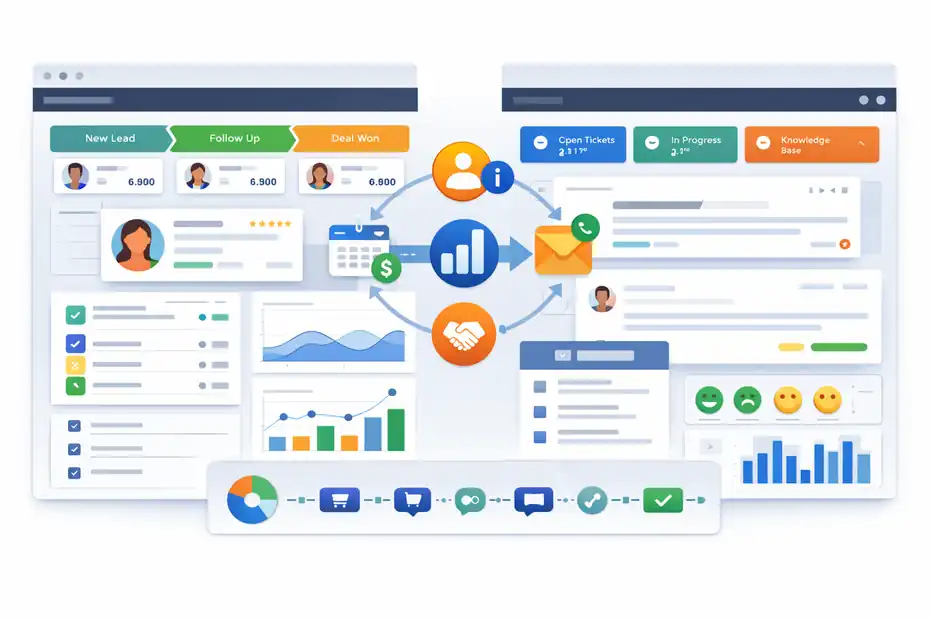
This is the real buying question. Plenty of businesses do not need the “best CRM” and the “best help desk” separately.
They need good-enough sales and support tools that share customer context and are simple to manage.
The Biggest Advantage Is Shared Customer Context
When sales and support live under the same vendor, handoffs get easier. A rep can see where a lead or customer sits in the journey, and a support team can work with cleaner account history instead of piecing together context from disconnected apps.
Freshworks explicitly markets the CRM side as a single source of truth for the customer journey, and its customer stories lean heavily on the benefit of replacing disconnected tools.
That matters more than most software demos admit. In real teams, lost context creates friction everywhere:
- For Sales: Reps miss renewal risk because support complaints are buried in another system.
- For Support: Agents treat high-value accounts like generic tickets because revenue context is hidden.
- For Leadership: Reporting gets messy because lifecycle data lives in silos.
I believe this is where Freshworks wins its best-value argument. Not because each individual module is always the absolute strongest in its category, but because the combined operational picture is easier to live with.
For SMBs and lower-midmarket teams, reducing tool sprawl is often worth more than chasing one extra advanced feature.
The Trade-Off Is Depth Versus Simplicity
The other side of that shared-context advantage is that Freshworks does not always go as deep as category leaders in every niche. A huge enterprise sales org might still want Salesforce-level customization.
A very advanced support operation might still prefer Zendesk or a more specialized CX stack. That does not make Freshworks weak. It just means its value comes from balance.
In my experience, buyers get this wrong in two ways:
- Mistake 1: They compare Freshworks to the most feature-heavy enterprise product and conclude it is “missing things.”
- Mistake 2: They compare only the base prices and ignore the cost of stitching together separate systems.
Freshworks is best judged as a practical operating stack. If you want something your sales manager, support lead, and ops person can all understand in the same month, that is where it shines.
Core Features That Actually Matter
A review gets more useful when we separate brochure features from features that affect daily work.
These are the areas that really move the decision.
Pipeline, Automation, And Built-In Communication Are Strong
Freshsales has a nice value story because its entry and mid-tier plans include the features small sales teams usually outgrow first: built-in communication tools, lifecycle tracking, and workflow automation.
The Growth plan already includes chat, email, phone, custom fields, and basic workflows, while Pro adds auto-assignment, sequences, multiple pipelines, AI scoring, and custom reporting.
That combination matters because it reduces the usual early-stage CRM pain. You are not just storing records. You are actually moving leads through a process.
A realistic example: imagine a 6-person B2B sales team that gets leads from forms, outbound prospecting, and referrals. In weaker CRMs, the first six months feel fine, then the cracks appear.
Leads sit unassigned. Reps forget follow-ups. Managers build pipeline reports in spreadsheets. Freshsales Pro is the tier where those problems start to get solved in a meaningful way.
- Useful Shortcut: Use lifecycle stages and auto-assignment first before building fancy automations.
- What To Watch: Basic tiers can feel deceptively complete until you need custom reporting or multiple pipelines.
- My View: If you need operational discipline, skip the temptation to judge Freshsales only by its free or cheapest plan.
Ticketing, Routing, And Portal Features Are The Support Strengths
Freshdesk’s core support value is less flashy, but very real. Ticketing, portal access, collaboration, reports, and progressively better routing controls are exactly what support teams need as volume rises.
The Pro plan especially looks like the practical sweet spot because it adds customized portals, custom objects, advanced ticketing, and stronger reporting.
Why this matters: support software usually breaks at the routing and reporting layer, not the ticket layer. Almost every help desk can receive tickets. The real question is whether the system helps your team prioritize, categorize, escalate, and learn from them.
Freshdesk becomes much more compelling when:
- You Have More Than One Queue: Billing, technical, onboarding, and general inquiries need different workflows.
- You Need Self-Service: A customer portal and knowledge base reduce repetitive tickets.
- You Need Better Visibility: Custom reporting helps team leads track backlog, response performance, and issue categories.
I suggest buyers pay close attention to how often their agents handle repeat questions. If repeat volume is high, Freshdesk can drive value faster than the CRM side because support inefficiency tends to show up in labor cost almost immediately.
Freddy AI Helps, But It Is Not A Reason To Buy Alone
Freshworks includes Freddy AI features across sales and support, but the AI story is layered rather than magically bundled into everything.
In Freshsales, AI capabilities like contact scoring, sales email help, deal insights, and forecasting insights show up in higher plans.
In Freshdesk, AI agent sessions and Copilot options are available with plan and add-on conditions, and Freshworks notes that session-based usage applies for AI agent interactions.
My honest opinion: Treat Freddy as a productivity bonus, not the foundation of your buying case.
That sounds less exciting, but it is the safer way to buy software in 2026. AI can improve reply drafting, prioritization, insights, and self-service. It does not fix messy workflows, bad data hygiene, or unclear ownership. Teams that buy for AI first often end up disappointed.
A better approach is this:
- Start With Process: Build clear stages, rules, tags, SLAs, and ownership.
- Add AI To Speed Work: Use AI for drafting, triage, and suggestions after the basics are clean.
- Track One Metric: Measure response time saved or admin time saved before expanding AI usage.
Freshworks itself highlights efficiency and AI-led cost savings in its messaging, but those gains only happen when the underlying process is already structured.
Pricing And Real Value Analysis
This is where the “best value?” part of the review gets interesting.
Freshworks is usually not the absolute cheapest option, but it often lands in a very attractive middle zone.
Freshsales Pricing Is Friendly At The Bottom, More Serious In The Middle
Freshsales currently offers a free plan for up to 3 users, then paid tiers starting at $9 per user per month for Growth, $39 for Pro, and $59 for Enterprise when billed annually.
The free plan includes core contact management basics, while Pro is where the deeper automation and AI features start appearing.
That creates a clear pattern:
| Plan | Best For | Annual Price |
|---|---|---|
| Free | Tiny teams testing a CRM | $0 for 3 users |
| Growth | Simple pipeline management | $9/user/month |
| Pro | Serious SMB sales ops | $39/user/month |
| Enterprise | Heavier governance/customization | $59/user/month |
Here is my read: The Growth plan is appealing, but Pro is the real evaluation tier if you care about scale. Freshworks looks inexpensive when compared to enterprise CRM pricing, yet not every small business will feel the jump from $9 to $39 is trivial. You need enough sales process complexity to justify it.
A simple benchmark I like: If better assignment, sequences, and reporting can save each rep even 2 to 3 hours a week, the Pro plan often pays for itself faster than buyers expect.
Freshdesk Pricing Offers Solid Entry Value, But Support Costs Can Climb
Freshdesk offers a free program for 1 to 2 agents for 6 months, then Growth at $19 per agent per month, Pro at $55, and Enterprise at $89 when billed annually.
Freshworks says Pro and Enterprise include 500 Freddy AI Agent sessions to try, with additional sessions sold separately, and the pricing page notes email AI agent sessions at $49 per 100 sessions in the plan comparison area.
| Plan | Best For | Annual Price |
|---|---|---|
| Free Program | Very small teams evaluating | $0 for 1–2 agents for 6 months |
| Growth | Basic structured support | $19/agent/month |
| Pro | Growing multichannel teams | $55/agent/month |
| Enterprise | Security and advanced routing needs | $89/agent/month |
This is where I think Freshworks remains competitive but less obviously “cheap.”
A 20-agent support team on Pro is not a tiny spend anymore. Still, compared with the implementation complexity and add-on layers found in many larger competitors, the value can still be strong.
My rule of thumb:
- Best Value: 5 to 50 seat teams that need better structure fast.
- Good Value With Caution: 50 to 150 seats if workflows are not highly specialized.
- Less Obvious Value: Large enterprises with deep customization, heavy governance, or unusually complex channel orchestration.
The Best-Value Verdict Depends On What You Are Replacing
Freshworks becomes a very strong value when it replaces multiple tools or removes operational friction. That is the part some pricing articles miss.
For example, if you currently pay for a basic CRM, a separate dialer, lightweight automation, and a help desk with weak reporting, Freshworks can consolidate enough cost and admin overhead to feel like a bargain.
Freshworks customer evidence and Forrester-backed service-suite materials emphasize outcomes like reduced administrative work, better efficiency, and long-term ROI.
One Freshsales customer quote on the pricing page says their team acquired 10x more customers while cutting admin time by 20%, and Freshdesk Omni’s Forrester study reports 225% ROI over three years, including $1.3 million in self-service and lower-cost channel savings plus $493,000 from improved agent efficiency.
I would not blindly project those numbers onto every company. But directionally, they support the core idea: Freshworks tends to create value when simplicity and consolidation matter more than edge-case depth.
Setup Experience And Day-To-Day Usability
A lot of software reviews overfocus on features and underweight adoption.
For many teams, usability is the difference between “bought” and “implemented.”
Freshworks Is Easier To Roll Out Than Many Enterprise Alternatives
Freshworks consistently leans into ease of use in both product messaging and user feedback.
Freshsales highlights an easy-to-use, AI-powered sales CRM, while Gartner comparisons show Freshsales Suite scoring well versus alternatives on service and support, and on ease of integration and deployment in some side-by-side comparisons.
Freshdesk Omni also shows a large review base with a 4.3 rating on Gartner Peer Insights.
That aligns with the practical reason many teams shortlist it. The interface usually feels less intimidating than heavyweight enterprise systems. For first-time ops owners, that matters a lot.
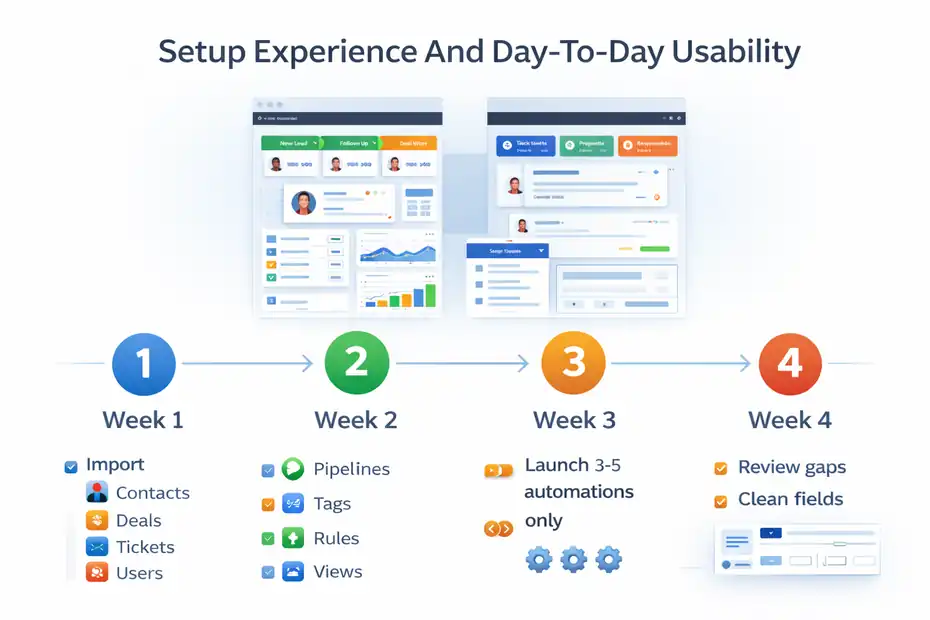
A sensible rollout path looks like this:
- Week 1: Import contacts, deals, ticket categories, and core users.
- Week 2: Set pipelines, tags, ownership rules, and inbox or ticket views.
- Week 3: Launch 3 to 5 automations only, not 30.
- Week 4: Review reporting gaps and clean fields before expanding.
I recommend resisting over-customization early. Freshworks works best when you let the default structure teach your team better habits first, then add complexity later.
The Interface Feels Modern, But Process Design Still Matters
Freshworks can feel easy on the surface, but ease of use does not remove the need for process clarity. That is a point I always come back to in CRM and support reviews.
A clean UI helps adoption. It does not solve unclear lifecycle stages, duplicate records, poor routing logic, or conflicting ownership.
A common example: A team installs Freshsales, imports leads, and loves the interface. Two months later they complain that reporting is “off.” The real issue is that reps were allowed to invent their own deal stages and skip close-lost reasons. That is not a product failure. That is a setup discipline problem.
So yes, I think Freshworks is user-friendly. But the best results come when you define:
- One Clear Pipeline Structure
- One Owner Rule Per Record
- One Support Taxonomy For Ticket Categories
- A Short Field Governance Policy
That sounds boring, but it is the kind of boring that protects your ROI.
Best Fit Use Cases
Not every business should buy Freshworks, and that is exactly why this section matters.
Freshworks Is A Great Fit For SMBs And Practical Midmarket Teams
I believe Freshworks is at its best for SMBs and lower-midmarket companies that want capable sales and support tools without the burden of an enterprise implementation.
The free and lower entry tiers make it accessible, while the Pro tiers on both Freshsales and Freshdesk unlock enough automation and reporting to support growing operations.
It is especially compelling for teams like these:
- B2B SaaS Teams: Need pipelines, sequences, lead tracking, and customer support under one vendor.
- Services Businesses: Need account visibility, follow-ups, and organized ticketing without a huge IT project.
- Ecommerce Or DTC Support Teams: Need structured ticketing, portals, and self-service before they need complex enterprise CX orchestration.
- Growing Startups: Need software that can mature with them for a while before a possible future replatform.
If you are in that zone, Freshworks often feels very sensible. It gives you structure early without demanding that you become a full-time systems administrator.
It Is Less Ideal For Highly Complex Enterprise Environments
Freshworks starts to look less dominant in very large, highly customized environments.
If your organization needs extreme process branching, complicated territory governance, very deep object relationships, or unusually advanced support orchestration, you may run into edges where specialist or enterprise products pull ahead.
Gartner comparison data suggests Freshsales performs competitively, but these markets also include products with heavier enterprise depth.
That does not mean Freshworks cannot serve larger companies. It clearly can. It just means the value equation changes.
The more your environment depends on these factors, the more carefully you should test:
- Complex Multi-Brand Support Workflows
- Strict Governance And Permissions Models
- Deep Revenue Operations Customization
- Heavy API Or Ecosystem Dependency
- Unique Regional Or Compliance Demands
In other words, Freshworks is strongest when your business wants speed and clarity. It is less unbeatable when your business needs endless architectural flexibility.
Where Freshworks Falls Short
No serious review should hide the weak spots. Freshworks has them.
Lower Tiers Can Look Better Than They Scale
This is probably my biggest caution. Freshworks is easy to like in a demo or free trial because the interface is approachable and the starter pricing looks fair.
But some of the features that make the platform really operationally strong sit in Pro or above. That is true on both the CRM and support sides.
So the risk is not exactly “bait and switch.” It is more subtle than that. You can underestimate your future needs.
A small team may start on Freshsales Growth and think, “This is enough.” Then six months later they want multiple pipelines, advanced workflows, and better reporting.
The support side follows a similar pattern once custom routing and richer reporting become important.
I suggest buyers model their needs 12 months ahead, not just today.
AI And Add-Ons Need Careful Cost Tracking
Freshworks is far from alone here, but AI pricing can get slippery if you do not track usage. Freshsales offers Freddy AI agent add-ons, while Freshdesk includes limited session access on higher plans and sells additional usage.
Freshdesk’s pricing materials also make clear that not every AI capability is simply unlimited by default.
That means you should ask very direct questions during evaluation:
- What AI Is Included Natively?
- What Is Metered By Session?
- What Happens If Usage Doubles?
- Which Roles Actually Need Copilot Access?
I would not call this a Freshworks-specific flaw as much as a 2026 software-buying reality. Still, it affects the “best value” conversation, because value disappears fast when add-ons are poorly planned.
Optimization Tips Before You Buy
If you are seriously considering Freshworks, a smarter evaluation process will save you money and frustration.
Test One Revenue Workflow And One Support Workflow End To End
Do not just click around the demo account. Build one real sales motion and one real support motion.
For sales, that could be: Web lead arrives, gets assigned, enters sequence, moves through stages, and lands in a report. For support, that could be: inbound issue arrives, gets categorized, routed, answered, and measured against a resolution target.
This matters because software feels very different when you test the full journey. Freshworks markets a unified customer journey and easy-to-use workflows, so your evaluation should pressure-test exactly that promise.
I recommend scoring the trial on five simple points:
- Time To First Useful Setup
- Reporting Clarity
- Admin Effort
- Rep Or Agent Adoption
- What Requires An Upgrade
That last one is the important one. It keeps you from buying based on trial excitement and discovering later that your must-have workflow lives one plan higher.
Buy For Operational Fit, Not Brand Halo
This is the most human piece of advice I can give you. Do not buy Salesforce because it feels “serious.” Do not buy HubSpot because it feels “popular.” Do not buy Freshworks because it feels “cheaper.” Buy the system your team will actually run well.
Freshworks has a very credible value position because it combines approachable UX, broad enough capability, strong SMB-to-midmarket relevance, and realistic pricing compared with many larger platforms.
Its review signals are also solid, including a 4.4 rating for Freshsales Suite in Gartner comparison results and a 4.3 rating for Freshdesk Omni on Gartner Peer Insights.
But the best software is the one that fits your team’s maturity. In many cases, Freshworks wins because it is easier to implement well, not because it has the loudest feature sheet.
Final Verdict
Freshworks is one of the better value plays in 2026 for businesses that want capable CRM and support software without the cost, complexity, or admin load of a more enterprise-heavy stack.
Freshsales offers a strong progression from basic pipeline management to serious sales operations, while Freshdesk gives growing support teams the structure they need before customer service chaos becomes expensive.
Official pricing currently starts at $9 per user per month for Freshsales Growth and $19 per agent per month for Freshdesk Growth, with Pro tiers unlocking much of the real operational power.
My verdict is simple: yes, Freshworks can be the best value, but only for the right buyer.
It is a strong choice if you want:
- Fast Time To Value
- One Vendor Across Sales And Support
- Good Usability
- Solid Automation At The Midmarket Level
- A Clear Upgrade Path
It is a less obvious choice if you need:
- Very Deep Enterprise Customization
- Highly Specialized Service Operations
- Heavy AI Usage Without Careful Cost Controls
- Unlimited Flexibility Across Every Edge Case
If I were advising a growing company with 10 to 100 people across sales and support, I would absolutely keep Freshworks on the shortlist.
In that band, it often delivers the mix most teams actually need: enough power, reasonable pricing, and a lower chance that the software becomes its own full-time job.
FAQ
What is Freshworks CRM and support software used for?
Freshworks CRM and support software is used to manage sales pipelines and customer support in one platform. It helps businesses track leads, automate follow-ups, handle support tickets, and improve customer communication without relying on multiple disconnected tools.
Is Freshworks CRM good for small businesses?
Yes, Freshworks CRM is a strong option for small businesses because it offers affordable pricing, easy setup, and essential automation features. It allows teams to manage sales and support without needing complex systems, making it ideal for startups and growing companies.
How much does Freshworks CRM and Freshdesk cost?
Freshworks CRM starts with a free plan, with paid tiers from $9 per user per month. Freshdesk also offers a free option, with paid plans starting at $19 per agent per month, depending on features, automation, and support capabilities.
What are the main advantages of Freshworks over competitors?
Freshworks stands out for combining CRM and support tools in one ecosystem, reducing the need for multiple platforms. It offers user-friendly design, faster setup, and competitive pricing, making it a practical choice compared to more complex enterprise solutions.
Is Freshworks worth it compared to HubSpot or Salesforce?
Freshworks is worth it for businesses that want simplicity, faster implementation, and lower costs. While it may lack some advanced enterprise features, it delivers strong value for small to mid-sized teams that prioritize ease of use and efficiency.

I’m Juxhin, the voice behind The Justifiable.
I’ve spent 6+ years building blogs, managing affiliate campaigns, and testing the messy world of online business. Here, I cut the fluff and share the strategies that actually move the needle — so you can build income that’s sustainable, not speculative.
Related posts:
 Why CRM Freshworks Stands Out From Other Platforms
 Freshworks CRM Pricing: Real Costs & Hidden Value
 What Is Freshworks CRM and How Does It Simplify Sales?
 Freshsales CRM Explained: How It Helps You Close Faster
 Freshworks Pricing Explained: Real Costs And Traps
 Inside Freshworks Inc: Products, Vision, and Growth Story