
Table of Contents
Some links on The Justifiable are affiliate links, meaning we may earn a small commission at no extra cost to you. Read full disclaimer.
A honest debutify shopify theme review starts with one simple question: do you actually need a “conversion-first” premium theme, or are you just paying for a bundle of features you could replace with Shopify defaults and a few apps?
I’ve looked at Debutify from that practical angle. On paper, it promises built-in upsells, urgency widgets, cross-sells, regular updates, and a 14-day free trial.
In reality, whether it feels powerful or overrated depends on your store model, your margin, and how much you value speed, simplicity, and app reduction over pure design flexibility.
What Debutify Is And Who It Is Really For
Debutify is not trying to be the prettiest Shopify theme on the market.
It is trying to be the most sales-focused for merchants who care about conversion tools, fewer app dependencies, and faster setup.
What Debutify Actually Sells You
When you strip away the marketing language, Debutify is a Shopify theme built around a simple promise: replace a stack of paid conversion apps with one theme that already includes many of those functions.
Its official messaging leans heavily on built-in upsells, cross-sells, urgency elements, smart merchandising features, and cost savings from reducing third-party app subscriptions.
Debutify also offers a 14-day free trial and promotes frequent updates through its changelog, which matters more than most beginners realize. A theme is not a one-time design decision anymore. It is part of your store infrastructure.
From what I’ve seen, that positioning makes Debutify much more practical than inspirational. It is not mainly for brand-first stores that want magazine-style storytelling. It is for merchants who want “install, configure, launch, improve” without stitching together five to ten separate tools.
That difference matters. Many store owners buy a theme based on homepage beauty, then discover they still need extra apps for sticky add-to-cart, bundles, stock counters, cart reminders, and search upgrades. Debutify is clearly designed to win that second conversation, not the first one.
The Types Of Stores That Usually Benefit Most
In my experience, Debutify makes the most sense for three groups.
- New Shopify merchants who want a faster path to a “complete” storefront without heavy custom development.
- Dropshipping or general e-commerce stores that rely on conversion boosters more than editorial brand presentation.
- Growth-stage stores trying to reduce app clutter, recurring fees, and compatibility issues.
Imagine you sell trending home organization products. You care less about cinematic brand storytelling and more about clean product pages, urgency elements, bundles, free shipping prompts, and fast mobile buying. That is exactly the kind of store Debutify seems built for.
On the other hand, if you run a premium fashion label, a design-led skincare brand, or a content-rich lifestyle store, your priorities may be different. In that case, layout sophistication, art direction, and storytelling sections can matter more than built-in CRO widgets.
That is where some Shopify Theme Store themes can feel more polished out of the box. Dawn is free and regularly updated by Shopify, while premium themes like Impulse position themselves around stronger visual merchandising and promotion design.
Why Debutify Is Not On The Shopify Theme Store
This is one of the first things many buyers notice. Debutify is sold directly through its own platform rather than through the official Shopify Theme Store.
Debutify’s own comparison content explicitly states that it is sold outside the Theme Store and managed through its own dashboard and support system. That does not automatically make it bad, but it changes the buying experience.
I think this is where some of the “overrated” conversation starts. Shopify Theme Store themes have a very familiar trust framework: one-time pricing, demo previews, public reviews, version history, and Shopify-centered purchase flow. Debutify asks you to trust its own ecosystem instead.
That is not a deal breaker. But it does mean you should evaluate it more like software than like a normal theme purchase. You want to pay attention to release consistency, support responsiveness, onboarding quality, and how comfortable you are being somewhat inside one vendor’s operating system.
How Debutify Works In Practice

The biggest difference between Debutify and a standard theme is not appearance.
It is how much functionality is packed into the theme experience itself.
The Core Value: Fewer Apps, More Built-In Sales Features
Debutify’s product page makes its pitch very clearly. It highlights built-in features such as cart countdowns, stock countdowns, sales notifications, free shipping goals, volume discounts, product bundles, back-in-stock tools, pre-orders, and pre-purchase offers.
It also claims these built-in capabilities can replace multiple paid app subscriptions and cites savings of more than $3,000 per year in marketing language, while showing examples of app categories like filters, cart drawer, smart search, sticky add-to-cart, and wishlist being included instead.
That pitch is strong because it solves a real Shopify problem. App stacking gets expensive, but it also gets messy. Every new app adds code, scripts, styling quirks, compatibility risk, and another dashboard. For many merchants, the real benefit is not just cost savings. It is operational calm.
Let me put that simply. If your store works with one theme and three essential apps, you usually sleep better than when it works with one theme and eleven add-ons that all want to control the cart, badges, search, and upsells.
This is where Debutify feels genuinely powerful. It is not only selling features. It is selling consolidation.
Theme Versioning, Updates, And Store Maintenance
A Shopify theme is never really “finished.” Shopify changes, apps change, checkout behavior changes, and performance expectations keep rising.
Debutify publishes its own changelogs, and recent releases such as version 8.12 emphasize subscription capabilities, UX improvements, performance optimizations, and stability updates.
Its help documentation also explains that updating the theme can require backing up your existing version and re-uploading the newer file, with the note that not all customizations transfer automatically.
That second detail matters a lot more than most reviews mention.
A beginner might hear “regular updates” and think that is automatically painless. It is not always painless. Updates are valuable, but they also create maintenance responsibility. If you customize heavily, any non-Shopify-Theme-Store theme should be treated carefully before upgrading.
My advice is simple: If you use Debutify, keep a clean change log of your own. Document what you edited, what custom code you added, and what app integrations matter most. That way, every theme update becomes manageable instead of stressful.
User Experience Versus Design Flexibility
Debutify’s real personality is utility-first. It wants your store to convert quickly, not necessarily to feel like a high-concept brand showcase.
I believe that is both its strength and its limitation. If your main goal is getting a clean storefront live with practical conversion elements, Debutify can feel refreshingly direct. You are not hunting through endless style options for the perfect mood. You are building a store meant to sell.
But design-focused merchants may feel constrained. This is where theme selection becomes less about “best” and more about fit. Debutify’s built-in conversion bias helps product-focused stores.
Meanwhile, premium Shopify themes like Impulse emphasize customizable promotional experiences and visual merchandising. Dawn, although simpler, benefits from tight Shopify integration and the familiar Theme Store workflow.
So no, Debutify is not overrated just because it is not artsy. But yes, it can feel overrated if you buy it for the wrong reason.
Step-By-Step Setup: What Getting Started Looks Like
If you are considering Debutify, the real question is not “Can it work?” It is “How fast can I get to a better storefront without creating extra maintenance headaches?”
Initial Setup And Installation Flow
Debutify’s help center makes it clear that onboarding starts with connecting your Shopify store URL and installing the Debutify custom app.
That tells you right away this is not the exact same experience as grabbing a theme straight from the Shopify Theme Store and publishing it from the usual theme library flow.
In practical terms, your setup flow usually looks like this:
- Start the Debutify trial.
- Connect your Shopify store.
- Install the required Debutify app components.
- Add the theme to your store.
- Configure sections, widgets, product page elements, and brand styling.
- Test mobile performance, cart behavior, search, and product page UX before publishing.
That is still beginner-friendly, but it has one more layer than a pure Theme Store install.
I suggest treating the first hour with Debutify as architecture work, not styling work. Before you touch fonts and colors, decide which built-in revenue features you actually want active.
Many merchants make the mistake of turning on too many conversion widgets at once. The result is not higher conversion. It is visual noise.
How To Configure It Without Making Your Store Feel Spammy
This is the biggest setup mistake with Debutify. Because it gives you access to so many sales-oriented features, it can tempt you into building the kind of store that feels like it is shouting at the visitor.
I would start with only the essentials:
- Sticky add-to-cart or fast purchase support.
- A free shipping progress indicator if your AOV can support it.
- Product bundles only where they genuinely improve cart value.
- Search and filters that make discovery easier.
- Trust-focused content like reviews or shipping clarity.
Then leave urgency tools for last.
For example, if you sell supplements and every page has a stock countdown, popup, sales notification, bundle prompt, pre-order badge, sticky CTA, and countdown timer, you may get the opposite effect. Instead of trust, you create pressure. Instead of momentum, you create skepticism.
A good rule I use is this: Every widget should answer one commercial question. Buy now, buy more, find faster, trust more, or return later. If a widget does not clearly serve one of those jobs, it probably should stay off.
What To Test Before You Go Live
Before publishing, run through the store like a first-time shopper. Not as the owner. As a distracted buyer on a phone.
Check these areas carefully:
- Homepage clarity: Can someone tell what you sell in five seconds?
- Collection usability: Are filters useful or overwhelming?
- Product page flow: Is the main CTA visible without friction?
- Cart behavior: Does it feel helpful or aggressive?
- Mobile spacing: Do urgency tools crowd the screen?
- Search: Does it help discovery or create dead ends?
This is where Debutify can outperform a prettier theme. A store that looks 15 percent less luxurious but is 30 percent easier to shop will often win in revenue terms.
I recommend using a simple benchmark after launch: track add-to-cart rate, checkout start rate, and conversion rate before and after theme changes. Without that, you are just reacting to aesthetics.
Features That Matter Most In A Real Debutify Shopify Theme Review
A feature list means very little until you connect it to revenue, maintenance, and customer experience.
Conversion Tools That Can Genuinely Replace Apps
Debutify is strongest when its features let you avoid extra recurring software. On its own site, it specifically highlights built-in tools connected to search, filtering, sticky add-to-cart, cart drawers, back-in-stock, wishlist, and other conversion helpers, along with example annual app-cost replacements.
This matters because Shopify merchants often underestimate the hidden tax of app subscriptions. Even when each tool looks cheap on its own, the combined cost adds up fast. A cart tool here, a bundle app there, a sticky CTA plugin, a wishlist app, an advanced search tool, and suddenly your margin has a new monthly leak.
Debutify’s strongest business case is not “our theme looks amazing.” It is “our theme may reduce the number of paid problems you need to solve elsewhere.”
That is a compelling case for lean operators. Especially if you are running paid traffic, improving contribution margin by cutting software overhead can matter almost as much as lifting conversion rate.
Speed, Performance, And Why The App Reduction Argument Matters
Debutify repeatedly frames itself as a high-converting, fast-loading theme built to reduce friction and app dependency.
Shopify’s own Dawn theme also strongly emphasizes future-proofing and performance monitoring improvements, which is why Dawn remains a serious baseline comparison rather than just a “free beginner theme.”
Here is my honest take: no theme is magically fast if you overload it with bad media, too many third-party scripts, and chaotic app behavior.
But fewer external apps usually does create a cleaner environment. That is why Debutify’s app reduction argument has real technical logic behind it.
Performance is also emotional. A fast store feels trustworthy. A laggy store feels risky. On mobile, that trust gap is even bigger.
So when Debutify says it helps reduce app reliance, I do not hear only a finance benefit. I hear a performance and reliability benefit too. That is one reason I think calling it “just hype” would be unfair.
Support, Documentation, And Operational Convenience
One underappreciated part of theme ownership is support quality. Debutify’s site promotes expert support, its help center contains installation and configuration guides, and its FAQ and documentation ecosystem are clearly part of the product experience.
I think this matters most for merchants who are not developers. A theme is only “easy” if you can solve issues quickly when they appear. Documentation reduces fear. Responsive support reduces downtime. Clear update instructions reduce mistakes.
The caution, though, is that you are leaning into Debutify’s ecosystem for that help. If you prefer the standardized comfort of Shopify Theme Store workflows and Shopify-native theme support expectations, that difference may matter to you more than it does to someone who just wants fast merchant support from the vendor directly.
Pricing, Value, And Total Cost Of Ownership
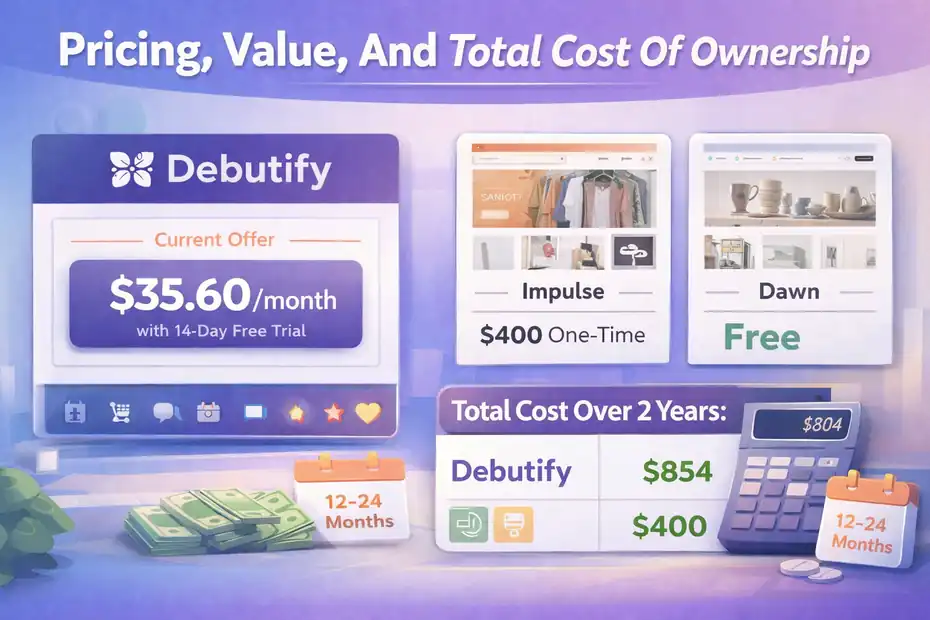
This is where the “powerful or overrated” debate gets real. A theme is not expensive or cheap in isolation. It is expensive or cheap relative to what it replaces.
Debutify Pricing Versus Traditional Shopify Theme Pricing
Debutify’s pricing page presents a recurring-plan model and highlights a current offer around $35.60 alongside a 14-day free trial, while its product messaging compares the theme purchase to app spending and positions the offer as a cost-saving alternative.
Shopify Theme Store premium themes, by contrast, typically use one-time pricing. For example, Impulse is listed at $400, while Dawn is free.
That distinction is huge.
A one-time premium theme can look expensive upfront but become cheaper over time. A recurring theme model can look affordable monthly but become more expensive if you keep it for years.
So the right comparison is never just “Debutify costs X and Impulse costs Y.” The better comparison is this: what is your total cost over 12 to 24 months after accounting for the apps you will or will not need?
A Simple Way To Judge Whether The Pricing Is Worth It
I suggest using this back-of-the-envelope test.
Debutify is probably worth it if all three are true:
- It lets you avoid at least three to five paid apps you would otherwise need.
- It helps you launch faster or iterate faster.
- It does not force expensive custom design work to look the way you want.
Let’s say you would normally pay for advanced search, sticky cart features, bundles, wishlist, and urgency tools. If Debutify replaces enough of that stack, the math can work quickly.
But here is the flip side. If you only need a clean storefront, light customization, and maybe one or two external tools, then a free theme like Dawn or a one-time premium theme may be the smarter buy. In that scenario, Debutify can feel like paying for a lot of capability you never use.
That is why the answer is not universal. Value depends on how “tool-heavy” your store strategy is.
Hidden Costs People Ignore
I see three hidden costs buyers often miss.
First, feature bloat. Just because Debutify includes many tools does not mean your store should use them all.
Second, update management. If your setup becomes customized, every upgrade needs care. Debutify’s own update documentation warns that not all customizations carry over automatically.
Third, brand fit. If you end up hiring someone to heavily redesign the storefront so it feels more premium or distinctive, your total cost goes up fast.
That is why I would not call Debutify universally cheap. I would call it high-leverage when used correctly.
Debutify Vs Other Shopify Theme Options
The best review is comparative. A theme only makes sense when you understand what problem it solves better than the alternatives.
Debutify Vs Dawn
Dawn is the default benchmark because it is free, Shopify-made, and consistently updated. Shopify describes it as future-proof and highlights ongoing performance monitoring improvements in recent versions.
Dawn wins on simplicity, native trust, and low cost. It is a great choice if you want to stay close to Shopify’s ecosystem and keep your theme stack lean.
Debutify wins when you want more built-in sales functionality without building an app stack from scratch. If you know you will need conversion helpers, merchandising tools, and multiple storefront enhancements, Debutify offers a more complete revenue-focused package.
My opinion? Dawn is the smarter “start clean” option. Debutify is the smarter “start selling aggressively with built-in support” option.
Debutify Vs Premium Theme Store Themes Like Impulse
Impulse is a useful comparison because it is a respected premium theme focused on promotions, merchandising, and mobile usability.
Its Theme Store page highlights quick buying, advanced promotions, stock counters, trust badges, quick view, recommended products, and strong catalog tools, all under a one-time $400 price.
So where does Debutify fit against that?
Debutify often makes more sense for merchants prioritizing conversion tooling consolidation and ongoing vendor ecosystem support.
Impulse often makes more sense for merchants who want a more established Theme Store purchase model and strong visual merchandising inside the Shopify theme marketplace.
This is a classic trade-off:
Debutify leans toward software-like utility.
Impulse leans toward premium theme polish inside Shopify’s native channel.
Neither is automatically better. Your workflow preference matters almost as much as the feature list.
When Debutify Is The Wrong Choice
I think Debutify is the wrong choice when:
- You care more about brand storytelling than sales widgets.
- You strongly prefer Shopify Theme Store trust and workflow.
- You only need a small number of advanced features.
- You want one-time theme cost rather than recurring expense.
- Your design team plans heavy custom development anyway.
That does not mean Debutify is bad. It means it is specific.
A lot of “overrated” reviews happen because store owners buy a product built for optimization and then judge it like a product built for artistic flexibility.
Common Mistakes That Make Debutify Feel Worse Than It Is
A theme can be good and still perform badly when it is used the wrong way.
Turning On Too Many Features At Once
This is mistake number one. Debutify gives you a lot of commercial controls, and some merchants take that as permission to activate everything.
Do not do that.
A conversion feature should reduce friction, add trust, or increase cart value. If it mainly adds visual pressure, it is probably hurting the store.
I suggest enabling one category at a time. Start with cart and product-page usability. Then add search and merchandising improvements. Then test bundles. Only after that should you experiment with urgency-style elements.
A cleaner store almost always outperforms a louder store over time.
Treating The Theme Like A Growth Strategy By Itself
Debutify can improve the storefront experience, but it cannot rescue weak offers, bad product-market fit, poor traffic, or confusing positioning.
I say this because many merchants expect a conversion-focused theme to manufacture conversions on its own. It cannot. It can help qualified visitors buy more easily. That is different.
Imagine two stores selling the same product. One has a compelling offer, useful reviews, and clear messaging. The other has generic copy and weak differentiation but installs every conversion widget available. The first store usually wins, even with a simpler theme.
Themes support your strategy. They do not replace it.
Ignoring Baseline Measurement
If you switch to Debutify and do not measure anything, you will have no idea whether it helped.
At minimum, compare these before and after the switch:
- Conversion rate
- Add-to-cart rate
- Checkout initiation rate
- Average order value
- Bounce rate on top landing pages
- Mobile product page engagement
Without that, every opinion about the theme becomes emotional. You end up saying things like “It feels better” or “I think sales improved,” which is not enough.
I recommend giving any major theme change at least a clean measurement window with stable traffic sources and no major promotion distortions.
Advanced Optimization Tips If You Decide To Use Debutify
This is where the theme can become more than just a setup shortcut. Used well, it can support a more disciplined optimization process.
Build Around One Revenue Goal Per Page Type
One reason Debutify can work well is that it gives you multiple monetization levers. But those levers need hierarchy.
- For collection pages, your main goal is usually faster discovery.
- For product pages, your main goal is purchase confidence.
- For the cart, your main goal is cart completion or cart expansion.
- For post-purchase, your goal is repeat value or add-on value.
If you apply that logic, feature decisions get much easier. Search, filters, and quick-buy behavior belong where discovery matters. Bundles and shipping thresholds belong where order value matters. Countdown tools only make sense where genuine urgency exists.
This stops the theme from becoming a random pile of widgets.
Keep Your Store Looking Like A Brand, Not A Funnel Template
This is my biggest practical advice for Debutify users.
Because the theme is conversion-oriented, you need to intentionally protect brand feel. Use whitespace. Use consistent product photography. Write cleaner copy. Keep your color system disciplined. Be selective with badges and promotional UI.
A lot of stores using sales-focused themes fail because they optimize for pressure instead of clarity. Modern conversion usually comes from confidence, not chaos.
So yes, use the revenue tools. But wrap them in a store that still feels credible, calm, and consistent.
Reduce Dependence Without Becoming Locked In
Debutify’s app-reduction message is smart, and in many cases useful. But I still recommend thinking modularly. Know which functions matter most. Know what you would replace if you ever moved themes. Keep product data, review data, and key merchandising logic as portable as possible.
That is not because Debutify is uniquely risky. It is just good operational hygiene.
Any time one vendor becomes your theme, part of your feature stack, your documentation source, and your update channel, portability matters.
I would write down your “must keep” functions before you fully commit. That way, you are choosing Debutify from strength, not dependency.
Final Verdict: Powerful Or Overrated?
Debutify is powerful when you judge it by the job it is actually trying to do. It offers a conversion-first Shopify theme experience with many built-in sales and merchandising features, a direct-vendor support model, regular release updates, and a clear promise to reduce app dependency and operational clutter.
It becomes overrated only when it is pitched, or bought, as a universal best theme for every kind of Shopify store.
I would recommend Debutify if you want a practical selling machine more than a design trophy. It is especially compelling for merchants who are tired of stacking paid apps just to get a store to feel complete.
I would not recommend it as quickly for highly brand-led stores, merchants who strongly prefer Shopify Theme Store buying standards, or businesses that only need a lightweight feature set.
So here is the clean answer.
Debutify is not overrated. But it is also not for everyone.
It is a focused tool. If your store needs built-in conversion features, lower app dependence, and faster revenue-oriented setup, Debutify can be a smart buy. If your store mainly needs native simplicity, premium visual storytelling, or one-time-cost theme ownership, there are better fits.
If I had to summarize this debutify shopify theme review in one sentence, it would be this: Debutify is strongest when you buy it as an optimization system, not when you buy it as a design fantasy.
FAQ
What is Debutify Shopify theme and how does it work?
Debutify is a conversion-focused Shopify theme designed to increase sales using built-in tools like upsells, bundles, and cart features. It works by reducing the need for third-party apps, allowing store owners to manage design and revenue optimization directly within the theme.
Is Debutify Shopify theme good for beginners?
Yes, Debutify is beginner-friendly because it simplifies store setup with pre-built conversion features. New users can launch faster without installing multiple apps, although some learning is still required to configure features properly and avoid cluttering the store with too many elements.
Does Debutify replace Shopify apps?
Debutify can replace several Shopify apps by offering built-in features like sticky add-to-cart, product bundles, and urgency tools. However, it may not fully replace all specialized apps, especially for advanced customization or niche functionality depending on your store’s needs.
Is Debutify Shopify theme worth the price?
Debutify is worth the price if you plan to use multiple built-in features that replace paid apps. For stores relying heavily on conversion tools, it can save money long term. However, for simple stores, a free or one-time theme may offer better value.
What are the main disadvantages of Debutify theme?
The main disadvantages include recurring pricing, potential feature overload, and limited design flexibility compared to premium themes. It is also not available on the Shopify Theme Store, which may be a concern for users who prefer Shopify’s native ecosystem and standardized support.

I’m Juxhin, the voice behind The Justifiable.
I’ve spent 6+ years building blogs, managing affiliate campaigns, and testing the messy world of online business. Here, I cut the fluff and share the strategies that actually move the needle — so you can build income that’s sustainable, not speculative.
Related posts:
 Debutify Shopify Guide: How to Launch a Profitable Store Fast
 Shopify DSers Review: Is It Really Worth Your Time?
 Shopify Theme Debutify Explained: Features, Pros & Cons
 Doba Supplier Network Explained: Quality and Reliability
 Doba Website Walkthrough: Features, Limits, and Usability
 AppScenic Dropshipping Review: Hidden Truths