
Table of Contents
Some links on The Justifiable are affiliate links, meaning we may earn a small commission at no extra cost to you. Read full disclaimer.
An aweber email marketing review should do more than repeat feature lists, and that is exactly where most articles fall short.
If you are trying to decide whether AWeber is still worth your money in 2026, you need the honest version: where it feels smooth, where it feels dated, and where it quietly does a better job than flashier competitors.
I have gone through its current plans, support setup, ecommerce tools, integrations, and third-party feedback, and the hidden truth is simple: AWeber is not the most advanced platform anymore, but for the right kind of business, it can still be a very practical one.
What AWeber Is Really Good At
AWeber has been around long enough to avoid a lot of beginner-hostile nonsense.
That matters more than many reviews admit, especially if you are trying to launch fast instead of building a perfect automation machine.
A Simple Newsletter Engine That Still Gets The Basics Right
The first hidden truth in this aweber email marketing review is that AWeber’s core strength is still the same thing it has always been: helping small businesses send emails without feeling overwhelmed.
Its platform centers on newsletters, automations, landing pages, sign-up forms, ecommerce pages, and web push notifications rather than trying to become a giant all-in-one CRM.
On its homepage and pricing pages, AWeber emphasizes email marketing, landing pages, email automation, ecommerce, and web push, which tells you a lot about how it wants to be used.
That narrower focus is actually helpful for many users. If you run a newsletter, coaching business, local service, creator brand, or a small store with a modest catalog, AWeber feels easier to understand than platforms built for enterprise marketing teams.
You are not buried under sales pipeline dashboards, attribution models, or complicated branching logic on day one.
In my experience, that simplicity creates real momentum. A beginner usually needs three things fast: a form, a welcome email, and a repeatable broadcast process. AWeber supports all of that without making you learn ten modules first.
Its drag-and-drop builder, templates, hosted broadcast archive, RSS-to-email, personalization, and email automations are all part of the core workflow.
The tradeoff is also clear. If you are expecting deep customer journeys with multi-condition branching based on browsing, purchase timing, lead scores, and lifecycle stages, AWeber starts to feel light.
But for straightforward newsletter operations, that lightness can be a feature rather than a flaw.
Support And Onboarding Are Better Than Most Budget-Friendly Tools
One of the more underrated parts of AWeber is support. A lot of cheaper email tools promise “easy setup” and then quietly send you into chatbot purgatory when anything breaks. AWeber still leans into human help.
Its contact page says chat and email are available 24/7, while phone support is available Monday through Friday from 8:00 AM to 8:00 PM ET. Its site also highlights free migration support.
That matters if you are moving from another platform, fixing DNS issues, importing a list, or trying to understand why subscribers are not entering the right automation. For many small businesses, support quality matters more than one extra shiny feature.
AWeber also sells a “Done For You” setup service, where its team builds an email system with emails, landing pages, workflows, and integrations in seven days, with a setup fee and ongoing plan cost listed on the pricing page. That is not for everyone, but it tells you something important: AWeber knows a large part of its audience does not want to become marketing ops experts.
I think that is one reason the tool keeps surviving while trendier platforms come and go. It understands that many customers are not trying to build a complex funnel empire. They just want email marketing that works and support that answers.
Its Ecommerce Landing Page Angle Is More Useful Than It Sounds
A surprising angle in this aweber email marketing review is AWeber’s ecommerce landing page system. The company specifically promotes pages for selling ebooks, paid newsletters, coaching programs, and courses, and says creators can keep 96%+ of every sale.
On the pricing comparison, AWeber also lists ecommerce selling, subscriptions, payment plans, purchase tagging, and low transaction fees, with 1.0% on Lite and 0.6% on Plus.
That is more meaningful than it first appears. A lot of email platforms treat selling as an afterthought unless you connect a separate store. AWeber clearly wants to serve digital sellers who need a quick checkout page tied to email capture and follow-up.
Imagine you sell a $29 mini-course, a paid workshop, or a premium newsletter. You do not necessarily need a giant storefront. You need a page, a checkout, tagging after purchase, and a post-purchase email sequence. AWeber is unusually aligned with that use case.
This does not make it the strongest ecommerce platform overall. It does mean AWeber is more interesting for creators and solopreneurs than many people assume. If your business model is simple and digital, its built-in selling tools may remove a surprising amount of friction.
That is one of the hidden truths most broad email marketing reviews miss.
How AWeber Works In Real Life
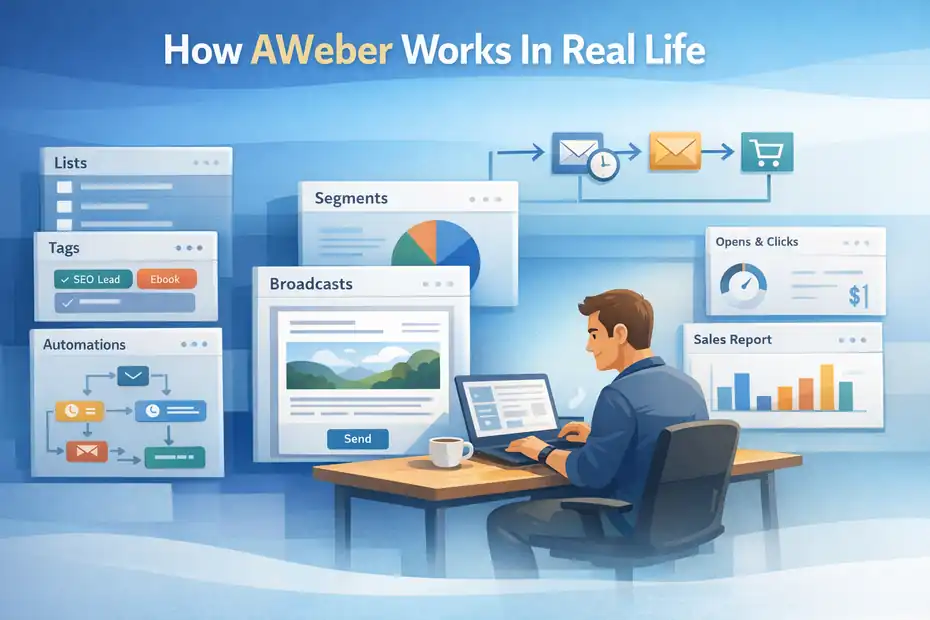
Features always sound good on landing pages. The real question is what daily use feels like when you are actually trying to grow a list and send campaigns.
Lists, Tags, And Automations Are The Core Of The System
AWeber’s system combines lists, tags, segments, broadcasts, and workflows. It supports tagging subscribers, basic and custom segmentation, welcome series, RSS automations, and behavior-based automation features on higher plans.
Its knowledge base also shows workflows for welcome series and subscriber actions, while the pricing page lists behavioral automation and split testing in the feature comparison.
Here is the practical way to think about it:
- Lists are your larger containers.
- Tags label actions or interests.
- Segments help you send more relevant messages.
- Broadcasts are one-time campaigns.
- Automations handle sequences and triggered follow-ups.
For a new user, that structure is manageable. You can start with one list, one lead magnet, one signup form, one welcome sequence, and a weekly email. That is enough to build a serious email asset without overengineering the account.
Where some people get tripped up is trying to use AWeber like a heavyweight lifecycle automation platform. It can do more than a basic newsletter app, but it still works best when your automation logic is clean and intentional. If your setup starts to need a diagram to explain it, that is usually the point where AWeber becomes less elegant.
I would suggest keeping your architecture simple: use tags for interests and actions, not endless list sprawl. That alone can save you from a lot of confusion six months later.
Building Your First Funnel Is Fairly Fast
If you are wondering how quickly you can get productive, AWeber is pretty good here. The Lite plan includes one email list, three landing pages, three email automations, three users, one custom segment, advanced message analytics, and 10x subscriber-volume monthly sends.
The Plus plan moves that to unlimited lists, landing pages, automations, users, and custom segments, with 12x subscriber-volume monthly sends, advanced analytics, and more advanced features.
That means a beginner can realistically build a first funnel even on Lite:
- Create one landing page or signup form.
- Connect it to a single main list.
- Tag new subscribers based on source or interest.
- Add a welcome automation.
- Start sending broadcasts weekly.
That setup is enough for a consultant, coach, blogger, or niche ecommerce seller to start collecting leads and nurturing them immediately.
A realistic scenario might look like this: You offer a free guide on your site, tag every lead from that guide as “SEO Lead,” send a three-email welcome sequence, and then move them into your weekly newsletter. That is not flashy, but it is the kind of system that actually grows a business.
This is another place where I think AWeber earns credit. It makes the first useful version of your funnel easier to launch than many tools that technically have “more power.”
Reporting Is Useful, But Not Revolutionary
AWeber includes message analytics, audience analytics on higher tiers, click tracking, webpage tracking, sales tracking, and deliverability-related reporting in its feature set. Its help docs also show users how to review click-through data for sent broadcasts.
For most small businesses, that is enough to answer the main questions:
- Which subject lines got opened?
- Which links got clicked?
- Which message generated sales?
- Which segment is more engaged?
- Which page or signup source performs best?
That said, reporting is one of the areas where AWeber feels more practical than advanced. You can get useful answers, but you are not stepping into the kind of deep attribution environment that larger platforms push.
I do not see that as a dealbreaker for most readers. In fact, many businesses never act on complex analytics anyway. They drown in dashboards and change nothing. AWeber’s reporting is better viewed as “enough to improve decisions consistently” rather than “best in class.”
If your team needs board-level reporting, multi-channel attribution, or very detailed funnel analytics, you will probably want something more robust. But if you mainly need to improve opens, clicks, sales, and subscriber engagement, AWeber gives you enough visibility to do the job.
AWeber Pricing: Where The Value Makes Sense And Where It Slips
Pricing is where opinions on AWeber usually split. Some users think it is fair. Others think newer tools deliver more automation for similar money.
What AWeber Costs Right Now
According to AWeber’s pricing page, its Lite plan starts at $12.49 per month billed annually, while Plus starts at $19.99 per month billed annually for the 0 to 500 subscriber range. The Lite tier allows 10x subscriber-volume monthly sends, while Plus allows 12x.
AWeber’s pricing tables also show Lite scaling to $15 monthly for 500 subscribers, $25 for 1,000, $35 for 2,500, and higher as your list grows.
At that entry level, AWeber is not absurdly expensive, but it is also not the obvious bargain it once was. The important question is not just “What is the monthly cost?” It is “What do I get without upgrading too soon?”
On Lite, you have meaningful limits: one list, three landing pages, three automations, one saved custom segment, and no removal of AWeber branding. For a very small operation, that may be enough. For anyone actively building funnels, those limits can arrive faster than expected.
On Plus, most of those constraints disappear, and the product becomes much more usable for a growing business. Unlimited lists, landing pages, automations, users, and segments make a real difference. This is why many serious users will end up treating Plus as the “real” AWeber experience.
So the hidden truth on pricing is this: Lite is attractive for testing, but Plus is where AWeber starts feeling complete.
The Value Is Best For Simple Businesses, Not Complex Ones
This is the part I would pay attention to before buying. AWeber is strongest when your business model is simple enough to benefit from its usability. If you need straightforward lead capture, newsletters, welcome sequences, digital product pages, and decent reporting, the price can make sense.
But the minute your requirements become more advanced, the value equation changes. At that point, you are paying for a platform that still feels limited in certain automation scenarios compared with some newer competitors. That does not make AWeber bad. It just means its value is more context-dependent than fan reviews suggest.
A good way to think about it is this:
- A local business owner may find AWeber a relief.
- A content creator may find it efficient.
- A course seller may like the ecommerce pages.
- A growth marketer may hit the ceiling quickly.
That split also appears in user reviews. G2 shows AWeber at 4.2 out of 5 from 648 reviews, and recent reviewers praise its ease of use, personalization, and support, while some also say pricing feels high compared with newer tools offering more advanced features.
So no, AWeber is not overpriced in every scenario. But yes, it can feel expensive if you are paying mainly for automation depth that it does not fully deliver.
The Hidden Truths Most Reviews Skip
This is where the real review starts. The following issues are not necessarily dealbreakers, but they are the things you should know before you commit.
The Automation Ceiling Is Real
AWeber absolutely supports automation, and its current plans list unlimited automations on Plus, along with behavioral automation and split testing. Its documentation also covers workflows, welcome series, and action-based automation.
But “supports automation” is not the same as “leads the market in automation.” That distinction matters.
The hidden truth is that AWeber’s automation is solid for linear and moderately segmented journeys, but it is not the platform I would choose first for highly sophisticated lifecycle design. If you run a business where customer behavior changes across multiple products, channels, and buying stages, you may find the logic less flexible than you want.
This is why some reviews sound weirdly divided. One person says AWeber automation is great. Another says it feels limited. They are often both right because they are solving different problems.
For example, a welcome sequence with different follow-ups based on link clicks is one thing. A multi-product, multi-touch customer journey with heavy branching, lead qualification, and progressive nurturing is another.
I would not call AWeber “bad at automation.” I would call it “good enough until your business becomes operationally complex.” That is a much more accurate framing.
Deliverability Is Not A Simple Win
A lot of software reviews either worship deliverability claims or ignore them completely. The honest answer is usually messy.
AWeber says it has an in-house reputation team that monitors signals, identifies abuse, and removes suspicious accounts to help improve reliability and deliverability. That is a good sign, and it suggests the company takes sender quality seriously.
At the same time, independent testing from EmailTooltester paints a more mixed picture. In its January 2024 round, AWeber had an overall deliverability rate of 83.1%, a last-three-round average of 89.4%, and a five-round average of 82.44%.
The same testing showed strong Outlook and Hotmail inboxing, high Yahoo and AOL performance over time, but weaker Gmail Primary performance in that latest round, plus relatively high missing-email and spam rates.
That means the hidden truth is not “AWeber has bad deliverability” or “AWeber has amazing deliverability.” It is that performance appears inconsistent depending on provider and testing window.
For most users, this should lead to a practical conclusion: your own list quality, authentication, sending behavior, and content still matter enormously. You cannot outsource good email practices to platform branding. AWeber has systems in place, but it is not a magic inbox pass.
AWeber’s Modern Features Are Real, But They Do Not Always Change The Core Experience
AWeber now includes AI-related tools like its Newsletter Assistant and AI subject line assistance. Its documentation says Newsletter Assistant can draft content for you through email interaction and create newsletter drafts in minutes.
That is useful, especially for creators who struggle to publish consistently.
It also supports web push notifications, which AWeber describes as clickable messages that appear on subscribers’ devices or browsers even when they are not actively browsing the site. On Lite, the pricing page lists support for up to 50,000 web push subscribers and messages.
Those additions make the product more current, but here is the honest part: they do not transform AWeber into a completely different class of platform. They are useful extensions around the same central promise of simple, approachable email marketing.
That is not a complaint. In fact, I think it is healthier than stuffing in random features no one uses. But you should go in knowing that AWeber’s improvements mostly strengthen its core use case rather than reinvent it.
Who AWeber Is Best For
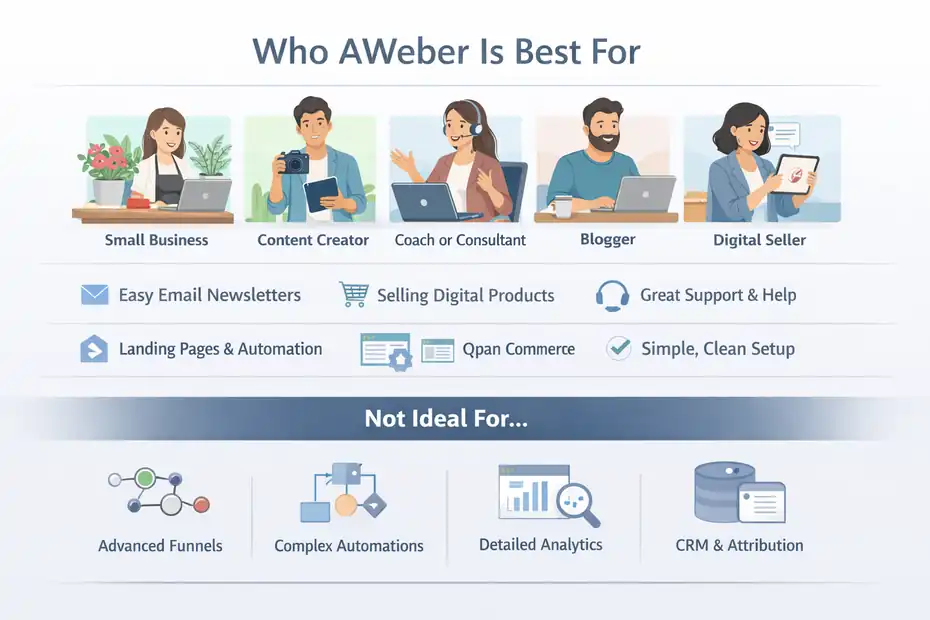
This is the part most readers really care about. Not “Is AWeber good?” but “Is AWeber good for me?”
You Should Consider AWeber If Your Business Looks Like This
AWeber makes the most sense for small businesses, creators, consultants, bloggers, coaches, and simple digital sellers who want an email platform that is easy to launch and maintain.
Its official positioning, current features, ecommerce pages, and support structure all line up well with that audience.
I would especially look at it if you fit one of these profiles:
- You want to publish newsletters consistently without a steep learning curve.
- You sell a digital product, paid newsletter, coaching session, or simple course.
- You care about support and migration help.
- You need landing pages, forms, automations, and sales tracking in one place.
- You prefer a cleaner setup over maximum automation complexity.
A realistic example: Imagine you run a weekly niche newsletter with a paid workshop offer every month. AWeber can handle signup pages, welcome emails, broadcast sends, checkout pages for the workshop, and post-purchase follow-up without needing a big external stack.
In other words, it works well when your monetization path is clear and your funnel is relatively tight.
You Should Probably Skip It If You Need Deeper Marketing Operations
AWeber becomes a weaker fit when your marketing team needs advanced automation orchestration, deeper analytics, heavier experimentation, or broader CRM-style functionality. Some recent G2 reviewers explicitly call out pricing pressure relative to newer tools with more advanced features.
I would be careful with AWeber if:
- You run many overlapping funnels and product lines.
- You need very complex branching logic.
- You depend on detailed lifecycle scoring or advanced attribution.
- You want the broadest modern automation capabilities for the price.
This does not mean you will fail with AWeber. It means your team may outgrow it sooner, and migrations are annoying. I always think it is smarter to choose based on the next 12 to 24 months of complexity, not just what feels easy this week.
That said, many people overbuy. They choose a powerful platform, use 8% of it, and resent the complexity forever. If that sounds like you, AWeber may actually be the more honest choice.
Step-By-Step: How To Set Up AWeber The Smart Way
A review is more useful when it shows how the software should actually be used. This is the setup path I would recommend for most small businesses.
Step 1: Build A Clean Foundation Before You Touch Automation
Before you create anything fancy, decide on your main list structure, primary lead source, and your first conversion goal.
In AWeber, it is tempting to jump straight into forms and emails, but structure matters. Since Lite limits you to one list and Plus supports unlimited lists, your approach should still favor simplicity either way.
Use one main audience container unless you have a true business reason not to.
Start with these pieces:
- One main list
- Two to four tags based on source or interest
- One lead magnet or signup offer
- One thank-you page
- One welcome sequence
- One weekly or biweekly broadcast rhythm
This setup keeps reporting easier and avoids the mess of duplicate list logic.
I suggest naming tags based on behavior, not guesswork. For example, “webinar-registered,” “guide-downloaded,” or “customer-course-a” will age much better than vague labels like “warm” or “engaged.”
If you do this part well, the rest of the platform becomes much easier to manage.
Step 2: Launch A Welcome Sequence Before You Worry About Fancy Campaigns
AWeber’s knowledge base includes welcome series and workflow setup guidance, and its feature set supports email automations across plans, with broader flexibility on Plus.
Your first automation should not be clever. It should be useful.
A strong basic sequence might look like this:
- Email 1: Deliver the promised resource and set expectations.
- Email 2: Share one quick win that helps the subscriber immediately.
- Email 3: Tell a short story or case example that builds trust.
- Email 4: Introduce your offer softly.
- Email 5: Handle objections and invite the next action.
That sequence alone can outperform a chaotic setup with ten disconnected automations.
Imagine you are a fitness coach selling a beginner meal-planning guide. Your welcome sequence could deliver the guide, explain one planning mistake most people make, show a client example, and then offer your paid template pack. That is exactly the kind of simple, revenue-producing workflow AWeber handles well.
Step 3: Use Landing Pages And Selling Features Only Where They Shorten The Funnel
AWeber includes landing pages, ecommerce selling, subscriptions, payment plans, sales tracking, Google Analytics support, Facebook pixel support on higher tiers, and transaction fees built into the pricing matrix.
The smartest way to use these features is not to rebuild your whole business inside AWeber. It is to remove friction from one narrow conversion path.
A few good use cases:
- A lead magnet landing page tied to your newsletter
- A paid workshop checkout page
- A coaching application or waitlist page
- A digital product sales page for one low-ticket offer
This is where I think AWeber can quietly outperform expectations. When a platform lets you collect the lead, process the sale, tag the buyer, and send follow-up without too many handoffs, conversion usually improves simply because the system is cleaner.
Keep it focused. One page, one offer, one action. That is where AWeber shines.
How To Get Better Results From AWeber
Owning the tool is not the same as using it well. Here is how to improve performance once your setup is live.
Focus On Relevance, Not Volume
AWeber gives you segmentation, personalization variables, saved segments, dynamic content support, click tracking, and workflow tools. Those matter because better email results usually come from better relevance, not from sending more often.
Here is what I recommend:
- Tag subscribers by entry point and interest.
- Send separate campaigns when intent differs.
- Personalize lightly; do not fake intimacy.
- Review click data more than open rates.
- Remove or re-engage stale subscribers before list fatigue builds.
A simple example: someone who downloaded your pricing checklist should not get the exact same follow-up as someone who joined from a general blog sidebar. Even one or two segmented paths can noticeably lift clicks.
This is also where AWeber’s simpler structure helps. Because you are not buried in complexity, it is easier to notice obvious relevance mistakes and fix them.
In many accounts, the biggest win is not a new feature. It is finally sending the right message to the right group.
Use AI And Web Push As Supporting Tools, Not Strategy Replacements
AWeber’s Newsletter Assistant can draft emails, and its web push notifications can help you reach opted-in visitors instantly on supported browsers and devices. Both are useful. Neither should become your whole strategy.
I would use Newsletter Assistant for first drafts, ideation, or consistency support, especially if you struggle to write every week. But always edit. Your best emails still need your tone, your examples, and your understanding of your audience.
For web push, be selective. AWeber itself notes that these notifications can increase engagement when used well and annoy people when used poorly. That is exactly right.
A good rhythm might be:
- Email for deeper communication
- Web push for timely reminders
- Landing pages for focused actions
- Automations for repeatable follow-up
The mistake is using every channel just because it exists. In my experience, a restrained setup usually wins.
Final Verdict: Is AWeber Still Worth It In 2026?
This aweber email marketing review comes down to one honest conclusion: AWeber is still worth it for the right user, but it is no longer a universal recommendation.
If you want a beginner-friendly email platform with strong support, useful landing pages, digital selling capability, straightforward automation, and a workflow that does not fight you, AWeber remains a credible option.
Its 24/7 chat and email support, phone availability on weekdays, free migration help, ecommerce features, and broad integrations make it more practical than many people give it credit for.
G2’s current 4.2 out of 5 rating from 648 reviews also suggests a product that continues to satisfy a large portion of its base.
But the hidden truths matter. Automation depth has limits. Pricing feels more average than exceptional once you need Plus. Deliverability looks mixed in independent testing rather than obviously elite. And if your business is becoming more operationally sophisticated, you may outgrow it sooner than you expect.
My practical rating would be this:
- 8/10 for beginners and small service businesses
- 8.5/10 for creators selling simple digital products
- 6.5/10 for advanced lifecycle marketers
- 7/10 overall in 2026
That may sound a little less dramatic than “best ever” or “totally outdated,” but it is closer to the truth. AWeber is not the flashiest platform on the market. It is a steady one. And for a lot of businesses, steady still converts.
FAQ
What is AWeber email marketing and how does it work?
AWeber is an email marketing platform that helps you collect subscribers, send newsletters, automate follow-ups, and track performance. It works by organizing contacts into lists and tags, allowing you to send targeted emails and build simple automation sequences that nurture leads and drive conversions.
Is AWeber good for beginners in email marketing?
Yes, AWeber is considered beginner-friendly because it offers a simple interface, ready-made templates, and strong customer support. Most users can set up a basic email funnel quickly without technical skills, making it ideal for small businesses, creators, and those new to email marketing.
How much does AWeber cost in 2026?
AWeber pricing starts at a low monthly rate for small lists, but most growing businesses will need the Plus plan for full features. Costs increase as your subscriber count grows, so it’s important to evaluate whether the features match your long-term needs before scaling.
What are the main limitations of AWeber?
AWeber’s main limitations include less advanced automation compared to newer tools and some pricing concerns as your list grows. While it handles basic email marketing well, businesses with complex funnels or detailed segmentation needs may find its automation capabilities somewhat limited.
Is AWeber worth it compared to other email marketing tools?
AWeber is worth it for users who want simplicity, reliable support, and easy setup. However, if you need advanced automation or deeper analytics, other platforms may offer more value. The right choice depends on how complex your email marketing strategy is.

I’m Juxhin, the voice behind The Justifiable.
I’ve spent 6+ years building blogs, managing affiliate campaigns, and testing the messy world of online business. Here, I cut the fluff and share the strategies that actually move the needle — so you can build income that’s sustainable, not speculative.
Related posts:
 How To Do Email Marketing For Small Business
 Top 10 Email Service Providers: Powerful Tools for Businesses
 How to Master AWeber Email Marketing in Just a Few Steps
 Constant Contact Pricing: Which Plan Is Right for You?
 MailerLite Free: What You Actually Get Without Paying
 Aweber Affiliate Sign Up Tutorial for Beginners