
Table of Contents
Some links on The Justifiable are affiliate links, meaning we may earn a small commission at no extra cost to you. Read full disclaimer.
Monday pricing breakdown for small businesses isn’t just about numbers on a pricing page—it’s about understanding what you’ll actually end up paying once your team starts using the tool in real life.
I’ve seen many small teams choose a plan thinking it fits perfectly, only to realize later that seat limits, missing features, or upgrades change the cost completely.
If you’re trying to avoid that mistake, this guide will walk you through what monday really costs, how pricing actually works, and how to choose the right plan without overpaying.
What Small Businesses Need To Know Before Looking At Monday Pricing
Monday pricing can look simple at first glance, but the real bill for a small business usually depends on three things: plan tier, billing cycle, and seat buckets. The headline price is only part of the story, which is why so many teams think they are buying one amount and end up approving another.
If you are researching a monday pricing breakdown for small businesses, the first thing to know is that monday’s Work Management pricing page currently shows Free, Basic, Standard, Pro, and Enterprise tiers.
The Free plan is limited to up to 2 seats, while paid plans are priced per seat per month but billed according to the seat group you choose. monday also says yearly billing saves 18% compared with monthly billing.
That last point matters more than it sounds. In practice, many small businesses are not billed for the exact number of people they have. They are billed in buckets, starting at 3 seats and then moving in multiples of 5. So a 4-person team is pushed into a 5-seat plan, and a 6-person team is pushed into a 10-seat plan. That is where the “real cost” conversation starts.
What The Advertised Prices Actually Mean
When monday lists Basic at $9, Standard at $12, and Pro at $19, those are annual-billing rates per seat per month on the Work Management product. On the public pricing page, the example shown for 10 seats is $90 per month for Basic, $120 for Standard, and $190 for Pro, each billed annually. Enterprise is quote-based.
That means the pricing page is showing you the monthly equivalent, not necessarily a month-to-month contract at that same rate. If you pay monthly instead of annually, monday says the monthly plan is not discounted, while yearly billing includes the 18% savings.
From what I’ve seen, this is where small business buyers get tripped up. They compare monday’s annual headline number against another tool’s true monthly price, and the comparison becomes unfair. You need to compare annual-to-annual or monthly-to-monthly, not mix both. That sounds obvious, but it is one of the most common SaaS pricing mistakes.
Why Small Teams Often Pay More Per Active User Than They Expect
Let’s say you have 3 people. The minimum paid starting point is 3 seats, so your annual-billed monthly total is straightforward: about $30 for Basic, $40 for Standard, and about $63.33 for Pro. That is just the listed per-seat rate multiplied by 3.
But once you hit 4 users, you are not buying 4 seats. You are buying 5. And if you hit 6, you are not buying 6. You are buying 10. For a budget-conscious business, that changes the cost per actual employee dramatically.
I think this is the single biggest pricing detail to understand before you choose monday. The platform itself is strong, flexible, and genuinely useful for operations-heavy teams, but the billing structure rewards clean team planning. If your headcount changes often, you need to model the next bucket before you buy.
Monday Work Management Plans And What You Get At Each Tier
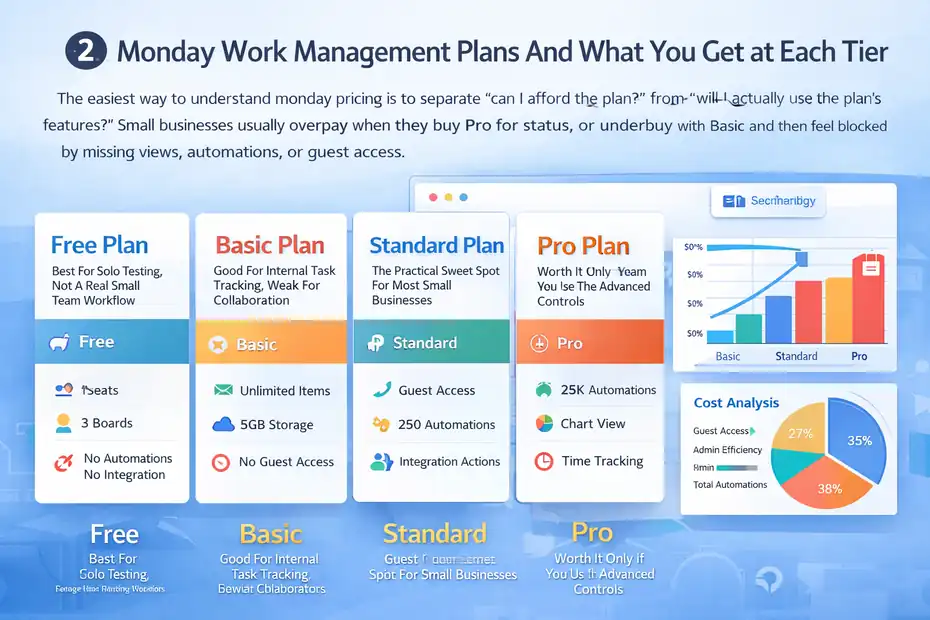
The easiest way to understand monday pricing is to separate “can I afford the plan?” from “will I actually use the plan’s features?”
Small businesses usually overpay when they buy Pro for status, or underbuy with Basic and then feel blocked by missing views, automations, or guest access.
Free Plan: Best For Solo Testing, Not A Real Small Team Workflow
The Free plan is only available on monday Work Management, and it is intentionally narrow. monday says it includes up to 2 seats, up to 3 boards, limited item capacity, a few core views, and no automations or integrations. Support content also notes that the Free plan cannot use viewers or guests.
That means the Free plan is fine if you are a founder organizing tasks alone with one teammate, or if you simply want to test the interface. It is not ideal for a serious small business workflow where you need recurring processes, outside collaboration, or app connections.
A realistic example: Imagine you run a five-person agency and want to manage projects, intake forms, deadlines, and client approvals in one place. The Free plan breaks almost immediately because you will hit the seat cap, the board cap, and the no-guest limitation. For most operating businesses, Free is a trial-like environment, not a long-term system.
Basic Plan: Good For Internal Task Tracking, Weak For Collaboration
Basic adds unlimited items, 5GB storage, AI credits, prioritized support, unlimited free viewers, and one-board dashboards. The public pricing page lists it at $9 per seat per month billed annually.
This is the plan I would consider if your team mainly wants a cleaner way to track tasks, owners, due dates, and status updates without advanced workflow logic. Think internal operations, simple marketing calendars, or lightweight project management.
The catch is important: Basic does not include guest access, and monday’s support articles say shareable boards and guest collaboration begin on Standard. So if part of your process involves clients, contractors, or external partners, Basic can become frustrating fast.
Standard Plan: The Practical Sweet Spot For Most Small Businesses
Standard includes everything in Basic plus Timeline and Gantt views, Calendar view, guest access, 250 automation actions per month, 250 integration actions per month, and dashboards that combine up to 5 boards. The listed annual-billing rate is $12 per seat per month.
For many small businesses, this is the plan that finally feels “complete.” You can build actual workflows instead of just static task lists. You can invite guests, which matters for client work.
You can add simple automations, which matters for reducing admin drag. And you can see work across more than one board, which matters once your business has multiple moving parts.
If I were advising a 3-to-10-person business that wants to use monday as a real operating system, Standard is where I would start first. It gives you enough structure to improve execution without paying Pro-level money before you know what you need.
Pro Plan: Worth It Only If You Use The Advanced Controls
Pro adds private boards, chart view, time tracking, formula columns, 25,000 automation actions, 25,000 integration actions, and dashboards that combine up to 20 boards. The public price is $19 per seat per month billed annually.
This is where monday starts shifting from “task management tool” to “serious workflow platform.” If your team tracks billable time, needs more advanced reporting, wants private operational areas, or runs automation-heavy processes, Pro can justify itself quickly.
But I would not recommend Pro by default for every small business. A coffee roaster, small design studio, or local services company may never touch formula columns or 25,000 automation actions. In those cases, Pro feels impressive in demos and underused in real life. Paying for unused capability is still overspending.
What You’ll Really Pay By Team Size
This is where the monday pricing breakdown for small businesses gets practical.
The list price matters, but the total you approve depends on your seat bucket, your billing frequency, and whether your team count is stable or messy.
Annual-Billed Cost Snapshot For Common Small Business Team Sizes
Below is the easiest way to think about Work Management pricing based on monday’s published annual-billing rates and seat-bucket rules. These figures use the current public Work Management pricing page.
| Team Size | Seats You Pay For | Basic | Standard | Pro |
|---|---|---|---|---|
| 3 users | 3 seats | $27/mo | $36/mo | $57/mo |
| 4 users | 5 seats | $45/mo | $60/mo | $95/mo |
| 5 users | 5 seats | $45/mo | $60/mo | $95/mo |
| 6 users | 10 seats | $90/mo | $120/mo | $190/mo |
| 8 users | 10 seats | $90/mo | $120/mo | $190/mo |
| 10 users | 10 seats | $90/mo | $120/mo | $190/mo |
These totals are derived from monday’s stated per-seat annual-billing rates and its published bucket pricing rules, which require 3 seats minimum and then multiples of 5.
The painful jump is from 5 to 6 users. That is where a team can see its software budget double overnight if it moves from the 5-seat bucket to the 10-seat bucket. That does not mean monday is overpriced. It means small teams need to plan headcount around the billing model instead of assuming linear cost growth.
What Monthly Billing Likely Looks Like
Monday confirms that annual plans include an 18% discount and that monthly billing is available without that discount. Based on those official numbers, the rough undiscounted monthly-equivalent rates are about $10.98 for Basic, $14.63 for Standard, and $23.17 for Pro per seat per month.
That is an inference from the published annual rate and discount, not a direct monthly quote shown on the page.
So a 5-seat team paying month to month would be looking at about $54.88 for Basic, $73.17 for Standard, and $115.85 for Pro before any taxes or local billing adjustments. Again, those are estimated from monday’s published annual discount, so your checkout screen is the final source of truth.
I suggest using those estimates as your planning numbers, then checking the actual in-app billing screen before you commit. That helps you avoid “surprise SaaS math,” especially if finance is approving several tools at once.
Cost Per Active User Can Be Misleading
A 4-person team on Standard does not really pay $12 per active user. Because you need 5 seats, your effective cost becomes $60 divided by 4 active users, which is $15 per real user per month on annual billing. A 6-person team on Standard pays for 10 seats, which makes the effective cost $20 per active user per month.
That is why I always tell small business owners to calculate two numbers: platform price and operational price. Platform price is what monday advertises. Operational price is what your real business pays based on your actual team shape. The second number is the one that should guide your decision.
The Hidden Costs And Pricing Traps Small Businesses Miss
Most frustration with monday pricing does not come from the software itself. It comes from buying without understanding the billing mechanics.
Once you know the traps, you can avoid most of them.
Seat Buckets Create Waste If Your Team Size Is In-Between
Bucket pricing is the clearest hidden cost. A 4-person team pays for 5 seats, and a 6-person team pays for 10. monday explains this directly in support documentation, but it is still easy to overlook during evaluation.
In practical terms, that means your most expensive employee might not be on payroll. It might be the empty software seat you are carrying because your team size lands in an awkward range. That sounds a little dramatic, but for a lean company, wasted recurring spend adds up fast.
My advice is simple: Do not size your monday subscription around today only. Size it around your likely headcount for the next 6 to 12 months. If you are about to hire from 5 to 6, model the 10-seat cost now.
Auto-Upgrades Can Raise Your Bill If You Add Users Casually
monday’s support documentation says that if you exceed your seat limit and do not remove the extra user within 5 days, the account can be automatically upgraded to the next seat bucket. monday also describes reminder emails during that window.
That means a well-meaning manager who invites an extra teammate “just for this project” can trigger a bigger billing event than expected. On a small team, that matters. Especially if nobody owns software administration.
I have seen this type of thing happen in a lot of SaaS stacks, not just monday. The fix is boring but effective: one admin, one owner of seat management, and one monthly audit of active users.
Guests Are Helpful, But Their Billing Rules Matter
On Standard, guests are billed differently. monday says every 4 guests count as 1 billed seat, and you can have up to 3 guests before that next group starts consuming a seat. On Pro and Enterprise, guests are unlimited. Guests are not available on Basic.
For a client-facing small business, this can make Standard more appealing than Basic even when the sticker price is higher. Why? Because giving a client or contractor controlled access may be cheaper and cleaner than upgrading everyone to a larger internal process or juggling updates by email.
A simple scenario: A 4-person team on Standard with a few occasional client guests may stay inside a 5-seat bucket comfortably. That same team on Basic cannot use guests at all, which may force messier workarounds.
Downgrades Usually Wait Until Renewal
Monday’s support documentation says upgrades take effect immediately, while many downgrades apply at the next renewal date. That includes lowering plan tier, reducing seats, or switching yearly to monthly.
So if you buy too much today, you may not fully undo the decision tomorrow. For a small business, that means your best savings often happen before checkout, not after.
Which Monday Plan Makes Sense For Different Small Business Types
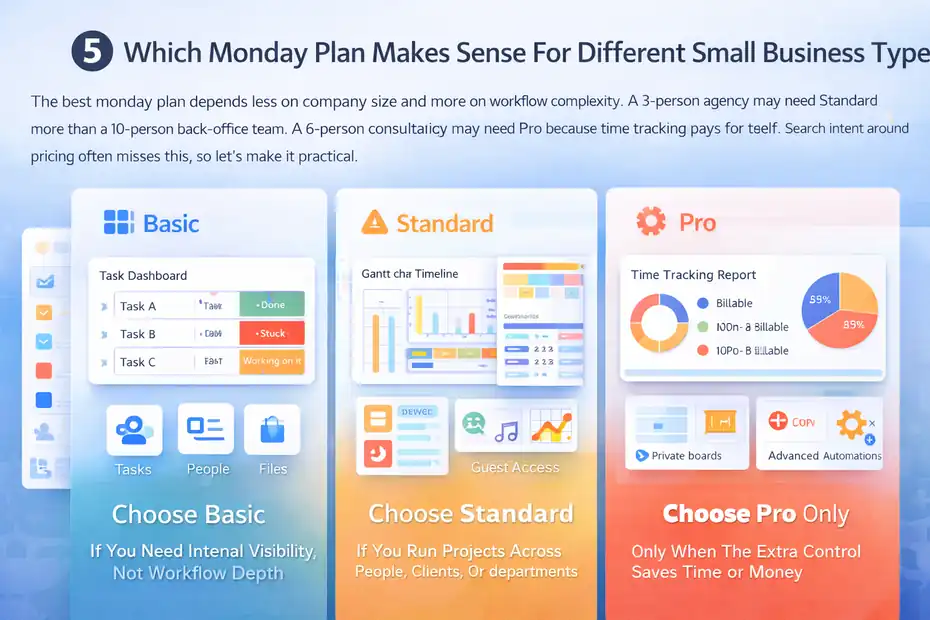
The best monday plan depends less on company size and more on workflow complexity. A 3-person agency may need Standard more than a 10-person back-office team.
A 6-person consultancy may need Pro because time tracking pays for itself. Search intent around pricing often misses this, so let’s make it practical.
Choose Basic If You Need Internal Visibility, Not Workflow Depth
Basic fits teams that mainly want one shared place for tasks, owners, files, and status. You are paying for structure, not sophistication. It is a solid step up from spreadsheets when you need accountability but not much automation.
I would put internal admin teams, very small founders’ offices, or straightforward content calendars here. If no one is asking for Gantt charts, guest collaboration, automations, or integrations, Basic may be all you need.
The danger is growing into frustration. If you already know you want client access, recurring workflows, or connected tools, buying Basic first can become a false economy.
Choose Standard If You Run Projects Across People, Clients, Or Departments
Standard is the best fit for most growing small businesses because it covers the everyday pain points that create operational drag: guest access, light automation, light integrations, and cross-board visibility.
I would recommend Standard for agencies, consultancies, small ecommerce teams, operations teams, and service businesses with repeatable workflows. It usually feels like the first “real” version of monday instead of a trimmed-down starter plan.
If you are trying to centralize work and reduce follow-up chaos, Standard is usually where the ROI starts to become obvious.
Choose Pro Only When The Extra Control Saves Time Or Money
Pro makes sense when you can point to a direct use case for private boards, time tracking, formula columns, or heavier automation volume. If those features solve a recurring operational problem, the jump can be worth it.
For example, a small agency billing retainers may recover lost revenue by tracking actual delivery time. A consulting team may need private boards for leadership planning. An operations-heavy team may use formula columns to calculate margin, SLA risk, or delivery lead time.
My rule is this: Do not buy Pro because it feels more professional. Buy it because one or two Pro-only features will save enough time, control, or revenue to offset the higher bill.
How To Keep Your Monday Costs Under Control
You do not need to “hack” monday pricing. You just need to manage it intentionally.
Most software waste in small businesses comes from loose admin habits, not bad pricing pages.
Audit Seats Before You Buy
Count true members, not occasional collaborators. monday distinguishes between members, viewers, and guests, and those user types affect billing differently. Free viewers can reduce paid-seat pressure in some cases, while guests may be better than adding full members depending on the plan.
I recommend building a simple spreadsheet before purchase with three columns: needs full edit access, needs view-only access, needs limited external access. That one exercise can stop you from buying a larger bucket than you really need.
Buy For The Next Logical Stage, Not The Distant Future
It is smart to leave a little room for growth. It is not smart to pay enterprise-style money because you might someday hire ten more people. monday’s bucket system already forces some extra capacity, so you do not need to over-insure even further.
A good approach is to buy for the next 6 months of realistic usage. That gives you enough room to operate without overcommitting far ahead.
Use Annual Billing Only If Your Team Shape Is Stable
Yearly billing saves 18%, which is meaningful. But savings only help if your team count and workflow needs are relatively stable. If you are experimenting, restructuring, or unsure whether monday will become your main system, monthly billing may be safer even though it costs more month to month.
I believe this is one of those cases where flexibility can be more valuable than discount. Saving 18% on the wrong setup is still the wrong setup.
Clean Up Inactive Users Before Renewal
Because downgrades generally apply at renewal and because overages can trigger auto-upgrades, user cleanup matters. monday’s support content also notes that admins manage billing and that deactivating users affects ownership of automations or integrations they created.
That means your cleanup process should be deliberate: transfer ownership where needed, deactivate nonessential users, and check your renewal timing before finance signs off.
Final Verdict: Is Monday Worth The Price For Small Businesses?
For the right small business, yes, monday can absolutely be worth the price. The platform is flexible, polished, and capable enough to replace scattered spreadsheets, ad hoc status updates, and a surprising amount of operational confusion. But it is not the cheapest option once you factor in seat buckets and higher tiers.
If you want the simplest answer, here is mine. Basic is affordable but limited for growing teams. Standard is the real sweet spot for most small businesses because it unlocks collaboration and workflow usefulness without forcing Pro-level spend. Pro is best when its extra controls map directly to time savings, revenue protection, or reporting needs.
The biggest thing to remember is this: monday’s advertised price is not always your operational price. The real amount you pay depends on your user count, your bucket, your billing cycle, and whether you control member versus guest access carefully.
So, if you are evaluating monday pricing for your small business, do not just ask, “What does monday cost?” Ask, “What will monday cost for my exact team shape over the next year?” That question usually leads to the right plan, the right budget, and a lot fewer pricing regrets.
FAQ
How much does monday.com cost for small businesses?
monday.com pricing for small businesses typically ranges from about $9 to $19 per user per month when billed annually. However, actual costs depend on seat buckets, meaning you may pay for more users than you have, especially as your team grows beyond 3 or 5 users.
What is the cheapest monday.com plan for small teams?
The cheapest option is the Free plan, but it is limited to 2 users and basic features. For real business use, the Basic plan is the lowest paid tier, offering essential task management features starting at around $9 per user per month annually.
Why does monday.com pricing increase suddenly with team size?
monday.com uses seat-based pricing in fixed bundles, not exact user counts. For example, a team of 6 users must pay for 10 seats. This structure can cause sudden price increases as your team grows past certain thresholds.
Is monday.com worth the cost for small businesses?
monday.com is worth it if your team needs structured workflows, collaboration, and automation. Most small businesses benefit most from the Standard plan, which balances cost and functionality while helping reduce manual work and improve team visibility.
Does monday.com offer discounts for annual billing?
Yes, monday.com offers approximately 18% savings when you choose annual billing instead of monthly. This discount can significantly reduce long-term costs, but it is best suited for teams with stable headcount and predictable usage.

I’m Juxhin, the voice behind The Justifiable.
I’ve spent 6+ years building blogs, managing affiliate campaigns, and testing the messy world of online business. Here, I cut the fluff and share the strategies that actually move the needle — so you can build income that’s sustainable, not speculative.
Related posts:
 Monday Program Review: Features That Actually Work
 QuickBooks Online Pricing 2025: Is It Still Worth the Cost?
 Project Management Software Monday: My Review
 Is Monday Project Management Software Worth It?
 Monday Project Tips That Make Work Easier
 Why Teams Prefer Monday PM Software Over Traditional Tools