
Table of Contents
Some links on The Justifiable are affiliate links, meaning we may earn a small commission at no extra cost to you. Read full disclaimer.
Monday review for freelancers managing clients is really a question about fit, not hype. If you juggle deadlines, client feedback, scope changes, invoices, and the constant “just checking in” messages, monday.com can feel like a serious upgrade from spreadsheets and scattered email threads.
But it is not magic, and it is definitely not the cheapest option for every solo setup.
In this guide, I’ll break down where monday actually helps freelancers, where it can feel heavy, and how to decide whether it improves your client workflow or just adds another tool to manage.
What Monday.com Actually Is For Freelancers
If you are coming in fresh, here is the simplest way to think about it: monday.com is a visual work management platform built around boards, views, automations, docs, forms, dashboards, and integrations.
It also offers freelancer-focused templates, client collaboration through shareable boards, time tracking options, and reporting tools that can pull data across multiple boards.
Why Freelancers Even Consider Monday In The First Place
Most freelancers do not start with project management software. We start with whatever is fast: Google Sheets, Notion pages, email folders, sticky notes, maybe a task app if we are feeling organized that week.
The problem shows up when client work gets layered. One client needs revisions, another wants a new quote, a third has not uploaded files, and suddenly your brain becomes the system. That works for a while. Then it breaks.
This is where monday.com gets interesting. It is not just a task list. It gives you a central place to track clients, projects, deliverables, deadlines, dependencies, files, comments, forms, and status updates in one workflow. I think that is the real value. Not “more productivity” in the abstract, but fewer dropped details.
For freelancers managing clients, that matters more than flashy dashboards. You want to know: What is due this week? What is blocked? Who owes feedback? Which work is billable? Which project is quietly going over scope?
Monday is strong when your work has repeatable stages. For example, if every client project moves through inquiry, proposal, onboarding, production, review, approval, and handoff, you can turn that into a reliable system instead of rebuilding it every time.
The Core Monday Terms You Need To Understand
Let me simplify the platform language because product jargon makes software feel harder than it is.
- Boards: Your main workspace for tracking work, clients, or projects. monday’s free plan includes up to 3 boards, and paid work management plans add broader functionality.
- Items: The rows inside a board. An item can be a client, a task, a deliverable, or a request.
- Columns: The fields that hold your project data, such as status, owner, due date, budget, or time tracked. monday supports time tracking as a column, including manual entries and exports.
- Views: Different ways to look at the same board, such as Kanban or Gantt. monday’s Kanban view emphasizes drag-and-drop visibility, while Gantt supports milestones, dependencies, and critical path planning.
- Automations: Rules that update, notify, or move work automatically. monday describes them as a way to save time on repetitive tasks.
- Integrations: Connections to tools like Gmail, Outlook, and Slack so work stays synced.
- WorkForms and Workdocs: Forms help you collect client information into boards, while docs help you collaborate on notes, briefs, and plans.
Once you understand those parts, monday feels much less overwhelming.
Who This Tool Is Best For And Who Should Skip It
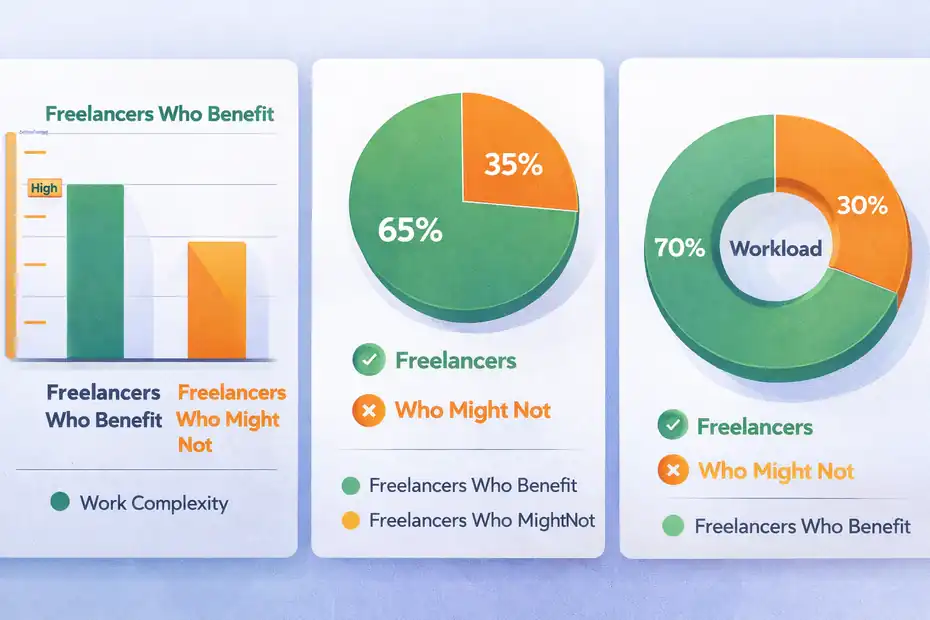
Not every freelancer needs a platform this flexible. Sometimes a simpler system wins.
Freelancers Who Will Probably Get Real Value
In my experience, monday makes the most sense when your freelance business looks more like a small operation than a solo side hustle.
You will likely benefit if you manage multiple clients at once, run recurring service packages, subcontract part of the work, or handle a workflow with approvals and moving deadlines. Designers, marketers, copywriters, web developers, consultants, and virtual assistants often fall into this category.
A good example is a freelance social media manager with 8 retainer clients. Each month includes content requests, approvals, asset collection, publishing schedules, revisions, and reporting. In that setup, monday can replace a messy combination of email chains, spreadsheets, and calendar reminders.
It is also useful if you want clients involved without exposing your whole workspace. monday’s shareable boards are built for external collaboration with guests such as clients, contractors, or freelancers, while keeping the rest of the account separate.
That feature alone can save hours of “I forwarded you the wrong doc” type chaos.
Freelancers Who May Feel It Is Too Much
There is also a real chance monday feels like overkill.
If you have only 2 or 3 active clients, deliver mostly one-off projects, and rarely need structured collaboration, you may not get enough return from a more advanced work management system. A simple task manager or even a clean spreadsheet may do the job.
I also would not recommend it as your first solution if you hate setup. monday is flexible, and flexibility always comes with some configuration work. You need to decide what your boards track, what each status means, what gets automated, and what clients can see.
That setup time pays off when you reuse the system over and over. But if your freelance work is highly custom and changes shape every week, you may spend more time designing the workflow than benefiting from it.
This is where the “hype” label becomes fair. The platform is strong, but only if your business is complex enough to justify it.
The Features That Matter Most For Client Management
For a freelancer, the best software features are not the biggest ones. They are the ones that reduce friction between you and the client.
Client Visibility Without Giving Away Your Whole Workspace
This is one of monday’s better strengths.
Shareable boards let you collaborate with outside users on specific projects without giving them access to your full account. That means a client can review timelines, upload files, comment on deliverables, and track status on the work you choose to expose.
That matters because many freelancers live in a weird middle zone. Clients want transparency, but you do not want them seeing every internal note, every backlog idea, or every other project on your plate.
A practical setup looks like this: You keep one internal board for full project operations and one shareable client-facing board for milestones, approvals, key deadlines, and files. This gives the client clarity without turning your system into a fishbowl.
I suggest this split for almost everyone. It reduces awkwardness, protects your internal planning, and still makes you look organized.
Time Tracking, Reporting, And Billable Work
If you bill hourly or need better visibility into effort, monday gives you more than a timer.
The Time Tracking Column lets you start and pause time, add sessions manually, view a history log, track time in subitems, and export time data to Excel. The Time Tracking Widget then rolls that information across multiple boards for team or workload reporting, including billable-hour style overviews.
That is useful for freelancers in two situations.
First, it helps you protect pricing. When a “small” revision cycle quietly eats 6 extra hours, you can see it. Second, it helps you estimate better. After three months of tracking, you start noticing patterns. Maybe a landing page draft usually takes 5 hours, but client revisions average another 3. That changes how you quote.
I would not treat monday as full accounting software. But as an operational time layer tied directly to tasks, it is genuinely useful.
Forms, Docs, And Intake That Save You Email Back-And-Forth
WorkForms and Workdocs can clean up the front end of your client workflow.
WorkForms lets you collect requests, project details, feedback, or onboarding info through branded forms that send responses directly into your boards. Workdocs lets you create collaborative documents in a workspace or inside a board through a docs column.
For freelancers, that means you can build a smarter intake system.
Imagine a web designer using one form for new project inquiries and another form for revision requests. Instead of random emails with half the details missing, every request lands in the right board with the same structure: client name, priority, deadline, files, budget, and requested changes.
That is not glamorous, but it is the kind of workflow cleanup that directly improves profit. Less admin time usually means better margins.
How Monday Works In A Real Freelance Client Workflow
This is the part most reviews skip. Features are easy to list. The real question is how they behave in an actual freelance operation.
A Simple Client Pipeline Setup
One of the easiest ways to use monday is to split your process into a pipeline board.
Your columns might include lead source, service type, quote value, proposal status, start date, project owner, deadline, and next action. Each item is a client or project opportunity.
Then you create status stages like Inquiry, Discovery, Proposal Sent, Won, Active Project, Waiting On Client, Revision Round, Complete, and Archived.
What I like about this structure is that it forces clarity. You stop asking, “What is going on with that project?” because the board answers it instantly.
A realistic scenario: A freelance brand designer has 12 warm leads, 5 active projects, and 3 revision-heavy clients. In monday, that is not one giant chaotic list. It becomes trackable work with visible stages and owners. If a project sits in Waiting On Client for 10 days, that is obvious.
This kind of visual pipeline is especially useful when your brain is overloaded. It turns hidden stress into visible information.
A Better Project Delivery Board For Each Client
Once a project starts, the best move is usually a dedicated delivery board.
Here is a simple example structure:
- Group 1: Onboarding
- Group 2: Strategy Or Planning
- Group 3: Production
- Group 4: Review And Feedback
- Group 5: Final Delivery
Inside each group, create tasks or subitems for deliverables, dependencies, due dates, feedback loops, and file links. Add a time tracking column if you charge hourly or want better effort estimates later.
I recommend one more thing: Add a “Client Action Needed” status. That tiny change is powerful. It immediately shows whether the project is blocked because of you or because the client has not approved something.
Freelancers often absorb blame for delays they did not create. A clear status structure helps protect you without becoming defensive.
Using Views To See The Same Work Differently
Different freelance work needs different views, and monday is strong here.
Kanban works well when you want quick movement between stages and easy drag-and-drop progress tracking. Gantt is more useful when timing, dependencies, milestones, and overlapping deliverables matter. monday also supports dashboards for pulling bigger-picture insights across boards.
For example, if you are a copywriter managing blog production for four clients, Kanban may be enough. You can move items from Brief Received to Drafting to Internal Edit to Client Review to Published.
But if you are a developer or designer managing multi-week builds, Gantt becomes more practical because delays in one phase affect others. You can actually see where one missed feedback round breaks the timeline.
I believe this is where monday starts feeling more professional than basic task apps. It lets you manage work at the level the project actually requires.
Setting It Up The Right Way As A Freelancer
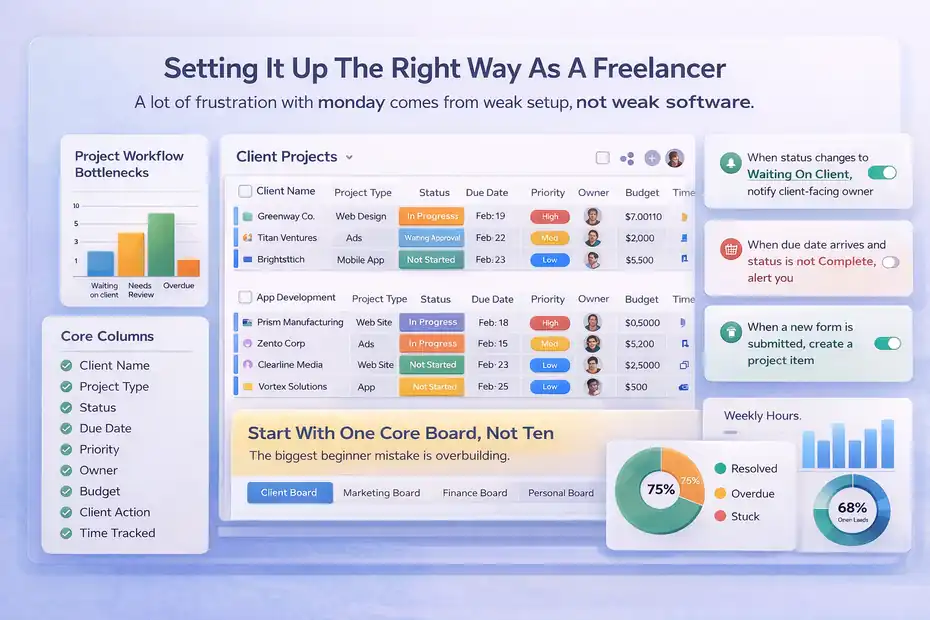
A lot of frustration with monday comes from weak setup, not weak software.
Start With One Core Board, Not Ten
The biggest beginner mistake is overbuilding.
You do not need a dashboard empire on day one. Start with one master board for client work. Each item can be a project, and each group can represent a stage, client, or service line depending on how you work.
Your first columns should be boring and useful:
- Client Name
- Project Type
- Status
- Due Date
- Priority
- Owner
- Budget Or Retainer Value
- Client Action Needed
- Time Tracked
- Files Or Links
That is enough to make the board useful immediately.
Once you have used it for a few weeks, you will see what is missing. Maybe you need a revision count. Maybe you need a formula column for margin. Maybe you need a custom field for content approval.
I strongly suggest earning complexity rather than designing it up front.
Build Automations Around Bottlenecks, Not Everything
Monday’s automation engine is meant to reduce repetitive admin, such as updating items, sending notifications, or moving work between states automatically.
That does not mean you should automate every motion on the board.
The best automations for freelancers are usually the ones tied to handoff friction:
- When status changes to Waiting On Client, notify the client-facing owner
- When due date arrives and status is not Complete, alert you
- When a new form is submitted, create a project item
- When a task is marked Approved, move the next dependency into progress
These are practical, not flashy. They remove follow-up work you would otherwise do manually.
In my experience, the right automation saves minutes dozens of times per month. The wrong one creates noise and confusion. Keep the rules few, obvious, and directly tied to how you work.
Create A Client-Friendly Front End
One lesson I have learned with client tools: what helps you internally can confuse clients externally.
So if clients will interact with your monday setup, simplify what they see. Use plain-language statuses like In Progress, Waiting For Feedback, Approved, and Delivered. Avoid internal labels that make sense only to you.
Use shareable boards for the external view, and keep your internal board more detailed. monday specifically positions shareable boards for external users such as clients and contractors, which fits this model well.
This helps with trust. Clients do not need maximum access. They need clear access.
That difference matters.
Where Monday Delivers Real Value And Where It Falls Short
This is the honest middle of the review.
What It Does Better Than Most Basic Systems
Monday’s biggest win is operational clarity.
You can centralize tasks, deadlines, files, feedback, forms, docs, and communication in one place instead of bouncing between five tools. For many freelancers, that creates a smoother client experience than a spreadsheet stack plus inbox chaos.
It is also flexible enough to support different service models. Retainers, fixed-price projects, content calendars, website builds, campaign execution, recurring support, and even subcontractor management can all fit the same ecosystem.
The other big strength is visibility. Dashboards can combine data across multiple boards, and even the lower work management tiers define limits around how many boards can feed a dashboard. The free plan lists dashboards combining up to 1 board, the Basic plan up to 5 boards, and higher plans more.
For freelancers, that means you can answer practical business questions faster: Which clients are late on approvals? Which service type consumes the most time? Which projects are nearing deadline?
That is where the platform starts paying back.
The Biggest Downsides You Should Know Before Paying
Now the uncomfortable part.
First, pricing can be awkward for solo freelancers. monday’s general pricing page shows a free plan for up to 2 seats, while work management paid pricing starts around $9 per seat per month billed annually for Basic and about $19 per seat per month billed annually for Pro, with feature limits changing by plan.
That may be fine if the system replaces multiple tools or supports client growth. But for a lean solo setup, it can feel expensive fast.
Second, setup quality determines everything. If you are not thoughtful about board structure, monday can turn into a colorful mess. I have seen freelancers blame the platform when the real issue was trying to manage leads, active projects, finance tracking, and personal tasks in one chaotic board.
Third, it is not inherently simple. It is usable, yes. But not frictionless on day one.
So no, it is not hype. But it is also not a plug-and-play miracle.
Pricing, ROI, And Whether It Is Worth It For Solo Freelancers
Software should earn its place in your business.
What You Are Actually Paying For
The important thing with monday pricing is not just the seat price. It is the operational leverage.
The current public pricing pages show a free plan, then paid work management tiers with Basic and Pro examples listed at roughly $9 and $19 per seat per month billed annually, along with differences in docs, integrations, automations, storage, and dashboard scope. monday also offers unlimited free viewers on the Basic work management plan page.
For a freelancer, that means the value depends on your business model.
If you handle five low-ticket projects a month and only need a task list, the ROI may be weak.
If you manage ten client relationships, recurring deliverables, revision rounds, and billable tracking, the ROI can be obvious. Saving even 3 to 5 admin hours a month may cover the subscription by itself, especially if the system also helps you avoid scope creep or missed deadlines.
That is the lens I would use. Not “Can I afford it?” but “Does this prevent costly chaos?”
A Simple Way To Decide If The Cost Makes Sense
Use this quick test.
monday is probably worth it if at least two of these are true:
- You manage 5 or more active client projects at once
- Client communication regularly gets buried in email
- You need better visibility into deadlines or team capacity
- You bill hourly or want clearer effort tracking
- You use repeatable workflows and want them standardized
- You collaborate with contractors or clients inside the workflow
If only one of those feels true, I would be cautious.
A lot of freelancers buy software aspirationally. They buy for the business they hope to have, not the one they are actually running. Sometimes that works. Often it just adds another monthly expense.
Common Mistakes Freelancers Make With Monday
The platform can help you, but only if you avoid a few common traps.
Overcomplicating The Workspace
This is the classic one.
Freelancers love the idea of building the “ultimate system.” Then three hours later they have 19 statuses, 14 columns, 6 mirrored views, and no clue what to click first.
A cleaner rule is this: every field should help you make a decision. If it does not affect action, reporting, billing, or communication, it may not need to be there.
Keep the workspace lean until usage tells you what to add.
Treating The Board Like A Database Instead Of A Workflow
A board full of information is not the same as a system that moves work forward.
I see this mistake when freelancers track everything but automate nothing, summarize nothing, and communicate nothing. The board becomes a storage unit, not a workflow engine.
The better approach is to connect stages, alerts, and responsibility. A healthy monday setup tells you what needs action next. It does not just hold project history.
That is a subtle difference, but it changes the entire user experience.
Letting Clients Into A Messy Process
Transparency is good. Unfiltered transparency is not always good.
Do not invite clients into your raw internal workflow unless it is genuinely clean and understandable. Use shareable boards or a simplified external layer so the client sees progress, deadlines, files, and approvals without seeing your private notes, backlog experiments, or every internal dependency.
You want clients to feel informed, not overwhelmed.
Advanced Ways To Use Monday As You Grow
Once the basics work, monday gets more interesting.
Use Templates And Reusable Workflows To Scale
Monday offers freelancer templates and a broader template library, which is useful once you stop treating every new client as a custom build from scratch.
A smart move is to create one repeatable project template per service. For example:
- Website build template
- Monthly SEO retainer template
- Blog content production template
- Design revision template
Each one should already include the right stages, tasks, due dates, automations, and client touchpoints.
This is where your setup starts compounding. Instead of “setting up a new client,” you duplicate a proven workflow and adjust only the details.
That saves time, but it also improves consistency. Clients notice when onboarding and delivery feel polished.
Add Capacity Planning Before You Need It
When freelancers start hiring subcontractors or collaborating with a small team, workload visibility becomes more important than task storage.
monday’s workload functionality is built to show who is over capacity and help allocate upcoming tasks more efficiently, with customization based on team work schedules.
Even if you are still solo, this becomes helpful once your calendar gets crowded. You can see whether the next two weeks are realistically manageable or whether you are quietly overcommitting.
I believe this is one of the more underrated uses of the platform. Many freelancers do not need “more leads.” They need a better capacity signal so they stop saying yes to impossible timelines.
Final Verdict: Better Workflow Or Hype?
If you want the simplest possible answer in this monday review for freelancers managing clients, here it is: monday.com is a better workflow tool than a hype tool, but only for freelancers with enough moving parts to justify structure.
It is strong for client-facing project delivery, recurring services, team collaboration, intake forms, workload visibility, time tracking, and reducing operational chaos. It is weaker when your business is still very small, highly informal, or unlikely to benefit from structured workflows.
I would recommend it most for freelancers who manage multiple clients at the same time and are starting to feel the cost of scattered systems. That is the point where monday stops being “nice software” and starts becoming real business infrastructure.
If your current setup still works, do not switch just because the platform looks polished.
But if you are dropping details, chasing approvals, losing time to admin, or struggling to scale client work cleanly, monday is not hype. It is probably a sign you have outgrown improvised systems.
FAQ
Is monday.com good for freelancers managing clients?
Yes, monday.com works well for freelancers managing multiple clients, especially those handling ongoing projects, revisions, and deadlines. It centralizes tasks, communication, and timelines in one place, which reduces missed details and improves workflow clarity. However, it may feel unnecessary for freelancers with only a few simple projects.
How does monday.com help with client workflow management?
Monday.com helps by organizing client projects into visual boards where you can track tasks, deadlines, feedback, and progress. It reduces reliance on scattered tools like email and spreadsheets. With features like automations and status tracking, you can streamline communication and avoid bottlenecks in your workflow.
Is monday.com worth it for solo freelancers?
It depends on workload complexity. For solo freelancers managing multiple clients or recurring services, monday.com can save time and improve organization. But for those with fewer projects or simple workflows, the cost and setup may outweigh the benefits compared to lighter tools or manual systems.
Can clients access monday.com boards?
Yes, monday.com allows you to share specific boards with clients without giving them full workspace access. This means clients can view progress, upload files, and leave feedback in a controlled environment, improving transparency while keeping your internal workflow private and organized.
What are the main downsides of monday.com for freelancers?
The main downsides include pricing for solo users, initial setup time, and potential over-complexity. If not structured properly, boards can become confusing. Freelancers with simple workflows may not benefit enough to justify the investment, making it better suited for more structured client management needs.

I’m Juxhin, the voice behind The Justifiable.
I’ve spent 6+ years building blogs, managing affiliate campaigns, and testing the messy world of online business. Here, I cut the fluff and share the strategies that actually move the needle — so you can build income that’s sustainable, not speculative.
Related posts:
 Is Freelancer Worth It: Make Good Money
 Legitimate Transcription Work From Home
 How Fiverr Affiliate Program Will Make You Tons Of Cash
 How Does Udemy Work? Your Ultimate Guide to the Online Learning Platform
 Side Job Ideas: 10+ Easy and Profitable Ways to Earn Extra Income
 Free Invoice Software: Top 10 Solutions for Small Businesses and Freelancers