Table of Contents
Some links on The Justifiable are affiliate links, meaning we may earn a small commission at no extra cost to you. Read full disclaimer.
If you want to learn how to build app using Bubble step by step, you’re in the right place. Bubble has become one of the most practical no-code platforms for turning an idea into a working web app without hiring a full development team on day one.
I’ve seen it work especially well for founders, freelancers, agencies, and internal teams that need to move fast.
The key is not just learning where buttons are, but understanding how Bubble actually structures apps so you can build something clean, useful, and ready to grow.
Understand What Bubble Is And Why It Works
Before you start building, it helps to understand what Bubble is actually doing behind the scenes. Bubble is a no-code app builder that lets you create web applications using a visual editor instead of traditional programming.
That means you design the interface, define your database, and create logic through workflows rather than writing code line by line.
What Bubble Is Best Used For
Bubble works best for web apps with user accounts, dashboards, internal tools, marketplaces, client portals, booking systems, CRMs, SaaS products, and MVPs. In my experience, it shines when your app needs a lot of logic, forms, user actions, and database-driven pages.
A simple marketing site does not really show Bubble’s full power. A client portal with logins, profile data, task tracking, messaging, or payments is where Bubble starts to make more sense. That is because Bubble combines frontend design and backend logic in one place.
Here is the simple version of what Bubble gives you:
- A visual page builder for layouts and app screens
- A built-in database for storing user and app data
- Workflow automation for actions, conditions, and logic
- Plugin support for payments, APIs, email, charts, and more
- Hosting and deployment in the same platform
If you are trying to validate an idea before paying for a full custom build, Bubble can be a smart choice. I believe that is one of the biggest reasons it keeps growing in popularity.
How Bubble Works Behind The Scenes
Bubble apps are built from three core parts: design, data, and workflows. Once you understand this, building gets much easier.
Think of it like this. The design layer is what users see. The database stores the information. The workflows tell the app what to do when someone clicks, signs up, saves, filters, or pays. Most beginners struggle because they jump into page design first and ignore the data structure. That usually creates a messy rebuild later.
A good Bubble app usually follows this flow:
- First, define the app’s purpose
- Next, map the database structure
- Then, build pages and repeating data displays
- After that, create workflows and permissions
- Finally, test, optimize, and launch
That order matters. If you skip the structure and go straight into styling, you often end up with a pretty app that breaks under real usage.
When Bubble Is A Smart Choice And When It Is Not
Bubble is a strong option when speed matters more than writing fully custom code from scratch. It is especially useful for startups, agencies making client apps, and founders proving demand. You can launch faster, change features quickly, and avoid long developer cycles during the early stage.
But Bubble is not perfect for every use case. Very high-performance consumer apps, advanced mobile-native experiences, or systems needing deep custom engineering may eventually outgrow a pure no-code stack. That does not mean Bubble is a bad choice. It just means you should match the tool to the stage of the business.
Imagine you are launching a niche appointment app for tutors. Bubble can handle accounts, profiles, schedules, forms, booking flows, payments, and admin dashboards. That is a great fit. If you are building a complex real-time 3D gaming platform, that is not the sweet spot.
For many founders, the real question is not “Can Bubble do everything forever?” It is “Can Bubble get me to traction, users, revenue, and proof?” In many cases, yes.
Plan Your App Before You Open The Editor
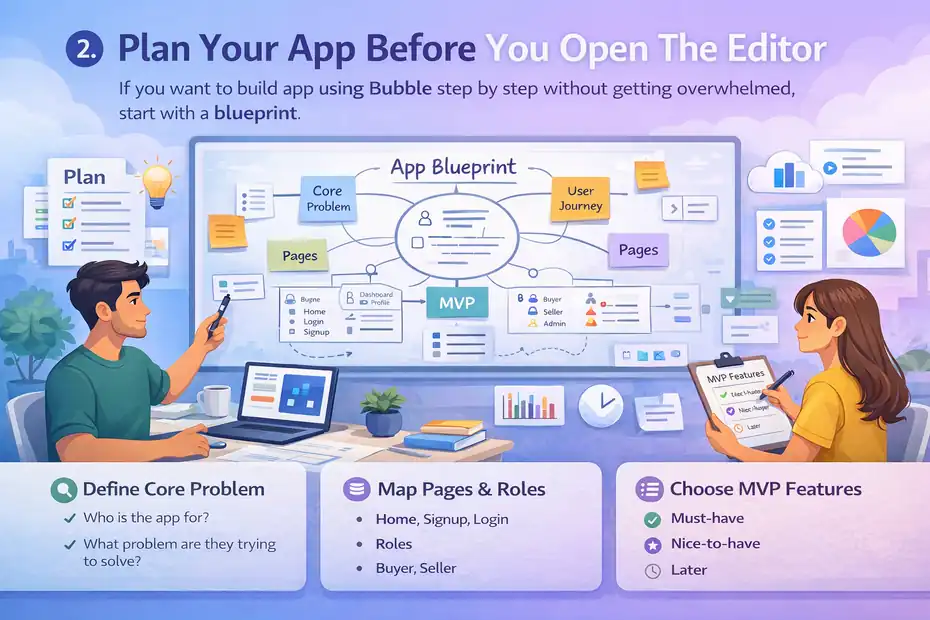
This is where smart projects separate themselves from frustrating ones. After each H2, I like to remind people of one thing: planning saves more time than any shortcut inside the platform.
If you want to build app using Bubble step by step without getting overwhelmed, start with a blueprint.
Define The Core Problem Your App Solves
Your app should solve one clear problem before it tries to solve ten. That sounds obvious, but many first-time builders add too many features too early. The result is usually confusion, broken workflows, and a product that feels heavier than it needs to be.
Start by answering these questions:
- Who is the app for?
- What problem are they trying to solve?
- What result do they want quickly?
- What is the minimum feature set needed to deliver that result?
For example, if you are building a freelancer client portal, your core problem may be helping clients review deliverables, approve work, and track invoices in one place. That is already enough to shape your first version. You do not need team chat, advanced analytics, community forums, and AI summaries on day one.
I suggest writing your app promise in one sentence. Something like: “This app helps fitness coaches manage client check-ins and progress tracking without messy spreadsheets.” That sentence becomes your filter. Every feature either supports it or distracts from it.
Map Pages, User Roles, And Key Actions
Once you know the app’s purpose, map the user journey. This step makes Bubble much easier because you stop guessing what to build next.
At minimum, sketch these items:
- Public pages: Home, pricing, login, signup
- Private pages: Dashboard, profile, settings, reports
- User roles: Admin, customer, team member, vendor
- Core actions: Sign up, create record, edit record, delete record, search, filter, pay, message
You do not need a beautiful wireframe tool. A simple document, whiteboard, or spreadsheet works. The goal is clarity.
Here is a simple example. A marketplace app may have buyers and sellers. Buyers browse listings, save favorites, message sellers, and pay. Sellers create listings, upload images, manage inventory, and receive inquiries. Admins review flagged content and manage users. That role separation helps you design your database and permissions correctly from the start.
One page can serve multiple roles, but the visible elements and workflows should change based on the logged-in user.
Choose An MVP Instead Of Building Everything
The fastest way to fail with Bubble is to treat version one like version five. An MVP, or minimum viable product, is the smallest useful version of your app that still solves the main problem. That keeps your build focused and your launch realistic.
I recommend dividing features into three buckets:
- Must-have: Required for the app to function
- Nice-to-have: Helpful but not essential
- Later: Valuable after users prove demand
Let’s say you are building a job board app. Must-have features might include user accounts, job posting, search, and applications. Nice-to-have features might include saved searches and employer analytics. Later features could include subscriptions, AI resume scoring, and team collaboration.
This matters because every extra feature increases database complexity, workflow logic, and testing time. I have seen founders delay launch by months because they kept adding “just one more thing.” Usually, the real win comes from publishing earlier and learning from user behavior.
Set Up Your Bubble App The Right Way
Now you are ready to enter the editor. This stage is about creating a clean foundation.
A solid setup makes every future change easier, especially when your app starts getting real users.
Create A New Bubble Project And Configure Basics
Start a new Bubble app with a clear project name that matches the product, not just the idea in your head. It sounds minor, but naming matters once you create multiple versions, client apps, or staging environments.
After creating the project, review the basics first:
- App name and version label
- Time zone and language settings
- Branding assets like logo and favicon
- Privacy and SEO basics for public pages
- User signup and login behavior
Bubble lets you start with a blank canvas or a template. Templates can help you learn, but I usually recommend caution. Many templates look great but include a lot of structure you may not need. That can slow down learning because you spend more time reverse-engineering someone else’s setup than understanding your own.
A blank app with a simple plan is often cleaner. You will make fewer assumptions and understand every workflow you add.
Structure Your Styles, Reusable Elements, And Layout System
One of the best things you can do early is create consistency. Bubble gives you flexibility, but too much flexibility can lead to design chaos. Set rules for spacing, typography, button styles, and page sections before you build all your screens.
Focus on these foundations:
- Reusable headers and footers
- Standard button styles for primary and secondary actions
- Consistent spacing between sections and form fields
- Reusable popups, alerts, and form groups
- Mobile-responsive containers
Reusable elements save serious time. If your navigation bar changes later, you update it once instead of editing every page. The same applies to modal windows, cards, profile sections, or empty-state messages.
I recommend thinking like a system builder, not just a page designer. That mindset helps your app feel professional much faster.
Organize Your Pages Before Adding Complex Features
Before building deep logic, create the key pages your app will need. Even if they are simple placeholders at first, this step gives you a visual structure.
A typical Bubble app may include:
- Home page
- Login page
- Signup page
- User dashboard
- Profile page
- Admin dashboard
- Settings page
- Dynamic detail page for records
Dynamic pages are especially important in Bubble. They let you show database content based on the current item, such as a job listing, client record, course page, or product detail. Learning how dynamic content works early will save you from creating too many duplicate pages.
Do not worry about perfect design yet. Get the structure in place first. I believe clarity beats polish during the first build phase every single time.
Build Your Database Before You Build Fancy Screens
This is one of the biggest lessons in any guide about how to build app using Bubble step by step. Your database is the backbone of the app.
If it is messy, your workflows, searches, privacy rules, and reports will all become harder to manage.
Create Data Types Based On Real Objects
In Bubble, your database is organized into data types. A data type is basically a category of information, like User, Project, Booking, Invoice, Message, or Product. The trick is to name them based on real app objects, not vague ideas.
For example, a coaching app might use:
- User
- Client Program
- Check-In
- Payment
- Message
- Resource
Each data type should represent something meaningful in the app. Then you add fields inside each one. A Check-In might include date, mood score, progress note, attached photo, and linked user.
I recommend avoiding duplicate or overlapping data types. If you create “Customer,” “Member,” and “Client” when they all mean almost the same thing, reporting and workflows become confusing fast.
Add Fields That Support Real Actions
Every field should support a user action, display need, filter, or workflow. That is a simple rule that prevents bloated databases.
For example, if you are building a booking app, a Booking data type might include:
- Service Name
- Booking Date
- Start Time
- End Time
- Status
- Customer
- Provider
- Payment Status
- Notes
That structure supports display, search, scheduling, and payment logic. On the other hand, random fields added “just in case” usually create clutter and slow you down later.
Bubble also lets fields connect to other data types. That is how relationships work. A Booking can be linked to one User. A User can have a list of Bookings. These relationships are what make dashboards, account histories, and filtered searches possible.
Set Privacy Rules Early, Not At The End
Privacy rules are one of the most important parts of Bubble and one of the most ignored by beginners. They control who can view, search, and modify data. If you skip them until launch week, you risk exposing information you never meant to expose.
At a basic level, you should decide:
- Can users only view their own records?
- Can admins view all records?
- Can vendors edit only their own listings?
- Should some fields stay hidden from other roles?
Imagine a therapy portal where users submit personal notes. Without proper privacy rules, someone could accidentally access data they should never see. That is not just a usability issue. It is a trust issue.
I suggest testing privacy as you build. Do not assume that because something looks hidden on the page, it is secure in the database. In Bubble, frontend visibility and database permission are not the same thing.
Design The User Interface And Connect Real Data
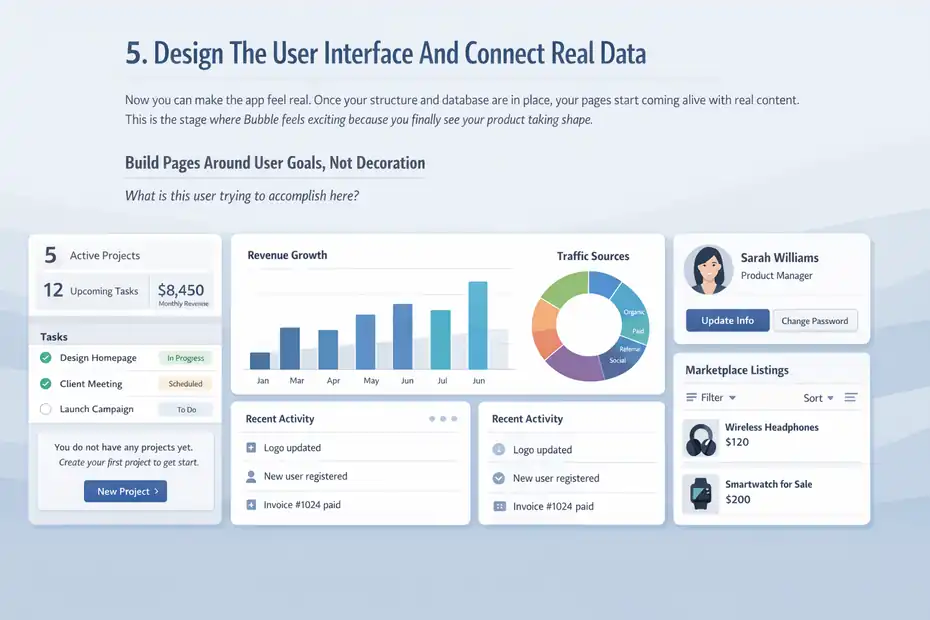
Now you can make the app feel real. Once your structure and database are in place, your pages start coming alive with real content.
This is the stage where Bubble feels exciting because you finally see your product taking shape.
Build Pages Around User Goals, Not Decoration
Good app design is less about visual tricks and more about helping users do the next obvious thing. Every page should answer one question: what is this user trying to accomplish here?
A dashboard should not just look polished. It should guide action. That might mean showing active projects, recent activity, upcoming tasks, or a button to create something new. A profile page should help users update information without friction. A marketplace listing page should make browsing, filtering, and contacting simple.
I recommend starting every page with these blocks:
- A clear page title
- One primary action
- Supporting data or navigation
- Helpful empty-state messaging
- Logical spacing and clean grouping
Empty states matter more than people think. If a user lands on a blank dashboard, explain what to do next. Something like “You do not have any projects yet. Create your first project to get started.” That small detail makes the app feel guided instead of broken.
Use Repeating Groups For Dynamic Content
Repeating groups are one of Bubble’s most powerful features. They display lists of database items like products, messages, bookings, users, or tasks. If your app has searchable or repeatable content, you will use repeating groups a lot.
The key is to pair them with the right data source and constraints. For example, a user dashboard might show only that user’s tasks where status is open. An admin page might show all pending approvals sorted by newest first.
Common use cases include:
- Listing jobs, products, or posts
- Showing comments or conversations
- Displaying transaction history
- Building search results
- Creating tables for admin dashboards
I suggest learning repeating groups deeply because they unlock a huge percentage of app functionality in Bubble. Once you understand them, you can build far more flexible interfaces without creating separate elements for every record.
Make Your App Responsive From The Start
Responsive design means your app adapts to different screen sizes. Bubble’s responsive engine has improved a lot, but it still rewards builders who think about layout early.
Do not wait until the end to test mobile behavior. I have seen desktop-first layouts turn into a mess on smaller screens because the builder used fixed widths everywhere.
Here are the basics that help:
- Use containers and groups with logical alignment
- Avoid hard-coded widths unless necessary
- Test tablets and phones as you build
- Keep forms short and easy to tap
- Use collapsible menus for smaller screens
Even if your Bubble app is mainly a web app, many users will still access it on mobile. In some industries, mobile traffic can exceed 50 percent. That makes responsive planning a core usability issue, not a design bonus.
Create Workflows That Make The App Functional
This is where Bubble stops being a collection of pages and becomes an application. Workflows are the action engine of the platform.
They tell the app what happens when a user clicks a button, submits a form, edits a profile, or triggers a condition.
Build Core User Actions First
Start with the basic actions your app cannot live without. Usually that means signup, login, logout, create, edit, save, and delete. Get those working before adding advanced automation.
A good beginner workflow path looks like this:
- User signs up
- User lands on dashboard
- User creates a record
- Record displays in repeating group
- User edits or deletes that record
- App confirms success
That basic loop teaches you most of what you need to know about inputs, database creation, conditional logic, and page updates.
I advise keeping workflows simple at first. Long chains with too many steps become hard to debug. Name buttons and elements clearly so your logic stays readable later.
Use Conditional Logic To Personalize The Experience
Bubble workflows become much more powerful when you add conditions. Conditions let you show, hide, block, or trigger actions based on role, status, input values, or page state.
For example:
- Only admins can see moderation buttons
- Only logged-in users can create bookings
- Show a warning if a payment is overdue
- Prevent form submission if required fields are empty
This is how your app starts feeling intelligent instead of generic. A client dashboard should not behave like an admin dashboard. A seller should not see buyer-only actions.
Conditional logic is also how you avoid clutter. Instead of showing everything to everyone, show only what matters in the moment. That improves usability and reduces mistakes.
Add Backend Workflows For Automation
As your app grows, backend workflows become useful for tasks that should happen automatically in the background. These might include sending reminder emails, generating reports, updating statuses, or processing scheduled actions.
This is where Bubble becomes more than just a page builder. You can automate real business logic without touching traditional backend code.
A few realistic examples:
- Send a reminder 24 hours before an appointment
- Mark a subscription as expired after a billing event
- Create a weekly summary for active users
- Notify admins when a listing gets flagged three times
Automation matters because it saves manual work and makes the product more reliable. From what I have seen, even a basic app feels far more premium once it includes timely automation.
Add Essential Features, Integrations, And User Trust Elements
At this stage, your app works. Now you improve usefulness and trust.
This section is where selective tool usage makes sense because some features require integrations to deliver the search intent properly.
Add Authentication, Notifications, And File Handling
Most Bubble apps need user authentication. Bubble includes built-in account tools, which is a major advantage for beginners. You can manage signups, logins, password resets, and user sessions without building the full auth system from scratch.
After that, think about user communication and uploads. Many apps need:
- Email confirmations
- Password reset flows
- In-app alerts
- Profile image uploads
- PDF or document attachments
A job application platform, for example, may need resume uploads, employer alerts, and account verification. A client portal may need invoice PDFs and status updates. These are not flashy features, but they directly affect trust.
When these flows work smoothly, your app feels legitimate. When they break, users get nervous fast.
Connect Payments, APIs, Or External Services Only When Needed
This is where many builders go too far too early. Integrations are powerful, but only add them when the core app already works. Otherwise you are layering complexity onto an unfinished foundation.
Some common Bubble integrations include:
- Stripe for subscriptions or one-time payments
- Email tools for transactional messaging
- Calendar services for scheduling
- APIs for external data or automation
- Analytics tools for event tracking
Let’s say you are building a membership app. Start by making signup, dashboard access, and content restrictions work. Then add payments. Do not begin with payment logic before the app experience itself is ready.
I believe this order matters because integrations amplify your system. They do not fix a weak one.
Improve Trust With UX Details And Error Prevention
Trust often comes from small moments. Confirmations, loading states, validation, and clear messaging make users feel safe. These details can raise perceived quality more than another feature ever will.
Here are the kinds of touches that improve trust:
- Success messages after saving
- Clear error alerts when something fails
- Disabled buttons during processing
- Required field checks before submission
- Helpful onboarding text for first-time users
Imagine clicking “Pay Now” and nothing happens for three seconds. That creates doubt. Add a loading indicator and a confirmation message, and the same action feels intentional.
These details also reduce support requests. A cleaner user experience means fewer confused users asking what went wrong.
Test, Launch, Optimize, And Scale Your Bubble App
This final stage is where many apps either mature or stall.
After each H2, I want the article to move the reader forward, and this is the stage where your mindset shifts from building to improving.
Test Your App Like A Real User Would
Before launch, run through the app as different user types. Test the happy path, but also test the awkward path. What happens if someone leaves a field blank, uploads the wrong file, logs in on mobile, or tries to access a restricted page?
I suggest testing these areas first:
- Signup and login flow
- CRUD actions: create, read, update, delete
- Role-based page access
- Search and filter behavior
- Mobile responsiveness
- Payment or form submission flows
- Privacy rule behavior
A helpful method is to create test users for each role. That exposes permission mistakes quickly. In my experience, this catches issues that page-by-page design review completely misses.
Track Performance And Improve Slow Areas
Bubble apps can become slower when the database grows or workflows become heavy. Optimization is not just for huge apps. It matters early because it affects user retention.
Some common performance wins include:
- Reducing unnecessary searches on page load
- Using constraints efficiently in repeating groups
- Avoiding too many hidden elements doing work in the background
- Reusing data already available on the page
- Cleaning up overly long workflows
If a dashboard loads ten searches at once, users feel that delay. If you simplify the data flow, the app becomes much smoother. Even a one-second improvement can make the product feel more polished.
Track what matters. Time to load, form completion rate, drop-off points, and trial-to-paid conversion are all useful metrics depending on your app model.
Scale The Right Way After Launch
Once users start using the app, your next job is not to rebuild everything. It is to improve based on behavior. Look at what people actually do, where they get stuck, and which features produce the most value.
Scaling may include:
- Adding new user roles
- Expanding admin tools
- Improving onboarding
- Launching paid plans
- Building deeper reporting
- Moving heavy logic into more efficient backend workflows
A realistic example: Imagine your Bubble app helps agencies manage client feedback. After launch, you notice users love approval tracking but ignore file comments. That insight tells you where to invest next. Build stronger reporting and notifications around approvals instead of guessing at random new features.
That is how smart scaling works. You do not add more because you can. You add more because the data and user behavior justify it.
Common Mistakes To Avoid When Building In Bubble
This section matters because most Bubble problems are not caused by the platform itself. They are caused by rushed decisions.
Building Pages Before Defining Data
This is probably the most common mistake. Builders create attractive screens first, then realize the data model does not support the workflows. That usually leads to duplicate fields, weak searches, and confusing logic.
Build the database first, or at least alongside the page structure.
Overusing Plugins Too Early
Plugins can save time, but too many can make the app unstable or harder to maintain. Use native Bubble features first whenever they can do the job well enough.
Only add plugins when they solve a real implementation need.
Ignoring Privacy Rules
A hidden button is not a privacy system. Many beginners assume that hiding something on the page makes it secure. It does not. Set database privacy rules deliberately and test them with different users.
Trying To Launch A Full-Scale SaaS On Day One
An MVP should be useful, not huge. Start with the smallest version that solves the core problem. Launch, learn, and improve. That approach usually wins faster than spending six months polishing unused features.
Final Thoughts On How To Build App Using Bubble Step By Step
Learning how to build app using Bubble step by step is really about learning how to think like a product builder. Bubble gives you the tools, but the quality of the app comes from your planning, structure, logic, and restraint.
If you start with a clear problem, map the user journey, build the database properly, and add workflows in a logical order, you can create something genuinely useful without writing traditional code.
I believe Bubble is at its best when you treat it like a serious application platform, not a shortcut toy. Build lean, test often, protect your data, and let real user behavior guide the next version. That is how simple ideas turn into real products.
FAQ
What is Bubble and how does it help build apps without coding?
Bubble is a no-code platform that lets you build web apps visually using drag-and-drop tools. It combines design, database, and workflows in one place, so you can create fully functional applications without writing code, making it ideal for beginners and startups.
How long does it take to build an app using Bubble step by step?
The time depends on complexity, but a simple MVP can be built in a few days to a few weeks. More advanced apps with workflows, integrations, and user roles may take several weeks to months, especially if you are learning Bubble for the first time.
Do I need technical skills to learn how to build app using Bubble step by step?
You do not need coding skills, but understanding logic, structure, and basic app concepts helps a lot. Bubble uses visual workflows, so beginners can learn quickly, but building more advanced apps requires practice and problem-solving skills over time.
Can Bubble apps handle real users and scale over time?
Yes, Bubble apps can handle real users and grow with your business. Many startups use Bubble for MVPs and even full products. However, performance optimization and proper database structure are important as your user base and data increase.
What are the main steps to build an app using Bubble step by step?
The main steps include planning your app idea, setting up the database, designing the interface, creating workflows, adding key features, testing the app, and then launching. Each step builds on the previous one to ensure a functional and scalable application.

I’m Juxhin, the voice behind The Justifiable.
I’ve spent 6+ years building blogs, managing affiliate campaigns, and testing the messy world of online business. Here, I cut the fluff and share the strategies that actually move the needle — so you can build income that’s sustainable, not speculative.