
Table of Contents
Some links on The Justifiable are affiliate links, meaning we may earn a small commission at no extra cost to you. Read full disclaimer.
ManyChat chatbot not sending messages fix is usually less about a mysterious bug and more about one of a few predictable blockers: the automation is off, permissions are stale, the contact is outside the allowed messaging window, or the channel connection broke after a Meta or Instagram change.
I’ve seen people lose hours rewriting flows when the real issue was a single disabled trigger or expired permission.
This guide walks you through the fastest fixes first, then shows you how to diagnose deeper delivery problems so you can get your bot sending again without guessing.
Start With The Fastest ManyChat Checks
Before you touch your flow logic, start with the few checks that solve a surprising number of cases.
ManyChat’s own troubleshooting guidance says one of the first things to verify is whether the trigger is actually turned on, and it also recommends refreshing permissions when things look correct but messages still do not send.
Check Whether The Trigger Is Actually Enabled
A lot of “ManyChat chatbot not sending messages fix” searches happen because the automation exists, looks polished, and still never fires. In my experience, this is the most frustrating kind of problem because everything feels finished until you notice one switch is off.
The first thing I suggest is opening the exact automation that should fire. Do not assume it is active just because the flow is published. In ManyChat, the flow itself can exist while the trigger attached to it is disabled.
That can happen with keyword automations, comment triggers, entry points, or message-based triggers. ManyChat explicitly notes that a keyword automation will not send if the keyword trigger is turned off.
Use this mini checklist:
- Trigger status: Confirm the trigger is switched on.
- Correct entry point: Make sure the right keyword, comment rule, story mention, or button is attached.
- Published version: Verify you are testing the current live version, not an older draft.
- One clear test case: Send exactly the trigger phrase you configured, without adding extra words.
I also recommend testing with a fresh user action, not from memory. For example, if your trigger word is “guide,” send only “guide” from the connected Instagram or Messenger account and watch whether the contact enters the flow.
Refresh Permissions Before You Rebuild Anything
Refreshing permissions is one of those boring fixes people skip because it feels too simple. But official ManyChat troubleshooting repeatedly points to refreshing permissions as an early fix when automations stop firing or sending correctly.
This matters because ManyChat sits between your account and Meta’s messaging infrastructure. If Instagram, Facebook Page, or Messenger permissions become outdated, the automation can look healthy inside ManyChat while the actual message handoff fails.
Here is the practical move:
- Go to Help in ManyChat: Use the refresh permissions option.
- Reconnect carefully: If needed, reconnect the Facebook Page or Instagram account.
- Re-test immediately: Use the same trigger right after reconnecting.
- Check for channel-specific issues: A Messenger bot and an Instagram bot can fail for different permission reasons.
I believe this should be one of your first actions any time messages stop sending “out of nowhere,” especially after role changes, password updates, Page admin changes, or Meta account security prompts.
Confirm You Are Testing On The Right Channel
ManyChat supports multiple channels, and the platform itself now highlights Instagram, WhatsApp, TikTok, and Messenger as core messaging channels. That sounds convenient, but it also creates confusion when people test one channel while troubleshooting another.
Imagine you built an Instagram DM automation triggered by comments on a Reel, but you keep testing through Facebook Messenger. The logic may be fine, but the trigger is channel-specific. The same goes for Messenger flows that cannot be validated through Instagram DMs.
I suggest checking three things:
- Correct channel selected: The automation was built for the channel you are testing.
- Correct account connected: The live Instagram business account or Page is the same one linked in ManyChat.
- Correct trigger type: Comment growth tools, keywords, direct replies, and story mentions behave differently.
This sounds obvious, but it is one of the easiest ways to waste 30 minutes.
Understand The Messaging Window Before You Assume It Is Broken
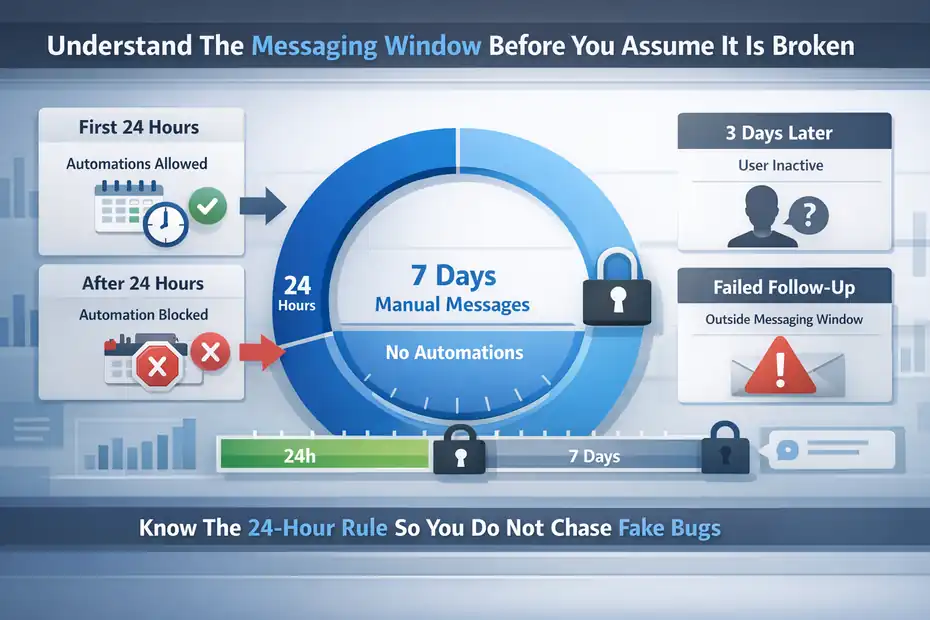
A huge number of delivery complaints are not true sending failures. They are policy restrictions. Meta’s messaging rules limit when businesses can send messages, and ManyChat follows those rules.
Meta states that businesses have up to 24 hours to respond after a user interacts, and ManyChat explains that after the initial 24 hours, a 7-day window may allow manual inbox messages, but automations are no longer delivered in that period.
Know The 24-Hour Rule So You Do Not Chase Fake Bugs
If your ManyChat flow is not sending, the first policy question is simple: did the user interact recently enough?
Meta’s standard messaging window gives your business 24 hours from the person’s last interaction to send messages that can include promotional content. After that, the rules get tighter.
This is where many people get tripped up. They think, “The contact is in my list, so I should be able to message them.” That is not how Messenger and Instagram messaging works. A contact existing in ManyChat is not the same as having an open messaging window.
A realistic example: Someone commented “LINK” on your post three days ago, got the DM, and never replied. If your automation tries to send a new follow-up now, ManyChat may block it even though the contact is clearly in your database.
The system is not malfunctioning. It is protecting your account from violating messaging policy.
That is why I always tell people to check the last user interaction timestamp before editing the automation.
Understand The 7-Day Window Without Overestimating It
ManyChat’s updated help documentation explains that after the initial 24 hours, Messenger and Instagram enter a 7-day period where manual messages through Inbox can still be sent, but automations will not be delivered. It also notes that the Human Agent tag applies only to human-sent messages, not automated ones.
This detail matters a lot.
People often assume, “Great, I have 7 more days.” Technically, yes, but not for bot-driven follow-up sequences. That period is more like a customer support extension for real humans replying manually. It is not a free pass for automated promotions, reminders, or nurture flows.
Here is the practical takeaway:
- Inside 24 hours: Automated and promotional replies are generally allowed.
- After 24 hours but within 7 days: Manual inbox replies may still work using the Human Agent path.
- Automation after 24 hours: Usually blocked.
- Beyond that: Wait for re-engagement or use an approved re-entry method.
When I troubleshoot sending issues, this is the checkpoint that most often reveals the real cause. The flow itself is fine. The timing is not.
Watch For Outside-Window Follow-Ups Hidden In Your Flow
Sometimes the first message sends, but the second or third one never arrives. That usually means the initial entry worked while the later step crossed a policy boundary.
This is common in flows that include delays. For example:
- A comment trigger sends the first DM immediately.
- The next message is delayed by 25 hours.
- The user never replies.
- That delayed automated follow-up fails.
From the outside, it looks like ManyChat “stopped sending.” In reality, the delay pushed the message outside the allowed window.
I recommend auditing every Smart Delay, follow-up branch, and reminder message in your flow. Ask one question for each delayed message: will the user still be inside the valid messaging window when this sends?
If not, remove the automation, shorten the delay, or redesign the sequence to encourage a reply earlier. One simple tactic is to ask a lightweight question in the first DM so the user responds and refreshes the conversation window legitimately.
Fix Broken Connections Between ManyChat And Meta
When a chatbot suddenly stops sending across multiple flows, I usually suspect the connection layer, not the content.
ManyChat community support responses also point to improper Instagram connection as a common reason automations do not send.
Reconnect Your Instagram Or Facebook Assets Properly
The most common hidden problem is that the Page, Instagram professional account, or admin permission changed after setup. That can happen when:
- Someone changed Page roles.
- The connected Facebook account lost admin rights.
- Two-factor authentication or security review interrupted access.
- The Instagram profile was switched or reauthorized incorrectly.
ManyChat may still display the channel in your workspace, which makes the issue easy to miss. But under the hood, the token or permission relationship can be stale.
My advice is to reconnect from the source, not halfway. Check the Page, the Instagram professional account, and the Facebook profile that manages them. Make sure the same person with proper permissions is reconnecting everything.
Then refresh permissions in ManyChat and test again. ManyChat’s official troubleshooting material specifically recommends refreshing permissions when automations do not fire correctly.
This is especially important after account restructuring or agency handoffs.
Verify You Still Have The Right Business Setup
A sending issue can come from account setup, not the bot builder. Messenger and Instagram automations depend on the underlying business configuration still being valid.
I recommend confirming these basics:
- Instagram account type: It should be a professional account where required for messaging features.
- Facebook Page link: The Instagram account should still be linked to the correct Page if the setup depends on that relationship.
- Admin access: The Facebook profile used to connect ManyChat still has the required level of access.
- Single source of truth: Avoid reconnecting through different team members randomly.
In my experience, this gets messy fast when multiple admins are involved. One person connects ManyChat, another changes Page settings, a third removes permissions, and nobody notices until the bot stops replying.
If you manage client accounts, document exactly which profile connected the channel and what permissions it had. That one habit prevents a lot of repeated outages.
Test With A Clean Trigger After Reconnection
After reconnecting, avoid vague testing like “it seems okay now.” Use one clean test designed to prove delivery.
A solid test looks like this:
- Use the exact keyword or comment trigger.
- Enter through the real live post, keyword, or DM entry point.
- Check whether the contact appears in ManyChat.
- Confirm the first message sends immediately.
- Confirm any action tags or custom fields update.
Why this matters: Sometimes reconnection restores message sending but not event capture, or event capture works but the message still fails. A clean test shows which part is healthy.
I also suggest avoiding overbuilt test flows during diagnosis. Use a short one-message test flow first. Once that sends reliably, reconnect the full automation.
Audit The Flow Logic Instead Of Guessing
If the connection is healthy and the user is inside the messaging window, the next place to look is flow logic.
ManyChat can fail to send for completely internal reasons: wrong branch, unpublished edits, impossible condition stacks, or message content that conflicts with the channel’s rules.
Check Conditions, Branches, And Goal Logic
This is where many smart marketers accidentally overengineer themselves into silence.
A flow can stop sending because the user never reaches the message block you expect. The trigger works, but a condition filters them out. Or a rule based on a tag, custom field, locale, prior flow, or button click sends them down a different path.
I suggest tracing one real user step by step:
- Entry trigger: Did the contact enter the intended automation?
- Immediate action: Was a tag applied or condition checked?
- Branch logic: Which path did the user actually take?
- Goal exits: Did the flow end early because a goal was met?
- Condition conflicts: Are you requiring values that most contacts do not have?
A realistic example: You built a follow-up branch that only sends if a custom field equals “lead magnet A,” but your current trigger never populates that field. The bot does not fail. It just quietly skips the message.
When I review broken flows, I often find that the sending issue is really a logic issue. The platform delivered exactly what the setup told it to deliver, which happened to be nothing.
Publish The Latest Version And Remove Old Dead Ends
Another common problem is that you fixed the flow but never published the changed version, or you published one flow while the trigger still points to an older one.
That sounds basic, but it happens constantly in busy accounts. ManyChat workspaces grow fast. You duplicate a flow, rename one version, leave another connected, test the wrong branch, and conclude sending is broken.
Do this cleanup:
- Confirm the trigger points to the current flow.
- Remove or archive duplicate test versions.
- Republish after every meaningful change.
- Label flows clearly by purpose and channel.
I recommend naming flows like this: “IG Comment DM – Free Guide – Live” and “IG Comment DM – Free Guide – Test.” That small naming habit prevents the classic “I edited the wrong automation” problem.
If your account has dozens of automations, flow hygiene is not optional. It is part of delivery reliability.
Check Message Content Limits On Instagram
ManyChat’s Instagram troubleshooting documentation notes that Instagram automations limit text blocks with buttons to 640 characters and text blocks without buttons to 1000 characters, and if you exceed those limits, the flow cannot be published.
This matters because content formatting can silently become part of your “sending” issue. Even if the flow structure is correct, a message block built beyond allowed limits can prevent a working publish state or create friction during setup.
I recommend being conservative with Instagram DM blocks:
- Keep first messages short.
- Do not overload button messages.
- Use multiple short blocks instead of one long wall of text.
- Test on mobile, where clutter shows up fast.
In my experience, shorter messages also perform better. They feel more human, generate faster replies, and help you stay inside the messaging window by encouraging interaction sooner.
Troubleshoot Trigger-Specific Sending Problems
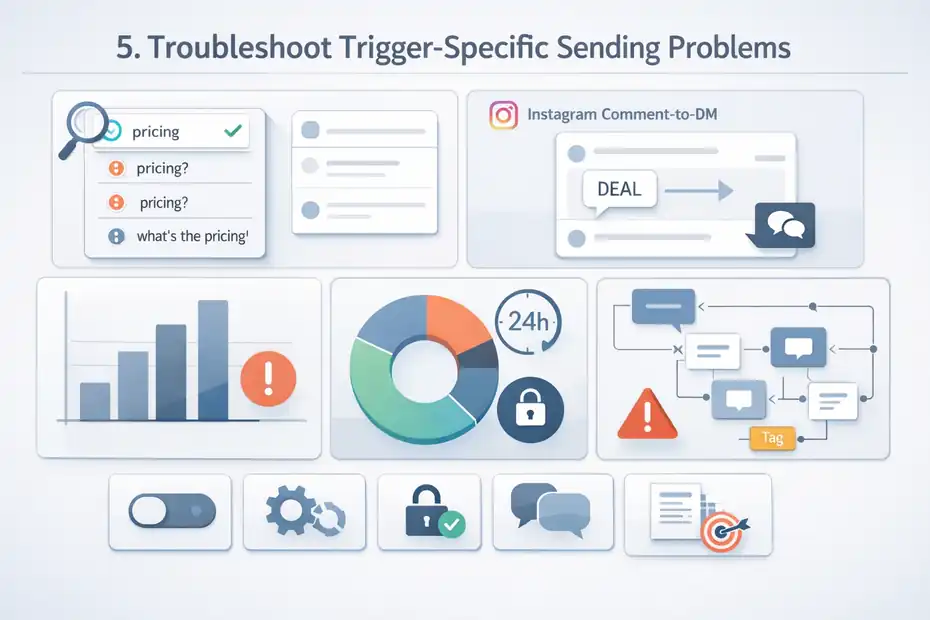
Not every ManyChat sending issue is equal. A keyword automation failing is different from a comment-to-DM automation failing, and both are different from delayed follow-ups or API-driven messages.
You will solve problems faster when you diagnose by trigger type.
Fix Keyword Automations That Never Fire
Keyword automations are often the simplest flows, which is why they are so annoying when they stop working. ManyChat’s troubleshooting page specifically calls out disabled keyword triggers as a reason automations will not send.
Here is how I approach keyword issues:
- Use the exact keyword: No punctuation or added words during testing.
- Check match settings: Confirm whether the automation expects exact match or contains match behavior.
- Make sure the trigger is enabled: This is the big one.
- Avoid overlapping keyword rules: Two rules can compete or route unpredictably.
- Check channel context: A Messenger keyword will not fire from Instagram DM unless configured there.
A realistic scenario: You set the keyword to “pricing,” but your audience sends “pricing?” or “what’s the pricing.” Depending on configuration, the automation may not match the way you expect.
I suggest starting with one highly distinct keyword during testing, something like “start123,” so there is zero ambiguity.
Fix Instagram Comment-To-DM Automations
Comment-triggered automations are powerful, but they are also one of the most common places people report delivery issues. Community guidance around broken Instagram automations often points back to permissions and the official Instagram troubleshooting process.
If comment-to-DM stopped working, check this sequence:
- The automation is still connected to the correct live post or rule.
- The comment trigger is active.
- Instagram permissions were refreshed.
- The connected account is the right business profile.
- Your test comment matches the configured rule.
I also suggest testing from a non-admin account where possible. Sometimes account owner interactions behave differently from audience interactions, and a clean external-style test gives you a more realistic result.
One thing I have noticed: Marketers tend to change the post caption, CTA wording, and trigger phrase after launch but forget to update the automation rule to match. The post says “comment DEAL,” while the bot is still listening for “discount.”
Fix Delayed Or Follow-Up Messages That Stop Mid-Flow
If the first message sends but follow-ups do not, assume timing or logic before assuming platform failure.
Common culprits include:
- A Smart Delay pushes the next message outside the 24-hour window.
- A condition requires a reply, click, or field update that never happened.
- A goal exits the user before the follow-up block.
- A manual tag or field change removed them from the intended path.
This is where flow maps help. Trace one subscriber visually. Do not just look at the message block that failed. Look at what had to happen before that block became eligible to send.
In my opinion, long automated follow-up ladders should always be built with policy in mind first and marketing logic second. If the message timing is not compliant, no clever copywriting will save the sequence.
Use A Practical Fix Workflow To Find The Real Cause Fast
When people panic, they change five things at once. That makes troubleshooting slower, not faster.
A better approach is to test in a tight order so each step eliminates one category of failure.
Run This Five-Step Diagnosis In Order
Here is the exact order I recommend for a “ManyChat chatbot not sending messages fix” workflow:
- Check the trigger: Is it enabled and attached to the right live flow? ManyChat says disabled triggers can stop automations from sending.
- Refresh permissions: ManyChat specifically recommends this when automations look correct but do not fire.
- Check the messaging window: Meta’s 24-hour rule and ManyChat’s 7-day manual-only rule explain many “broken” follow-ups.
- Use a one-message test flow: Strip away conditions and delays.
- Audit the full flow logic: Add branches back only after the simple test works.
This order matters because it prevents you from rebuilding a flow whose real issue is permissions or policy timing.
I believe this is the fastest path for most accounts because it starts with the highest-probability fixes and moves toward deeper technical diagnosis only when necessary.
Build A Temporary Minimal Test Flow
A minimal test flow is one trigger and one short message. Nothing else.
I use this constantly because complex automations hide the actual issue. With a minimal test, you can answer one question fast: can this channel send any message right now?
Your temporary test flow should include:
- One clear trigger: Keyword or comment rule.
- One short text message: Something like “Test received.”
- No conditions, delays, or external actions.
- A visible tag: So you can confirm entry if the message fails.
If this minimal flow sends, your account and channel are probably healthy. The issue lives in the original automation. If it does not send, the issue is likely permissions, connection, or messaging-policy related.
That single distinction saves a lot of wasted effort.
Keep A Log Of What You Changed
This sounds like something only agencies do, but honestly, everyone should do it. When troubleshooting, write down:
- Time of test
- Trigger used
- Channel tested
- What changed before the test
- What happened
Why? Because ManyChat issues often look inconsistent when they are actually conditional. A simple log helps you see patterns, like “keyword worked on Messenger but not Instagram” or “initial DM sent, delayed follow-up failed at 25 hours.”
I’ve seen people convince themselves a bug is random when the real pattern was obvious in hindsight.
Prevent Future Sending Problems Before They Hurt Leads
Once you fix the current issue, the next smart move is preventing the same outage from happening next week.
This matters even more if ManyChat is tied to lead capture, customer support, or launch campaigns.
Design Flows Around Compliance, Not Around Hope
ManyChat’s own content is pretty blunt here: users are not able to send messages outside the 24-hour window, and trying to design around that is not worth the risk.
That means your automation strategy should assume:
- Users may not reply.
- Follow-ups may lose eligibility quickly.
- Manual support is different from automation.
- Re-engagement should happen through valid prompts, not forced workarounds.
A better design pattern is to get the user to respond early. Ask a simple question. Offer two buttons. Give them a quick choice. Every reply creates a healthier conversation thread and improves the odds that the messages you actually care about will go through.
This is one of those areas where smarter strategy fixes what people often call a technical problem.
Keep Your Account Setup Stable
Connection issues often begin with team changes, client handoffs, or account cleanup. So I recommend creating a simple internal checklist:
- Who connected the channel originally
- Which Facebook profile has admin rights
- Which Page and Instagram account are linked
- When permissions were last refreshed
- What changed before the last outage
If you run multiple brands, this gets even more important. The problem is rarely the chatbot alone. It is the messy stack around it.
In my experience, the brands with the fewest outages are not the ones with the fanciest flows. They are the ones with the cleanest operational setup.
Choose The Right Plan For Your Usage
Pricing does not directly cause every sending issue, but plan limitations can create confusion around what features, contact limits, or subscription setup you actually have.
ManyChat’s public pricing page shows a free plan and paid options, while help documentation in March 2026 notes a newer pricing model with multiple plans and regional variation in plan availability.
The practical lesson is simple: check your live pricing page and current plan details before assuming you have access to a feature because an older tutorial said so. ManyChat’s March 2026 help content specifically notes that plan availability may vary by region.
I suggest reviewing your current subscription whenever:
- You hit contact growth milestones.
- A feature seems missing.
- A workspace changes owners.
- You are following older setup tutorials.
Sometimes the fix is not “repair the bot.” It is “stop troubleshooting based on outdated assumptions.”
Final Fix Checklist You Can Use In Five Minutes
If you want the shortest path to a working bot, use this checklist. It covers the highest-probability causes without dragging you into unnecessary rebuilds.
Your Five-Minute ManyChat Sending Checklist
- Trigger on: ManyChat says disabled triggers can stop automations from sending.
- Permissions refreshed: ManyChat recommends refreshing permissions when the automation looks correct but does not fire.
- Correct channel tested: Instagram, Messenger, and other channels do not share triggers automatically. ManyChat supports multiple channels, so cross-channel testing can mislead you.
- Inside the allowed window: Meta’s 24-hour rule is the first policy checkpoint.
- No delayed automation outside 24 hours: ManyChat says automations are not allowed during the later 7-day manual reply period.
- Flow actually published: Make sure the live trigger points to the current version.
- Conditions not blocking delivery: Check tags, fields, branches, and goals.
- Message blocks fit channel rules: Instagram text block limits can affect publishability and setup.
- Minimal test flow works: If a one-message flow sends, the channel is probably healthy.
- Reconnect assets if needed: Especially after admin, Page, or Instagram changes.
What I Would Do First If This Were My Account
If this were my own account, I would not start by rewriting copy or rebuilding the flow. I would do this in order:
- Refresh permissions.
- Test a one-keyword, one-message flow.
- Check whether I am inside the 24-hour window.
- Reconnect the channel if the test still fails.
- Then inspect flow conditions and delays.
That sequence is boring, but it works.
Most ManyChat sending problems are fixable fast once you stop treating them like mysterious chatbot failures. Usually, the real issue is either permissions, policy timing, or logic. And once you know which category you are in, the fix becomes much more obvious.
FAQ
What is the most common reason ManyChat is not sending messages?
The most common reason is that the automation trigger is turned off or the user is outside the 24-hour messaging window. Even if the flow looks correct, ManyChat will not send messages if permissions are outdated or if Meta’s messaging rules block delivery.
How do I fix ManyChat chatbot not sending messages quickly?
Start by checking if the trigger is enabled, then refresh permissions inside ManyChat. Test with a simple one-message flow and confirm the user is within the messaging window. These steps usually identify whether the issue is technical, policy-related, or caused by flow logic.
Why are my ManyChat messages not sending after a delay?
Delayed messages often fail because they fall outside the 24-hour messaging window. If a user does not respond, ManyChat cannot send automated follow-ups after that period. Adjust your delays or encourage faster replies to keep the conversation active.
Does reconnecting Facebook or Instagram fix ManyChat issues?
Yes, reconnecting your Facebook Page or Instagram account can fix many sending issues. Broken or expired permissions are a common cause. Reconnecting ensures ManyChat can properly communicate with Meta’s system and deliver messages without interruption.
Can flow conditions stop ManyChat messages from sending?
Yes, incorrect conditions or filters can block messages from sending even if the trigger works. If tags, custom fields, or branches are set incorrectly, users may never reach the message step. Always test the full path to confirm delivery logic.

I’m Juxhin, the voice behind The Justifiable.
I’ve spent 6+ years building blogs, managing affiliate campaigns, and testing the messy world of online business. Here, I cut the fluff and share the strategies that actually move the needle — so you can build income that’s sustainable, not speculative.
Related posts:
 ManyChat Conversational Marketing Strategy That Drives Sales
 ManyChat vs Chatfuel Comparison: Which Wins for Automation?
 Social Media Marketing for Small Business – Best Tips
 Methods for Marketing Affiliate Websites – Simple Ways
 Internet Marketing Ideas: Increase Your Marketing Efforts
 Monetizing a Website: Best Earning Money Practice