
Table of Contents
Some links on The Justifiable are affiliate links, meaning we may earn a small commission at no extra cost to you. Read full disclaimer.
A hello bar lead capture tool review matters because this kind of software can either quietly grow your email list every month or become another subscription that looks useful but never pays for itself.
I’ve looked closely at Hello Bar’s current features, pricing, support documentation, and public review signals, and my takeaway is pretty simple: it can deliver solid ROI for the right website, but only if your traffic, offer, and setup discipline are already in decent shape.
If you want an honest, practical breakdown instead of marketing fluff, this guide will help.
What Hello Bar Is And Who It Is Best For
Hello Bar sits in the onsite conversion category. In plain English, it helps you show bars, popups, sliders, overlays, and inline calls to action on your site so more visitors subscribe, click, or buy.
On its homepage, Hello Bar positions itself as a popup builder for media brands, agencies, ecommerce stores, and professional service firms, and it says it integrates with tools like HubSpot, Klaviyo, MailerLite, Shopify, Slack, Salesforce, and Zapier.
What I like here is the clarity of purpose. This is not pretending to be a full CRM, a full funnel builder, or an all-in-one marketing suite. It is mainly an onsite lead capture and conversion layer.
That focus is useful because a lot of businesses do not need another giant platform. They need a faster way to turn anonymous traffic into email subscribers and leads.
Hello Bar is especially attractive if you fall into one of these groups:
- Content sites that want more newsletter signups.
- Small ecommerce brands that need discount popups, exit offers, or cart recovery prompts.
- Agencies that want something easy to deploy across client websites.
- Service businesses that need consultation requests, quote forms, or lead magnets.
Where I would be more cautious is with advanced teams that need very deep segmentation, sophisticated experimentation workflows, or richer built-in analytics.
Review summaries and user feedback consistently praise ease of use and integrations, but they also mention limits around advanced targeting and deeper analytics.
What The Product Actually Does
At the practical level, Hello Bar lets you build lead capture units without heavy development work. The platform highlights templates, drag-and-drop editing, A/B testing, targeting, personalization, reporting, and direct integrations as core parts of the product.
Its support center also shows features for GDPR controls, custom thank-you experiences, device previews, survey-style fields, webhooks, and CMS installation help across platforms like Squarespace, Webflow, Wix, and Blogger.
That feature mix tells me Hello Bar is trying to win on speed and accessibility. You can get campaigns live quickly, and for a lot of small teams, that matters more than having every enterprise bell and whistle.
The Core Promise Behind The ROI Angle
Hello Bar’s own pitch is conversion lift. The site claims “Convert 83% more” visitors into leads, subscribers, and buyers, and it also presents case-style proof points such as a lead capture increase above 50%, an added $52,223 result for one campaign, average 3x client conversion improvement for a fast-growing agency, and a Shopify store reducing cart abandonment by 47%.
I would treat those numbers as directional, not guaranteed. They show what is possible, not what the average user will get. Still, they are useful because they frame the real buying question: can Hello Bar recover enough lost attention from existing traffic to justify the subscription?
How Hello Bar Works As A Lead Capture System
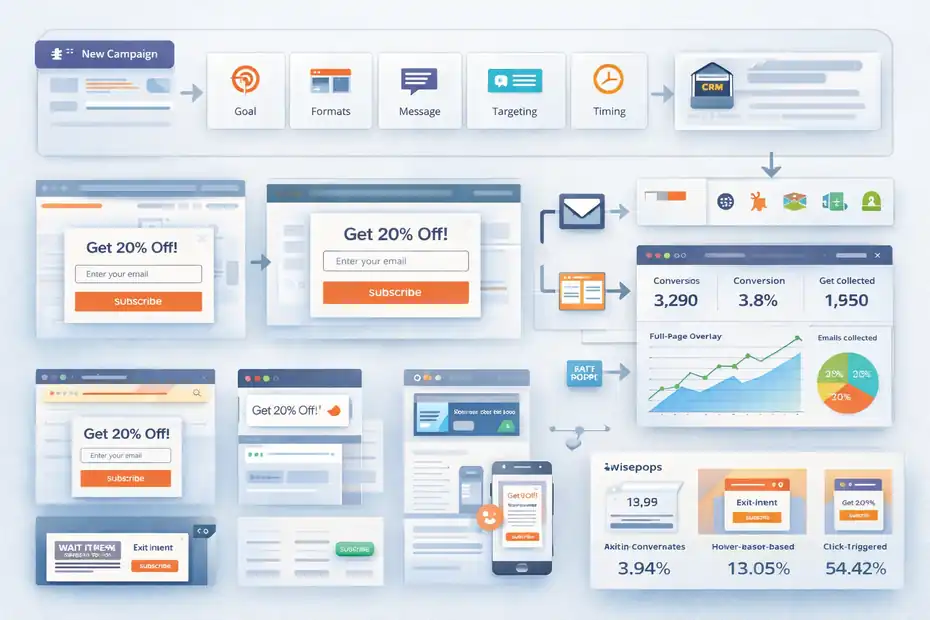
The basic workflow is simple. You create a campaign, choose a goal, choose a format, design the message, set targeting and timing rules, connect your email or CRM destination, then track conversions.
That is exactly the kind of setup a beginner can understand, and the support documentation reflects that beginner-friendly flow.
The Campaign Formats You Can Use
Hello Bar started with the classic top notification bar, but the product now supports a wider set of onsite units. Public product pages and feature listings reference bars, popups, modals, sliders, alerts, page takeovers, inline CTAs, welcome-style units, and opt-in forms.
G2’s feature page also notes support for multiple popup types, mobile optimization, targeting, triggered campaigns, analytics, A/B testing, and no-code customization.
That matters because ROI does not come from “having a popup.” It comes from matching the format to the moment. A top bar works for broad announcements. An inline CTA works better inside long-form content.
An exit popup is better when a visitor is about to leave. A discount modal works when a product page visitor needs a final push.
In my experience, this is where many businesses mess up. They install one generic email popup everywhere, then declare the tool ineffective. The tool is rarely the first problem. The offer-message-timing match usually is.
Targeting, Timing, And Personalization
Hello Bar’s homepage and support center emphasize targeting by page, behavior, content, device, time windows, number of visits, and previous page URL. It also describes personalization and triggered behavior as core parts of the platform.
This is important because popup performance depends heavily on context. Wisepops’ large-scale popup data found an average popup conversion rate of 4.82%, while channel-targeted campaigns converted at 5.19% versus 4.82% for non-targeted campaigns.
Hello Bar’s own recent content also cites strong differences by trigger type, including 3.94% for exit-intent popups, 13.05% for hover-based triggers, and 54.42% for click-triggered ones in the referenced Wisepops dataset.
That does not mean you should chase whatever number looks biggest. Click-triggered popups often convert higher because the user has already shown intent. The lesson is simpler: trigger choice changes performance a lot, so default settings are rarely the best settings.
Integrations And Data Flow
Hello Bar becomes much more valuable once leads flow somewhere useful.
The product publicly lists integrations with Zapier, HubSpot, Klaviyo, MailerLite, Shopify, Slack, and Salesforce, while support documentation shows additional sync options like ConvertKit, MailerLite, Campaign Monitor, Sender, Brevo, webhooks, Intercom, and Slack. Some integration features require Growth or higher plans.
That means Hello Bar is not just collecting emails into a dead list. It can feed a welcome flow, a nurture sequence, or a sales follow-up process.
And that is exactly where ROI compounds. A popup that collects leads but never triggers timely follow-up is only doing half the job.
Hello Bar Features That Matter Most For ROI
A long feature list is nice, but only a handful of features usually drive actual financial return.
That is the lens I care about most in a hello bar lead capture tool review.
A/B Testing Is One Of The Strongest ROI Levers
Hello Bar includes A/B testing in its paid tiers and describes an automatic system that tests variants and preferentially shows the better-converting version.
Its homepage says A/B testing is built in, and support documentation explains the feature as an automated optimization mechanism.
This matters because a popup campaign rarely starts at peak performance. Small tests can create meaningful gains:
- Headline change from generic to specific.
- Offer change from “join our list” to “get 10% off.”
- Trigger delay change from 3 seconds to 15 seconds.
- CTA change from “submit” to “get my guide.”
Even a modest lift compounds. If your site gets 20,000 sessions a month and one campaign improves from 2.0% to 3.0%, that is 200 extra leads over time.
If 5% of those leads become customers and your average first purchase is $80, the difference becomes real money quickly.
Templates And No-Code Setup Reduce Hidden Costs
Hello Bar pushes its template library and ease-of-use angle hard, and that is not just marketing fluff.
When a tool is simpler to launch, the true cost of ownership drops because you need less design time, less dev time, and less internal friction. G2’s feature page also notes pre-designed templates and no-code customization.
I think this is underrated. Many teams compare software by subscription price only, then ignore implementation drag. A cheaper tool that needs six hours of developer help is not always cheaper than a more polished tool your marketer can launch alone in 30 minutes.
Targeting Rules Protect User Experience
A lot of popup tools get blamed for annoying visitors when the real issue is sloppy targeting. Hello Bar’s available targeting rules, device controls, visit-count logic, and time-based display settings help you limit that problem.
The support center specifically references mobile-only display, device-specific display, time-of-day scheduling, number-of-visits rules, and previous-page targeting.
That kind of control matters for both ROI and brand perception. If a first-time blog reader gets a hard-sell popup instantly, you may kill trust. If a repeat reader on article three sees a useful checklist offer, you may gain a subscriber without harming the experience.
Survey Fields And Questions Create Better Segmentation
This is a nice extra feature that many buyers overlook. Hello Bar support documents show that email collection campaigns can be turned into simple survey forms or questionnaires by adding fields.
That opens smarter lead capture paths. Instead of collecting only an email, you can collect intent signals like business size, service interest, or product category.
For B2B or service businesses, that can improve lead quality even if raw conversion rate drops slightly. In many cases, better-qualified leads beat more leads.
Hello Bar Pricing Review And Cost Transparency
This is where things get interesting, because the pricing page raises a small but meaningful trust issue.
The top pricing cards and the lower detailed comparison table do not fully match.
The Pricing Tiers I Found
On the pricing page, the top section shows these billed-annually prices and limits:
- Starter: Free forever, up to 5,000 views.
- Growth: $39 per month billed annually, up to 50,000 popup views per month.
- Premium: $69 per month billed annually, up to 150,000 popup views per month.
- Elite: $129 per month billed annually, up to 500,000 popup views per month.
But lower on the same pricing page, the detailed comparison table lists:
- Growth: $29 per month billed annually.
- Premium: $49 per month billed annually.
- Elite: $99 per month billed annually.
I want to be very clear here: that inconsistency does not automatically mean anything shady is happening. It could be a page update issue, testing artifact, or stale comparison section.
But as a buyer, I would absolutely verify the final plan price before committing.
What The Plans Include
The free Starter plan includes unlimited popups, pre-built themes, basic support, and 5,000 lifetime views. The paid tiers include unlimited popups, subscribers, and A/B tests, with increasing view allowances and more advanced or premium support and integrations.
The lower table also shows plan differences around targeting strength, technical support priority, number of seats, integration level, and design/customization capabilities like removing the Hello Bar logo.
For a very small site, the free plan can be useful as a test bed. But 5,000 lifetime views is not much, so it feels more like a real trial than a long-term free plan.
My Pricing Take
I believe Hello Bar is reasonably priced if your site already has traffic and you know what offer you want to promote. If you are still figuring out your lead magnet, your audience, and your message, almost any popup tool will feel expensive because the real issue is not the subscription. It is unclear strategy.
My only hesitation is the pricing presentation. A conversion tool sells trust. If the pricing page itself is unclear, that is not ideal in a product review focused on ROI.
How To Calculate Hello Bar ROI Before You Buy
This is the section most reviews skip, and honestly, it is the one that matters most.
You do not buy lead capture software because it is interesting. You buy it because the math works.
A Simple ROI Formula You Can Use
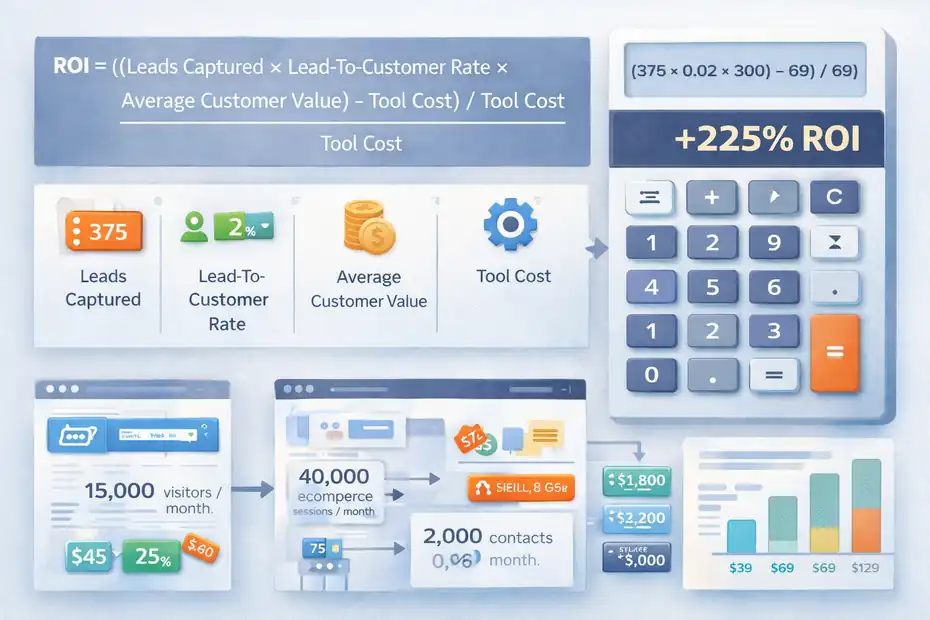
Use this framework: ROI = ((Leads Captured × Lead-To-Customer Rate × Average Customer Value) – Tool Cost) / Tool Cost
Let me break that down in plain English. You estimate how many extra leads Hello Bar could create, how many of those leads become customers, and how much a customer is worth. Then you compare that added value to the subscription cost.
Example For A Content Or Service Website
Imagine your site gets 15,000 monthly visitors. Without a lead capture layer, maybe under 1% of visitors become contacts, which aligns with HubSpot community guidance that many sites see visitor-to-contact conversion below 1%, while 2% to 5% is a strong result.
Now say Hello Bar helps you add a focused lead magnet and move an article-level opt-in campaign to 2.5%. That is 375 leads per month.
If just 2% of those leads become clients, that is 7.5 customers.
If a customer is worth $300, that is $2,250 in gross value.
Even after subtracting a $39, $69, or $129 monthly subscription, the math can look very attractive.
Of course, your real numbers may be lower or higher. That is why I recommend running conservative, expected, and optimistic scenarios before deciding.
Example For Ecommerce
Hello Bar’s recent content cites discount-code popups converting between 7.5% and 7.65%, versus 5.10% for popups without an incentive, and its exit-intent guide cites data showing discount-based exit offers can convert abandoning visitors and recover some lost sales.
So imagine an ecommerce store gets 40,000 monthly sessions. A discount popup converts 5% of visitors into email subscribers. That is 2,000 new contacts. If your welcome flow gets even a small fraction of those to purchase, the tool can pay back fast.
What matters here is not just conversion rate. It is downstream monetization. A high-converting popup with weak email follow-up can underperform a lower-converting popup tied to a strong welcome series.
The Real ROI Filters
Before buying, ask yourself these questions:
- Do I already have enough traffic for lead capture to matter?
- Do I have a clear offer people would exchange an email for?
- Do I have email or CRM follow-up in place?
- Can I measure lead value over 30 to 90 days?
If the answer is yes to most of those, Hello Bar has a fair chance of paying for itself.
Hello Bar Setup: The Best Way To Launch It
A tool review is incomplete without implementation advice, because bad setup makes good tools look mediocre.
Hello Bar has documentation for installation across multiple website platforms and a script-based setup path, so getting it live is not the hard part. The hard part is launching the right first campaigns.
The Best First Campaign To Build
I suggest starting with one campaign, not five. Pick the page type with the clearest commercial or subscriber intent:
- Blog post traffic: Offer a checklist, template, guide, or newsletter incentive.
- Product page traffic: Offer a discount, bundle, or free shipping prompt.
- Service page traffic: Offer a consultation, estimate, or audit.
- Pricing page traffic: Offer a comparison guide, FAQ, or objection-handling CTA.
This focused approach gives you cleaner data and makes optimization easier.
The Basic Setup Flow I Recommend
- Step 1: Choose one conversion goal. Email capture is the easiest starting point.
- Step 2: Match the format to the page intent. Inline CTAs are often better for educational content, while exit popups can work on transactional pages.
- Step 3: Write one clear value proposition. “Get weekly updates” is weak. “Get the 12-point CRO checklist we use before launching paid traffic” is stronger.
- Step 4: Delay the popup enough to avoid instant annoyance. Let people engage first.
- Step 5: Connect the form to your email platform and trigger a welcome sequence immediately.
- Step 6: Measure conversion rate, assisted revenue, and lead quality before expanding.
Hello Bar’s support and integration docs make this workflow realistic even for a small team without a developer.
The KPI Benchmarks That Actually Matter
Do not obsess over one vanity number. Track:
- View-to-submit conversion rate.
- Total leads captured.
- Lead-to-customer rate.
- Revenue per lead.
- Revenue per popup view.
- Bounce or annoyance signals after launch.
Popup benchmark studies vary. Wisepops reports an average of 4.82%, while Omnisend reported a 2.1% average email popup conversion rate across 1.24 billion displays in 2025. Both can be true because datasets, industries, and definitions differ.
That is why your own baseline matters more than chasing someone else’s benchmark.
Common Hello Bar Mistakes That Kill ROI
A lot of poor tool reviews are really bad implementation reviews in disguise. Hello Bar can work, but it is easy to use it badly.
Mistake 1: Showing The Same Offer To Everyone
One generic popup across every page sounds efficient, but it usually lowers relevance. Use page-level or visit-based targeting so the offer matches what the person is reading or buying.
Hello Bar supports targeting and personalization features specifically for that reason.
Mistake 2: Pushing For An Email Before Earning Trust
This is common on blogs and service sites. A user lands from Google, sees a popup immediately, and has not even read a sentence yet.That hurts both UX and performance.
In most cases, delaying the ask or using an inline CTA further down the page works better.
Mistake 3: Measuring Only Form Fills
A popup with a 6% conversion rate can still have poor ROI if the leads are low quality.
Another popup with a 2.5% conversion rate may bring in better-fit subscribers who actually buy. Revenue quality beats vanity volume.
Mistake 4: Not Connecting To Follow-Up Automation
Hello Bar supports CRM, ESP, and webhook-style integrations, but if you do not connect the captured lead to a welcome or sales sequence, you are leaving most of the value on the table.
Mistake 5: Ignoring The Free-Plan Ceiling
The free plan’s 5,000 lifetime views disappear quickly on even a modest site. If you treat it as a forever solution, you will likely hit a wall fast.
Advanced Optimization Tips To Get Better Results
Once the basic campaign is running, the next gains usually come from smarter refinement rather than big redesigns.
Use Offer Strength Before Design Tweaks
In my experience, businesses obsess over colors and button shapes before fixing the actual offer. A stronger lead magnet usually beats a prettier popup.
Hello Bar’s own recent guidance shows incentives matter, with discount-code popups outperforming no-incentive versions in ecommerce.
So test the offer first:
- 10% off versus free shipping.
- Checklist versus webinar invite.
- Audit request versus case study download.
Split Test Message Match By Page Intent
A blog reader and a pricing-page visitor are not the same person psychologically. Create separate messaging by page type.
Educational pages should invite the next useful step. Bottom-funnel pages should reduce friction and objections.
Use Multi-Field Forms Carefully
Extra fields can qualify leads, but they can also lower raw conversion. The right move depends on your business model. For B2B and services, one extra qualification field may improve ROI.
For ecommerce newsletter capture, a simple email field often wins. Hello Bar’s support docs confirm you can add fields when needed.
Treat Mobile As Its Own Experience
Hello Bar supports device targeting and previews, which matters because mobile popup UX is very different.
A desktop pattern that feels fine can feel aggressive on a phone. Use shorter copy, smaller friction, and tighter timing on mobile.
Hello Bar Pros, Cons, And Final Verdict
This is where I land after looking at the current product, pricing, support material, and public review patterns.
The Main Pros
- Easy to understand and deploy for non-technical users.
- Good mix of formats including bars, popups, sliders, takeovers, and inline CTAs.
- Useful targeting, A/B testing, and personalization features for optimization.
- Broad enough integration coverage for most SMB workflows.
- Reasonable entry cost if you already have traffic and a defined offer.
The Main Cons
- Pricing presentation appears inconsistent on the official page, which is not great for buyer confidence.
- Public messaging also shows inconsistent installed-base claims, with “over 600,000 websites” in some places and “over 700,000 websites” elsewhere.
- Review summaries suggest some users want deeper analytics and more advanced automation.
- The free plan is useful but limited enough that many growing sites will outgrow it quickly.
Is Hello Bar Worth It?
I think Hello Bar is worth it for small to midsize sites that want a practical lead capture tool without a steep learning curve. It is a better fit for teams that value speed, clear implementation, and enough optimization tools to improve results over time.
I would be less excited about it for teams that need enterprise-grade reporting, extremely deep behavior logic, or highly complex multi-brand experimentation systems.
Final ROI Verdict
If your site already gets meaningful traffic and you have a real offer, Hello Bar can absolutely produce positive ROI.
The support for A/B testing, targeting, integrations, and multiple popup types gives you enough room to move from “we added a popup” to “we built a measured acquisition system.”
If you do not yet have traffic, follow-up automation, or offer-market fit, Hello Bar will not magically fix that. It will simply expose those gaps faster.
My honest rating: Good tool, good fit for many SMBs, but buy it with a measurement plan. That is how you turn a lead capture app into an ROI channel instead of a monthly expense.
Who Should Buy Hello Bar And Who Should Skip It
This final section is really the buying shortcut.
Buy Hello Bar If
You should consider Hello Bar if you already have content traffic, product page traffic, or service page traffic that is not converting as well as it should.
It is also a solid option if your team wants something marketers can launch and test without waiting on developers every time.
The platform’s emphasis on templates, no-code editing, A/B testing, and integrations makes that use case very practical.
Skip Hello Bar If
You may want to skip Hello Bar if you are still at the stage where you do not know what your offer is, you are barely getting traffic, or you need much more advanced customer journey orchestration than a dedicated lead capture layer typically provides.
You may also want stronger buying clarity than the current pricing page provides.
My Bottom-Line Advice
I suggest thinking about Hello Bar less as “popup software” and more as a conversion multiplier for traffic you already paid for or earned. That mindset changes the decision.
Instead of asking whether the tool is cheap, ask whether your current traffic leakage is more expensive than the subscription.
For many websites, it is.
FAQ
What is Hello Bar and how does it work?
Hello Bar is a lead capture tool that displays popups, bars, and forms on your website to collect emails or drive actions. It works by targeting visitors based on behavior or page context, then presenting offers like discounts or lead magnets to increase conversions and engagement.
Is Hello Bar worth it for small businesses?
Hello Bar can be worth it for small businesses if they already have consistent website traffic and a clear offer. It helps convert visitors into leads without complex setup, making it a practical option for improving email growth and customer acquisition with minimal technical effort.
What is a good conversion rate for Hello Bar campaigns?
A good conversion rate typically ranges between 2% and 5%, depending on the industry and offer quality. Highly targeted campaigns or strong incentives can push results higher, while generic popups often perform lower. Testing different triggers and messages is key to improving performance.
Does Hello Bar slow down your website?
Hello Bar is designed to be lightweight and usually does not noticeably slow down your website. However, like any script-based tool, performance can vary depending on how many campaigns you run and how optimized your overall site setup is.
How do you maximize ROI with Hello Bar?
To maximize ROI, focus on matching the offer to user intent, using A/B testing, and connecting leads to follow-up email sequences. The biggest gains come from improving lead quality and conversion flow rather than simply increasing popup visibility or impressions.

I’m Juxhin, the voice behind The Justifiable.
I’ve spent 6+ years building blogs, managing affiliate campaigns, and testing the messy world of online business. Here, I cut the fluff and share the strategies that actually move the needle — so you can build income that’s sustainable, not speculative.
Related posts:
 How to Make Money With Email Marketing
 How an Online Subscription Business Can Help You
 Content Marketing Writer: Be Successful
 How Do Freelancers Get Paid: A Guide to Payment Options and Methods
 High Converting Sales Funnel: The Ultimate Guide to Boosting Your Revenue
 How to Grow Online Business: Top 10 Strategies Used by Industry Leaders