
Table of Contents
Some links on The Justifiable are affiliate links, meaning we may earn a small commission at no extra cost to you. Read full disclaimer.
If you’re wondering whether is surveymonkey good for audience targeting is a fair question, I think it absolutely is.
SurveyMonkey can be a smart, fast way to reach specific groups of people, but it can also feel more precise than it really is if you do not understand how online panels work.
The platform gives you speed, convenience, and a lot of filters, yet good targeting is not the same thing as perfect representativeness.
That difference matters more than most marketers, founders, and researchers realize.
What SurveyMonkey Audience Actually Is
SurveyMonkey Audience is not just a survey builder feature.
It is SurveyMonkey’s built-in respondent marketplace, which lets you buy completed responses from targeted online panels inside the same platform where you create the survey.
How SurveyMonkey Audience Works In Practice
At a practical level, SurveyMonkey Audience lets you create a survey, choose a target audience, set the number of completed responses you want, and pay for the panel to fill it.
The company says its audience network reaches more than 335 million people across over 130 countries, with more than 200 targeting options available
It also notes that you can get results in as little as an hour for some projects, which explains why the tool is attractive for quick concept tests and market feedback.
What matters here is the mechanism. You are not uploading your own customer list. You are buying access to people who match profile criteria inside SurveyMonkey’s panel ecosystem and partner network.
SurveyMonkey’s documentation says global panelists are managed by trusted partners, and respondents who do not meet quality and activity standards can be removed from the program.
That setup is useful because it removes a lot of operational friction. You do not need to source participants manually, negotiate with a separate panel vendor, or stitch together survey software and sample procurement.
In my experience, that is the real appeal: not magical targeting accuracy, but speed and ease. For many teams, especially smaller ones, that convenience is the difference between doing research this week and postponing it for three months.
What “Audience Targeting” Really Means Here
This is where people sometimes get confused. Audience targeting inside SurveyMonkey mostly means filtering for profiled characteristics and then refining with extra controls.
SurveyMonkey says you can target by country, demographics, employment status, hobbies, religion, firmographics, and other attributes. You can also add up to three custom screening questions to narrow the audience further.
That sounds incredibly precise, and sometimes it is good enough. For example, if you want women aged 25 to 44 in the United States who own dogs and buy skincare online, you can get meaningfully closer to that audience than you could with a generic public survey link. That is valuable.
But targeting is not the same as census-grade sampling. Filters help you reach a narrower subset of online respondents. They do not automatically make the sample representative of every real-world person in that group. This is one of the biggest misunderstandings in audience research.
A highly filtered panel can still be biased if the people who joined the panel differ in important ways from the broader market you care about. AAPOR has explicitly cautioned against casually treating nonprobability online panel results as representative of the general population.
Where SurveyMonkey Is Genuinely Good For Audience Targeting
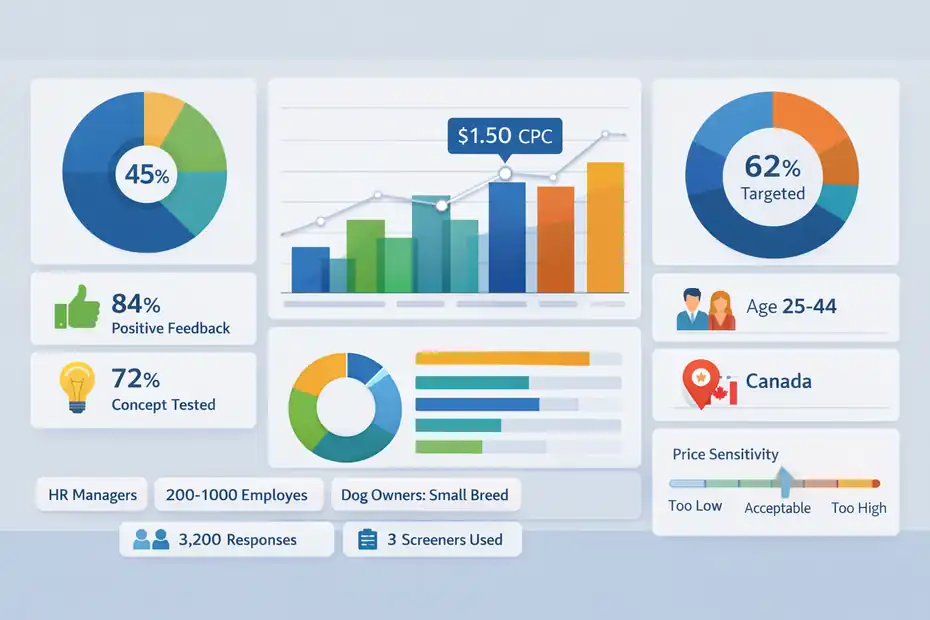
I do think SurveyMonkey is good for audience targeting in several very common business scenarios.
The key is using it for directional insight rather than pretending it is a flawless picture of the whole market.
It Is Strong For Fast Validation And Early-Stage Decision Making
SurveyMonkey is at its best when you need fast feedback from a reasonably relevant audience. That includes concept testing, messaging checks, packaging feedback, landing page reactions, price sensitivity exploration, feature prioritization, and light market discovery.
The platform is designed for speed, and SurveyMonkey says some projects can return insights in as little as an hour.
Starting costs are also low enough for many small tests, with the product page advertising pricing from $1 per response, though actual cost rises with survey length, targeting complexity, qualification rate, and balancing settings.
Imagine you run a small ecommerce brand and want to know which of three product angles feels most compelling to pet owners in Canada. SurveyMonkey can be a very smart choice.
You can field a short survey, target the right country and broad ownership profile, and get directional answers quickly enough to influence your campaign before you spend on ads.
That is the word I would keep coming back to: directional. When your goal is to reduce uncertainty, not produce a publishable national estimate, SurveyMonkey can do a lot of good. Many teams do not need academic perfection.
They need a reliable enough read to avoid obvious mistakes, and that is a much more realistic standard.
It Gives You Real Targeting Control Without Requiring A Research Ops Team
One reason people like SurveyMonkey Audience is that it offers meaningful filtering without demanding advanced procurement skills. SurveyMonkey says users can choose country, gender, age, and income, then expand into hundreds of additional targeting options. It also allows optional settings like custom screening questions, exclusions, and scheduling.
That matters because many businesses have a targeting problem, not a survey-design problem. They know what they want to ask. They just do not know how to get the right people to answer.
A simple example: A SaaS company wants opinions from full-time HR managers at firms with 200 to 1,000 employees. SurveyMonkey gives them a starting point they can actually operate. They do not need a dedicated sample vendor relationship. They can launch inside one interface.
I believe this is one of the product’s most underrated strengths. SurveyMonkey reduces coordination overhead. That sounds boring, but it is not. Fewer moving parts means more research gets done, which often creates better decisions than a theoretically superior but never-launched study.
It Can Be Surprisingly Useful For Niche Refinement
SurveyMonkey becomes more effective when you combine profile targeting with smart screeners. The platform allows up to three screener questions, which lets you validate or refine panel profile assumptions.
For example, you can target dog owners and then ask what size dog they have to isolate small-dog owners.
This is where the tool becomes much more than a blunt demographic filter. Screeners let you qualify for recent behavior, role seniority, product usage, purchase timing, or problem awareness. In real projects, that extra layer often matters more than age or gender.
A founder testing accounting software messaging, for instance, might start with small-business owners but use screeners to identify those who switched bookkeeping tools in the past 12 months. That is far more actionable than broad business-owner targeting alone.
The tradeoff is cost and incidence. SurveyMonkey notes that adding targeting options, longer surveys, custom balancing, and qualification rate considerations can increase cost per response. In other words, precision is available, but you usually pay for it.
Where SurveyMonkey Can Be Misleading
This is the part most “best tool” articles skip. SurveyMonkey can absolutely mislead you if you mistake access for accuracy.
The Biggest Risk Is False Confidence In Representativeness
The clean interface and polished targeting menus can create a dangerous illusion: that if you selected enough filters, the results must reflect the real market. That is not automatically true.
SurveyMonkey Audience is an online panel solution. More broadly, survey methodologists have long warned that internet-based and nonprobability panel samples can suffer from coverage bias and selection bias. A 2023 practitioners’ analysis noted a general concern that internet surveys exclude the offline population.
The AAPOR report on online panels also distinguishes probability-based panels from nonprobability approaches and warns researchers to understand those tradeoffs rather than casually projecting findings to the full population.
Here is the simple version. The people available to answer your survey are not just “parents in Texas” or “IT managers in Germany.”
They are “parents in Texas who are reachable through online panel ecosystems and willing to answer surveys,” or “IT managers in Germany who fit a panel profile and pass the screeners.” That is still useful, but it is not identical to the entire market.
I suggest treating SurveyMonkey results as evidence, not truth. The platform can reduce uncertainty, but it does not eliminate it.
Narrow Filters Can Make You Feel More Precise Than You Are
Another trap is overtargeting. The more specific you get, the more you may feel like you are talking to exactly the right audience. Sometimes you are. Sometimes you are just shrinking the available pool and increasing the odds of unstable results.
SurveyMonkey itself notes that if there are not enough panelists for your order, you may need to reduce the number of responses or broaden your targeting options. It also says custom screening questions require even more responses to reach your goal. That is a practical reminder that ultra-niche targets can strain feasibility.
Let me break that down with a scenario. Suppose you want U.S. women aged 30 to 34, earning over a certain income, working in biotech, living in urban areas, who bought collagen supplements in the last 60 days, and who have two children.
It sounds impressive. But now you may be dealing with a smaller, more expensive, and potentially less stable sample than you realize.
More filters do not always create better insight. Often they create more fragile insight.
Speed Can Hide Survey Design Problems
Fast feedback is great, but speed sometimes covers up weak survey design. SurveyMonkey’s own guidelines recommend keeping Audience surveys short and simple, with fewer than 10 pages and no more than 10 questions per page, because shorter surveys get higher response rates.
That is a strong hint: if your survey is bloated, confusing, or exhausting, your targeting quality will not save you.
Many teams blame the panel when the real problem is the questionnaire. They ask leading questions, stack too many concepts into one prompt, bury key qualifiers late in the survey, or make answer options impossible to interpret. Then they say the audience was bad.
In my experience, this is one of the most common failures in self-serve market research. People buy targeted respondents but do not earn good data from them. Good targeting only gets the right people into the room. It does not make the conversation smart.
How To Judge Whether SurveyMonkey Is Good For Your Specific Use Case
The smartest answer to is surveymonkey good for audience targeting is “it depends on the decision you need to make.” That may sound annoyingly nuanced, but it is also the truth.
When SurveyMonkey Is A Smart Choice
SurveyMonkey is a strong fit when you need directional insight from a defined audience quickly and cost-effectively. It is especially useful when you are comparing options rather than estimating exact population values.
Use cases where it often works well include concept testing, early product-market-fit exploration, ad/message comparison, pricing experiments, feature prioritization, and audience segmentation hypotheses. These are all cases where relative differences matter more than perfect population inference.
For example, if version A of a product concept consistently beats versions B and C among a reasonably targeted audience, that result can still be operationally valuable even if the sample is not a perfect mirror of the total market. You are making a choice, not writing census tables.
I recommend SurveyMonkey most often for teams that ask questions like, “Which direction should we test next?” rather than, “What exact percentage of the entire national market believes this?” That distinction saves a lot of disappointment.
When SurveyMonkey Is A Bad Fit
SurveyMonkey is a weaker choice when your stakes require high-confidence population representation, regulated reporting, public polling claims, or deep inferential precision. It is also risky when your target audience is extremely hard to verify through profile data alone.
If you need to claim something like “42% of all adults in this country prefer X,” you should be much more careful. If you are supporting policy decisions, medical claims, investor-facing market sizing, or public opinion reporting, a self-serve online panel is usually not the place to cut corners.
AAPOR’s guidance is relevant here: nonprobability panel results should not be treated casually as representative of the general population.
It is also a poor fit for highly specialized B2B targets if you cannot verify identity or decision authority well. “Marketing manager” can mean wildly different things depending on company size, geography, and self-reported profile accuracy.
Quick Decision Table
| Use Case | Is SurveyMonkey Good For Audience Targeting? | Why |
|---|---|---|
| Testing 3 product concepts | Yes, usually | Fast directional comparison is where panels shine |
| Comparing ad messages | Yes | You mainly need relative audience reaction |
| Finding broad consumer attitudes | Usually | Good if you avoid overclaiming representativeness |
| Estimating national public opinion precisely | Not ideal | Panel bias and inference limits matter more |
| Niche B2B buyer research | Mixed | Can work with strong screeners, but verification is hard |
| Customer research using your own users | No, use your list first | First-party audience beats rented panel data for customer truth |
| International exploratory research | Yes, often | 130+ country reach is useful for early exploration |
| Regulatory or academic-grade measurement | Usually no | Methodological rigor requirements are higher |
The table is the heart of the decision. SurveyMonkey is often smart for exploration, prioritization, and validation. It becomes misleading when used as a shortcut for certainty.
How To Set Up SurveyMonkey Targeting The Right Way
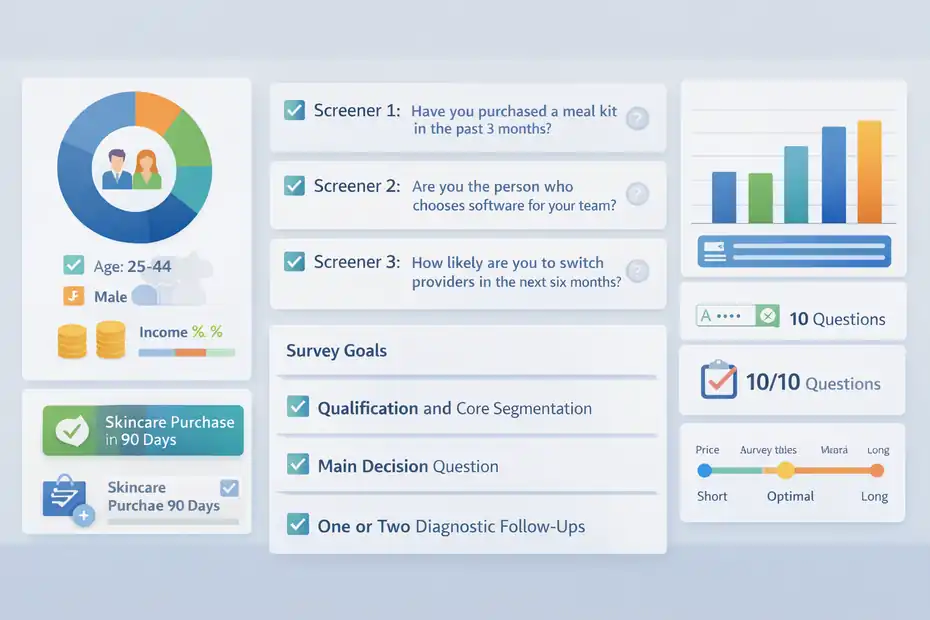
If you decide to use it, setup quality matters a lot. I would argue that most bad outcomes come from poor targeting design, not just platform limitations.
Start With A Behavioral Audience Definition, Not Just Demographics
The biggest setup mistake is beginning with age, gender, and income before you define the actual decision-relevant audience. Demographics are easy to click, so people overuse them. Behavior is usually more valuable.
Ask yourself: Who can genuinely answer this question? Not “who looks like the audience,” but “who has the experience, need, purchase role, or context that makes their answer useful?”
A strong audience definition might be “people who bought skincare online in the last 90 days” or “managers who evaluated payroll software this year.” That is much more actionable than “women 25 to 44” or “small business owners.”
Then use demographics only where they help narrow the context. SurveyMonkey’s targeting options and screener questions are most effective when they reflect behavior or eligibility, not vanity segmentation.
I suggest writing your audience definition in one sentence before you open the platform. If you cannot describe the ideal respondent clearly in plain English, your targeting settings will probably drift.
Use Screeners To Confirm The Important Stuff
SurveyMonkey allows up to three screener questions, and you should use them wisely. I recommend spending those questions on the biggest sources of misclassification.
A compact approach looks like this:
- Screener 1: Confirm category behavior. Example: “Have you purchased a meal kit in the past 3 months?”
- Screener 2: Confirm role or authority. Example: “Are you the person who chooses software for your team?”
- Screener 3: Confirm relevance level. Example: “How likely are you to switch providers in the next 6 months?”
This is much better than wasting screeners on trivia.
One personal rule I like: Use targeting filters for broad fit, and use screeners for truth-checking. Profiles get you close. Screeners help verify the people who actually matter.
Keep The Survey Short Enough To Protect Data Quality
SurveyMonkey’s design guidance is very clear that shorter, simpler Audience surveys tend to perform better, recommending fewer than 10 pages and no more than 10 questions per page. Pricing also rises with length.
That means survey length hits you twice: it can reduce completion quality and increase cost.
A better workflow is to separate research goals. Do not ask one survey to solve brand positioning, pricing, feature adoption, audience demographics, and open-ended product ideation all at once. That is how you create respondent fatigue and blurry answers.
Here is a better structure:
- Survey Goal 1: Qualification and core segmentation
- Survey Goal 2: Main decision question
- Survey Goal 3: One or two diagnostic follow-ups
That is enough for most tactical studies. The cleaner the survey, the more your targeting effort actually pays off.
How To Read SurveyMonkey Results Without Fooling Yourself
This is where good researchers separate themselves from people who just collect charts.
Treat Results As Directional Evidence First
Even when the data looks clean, I recommend reading SurveyMonkey Audience results in layers. Start with directional interpretation before you jump to certainty.
Ask questions like: Which option won? Were the differences large or small? Did patterns repeat across relevant subgroups? Did open-text answers support the multiple-choice story?
This mindset matters because online panel targeting can generate useful signal without justifying strong claims about the total market. AAPOR’s guidance on online samples is basically a reminder to align your conclusions with the method’s strengths and limits.
I believe this single habit prevents a lot of bad decisions. Instead of saying, “The market definitely prefers Message A,” say, “Among this targeted panel audience, Message A clearly outperformed the alternatives, so it is the best candidate for the next live test.” That sentence is more honest and usually more useful.
Watch Subgroups Carefully
SurveyMonkey lets you filter results by demographic information included in the survey output and by collector when you use multiple Audience collectors. That is helpful for comparing segments.
But subgroup analysis is where people often overread thin data. If you bought 200 completes and then start slicing into women 18 to 24, women 25 to 34, men 18 to 24, men 25 to 34, rural, urban, high income, low income, and so on, you can quickly end up making strong claims from tiny cells.
A practical rule I use is simple: The more you slice, the more cautious your interpretation should become. Subgroups are often best used to spot patterns worth retesting, not as final truth.
For example, if one concept performs exceptionally well among younger respondents, that is a clue. It is not automatically a market law.
Validate Important Findings Somewhere Else
The most confident use of SurveyMonkey comes when you triangulate. That means comparing panel findings with other signals: your website analytics, ad click behavior, CRM data, customer interviews, support tickets, or sales calls.
If a SurveyMonkey audience says buyers care most about ease of setup, and your demo calls keep surfacing the same theme, confidence increases. If the panel says price is not a concern but your checkout data shows heavy drop-off at cost, that tension is worth investigating before you act.
SurveyMonkey also offers Response Quality tools that use machine learning to flag low-quality answers, such as gibberish in text boxes or straight-lining across questions. That is useful, but it is not a replacement for external validation. It helps clean the data. It does not prove the sample perfectly reflects your market.
Common Mistakes That Make SurveyMonkey Targeting Look Worse Than It Is
A lot of frustration with SurveyMonkey is self-inflicted. The platform has real limits, but users often make those limits much worse.
Mistake 1: Using It Instead Of Your Own Customer Data
If you already have customers, users, leads, or subscribers, your first move should usually be to learn from them before renting a panel. SurveyMonkey itself supports other collector types like web links and email invitations, so Audience is not your only option.
This matters because your own audience often contains the highest-value truth. A panel can tell you how a targeted market reacts. Your actual customers can tell you why people buy, churn, hesitate, upgrade, or complain.
I have seen teams spend hundreds on panel responses while ignoring 10,000 existing users they could have surveyed directly. That is backwards.
Use SurveyMonkey Audience when you need non-customer perspective, category feedback, or pre-launch learning. Do not use it as an excuse to skip first-party research.
Mistake 2: Buying Precision You Do Not Need
Because SurveyMonkey lets you add more targeting logic, screeners, balancing, and delivery upgrades, it is easy to overengineer a modest question.
The platform states that price per response rises with factors like survey length, targeting options, custom balancing, and qualification rate, and Express Delivery adds another $1 per response.
That can be worth it for high-stakes research. But plenty of teams overspend to answer low-risk questions that only need rough directional clarity.
I suggest matching your budget to the decision. If you are choosing between two headlines, you probably do not need ultra-fine targeting and premium speed. If you are testing a major rebrand before a six-figure rollout, tighter design and bigger spend make more sense.
Mistake 3: Forgetting That Respondents Are Still Humans In A Survey Environment
Panel respondents are not robots, but they are also not interacting with your product in real life. They are answering questions in a survey context. That affects how people think, respond, and simplify their choices.
A message that scores well in a survey might not win in a crowded social feed. A concept that sounds appealing in theory may fail at checkout. A packaging idea that looks premium in a static mockup may feel confusing on a shelf.
This is not a SurveyMonkey-specific flaw. It is a general survey-research reality. Still, it is one of the main reasons I advise using panel targeting for screening and prioritization, then validating important decisions with live behavior whenever possible.
Advanced Ways To Use SurveyMonkey More Effectively
Once you stop expecting perfection, you can use the platform more intelligently.
Run Multiple Audience Collectors Instead Of One Blended Sample
SurveyMonkey allows you to create multiple Target Audience collectors for a single survey and later filter results by collector. This is a powerful but underused tactic.
Instead of jamming every audience into one sample and hoping the crosstabs make sense later, split key segments upfront. For example:
- Collector 1: Existing category users
- Collector 2: Category-aware non-users
- Collector 3: Competitor switchers
This gives you cleaner comparisons and reduces the temptation to overinterpret tiny subgroups after the fact.
I especially like this for B2B studies where roles differ sharply. Separate managers, directors, and executives when the buying perspective changes meaningfully.
Use Exclusions To Reduce Repeat Respondent Problems
SurveyMonkey says you can exclude panelists who have taken surveys you launched in the past 100 days on its Contribute and Rewards panel by using the Exclusions option.
That is a useful control if you run repeated studies in the same category. You do not want the same highly survey-experienced people shaping every wave of insight, especially if your brand, concepts, or questions are evolving.
This will not eliminate all panel conditioning concerns across the broader ecosystem, but it is still a smart safeguard.
Pair SurveyMonkey With A Validation Ladder
My favorite advanced workflow is what I think of as a validation ladder:
- Use SurveyMonkey Audience for fast targeting and idea screening.
- Take the best-performing options into customer interviews or usability tests.
- Validate finalists with live-market behavior such as ad CTR, landing page conversion, or sales feedback.
- Feed that learning back into your next survey round.
This approach respects what SurveyMonkey is good at. It is a fast narrowing tool. It helps you spend your deeper validation budget on better candidates.
That is a much smarter use than trying to make one survey answer every strategic question by itself.
Final Verdict: Smart, But Only If You Respect The Limits
So, is SurveyMonkey good for audience targeting?
Yes, often. But only when you define “good” correctly.
SurveyMonkey is good for audience targeting when you need fast, practical access to a reasonably relevant audience for directional research.
Its panel reach, large country coverage, targeting attributes, screener support, integrated workflow, and response-quality tooling make it genuinely useful for concept testing, message testing, exploratory market research, and many early-stage decisions.
It becomes misleading when people mistake targeted online panel access for guaranteed representativeness, or when they overclaim precision from narrow filters and modest sample sizes.
Methodology guidance from AAPOR and broader research literature makes that caution well worth taking seriously.
If I had to give you the most practical takeaway, it would be this: use SurveyMonkey to reduce uncertainty, not to manufacture certainty. That is where the platform shines. When you treat it as a smart decision-support tool instead of a magic truth machine, it can be extremely valuable.
FAQ
Is SurveyMonkey good for audience targeting?
SurveyMonkey is good for audience targeting when you need fast, directional insights from a defined group. It offers strong filtering and screening tools, but results should not be treated as perfectly representative of the entire population.
How accurate is SurveyMonkey Audience targeting?
SurveyMonkey Audience targeting is reasonably accurate for general segmentation and behavioral insights. However, since it relies on online panels, it may include biases and should be used for trends and comparisons rather than precise population-level conclusions.
What are the limitations of SurveyMonkey for targeting audiences?
The main limitations include potential sample bias, reliance on self-reported data, and reduced accuracy for highly niche audiences. Over-targeting can also shrink sample quality, making results less stable or harder to generalize.
When should you use SurveyMonkey Audience?
You should use SurveyMonkey Audience for concept testing, message validation, and early-stage market research. It works best when you need quick feedback to guide decisions rather than exact statistical representation.
Can SurveyMonkey replace professional market research panels?
SurveyMonkey cannot fully replace professional research panels for high-stakes or regulated studies. It is better suited for fast, cost-effective insights, while advanced research often requires more controlled sampling and methodology.

I’m Juxhin, the voice behind The Justifiable.
I’ve spent 6+ years building blogs, managing affiliate campaigns, and testing the messy world of online business. Here, I cut the fluff and share the strategies that actually move the needle — so you can build income that’s sustainable, not speculative.
Related posts:
 Data Management Platform: Best Practices for Success
 Is SurveyMonkey Worth It For Ecommerce Feedback: Real Value
 Is SurveyMonkey Enough For Professional Surveys: Expert Verdict
 How to Boost Your Business with Effective Marketing Tactics
 SurveyMonkey Pros And Cons For Freelancers: Smart Tool Or Overpriced?
 Is SurveyMonkey Good For Customer Research: Real Insights Or Noise?