
Table of Contents
Some links on The Justifiable are affiliate links, meaning we may earn a small commission at no extra cost to you. Read full disclaimer.
Later review for bloggers is a fair question because scheduling social content sounds helpful, but not every tool actually moves traffic, saves time, or fits the way bloggers work.
If you publish articles, promote them on Instagram or Pinterest, and want a cleaner system for getting more eyes on your content, Later can be useful. But it is not magic, and it is definitely not the right choice for every blogging setup.
In this guide, I’ll walk you through what Later does well, where it falls short, and whether it can genuinely help you grow faster.
What Later Actually Is And Why Bloggers Consider It
Later is a social media management platform built around planning, scheduling, publishing, analytics, and Link in Bio.
As of 2026, it supports Instagram, Facebook, Pinterest, TikTok, LinkedIn, Threads, YouTube Shorts, and Snapchat, which gives bloggers a fairly wide publishing range from one dashboard.
What Later Means In Practical Terms For A Blogger
If you are a blogger, you usually are not looking for “social media management” in the abstract. You want something simpler: a way to turn one blog post into multiple social touchpoints without opening five apps every day. That is where Later makes sense.
In practical use, Later gives you a content calendar, a media library, scheduling tools, profile analytics, and a Link in Bio page that can send people from your social profiles to your articles or landing pages.
Here is the real appeal. Imagine you publish one article every Tuesday. Without a system, promotion often becomes random. You share it once on Instagram Stories, maybe pin it later, then forget about it.
With Later, you can build a repeatable flow where that same article gets promoted across multiple channels over the next two weeks.
That is why bloggers keep looking at tools like this. The value is not “posting faster.” The value is creating a consistent promotion engine around content you already worked hard to write.
Why Bloggers Are Drawn To Later Specifically
Later has always been associated strongly with visual planning, especially for Instagram, and that still matters for bloggers who rely on lifestyle, food, travel, fashion, beauty, DIY, or creator-style content.
It also includes Link in Bio, which is especially useful when your audience discovers you on social but needs a smooth path to your blog.
Later says Link in Bio can connect Instagram and TikTok posts to specific URLs and track page views, clicks, button clicks, and click-through rate.
I think this matters more for bloggers than many reviews admit. A generic scheduling tool can queue posts, but bloggers often need a “bridge” between discovery and reading. Link in Bio is that bridge.
Still, attraction is not the same as fit. A food blogger with a visual brand may get real value here. A blogger who gets most traffic from SEO and email might barely use half the features.
Who Later Is Best For And Who Should Skip It
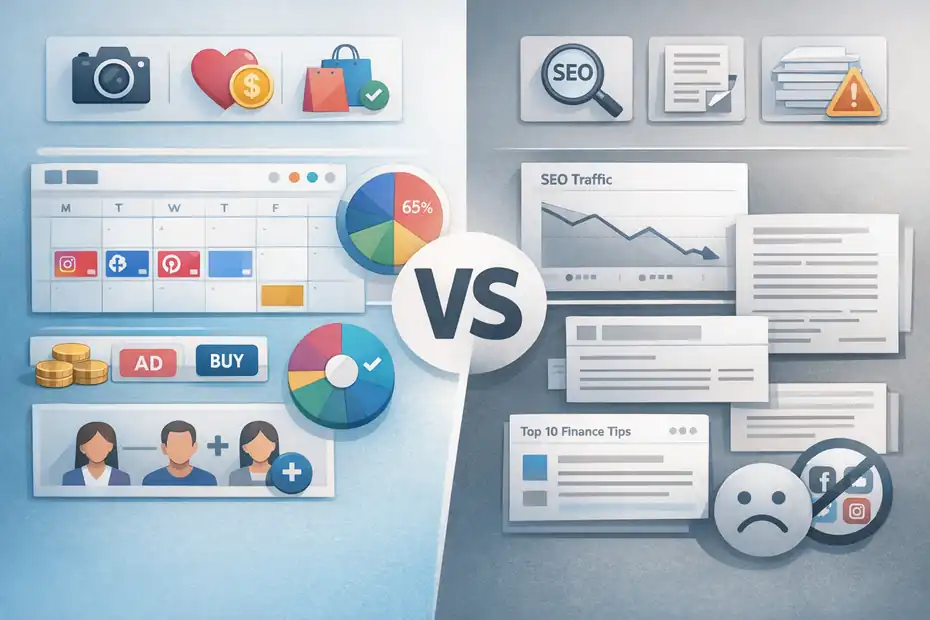
Later is not a universal “yes.” It fits certain blogging models really well and feels unnecessary for others. That distinction is what makes this review useful.
Bloggers Who Will Probably Get Real Value
Later is strongest for bloggers who already treat social media as a traffic channel, not just a place to occasionally post updates. If that sounds like you, there is a solid chance the tool will pay for itself in saved time and cleaner execution.
The best fit usually looks like this:
- Visual-content bloggers: Food, travel, fashion, beauty, home, craft, and lifestyle bloggers tend to get the most obvious benefit because image-led promotion matters more in those niches.
- Multi-platform promoters: If you actively post to Instagram, Pinterest, TikTok, or LinkedIn, a shared calendar is genuinely helpful.
- Bloggers selling something: Courses, affiliate offers, templates, coaching, digital products, and sponsored content all benefit from cleaner traffic routing through Link in Bio.
- Small teams: Later’s paid plans add more users and more social sets, which helps if you work with a VA, editor, or content assistant.
In my experience, the sweet spot is the blogger who has enough content to promote consistently but not enough time to do it manually. That middle stage is exactly where scheduling tools start feeling less like a luxury and more like infrastructure.
Bloggers Who May Waste Money On It
Some bloggers buy scheduling software before they have a distribution problem. That is the mistake.
Later may not be worth it if you are in one of these situations:
- SEO-first, social-light blogs: If 90% of your growth comes from Google and you only post socially once in a while, the tool may sit unused.
- Text-heavy niches: Finance, legal, technical B2B, or deeply research-driven blogs may get more value from email, search, and long-form authority building than from visual social promotion.
- Early-stage bloggers with little content: If you only have five posts live, scheduling will not fix the bigger issue, which is building a stronger content base.
- People who dislike social entirely: Later makes social easier, but it does not make you enjoy a channel that fundamentally does not fit your style.
This is where I think many software reviews get too optimistic. A tool cannot create channel-market fit. It can only improve a process that already deserves attention.
How Later Works For Blog Traffic, Not Just Social Posting
This is the section most bloggers care about. Can Later help you grow traffic, or does it only help you look organized?
The Traffic Mechanism Behind Later
Later does not increase blog traffic directly in the same way SEO can. It improves the system around content distribution. That sounds less exciting, but it is still valuable.
The workflow is simple. You publish a blog post, create supporting social assets, schedule them across relevant platforms, and funnel those clicks into your blog or landing page through captions, profile links, or Link in Bio.
Later’s Link in Bio analytics tracks page views, post clicks, button clicks, and click-through rate, which helps you see whether that funnel is working.
For bloggers, that means Later is best understood as a distribution multiplier. It helps you squeeze more reach and more repeat visibility from each article you publish.
That matters because many blog posts fail not because they are bad, but because they are under-promoted.
What Later Can Improve In A Blogger Workflow
Let me break it down in a realistic way. Suppose you publish “25 Easy High-Protein Breakfast Ideas.” With no system, you might share it once and move on. With Later, you could schedule:
- Instagram carousel: A few recipe teaser slides.
- Pinterest pins: Multiple visuals with different text angles.
- TikTok or Reels promo: A short behind-the-scenes clip.
- Link in Bio destination: The full post, recipe hub, or email opt-in.
Later supports scheduling and content management across these social profiles, plus analytics on supported platforms and Link in Bio performance.
That does not guarantee more traffic, but it does create more opportunities for discovery. And for bloggers, opportunity volume matters. One post seen once is a missed asset. One post repurposed intelligently becomes a traffic engine.
Later Features That Matter Most For Bloggers
Not every feature matters equally. Bloggers should care less about shiny dashboards and more about the features that support publishing consistency and click flow.
Content Calendar And Scheduling
The core value of Later is still scheduling. You can plan content ahead of time, organize publishing across multiple supported networks, and avoid the stop-start pattern that kills blog promotion consistency.
Later’s help documentation says users can schedule posts to major platforms including Instagram, Facebook, Pinterest, TikTok, LinkedIn, Threads, YouTube Shorts, and Snapchat.
For bloggers, the calendar matters because promotion works better as a sequence than as a single post. One article can become several scheduled touchpoints, spread across days or weeks.
I suggest thinking in campaigns instead of posts. Every new blog post should trigger a mini content campaign:
- Day 1: Publish article and announce it.
- Day 2: Share a quote, stat, or takeaway.
- Day 4: Post a carousel or idea summary.
- Day 7: Reframe it from a different angle.
- Day 10: Re-share through a seasonal or problem-based hook.
Later makes that workflow easier because you can see the content stack in one place instead of improvising every day.
Link In Bio For Article Clicks
For bloggers, this is one of Later’s most important features. Later describes Link in Bio as a mini website in your social profile, where you can add buttons, social links, and post-linked destinations for Instagram and TikTok.
That matters because the classic blogging problem on Instagram is simple: people see your content, but getting them from that content to your article is clunky. Link in Bio reduces that friction.
The analytics side is even more important. Later says you can track page views, clicks on posts, button clicks, and click-through rate inside Link in Bio.
For a blogger, that means you can stop guessing which topics actually pull readers off-platform. You may discover, for example, that your list posts drive more clicks than your opinion posts, or that product-led content converts better than educational content from social audiences.
Analytics And Performance Tracking
Later includes platform analytics on its plans, with the Starter plan showing up to three months of analytics according to the pricing and plan pages, while higher tiers add more advanced capabilities like custom analytics.
This is helpful, but I want to be honest about something. Later analytics are useful for content decisions, not full business intelligence. They can tell you what content is performing, which profile is growing, and which social efforts are driving interest.
But if you want deep attribution tied to revenue, you will still need your site analytics and probably UTM tracking.
That said, for bloggers who are not yet measuring social systematically, Later provides a much better starting point than gut feeling.
Later Pricing And Whether The Cost Makes Sense
Pricing always matters because a tool that saves five minutes a week is not worth a monthly fee.
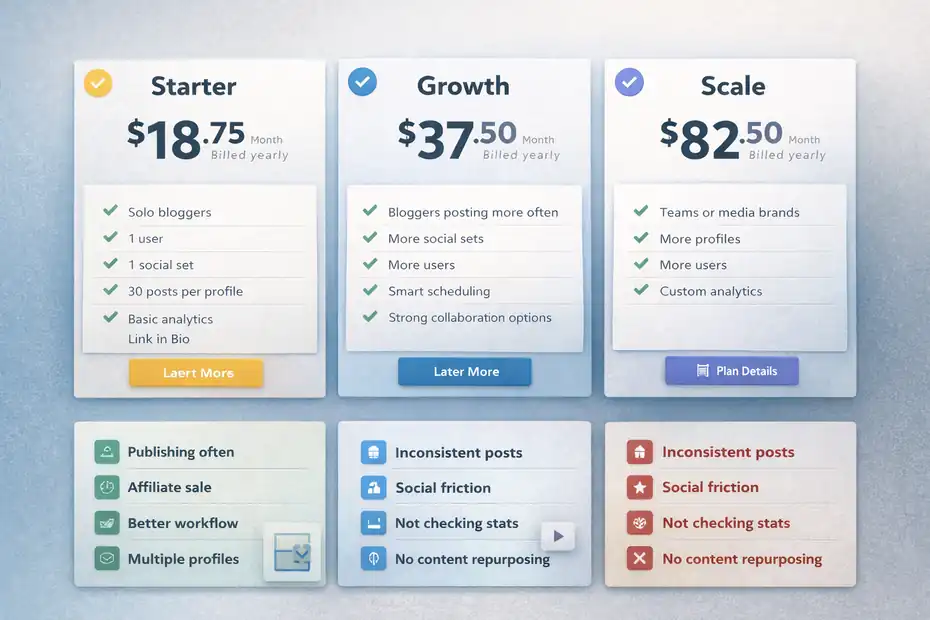
Later’s official pricing page lists Starter at $18.75 per month billed yearly, Growth at $37.50 per month billed yearly, and Scale at $82.50 per month billed yearly.
The Starter tier includes one social set, one user, up to 30 posts per profile, basic analytics, and Link in Bio.
A Simple Pricing Snapshot For Bloggers
| Plan | Official Starting Price | Best For | What Bloggers Should Notice |
|---|---|---|---|
| Starter | $18.75/month billed yearly | Solo bloggers | 1 user, 1 social set, 30 posts per profile, basic analytics, Link in Bio |
| Growth | $37.50/month billed yearly | Bloggers posting more often | More social sets, more users, smart scheduling, stronger collaboration options |
| Scale | $82.50/month billed yearly | Teams or media brands | More profiles, more users, custom analytics |
Pricing changes over time, so I would always verify the current plan details before subscribing.
When The Cost Is Easy To Justify
The cost is easiest to justify when one of these is true:
- You publish at least weekly and promote every post repeatedly.
- One extra affiliate sale or sponsored-content lead can cover the subscription.
- You are replacing scattered manual work with a single workflow.
- You manage multiple profiles and need structure.
A blogger monetizing with affiliate links, digital products, or consulting can often justify Later quickly if social already contributes meaningful clicks. One extra conversion per month may cover the software.
When The Cost Feels Hard To Defend
The cost feels heavy when you are using Later as a “maybe I’ll become more consistent” purchase. Software is not a habit substitute.
If you are not publishing consistently, not repurposing content, and not checking performance, even a low monthly fee becomes wasteful. I believe this is the real dividing line in the “grow traffic faster or waste time” question. The tool works best when you already have a publishing habit and need leverage, not motivation.
Setting Up Later The Right Way As A Blogger
If you do decide to use Later, the setup matters more than people think. A weak setup creates the illusion that the tool does not work.
Step-By-Step Setup That Actually Supports Traffic
Here is how I would set it up for a blog from day one:
- Step 1: Connect only the profiles that matter. Do not connect every network just because Later supports them. Connect the ones your blog can realistically maintain. Later supports a broad set of platforms, but that does not mean you need all of them.
- Step 2: Build a media naming system. Organize visuals by post title, campaign, or content pillar so you are not hunting for assets later.
- Step 3: Create a Link in Bio structure. Add your core pages first: latest post, start here page, lead magnet, affiliate resources, and main categories. Later provides Link in Bio buttons and post linking options.
- Step 4: Create templates for recurring promotions. For example, weekly post share, monthly roundup, seasonal refresh, and evergreen reshare.
- Step 5: Use tracking links. Even if Later shows click data, use site-side analytics too so you can see how social visitors behave after the click.
That last point matters a lot. Getting the click is nice. Getting the right click is better.
The Best Content Structure To Load Into Later
Bloggers usually make one of two mistakes: they either post only article links, or they post random brand content disconnected from their blog.
A better structure is to work from three buckets:
- Traffic content: Posts meant to drive readers to articles.
- Trust content: Posts that build authority or personality without asking for a click.
- Conversion content: Posts that point to lead magnets, products, services, or affiliate pages.
When I look at blogging workflows that actually scale, they almost always balance these buckets. Later becomes much more valuable when it manages a real system rather than isolated posts.
The Biggest Mistakes Bloggers Make With Later
A tool can absolutely waste your time if you use it badly. This is where many bloggers go wrong.
Mistake One: Treating Scheduling As Strategy
Scheduling is logistics, not strategy. If the content angle is weak, the audience fit is wrong, or the creative is boring, Later cannot fix that.
I have seen bloggers queue a month of content and assume that consistency alone will bring traffic. It usually does not. Consistency amplifies quality; it does not replace it.
A strong promotion plan answers three questions first:
- What problem does this post solve?
- Why would someone care on this platform?
- What is the easiest next click?
Later is most effective when each scheduled post has a job. Some posts earn reach. Some earn saves. Some earn clicks. If all of them just “announce new blog post,” performance drops fast.
Mistake Two: Sending Every Platform The Same Creative
Cross-posting is useful. Copy-pasting is lazy.
Yes, Later can help you manage multiple platforms from one place. But bloggers still need to adapt the packaging of a message. The same article may need a Pinterest title hook, an Instagram carousel structure, and a short-form video concept depending on the channel. Later’s value is in coordination, not in making every network identical.
A realistic example: A budgeting blogger writes “How To Stop Overspending On Groceries.” On Pinterest, a checklist graphic may work. On Instagram, a carousel with “7 grocery traps” may work better. On TikTok, a quick “3 mistakes I stopped making” angle may outperform both.
Same article. Different entry point. That is what smart use looks like.
Mistake Three: Ignoring Click Quality
A click is not the goal. Useful behavior after the click is the goal.
Later’s Link in Bio analytics help you see whether people are clicking, but bloggers still need to ask what those visitors do next.
If your social traffic bounces instantly, the problem may be:
- The blog post did not match the promise of the post.
- The page loaded slowly.
- The headline was too vague.
- The audience was curious but not qualified.
This is why I recommend pairing social analytics with site analytics. That combination tells you whether Later is helping you get more attention or better visitors.
Optimization Strategies That Make Later Worth It
Once the basics are working, the next question is how to get better results from the same tool. This is where Later can move from “helpful scheduler” to “real growth support.”
Build A Repurposing Engine Around Every Blog Post
The biggest optimization is not a setting inside Later. It is your content repurposing system.
For every new article, create:
- 1 primary announcement post
- 2 to 3 educational support posts
- 1 opinion or myth-busting angle
- 1 old-post refresh or internal-link tie-in
- 1 conversion-focused follow-up
Then schedule that sequence over two to three weeks.
This works because most followers will never see all of your posts, and many need multiple touchpoints before clicking. Later gives you the structure to spread those assets out without managing the whole thing manually.
For bloggers, repurposing is one of the highest-leverage habits available. You already did the hardest work by writing the article. Promotion should not stop after one share.
Use Link In Bio Like A Funnel, Not A Link Dump
Many bloggers turn Link in Bio into a messy menu of everything they have ever made. That usually lowers click focus.
A better approach is to organize it around intent:
- Read: Latest or best blog content.
- Start here: Intro page for new readers.
- Freebie: Lead magnet or email signup.
- Shop or recommend: Best products, tools, or affiliate resources.
- Seasonal feature: Timely content you want to prioritize.
Later’s Link in Bio feature supports linked posts and buttons, and the analytics let you see what gets actual action.
In my view, this is one of the most underrated parts of the platform for bloggers. A clean funnel often matters more than one extra social post per week.
Review Performance Monthly, Not Randomly
Optimization gets easier when you review consistently.
At the end of each month, look for patterns:
- Which topics got the most clicks?
- Which content format drove the best response?
- Which platform sent the best visitors?
- Which calls to action underperformed?
- Which old posts deserve another promotion cycle?
Later offers platform analytics and Link in Bio reporting, which makes this review process more manageable for solo creators.
You do not need a giant dashboard. You need enough signal to make better decisions next month than you made this month.
Realistic Pros And Cons Of Later For Bloggers
No serious review is complete without tradeoffs. Later does some things very well, but it also has limits.
The Pros Bloggers Usually Notice First
The first big advantage is organization. Later pulls scheduling, content planning, analytics, and Link in Bio into one environment, which reduces the mental clutter that comes from bouncing between tools.
The second advantage is consistency. Bloggers who struggle with irregular promotion often improve simply because the workflow becomes visible and easier to maintain.
The third advantage is traffic routing. Link in Bio is not just a cosmetic extra. For many bloggers, especially those active on Instagram and TikTok, it solves a real click problem and gives better visibility into what people choose to visit.
The fourth advantage is platform breadth. Supported networks include not only Instagram and Pinterest but also LinkedIn, Threads, TikTok, YouTube Shorts, and more. That gives bloggers room to test where their content style works best.
The Cons You Should Take Seriously
The biggest downside is that Later only becomes powerful if your social promotion strategy already deserves effort. For bloggers with weak social fit, it becomes a polished layer on top of a low-return channel.
Another downside is cost sensitivity. Even though the entry tier is not outrageously expensive, it still needs to justify itself against your actual results.
There is also a learning curve in setting up a smart publishing system. Not a technical one, necessarily, but a strategic one. You still need to know what to post, how often to post, and what your audience clicks.
So yes, Later can waste time if you expect it to replace strategy. But it can save time and improve traffic opportunity if you use it to support a strong content machine.
Final Verdict: Grow Traffic Faster Or Waste Time?
Later is a good tool for bloggers, but only for the right kind of blogger.
My Honest Take
If you publish consistently, use social as a serious traffic channel, and want a cleaner system for scheduling and routing people to your content, Later is worth strong consideration.
The combination of multi-platform scheduling, Link in Bio, and analytics gives bloggers a practical workflow for promoting content more consistently and measuring what gets clicked.
If that is your situation, Later can absolutely help you grow traffic faster, mostly by reducing friction and helping you get more mileage from every article you publish.
But if you are still inconsistent, barely active on social, or hoping software will create an audience by itself, Later will probably feel like an unnecessary subscription. In that case, it becomes less of a growth tool and more of a distraction.
The Best Way To Decide
I recommend asking yourself three simple questions:
- Do I already create social content from my blog posts?
- Do I have enough posts, products, or offers to justify regular promotion?
- Would a structured system help me stay consistent and measure clicks better?
If the answer is yes to all three, Later is probably a smart fit.
If the answer is no, your next best move may be simpler: publish more, tighten your blog strategy, and build your traffic foundation first.
My final verdict is this: Later is not a shortcut, but for bloggers with a real content engine, it is a useful amplifier. That is a big difference. And in blogging, amplifiers are often what separate “I posted it” from “people actually saw it.”
FAQ
What is Later and how does it help bloggers?
Later is a social media scheduling and content planning tool that helps bloggers organize, automate, and track their promotional content. It allows you to schedule posts, manage multiple platforms, and use link in bio features to drive traffic from social media directly to your blog posts more consistently.
Is Later worth it for bloggers in 2026?
Later is worth it for bloggers who actively use social media to promote content and want a streamlined system. It works best if you publish regularly and repurpose blog posts into multiple social formats. If social media is not a major traffic source, the value may be limited.
Can Later increase blog traffic?
Later can increase blog traffic indirectly by improving consistency and visibility across social platforms. By scheduling multiple posts for each article and using link in bio tools, bloggers create more opportunities for clicks. However, results depend on content quality and audience engagement, not just the tool itself.
What platforms does Later support for bloggers?
Later supports platforms like Instagram, Pinterest, TikTok, Facebook, LinkedIn, Threads, YouTube Shorts, and Snapchat. This allows bloggers to manage multiple traffic channels from one dashboard, making it easier to distribute content and test which platforms bring the most visitors to their blog.
What are the biggest mistakes bloggers make with Later?
The biggest mistakes include relying on scheduling without a clear strategy, posting the same content across all platforms without adapting it, and ignoring analytics. Bloggers often fail to track what drives clicks, which leads to wasted effort instead of building a system that actually supports traffic growth.

I’m Juxhin, the voice behind The Justifiable.
I’ve spent 6+ years building blogs, managing affiliate campaigns, and testing the messy world of online business. Here, I cut the fluff and share the strategies that actually move the needle — so you can build income that’s sustainable, not speculative.
Related posts:
 The Biggest Mistakes When Creating a Blog – Fix Them Now
 Sprout Social Competitors You Didn’t Know Existed
 Create a Blog Post That Ranks and Brings in Traffic
 Create a Blog Free and Start Earning With No Risk
 Leadpages Review For Bloggers Building Email Lists: Grow Faster Or Not?
 Later Review For Ecommerce Brands: More Sales Or Just More Posts?