
Table of Contents
Some links on The Justifiable are affiliate links, meaning we may earn a small commission at no extra cost to you. Read full disclaimer.
An honest leadpages review for beginners has to answer one question first: are you paying for real simplicity, or just buying an easier-looking version of tools you could piece together for less?
I’ve gone through Leadpages with that beginner lens in mind, and I think the answer is more nuanced than the sales page suggests. It really can be a fast way to launch landing pages, collect leads, and even sell simple offers.
But for some beginners, the monthly cost starts making less sense once the first excitement wears off.
What Leadpages Is And What It Actually Helps You Do
Leadpages is best understood as a conversion-focused page builder, not a full business operating system.
That difference matters because beginners often expect one tool to do everything.
Leadpages Is Built For Landing Pages, Lead Capture, And Simple Sales
At its core, Leadpages is designed to help you publish landing pages, pop-ups, alert bars, and simple websites without needing a developer. It also includes built-in A/B testing on current plans, standard integrations with email tools, custom domain connections, and Stripe-powered payments for selling offers directly from a page or pop-up.
That makes it more than a page editor, but still much narrower than an all-in-one platform that handles your CRM, deep automation, course delivery, or storefront backend.
- What it does well: Gets a lead magnet, webinar signup, service offer, or simple checkout page live fast.
- What it does not replace: Your email marketing platform, your full ecommerce stack, and in many cases your main website strategy.
- Why beginners like it: The setup is intentionally simplified, and user reviews consistently mention ease of use and fast page creation as major positives.
In my experience, that positioning is both Leadpages’ biggest strength and its biggest trap. If you want one focused tool to publish pages that convert, it makes sense. If you expect it to become the center of your business, you may outgrow it faster than you think.
Who Leadpages Is Best For In 2026
Leadpages fits a very specific beginner profile. It works best for solopreneurs, coaches, consultants, creators, local service businesses, and small teams that need campaign pages more than a deeply customized site.
The official product pages lean heavily into that “launch fast without dev work” angle, and even customer stories on Leadpages’ site emphasize getting pages live in hours instead of weeks.
Here’s the practical filter I’d use:
- Good fit: You need opt-in pages, thank-you pages, pop-ups, and a simple paid offer connected to Stripe.
- Maybe fit: You already have traffic and want to test headlines, layouts, or offers with A/B testing.
- Poor fit: You need advanced funnels, heavy design freedom, built-in coupon logic, or a complex online store.
That last point matters. Leadpages Checkouts can process one-time and recurring payments through Stripe, but there are still beginner-relevant limitations. For example, the checkout form does not currently support coupon or promo code fields, and some default payment-related fields are not customizable.
How Leadpages Works For A Beginner
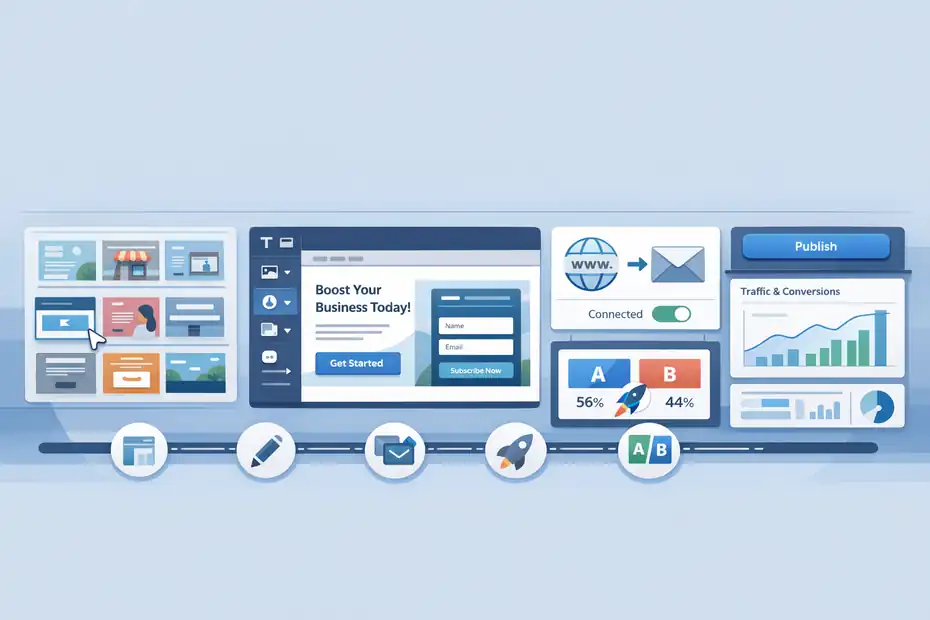
Before you decide whether the price is fair, you need to understand the workflow. Leadpages feels easy because it compresses a lot of setup into a few basic steps.
The Basic Workflow Is Simpler Than WordPress For Campaign Pages
A beginner usually starts with a template, edits the copy and visuals, connects a domain, adds a form or checkout, links an integration, and publishes.
That is the core flow. Leadpages is built specifically to reduce the number of moving parts required to get a conversion-focused page online, which is why it appeals to people who do not want to touch WordPress themes, plugin conflicts, or custom code.
Leadpages’ site builder page even frames this as accomplishing in a few hours what might take weeks in WordPress.
- Step 1: Choose a landing page or site template.
- Step 2: Edit the messaging, offer, and call to action.
- Step 3: Connect your domain and email platform.
- Step 4: Publish and send traffic.
- Step 5: Test and refine with built-in A/B testing.
That’s why beginners often describe Leadpages as “easy.” It reduces technical friction. It does not reduce strategic friction. You still need a solid offer, clear copy, and a traffic source.
Why Simplicity Helps More Than Fancy Features At The Start
Most beginners do not fail because they lacked AI personalization, advanced dynamic content, or enterprise collaboration. They fail because nothing gets published. In that sense, Leadpages has the right bias. It pushes you toward shipping pages quickly and improving them later.
The broader conversion benchmark point matters here too. Unbounce says its benchmark report is based on more than 57 million conversions across 41,000-plus landing pages, and its CRO guidance emphasizes that even small conversion improvements can materially improve results from the same traffic. That makes a beginner-friendly testing workflow more valuable than it might sound at first.
- Beginner reality: A simple page that is live and collecting emails beats a perfect page still sitting in drafts.
- Where Leadpages helps: Fewer setup decisions, easier publishing, built-in testing.
- Where beginners still struggle: Writing weak headlines, offering vague lead magnets, or sending cold traffic to a page that was never validated.
I believe this is the fairest way to judge Leadpages: not by whether it has the most features, but by whether it helps you get to version one faster without wrecking conversion quality.
Getting Started With Leadpages Step By Step
This is where most reviews get too fluffy. Let me break it down the way a real beginner would experience it.
Step 1: Build Your First Lead Capture Page
Your first page should be narrow. Not a homepage. Not a “welcome to my business” page. Just one page with one job: get the email signup, book the call, or sell the starter offer.
A good beginner setup looks like this:
- Headline: Promise one clear outcome.
- Subheadline: Explain who it is for and why it matters now.
- Offer section: Show the lead magnet, consultation, or product.
- Form or button: Ask for the smallest reasonable action.
- Proof: Add one testimonial, stat, or trust marker.
- Thank-you page: Confirm the action and set the next step.
Leadpages supports unlimited traffic and leads on its listed plans, includes landing pages, and lets you connect forms to popular email platforms such as Mailchimp, Kit, AWeber, and ActiveCampaign through integrations.
My advice: Do not over-design the page. Beginners lose time tweaking colors and spacing when the bigger win usually comes from tightening the promise and clarifying the CTA.
Step 2: Connect Your Email Tool And Domain
This is the moment where beginners either feel relieved or annoyed. The relief comes from Leadpages handling a lot of the page setup. The annoyance comes when you realize you still need your stack connected correctly.
Leadpages supports integrations with major email platforms and lets you connect custom domains depending on plan level. On the current pricing page, Standard includes one custom domain and Pro includes three. The integrations page lists connections for tools like Mailchimp, Kit, AWeber, and ActiveCampaign.
- Best practice: Use one domain for all campaigns to keep branding clean.
- Best practice: Tag leads based on page or offer so your follow-up emails are relevant.
- Mistake to avoid: Sending every new lead into one generic list with no segmentation.
If you are a true beginner, this connection step is where the product starts showing its real value. A builder is not useful unless it fits into your actual lead flow. Leadpages handles that part well enough for small businesses that do not need complicated automation.
Step 3: Publish, Test, And Verify The Whole Funnel
Publishing the page is not the finish line. You need to test the experience like a visitor would. That includes the form, the thank-you page, and any checkout or follow-up email.
Leadpages’ support docs note that checkouts can only be fully tested on published pages at their live URL, not in preview mode. If you use payments, the official guidance suggests temporarily setting the Stripe product to $0 for flow testing, then restoring the real price afterward.
For pop-ups, there is another beginner gotcha: standalone pop-up publishing can involve copying and pasting code onto your site, and timed and exit pop-ups do not work on mobile devices.
Leadpages also notes that support for troubleshooting site-specific embed issues may be limited if the problem is on your website side.
That is why I recommend this quick launch checklist:
- Check 1: Test the form submission yourself.
- Check 2: Confirm the lead reaches your email platform.
- Check 3: Open the page on mobile.
- Check 4: Test page speed and button visibility.
- Check 5: Make sure the thank-you page gives a next action.
The Features That Matter Most For Beginners
You do not need a feature dump. You need to know which features genuinely change the beginner experience.
Landing Pages, Templates, And A/B Testing Are The Real Core
The most valuable part of Leadpages is not “having a builder.” Plenty of platforms have that. The value is that Leadpages combines templates, page publishing, lead capture, and testing in one workflow that is manageable for a non-technical user.
The official pricing page says current plans include unlimited A/B testing, while Leadpages’ product pages focus on high-converting pages, pop-ups, and alert bars.
For a beginner, that means you can build a page, duplicate it, test a new headline or CTA, and learn from actual traffic without buying a separate testing platform.
- Most useful first test: Headline vs. headline.
- Second useful test: Button copy.
- Third useful test: Short form vs. longer form.
- Least useful early test: Tiny style changes that do not affect intent.
I suggest treating Leadpages as a testing platform disguised as a page builder. That mindset makes the monthly cost easier to justify because you are paying for learning speed, not just publishing.
Pop-Ups, Alert Bars, And Checkouts Can Add Real Value
A lot of beginners overlook the supporting conversion tools. Pop-ups and alert bars can help you squeeze more value from existing traffic, especially if you already have a blog or basic website.
Leadpages offers alert bars for announcements, lead magnets, and traffic redirection, and supports multiple pop-up trigger types including standard, timed, and exit intent. But again, timed and exit pop-ups are not supported on mobile, which is a bigger limitation than many reviews mention.
Checkouts are also more useful than they sound for simple businesses. You can accept one-time payments or recurring subscriptions through Stripe, and Leadpages says there are no added transaction fees on its side.
There is also support for a single one-time order bump. But one-click upsells are not available, and checkout field flexibility is limited because Stripe-required fields stay fixed.
This is the pattern you will see throughout Leadpages: strong beginner convenience, moderate customization, and obvious edges once your business model becomes more complex.
Leadpages Pricing: Fair Deal Or Beginner Trap?
This is the part where the review has to get honest. A tool can be easy and still be overpriced for your stage.
Current Leadpages Pricing And What You Actually Get
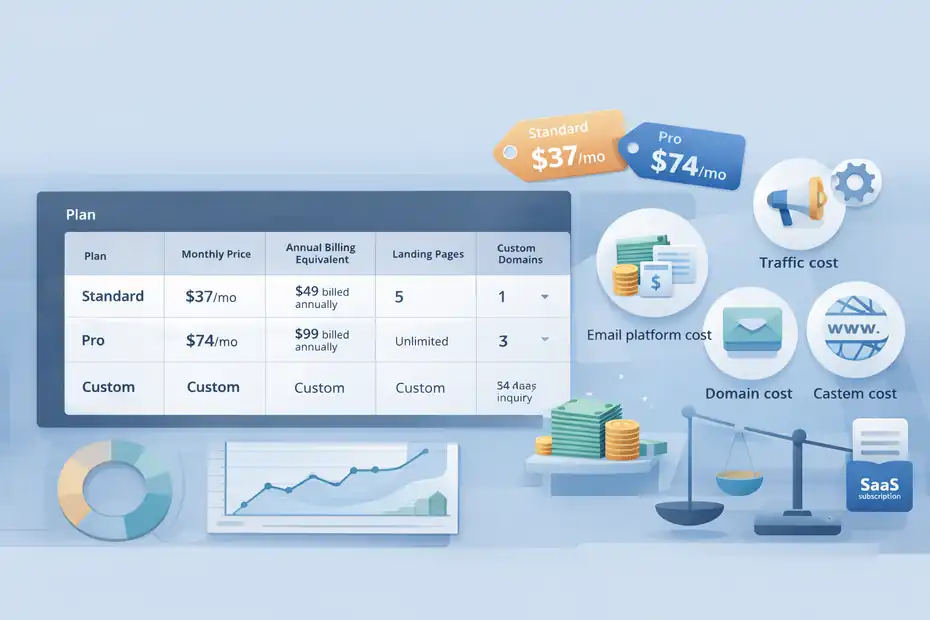
Leadpages’ official pricing page currently lists Standard at $37 per month, billed annually at $49, and Pro at $74 per month, billed annually at $99. Standard includes 5 landing pages, unlimited traffic and leads, one custom domain, standard integrations, unlimited A/B testing, sales and payments, blog monetization, client sub-accounts, and advanced integrations according to the current plan page.
Pro expands that to unlimited landing pages and three custom domains. There is also a 14-day free trial and a Custom tier with custom pricing.
Current official pricing is summarized below.
| Plan | Monthly Price | Annual Billing Equivalent | Landing Pages | Custom Domains | Trial |
|---|---|---|---|---|---|
| Standard | $37/mo | $49 billed annually | 5 | 1 | 14 days |
| Pro | $74/mo | $99 billed annually | Unlimited | 3 | 14 days |
| Custom | Custom | Custom | Custom | Custom | Sales inquiry |
Here is my honest take: The Standard plan can be reasonable if one good page brings in leads worth more than the monthly cost. But if you are brand new, with no traffic and no validated offer, even $37 a month can become dead weight quickly.
The Real Cost Is Not Just The Subscription
Beginners often ask, “Is Leadpages expensive?” I think the better question is, “Expensive compared to what outcome?” If the tool helps you launch a page in a day instead of spending two weeks wrestling with site setup, the cost can be justified.
If you never send traffic, never test, and never build follow-up emails, it becomes another SaaS subscription you resent.
You also need to remember the surrounding costs:
- Traffic cost: Ads, sponsorships, or even the time required to create organic traffic.
- Email platform cost: Leadpages integrates with email tools, but does not replace them.
- Domain cost: Small, but still part of the setup.
- Opportunity cost: Paying monthly while your page is not yet converting.
This is why I tell beginners to make a 90-day math check. If one lead is worth $20 to you and Leadpages helps generate 10 extra qualified leads in three months, the subscription may be easy to defend. If your lead value is unclear, your pages are untested, and your traffic is inconsistent, the cost feels heavier very fast.
Where Leadpages Feels Easy For Beginners
Not every strength needs to be dramatic. Sometimes the best feature is simply that the platform gets out of your way.
It Removes A Lot Of Technical Friction
Leadpages is genuinely easier than more flexible platforms for getting basic campaigns online.
The company positions the product around drag-and-drop building, fast publishing, and avoiding developer dependence, and that matches the way many users describe it on review platforms.
G2’s review summary highlights ease of use, intuitive design, fast page creation, and helpful support as common positives.
- Easy win: You do not need to understand hosting architecture to launch a lead page.
- Easy win: You can connect common email tools without custom engineering.
- Easy win: You can start testing faster than you probably would on a more open-ended system.
I think this matters more than advanced users sometimes admit. Beginners are usually not choosing between Leadpages and an enterprise platform. They are choosing between Leadpages and procrastination.
It Encourages Better Marketing Behavior
A hidden advantage of Leadpages is that it nudges you into campaign thinking. Instead of dumping every offer onto one homepage, you start building one-page experiences around one goal. That alone can improve results.
Unbounce’s benchmark reporting underscores why this mindset matters: landing page optimization has measurable upside, and even moving from a 1% conversion rate to 2% would double results from the same traffic and spend. Leadpages gives beginners a practical route into that habit by bundling page creation with testing and conversion tools.
A realistic beginner scenario might look like this: You run a small coaching business, create a “Free 15-Minute Clarity Call” page, connect it to your email platform, and test two headlines over a month. That is not flashy. But it is real marketing infrastructure. And for many small businesses, that is the difference between random posting and a repeatable lead engine.
Where Leadpages Can Become A Costly Mistake
This is where the review needs some bluntness. Leadpages is not a mistake by default. It becomes a mistake when you buy it for the wrong reason.
It Is A Bad Buy If You Do Not Yet Have A Clear Offer
If you do not know what you are trying to sell, what problem you solve, or what your lead magnet is supposed to lead into, Leadpages will not rescue you. It may actually hide the real issue because the builder feels productive.
A lot of beginners confuse page quality with offer quality. You can publish a very clean page that still converts poorly because the promise is weak, the audience is too broad, or the CTA asks for too much too soon. No landing page tool fixes that. The best it can do is help you test faster.
- Costly mistake: Paying for the tool before validating the offer.
- Costly mistake: Building pages with no distribution plan.
- Costly mistake: Thinking “I launched a page” means “I built a funnel.”
I believe this is the biggest reason some beginners call Leadpages overpriced. The platform did its job. Their strategy did not.
Customization And Commerce Limits Matter More Than Sales Pages Admit
Leadpages is strong for simple funnels. The problems start when you want edge-case flexibility.
Some examples from official docs are worth calling out plainly: checkout forms do not currently support coupon or promo code fields; key payment fields are not fully customizable; one-click upsells are not available; some digital product delivery workflows depend on account timing or external integrations; and timed or exit pop-ups do not work on mobile.
Those are not deal-breakers for every beginner. But they are absolutely deal-breakers for some business models.
Use this filter:
- Still fine for Leadpages: Lead magnets, service bookings, simple paid downloads, newsletter growth.
- Starting to strain: Discount-heavy offers, advanced funnel logic, complex product catalogs.
- Probably wrong tool: Full ecommerce, heavily customized checkout flows, sophisticated lifecycle automation inside one platform.
That is why I would never call Leadpages universally “worth it.” It is worth it for the right simplicity.
Leadpages Vs Other Landing Page Builders For Beginners
You do not evaluate value in a vacuum. You evaluate it against alternatives and your actual stage.
Leadpages Vs Unbounce Vs Instapage
Official pricing pages show Leadpages starting lower than both Unbounce and Instapage. Unbounce’s pricing page lists plans beginning at $99 per month billed annually, while Instapage lists Create at $79 per month and Optimize at $159 per month, both with visitor allowances attached.
Leadpages starts at $37 per month on its current pricing page, which is a major difference for beginners watching budget closely.
Here is the practical comparison.
| Platform | Entry Price | Best For | Main Beginner Advantage | Main Beginner Drawback |
|---|---|---|---|---|
| Leadpages | $37/mo | Solopreneurs and small businesses | Lower cost, simpler setup | Less flexibility at the edges |
| Unbounce | $99/mo | Marketers focused on CRO depth | Strong optimization toolkit | Bigger cost jump for beginners |
| Instapage | $79/mo | Teams wanting more design and collaboration | Strong builder and collaboration features | Visitor limits and higher cost |
If you are a beginner paying with your own money, Leadpages often wins the first-round comparison because it gets you into the game at a lower monthly cost.
When A Cheaper Or Different Option Makes More Sense
That said, the “best” platform depends on what you are optimizing for.
- Choose Leadpages when: You want fast deployment, basic testing, and simple lead generation without enterprise pricing.
- Choose Unbounce when: You already care deeply about optimization tooling and expect to run serious experiments.
- Choose Instapage when: Collaboration, design precision, and larger marketing workflows matter more than entry-level affordability.
My honest opinion is that Leadpages occupies the most practical middle ground for beginners who want something more focused than a generic site builder but less expensive than premium CRO platforms. The risk is not that Leadpages is a bad product. The risk is that beginners sometimes buy mid-tier software before they have mid-tier traction.
Common Beginner Mistakes With Leadpages
Most bad results come from how the platform is used, not from the platform existing.
Mistake 1: Treating The Template As The Strategy
Templates save time, but they do not create positioning. A beginner often swaps in a logo, changes the colors, writes a vague headline like “Grow Your Business Today,” and wonders why nothing happens.
Use the template for structure, not messaging. The page still needs:
- A specific audience: Who is this for?
- A specific pain point: What problem gets solved?
- A specific next step: What exactly should the visitor do?
- A specific reward: What happens after they convert?
This is one reason benchmark data matters. Landing page performance varies significantly by industry and intent, so copying a layout without understanding the offer will not magically produce above-average conversion. Unbounce’s benchmark report is based on a very large dataset precisely because context changes outcomes so much.
I suggest spending more time on the headline and offer than on design tweaks. That usually gives beginners the biggest lift.
Mistake 2: Launching Without Measurement Or Follow-Up
A landing page without tracking is just a pretty page. A landing page without follow-up is a leaky bucket. Leadpages can capture the lead, but the business value comes from what happens after that.
At minimum, a beginner should know:
- Traffic source: Where visitors came from.
- Conversion rate: How many visitors took the action.
- Lead quality: Whether the signups are relevant.
- Next action rate: Whether people open emails, book calls, or buy.
Leadpages supports integrations and checkouts, but it does not remove your responsibility to define the funnel. If your follow-up emails are weak or nonexistent, your page performance may look worse than it really is because the back end is broken.
In my experience, this is where beginners underestimate the total system. They buy a landing page tool when what they really need is a lead capture process.
How To Get Better Results From Leadpages After Launch
This is where the subscription starts earning its keep. Not at publish time, but in the weeks after.
Focus On Conversion Levers That Actually Move Numbers
You do not need ten experiments. You need the right few. Since landing page optimization can dramatically improve outcomes from the same traffic, the smartest beginner move is to test high-impact elements first.
Unbounce’s CRO framing makes that point clearly: small conversion rate gains can create outsized performance gains.
Start here:
- Test 1: Headline promise.
- Test 2: CTA wording.
- Test 3: Hero section image or proof element.
- Test 4: Form length.
- Test 5: Call booking vs. free resource offer.
A realistic example: Imagine you are a freelance designer. Version A says “Book a Discovery Call.” Version B says “Get A Free 10-Minute Homepage Audit.” Same audience, different promise. The second offer may produce more top-of-funnel leads because it feels easier and more concrete.
That is the kind of testing Leadpages is genuinely useful for.
Use Supporting Tools Only When They Solve A Real Bottleneck
This is where I think beginners often get distracted. Pop-ups, alert bars, and checkouts are useful, but only when they address a clear problem.
- Use an alert bar when: You want to drive existing site visitors toward one focused campaign.
- Use a pop-up when: Your blog gets steady traffic and you want more email opt-ins.
- Use a checkout when: You sell a simple service, digital product, or recurring membership through Stripe.
Official docs show those features are real and practical, but also limited in beginner-important ways, especially on mobile pop-up behavior and checkout customization.
My rule is simple: add one extra conversion tool only after the main page is working. Otherwise you end up layering tactics on top of a weak core offer.
Final Verdict: Easy Start Or Costly Mistake?
Leadpages is an easy start when you are clear on your offer, need pages live quickly, and want a lower-cost entry into real landing page testing than tools like Unbounce or Instapage usually offer.
Official pricing and product pages support that value story: lower starting price, built-in A/B testing, standard integrations, pop-ups, alert bars, and Stripe-powered selling in one package.
It becomes a costly mistake when you are still guessing about your audience, still have no traffic plan, or actually need deeper ecommerce and customization features than Leadpages is built for.
The official support docs make those limits pretty clear once you dig into them: mobile restrictions for timed and exit pop-ups, limited checkout customization, no coupon field, and no one-click upsells.
So here’s my honest conclusion: For beginners who want a focused lead generation tool and are ready to use it properly, Leadpages is still a solid choice in 2026. For beginners hoping software will compensate for an unclear offer or missing strategy, it will feel expensive fast. The platform is not the mistake. Buying it too early might be.
FAQ
What is Leadpages and is it good for beginners?
Leadpages is a landing page builder designed to help beginners create high-converting pages without coding. It is good for beginners who want to launch quickly, but it works best when you already have a clear offer and traffic plan in place.
Is Leadpages worth the price for beginners?
Leadpages can be worth the price if you actively use it to generate leads or sales. However, beginners without a validated offer or consistent traffic may find the monthly cost hard to justify in the early stages.
How easy is it to use Leadpages for the first time?
Leadpages is considered easy to use because it offers templates, drag-and-drop editing, and simple publishing. Most beginners can build and launch a landing page within a few hours without needing technical skills or prior experience.
What are the main limitations of Leadpages?
Leadpages has limitations in checkout customization, lacks coupon code support, and offers limited advanced funnel features. It is not ideal for complex ecommerce setups or businesses that need deep automation and flexible design control.
Can you make money using Leadpages as a beginner?
Yes, beginners can make money using Leadpages by capturing leads, promoting services, or selling simple digital products. Success depends more on your offer, messaging, and traffic strategy than the platform itself.

I’m Juxhin, the voice behind The Justifiable.
I’ve spent 6+ years building blogs, managing affiliate campaigns, and testing the messy world of online business. Here, I cut the fluff and share the strategies that actually move the needle — so you can build income that’s sustainable, not speculative.
Related posts:
 Leadpages Review For Coaches And Consultants: Book More Clients Faster?
 Leadpages Review For Bloggers Building Email Lists: Grow Faster Or Not?
 Internet Marketing Ideas: Increase Your Marketing Efforts
 How to Increase Social Media Followers
 Squirrly SEO – The Ultimate WordPress SEO Plugin for Boosting Your Website’s Rankings
 How to Get More Leads: 5 Proven Strategies to Boost Sales Now