Table of Contents
Some links on The Justifiable are affiliate links, meaning we may earn a small commission at no extra cost to you. Read full disclaimer.
Honest Later review for Instagram marketing is a smart search if you’re tired of polished landing pages and want to know whether the tool actually helps you grow.
I’ve gone through Later’s current features, pricing, documented limitations, and real user feedback to answer the question most people really mean: will this save you time and improve your Instagram results, or will it just give you another dashboard to manage?
My view is simple: Later is genuinely useful for visual planning and consistent publishing, but whether it drives real growth depends heavily on how you use it and which plan you choose.
What Later Actually Is For Instagram Marketing
Later started as an Instagram-first scheduler, and even now, that is still where the product feels most natural.
The platform currently positions itself as an all-in-one social media management system with scheduling, analytics, and Link in Bio features, while also supporting multiple social networks beyond Instagram.
The Core Job Later Does Best
If I had to sum Later up in one sentence, I’d say this: it helps you organize Instagram content before posting so your account looks intentional instead of chaotic. That matters more than many people admit.
For a lot of creators and brands, Instagram marketing breaks down for boring reasons. Content gets created too late. Reels sit in Google Drive folders. Carousels are ready, but no one remembers to post them. Captions are rushed. The feed starts looking random. Later is designed to solve exactly that workflow mess by giving you a calendar, media library, scheduler, and feed preview in one place.
What makes that especially relevant for Instagram is the visual planner. Later’s Visual Planner lets you preview scheduled posts alongside published ones and rearrange upcoming content by drag and drop. That is a small feature on paper, but in practice it is one of the clearest reasons people keep using Later instead of a simpler native workflow.
I believe that is also why Later gets described as “easy” and “visual” so often in user reviews. One recent G2 review specifically praised the drag-and-drop calendar and how useful it was for maintaining a consistent visual identity on Instagram.
What Later Does Not Magically Do
This is where many reviews get too generous. Later does not create demand by itself. It does not fix weak positioning, boring creative, bad hooks, or offers nobody wants.
A scheduler can improve consistency, reduce missed posts, and make testing easier. It cannot make average content perform like great content. That sounds obvious, but it is the exact trap many small businesses fall into. They subscribe to a tool, become more “organized,” and then wonder why growth still feels flat.
In my experience, Later works best when your bottleneck is execution, not strategy. If you already know who you’re targeting, what content pillars you post, and which actions matter most, Later can absolutely help. If your Instagram feels directionless, Later may simply help you publish directionless content more efficiently.
That is the big distinction behind any honest later review for Instagram marketing: it is a workflow tool first, a growth multiplier second. The multiplier only shows up once the fundamentals are already there.
Who Usually Gets The Most Value
The strongest fit is pretty clear.
Creators who care about feed aesthetics, ecommerce brands that need a tidy posting calendar, agencies managing multiple profiles, and small marketing teams that want approvals and visibility all line up well with Later’s strengths.
Later’s current plans include multiple users, social sets, approval workflows, analytics windows that expand by plan, and shared calendar options that make collaboration easier than a purely manual Instagram process.
A solo creator posting casually can still use it, but the cost-benefit tradeoff becomes more debatable. Instagram itself already lets professional accounts schedule certain posts natively, and Meta’s ecosystem covers some planning basics too.
Official Instagram help says eligible users can schedule up to 25 posts a day up to 30 days in advance from within Instagram.
So the question is not “can Later schedule Instagram?” It clearly can. The real question is whether the extra planning, analytics, link tracking, and workflow control justify paying for something beyond native scheduling. That answer depends on your content volume and your need for structure.
How Later Works In Real-World Instagram Workflows
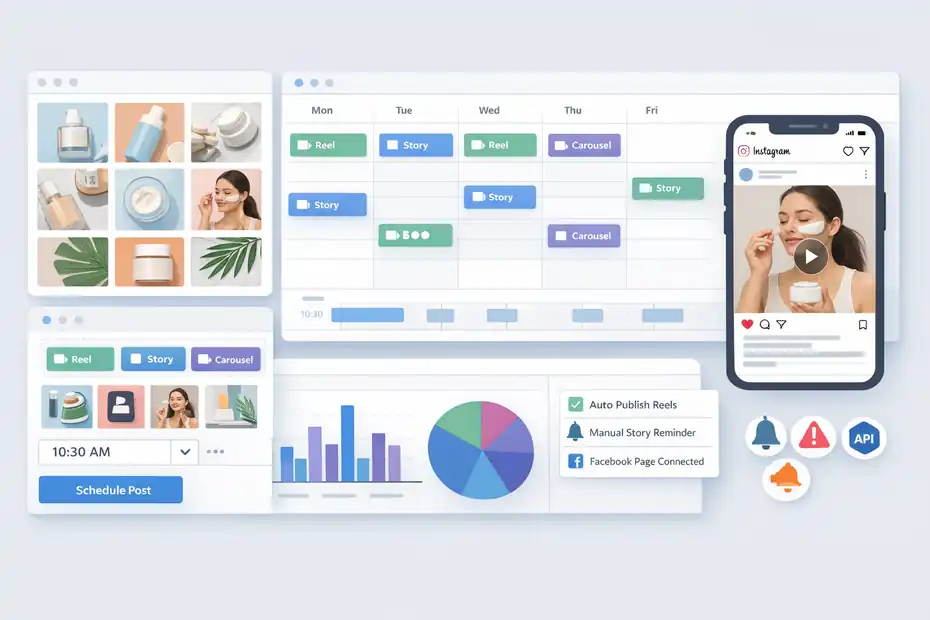
To judge whether a tool is hype, you have to look at daily use, not feature pages.
Later’s real value shows up in how a post moves from idea to asset to scheduled content to reporting.
Planning Content Before It Becomes A Fire Drill
A lot of Instagram marketing problems start before posting day. You know you need three Reels this week, two Story sequences, and a carousel tied to a product launch. But the assets live in different folders, captions are unfinished, and no one is sure what goes live first.
Later’s content flow is built to reduce that chaos. You upload assets into the Media Library, create posts in the calendar, preview them visually, and assign dates and times. That means you are not just posting faster. You are creating a repeatable publishing system.
Imagine you run a skincare brand with four content pillars: education, testimonials, product demos, and founder stories. Without a planner, you might accidentally post three educational carousels in a row and ignore demos for a week.
With a visual calendar, you can spot imbalance quickly and fix it before it hurts engagement or conversions.
This is one reason I suggest Later for content-heavy brands rather than occasional posters. The more moving pieces you have, the more useful planning infrastructure becomes.
Scheduling Reels, Carousels, And Stories
Later currently supports Instagram single-image posts, Reels, Stories, multi-photo carousel posts, and collaborative posts, with some limitations depending on account type and plan. Reels scheduling is available across plans, while some Instagram publishing features such as carousel publishing and Stories have plan or profile-type restrictions.
This matters because Instagram growth in 2026 is heavily format-driven. If your tool handles static feed posts well but makes Reels or Stories awkward, it quickly becomes less useful. Later at least keeps those formats inside the same workflow, which is a genuine strength.
That said, there are limitations you should know before subscribing. Later’s help center states that personal Instagram profiles cannot publish through Later because Instagram only allows API publishing for business or creator profiles.
It also notes that auto-publishing Stories is only available for business profiles, while creator profiles must use notification publishing for Stories.
Those details matter more than flashy marketing copy. If you are a creator using a creator profile and expecting fully automatic Story publishing, you may be disappointed. That is not always Later’s fault. Some of it comes from Instagram API rules. But from the buyer’s perspective, the limitation still affects your workflow.
Where The Experience Feels Smooth, And Where It Doesn’t
The smooth part is the visual scheduling and the feeling of seeing your week or month mapped clearly. That is where Later still feels polished.
The less smooth part is the gap between “scheduled” and “fully frictionless.” Supported post types, auto-publish settings, Facebook Page connections, and permissions can all affect how cleanly publishing works.
Later’s own troubleshooting documentation notes that some features require your Instagram profile to be connected to a Facebook Page and that missing permissions are a common cause of connection issues.
This lines up with user feedback too. One recent G2 review praised the interface but complained that support and analytics needed improvement. Another user mentioned difficulty scheduling Stories.
So here is my honest take: Later is easier than a spreadsheet-plus-phone-reminder workflow, but it is not frictionless enough that you can ignore setup details. If you hate technical setup and want everything to work perfectly without checking permissions, you may find the early experience more annoying than expected.
Step-By-Step Setup: How To Use Later Properly For Instagram Marketing
A fair review should not just say whether the tool is good. It should show what “using it well” actually looks like. Later can feel underwhelming when it is used as a simple posting queue. It gets much better when you build a real system around it.
Step 1: Connect The Right Instagram Account Type
Before anything else, make sure your Instagram account setup matches Later’s requirements. Later states that Instagram publishing through the platform is only available for business or creator profiles, not personal accounts. Some functions also require connecting the Instagram profile to a Facebook Page.
That sounds basic, but it is where many people lose time. They sign up, import media, start testing, and then realize publishing or analytics are limited because the account was connected incorrectly.
My advice is simple: Use a professional account from day one, check permissions carefully, and confirm whether your workflow depends on business-only features such as Story auto-publishing. If you skip that step, every later complaint about failed posts or missing functionality becomes more likely.
A small business example makes this clearer. If you run a local bakery and want a team member to schedule Stories automatically during launch week, a creator profile may not be enough for the workflow you want. A business profile is the safer choice in that case.
Step 2: Build Content Buckets In The Media Library
Later becomes more useful once your assets are organized. The Media Library is not glamorous, but it is one of the easiest places to save time.
I recommend uploading content in themed batches instead of one post at a time. For example, group assets into buckets like behind-the-scenes, product education, customer proof, founder voice, and promotion. That makes calendar planning faster because you are choosing from a prepared library rather than reacting under deadline pressure.
This is also where many brands quietly improve consistency. When you can see your assets together, patterns become obvious. Maybe all your visuals lean too product-heavy. Maybe your testimonial content is too sparse. Maybe your Reel mix is strong, but you have almost no Story assets prepared.
Later’s help content explicitly highlights uploading, organizing, and collecting media as a core part of the platform.
In my experience, this step matters more than AI captions or smart timing. Instagram growth often improves because the team finally gets organized enough to post better content consistently, not because a tool uncovers some secret tactic.
Step 3: Use The Visual Planner To Balance Your Feed
The visual planner is where Later earns its Instagram-first reputation. Official product pages and help docs describe the feature as a way to preview scheduled Instagram photos and videos next to published posts and rearrange them with drag and drop.
This matters for more than aesthetics. Good Instagram marketing is partly about sequencing.
You do not want every post to ask for a sale. You do not want three low-context product shots back-to-back. You do not want your most important launch asset buried between unrelated graphics. A feed planner helps you notice those issues before they go live.
I suggest using a simple ratio. For every direct conversion post, aim to surround it with posts that build trust, curiosity, or authority. A skincare brand might alternate between tutorial Reel, customer result carousel, ingredient explainer, then launch post. A coach might rotate tip Reel, client win, myth-busting carousel, then offer CTA.
That kind of balance is hard to see from a list view alone. It is easy with a visual planner. That is exactly why Later still stands out for Instagram users who care about brand presentation.
Step 4: Schedule Around Audience Behavior, Not Just Convenience
A scheduler is only as smart as the timing behind it. Later promotes smart scheduling and best-times-to-post functionality on higher plans, but timing should still be validated against your own audience behavior.
Third-party benchmark data can still help as a starting point. Buffer’s 2026 analysis of more than 9.6 million Instagram posts found that top posting times clustered around Thursday at 9 a.m., Wednesday at 12 p.m., and Wednesday at 6 p.m., with Wednesday and Thursday performing best overall.
I would treat that as a baseline, not a rule. A fitness coach serving busy professionals may find early mornings or late evenings work better. A local restaurant may see stronger results before lunch and dinner. A teen fashion brand may win on weekends even though broad datasets say weekends underperform.
The smart move is to schedule in Later, test a few windows consistently for 30 days, and compare saves, reach, profile visits, clicks, and conversions. That is how a tool becomes useful instead of decorative.
Features That Actually Help Growth, And Features That Mostly Sell The Tool
This is where the honest part matters. Not every feature is equally valuable. Some improve results directly. Others mostly make the platform easier to market.
Features I Think Genuinely Matter
The first real growth feature is consistency. That sounds boring, but it is true. Brands that publish on a dependable cadence almost always learn faster because they generate more data, refine faster, and stay top of mind more often.
The second is visual planning. On Instagram, presentation still matters. Later’s grid preview is not just pretty. It helps you maintain content variety, pace promotional posts more carefully, and reduce feed clutter.
The third is Link in Bio tracking. Later describes Link in Bio as a mini website inside your social profile and says it can connect posts to specific URLs while tracking clicks, page views, and click-through rates.
That is useful because Instagram marketers often obsess over reach while ignoring traffic quality. If one Reel gets fewer likes but sends more clicks to a product page, that is important. Link in Bio analytics helps reveal that.
The fourth is collaborative workflow. Shared calendars, multiple users, and approval structures matter if more than one person touches the account. For agencies and teams, this is often the difference between organized marketing and endless Slack messages.
Features That Sound Bigger Than They Usually Are
AI content tools are included in paid plans, but I would not buy Later mainly for that. The pricing page shows limited AI credits by plan, and AI writing inside scheduling platforms is often useful for rough drafts, not polished brand voice.
Future trends and competitive benchmarking on higher plans sound interesting too, especially for larger brands. Later says future insights is powered by social listening and that competitive benchmarking is available on Scale.
Still, most small businesses do not need predictive trend language as much as they need clearer messaging, stronger offers, and better content packaging. I am not saying those features are useless. I am saying they are rarely the reason results improve first.
If your Instagram basics are weak, advanced features can become expensive distractions. A clean calendar, better hooks, and clearer CTAs usually move the needle faster than premium dashboards.
Later Pricing: Is It Worth The Money?
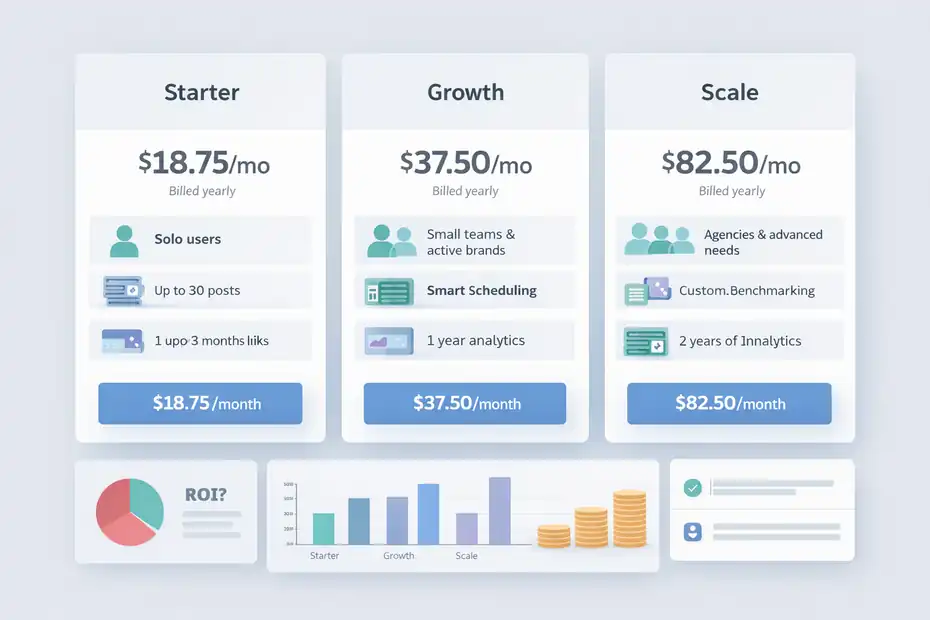
Pricing is where hype gets tested fast. A tool can be good and still not be worth paying for in your situation.
Later’s public pricing currently shows Starter at $18.75 per month billed yearly, Growth at $37.50 per month billed yearly, and Scale at $82.50 per month billed yearly. Starter includes one social set, one user, up to 30 posts per profile, Link in Bio, and up to three months of analytics.
Growth expands users, social sets, smart scheduling, and analytics history to one year. Scale adds custom analytics, more users, more profiles, and up to two years of analytics.
Pricing Table: What You’re Really Paying For
| Plan | Public Price (Annual Billing) | Best For | Main Limits Or Advantages |
|---|---|---|---|
| Starter | $18.75/month | Solo users with light scheduling needs | 1 user, 30 posts per profile, 3 months analytics |
| Growth | $37.50/month | Small teams and active brands | 2 users, smart scheduling, 1 year analytics |
| Scale | $82.50/month | Agencies and advanced reporting needs | custom analytics, benchmarking, 2 years analytics |
My honest opinion: Starter is reasonable if you post often enough to justify structure, but it may feel thin if you expect robust analytics. Growth is where Later starts feeling like a serious operating tool rather than a basic scheduler. Scale only makes sense if reporting, collaboration, and competitive tracking are important enough to affect revenue decisions.
When Later Feels Worth It
Later is usually worth it when one of these is true.
You publish enough content that missed posts and messy workflow cost you real opportunities. You need approvals. You care about how the feed looks. You want link tracking connected to posts. Or you manage multiple profiles and cannot rely on native posting alone.
A realistic scenario: A boutique ecommerce brand posting four Reels, two carousels, and daily Stories per week. In that case, even a modest lift in consistency and click tracking can justify the monthly cost because the tool saves staff time and keeps launches organized.
When It Feels Overpriced
Later feels overpriced when your Instagram activity is light, your content strategy is unclear, or native Instagram scheduling already covers most of what you need.
If you post twice a week, do not care much about feed layout, and rarely review analytics, you may not see enough return. In that case, the platform can become one more subscription that makes you feel productive without changing business outcomes.
That is why the answer to “is Later worth it?” is not universal. It depends less on the tool and more on your operating complexity.
The Biggest Pros And Cons In An Honest Later Review For Instagram Marketing
By this point, the pattern is clear: Later is genuinely strong in some areas and noticeably weaker in others.
Pros: Where Later Earns Its Reputation
The biggest advantage is usability. Multiple G2 reviewers describe it as easy to use, straightforward, and especially helpful for visual Instagram planning.
The second advantage is Instagram-native feel. Even though Later supports many networks, its visual planner, grid preview, Link in Bio integration, and content calendar still make the product feel most natural for Instagram-centric brands.
The third advantage is multi-format support. Reels, Stories, carousels, single-image posts, and collaborative posts are all supported in some form, which helps keep your workflow centralized.
The fourth is data depth by plan. Even if Later is not the most advanced analytics platform in the world, one year or two years of history on higher tiers is useful for trend analysis, seasonal planning, and stakeholder reporting.
Cons: Where The Hype Starts To Slip
The clearest downside is that some useful features are either restricted by plan or affected by API rules. Stories auto-publish only for business profiles. Personal accounts cannot publish through Later.
Some features require Facebook Page connections. Carousel and Stories support also depends on current paid-plan conditions in Later’s help documentation.
The second downside is analytics expectations. Later offers analytics, yes, but user feedback still points to complaints about depth and support. One G2 reviewer explicitly said support and analytics needed improvement.
The third downside is that Later can be mistaken for a growth engine when it is really a publishing and organization tool. That leads buyers to expect more direct ROI than the software alone can create.
I would phrase it this way: Later is very good at helping good marketers execute. It is much less effective at rescuing weak strategy.
Common Mistakes People Make When Using Later For Instagram
A tool review is not complete without looking at how people sabotage their own results.
Mistake 1: Scheduling Too Far Ahead Without Feedback Loops
Many users love the feeling of “batching a month of content,” but Instagram moves fast. Audience behavior, trends, and even platform features can shift quickly. Scheduling is helpful, but over-scheduling can make your content feel stale.
Instagram itself keeps evolving, and recent platform coverage shows new scheduling-related changes around features like Trial Reels. That is a reminder that rigid workflows can age badly when the platform changes.
I suggest planning two to three weeks ahead, not blindly locking an entire month unless your content is evergreen. Leave room for reactive content, social proof, and posts tied to live audience questions.
Mistake 2: Measuring Likes Instead Of Business Outcomes
This is a huge one. Later’s Link in Bio and analytics features are most useful when tied to actions that matter: clicks, leads, sales, bookings, email signups, or profile actions.
If you only check likes and views, you miss the real value of organized Instagram marketing. Sometimes a lower-reach carousel will outperform a viral Reel in actual revenue because it attracts higher-intent visitors.
Mistake 3: Using The Visual Planner As An Aesthetic Toy
A beautiful grid is nice. A strategic grid is better.
Some brands use Later’s planner only to color-coordinate posts. That can help branding, but it is not enough.
The better use is pacing content types, balancing promotional intensity, and mapping posts to specific goals. A clean-looking feed that does not educate, build trust, or convert is still weak marketing.
Mistake 4: Ignoring Technical Publishing Limits
Later documents multiple Instagram-related limitations, including profile type requirements, post limits, unsupported effects, and auto-publish conditions.
For example, its help docs note unsupported effects like trending music, sounds, stickers, and polls for some Instagram post types through Later’s publishing support.
Later also documents a 50-post auto-publish limit within a moving 24-hour period per Instagram business or creator profile.
If you ignore those details, you may blame the tool for issues that were documented beforehand.
Advanced Optimization: How To Get Real Growth With Later Instead Of Just More Scheduled Posts
This is where the review becomes practical. A scheduler helps most when it supports a better testing system.
Build A Weekly Testing Rhythm
I recommend creating a simple repeatable test cycle.
- Week one: test hooks.
- Week two: test formats.
- Week three: test posting times.
- Week four: test CTAs and offers.
Later’s calendar and analytics history make that easier because you can structure content intentionally and compare outcomes over time. Higher-tier analytics windows also help you spot patterns beyond one lucky week.
For example, a service business might test three Reels with the same topic but different opening hooks: problem-first, myth-busting, and result-focused. Later helps keep that experiment organized. The growth comes from the testing logic, not the scheduler alone.
Use Link In Bio As A Conversion Layer
Too many Instagram marketers treat the bio link like an afterthought. Later’s Link in Bio is more useful when it matches content campaigns tightly. Later says you can link Instagram posts to specific URLs and track clicks and CTR.
That means you can align a product demo Reel with a product page, a founder story with an about page, and an educational carousel with an email opt-in. That is much stronger than sending everyone to a homepage and hoping they figure it out.
I believe this is one of Later’s more underrated strengths. It gives Instagram content a clearer path to measurable action.
Use The Tool To Reduce Decision Fatigue
One of the hidden wins of Later is psychological, not technical. When your content is mapped out, you stop wasting energy on tiny daily decisions. That makes it easier to spend your best thinking on creative quality, offers, hooks, and audience research.
For many of us, that alone is valuable. Better execution often comes from lower mental clutter, not from secret hacks.
Final Verdict: Real Growth Or Hype?
Later is not hype, but it is often over-promised.
If your Instagram marketing struggles because your workflow is messy, your content calendar is inconsistent, your feed lacks structure, or your team needs approvals and visibility, Later is a very solid tool. Its visual planner, multi-format scheduling, Link in Bio features, and scalable collaboration options make it genuinely useful.
If you expect Later to create growth by itself, you will probably feel disappointed. The platform does not replace strategy, positioning, creative quality, or audience understanding. It amplifies good process more than it creates good marketing.
So here is my honest later review for Instagram marketing in one line: Later delivers real value for execution-heavy Instagram teams and creators, but the growth is real only when the content strategy behind it is real too.
My recommendation is simple.
Choose Later if you need:
- Visual planning for Instagram-heavy content
- Better organization across Reels, Stories, carousels, and feed posts
- Link in Bio tracking tied to campaigns
- Team workflow, approvals, or multi-account structure
Skip or delay Later if you:
- Post infrequently
- Do not review analytics
- Are still unclear on your audience or content strategy
- Only need basic native scheduling
That is not the flashiest conclusion, but it is the honest one. Later is best seen as an Instagram operations tool with real upside, not a magic growth machine. Used well, it can absolutely help you grow. Used casually, it may just help you stay busy.
FAQ
What is Later and how does it help with Instagram marketing?
Later is a social media scheduling tool designed to help you plan, organize, and publish Instagram content consistently. It improves workflow by allowing visual feed planning, post scheduling, and performance tracking, making it easier to maintain a structured content strategy and stay consistent with posting.
Is Later worth it for Instagram growth?
Later can be worth it if your main challenge is consistency and organization. It helps you post regularly and track performance, but it does not create growth on its own. Real results depend on your content quality, audience targeting, and overall Instagram strategy.
Does Later increase Instagram engagement automatically?
Later does not directly increase engagement automatically. It supports better timing, consistency, and content planning, which can improve engagement over time. However, engagement still depends on content relevance, creativity, and how well your posts connect with your audience.
What are the main limitations of Later for Instagram?
Later has some limitations such as restricted features based on account type, limited analytics depth on lower plans, and dependency on Instagram’s API rules. Some features like automatic story publishing or full functionality may require a business account or higher-tier subscription.
Who should use Later for Instagram marketing?
Later is best suited for content creators, small businesses, and marketing teams that post frequently and need structure. It is especially useful for those who want visual feed planning, better scheduling, and collaboration tools to manage Instagram content more efficiently.

I’m Juxhin, the voice behind The Justifiable.
I’ve spent 6+ years building blogs, managing affiliate campaigns, and testing the messy world of online business. Here, I cut the fluff and share the strategies that actually move the needle — so you can build income that’s sustainable, not speculative.