
Table of Contents
Some links on The Justifiable are affiliate links, meaning we may earn a small commission at no extra cost to you. Read full disclaimer.
LearnWorlds review for course creators is a search that usually happens right before a serious decision: you are either launching your first course, or you are tired of outgrowing a simpler platform.
I get why this question matters. Course software is not just a tool stack choice. It affects your branding, your checkout, your student experience, and how much manual work you deal with every week.
After looking at LearnWorlds’ current features, pricing, analytics, and user feedback, I’d say it is powerful for the right creator, but it can absolutely feel like overkill if your business is still very simple.
What LearnWorlds Is Really Built For
LearnWorlds is not trying to be the lightest or easiest course platform on the market.
It is positioned as an all-in-one, AI-powered LMS for creators, educators, trainers, and businesses that want to build, market, and sell digital learning products from one branded system.
Who The Platform Fits Best
When I look at LearnWorlds, I do not see a platform built mainly for hobby creators. I see something made for people who care about presentation, learning experience, and operational control.
The official product pages lean heavily into branded schools, interactive learning, subscriptions, analytics, and white-label delivery.
That matters because many course creators eventually hit the same wall. They launch with a simple tool, get a few sales, then realize they want better checkout flexibility, richer course design, deeper reporting, or stronger branding.
LearnWorlds is clearly designed for that “I need a real business platform now” stage. That is especially true if you sell to professionals, teams, clients, or premium learners rather than a casual audience.
From what I’ve seen, the best-fit users look like this:
- Best Fit: Coaches building premium academies, consultants selling training, creators with multiple offers, membership businesses, and training providers needing reporting or SCORM support.
- Less Ideal Fit: Creators who only want a basic video course, one checkout page, and the lowest monthly cost.
That distinction is the heart of this review. LearnWorlds is not overrated because it lacks capability. It can feel overrated when the creator does not actually need the extra capability.
Why It Feels More Like A Learning Business Platform Than A Simple Course App
A lot of platforms let you upload lessons and sell access. LearnWorlds goes further by focusing on the learning environment itself. Its official feature set includes interactive video, ebooks, assessments, SCORM and HTML5 content, certifications, subscriptions and bundles, analytics dashboards, and white-label website options.
That sounds like marketing language until you translate it into real use. For a course creator, this means you can build more than a content library. You can build a branded training experience with layered products, recurring revenue options, progress tracking, and more polished student engagement.
I believe this is the biggest reason LearnWorlds stands out. It treats your course like a digital product business, not just a folder of lessons behind a paywall.
How LearnWorlds Works For Course Creation
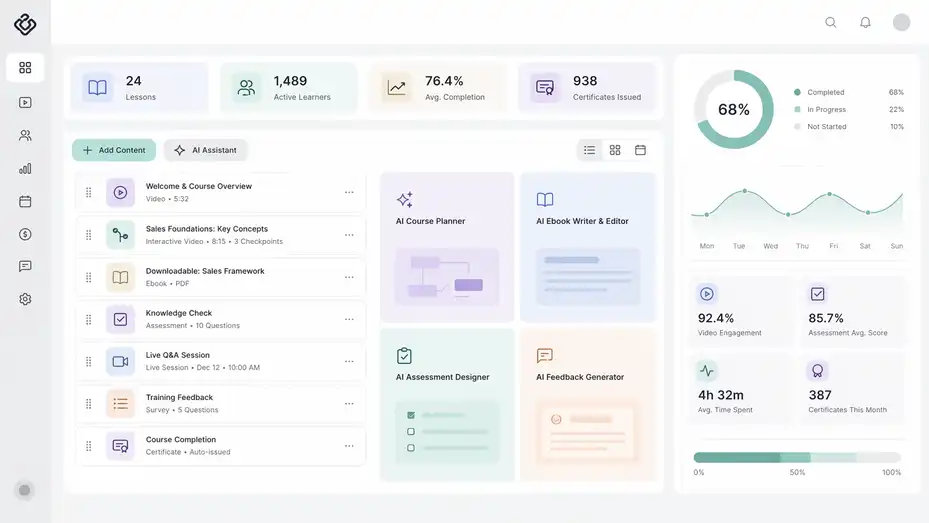
This is where LearnWorlds becomes more interesting. The platform is not only about hosting lessons. It tries to improve how the lessons are built, consumed, and measured.
Course Building And Content Authoring
LearnWorlds supports multiple course content types, including videos, interactive videos, ebooks, assessments, live sessions, surveys, certificates, and SCORM or HTML5 packages.
That gives you more teaching flexibility than a platform that only supports video modules and PDFs. Imagine you run a sales training business. Instead of uploading ten talking-head videos and hoping people finish them, you can mix in quizzes, downloadable materials, checkpoints, and interactive video moments that turn passive viewing into active learning.
LearnWorlds specifically promotes AI-generated subtitles and interactive video on higher plans, which suggests this is one of its strongest differentiators.
The practical advantage is not just “more features.” It is better lesson design. In my experience, creators often underestimate how much completion rate depends on pacing and format variety. A student who has to click, answer, reflect, or respond is usually more engaged than someone who only watches.
There is also an AI layer. LearnWorlds says its AI feature set includes an AI course planner, AI ebook writer and editor, AI assessment designer, and AI feedback generator.
I would not rely on that AI to replace expertise, but I do think it can speed up the boring parts of production. For many creators, that means less time formatting and more time refining the actual teaching.
Interactive Learning Is One Of The Strongest Selling Points
If you are comparing platforms and wondering what makes LearnWorlds feel “premium,” interactive learning is near the top of the list. The platform highlights interactive video, AI-generated subtitles, assessments, gradebook collection for SCORM quizzes, and learner engagement dashboards.
This is more important than it sounds. Most course creators do not lose students because their information is bad. They lose students because their content delivery feels flat. LearnWorlds seems built to solve that with more dynamic content options.
Here is where I think the platform earns real points:
- Interactive Video: Better for lesson checkpoints, engagement, and guided watching.
- Assessments: Useful if you teach skills that need proof of understanding.
- SCORM Support: A major plus for professional training creators or anyone migrating standardized content.
- Certificates And Tracking: Stronger perceived value for learners and clients.
If your audience expects transformation, not just information, these tools matter more than flashy templates.
Where LearnWorlds Shines In Day-To-Day Business Use
A good course platform should not only help you publish. It should help you run the business after publishing.
Branding, White-Labeling, And Owning The Experience
LearnWorlds makes a big deal out of white-labeling, and for good reason. Its official materials emphasize custom domains, branded logins, branded emails, customized dashboards, and even a branded mobile app experience. The platform also claims branded domains and logins can drive 34% more engagement on its white-label page.
Now, I would treat that engagement claim as vendor-provided marketing rather than a universal guarantee. But the broader point still stands: controlling the brand experience matters, especially for premium offers, B2B training, and client-facing academies.
If you sell a $49 mini-course, branding helps. If you sell a $2,000 certification path or a corporate training package, branding becomes part of trust. Students notice when the platform feels like your business rather than rented software.
That is why I think LearnWorlds is especially attractive for creators who want a polished front-end. The white-label positioning is stronger than what many basic course platforms offer, and that can support higher pricing when your market is more serious.
Selling Options, Revenue Models, And Checkout Flexibility
LearnWorlds supports e-commerce features, payment gateways including Stripe and PayPal, and payment options such as Apple Pay, Google Wallet, and buy now, pay later options like Klarna and Afterpay/Clearpay through Stripe. It also supports subscriptions, bundles, free trials, and one-time or recurring pricing models.
For course creators, this is not a minor detail. Monetization flexibility often determines whether your course stays a side project or becomes a stable business.
Here is a simple scenario. Imagine you teach fitness professionals:
- You sell a low-ticket intro course.
- You bundle advanced certifications.
- You offer a monthly membership for continued education.
- You run occasional workshops or coaching.
A platform with rigid pricing logic makes that hard. LearnWorlds appears to support that business model natively through bundles, subscriptions, plan management, and sales analytics.
I suggest paying close attention here if you already know you want recurring revenue. Too many creators choose software based only on launch convenience and regret it when they start building bundles or memberships later.
Analytics And Reporting Are Better Than Many Creator-Focused Platforms
LearnWorlds offers reporting on user progress, course participation, product insights, segment-based reports, scheduled exports, and sales analytics such as gross versus net revenue, refunds, pricing model performance, payment methods, and geography filters. It also highlights AI-powered insights in its reporting tools.
This is one of those areas where many creators do not care at first, then suddenly care a lot.
At the beginning, you just want sales. Later, you want answers:
- Which course converts best?
- Where do students drop off?
- Are subscriptions outperforming one-time sales?
- Which pricing model leads to more refunds?
- Which audience segment actually finishes the course?
LearnWorlds seems much better equipped for those questions than a platform built mainly for basic course hosting.
In my opinion, this is one of the most underrated reasons to choose a platform like LearnWorlds. Better reporting helps you make less emotional decisions. You stop guessing and start improving what the data actually shows.
Pricing: Is LearnWorlds Worth The Cost?
This is where the “powerful or overrated” debate gets real. A platform can be excellent and still be the wrong value for your stage.
LearnWorlds’ official pricing page currently lists Starter at $24/month, Pro Trainer at $79/month, and Learning Center at $249/month when billed annually, with higher monthly rates shown if not annual.
The plan comparison page also states the Starter plan includes a $5 fee per course enrollment, while Pro, Learning Center, and Corporate list no transaction fees.
Current Pricing Snapshot
Here is the practical view of the main public plans based on LearnWorlds’ official pages.
| Plan | Public Starting Price | Transaction Fees | Best For |
|---|---|---|---|
| Starter | $24/month | $5 per enrollment | Testing an idea on a tight budget |
| Pro Trainer | $79/month | 0 | Serious solo creators |
| Learning Center | $249/month | 0 | Teams, advanced schools, training businesses |
| High Volume / Corporate | Custom | 0 | Large organizations or enterprise needs |
The big issue is not whether these prices are high in absolute terms. It is whether your revenue model can justify them.
If you are pre-revenue, the Starter plan looks approachable, but the per-enrollment fee can get annoying fast. If your course gains traction, Pro becomes more attractive because you eliminate the extra fee and get a more scalable setup.
When The Pricing Feels Fair And When It Feels Expensive
I think LearnWorlds pricing feels fair in three situations.
First, it feels fair when your course revenue is already coming in. A creator making consistent monthly sales can usually justify paying more for stronger reporting, branding, and monetization tools.
Second, it feels fair when your offer is high-ticket. If one sale covers a large chunk of your software cost, the decision becomes easier.
Third, it feels fair when you are replacing several tools. If LearnWorlds reduces your need for separate course software, community tools, or some marketing and reporting work, the total stack cost may be more reasonable than it first appears.
It feels expensive when you only need one simple course, have a small audience, and do not care much about branding or analytics. In that case, you may be paying for depth you will barely touch.
So, is it worth it? For the right creator, yes. For the wrong creator, it will feel like buying a studio setup to record one voice memo.
The Biggest Pros And Cons For Course Creators
This is the section most people actually want, so let me be direct.
What LearnWorlds Does Extremely Well
The strongest LearnWorlds advantages are not random features. They connect to clear business outcomes.
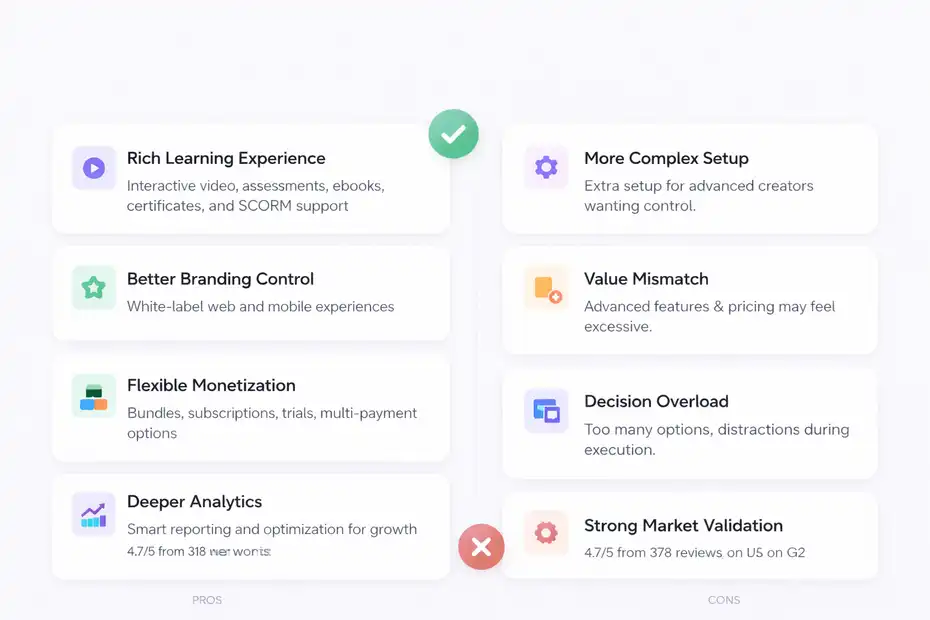
- Rich Learning Experience: Interactive video, assessments, ebooks, certificates, and SCORM support create a more serious learning environment.
- Better Branding Control: White-label web and mobile experiences help creators build a platform that feels owned, not borrowed.
- Flexible Monetization: Bundles, subscriptions, trials, one-time pricing, and multiple payment options support different business models.
- Deeper Analytics: Reporting goes well beyond “number of sales” and supports smarter optimization.
- Strong Market Validation: LearnWorlds currently shows a 4.7/5 rating from 378 reviews on G2.
I especially like that the strengths are connected. Branding supports positioning. Better content experience supports completion. Better analytics supports optimization. Flexible monetization supports growth.
That is what a good platform should do.
Where LearnWorlds Can Feel Frustrating Or Overbuilt
Now the honest part. Power usually comes with complexity.
A feature-rich platform often asks more from you up front. You need to make more decisions about structure, products, settings, and experience design. That is great when you want control. It is tiring when you just want to launch quickly.
The other issue is value mismatch. If you only need a basic course host, LearnWorlds may feel heavier than necessary. You might never use SCORM, advanced analytics, white-labeling, or interactive video. In that case, the platform is not bad. It is just not matched to your stage.
I also think some creators can get distracted by “platform possibility.” When software offers lots of options, it is easy to spend too much time perfecting the school and not enough time validating the offer.
My opinion is simple: LearnWorlds is most at risk of feeling overrated when the creator is underestimating how much execution still matters. Software can improve delivery, but it cannot fix weak positioning, weak messaging, or a weak course promise.
Setup Experience And What Getting Started Actually Feels Like
A review is incomplete if it only talks about features. You also need to know whether the platform feels manageable when you first log in.
What The Early Setup Likely Looks Like
Based on LearnWorlds’ own onboarding materials, help center resources, webinars, and AI-guided course creation tools, the platform clearly invests in helping users get started. Its pricing page links to 700+ help articles and daily webinars, and its AI features are positioned as production shortcuts.
That suggests onboarding support is not an afterthought.
Still, I would set expectations realistically. A platform with deep functionality is rarely “instant easy” in the same way as a very simple creator tool. You will likely spend time on:
- Course structure
- School branding
- Pricing setup
- Checkout and payment settings
- Community or membership configuration
- Reporting views
- Automations and learner flows
For a beginner, that can feel like a lot. For an experienced creator, that is often exactly what you want.
I suggest thinking of LearnWorlds setup like building a storefront, not uploading files to a folder. That mindset helps you use the platform well.
A Practical First-Month Setup Plan
If I were advising a creator starting on LearnWorlds, I would keep the first month simple.
- Week 1: Build one flagship course with clean modules, one clear student outcome, and a simple branded landing page.
- Week 2: Set up checkout, pricing, and one upsell path such as a bundle or bonus offer.
- Week 3: Add engagement elements like assessments, community prompts, or interactive video checkpoints.
- Week 4: Review reporting, identify drop-off points, and adjust the course experience.
That order matters. Too many people try to configure everything at once. I recommend launching the core learning product first, then layering in the advanced tools once real students start interacting with the content.
That is usually how you get the best return from a platform like this.
Common Mistakes Course Creators Make With LearnWorlds
This is where a lot of reviews stay shallow. The platform itself is only half the story. The other half is how creators misuse it.
Mistake 1: Paying For Advanced Features Without A Business Reason
I’ve seen this pattern with many digital tools. A creator buys the more powerful platform because it looks professional, then uses 15% of it.
If your current offer is one beginner course with a tiny audience, the most important thing is not interactive video or sales analytics by geography. It is market validation. LearnWorlds can still work, but the justification should be clear.
Do you need branding? Bundles? subscriptions? reporting? better delivery? If the answer is mostly no, the platform may be premature.
That is not a criticism of LearnWorlds. It is a reminder that software ROI depends on business stage.
Mistake 2: Overbuilding The School Before Selling The Course
Because LearnWorlds supports polished academies and white-label customization, it is tempting to spend days adjusting visuals and structure.
The danger is obvious. You feel productive, but you are avoiding the scarier work of validating your offer.
I suggest a simple rule: Your first version should be “good enough to sell, good enough to teach, good enough to measure.” After that, improve it with real learner feedback and analytics. LearnWorlds gives you the tools to optimize. That does not mean you should build the final version before your first sale.
Mistake 3: Ignoring Data After Launch
This one is surprisingly common. Creators buy a platform with strong analytics, then make decisions based on gut feeling anyway.
LearnWorlds provides progress reporting, product insights, and revenue analytics for a reason.
Use that data. Watch where learners stop. Compare refunds by pricing model. Look at which offers generate recurring revenue. Review which courses create the best completion rates. That is how the platform becomes a growth tool instead of just a delivery system.
Advanced Optimization Strategies Once You’re Up And Running
Once the basics are live, LearnWorlds becomes more valuable because its deeper features start paying off.
Improve Completion Rates With Better Learning Design
Most creators focus heavily on acquisition and not enough on completion. That is a mistake. Completion affects testimonials, referrals, retention, and future upsells.
LearnWorlds’ content mix makes it easier to design for progress rather than just information dumping. Interactive video, assessments, ebooks, and learner progress tools can help break big lessons into more manageable experiences.
A good optimization play looks like this:
- Shorten lesson segments
- Add checkpoints after key concepts
- Use quizzes to reinforce confidence
- Turn static resources into guided materials
- Review progress data to find friction points
I believe this is where premium course creators separate themselves. Better student outcomes create stronger businesses than prettier landing pages ever will.
Increase Revenue Per Customer With Offer Structuring
LearnWorlds’ support for bundles, subscriptions, and multiple pricing models makes it suitable for value ladders rather than one-off course sales.
Here is a realistic structure:
- Entry offer: Low-ticket starter course
- Core offer: Signature transformation program
- Continuity offer: Monthly membership or subscription
- Premium offer: Coaching, cohort, or certification path
This kind of architecture helps you earn more from the same audience without constantly chasing new traffic. And because LearnWorlds includes sales analytics and product insights, you can actually see which layers perform best.
That is one of the clearest signs that the platform is built for growth-minded creators, not just first-time launchers.
Final Verdict: Powerful Or Overrated?
LearnWorlds is powerful, but not universally necessary.
For course creators who want a branded academy, richer learning experiences, flexible monetization, and deeper analytics, I think LearnWorlds is one of the more compelling all-in-one options right now.
Its official feature set around interactive video, subscriptions, SCORM, white-label delivery, and analytics makes that case pretty convincingly, and the current 4.7/5 rating on G2 adds outside validation.
For creators who only need a simple way to upload lessons and collect payments, it may feel like more platform than you need. In that situation, “overrated” usually means “misaligned,” not “bad.”
My honest takeaway is this: LearnWorlds is at its best when you treat your course like a real education business. If that is where you are headed, the platform makes a lot of sense. If you are still proving demand, keep your setup lean and be sure the added capability will actually help you sell, teach, and retain students better.
That is the real answer to this LearnWorlds review for course creators. It is powerful when your business is ready for the power.
FAQ
What is LearnWorlds and who is it best for?
LearnWorlds is an all-in-one online course platform designed for creators who want advanced control over branding, learning experience, and monetization. It works best for coaches, educators, and businesses building structured training programs or premium digital products rather than simple one-off courses.
Is LearnWorlds easy to use for beginners?
LearnWorlds can feel slightly complex at first because of its advanced features, but beginners can still use it effectively with a simple setup approach. The platform offers guided onboarding, tutorials, and AI tools that help reduce the learning curve over time.
How much does LearnWorlds cost?
LearnWorlds pricing starts at around $24 per month, with higher plans offering more features and no transaction fees. Costs increase based on functionality, making it more suitable for creators with a clear monetization strategy or growing course business.
Does LearnWorlds support subscriptions and memberships?
Yes, LearnWorlds supports subscriptions, bundles, and recurring revenue models. This allows course creators to build memberships, offer tiered access, and create long-term customer value instead of relying only on one-time course sales.
Is LearnWorlds worth it for course creators?
LearnWorlds is worth it if you need advanced features like interactive learning, strong branding, and detailed analytics. For simple course setups, it may feel unnecessary, but for scaling a serious education business, it offers strong long-term value.

I’m Juxhin, the voice behind The Justifiable.
I’ve spent 6+ years building blogs, managing affiliate campaigns, and testing the messy world of online business. Here, I cut the fluff and share the strategies that actually move the needle — so you can build income that’s sustainable, not speculative.
Related posts:
 LearnWorlds Features Overview: Tools That Power Online Courses
 How to Get LearnWorlds Free Trial and Start Fast
 LearnWorlds Online Course Platform Review: Hidden Advantages
 LearnWorlds Platform Walkthrough Guide: Full Dashboard Tour
 LearnWorlds Pros And Cons For Educators: Honest Platform Breakdown
 10 Digital Marketing Affiliate Marketing Hacks That Work