
Table of Contents
Some links on The Justifiable are affiliate links, meaning we may earn a small commission at no extra cost to you. Read full disclaimer.
If you’re wondering whether is surveymonkey useful for digital products is even the right question, I think it is. For many creators, coaches, SaaS founders, and course sellers, the real issue is not collecting more feedback.
It is collecting the right feedback before you build the wrong thing. SurveyMonkey can absolutely help with that, but only when you use it as a decision tool instead of a generic questionnaire app.
In this guide, I’ll walk you through where it works, where it falls short, and how to use it to shape better digital offers with less guessing.
What SurveyMonkey Actually Does For Digital Product Businesses
SurveyMonkey can create surveys, forms, quizzes, and feedback flows, and it supports features like skip logic, survey logic, AI-assisted survey creation, templates, and integrations.
SurveyMonkey also says it offers 200+ integrations and a large global audience panel, which matters when you need structured feedback beyond your own email list.
What It Is Best At
If you sell digital products, SurveyMonkey is most useful when you need clean, structured answers from real people. That could mean pre-selling a course, validating a template pack, improving onboarding for a membership, or testing which promise resonates most before a launch.
The platform shines when your questions need to be standardized. In plain English, that means every respondent sees the same framework, so you can compare answers without turning your notes into chaos. That is a big deal when you are trying to spot patterns instead of chasing random opinions from social media comments.
A lot of founders make the mistake of asking, “Can I collect feedback?” Of course you can. Google Forms, DMs, and email replies can do that too. The better question is, “Can I collect feedback in a way that helps me make a confident product decision?” That is where SurveyMonkey becomes genuinely useful.
You also get survey logic, which lets you show different questions depending on previous answers. For digital products, that means a beginner buyer can get one path while an advanced buyer gets another. Instead of forcing everyone through the same form, you can personalize the survey and protect response quality.
What It Is Not Great At
SurveyMonkey is not a magic product strategy engine. It will not automatically tell you which course to build, what your ideal price should be, or why your audience is ghosting your checkout page. It only reflects the quality of the questions you ask.
I also would not use it as your only customer research method. Surveys are good for pattern detection, but they are not always great at uncovering emotional nuance. People often say one thing and do another. Someone may tell you they want “more templates,” but what they really want is to save time without feeling dumb.
Another issue is bias. If you survey only your warmest followers, your data can become overly positive and unrealistic. That can lead to a product that sounds exciting on paper but underperforms in the market.
So yes, SurveyMonkey is useful. But it becomes truly useful only when it sits inside a wider research process that includes interviews, offer testing, and actual buying behavior.
Who Should Use It
In my experience, SurveyMonkey is especially useful for four groups.
- Course creators: Validate lesson structure, outcomes, and objections before recording 20 hours of content.
- Template sellers: Find out which assets people will actually use instead of what sounds nice in theory.
- SaaS founders: Understand onboarding friction, feature requests, and why trial users fail to convert.
- Membership owners: Learn what content cadence, format, and support style your members really value.
If you are selling a simple low-ticket product with very little audience data, SurveyMonkey can still help, but it may be more tool than you need at first. If you already have traffic, a list, a user base, or a customer segment you can reach, then it becomes much more valuable.
That is the dividing line I suggest using. Not “Is this tool good?” but “Do I have enough people and enough decisions to make that structured feedback will save me time and money?”
When SurveyMonkey Is Useful And When It Is Overkill
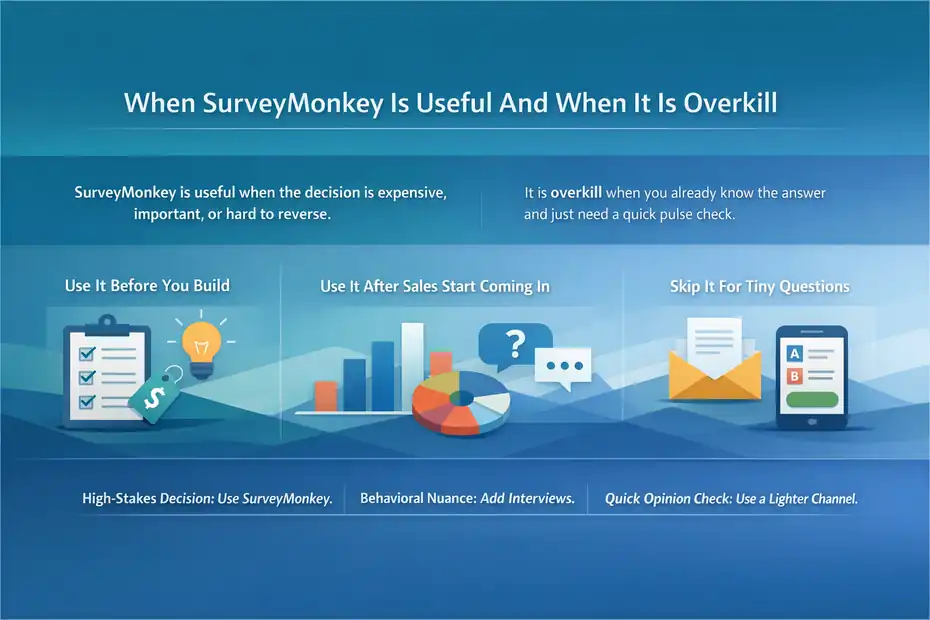
The short answer is this: SurveyMonkey is useful when the decision is expensive, important, or hard to reverse.
It is overkill when you already know the answer and just need a quick pulse check.
Use It Before You Build
This is one of the smartest times to use SurveyMonkey. Before building a digital product, you need to know what problem is urgent, what outcome people want, and what objections would stop them from buying.
Imagine you are planning a $149 course about email automation for small online shops. You could spend three weeks outlining modules based on what you think matters. Or you could survey 150 potential buyers and learn that their biggest issue is not automation strategy at all. It is writing the first welcome email without sounding robotic. That changes the whole product.
This is where surveys save money. Instead of polishing the wrong thing, you identify the pain point with the highest emotional weight. That gives your product a stronger promise and a much better chance of converting.
I believe this is one of SurveyMonkey’s best use cases for digital products. It helps you reduce assumption risk before you commit to production time.
Use It After Sales Start Coming In
Once people are buying, SurveyMonkey becomes useful in a different way. Now you are not validating demand. You are improving fit.
You can ask buyers why they purchased, what almost stopped them, what result they wanted fastest, and what felt confusing after checkout. Those answers can improve your sales page, onboarding emails, lesson order, and retention strategy.
This is especially powerful for memberships and SaaS products. Small friction points often kill retention more than major product flaws. A short post-purchase or post-onboarding survey can reveal where confidence drops. Maybe users are overwhelmed in week one. Maybe they do not understand where to start. Maybe they expected templates but got theory.
That kind of insight is hard to get from analytics alone. Your dashboard may show a drop-off. The survey helps explain why it happened.
Skip It For Tiny, Low-Stakes Questions
Not every decision deserves a full survey workflow. If you are choosing between two thumbnail styles, deciding which bonus to add to a launch, or checking whether your audience prefers video or text, a quick email reply or Instagram Story poll may be enough.
This is where some people misuse SurveyMonkey. They apply a formal research tool to a casual marketing question, then wonder why the process feels heavy.
A simple rule I like is this:
- High-stakes decision: Use SurveyMonkey.
- Behavioral nuance: Add interviews.
- Fast opinion check: Use a lighter channel.
That balance keeps your process efficient and prevents “research theater,” where you collect data mainly to feel productive.
How SurveyMonkey Helps You Build Better Digital Offers
This is the real reason the tool matters. Not because it creates surveys, but because it can sharpen the offer itself.
A better offer almost always beats a prettier landing page.
It Reveals The Core Problem Behind The Product
Most weak digital products fail because they solve a broad problem instead of a painful one. SurveyMonkey can help you narrow your focus.
For example, a creator may think their audience wants “better productivity.” That sounds fine, but it is too vague to sell well. A good survey can uncover that the real pain is “I start too many projects and never finish the one that makes money.” That is much more specific, emotional, and marketable.
Once you have that language, everything improves. Your headline gets clearer. Your product structure gets tighter. Your examples become more relevant. Your buyer sees themselves in the pitch.
This is why I often recommend using surveys to uncover phrasing, not just preferences. Product positioning gets much stronger when you borrow your audience’s natural wording instead of inventing polished copy in isolation.
It Helps You Prioritize Features And Modules
Digital product creators often add too much. More lessons, more templates, more bonuses, more dashboards. The logic sounds generous, but the result is usually confusion.
SurveyMonkey is helpful here because it lets you rank interest, urgency, and usefulness. Instead of asking, “What would you like?” ask respondents to choose what would help them most in the next 30 days. That time-bound framing usually produces better data.
Let me give you a realistic scenario. Suppose you are building a content planning membership. You are considering weekly prompts, swipe files, analytics reviews, and live co-working. Your audience may say all four sound good.
But if you force a priority ranking, you may discover that swipe files and planning support dominate while analytics reviews barely matter.
That changes how you build the offer. You lead with what people value most and stop padding the product with extras that dilute the pitch.
It Helps You Find Conversion Friction
One underrated use of SurveyMonkey is finding what makes people hesitate. For digital products, objection data is gold.
A smart objection survey can uncover patterns like:
- Price uncertainty
- Lack of trust in outcomes
- Confusion about who the product is for
- Fear of not having time
- Skepticism about implementation
Those are not small details. They are conversion blockers.
When you know the real blocker, you can address it directly. Maybe you need a faster-win module, stronger testimonials, a “who this is for” section, or better pre-sale education. I have seen simple objection surveys lead to stronger product-market fit than full redesigns.
That is why I would never use SurveyMonkey only to ask, “What do you want me to make?” The better move is asking, “What is getting in your way right now?”
How To Set Up A Useful Survey For A Digital Product
A good survey is not long. It is focused. Most of the value comes from question quality, sequence, and audience targeting, not sheer length.
Start With One Decision
Before writing a single question, define the decision the survey needs to support. This matters more than people realize.
Ask yourself: Are you trying to validate a new product, improve an existing one, change pricing, reduce churn, or sharpen your messaging? Pick one.
The worst surveys try to do everything at once. They ask about product ideas, preferred content formats, pricing, demographics, brand awareness, and random opinions in one messy form. The result is muddy data and tired respondents.
I suggest using this framing sentence before you build the survey: “By the end of this survey, I want to decide whether we should ___.” That blank forces clarity.
Examples:
- Build a beginner course or advanced workshop
- Keep the membership monthly or switch to quarterly
- Focus the product on speed, simplicity, or revenue impact
- Rework onboarding before adding more features
When the decision is clear, the survey becomes much easier to design and much more useful to analyze.
Keep The Question Flow Logical
Survey flow matters because people lose patience fast. SurveyMonkey supports logic and skip paths, which helps you keep the experience relevant for each person.
A simple structure works best:
- Opening questions: Identify role, experience level, or product stage.
- Problem questions: Explore pain points, urgency, and current workarounds.
- Solution questions: Test interest in outcomes, features, or support formats.
- Objection questions: Find friction around price, trust, timing, or complexity.
- Closing questions: Invite optional detail, examples, or interview follow-up.
That flow feels natural because it mirrors how people think. First they locate themselves, then describe the problem, then evaluate possible solutions.
Avoid putting sensitive or demanding open-ended questions too early. You need to earn attention before asking for effort.
Also, do not overload respondents with endless matrices and ratings. A few strong multiple-choice and open-text questions will usually outperform a giant wall of survey mechanics.
Use Branching To Improve Relevance
Branching is one of the strongest reasons to choose SurveyMonkey over more basic forms. If someone already bought your product, they should not see the same questions as someone who only follows you on LinkedIn.
That sounds obvious, but many surveys ignore it.
Here is a practical branching idea for digital products:
- Audience segment A: Prospects who have not purchased
- Audience segment B: New buyers
- Audience segment C: Existing customers who finished the product
- Audience segment D: Former users or churned members
Each group should get different questions. Prospects reveal objections. New buyers reveal buying motivation. Active users reveal onboarding friction. Former users reveal retention problems.
This kind of structure produces much cleaner data because you are not averaging together completely different experiences.
The Best Survey Questions To Ask Before Launching A Digital Product
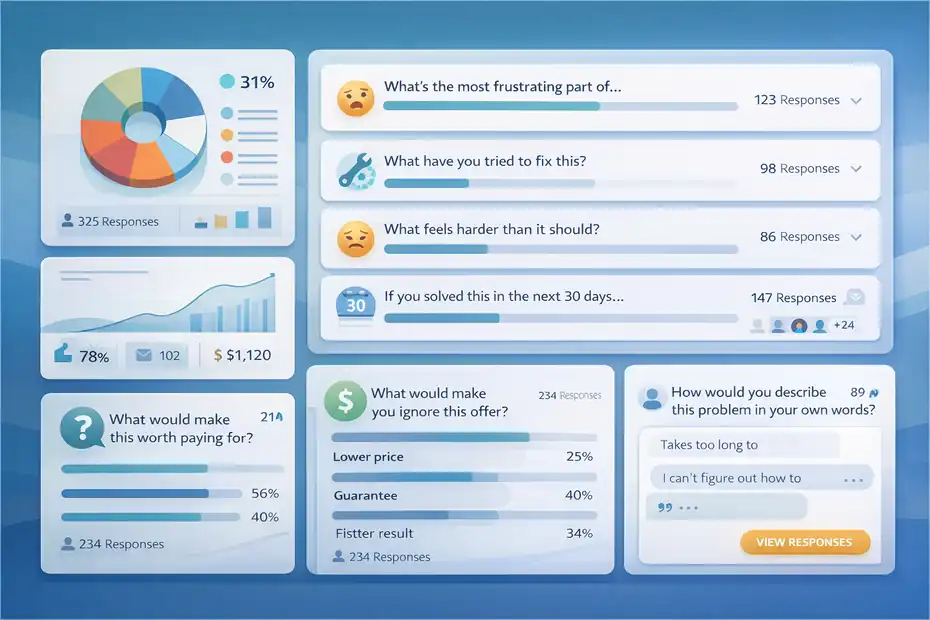
The tool matters less than the questions. Great questions create decision-ready answers. Weak questions create vague encouragement that feels nice but does not help.
Ask About Current Struggles, Not Future Dreams
One common mistake is asking what people would like someday. Those answers sound ambitious, but they rarely predict buying behavior.
Instead, ask about present-tense problems. For example:
- What is the most frustrating part of creating your first paid digital offer?
- What have you already tried to fix this?
- What feels harder than it should right now?
- If you solved this in the next 30 days, what would change for your business?
These questions work because they anchor respondents in reality. You learn what is painful, costly, and urgent now. That is much more useful than hearing that people want “growth,” “clarity,” or “more confidence.”
In my experience, the strongest offers come from solving annoying, repeated problems. Surveys should help you find those repeated pain patterns.
Ask About Buying Triggers And Objections
If your product will be sold, not just downloaded for free, you need buying intelligence. That means understanding what creates momentum and what creates hesitation.
Useful buying questions include:
- What would make this worth paying for?
- What would make you ignore this offer?
- Which outcome feels most valuable right now?
- What would you need to believe before buying?
These are strong because they tie feedback to action. They move beyond “Do you like this idea?” and into “Would this actually feel worth the money and attention?”
That difference matters. Plenty of people say a product idea sounds good. Much fewer people tell you what would make it feel essential.
Ask For Language You Can Reuse
This is one of my favorite survey uses. I always look for raw phrases that can become copy.
Ask things like:
- How would you describe this problem in your own words?
- What do you wish was easier about this process?
- What nearly made you give up?
- What kind of result are you hoping for?
These answers often contain the exact phrases your sales page needs. Real customer language usually beats clever brand language. It sounds more believable because it came from lived experience.
A line like “I don’t need more strategy, I need someone to help me turn it into something sellable” can become a headline, a callout box, or an email hook. That is the kind of insight that makes SurveyMonkey valuable beyond data collection.
SurveyMonkey Features That Matter Most For Digital Product Research
Not every feature matters equally. For digital product work, a few stand out because they improve data quality and workflow efficiency.
Logic, Branching, And Personalization
SurveyMonkey’s logic features let you route people through different question paths, skip irrelevant sections, or end surveys early based on answers. That keeps surveys shorter and more relevant, which is usually good for completion quality.
For digital products, this matters a lot because your audience is rarely one single group. You may have beginners, advanced users, customers, non-buyers, free subscribers, and churned members in the same pool.
Without logic, your survey gets bloated. With logic, you can ask smarter questions without making the experience annoying.
I think this is one of the clearest reasons SurveyMonkey is useful for digital products. It handles segmentation better than extremely basic form tools, and that usually leads to better decisions.
Templates, AI Help, And Analysis Support
SurveyMonkey promotes AI-assisted survey creation and a library of 500+ templates, which can help you move faster if you are not confident about question structure.
That said, I would use templates carefully. They are a good starting point, not a strategy. Many template-based surveys are too generic for product research. They ask broad satisfaction questions when what you really need is sharp decision intelligence.
The analysis side is more useful than many people expect. Paid plans also include stronger filters and text analysis options, which can help you make sense of open-ended responses at scale.
If you only have 20 responses, you can review them manually. If you have 500 responses from buyers and leads, filtering by segment becomes much more important. That is where a more mature survey platform earns its cost.
Integrations And Workflow Fit
SurveyMonkey says it supports 200+ native integrations, and it also offers API access and workflow connections with platforms like Slack, HubSpot, Microsoft tools, and Power Automate.
For many digital product businesses, the real value is not just collecting feedback. It is moving that feedback into your actual operating system.
For example, you can send responses into your CRM, tag leads based on intent, notify your team about low satisfaction scores, or export customer objections into a research doc for copywriting. That saves time and helps feedback turn into action.
If your business is still small, this may not matter much yet. But once you are running launches, onboarding flows, or product iterations regularly, workflow fit becomes a real advantage.
Practical Use Cases By Digital Product Type
Different digital products need different feedback. The tool stays the same, but the questions and timing should change.
Courses And Cohort Programs
For courses, SurveyMonkey is most useful before outlining and after the first student wave.
Before launch, use it to validate the outcome, identify skill gaps, and understand what makes the topic feel overwhelming. You are looking for friction points, not compliments.
After launch, ask buyers where they got stuck, which module felt most valuable, and what result they expected fastest. This is where you learn whether your curriculum matches real user momentum.
A realistic example: Imagine your course teaches beginner SEO. You assume the biggest need is keyword research. But the survey shows learners mainly struggle with turning research into an actual article outline. That tells you where to strengthen examples, worksheets, or templates.
SaaS And Subscription Products
For SaaS, SurveyMonkey is extremely useful for onboarding and churn analysis.
You can survey trial users who never activate, new customers after setup, and users who cancel after 30 or 60 days. Each group reveals a different kind of friction.
The key for SaaS is not just asking whether people like the product. It is learning whether they reached value fast enough. If not, why not?
Questions should focus on setup clarity, expected outcomes, moment of confusion, missing integrations, and perception of ROI. In simple terms, ROI means whether the product feels worth the money relative to the result.
Because SaaS users often move through distinct lifecycle stages, logic-based surveys are especially helpful here.
Templates, Downloadables, And Low-Ticket Products
Low-ticket products are tricky because buyers often give less feedback unless prompted well. But SurveyMonkey can still help if you keep surveys short and tightly focused.
Use it to learn:
- Why someone bought quickly
- What nearly stopped the purchase
- Whether the product saved time, reduced confusion, or improved quality
- What add-on product would feel like the natural next step
For template packs and mini-products, this kind of insight is valuable because it helps you create product ladders. A simple spreadsheet template may lead naturally to a dashboard pack, then a training, then a higher-ticket implementation offer.
The survey helps you see what the next logical offer should be instead of guessing based on your own roadmap.
Common Mistakes That Make SurveyMonkey Less Useful
The tool is rarely the real problem. Usually the survey design, audience selection, or interpretation is what breaks the process.
Asking Leading Or Flattering Questions
Questions like “Would you love a course that helps you grow faster?” are almost useless. They invite polite optimism, not honest evaluation.
People tend to agree with attractive-sounding ideas. That does not mean they will buy them.
A better approach is neutral wording. Ask what they are struggling with, what they have already tried, and what outcome matters most. This reduces bias and gives you more grounded information.
I also suggest avoiding questions that make respondents feel like they are helping you create something nice. That social pressure can distort answers. You want truth, not encouragement.
Surveying The Wrong Audience
This is probably the biggest failure point. If you ask general followers about a specialized product, your data can be noisy and misleading.
For example, if you are building a product for experienced Etsy sellers but most of your audience is beginners, your survey may push you toward entry-level content that does not match the buyers you actually want.
That is why segmentation matters. Survey the people closest to the actual buying context whenever possible.
A smaller, targeted sample often beats a large but mixed audience. One 2026 meta-analysis reported an average online survey response rate of 44.1% in published research and found that a more clearly defined population improved response rates.
Collecting Data Without A Decision Plan
Some people collect 300 responses and still do nothing useful with them. Why? Because they never defined how the answers would change the product.
Before launching your survey, decide what patterns would trigger action. For example:
- If price sensitivity dominates, test a lower-risk entry offer.
- If confusion about outcomes dominates, clarify positioning.
- If beginners and advanced users want very different things, split the offer.
- If time pressure is the main objection, shorten the promise to a faster win.
That is what makes survey research practical. Without a decision framework, it becomes a motivational spreadsheet.
Pricing, Limits, And Whether The Cost Makes Sense
The platform can be useful, but it still has to make financial sense for your stage of business. This is where many creators hesitate, and honestly, that is fair.
SurveyMonkey’s pricing and response limits vary by plan. Its official pricing pages show free and paid options, response caps, unlimited questions on paid plans, overage charges on some plans, and monthly or annual billing structures depending on the plan type.
What You Are Really Paying For
You are not just paying for question fields. You are paying for better survey logic, stronger analysis, response capacity, integrations, and a more professional research workflow.
For a business making digital products, the cost makes sense when one of these is true:
- You are making product decisions that affect revenue
- You need segmented customer feedback
- You are collecting enough responses that manual analysis becomes painful
- You need integrations with your sales, CRM, or reporting systems
If none of those apply yet, a lighter form tool may be enough for now.
Simple Cost-Benefit Thinking
Here is how I like to think about it. If a survey helps you avoid building the wrong product, the tool can pay for itself very quickly.
Imagine you were about to spend 30 hours creating a mini-course no one really wanted. Even at a modest internal value of $40 per hour, that is $1,200 in sunk effort. A well-designed survey that redirects your topic, angle, or structure could save far more than the platform costs.
That is the real comparison. Not “free form vs paid form,” but “cheap feedback tool vs expensive bad decision.”
Quick Comparison Table
| Need | SurveyMonkey Fit | Why It Matters For Digital Products |
|---|---|---|
| Basic audience pulse check | Moderate | Useful, but may be more than you need |
| Segmented customer research | Strong | Logic and branching improve answer quality |
| Product validation before launch | Strong | Helps identify urgency, language, and objections |
| Post-purchase feedback | Strong | Good for finding onboarding and retention issues |
| Deep workflow automation | Strong | Integrations and API support help at scale |
| Zero-budget solo creator stage | Mixed | Useful, but cost may be hard to justify early |
My honest take is this: If your digital product business is still very early, treat SurveyMonkey as optional. If you already have traffic, customers, or recurring product decisions, it becomes much easier to justify.
How To Turn Survey Data Into A Better Offer
Collecting responses is only half the work. The real win comes from translating patterns into a sharper product and stronger messaging.
Group Answers By Decision Theme
Once responses come in, do not read them randomly. Group them into decision themes.
Good categories include:
- Core pain point
- Desired outcome
- Buying trigger
- Objection
- Feature priority
- Experience level
- Vocabulary or phrasing
This lets you see where patterns repeat. If 37% of respondents mention time pressure, that should influence both the product structure and the marketing angle. If most people want templates over training, that should affect what you build first.
Pattern-based review is where the value starts becoming strategic instead of anecdotal.
Rewrite The Offer Based On What You Learned
Here is a practical example.
Suppose your original offer is: “A complete system for scaling your digital product business.”
After survey review, you realize your audience is not asking for scale. They are asking for a first offer that feels clear and sellable. That shifts the offer dramatically.
A better version might become: “Create your first digital product offer that people instantly understand and want to buy.”
That is narrower, more immediate, and more emotionally grounded.
This is why I keep coming back to positioning. SurveyMonkey is useful for digital products because it helps you build the offer people are actually trying to buy, not the one you assumed they wanted.
Create A Repeatable Feedback Loop
The smartest way to use SurveyMonkey is not once. It is repeatedly at key stages.
A simple feedback loop looks like this:
- Pre-build validation
- Pre-launch objection check
- Post-purchase clarity survey
- Completion or churn survey
- Iteration survey after major updates
This turns your product into a living offer shaped by real user evidence.
Survey response rates vary widely by context, but benchmarks commonly cited in current industry discussions often land around the 20% to 30% range for many business surveys, while research-specific contexts may differ more widely. That means even a modest response pool can be useful if the audience is well targeted and the questions are focused.
Final Verdict: Is SurveyMonkey Useful For Digital Products?
Yes, SurveyMonkey is useful for digital products, but not in the lazy way many people hope.
It is not useful because it magically creates insights. It is useful because it gives you a structured way to uncover pain points, objections, feature priorities, and customer language before you waste time building the wrong thing.
Its logic features, integrations, and analysis tools make it especially valuable once your digital product business has enough complexity that casual feedback channels stop being reliable.
If you are an early-stage creator with a tiny audience, you may not need it yet. But if you are validating offers, improving conversions, reducing churn, or refining your messaging, SurveyMonkey can absolutely help you build better digital products.
My advice is simple: Do not use it to ask people what sounds nice. Use it to discover what feels urgent, what blocks purchase, and what result matters most right now.
That is where better offers come from.
FAQ
Is SurveyMonkey useful for digital products?
Yes, SurveyMonkey is useful for digital products when you need structured feedback to guide decisions. It helps identify real customer pain points, validate product ideas, and improve offers before launch. The key is asking focused questions tied to a specific decision rather than collecting general opinions.
When should I use SurveyMonkey for digital product research?
You should use SurveyMonkey before building a product, during pre-launch validation, and after sales begin. It works best for high-impact decisions like product positioning, pricing, and feature prioritization. It is less useful for quick opinions or low-stakes decisions where simpler tools are enough.
What kind of questions work best in SurveyMonkey surveys?
The best questions focus on current problems, buying triggers, and objections. Ask about real struggles, what people have already tried, and what would make a solution worth paying for. Avoid vague or leading questions, and prioritize clarity, specificity, and actionable insights.
Can SurveyMonkey improve digital product conversions?
Yes, SurveyMonkey can improve conversions by uncovering why people hesitate to buy. It reveals objections, confusion points, and missing trust factors. You can then adjust your messaging, pricing, or product structure to directly address those issues and increase sales performance.
Is SurveyMonkey worth the cost for creators?
SurveyMonkey is worth the cost if you are making important product decisions or collecting feedback at scale. It becomes valuable when better insights can prevent wasted time or failed launches. For beginners with small audiences, simpler tools may be enough initially.

I’m Juxhin, the voice behind The Justifiable.
I’ve spent 6+ years building blogs, managing affiliate campaigns, and testing the messy world of online business. Here, I cut the fluff and share the strategies that actually move the needle — so you can build income that’s sustainable, not speculative.
Related posts:
 Monetize Blog Without Adsense
 How to Build a Social Media Marketing Strategy from Scratch
 10 Website Marketing Solutions To Boost Traffic Instantly
 How to Grow an Online Business That Scales While You Sleep
 How to Grow Online Business on Facebook Using Groups and Ads
 Should I Use SurveyMonkey For Lead Generation: Does It Convert?