Table of Contents
Some links on The Justifiable are affiliate links, meaning we may earn a small commission at no extra cost to you. Read full disclaimer.
A solid learnworlds features overview helps you figure out whether the platform is just another course builder or something you can actually grow with.
From what I’ve seen, LearnWorlds stands out because it is built around the full online course experience, not just uploading lessons and collecting payments.
You get tools for content creation, learner engagement, website design, assessments, reporting, and scale.
In this guide, I’ll walk you through the features that matter most, where they shine, where you should be careful, and how to decide if they fit the kind of courses you want to build.
What LearnWorlds Is Really Built To Do
LearnWorlds is not just a video hosting tool with a checkout page.
It is designed as a full learning platform for creators, trainers, academies, and businesses that want to build, deliver, market, and manage online education from one place.
Course Platform First, Website Builder Second
A lot of platforms start with “make a pretty page, then add a course.” LearnWorlds feels like it starts from the learning side first. Its core product includes course delivery, assessments, certificates, interactive video, ebooks, forms, surveys, and live sessions, which tells you the platform is trying to support actual instruction, not only digital product sales.
That matters more than many people realize. Imagine you are a consultant teaching a client onboarding program. You do not only need a sales page. You need structured modules, lesson progression, proof of completion, learner tracking, maybe a quiz, and possibly a live workshop. LearnWorlds is built for that kind of flow.
In my experience, this changes how you plan your course. Instead of asking, “Where do I upload my videos?” you start asking better questions: “How should learners move through this?” “Where should I add feedback?” “What should I track?” That shift usually leads to a stronger learning product.
Flexible Enough For Different Business Models
LearnWorlds supports free, paid, private, drip-fed, and curated learning pathways, which makes it useful for more than one course type. A creator can sell a signature course, a coach can run cohort-based programs, and a company can use it for employee or customer education.
This is one of the reasons the platform gets attention from both solo creators and organizations. The same account can support a simple paid course today and a more layered academy later.
I believe this is one of LearnWorlds’ biggest strengths: it gives you room to start small without forcing a migration the moment your offer becomes more sophisticated.
Content Creation Features That Shape The Learning Experience
The best course platforms do more than store content. They help you package information in ways that improve completion, clarity, and retention.
This is where a LearnWorlds features overview gets interesting, because the platform offers several lesson types instead of forcing everything into plain video modules.
Interactive Video Turns Passive Lessons Into Active Ones
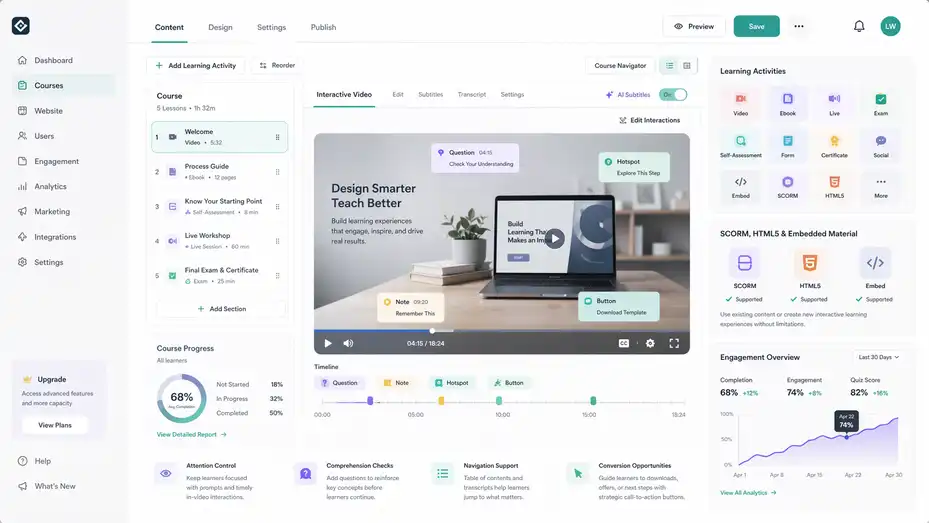
LearnWorlds is especially known for interactive video. According to its official feature pages and support docs, you can add quizzes, hotspots, buttons, pointers, titles, images, transcripts, subtitles, and navigation elements directly into videos. It also supports AI-generated subtitles and transcripts on higher plans.
That sounds technical, but the use case is simple. Instead of letting a student watch 18 minutes of content and hope they stay focused, you can break the lesson with a question at minute four, a key reminder at minute nine, and a call-to-action button at the end.
Here is where this becomes powerful:
- Attention control: You can interrupt passive watching with simple prompts.
- Comprehension checks: In-video questions let learners test understanding before moving on.
- Navigation support: Tables of contents and transcript-based structure help students revisit key moments fast.
- Conversion opportunities: Buttons inside videos can move learners to coaching offers, downloads, or next steps.
For a creator selling premium education, that can feel much more polished than a standard video course. It also helps if your learners tend to skim. Instead of fighting that behavior, you design for it.
Multiple Learning Activities Give You More Teaching Options
LearnWorlds support documentation says courses are built from sections and “learning activities,” and those activities cover multimedia, live sessions, ebooks, exams, self-assessments, forms, certificates, social elements, and embedded content.
This matters because not every concept should be taught in the same format. Some things need a video. Some need a workbook. Some need reflection. Some need a live session.
A practical setup could look like this:
- Lesson 1: Short welcome video
- Lesson 2: Ebook lesson with screenshots and process notes
- Lesson 3: Self-assessment to identify weak spots
- Lesson 4: Live group session
- Lesson 5: Final exam plus certificate
That is a much better learning design than uploading ten long videos and calling it a course. For many of us, the biggest problem with online education is not lack of information. It is poor delivery. LearnWorlds gives you more building blocks to fix that.
SCORM, HTML5, And Embedded Material Matter For Advanced Use Cases
Official LearnWorlds pages also reference SCORM and HTML5 support. That is especially useful for training companies, compliance teams, and businesses that already have packaged learning content and do not want to rebuild everything from scratch.
If you are a solo course creator, you may never touch SCORM. That is fine. But if you work with corporate clients, certification programs, or existing interactive modules, this becomes a major advantage.
I suggest paying attention to this if you expect B2B work later. Features like this are often ignored early, then suddenly become the reason someone switches platforms.
Assessment, Certificates, And Feedback Tools
Once your content is in place, the next question is whether learners are actually understanding it.
LearnWorlds puts real weight behind this part of the experience instead of treating quizzes like an afterthought.
The Assessment Builder Goes Beyond Basic Quizzes
LearnWorlds says its assessment builder includes 16+ question types, question banks, randomization, instant grading, adaptive rules, retakes, certificates, report cards, and performance analytics.
Support articles also point to settings for timers, attempts, feedback, manual review, and AI-assisted grading.
This is useful because “quiz” can mean very different things depending on your business.
If you run a beginner knitting course, a lightweight self-check quiz may be enough. If you run compliance training for staff, you may need timed tests, retakes, and controlled question delivery. If you coach freelancers, a self-assessment might help students diagnose where they are stuck before you recommend a next step.
That flexibility makes the assessment feature more than a box-checking tool. It becomes part of the product itself.
Certificates Add Motivation And Business Value
LearnWorlds includes certificates as part of its broader assessment and completion system.
Some creators dismiss certificates because they sound formal. I think that is a mistake. Even when a certificate has no official accreditation value, it still helps in three practical ways.
- Progress motivation: People like finishing things that feel recognized.
- Shareability: A completion badge or certificate can become organic marketing.
- Client confidence: In B2B, a certificate can show that staff or customers completed required training.
Imagine you sell a customer education course for software onboarding. A certificate may not be legally important, but it can still reassure managers that users completed the program.
Better Feedback Usually Means Better Completion
One underrated part of LearnWorlds is the way feedback can be baked into assessments and learning flow. Instant grading, smart feedback, and manual review options make it easier to guide learners instead of just scoring them.
That matters because most students do not fail from lack of effort. They fail because they stay confused too long.
A quick example: if a learner misses three questions about pricing strategy, you can use feedback to point them back to the exact lesson or resource they should revisit. That feels more helpful than simply showing “6/10.”
From what I’ve seen, this kind of feedback loop separates a decent online course from one that actually changes behavior.
Website, Branding, And School Design Features
LearnWorlds is often described as an all-in-one platform, and the website layer is a big reason why.
You are not forced to send students to a separate site for branding, blog content, or course sales pages.
The Website Builder Is A Real Growth Feature, Not Just Decoration
LearnWorlds’ official website builder page highlights 50+ customizable templates, a no-code drag-and-drop editor, built-in SEO tools, pop-ups, forms, personalized after-login pages, multilingual support, and mobile-ready design. It also allows custom domain connection and custom HTML, CSS, and JavaScript for more advanced edits.
That combination is more important than it looks.
A weak site can make a strong course feel cheap. On the flip side, a polished academy site can make your whole brand feel more credible before a visitor even reads the curriculum.
The practical upside is that you can build:
- A homepage for your academy
- Course sales pages
- Lead capture pages
- Pricing pages
- Thank-you pages
- Member-facing pages after login
For many creators, that removes the need to stitch together a separate website builder and a course platform.
White Labeling Helps You Look Like A Serious Brand
LearnWorlds supports custom domains and reduced platform branding depending on your setup and plan structure.
This sounds cosmetic, but it affects trust. If a student lands on a branded academy with your own domain, design, navigation, and learning environment, the experience feels more premium and coherent.
Let me put it simply: People are more likely to pay higher prices when the product feels like a business, not a hacked-together stack of tools.
Built-In SEO And Forms Support The Top Of Funnel
The official website builder page also references built-in SEO, forms, and pop-ups.
That matters if your goal is not only to host students, but to attract them.
A common scenario is this: You publish blog content, capture leads with a free mini-course or checklist, nurture them through email, and then convert them into a paid course. The more of that flow your platform supports natively, the less fragile your system becomes.
I would not say LearnWorlds replaces every advanced marketing tool for every business. But for many course brands, it covers enough ground to simplify the stack significantly.
Live Learning, Community, And Student Engagement Features
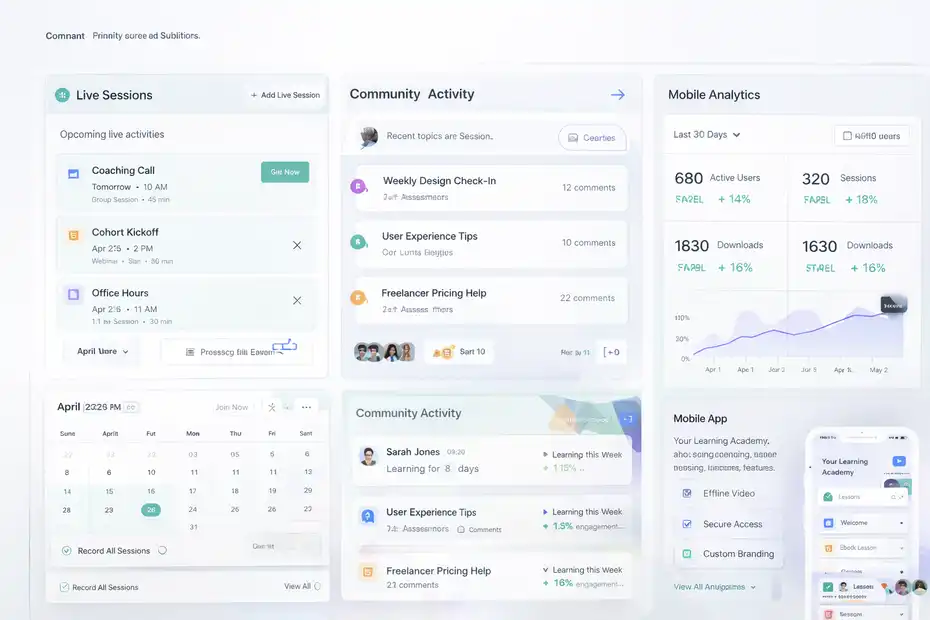
Recorded lessons are useful, but they are not always enough. Many course businesses grow faster when learners can interact with the instructor or each other.
LearnWorlds includes several features aimed at that deeper level of engagement.
Live Sessions Support Coaching, Workshops, And Cohorts
LearnWorlds support documentation explains that you can schedule and host live classes and webinars inside the learning flow. It also supports 1:1 and group sessions as learning activities.
This is a big advantage if your teaching model includes any of the following:
- Weekly coaching calls
- Cohort launches
- Q&A workshops
- Office hours
- Onboarding sessions
- Hybrid self-paced plus live programs
A self-paced course gets people in the door. Live touchpoints often help them finish.
Imagine you run a UX portfolio course. Your pre-recorded lessons teach structure, messaging, and layout. But a monthly live review session is what helps students actually apply the material. LearnWorlds makes that kind of blended model much easier to organize.
Community Features Can Reduce Isolation And Refund Risk
LearnWorlds promotes a social-first training experience, and its support center includes dedicated community guidance. It also lists social learning activities among supported course elements.
That matters because many learners do not quit because your content is bad. They quit because they feel alone, behind, or invisible.
Community tools can help create:
- Accountability through visible progress and discussion
- Peer learning around common questions
- Extra engagement between lesson completions
- Stronger brand loyalty over time
I have seen this matter most in courses that take more than a week to finish. The longer the transformation, the more helpful it is to give learners a place to interact rather than disappearing into a content library.
Mobile App Support Extends The Learning Habit
LearnWorlds offers a mobile app builder and states that app analytics can track active users, sessions, and downloads. Support materials also reference offline video access, biometric authentication, and mobile app customization.
Not every business needs its own mobile app. Let’s be honest about that.
But if your audience learns in short bursts, commutes often, or expects a more polished membership experience, mobile becomes much more valuable. Fitness, language learning, coaching, and internal training are good examples.
A mobile app is not just a nice add-on. In the right niche, it can increase repeat engagement because it makes learning feel easier to return to.
Analytics, Reporting, And Admin Control Features
A course platform should not leave you guessing. LearnWorlds leans into reporting and operational control, which is especially useful once you move beyond a single small course.
Reporting Helps You Improve The Course, Not Just Watch Numbers
LearnWorlds’ analytics and reports page says the platform supports progress tracking, exam results, survey responses, participation history, segmentation, custom reports, exports, scheduled reports, and AI-powered insights.
That means you can look beyond vanity metrics.
Useful questions you can answer include:
- Where are learners dropping off?
- Which assessments are too easy or too hard?
- Which course attracts enrollments but weak completion?
- Which student group performs differently from another?
- What parts of the academy actually generate revenue?
This is where course optimization becomes much more real.
For example, if you discover that 42% of learners stop halfway through Module 3, that is not “bad student behavior.” It may mean your lesson sequence is too long, the exercise is confusing, or the payoff is delayed. Reporting helps you diagnose product problems rather than blaming the audience.
Custom User Roles Help Teams Work Without Chaos
LearnWorlds’ custom user roles feature allows role creation across 60+ permission controls, and support docs explain predefined and custom roles for administrative, instructional, management, and reporting use cases.
This is one of those features that sounds boring until you need it badly.
If you are solo, you may not care today. But once you hire a support manager, bring in guest instructors, sell B2B training, or work with a client team, permission control becomes a serious operational issue.
A few examples:
- A support assistant should answer student questions without editing payments.
- An instructor may need course access without full admin controls.
- A reporting manager may need progress dashboards without touching content.
- A client contact may need to see only their team’s training data.
That kind of separation protects the school and makes scaling cleaner.
Integrations Matter Most When The Business Gets More Complex
LearnWorlds officially says it connects with 50+ tools and supports API, webhooks, and automation platforms such as Zapier, plus connections with business tools like Stripe, Zoom, and HubSpot. Its broader solution pages also mention 4,000+ integrations in some enterprise contexts.
I would not build your whole buying decision around integrations alone, but they matter when your course business starts feeding other systems.
A few common cases:
- Enrollments need to trigger CRM updates
- Webinar registrations need to sync with course access
- Sales data needs to move into reporting dashboards
- Lead forms need to connect with email automation
This is usually the difference between “I have a course” and “I run a training business.”
Pricing Tiers, Fit, And When LearnWorlds Makes Sense
Features only matter if they match the kind of course operation you actually want to run.
LearnWorlds is powerful, but that does not automatically mean it is the right choice for everyone.
Pricing Reflects A More Serious Feature Set
On its official pricing page, LearnWorlds lists plans including Starter, Pro Trainer, Learning Center, and High Volume/Corporate, with higher tiers adding more advanced learning and support features.
The site currently shows Learning Center at $249/month annually or $299/month monthly, and notes that some advanced interactive video capabilities start at higher plans.
That pricing tells you something important: LearnWorlds is not aiming only at hobby creators.
It is better to think of it this way. If your business depends on deeper course delivery, branded academy experience, assessments, analytics, live learning, and scale, the price can be reasonable. If you only need a simple video course and checkout link, it may feel like too much platform for the job.
Best Fit By Use Case
Here is a practical breakdown.
| Use Case | LearnWorlds Fit | Why |
|---|---|---|
| First-time creator with one small course | Moderate | Strong tools, but may be more than you need at the start |
| Coach with premium program | Strong | Live sessions, branded site, upsell paths, learner experience |
| Training company | Very strong | Assessments, certificates, roles, reporting, SCORM support |
| Customer education academy | Very strong | Structured delivery, tracking, live elements, white labeling |
| Enterprise or compliance training | Strong | Reporting, roles, integrations, security-focused higher tiers |
This is where I’d be blunt: LearnWorlds shines when learning experience is central to your offer. If content quality and student progression matter to your brand, the feature depth makes sense.
The Biggest Tradeoff Is Complexity Versus Capability
More features give you more control, but they also create more decisions.
That means setup can take longer than with a lighter platform. You need to think through your course structure, learner journey, website layout, assessments, and reporting goals. For some people, that is a downside. For others, that is exactly why the platform works.
In my view, LearnWorlds is strongest for people who want to build an online school, not just upload lessons.
How To Use LearnWorlds Features Strategically
The smartest way to use LearnWorlds is not to activate everything at once. It is to use the right features in the right order based on your business stage.
Start With Core Delivery, Then Layer Engagement
For a new course, I suggest this sequence:
- Step 1: Build a clean course structure with sections and mixed learning activities.
- Step 2: Add one or two assessments where confusion is most likely.
- Step 3: Use interactive video only in lessons that need higher engagement.
- Step 4: Create a polished course sales page and branded school homepage.
- Step 5: Add live sessions or community only if they support the offer.
This keeps you from overbuilding too early.
One common mistake is spending three weeks customizing every detail before validating the course. The platform gives you a lot of room, but you still want to build around real learner outcomes.
Use Data To Improve The Product, Not Just Marketing
Once students are active, move into reporting.
Look for:
- Drop-off points
- Weak quiz performance
- Low engagement lessons
- High-performing course paths
- Support requests that repeat
Then update the course based on that behavior. That is how a decent course becomes a better one over time.
Build For The Experience You Want To Be Known For
This is probably my biggest takeaway from a learnworlds features overview: the platform rewards intentional course design.
If you want to be known for premium, thoughtful learning, use the features to support that reputation. Add assessments where they help. Use interactive video where it improves attention.
Build a branded site that feels trustworthy. Use reports to fix weak spots. Add live or community layers where connection matters.
Do not use features just because they exist. Use them to make the student experience clearer, smoother, and more effective.
Final Thoughts
LearnWorlds offers a deeper feature set than many course platforms, especially around interactive learning, assessments, branded websites, analytics, roles, and blended delivery.
Officially, it supports a broad mix of course activities, 50+ website templates, 16+ assessment question types, live sessions, community elements, advanced reporting, custom roles, and a growing integration layer.
That does not mean it is the easiest option for every beginner. But if you are building a serious online course business, a training academy, or a customer education program, I believe the platform earns a close look.
The real strength is not one flashy feature. It is how the tools work together to support the full learning journey, from first visit to final completion.
FAQ
What is included in a LearnWorlds features overview?
A LearnWorlds features overview includes tools for course creation, interactive video, assessments, website building, analytics, and student engagement. It covers everything needed to create, deliver, and scale online courses from one platform, making it suitable for creators, coaches, and training businesses.
How does LearnWorlds improve online course engagement?
LearnWorlds improves engagement through interactive video, quizzes, live sessions, and community features. These tools keep learners active instead of passively watching content, helping increase course completion rates and making the learning experience more dynamic and effective.
Is LearnWorlds suitable for beginners?
LearnWorlds is suitable for beginners, but it works best for those willing to learn its features. While the platform offers powerful tools, it may feel complex at first. However, beginners who want to build a serious online course business can benefit from its flexibility and scalability.
Can LearnWorlds replace a website builder?
Yes, LearnWorlds can replace a website builder for many users. It includes customizable templates, SEO tools, and a drag-and-drop editor, allowing you to create landing pages, sales pages, and a full course website without needing an external platform.
What makes LearnWorlds different from other course platforms?
LearnWorlds stands out with its focus on interactive learning, advanced assessments, and built-in website capabilities. Unlike simpler platforms, it offers deeper control over the learning experience, making it ideal for businesses and creators who prioritize structured, high-quality education.

I’m Juxhin, the voice behind The Justifiable.
I’ve spent 6+ years building blogs, managing affiliate campaigns, and testing the messy world of online business. Here, I cut the fluff and share the strategies that actually move the needle — so you can build income that’s sustainable, not speculative.