
Table of Contents
Some links on The Justifiable are affiliate links, meaning we may earn a small commission at no extra cost to you. Read full disclaimer.
Apollo io b2b lead generation tool review searches usually come from one simple question: Is Apollo actually good enough to help you find, contact, and convert B2B prospects, or is it just another overhyped sales database?
I’ll be honest with you: Apollo is powerful, but it is not magic. It combines contact data, company search, enrichment, email sequencing, calling, lead scoring, and workflow automation in one platform.
That makes it attractive for startups, sales teams, founders, recruiters, and marketers who want fewer tools and a more repeatable outbound process.
Understand What Apollo IO Actually Is
Apollo is best understood as a sales intelligence and engagement platform, not just a place to “find emails.”
That distinction matters because the real value comes from combining prospect discovery, contact enrichment, outreach, and pipeline actions in one workflow.
What Apollo IO Does In Simple Terms
Apollo helps you identify companies and people that match your ideal customer profile, find their business contact information, organize them into lists, and reach out through email, calls, and automated sequences.
The platform’s own positioning is broader than a contact database. Apollo describes its prospecting product around a large B2B database, precision filters, buyer intent data, enrichment, scoring, API access, and workflow support. Its site says the database includes 230M+ contacts and supports 65+ data attributes for filtering prospects.
Let me break it down in plain English. If you sell accounting software to finance leaders at SaaS companies, Apollo can help you search for SaaS companies, narrow by employee count, geography, technologies used, department, job title, seniority, and other filters. Then you can save relevant contacts, verify their emails, add them to an outreach sequence, and track engagement.
That is why many people compare Apollo to a mix of ZoomInfo, Salesloft, Outreach, and a lightweight CRM. I would not say it fully replaces all of those tools for every team, but for many small and mid-sized B2B teams, it can reduce tool sprawl.
Who Apollo Is Built For
Apollo is mainly built for B2B teams that need a repeatable way to find and contact business buyers. That includes sales development representatives, account executives, founders, growth marketers, recruiters, revenue operations teams, and agencies doing outbound prospecting.
In my experience, Apollo makes the most sense when your buyer can be defined clearly. For example, “VP of Operations at U.S. logistics companies with 50–500 employees” is a strong Apollo use case. “Anyone who might want my product” is not.
You will get better results when you already know:
- Target company type: Industry, size, location, funding stage, or business model.
- Target buyer: Job title, seniority, department, and common pain points.
- Offer: The specific problem you solve and why now is a good time to talk.
- Outbound motion: Email, phone, LinkedIn, or a combination.
Apollo is not a shortcut around strategy. It is a multiplier for a clear strategy. If your targeting is messy, Apollo can help you build a bigger messy list faster. That sounds funny until you realize how many teams do exactly that.
The Core Problem Apollo Tries To Solve
The core problem Apollo solves is the gap between “we know who we want to sell to” and “we have a working list of real people we can contact.”
Before tools like Apollo became popular, teams often had to buy static lead lists, manually scrape company websites, guess email formats, use separate verification tools, upload CSV files into a different outreach platform, and then manually track everything in a CRM.
Apollo compresses that workflow. You can search, filter, enrich, save, sequence, call, and measure from one place. Apollo also says it supports automatic enrichment to keep CRM data accurate and up to date, which is useful because stale data is one of the quiet killers of outbound sales.
The hidden power is speed and workflow continuity. The risk is that speed can make you careless. The best users treat Apollo like a prospecting engine, not a spam cannon.
Evaluate Apollo IO’s Lead Database Quality
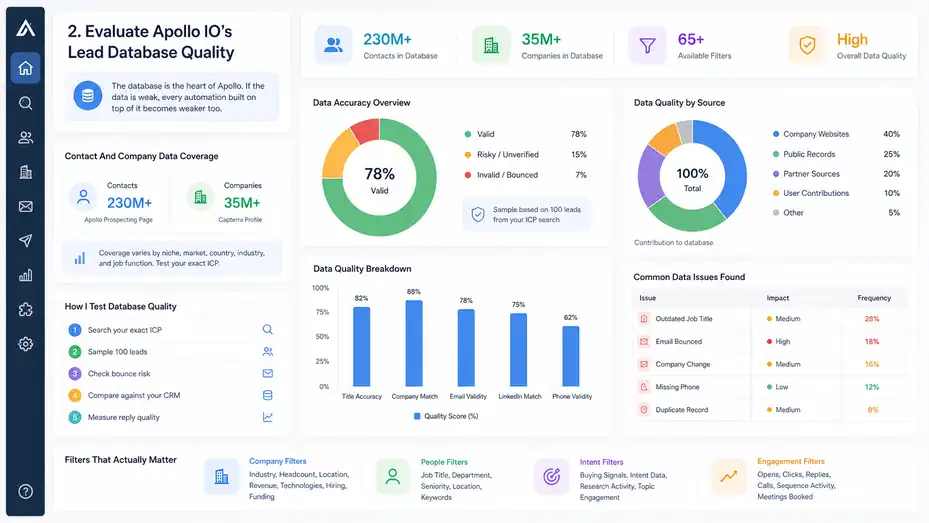
The database is the heart of Apollo. If the data is weak, every automation built on top of it becomes weaker too.
Contact And Company Data Coverage
Apollo claims a very large B2B database, with its current prospecting page referencing 230M+ contacts and 65+ filters. Capterra’s Apollo profile describes the platform as including a B2B database with over 210M contacts and 35M companies, though Apollo’s own current marketing page now presents the higher 230M+ contact figure.
For a buyer, the exact number matters less than coverage in your niche. A huge database does not guarantee strong data for every market, country, industry, or job function.
Here’s how I would test it:
- Search your exact ICP: Use your real filters, not broad demo filters.
- Sample 100 leads: Check titles, companies, emails, and LinkedIn profiles manually.
- Check bounce risk: Export or sequence only verified emails at first.
- Compare against your CRM: Look for duplicates, outdated roles, and missing fields.
- Measure reply quality: Good data produces relevant replies, not just opens.
Imagine you sell cybersecurity consulting to healthcare companies. Apollo might show thousands of security and IT contacts, but your real test is whether those contacts still work at the company, whether they have decision influence, and whether the email is usable.
Data Accuracy And The Reality Of B2B Prospecting
No B2B contact database is perfectly accurate. People change jobs, companies restructure, domains change, departments merge, and titles get weird. That is not an Apollo-only problem; it is a B2B data problem.
G2’s review summary says users often praise Apollo for ease of use and accurate contact data, but some also report inconsistent data, especially outdated contact information.
Capterra’s feature summaries say reviewers appreciate Apollo’s lead capture, lead qualification, and validation features, while still noting occasional bounced emails and data inconsistencies.
That matches what I would expect from a large sales intelligence platform. The bigger the database, the more important your verification workflow becomes.
I suggest treating Apollo data as “actionable but not unquestionable.” Before launching a high-volume campaign, check a sample. Before contacting enterprise accounts, review each record manually. Before syncing thousands of contacts into your CRM, set field rules so you do not overwrite better first-party data.
Filters That Actually Matter
Apollo’s filters are one of its strongest features because they help you narrow a broad market into a usable prospect list. But more filters do not automatically mean better targeting.
The most useful filters usually include:
- Company filters: Industry, headcount, location, revenue range, technologies, hiring trends, and funding.
- People filters: Job title, department, seniority, location, and keywords.
- Intent filters: Signals that suggest a company may be researching or moving toward a buying decision.
- Engagement filters: Opens, clicks, replies, call outcomes, and sequence activity.
The mistake I see often is filtering by title only. For example, “Head of Marketing” may include demand generation leaders, brand marketers, content managers, and one-person startup teams. Those people may have very different problems.
A better approach is to combine title with company context. “Head of Marketing at B2B SaaS companies with 51–200 employees using a CRM and hiring SDRs” is much more useful than “marketing leads.”
Review Apollo IO’s Main Features
Apollo’s feature set is wide, which is both its biggest advantage and one reason new users can feel overwhelmed.
The key is to understand which features matter for lead generation and which ones are nice extras.
Prospect Search And List Building
Prospect search is where most users start. You use filters to find companies or contacts, then save those records into lists.
In practice, I recommend building account lists before contact lists. That means you first define the companies you want to sell to, then find the right people inside those companies. This prevents the classic mistake of collecting random contacts who match a job title but work at poor-fit companies.
A simple workflow looks like this:
- Build the account list: Filter by industry, company size, region, and business signals.
- Review the companies: Remove poor-fit accounts manually.
- Find contacts inside accounts: Filter by department, title, and seniority.
- Segment contacts by role: Separate decision-makers, influencers, and users.
- Create outreach lists: Group leads by pain point or use case, not just title.
Let’s say you sell HR software. Your account list might include 200 growing companies hiring heavily. Your contact list may include heads of HR, people operations managers, and finance leaders. Each role needs a slightly different message.
Email Sequences And Sales Engagement
Apollo includes sales engagement features such as sequences, email campaigns, automated follow-ups, A/B testing, calls, and workflow actions.
Apollo’s pricing page says email campaigns are included on every account, though non-paying plans can only connect Gmail accounts, while paid users can connect Microsoft Office or other providers.
This is where Apollo becomes more than a database. You can create a sequence that sends an initial email, waits a few days, sends a follow-up, creates a call task, and stops automatically when someone replies.
A basic outbound sequence might look like this:
- Email 1: Introduce the relevant pain point and why you are reaching out.
- Email 2: Share a short proof point or useful idea.
- Call task: Call only the best-fit contacts, not every scraped lead.
- Email 3: Offer a specific next step, such as a short audit or comparison.
- Breakup email: Politely close the loop without pressure.
I believe sequences work best when they feel like structured persistence, not robotic nagging. Keep each message focused, useful, and easy to reply to.
Data Enrichment And CRM Hygiene
Enrichment means filling in missing contact or company information, such as job title, company size, email address, phone number, LinkedIn URL, or firmographic data. Firmographic data is just company-level information, like industry, revenue, headcount, and location.
Apollo’s enrichment tools are designed to keep records fresher and more complete. Its knowledge base says Apollo offers multiple enrichment tools to help keep data fresh and up to date, while its prospecting page highlights automatic CRM enrichment.
This matters because many sales teams slowly poison their CRM with outdated data. A contact changes jobs, a company grows, a lead’s department changes, and suddenly your segmentation becomes unreliable.
I recommend using enrichment in layers:
- Before outreach: Enrich only leads that match your ICP.
- Before CRM sync: Decide which fields Apollo can update and which fields it should not overwrite.
- After engagement: Enrich accounts that show intent, replies, or website activity.
- Quarterly cleanup: Refresh high-value segments instead of refreshing everything blindly.
Enrichment is not just about more data. It is about better decisions.
Lead Scoring And Prioritization
Lead scoring helps you rank contacts or accounts based on fit and behavior. Apollo says its scoring engine can rank contacts and accounts using demographic and behavioral data.
A practical lead score should answer one question: “Who deserves attention first?”
For example, a high-fit lead might be a VP at a company in your target industry with 200 employees, using a relevant technology, and showing interest in your category. A low-fit lead might have the right title but work at a company that is too small, outside your service area, or unlikely to buy.
I would not overcomplicate scoring at the beginning. Start with a simple model:
| Score Factor | Why It Matters | Example |
|---|---|---|
| Company Fit | Confirms the account matches your market | SaaS company, 51–500 employees |
| Role Fit | Confirms the person can influence the deal | VP Sales, RevOps, Founder |
| Timing Signal | Suggests possible urgency | Hiring SDRs, new funding, category research |
| Engagement | Shows interest in your outreach | Reply, click, booked meeting |
| Disqualification | Prevents wasted effort | Student, vendor, competitor, wrong country |
The goal is not to create a perfect score. The goal is to help your team spend more time on the right people.
Set Up Apollo IO For B2B Lead Generation
The setup phase determines whether Apollo becomes a growth asset or a messy database full of unqualified contacts.
I suggest slowing down here, even if the platform makes it tempting to move fast.
Define Your Ideal Customer Profile First
Your ideal customer profile, or ICP, is the type of company most likely to buy from you and succeed with your product or service. Apollo can help you find leads, but it cannot decide your market for you.
Before touching filters, write a simple ICP statement:
“We help [type of company] with [specific problem] when they are [trigger or stage], usually by working with [buyer role].”
For example: “We help B2B SaaS companies with 20–100 sales reps improve outbound conversion when their SDR team is booking meetings but pipeline quality is inconsistent, usually by working with RevOps and sales leaders.”
That one sentence gives you your company filters, contact filters, and messaging angle.
Here’s what I recommend defining:
- Best-fit industries: The markets where your solution has the strongest proof.
- Company size: Employee count or revenue range that matches your pricing.
- Buyer roles: Decision-makers, influencers, users, and blockers.
- Pain points: The problems that make your offer urgent.
- Disqualifiers: Company types, regions, or titles you do not want.
The tighter your ICP, the more Apollo feels like a precision tool.
Build Your First Target Account List
Start with accounts, not people. This is a small change that creates a big improvement in lead quality.
Use Apollo’s company filters to create a list of target accounts. Then manually review the first 50 to 100 companies. Look at their websites, positioning, hiring pages, and whether they genuinely match your offer.
A good starter list should be small enough to inspect but large enough to test. For many teams, 100 to 300 accounts is a healthy first batch.
A practical account list workflow:
- Choose one segment: Do not mix industries in your first campaign.
- Apply firmographic filters: Use size, location, industry, and business model.
- Add timing filters: Look for growth, hiring, funding, technology use, or intent.
- Remove bad fits: Exclude companies that cannot buy or do not need you.
- Save the list: Name it clearly, such as “US B2B SaaS 51–200 Employees Hiring SDRs.”
Naming matters more than people think. Three months from now, “List 1” will mean nothing. A clear list name becomes operational memory.
Find The Right Contacts Inside Each Account
Once the account list is clean, search for the right people inside those companies. This is where many Apollo users either win or create chaos.
Do not grab every contact with a broad title. Instead, map buying roles.
For example, if you sell sales coaching software:
- Economic buyer: VP Sales, Chief Revenue Officer, Founder.
- Champion: SDR Manager, Sales Enablement Manager.
- User: Account Executive, Sales Development Representative.
- Technical reviewer: Revenue Operations or Sales Operations.
For cold outbound, I often suggest starting with two to three contacts per account. One decision-maker, one likely champion, and one operations-focused person can give you enough coverage without making the outreach feel spammy.
Keep your list clean. If the contact has an unrelated role, remove them. If the company looks wrong, remove the whole account. Apollo gives you scale, but your judgment gives you quality.
Use Apollo IO For Outreach Without Sounding Robotic
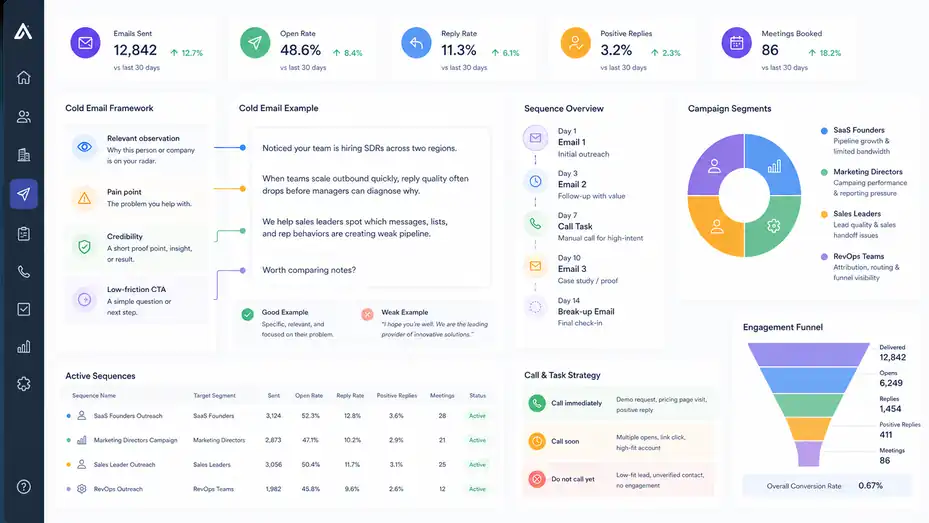
Lead generation is not just finding leads. It is starting relevant conversations. Apollo can automate parts of outreach, but it cannot make a weak message meaningful.
Write Better Cold Emails From Apollo Data
The best Apollo outreach uses data to personalize the reason for contact. That does not mean writing a fake compliment like “Loved your recent post” when you did not read it. It means connecting your offer to the prospect’s likely business context.
A useful cold email usually includes:
- Relevant observation: Why this person or company is on your radar.
- Pain point: The problem you help with.
- Credibility: A short proof point, insight, or result.
- Low-friction CTA: A simple question or next step.
Example: “Noticed your team is hiring SDRs across two regions. When teams scale outbound quickly, reply quality often drops before managers can diagnose why. We help sales leaders spot which messages, lists, and rep behaviors are creating weak pipeline. Worth comparing notes?”
That message works better than “I hope you’re well. We are the leading provider of innovative solutions.” I say that with love, because we have all written boring emails at some point.
Segment Sequences By Pain Point
One of Apollo’s hidden advantages is that you can create different lists and sequences for different buyer problems. Use that. Do not send the same sequence to every lead.
For example, a marketing agency using Apollo might create separate campaigns for:
- SaaS founders: Focus on pipeline growth and limited internal marketing bandwidth.
- Marketing directors: Focus on campaign performance and reporting pressure.
- Sales leaders: Focus on lead quality and sales handoff issues.
- RevOps teams: Focus on attribution, routing, and funnel visibility.
Each group may care about the same service, but they care for different reasons.
In my experience, segmentation beats fake personalization. A truly relevant message to a tightly defined group usually performs better than a generic message with a first-name token and company name.
Use Calls And Tasks Strategically
Apollo includes calling and task workflows, but I would not call every lead. That is a fast way to burn time and annoy people.
Instead, use tasks for high-intent or high-value prospects. For example, create call tasks when someone opens multiple emails, clicks a relevant link, replies with interest, visits your site, or belongs to a high-value target account.
A simple calling rule could be:
- Call immediately: Demo request, pricing page visit, positive reply.
- Call soon: Multiple opens, link click, high-fit account.
- Do not call yet: Low-fit lead, unverified contact, no engagement.
This keeps your human effort focused where it has the highest chance of creating a real conversation.
Compare Apollo IO Pricing And Plans
Pricing can change, and Apollo’s credit system can affect the real cost more than the headline plan price. So, always check the current pricing page before buying.
Current Pricing Snapshot
Apollo’s official pricing page confirms a free Starter path after trial and explains that trial plans include 50 credits and 5 mobile credits. The same page says Apollo uses credits, export credits, plan limits, and fair use rules for Unlimited plans.
Capterra lists Apollo’s starting price as $49 per user per month and notes that a free trial is available.
Here is a practical buyer-focused view:
| Pricing Area | What To Check | Why It Matters |
|---|---|---|
| Starter Or Free Access | Included credits, email account limits, export limits | Good for testing, not always enough for serious outbound |
| Paid User Price | Monthly vs annual cost per user | Costs rise quickly as the team grows |
| Credits | Email, mobile, export, enrichment, or usage-based credits | Credit usage can become the real budget driver |
| CRM Integrations | Whether your CRM integration is included | Needed for clean sales operations |
| Advanced Features | API, governance, custom plans, higher limits | Important for larger teams |
| Cancellation And Changes | Upgrade, downgrade, cancellation rules | Prevents budget surprises |
My advice is simple: Do not buy based only on the monthly seat price. Estimate your monthly prospecting volume, mobile number usage, export needs, CRM sync needs, and enrichment needs.
When Apollo Is Cost-Effective
Apollo can be very cost-effective when it replaces multiple tools. If you currently pay separately for a contact database, email sequencing tool, enrichment provider, dialer, and lightweight sales analytics, Apollo may reduce total cost.
Apollo’s own pricing FAQ frames the product as combining email addresses, sequencing, A/B testing, call recording, follow-ups, opportunities, and database access in one system.
That said, cost-effectiveness depends on how deeply your team uses the platform. Paying for Apollo and only using it to export emails is usually not the best value. Paying for Apollo and using search, enrichment, sequences, scoring, CRM sync, and reporting is a stronger case.
A simple ROI example: Imagine a two-person outbound team pays roughly a few hundred dollars per month for Apollo and books four qualified meetings from it. If one deal from those meetings is worth $5,000 or more, the tool can pay for itself quickly. But if the team sends poor campaigns, burns credits, and books no relevant meetings, even a cheap tool becomes expensive.
Hidden Cost Areas To Watch
The word “hidden” in this review title matters. Apollo’s hidden power is workflow speed. Its hidden risk is unmanaged usage.
Watch these areas:
- Credit consumption: Mobile numbers, exports, and enrichment can use credits faster than expected.
- Bad-fit exports: Exporting weak leads wastes money and creates CRM clutter.
- Duplicate tools: You may still pay for tools Apollo partly replaces.
- Deliverability work: You may need domain setup, inbox warming discipline, and list hygiene.
- Team training: A powerful platform needs clear rules, or reps will use it inconsistently.
I suggest creating a monthly Apollo usage dashboard. Track credits used, leads saved, leads sequenced, bounce rate, reply rate, meetings booked, opportunities created, and closed revenue. That tells you whether Apollo is a cost or an acquisition asset.
Analyze Apollo IO Reviews, Pros, And Cons
User reviews are useful when you read them for patterns, not perfection. Every platform has fans and frustrated users.
What Users Commonly Like
Across review platforms, Apollo is often praised for ease of use, prospecting speed, contact data, and having multiple sales tools in one place. G2’s review summary highlights ease of use, accurate contact data, an intuitive interface, and streamlined lead generation.
Capterra shows a 4.5 overall rating based on 383 reviews, with 4.5 ratings for ease of use and features, plus 92% positive sentiment in its review summary.
The biggest practical benefits are:
- Fast list building: You can go from ICP idea to prospect list quickly.
- Strong filters: Useful for narrowing broad markets.
- All-in-one workflow: Search, save, enrich, sequence, and track in one place.
- Accessible entry point: The free or lower-cost starting point helps smaller teams test.
- Good learning curve: Many users find it easier than more enterprise-heavy tools.
I would especially recommend Apollo to teams that need to move quickly but still want reasonable control over targeting.
What Users Commonly Criticize
The most common complaints are exactly what I would expect: imperfect data, occasional outdated contacts, possible bounce issues, and an interface that can feel busy at first.
G2’s review summary specifically notes that some users report inconsistent data accuracy, especially outdated contact information. Capterra’s feature summaries also mention occasional bounced emails and inconsistencies, even while rating Apollo’s contact database, lead capture, lead qualification, validation, and prospecting tools positively.
One Capterra user review also says the interface can feel overwhelming at first, which is believable because Apollo has a lot packed into one product.
These are not dealbreakers for most teams, but they are reasons to build guardrails.
Do not let new reps export thousands of leads without review. Do not sync every Apollo field into your CRM without rules. Do not assume every “verified” email will perform perfectly. Use Apollo with process discipline.
My Honest Verdict On The Hype
Apollo is not hype if you need B2B prospecting, enrichment, and outbound engagement in one place. It is genuinely useful.
But it becomes hype when people expect it to solve positioning, messaging, deliverability, sales skills, and offer quality by itself. No tool can do that.
My honest take: Apollo is a strong B2B lead generation tool for teams with a clear ICP, a defined outbound motion, and someone responsible for data quality. It is less ideal for teams that want to blast generic messages at huge lists and call that growth.
Avoid Common Apollo IO Mistakes
Most Apollo failures are not caused by the software. They happen because teams use the tool faster than they think.
Mistake 1: Building Lists Before Defining The Offer
A lot of teams start Apollo by searching for job titles. That feels productive, but it skips the most important question: Why would this person care?
Before building a list, define the offer. Not your product category, but the specific problem you solve.
Weak offer: “We help companies grow.”
Strong offer: “We help B2B SaaS teams reduce no-show rates from outbound demos by improving reminder flows, qualification, and rep handoff.”
The strong offer tells you who to target, what trigger to look for, and what message to write.
If your Apollo campaign underperforms, do not immediately blame the data. Ask whether the offer is specific enough. A clear offer can make a smaller list outperform a massive generic one.
Mistake 2: Overusing Automation
Apollo makes automation easy, and that is exactly why you need restraint.
Too many teams create long sequences with too many touches, too little relevance, and no human review. That can hurt your brand, reduce reply quality, and create deliverability issues.
Use automation for structure, not laziness. Automate reminders, follow-ups, task creation, and list movement. Keep the thinking human.
A healthy outbound system might automate:
- Follow-up timing: So leads do not fall through the cracks.
- List routing: So high-fit prospects enter the right campaign.
- CRM updates: So reps do not waste time on admin.
- Task creation: So engaged leads get human attention.
But your positioning, segmentation, and message quality still need human judgment.
Mistake 3: Ignoring Deliverability
Email deliverability means whether your emails actually land in the inbox instead of spam. Apollo can help you send campaigns, but it cannot magically protect a poor sending setup.
You should still use good outbound hygiene:
- Use a proper business domain: Avoid sending from your main domain if you are testing cold outreach heavily.
- Set up authentication: SPF, DKIM, and DMARC help mailbox providers trust your emails.
- Start with low volume: Ramp gradually instead of blasting hundreds of emails on day one.
- Use verified contacts: Avoid risky addresses when testing.
- Watch bounce and reply rates: These show whether your data and messaging are healthy.
In most cases, I would rather send 300 highly relevant emails than 3,000 careless ones. Apollo gives you reach, but reputation still matters.
Mistake 4: Syncing Messy Data Into The CRM
CRM sync can save time, but it can also create a disaster if you do not set rules.
Before syncing Apollo data, decide:
- Which fields Apollo can create.
- Which fields Apollo can update.
- Which fields should never be overwritten.
- How duplicates should be handled.
- When leads become contacts or accounts.
- Who owns cleanup.
For example, you may allow Apollo to add missing LinkedIn URLs but not overwrite lifecycle stage, account owner, or revenue fields. That protects your CRM from accidental damage.
Revenue operations teams should be involved early. If you are a founder or solo operator, create a simple spreadsheet of field rules before turning on sync. Future you will be grateful.
Optimize Apollo IO For Better Results
Once the basics work, optimization is where Apollo starts becoming truly valuable. Small improvements in targeting, messaging, and routing can compound quickly.
Track The Metrics That Matter
Do not judge Apollo only by how many leads you export. That is a vanity metric. The real question is whether the leads turn into conversations, meetings, pipeline, and revenue.
Track these metrics by campaign:
| Metric | Healthy Question To Ask |
|---|---|
| Lead-To-Sequence Rate | Are we using the leads we save? |
| Bounce Rate | Is the data clean enough? |
| Open Rate | Are inbox placement and subject lines working? |
| Reply Rate | Is the message relevant? |
| Positive Reply Rate | Are we attracting real interest? |
| Meeting Booked Rate | Is the CTA strong enough? |
| Opportunity Rate | Are we targeting buyers with real fit? |
| Closed Revenue | Is Apollo producing business outcomes? |
I pay special attention to positive reply rate. A campaign can have a decent reply rate but mostly receive “not interested” responses. Positive replies tell you whether your market, message, and timing are working.
Improve Targeting Before Improving Copy
When campaigns fail, people often rewrite the email first. Sometimes that helps. But in my experience, targeting usually has more leverage.
A mediocre email to the right person with a real pain point can still start a conversation. A beautiful email to the wrong person usually does nothing.
Use Apollo filters to test narrower segments:
- Industry-specific campaign: One pain point for one industry.
- Trigger-based campaign: Companies hiring, expanding, or using a certain technology.
- Role-based campaign: One message for one buyer role.
- Account-tier campaign: More personalization for higher-value accounts.
For example, instead of targeting “operations leaders,” target “operations leaders at fulfillment companies with 100–500 employees hiring warehouse managers.” That gives your message context.
Use A/B Testing Carefully
Apollo’s pricing FAQ mentions A/B testing email campaigns as part of its sequencing capabilities.
A/B testing means comparing two versions of something to see which performs better. The trap is testing too many things at once. If you change the subject line, first sentence, CTA, and audience, you will not know what caused the result.
Start with simple tests:
- Subject line test: Direct pain point vs curiosity-based.
- Opening line test: Company trigger vs role-based problem.
- CTA test: “Worth a quick chat?” vs “Open to comparing notes?”
- Proof test: Case-study result vs operational insight.
Run tests long enough to collect meaningful data. A test with 20 sends is not a decision. A test with a few hundred targeted sends can reveal a pattern.
Build A Feedback Loop With Sales Calls
Apollo data becomes more valuable when you feed real sales feedback back into your process.
After every call, tag what you learned:
- Was the company a real fit?
- Was the title the right buyer?
- Was the pain point accurate?
- Did the prospect understand the offer?
- What objection came up?
- What trigger created interest?
Then use that feedback to adjust filters, scoring, and messaging.
Imagine your campaign targets HR directors, but most calls reveal that finance owns the budget. That insight should change your contact strategy. Or maybe you learn that companies under 50 employees love the idea but cannot afford it. That should change your company size filter.
Apollo helps you find the market. Conversations help you understand it.
Decide Whether Apollo IO Is Right For You
Apollo is a strong tool, but it is not the right choice for every situation. The best decision depends on your sales motion, budget, data needs, and team maturity.
Best-Fit Use Cases
Apollo is a strong fit for teams that sell to clearly defined B2B buyers and need outbound prospecting at a manageable cost.
It is especially useful for:
- Startups: Founders can build early pipeline without buying multiple expensive tools.
- SDR teams: Reps can prospect, sequence, and track activity in one place.
- Agencies: Teams can build lists across niches and test campaigns quickly.
- Recruiters: Users can identify professionals by title, company, and background.
- Revenue teams: Enrichment and scoring can support cleaner operations.
Apollo is also a good fit when you want to test a market. For example, a founder exploring whether mid-market fintech companies respond to a compliance automation offer can build a small list, send a careful campaign, and learn quickly.
When Apollo May Not Be Enough
Apollo may not be enough if you need extremely specialized data, strict enterprise governance, very advanced sales engagement features, or deep CRM customization.
It may also disappoint you if:
- Your target market is too broad.
- Your buyer data is hard to verify.
- You rely heavily on personal emails rather than business contacts.
- Your outbound messaging is generic.
- Your team lacks deliverability discipline.
- You need perfect data accuracy.
Capterra’s Apollo profile shows strong ratings, but also notes that users mention inconsistencies and occasional errors in areas like contact data and validation.
That is why I recommend testing Apollo with your exact ICP before committing heavily. Do not evaluate it using a random demo search. Evaluate it using your real market.
Apollo IO Alternatives To Consider
You may compare Apollo with several categories of tools, depending on what you need.
| Tool Category | Common Use Case | When It May Beat Apollo |
|---|---|---|
| Enterprise Data Platforms | Large-scale sales intelligence | Deeper enterprise data, contracts, governance |
| Dedicated Sales Engagement Tools | Complex outbound sequences | Advanced sequencing and team workflows |
| Email Verification Tools | Cleaning contact lists | Stronger standalone verification |
| CRM Platforms | Managing pipeline and customers | Better deal management and reporting |
| Intent Data Platforms | Buying signal detection | Deeper intent and account research |
Apollo’s advantage is that it combines many of these functions. A specialist tool may outperform Apollo in one area, but Apollo often wins on convenience and total workflow speed.
My rule: Choose Apollo when you want one practical system for prospecting and outbound. Choose specialist tools when one part of your workflow needs enterprise-level depth.
Build A Practical Apollo IO Workflow
A tool review is not complete unless you know how to actually use the tool. Here is a realistic Apollo workflow I would use for a B2B team starting from scratch.
Week 1: Build The Foundation
Start by defining one campaign, one audience, and one offer. Do not try to launch five campaigns at once.
Your first-week setup:
- Define ICP: Choose one narrow customer segment.
- Create account filters: Industry, size, location, and key business signals.
- Save 100–300 accounts: Keep the list manageable.
- Review accounts manually: Remove obvious poor fits.
- Find 2–3 contacts per account: Focus on likely buyers and influencers.
- Set CRM rules: Decide what syncs and what stays untouched.
- Write one sequence: Keep it short, relevant, and easy to reply to.
By the end of week one, you should have a clean pilot campaign, not a giant messy database.
Week 2: Launch A Controlled Test
In week two, send a small batch and watch the signals.
I suggest starting with 50 to 150 contacts, depending on your sending setup and experience. The goal is not maximum volume. The goal is learning.
Watch:
- Bounce rate.
- Open rate.
- Reply rate.
- Positive replies.
- Objections.
- Unsubscribe signals.
- Meetings booked.
If bounce rate is high, pause and improve data quality. If opens are low, review deliverability and subject lines. If replies are low, review targeting and message relevance. If replies are negative, your offer may be misaligned with the audience.
This is where humility helps. The market is giving you feedback. Listen before scaling.
Week 3 And Beyond: Scale What Works
Once you have a segment that produces positive replies or meetings, expand carefully.
Scaling does not mean “send more of the same to everyone.” It means increasing volume while protecting quality.
You can scale by:
- Adding similar accounts.
- Creating role-specific sequences.
- Testing adjacent industries.
- Adding call tasks for engaged leads.
- Enriching high-intent accounts.
- Building lead scores from real conversion data.
For example, if your first campaign works with B2B SaaS companies using a certain CRM, your next campaign might target a similar company size in another region or a related software category. Keep one variable stable while testing another.
That is how Apollo becomes a repeatable growth system instead of a one-off list-building tool.
Final Verdict: Hidden Power Or Hype?
Apollo has hidden power, but only for teams willing to use it with focus.
It gives you speed, data, enrichment, sequencing, scoring, and workflow automation in one platform. That is genuinely valuable.
The Bottom Line
Apollo IO is not just hype. For B2B lead generation, it is one of the more practical all-in-one platforms because it helps you move from market definition to contact discovery to outreach execution without constantly switching tools.
Its strengths are clear: large database, strong filters, accessible pricing entry point, sales engagement features, enrichment, scoring, and solid user satisfaction. Apollo’s own site claims 230M+ contacts, 65+ filters, and a 4.7/5 rating based on 9,015 G2 reviews, while Capterra lists a 4.5 overall rating from 383 reviews.
Its weaknesses are also real: data can be imperfect, credits need management, the interface may feel busy, and automation can create bad habits if your team lacks discipline.
My final recommendation: Use Apollo if you have a clear ICP, a specific offer, and a plan to measure results beyond exported leads. Skip or delay it if you have not figured out your market, message, or sales process yet.
Best Way To Start
Start small. Pick one segment. Build one account list. Find two or three buyer roles. Write one sequence. Send a controlled batch. Measure replies and meetings. Improve before scaling.
That simple approach will teach you more than exporting 10,000 leads ever could.
Apollo’s hidden power is not just the database. It is the ability to turn a clear sales strategy into a repeatable outbound workflow. But the strategy still has to come from you.
FAQ
What is Apollo IO used for in B2B lead generation?
Apollo IO is used to find B2B contacts, build targeted prospect lists, enrich company data, and run outbound email sequences. It helps sales teams identify decision-makers, verify contact details, and manage outreach from one platform, making it useful for prospecting, pipeline building, and sales engagement.
Is Apollo IO good for small businesses?
Apollo IO can be good for small businesses that need an affordable way to find leads and test outbound sales. It works best when you already know your ideal customer profile, target industry, buyer role, and offer. Without clear targeting, the tool can create large but low-quality lists.
How accurate is Apollo IO contact data?
Apollo IO contact data is useful, but it is not perfect. Like most B2B databases, some emails, job titles, and company details may be outdated. The best approach is to use verified emails, review important accounts manually, and track bounce rates before scaling any campaign.
Does Apollo IO replace a CRM?
Apollo IO does not fully replace a CRM for most teams. It can support prospecting, outreach, enrichment, and basic pipeline workflows, but a dedicated CRM is usually better for managing deals, customer relationships, reporting, and long-term sales operations as your business grows.
Is Apollo IO worth it for B2B sales teams?
Apollo IO is worth it for B2B sales teams with a clear prospecting strategy, defined buyer profile, and disciplined outreach process. Its value comes from combining data, enrichment, sequences, and tracking. It is less effective if used only to export contacts or send generic cold emails.

I’m Juxhin, the voice behind The Justifiable.
I’ve spent 6+ years building blogs, managing affiliate campaigns, and testing the messy world of online business. Here, I cut the fluff and share the strategies that actually move the needle — so you can build income that’s sustainable, not speculative.
Related posts:
 Generating Leads on LinkedIn: The Ultimate Guide for B2B Sales Professionals
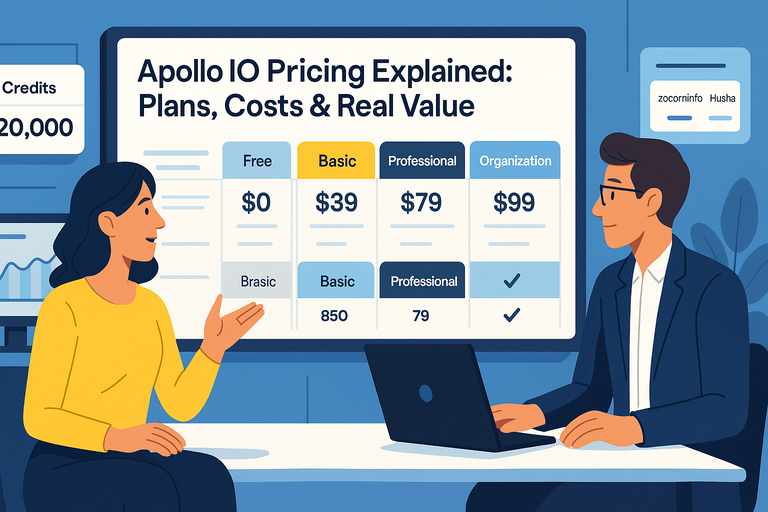 Apollo IO Pricing Explained: Plans, Costs & Real Value
 B2B Commerce: Driving Sales Through Effective Marketing Strategies
 10 Similar Sites To Apollo IO Every Marketer Should Try
 Freshworks CRM Pricing: Real Costs & Hidden Value
 HubSpot Vs Salesforce For Small Business: Honest Verdict