
Table of Contents
Some links on The Justifiable are affiliate links, meaning we may earn a small commission at no extra cost to you. Read full disclaimer.
Sellfy ecommerce platform review searches usually come from creators who want a straight answer: Is Sellfy actually good enough to sell digital products, merch, subscriptions, and simple physical goods without building a complicated store?
In my view, Sellfy is best for creators who care more about launching quickly than customizing every tiny detail. It gives you a storefront, checkout, digital delivery, print-on-demand options, coupons, email marketing, and creator-friendly selling tools in one place.
But it is not perfect.
This review will walk you through what Sellfy does well, where it feels limited, and who should use it.
What Sellfy Is And Who It Is Really Built For
Sellfy is an ecommerce platform designed for creators who want to sell online without stitching together a pile of apps.
It focuses on digital products, subscriptions, print-on-demand merchandise, and simple storefront selling.
What Sellfy Does In Simple Terms
Sellfy gives you a hosted online store where you can upload products, connect payments, customize your storefront, and start selling through product pages, links, buttons, or embedded widgets. The key difference is that Sellfy is not trying to be a giant enterprise ecommerce system. It is trying to be a simple creator commerce platform.
That matters because many creators do not want the full complexity of a traditional online store. Imagine you are selling Lightroom presets, fitness PDFs, music packs, Notion templates, coaching resources, or branded t-shirts.
You probably need fast setup, secure file delivery, payment processing, basic marketing, and a clean checkout. You may not need advanced inventory routing, complex shipping rules, or a massive app marketplace.
Sellfy supports digital downloads, physical products, subscriptions, video streaming, and built-in print-on-demand merchandise. Its official feature page also lists PDF stamping, limited downloads, store customization, shopping cart functionality, and custom domain support.
In plain English, Sellfy helps you turn your audience into customers without forcing you to become a web developer. You can build a small branded store, sell directly from social media, or embed products on an existing website.
Who Sellfy Is Best For
Sellfy is strongest for creators who already have, or are building, an audience. That could mean a YouTube channel, Instagram page, newsletter, podcast, blog, design portfolio, or small community.
I would seriously consider Sellfy if you sell:
- Digital Products: Ebooks, templates, presets, music files, design assets, videos, PDFs, or downloadable resources.
- Creator Merch: T-shirts, hoodies, mugs, hats, and other print-on-demand items.
- Subscriptions: Paid access to recurring digital content, files, updates, or creator resources.
- Simple Physical Products: Small product lines where you do not need advanced warehouse management.
Where Sellfy makes the most sense is speed. You can get a clean store live without dealing with hosting, plugins, coding, or complicated checkout settings. That is a big deal for creators who lose momentum when tools get too technical.
In my experience, platforms like this work best when your business model is simple and your audience already understands why they should buy from you. Sellfy will not magically create demand. But it can remove friction once someone is ready to purchase.
Who Sellfy Is Not Ideal For
Sellfy is not the best fit for every ecommerce business. If you need deep customization, advanced SEO control, a large app ecosystem, multi-location inventory, complex product variants, or detailed backend workflows, you may outgrow it.
For example, a clothing brand with hundreds of SKUs, regional warehouses, wholesale pricing, and complex shipping rules would likely need a more flexible ecommerce stack. Sellfy can sell physical products, but its sweet spot is creator-led selling, not large retail operations.
The same applies if your business depends heavily on content marketing SEO. Sellfy lets you create a storefront, but it is not a full blogging CMS. If your growth strategy depends on publishing dozens of search-optimized articles, you may want to pair Sellfy with a content-focused website or use an ecommerce platform with stronger native content features.
That is not a criticism as much as a positioning point. Sellfy is simple by design. The more complexity you need, the more you may notice its limits.
How Sellfy Works From Storefront To Checkout
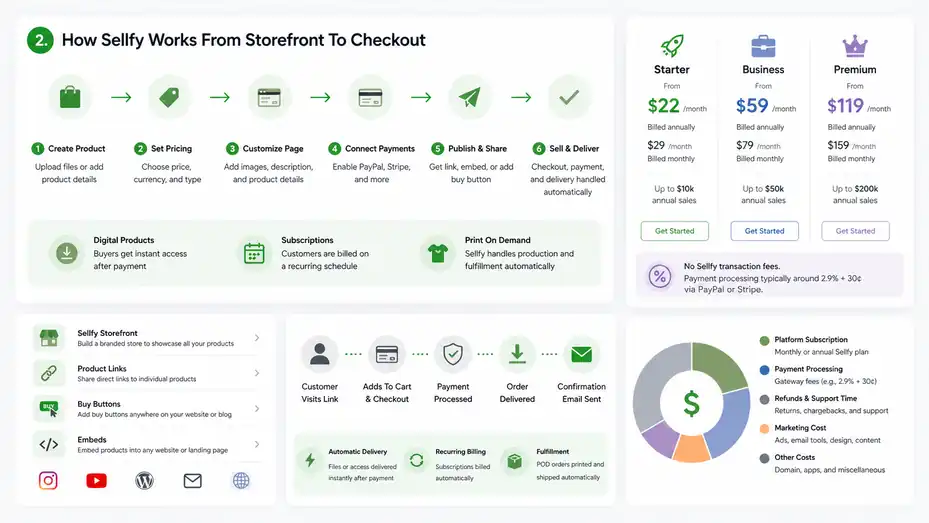
To judge Sellfy fairly, you need to understand the basic selling flow.
The platform is built around getting a product online, sending traffic to it, processing payment, and delivering the order automatically.
The Basic Sellfy Selling Flow
The Sellfy workflow is straightforward. You create a product, add your product file or product details, set pricing, customize the product page, connect payment options, and publish. Once someone buys, Sellfy handles checkout and order delivery.
For digital products, that means the buyer receives access to the file after payment. For subscriptions, the customer is billed on a recurring schedule.
For print-on-demand products, Sellfy can automatically handle production and fulfillment after an order comes in. Sellfy’s official feature page says it can automatically print incoming print-on-demand orders and send them to customers.
Here’s how that looks in a realistic creator scenario. Imagine you are a photographer selling a $19 preset pack. You upload the preset files, add sample before-and-after images, write a short product description, set the price, and publish the page.
Then you place the product link in your Instagram bio and YouTube description. A buyer clicks, pays, and receives the download automatically.
That is the appeal. Instead of manually sending files, checking payments, or building a custom checkout, you let the system handle the repetitive parts.
Storefront, Product Links, And Embeds
Sellfy gives you more than one way to sell. You can use a full Sellfy storefront, share direct product links, add buy buttons, or embed products into another website. Capterra’s Sellfy profile also notes that teams can use product links, “Buy now” buttons, and other selling options across social and web channels.
This is useful because not every creator needs a traditional store homepage. Some creators sell from landing pages. Others sell through YouTube videos, newsletters, or blog posts. Sellfy’s link-based selling style fits that reality.
For example, if you already have a WordPress blog that ranks on Google, you could keep your blog where it is and embed Sellfy product buttons inside your buying guides. That way, your content engine and checkout system stay separate but connected.
I like this approach for creators who want flexibility without rebuilding everything. Your store does not have to be the center of your entire online presence. It can simply be the checkout layer that turns attention into revenue.
Payments, Fees, And The Real Cost Of Selling
Sellfy currently advertises three main paid plans with no Sellfy transaction fees: Starter, Business, and Premium. On annual billing, the official pricing page lists Starter from $22/month, Business from $59/month, and Premium from $119/month.
On monthly billing, it lists Starter from $29/month, Business from $79/month, and Premium from $159/month.
The “no transaction fee” part is important, but you should not misunderstand it. Sellfy does not add its own platform transaction fee, but you still pay payment processing fees through providers such as PayPal or Stripe.
Sellfy’s pricing FAQ says payment processing is typically around 2.9% + 30¢, depending on the gateway used.
Here is the practical takeaway. If you sell a $29 digital product, you should calculate:
- Platform Subscription: Your monthly or annual Sellfy plan.
- Payment Processing: The standard payment gateway fee.
- Refunds And Support Time: The hidden cost many creators forget.
- Marketing Cost: Ads, email tools, design, or content production if needed.
Sellfy’s pricing is predictable, but the annual sales limits matter. Starter allows up to $10k in annual sales, Business up to $50k, and Premium up to $200k based on the official pricing comparison.
Sellfy Pricing Review: Plans, Limits, And Value
Pricing is one of the most important parts of any sellfy ecommerce platform review because creator margins can be thin at the beginning.
Sellfy is affordable for simple selling, but the best plan depends heavily on your sales volume and marketing needs.
Sellfy Pricing Table
| Plan | Annual Billing Price | Monthly Billing Price | Annual Sales Limit | Best For | Key Notes |
|---|---|---|---|---|---|
| Starter | From $22/month | From $29/month | Up to $10k/year | New creators testing products | Includes unlimited products and core selling features |
| Business | From $59/month | From $79/month | Up to $50k/year | Growing creators with regular sales | Adds more room for revenue growth |
| Premium | From $119/month | From $159/month | Up to $200k/year | Established creators and higher-volume sellers | Includes growth features such as upselling, cart abandonment, affiliate marketing, and priority support |
| Custom | Contact Sellfy | Contact Sellfy | Above $200k/year | High-volume sellers | Requires custom pricing conversation |
Sellfy’s official pricing page also mentions a 14-day free trial and a 30-day money-back guarantee after upgrading.
How To Choose The Right Plan
I suggest choosing your Sellfy plan based on realistic revenue, not wishful thinking. Many creators overbuy software because they imagine the version of their business they hope to have six months from now. I get the optimism, but software should support your current stage.
If you are validating your first product, Starter is usually enough. You can sell digital downloads, subscriptions, and merch with unlimited products, while staying within a predictable monthly cost. The $10k annual sales cap is the main thing to watch.
If you are already selling consistently, Business may make more sense because the $50k annual sales limit gives you more breathing room. This is especially useful if you have a $49 template pack, $99 course-style download, or recurring subscription offer.
Premium is where Sellfy becomes more growth-focused. The official pricing page lists growth features on Premium, including product upselling, cart abandonment, affiliate marketing, product and design migration, and priority support.
My practical rule is simple: Upgrade when the added feature can reasonably pay for itself. For example, if cart abandonment recovery helps recover two $79 orders per month, it can quickly justify the jump for the right seller.
Is Sellfy Expensive Compared With Alternatives?
Sellfy is not the cheapest possible way to sell online, but it can be cost-effective if it replaces several separate tools. A creator might otherwise need a website builder, digital delivery plugin, checkout tool, email marketing tool, and print-on-demand provider.
That said, the sales caps make the pricing model different from some competitors. You are not only paying for features; you are paying within a revenue band. If your sales grow quickly, you may need to upgrade even if you do not need every advanced feature.
This is where you should think in profit, not just monthly cost. A $59/month plan is not expensive if it helps you sell $3,000/month in high-margin downloads. But it may feel expensive if you sell one $12 product every few weeks.
From what I’ve seen, Sellfy’s pricing is strongest for creators who have simple products, decent margins, and an existing audience. It is weaker for hobby sellers who want a free forever plan or complex sellers who need deep customization.
Sellfy Features Review: What You Actually Get
Sellfy’s feature set is built around fast selling, not endless configuration.
The platform covers the essentials well, especially for creators selling digital files, video, subscriptions, and merch.
Digital Products And File Delivery
Digital products are Sellfy’s strongest use case. You can sell ebooks, videos, music, audio, design files, templates, software resources, or other file-based products. Sellfy’s official feature page specifically mentions ebooks, videos, audio, music, PSD, AI, and other file types.
The benefit is not just uploading files. The real value is automatic delivery. Once a customer pays, the system gives them access without you needing to manually email anything. That protects your time and makes the customer experience feel professional.
Sellfy also includes features that matter for digital sellers, such as PDF stamping and limited downloads. PDF stamping adds buyer information to PDF files, which can discourage unauthorized sharing. Limited downloads can help reduce casual abuse by controlling repeated file access.
A practical example: If you sell a $39 workbook, PDF stamping can make the file feel more personalized and less anonymous. It will not stop every form of piracy, but it adds a useful layer of accountability.
I would still recommend keeping your digital product delivery simple. Use clear filenames, include a “Start Here” PDF when needed, and test the checkout yourself before sending traffic.
Print-On-Demand And Merch Selling
Sellfy includes built-in print-on-demand for products such as t-shirts, hoodies, mugs, and hats. The platform says it automatically prints incoming orders and sends them to customers.
This is especially helpful for creators who want merch but do not want to manage inventory. You do not need to buy 200 shirts upfront, store boxes in your room, or manually ship each order. The customer buys, the item gets produced, and fulfillment happens through the system.
The tradeoff is margin. Print-on-demand usually gives you lower profit per item than bulk ordering. But it also reduces risk. For many creators, that is a fair exchange.
Imagine you run a small gaming channel with 12,000 subscribers. Instead of guessing whether your audience wants a hoodie, you can launch a simple design and promote it in one video. If only 15 people buy, you have not wasted money on inventory. If 300 people buy, you have proof that merch can become a serious revenue stream.
My advice is to treat print-on-demand as a testing tool first. Launch one or two strong designs, measure conversion rate, and only expand after you see real demand.
Subscriptions And Video Streaming
Sellfy supports digital subscription products where customers can be charged weekly, monthly, or yearly. It also offers video streaming, which can reduce download issues and help lower piracy risk for video content.
Subscriptions can be powerful because recurring revenue gives creators more stability. Instead of launching a new product every month, you can build an offer where customers pay for ongoing access, updates, or new content.
But subscriptions also create pressure. You need to keep delivering value. A $9/month resource library sounds easy until subscribers expect fresh material every month. Before offering a subscription, I suggest planning at least three months of content or updates.
Video streaming is useful if you sell tutorials, workshops, mini-courses, or training content. It is not the same as building a full learning management system with quizzes, certificates, and student communities. But for straightforward paid video access, it can be enough.
A good starter subscription might include monthly templates, private downloads, bonus videos, or updated swipe files. Keep the promise specific. “New design assets every month” is clearer than “exclusive content.”
Store Design, Customization, And Brand Control
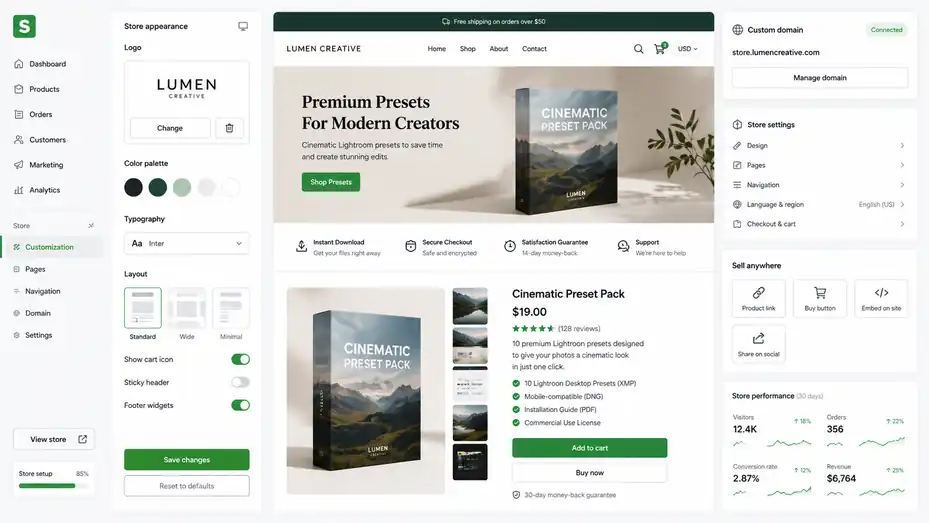
Sellfy lets you build a clean storefront without coding. It gives enough customization for most creator shops, but it will feel limited if you want full design freedom.
Store Customization Options
Sellfy lets you customize your store by adding your logo, changing colors, adjusting layout, and connecting your own domain. Its official feature page describes customization, custom domain support, shopping cart functionality, and store language options.
For a creator, these basics matter. Your store should feel connected to your brand, not like a random checkout page. A custom domain also helps build trust because customers see your brand name in the URL.
However, Sellfy is not a blank-canvas website builder. You are working inside its storefront system. That is good for speed but less ideal for advanced design. You should expect clean and functional, not endlessly customizable.
In my experience, this is usually enough if your product positioning is strong. A simple store with a clear offer often beats a beautiful store with confusing copy. Design helps, but clarity sells.
Focus first on the essentials: A strong product image, clear headline, short benefit-driven description, trust signals, refund policy, and simple checkout path.
Product Page Best Practices
A Sellfy product page should answer the buyer’s main questions before they hesitate. Most creators underwrite their product descriptions. They assume the audience already understands the value, but that is not always true.
Here’s a simple structure that works well:
- Product Promise: Explain what the buyer gets and the outcome it helps create.
- What’s Included: List the files, formats, templates, videos, or resources included.
- Who It’s For: Clarify the ideal buyer so the right person feels seen.
- How To Use It: Give a simple explanation of what happens after purchase.
- Trust Reassurance: Add refund terms, support details, or compatibility notes.
For example, instead of saying “50 Canva templates,” say “50 Canva templates for creating polished Instagram carousel posts in less time, even if design is not your strongest skill.”
That small shift changes the product from a file bundle into a practical solution.
I also suggest adding product screenshots or mockups whenever possible. Buyers cannot touch a digital product, so visuals do extra work. Show the inside, not just the cover.
Using Sellfy With An Existing Website
One of Sellfy’s useful strengths is that you do not have to move your whole online presence into Sellfy. You can keep your main website, blog, or portfolio and use Sellfy as the selling layer through product links or embeds.
This setup works well if you already have traffic from search, social media, or email. For example, a music producer could publish beat-making tutorials on their blog, then embed Sellfy buttons for sample packs inside relevant articles.
This is also helpful for SEO. If your existing site already has authority, backlinks, and content, you may not want to start from zero on a new storefront domain. Instead, let your content site attract visitors and let Sellfy handle checkout.
The main thing is consistency. Your product page, website, emails, and social posts should use the same product names, pricing, and promise. Confusion kills conversions faster than a plain design ever will.
Marketing And Conversion Tools Inside Sellfy
Sellfy includes marketing tools that help creators sell more without immediately needing separate software.
These features are useful, but they work best when paired with a clear offer and consistent traffic.
Coupons, Discounts, And Upsells
Sellfy includes core marketing features such as coupons and promotional tools, while higher-tier plans include growth features like product upselling and cart abandonment.
Coupons are simple but effective when used with intention. I do not recommend discounting constantly because it can train your audience to wait. Instead, use coupons around launches, seasonal promotions, bundle offers, or audience milestones.
For example: “Use code LAUNCH20 for 20% off this week” gives people a reason to act now without making your product feel permanently cheap.
Upsells can be even more powerful. If someone buys a $19 template pack, you might offer a $39 bundle with extra templates, tutorial videos, or commercial-use rights. This increases average order value, which means you earn more from the same traffic.
The key is relevance. A good upsell feels helpful. A bad upsell feels like a random add-on. Offer the next logical step, not just the next product you want to push.
Email Marketing And Customer Follow-Up
Sellfy includes email marketing features in its plans, according to the official pricing page.
This matters because most buyers do not purchase the first time they see your product. Email gives you a way to follow up, announce updates, share new releases, and turn one-time buyers into repeat customers.
A simple email strategy could look like this:
- Email 1: Thank the customer and explain how to use the product.
- Email 2: Share a quick win or tutorial related to the product.
- Email 3: Ask for feedback or a testimonial.
- Email 4: Recommend a related product or bundle.
You do not need a complex funnel at the beginning. A helpful follow-up sequence is often enough to increase customer satisfaction and repeat purchases.
One underused tactic is sending product update emails. If you improve a template pack or add bonus files, tell past buyers. It shows that you care about the product after the sale, which builds trust.
Cart Abandonment And Affiliate Marketing
Cart abandonment recovery is valuable because some buyers get distracted, hesitate, or leave before completing checkout. Premium includes cart abandonment as part of its listed growth features.
This feature can recover sales that would otherwise disappear. Even a small recovery rate can matter if your product price is high enough. For example, recovering three abandoned $79 orders in a month can make a noticeable difference.
Affiliate marketing can also help creators grow through partnerships. Instead of paying upfront for ads, you reward people who refer sales. This works especially well for digital products because margins are often higher than physical goods.
A realistic scenario: You sell a $49 Notion system for freelancers and offer affiliates 30%. A productivity YouTuber promotes it to their audience. They earn a commission, you gain customers, and buyers discover a product through someone they already trust.
Affiliate marketing only works when the product is genuinely good. Affiliates may send traffic once, but strong conversion and low refund rates determine whether they keep promoting.
Sellfy Pros And Cons: The Honest Verdict
No platform is perfect. Sellfy’s strengths are obvious for creators, but its limitations are just as important if you are trying to choose the right ecommerce platform.
Sellfy Pros
Sellfy’s biggest advantage is simplicity. Reviews across platforms often praise ease of use, quick setup, and creator-friendly selling. G2’s review summary says users consistently praise Sellfy for ease of use and quick store launches without technical skills, while noting some limitations around customization.
Here are the pros that stand out:
- Fast Setup: You can launch a basic store quickly without coding.
- Creator-Focused Product Types: Digital downloads, subscriptions, print-on-demand, video, and physical products fit creator business models.
- No Sellfy Transaction Fees: Sellfy states that it charges 0% transaction fees on its paid plans, though payment processing fees still apply.
- Built-In Marketing Tools: Coupons, email marketing, upsells, cart abandonment, and affiliate features reduce the need for extra tools.
- Simple Selling Options: Storefronts, direct links, buy buttons, and embeds make it flexible for creators selling from social media or existing websites.
I believe Sellfy’s strongest value is focus. It does not try to do everything. It tries to help creators sell products quickly, and that clarity makes the platform easier to understand.
Sellfy Cons
Sellfy’s simplicity can also become its biggest limitation. If you want deep customization or advanced ecommerce workflows, you may feel boxed in.
The main cons are:
- Sales Caps: Plans have annual sales limits, which means fast growth may require upgrading.
- Limited Customization: It is easier than many platforms, but less flexible than a fully customizable ecommerce setup.
- Not A Full Content Platform: It is not built to replace a serious blog, content hub, or advanced SEO website.
- Advanced Features Cost More: Features like cart abandonment, product upselling, affiliate marketing, migration help, and priority support are on Premium according to Sellfy’s pricing page.
- Payment Processing Still Applies: No platform transaction fee does not mean zero payment cost.
Capterra reviews also show positive comments around customization, customer support, dashboard usability, custom domains, and email marketing, but third-party reviews should always be read with context because individual experiences can vary.
My honest take: Sellfy is excellent when your needs match its lane. It becomes less attractive when you need enterprise-level control.
My Creator Verdict
If I were a creator selling my first serious digital product, I would consider Sellfy a strong option. It removes enough technical friction that I could focus on product quality, audience trust, and promotion.
But I would not choose it blindly. I would first ask: Do I need deep design control? Do I need a full blog and SEO engine? Do I expect to pass the plan sales limit quickly? Do I need advanced integrations?
If the answer to most of those is no, Sellfy looks attractive. If the answer is yes, I would compare it carefully against broader ecommerce platforms before committing.
The best platform is not the one with the longest feature list. It is the one that fits the business you are actually building.
Sellfy Alternatives And Comparison
A good Sellfy review should compare it with other options because different creators need different selling systems. Sellfy is not automatically better or worse; it depends on your priorities.
Sellfy Vs Shopify
Shopify is more powerful for traditional ecommerce. It has a larger app ecosystem, deeper inventory features, more theme options, and stronger scalability for physical product brands. But that power comes with more setup decisions.
Sellfy is simpler and more creator-focused. It is easier to understand if your main products are downloads, merch, subscriptions, or small physical items. You do not need to add as many apps to cover basic creator selling needs.
Choose Sellfy if you want fast setup, built-in digital selling, and fewer moving parts. Choose Shopify if you plan to build a more complex online store with many products, advanced customization, and long-term retail infrastructure.
A simple example: A musician selling sample packs and occasional merch may prefer Sellfy. A skincare brand with inventory, shipping zones, bundles, retail expansion, and paid app integrations will probably prefer Shopify.
Sellfy Vs Gumroad Or Payhip
Gumroad and Payhip are often considered by digital creators because they are easy ways to sell downloads and simple products. They can be attractive for beginners, especially if you want to test an idea before paying a larger monthly subscription.
Sellfy feels more like a branded storefront platform. It gives you more of an all-in-one shop experience, including storefront customization, product types, print-on-demand, and built-in marketing features.
The tradeoff usually comes down to cost structure, branding, and control. Some creators prefer marketplace-like simplicity. Others want their own branded storefront with fewer distractions.
If your goal is to test one ebook, a lighter tool may be enough. If your goal is to build a creator store with multiple products, merch, subscriptions, and repeat customer marketing, Sellfy becomes more compelling.
Sellfy Vs WooCommerce
WooCommerce gives you more ownership and flexibility because it runs on WordPress. It can be extremely powerful for content-driven ecommerce, especially if organic search is central to your strategy.
But WooCommerce usually requires more maintenance. You may deal with hosting, themes, plugins, updates, security, checkout settings, and performance issues. For some people, that control is worth it. For others, it becomes a distraction.
Sellfy is the cleaner path if you want fewer technical decisions. You pay for convenience. WooCommerce is better if you want to build a highly customized content and commerce system over time.
Here is my quick rule: Choose WooCommerce when your website itself is a major business asset. Choose Sellfy when your products and audience are the main assets and the store just needs to work.
How To Set Up A Sellfy Store Step By Step
Setting up Sellfy is not complicated, but a thoughtful setup can make a major difference in conversion. The goal is not just to publish products; it is to create a buying experience that feels clear and trustworthy.
Step 1: Define Your First Offer
Before touching store settings, define your product clearly. Many creators skip this and end up with a vague product page that does not convert.
Start with one sentence: “This product helps [specific person] achieve [specific outcome] without [specific frustration].”
For example: “This template pack helps freelance designers send polished client proposals without building each one from scratch.”
That sentence gives you the foundation for your headline, product description, social posts, and emails. It also stops you from describing only the product contents. Buyers care about contents, but they buy outcomes.
Then decide your product format, price, and delivery promise. Is it a PDF? A zip file? A video library? A subscription? A print-on-demand product? Keep the first version simple. You can add complexity after you prove demand.
I recommend launching with one strong core offer instead of five weak products. A focused store is easier to explain and easier to promote.
Step 2: Build The Product Page
Once your offer is clear, create the product page around buyer questions. Your page should quickly explain what it is, who it is for, what is included, how it works, and why it is worth the price.
Use plain language. Do not say “comprehensive productivity optimization system” if you mean “a weekly planner that helps you organize client work.” Clear beats clever.
For digital products, include screenshots, previews, or a short walkthrough. For merch, use clean mockups and explain sizing or materials if relevant. For subscriptions, explain exactly what customers receive and how often.
A practical page structure could be:
- Headline: State the main outcome.
- Opening Paragraph: Explain the problem and product in simple terms.
- Included Section: List files, formats, or items.
- Use Case Section: Show how the buyer will use it.
- FAQ Section: Address refunds, compatibility, access, and support.
- Checkout Prompt: Invite the buyer to purchase with confidence.
Do not overload the page. The goal is to remove doubt, not write a novel.
Step 3: Connect Payments And Test Checkout
After your product page is ready, connect your payment gateway and test the checkout flow. Sellfy supports payment through providers such as Stripe and PayPal, based on its pricing FAQ.
Testing is not optional. Buy your own product or run a test order if available. Check the confirmation email, download access, product file, receipt, and mobile experience. Many creators lose sales because they never walk through the process like a customer.
Pay attention to small trust details. Does the product name look clear on the receipt? Does the buyer know what happens after payment? Is the file easy to open? Are instructions included?
For digital products, include a simple “Read Me” file if the download contains multiple assets. For templates, explain how to copy or use them. For video products, clarify access steps.
A smooth post-purchase experience reduces refund requests and support messages. It also makes buyers more likely to recommend your product.
Step 4: Launch With A Simple Promotion Plan
A store without traffic is just a quiet room. Once your Sellfy product is live, plan a focused launch rather than casually dropping the link once.
You do not need a complicated campaign. You need repetition with value. Explain the problem, show the product, share examples, answer objections, and remind people before the launch window ends.
A simple seven-day launch could include:
- Day 1: Announce the product and who it is for.
- Day 2: Show what is inside.
- Day 3: Share a use case or tutorial.
- Day 4: Answer common objections.
- Day 5: Share social proof or early feedback.
- Day 6: Remind people about the offer.
- Day 7: Final call with a clear reason to buy now.
The biggest mistake is assuming one post is enough. People are busy. They may need several touchpoints before buying.
Common Sellfy Mistakes To Avoid
Sellfy makes selling easier, but it cannot fix weak positioning, unclear offers, or poor promotion.
The platform is a tool; the strategy still matters.
Mistake 1: Treating Sellfy Like A Traffic Source
Sellfy helps you sell, but it does not automatically send buyers. This is one of the most important things to understand before signing up.
Your traffic may come from YouTube, TikTok, Instagram, Pinterest, SEO, email, partnerships, communities, or paid ads. Sellfy is where the transaction happens. It is not the entire marketing engine.
If you launch a store and nothing happens, the issue may not be the platform. It may be that not enough of the right people saw the offer.
Before investing heavily in store design, ask where your first 100 potential buyers will come from. If you cannot answer that, work on distribution. Build content, grow an email list, collaborate with relevant creators, or create helpful resources that lead naturally to your product.
In most cases, the winning formula is simple: Right audience, clear problem, useful product, repeated promotion, easy checkout.
Sellfy handles the last part well. You still need to build the first four.
Mistake 2: Selling A Product With A Weak Promise
A common creator mistake is selling files instead of outcomes. “20 PDFs” is not as compelling as “20 worksheets to help you plan your first paid workshop.”
People buy because they want progress. They want to save time, look better, learn faster, solve a problem, avoid mistakes, or feel more confident. Your product page should connect the product to that progress.
This is especially true for digital products because buyers cannot physically inspect them. Your explanation has to do the heavy lifting.
Before publishing, ask yourself:
- What problem does this solve?
- Who has this problem most urgently?
- Why is this better than searching for free alternatives?
- What result can the buyer reasonably expect?
- What might stop them from buying?
Answer those questions directly on your product page. Do not make buyers guess.
A strong promise does not mean exaggerating. In fact, realistic promises often convert better because they feel trustworthy.
Mistake 3: Ignoring Customer Experience After Purchase
Many creators obsess over the checkout and forget the after-purchase experience. But the moment after payment is when trust is either confirmed or damaged.
Make sure customers know exactly what to do next. If they bought a file, tell them how to download it. If they bought a subscription, explain what they receive and when. If they bought merch, set expectations around fulfillment and delivery.
For digital products, I like adding a simple welcome note inside the download. It can say what is included, how to use the files, and where to contact you for help.
This small touch makes the product feel more premium. It also reduces confusion.
Remember, your best future customers are often your current customers. If they have a smooth experience, they are more likely to buy again, leave a review, or recommend you to someone else.
Advanced Optimization And Scaling Tips
Once your Sellfy store is working, the next step is improving conversion, increasing average order value, and creating repeat purchases.
This is where the business starts to mature.
Improve Your Conversion Rate Before Chasing More Traffic
Many creators chase more traffic too early. Sometimes the better move is improving the page that already gets visitors.
Start with your conversion rate. If 1,000 people visit your product page and 10 buy, your conversion rate is 1%. If you improve that to 2%, you double sales without increasing traffic.
Look at the page through a skeptical buyer’s eyes. Is the offer clear within five seconds? Is the price easy to understand? Are the benefits specific? Are there screenshots or examples? Does the product feel trustworthy?
You can test changes such as:
- Headline: Make the outcome clearer.
- Product Images: Show the inside of the product.
- Description: Replace vague claims with specific use cases.
- Pricing: Test bundles or tiered offers.
- FAQ: Answer objections before buyers leave.
I suggest changing one major thing at a time. If you rewrite the whole page, change the price, and launch a new design all at once, you will not know what caused the result.
Use Bundles To Increase Average Order Value
Bundles are one of the simplest ways to make more money from the same audience. Instead of selling one product, group related products into a higher-value package.
For example, a designer selling a $15 Instagram template pack could create a $49 bundle that includes Instagram posts, story templates, brand board templates, and a short setup guide. The buyer gets more value, and the creator earns more per sale.
The best bundles solve a larger version of the same problem. Do not bundle random products just because you have them. A clean bundle should feel like a complete toolkit.
You can also create good-better-best pricing:
- Basic: One product for buyers who want the simplest solution.
- Standard: Product plus bonus resources.
- Premium: Full bundle with templates, tutorials, and commercial rights.
This gives buyers choice without overwhelming them. In my experience, many customers choose the middle option when the value is obvious.
Build A Repeat Purchase System
A creator store becomes much more valuable when buyers return. Repeat customers are usually easier to sell to because they already trust you.
Think about what the buyer needs next. If someone buys your beginner photography presets, maybe they later need an editing workflow guide. If they buy a content calendar template, maybe they later need caption templates or analytics sheets.
This is where email follow-up, product updates, and seasonal launches help. You are not just selling once. You are building a small ecosystem of useful products.
A simple repeat purchase system could be:
- First product solves an urgent beginner problem.
- Follow-up email teaches the buyer how to get results.
- Second product solves the next logical problem.
- Bundle offer combines related products.
- Subscription provides ongoing updates or monthly resources.
This is how a small store becomes a real creator business. Not through endless random products, but through connected offers that help the same audience keep moving forward.
Final Verdict: Is Sellfy Worth It?
Sellfy is worth considering if you are a creator who wants a simple, focused ecommerce platform for digital products, subscriptions, print-on-demand, and lightweight online selling.
It is not the most customizable platform, but it does the creator basics well.
My Honest Recommendation
My honest verdict is this: Sellfy is a strong choice for creators who want to launch quickly, sell cleanly, and avoid technical setup headaches. It is especially good for digital products, merch testing, paid downloads, and simple recurring offers.
I would recommend Sellfy if you value simplicity over endless customization. I would be more cautious if your business depends on advanced SEO content publishing, complex physical product logistics, or highly custom storefront design.
The official pricing, feature set, and third-party review patterns all point to the same general conclusion: Sellfy is easy to use, creator-friendly, and practical, but less flexible than larger ecommerce systems. Users commonly praise its simplicity and quick setup, while some reviews note limited customization compared with broader platforms.
For many creators, that tradeoff is exactly right. You do not always need the biggest platform. You need the one that helps you publish, sell, learn, and improve without getting stuck.
Best Use Cases For Sellfy
Sellfy is best for:
- Creators selling digital downloads.
- YouTubers, artists, musicians, designers, educators, and template sellers.
- Small brands testing print-on-demand merch.
- Coaches or experts selling paid resources.
- Creators who want a simple branded storefront.
- Sellers who prefer predictable subscription pricing without Sellfy transaction fees.
It is less ideal for large ecommerce brands, complex inventory operations, advanced custom websites, or businesses that need many third-party integrations.
I would frame Sellfy as a practical creator commerce tool, not a universal ecommerce solution. When used for the right business model, it can feel refreshingly simple.
Final Takeaway
If your main goal is to start selling digital products or creator merch without technical overwhelm, Sellfy deserves a serious look. It gives you the essentials: storefront, checkout, product delivery, marketing tools, and payment support in one place.
The smartest way to approach it is to start lean. Create one clear offer, build a strong product page, test checkout, launch to your audience, and improve based on real buyer behavior.
That is where Sellfy works best. Not as a magic button, but as a clean system that helps you turn creator trust into real revenue.
FAQ
Is Sellfy A Good Ecommerce Platform For Creators?
Yes, Sellfy is a good ecommerce platform for creators who want to sell digital products, subscriptions, print-on-demand merch, and simple physical products without complex setup. It works best for creators who already have an audience and want a fast, beginner-friendly way to launch an online store.
What Can You Sell On Sellfy?
You can sell digital downloads, ebooks, templates, music, videos, subscriptions, physical products, and print-on-demand merchandise on Sellfy. It is especially useful for creators selling simple products because it handles checkout, product delivery, and basic marketing tools in one platform.
Is Sellfy Better Than Shopify?
Sellfy is better than Shopify for creators who want a simpler way to sell digital products or merch quickly. Shopify is better for larger ecommerce stores that need advanced customization, inventory management, apps, and scaling features. The better choice depends on your store complexity.
Does Sellfy Charge Transaction Fees?
Sellfy does not charge its own transaction fees on paid plans, but payment processors such as Stripe or PayPal still charge standard processing fees. This means your total cost includes the monthly Sellfy plan plus payment processing costs on each successful sale.
Who Should Use Sellfy?
Sellfy is best for creators, artists, YouTubers, educators, musicians, designers, and small online sellers who want a simple storefront. It is a strong choice if you sell digital products, recurring content, or creator merch and do not need advanced ecommerce customization.

I’m Juxhin, the voice behind The Justifiable.
I’ve spent 6+ years building blogs, managing affiliate campaigns, and testing the messy world of online business. Here, I cut the fluff and share the strategies that actually move the needle — so you can build income that’s sustainable, not speculative.
Related posts:
 Monetize Blog Without Adsense
 Digital Products to Sell: Top 10 Profitable Ideas for Your Online Business
 Product Manager Salary: How to Boost Your Earning Potential
 Fitness Bloggers and the Art of Passive Income: Tips and Tricks
 How Does a Blogger Earn Money and Grow Income Fast?
 Is SurveyMonkey Useful For Digital Products: Build Better Offers