
Table of Contents
Some links on The Justifiable are affiliate links, meaning we may earn a small commission at no extra cost to you. Read full disclaimer.
Bubble pricing explained gets confusing fast once you move past the homepage and start asking the real questions: what do you actually pay, when do costs jump, and which plan makes sense for the app you’re building?
I’ve seen a lot of people underestimate Bubble because they focus on the base monthly fee and ignore workload, add-ons, and growth-stage surprises.
In this guide, I’ll break it all down in plain English so you can choose a plan with your eyes open, avoid the common traps, and budget for Bubble more realistically in 2026.
What Bubble Pricing Actually Means
Bubble’s pricing model looks simple at first, but it is really a mix of fixed subscription pricing and usage-based cost.
On the fixed side, you choose a plan. On the variable side, your app consumes workload units, and once your app is live, those usage patterns matter a lot more than many beginners expect.
Why Bubble Pricing Feels Different From Typical SaaS Pricing
- The core difference: Bubble is not just charging you for seats or storage. It charges for the platform layer that hosts, runs, and scales your application.
- What that means in practice: Two apps on the same Starter plan can have very different total monthly costs if one app is lightweight and the other runs lots of workflows, searches, API calls, or file activity.
- The beginner mistake: Many people compare Bubble to a website builder when they should be comparing it to a full app stack.
That difference matters because Bubble is closer to app infrastructure than a simple page builder. According to Bubble’s docs, workload measures the work Bubble does to power your app, including things like database operations, workflows, API communication, authentication, payments, and media processing. Bubble tracks that usage monthly in workload units, or WU.
In my experience, this is the biggest mental shift to make early. If you treat Bubble pricing like “I pay one flat fee and I’m done,” you will probably budget badly. If you treat it like “I pay a base plan plus infrastructure usage,” the pricing starts to make more sense.
The Two Layers Of Cost You Need To Watch
- Layer 1: Plan cost. This is your monthly or annual subscription.
- Layer 2: Growth cost. This includes workload overages, workload tiers, plugin subscriptions, and extra storage.
- The hidden reality: Most frustration with Bubble pricing comes from misunderstanding layer 2, not layer 1.
Bubble’s official pricing shows Free, Starter, Growth, Team, and Enterprise tiers. The paid web + mobile plans currently start at $59 per month billed annually for Starter, $209 for Growth, and $549 for Team. If you pay monthly instead of annually, the same web + mobile plans rise to $69, $249, and $649.
That gap is not tiny. Paying monthly adds $10 on Starter, $40 on Growth, and $100 on Team for web + mobile. So even before workload enters the picture, billing cadence changes your budget meaningfully.
Bubble’s Current Plans And What You Actually Get
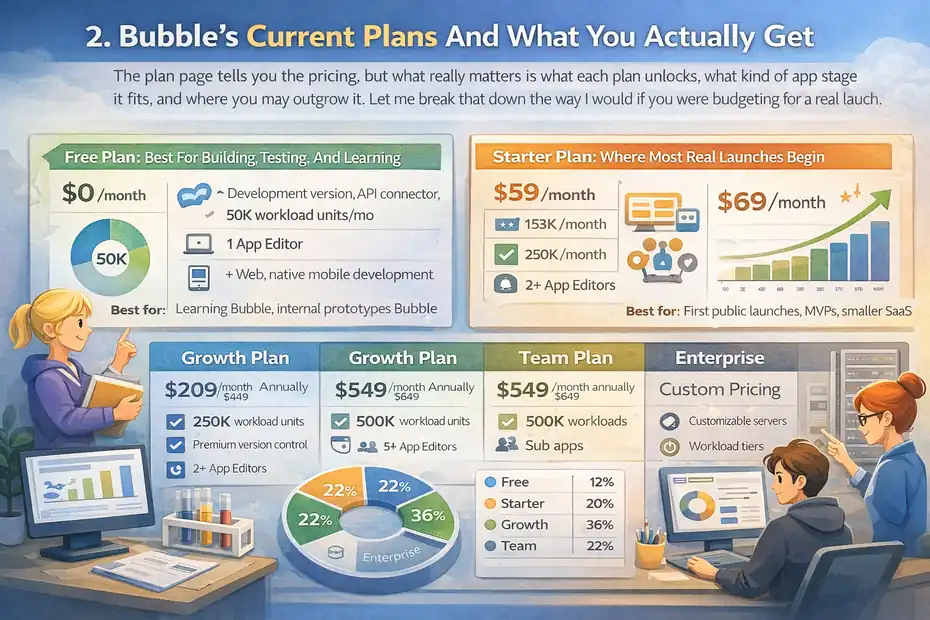
The plan page tells you the pricing, but what really matters is what each plan unlocks, what kind of app stage it fits, and where you may outgrow it.
Let me break that down the way I would if you were budgeting for a real launch.
Free Plan: Best For Building, Testing, And Learning
- Price: $0 per month.
- Included: Development version, API connector, 1 app editor, 50K workload units per month, 6 hours of server logs, web and native mobile development tools.
- Best for: Learning Bubble, internal prototypes, proof-of-concept work, and pre-launch building.
This is a better plan than many people assume. Bubble says the Free plan comes with 50K WU per month and enough to build and test your app before launch.
Its docs also note that the Free plan is the best way for beginners to assess workload needs because you can observe how your specific app consumes resources before committing to a paid tier.
The catch is simple: It is a building environment, not a serious launch plan. You do not get a live production website on the Free tier, and Free apps cannot buy workload tiers or incur overages. That makes it great for experimentation and bad for anything customer-facing.
Starter Plan: Where Most Real Launches Begin
- Annual price for web + mobile: $59 per month.
- Monthly price for web + mobile: $69 per month.
- Included: 175K WU per month, recurring workflows, basic version control, 2 days of server logs, live website, custom domain, 5 build submissions per month, 3 live app versions, unlimited OTA updates.
- Best for: First public launch, MVPs, smaller SaaS products, client portals, internal tools with moderate traffic.
I believe Starter is the most important Bubble plan to understand because it is where many founders launch and where many of them also make their first pricing mistake.
The base fee looks manageable, but whether Starter remains affordable depends almost entirely on how efficient your app is after real users arrive. Bubble includes 175K WU per month on Starter, which sounds generous until you build a workflow-heavy product.
If you are launching something like a member dashboard, booking app, simple marketplace MVP, or CRM-style internal tool, Starter can be a strong fit.
If you are building something with frequent searches, heavy background automation, or lots of file uploads, you need to watch workload from day one. That is where many “Bubble is expensive” complaints actually begin.
Growth, Team, And Enterprise: When Collaboration And Scale Matter
- Growth: $209 annually or $249 monthly for web + mobile, with 250K WU, 2 app editors, premium version control, 10 custom branches, 14 days of server logs, 10 build submissions, and 5 live versions.
- Team: $549 annually or $649 monthly for web + mobile, with 500K WU, 5 app editors, 25 custom branches, sub apps, 20 days of server logs, 20 build submissions, and 8 live versions.
- Enterprise: Custom pricing with custom workload, hosting location choice, customizable servers, dedicated support, invoice or ACH options.
A lot of people assume Growth is mainly about more workload, but that is only part of the story. Growth and Team also add collaboration and governance features that matter if multiple people are building, reviewing, and shipping the app. That includes more editors, more branches, better version control, and longer server logs.
So here is my practical rule: upgrade for features first, not just for extra WU. If you only need more usage headroom, a workload tier may be smarter than jumping plans. Bubble’s own documentation explicitly says workload tiers can let you stay on Starter, for example, without paying for Growth features you do not need.
Workload Units Explained In Plain English
This is the part people either ignore or overcomplicate.
You do not need to memorize Bubble’s internal mechanics, but you do need a working understanding of workload if you want predictable costs.
What Workload Units Are
- Simple definition: Workload units measure the server work Bubble performs to run your app.
- Examples of activities: Database searches, workflow execution, API requests, payment processing, authentication, and media-related activity.
- Why it matters: Your monthly plan includes a WU allowance, and using more than that can lead to extra cost or downtime if overages are off.
Bubble explains workload as a measure of the server resources needed to host, run, and scale your application. It also notes there are multiple activity types underneath the total calculation, which is why your app’s workload depends on what users do and how your workflows are designed.
This is why user count alone is a bad budgeting shortcut. Bubble says more users usually means more workload, but user count is not necessarily the main driver. A small number of users can still create high workload if the app runs heavy workflows or background activity.
What Usually Drives Workload Up
- Heavy searches: Repeated database queries, especially inefficient ones.
- Workflow volume: Lots of actions firing in the background.
- External API activity: Sending and receiving data frequently.
- Data operations: Bulk changes, imports, exports, and complex processing.
- Media handling: Uploads and file operations.
In real-world terms, imagine two apps with 1,000 monthly users. App A is a simple client portal where people log in, view one dashboard, and update a few fields. App B is a marketplace with dynamic searches, notifications, scheduled workflows, messaging, and payment triggers.
Even with similar user counts, App B can burn through workload much faster because each visit causes more things to happen behind the scenes. Bubble’s docs say both quantity and load of activities matter.
That is why I suggest thinking in “cost per user action,” not just “cost per user.” The more moving parts you add, the more every click can cost you over time.
What Workload Does Not Mean
- It is not exactly speed.
- It is not just traffic.
- It is not a punishment for growth.
Bubble states there is no direct relationship between workload and speed. That is important because many people hear “usage-based pricing” and assume high workload means the app is slow. Not necessarily. Workload tracks resource consumption over the month, while performance depends on different factors.
I think the fairest way to view WU is this: Bubble is charging you for the amount of app work you are asking its infrastructure to do. You may dislike the pricing model, but it is not random. The trick is building efficiently enough that workload growth stays proportional to business growth.
What Bubble Really Costs At Different Stages
The smartest way to understand Bubble pricing is to stop asking, “What’s the cheapest plan?” and start asking, “What will this cost at my stage?” That shift saves a lot of regret.
Stage 1: Prototype Or Pre-Launch App
- Likely plan: Free.
- Likely spend: $0.
- Possible extras: None yet, unless you buy third-party plugins or external services.
For a prototype, Bubble can be very cost-effective. You can design, build, connect APIs, and test without paying for a live plan. This is exactly what Bubble’s Free tier is meant for.
At this stage, your real cost is usually not Bubble itself. It is time, scope creep, and unnecessary plugin purchases. I have seen builders spend more on optional plugin subscriptions during prototyping than they would have on Bubble itself if they had kept the build lean.
Stage 2: MVP Launch
- Likely plan: Starter.
- Likely spend: $59 annually billed or $69 monthly billed for web + mobile.
- Common extras: A few plugin subscriptions, maybe extra storage later.
This is where most new SaaS founders or no-code agencies land first. Starter gives you the basics to go live, including the live website, custom domain, recurring workflows, and mobile build support if you need it.
For many MVPs, this is enough. Bubble’s docs even say most apps on paid plans do not need more workload than what is included in Starter, Growth, or Team. That line is more reassuring than it sounds. It tells you that not every app instantly turns into an overage machine.
Stage 3: Traction And Growing Usage
- Likely plan: Starter plus workload tier, or Growth.
- Likely spend: Base plan plus extra workload costs.
- The key decision: Do you need more app features, or just more usage room?
This is the stage where Bubble pricing becomes strategic. Once you begin to get traction, you may hit workload thresholds without needing more editors, branches, or versioning features. Bubble specifically says workload tiers are designed for that scenario and often let you stay on your current plan rather than upgrading.
In my opinion, this is the most overlooked pricing move on Bubble. People jump from Starter to Growth because they assume the next plan is the only path up. Sometimes it is. Sometimes it is just the expensive path.
Stage 4: Team-Based Product Or Multi-Person Delivery
- Likely plan: Growth or Team.
- Likely spend: $209 to $649 depending on billing cadence and plan.
- Why upgrade: Collaboration, branching, editor access, governance, and more mature release workflows.
If you have multiple builders, QA processes, or client delivery teams, plan cost is no longer just about workload. You are now paying for development operations. Growth includes 2 app editors and 10 custom branches, while Team includes 5 editors and 25 branches plus sub apps.
That may sound expensive until you compare it to the cost of messy deployments, broken production workflows, or developers stepping on each other’s work. For serious app operations, those features can justify the jump.
The Biggest Bubble Pricing Traps
This is where I want to be blunt. Bubble pricing is not impossible to manage, but there are a few traps that keep catching people because they are easy to underestimate.
Trap 1: Looking Only At The Base Subscription
- What people do: “Starter is only $59, so Bubble is cheap.”
- What they miss: Workload, storage, plugins, and future scale.
- Why it hurts: The budget looks fine until the app goes live and behavior changes.
The base plan is only the entry ticket. Bubble also allows paid plugins, extra file storage at $3 per 100 GB per month, and workload expansion via tiers or overages. Some plugins can be monthly subscriptions or one-time payments, and some also depend on external services with their own charges.
So the real question is not “What is the plan price?” It is “What is my total operating cost after launch?” That is a very different number.
Trap 2: Confusing More Users With The Only Cost Driver
- What people think: “If I only have a few users, I’ll be fine.”
- What Bubble says: Activity load matters as much as volume.
- Why it hurts: Low user count can still create surprisingly high usage.
Bubble’s docs are very clear here: workload depends on what your app is doing, not just how many people use it. A small user base with heavy workflows can consume more than a larger user base with lightweight interactions.
I recommend you treat every automation, search pattern, and API call as something that has a recurring operating cost. Not scary. Just real.
Trap 3: Leaving Overages On Without Monitoring
- What happens: Your app exceeds included WU and keeps running.
- The upside: No sudden outage.
- The downside: You can pay extra if you are not watching usage.
Bubble says overages are available on Starter, Growth, and Team, and if you do not have a workload tier subscription, the overage rate is $0.30 per 1,000 WU. Bubble also sends notification emails at 75% and 100% usage.
That notification system helps, but it is not a substitute for active monitoring. If your app has a viral spike, a buggy workflow, or a background process gone wild, costs can rise before you fully diagnose the issue.
Trap 4: Turning Overages Off Without A Backup Plan
- What happens: Your costs are capped.
- The risk: If usage hits the cap, the app can go offline.
- Who should consider this: Builders with strict budget ceilings and strong monitoring.
Bubble allows you to disable overages, but it also states that if your app hits the limit while overages are off, the app will be taken offline until you enable overages, buy more workload, or wait for the next billing period.
That means overages-off is not a “safe mode.” It is a tradeoff. You are choosing cost certainty over uptime certainty.
How To Choose The Right Bubble Plan
You do not need a perfect forecast to choose well. You just need a better decision framework than “pick the cheapest plan and hope.”
Choose Based On Launch Stage First
- Still building: Free.
- Going live with an MVP: Starter.
- Need more collaboration and governance: Growth.
- Running a larger team or client operation: Team.
- Need enterprise controls: Enterprise.
This sounds obvious, but it keeps people from overpaying too early. Free is for construction. Starter is usually for your first public version. Growth and Team are mainly justified when your build process becomes more complex, not simply because you are nervous about scale.
I suggest you upgrade only when the next tier solves a real bottleneck you already feel. Premature upgrading is one of the easiest ways to waste money on Bubble.
Choose Based On App Behavior Second
- Light app behavior: Dashboards, forms, basic portals, simpler CRUD apps.
- Moderate behavior: Booking flows, notifications, recurring tasks, moderate API use.
- Heavy behavior: Messaging, marketplaces, background automation, file-heavy apps, high-volume search.
Bubble’s docs repeatedly emphasize that workload depends on app activity. That means your feature set matters more than your pitch deck. A “small SaaS” with lots of automations can be heavier than a larger but simpler internal app.
So before picking a plan, map the expensive behaviors: repeated searches, bulk updates, scheduled workflows, file handling, and external API traffic. That will tell you more than your expected user count alone.
Choose Billing Cadence Intentionally
Here is a quick reference for current official pricing on Bubble’s main web + mobile plans:
| Plan | Annual Billing | Monthly Billing | Included Workload |
|---|---|---|---|
| Free | $0 | $0 | 50K WU |
| Starter | $59 | $69 | 175K WU |
| Growth | $209 | $249 | 250K WU |
| Team | $549 | $649 | 500K WU |
These figures come from Bubble’s current pricing and plan docs.
My advice is simple: Use monthly billing when you are still uncertain, but switch to annual as soon as your app has a stable direction. The savings become meaningful fast.
Add-Ons, Overages, And Other Costs People Forget
This is the part that turns a neat spreadsheet into a messy reality. The more serious your app becomes, the more these “small” extras matter.
Workload Tiers Vs Overage Billing
- Workload tiers: Pre-purchased additional workload.
- Overages: Pay-as-you-go extra usage after you exceed your included limit.
- Bubble’s guidance: Tiers are often the cost-efficient path when you need sustained additional usage.
Bubble says if you need more workload on Starter, Growth, or Team, you can either purchase a workload tier or pay overages. It also says workload tiers are offered with volume discount and are meant to help you scale without forcing a plan upgrade.
That matters because overages are flexible, but flexibility is not always the cheapest option. If you consistently run above plan limits, a tier is usually the smarter financial move.
Storage, Plugins, And Third-Party Costs
- Storage: Extra file storage costs $3 per 100 GB per month.
- Plugins: Can be free, subscription-based, or one-time purchase.
- Third-party services: Some plugins rely on outside APIs that create separate bills.
Storage is one of those line items that feels harmless until your app starts handling lots of images, PDFs, audio, or user-generated files. Bubble’s docs price additional storage at $3 per 100 GB per month. The cost is not outrageous, but it adds up quietly over time.
Plugins can be even trickier. A few seemingly cheap subscriptions can turn into a real monthly stack, especially if each solves a different gap. I strongly recommend auditing every plugin quarterly and asking one question: does this still earn its keep?
Bandwidth And Environment Nuances
Bubble also includes bandwidth allowances by plan: 1 GB on Free, 100 GB on Starter, 500 GB on Growth, and 1 TB on Team. It also notes that all paid apps include 100,000 monthly workload units for the Development environment, and both Live and Development workload count toward total usage.
That second point surprises people. Testing, data cleanup, and development-side activity can contribute to workload too. So if your team is constantly importing, exporting, or running heavy dev-side operations, that can affect your overall usage picture.
How To Keep Bubble Costs Under Control
The good news is that Bubble costs are manageable when you build with workload in mind instead of treating optimization as an afterthought.
This is where smart architecture starts paying you back every month.
Monitor Before You Panic
- Use Bubble’s metrics tools: Check workload charts and drill into contributing activity.
- Watch thresholds: Bubble sends alerts at 75% and 100%.
- Look for patterns: Spikes, repeated searches, runaway workflows, or unexpectedly heavy API actions.
Bubble provides workload reporting and app metrics so you can inspect which processes are consuming resources. That is the first place I would look before upgrading anything.
The goal is not to obsess over every WU. The goal is to identify what is abnormal. One bloated workflow can easily be more expensive than dozens of smaller app interactions.
Build More Efficiently
- Reduce unnecessary searches.
- Avoid workflow chains that fire more than needed.
- Review background automations regularly.
- Be careful with file-heavy features.
- Keep your data design clean.
Bubble itself encourages building with performance in mind because the most cost-efficient operation comes from efficient design, not simply from buying more workload.
From what I’ve seen, the fastest wins usually come from simplifying data retrieval, trimming redundant workflows, and rethinking anything that runs automatically at scale. Fancy features are rarely the problem by themselves. Unchecked repetition is.
Scale In The Right Order
- Step 1: Measure actual workload.
- Step 2: Optimize obvious waste.
- Step 3: Decide whether you need a workload tier.
- Step 4: Upgrade plans only when collaboration or feature limits justify it.
This order matters. Too many teams upgrade plans to solve what is really an architecture problem. That can buy time, but it usually does not fix the root issue. Bubble’s own docs suggest using workload tiers when you need more usage without necessarily needing the next plan’s advanced features.
I think that is the most practical lesson in Bubble pricing explained properly: scaling cost and scaling product maturity are not always the same thing.
Final Verdict: Is Bubble Pricing Worth It?
Bubble pricing is fair for some apps, frustrating for others, and misunderstood by almost everyone the first time they look at it.
The reason is simple: You are not just buying software access, you are buying app infrastructure, deployment, and scale management in one platform.
When Bubble Pricing Makes Sense
- You want to launch fast without a traditional engineering stack.
- You value having web, mobile, backend, workflows, hosting, and deployment in one place.
- Your app is designed efficiently enough that workload stays predictable.
Bubble itself positions the platform as an all-in-one way to build web, iOS, and Android apps, and that bundled approach can be cost-effective compared with stitching together separate tools and services.
For a founder, solo operator, or agency trying to move quickly, that convenience has real value. In many cases, the question is not whether Bubble is “cheap,” but whether it is cheaper than alternative stacks once speed and complexity are factored in.
When Bubble Pricing Becomes Painful
- You build inefficiently and ignore workload.
- You rely on lots of paid plugins and third-party services.
- You scale usage before you understand what actions are expensive.
If you skip monitoring, workload can feel unpredictable. If you monitor and optimize early, it becomes much more manageable. Bubble even provides alerts, workload charts, and tier/overage options to help you respond before pricing gets out of hand.
My honest take is this: Bubble is usually not “too expensive.” It is usually “more operationally sensitive than people expected.” That is a big difference.
The Simplest Way To Decide
Ask yourself three questions:
- Can Bubble help me launch faster than a custom stack?
- Do I understand what behaviors in my app will consume workload?
- Am I willing to monitor and optimize my app as it grows?
If the answer is yes, Bubble can be a strong value. If the answer is no, the pricing will probably feel stressful, because you will experience it as surprise charges and forced upgrades instead of a system you planned for.
That is really the heart of bubble pricing explained well: the plan price is only the start, workload is the lever that changes everything, and the builders who win are the ones who budget for behavior, not just for subscriptions.
FAQ
What is Bubble pricing and how does it work?
Bubble pricing is based on a monthly subscription plan plus workload usage. You pay a fixed fee for your plan, and your app consumes workload units depending on activity like workflows, database queries, and API calls. Costs increase if your app exceeds included workload limits.
Is Bubble expensive for beginners?
Bubble is affordable for beginners when used correctly. The Free plan allows building without cost, while the Starter plan is relatively low-priced. However, costs can rise if your app uses high workload or multiple paid plugins, so efficient design and monitoring are important early on.
What are workload units in Bubble pricing?
Workload units measure how much server activity your app generates. Actions like searches, workflows, and API requests consume workload. The more complex and active your app is, the more workload it uses, which directly impacts your total monthly cost.
Can you avoid extra costs on Bubble?
You can reduce extra costs by optimizing workflows, limiting unnecessary searches, and monitoring usage regularly. Choosing workload tiers instead of overages and avoiding unnecessary plugins also helps keep pricing predictable and manageable as your app grows.
Which Bubble plan should I choose?
The best Bubble plan depends on your stage. Use Free for building, Starter for launching MVPs, and Growth or Team for scaling and collaboration. Choose based on app complexity and team needs, not just price, to avoid unnecessary upgrades or limitations.

I’m Juxhin, the voice behind The Justifiable.
I’ve spent 6+ years building blogs, managing affiliate campaigns, and testing the messy world of online business. Here, I cut the fluff and share the strategies that actually move the needle — so you can build income that’s sustainable, not speculative.
Related posts:
 What is Bubble io? A Step-by-Step Guide to Building Your First App
 5 Proven App Monetization Strategies to Boost Your Revenue Now!
 SurveyMonkey Real User Experience For Lead Generation: What To Expect
 ManyChat vs Chatfuel Comparison: Which Wins for Automation?
 Hello Bar Vs OptinMonster Comparison For Conversions
 Is SurveyMonkey Enough For Professional Surveys: Expert Verdict