Table of Contents
Some links on The Justifiable are affiliate links, meaning we may earn a small commission at no extra cost to you. Read full disclaimer.
A real bubble vs webflow comparison starts with one honest question: are you building a website that needs great design and content performance, or a web app that needs real product logic?
I’ve seen people treat these tools like direct substitutes, and that usually creates expensive mistakes. Bubble and Webflow both let you build visually, but they solve different problems in 2026.
Bubble leans into full-stack app building with workflows, database logic, and shared web-mobile infrastructure, while Webflow is now much more clearly centered on websites, CMS-driven growth, and branded web experiences.
What Bubble And Webflow Actually Are
This is where most comparisons go wrong. People compare “no-code tools” in general, but Bubble and Webflow are closer to two different categories that happen to overlap a little.
Bubble Is A Full-Stack App Builder
When I look at Bubble, I see a product-building platform first. Its core model is visual app development with database records, workflows, user accounts, hosting, and logic inside the same project. Bubble’s documentation is explicit that you can build web apps, native mobile apps, or both, and that shared projects can use the same database, workflows, and infrastructure.
That matters because the minute your product needs user-specific data, permissions, automation, or complex states, you stop thinking like a site owner and start thinking like an app operator.
In practice, that means Bubble is usually the better fit for SaaS products, internal tools, client portals, marketplaces, booking systems, dashboards, and any product where one user sees different data from another. You are not just publishing pages. You are managing behavior.
I also think Bubble’s biggest strength is not “no code” by itself. It is consolidation. You do not have to stitch together design, backend logic, user auth, and the main database from day one. That lowers complexity early, even if Bubble has a steeper learning curve later.
A simple example: Imagine you are launching a job board where employers pay to post listings, candidates create profiles, and each side gets different dashboards. Bubble thinks naturally in that model.
Webflow Is Primarily A Website Experience Platform
Webflow, on the other hand, is built around visual website creation, content publishing, hosting, CMS structure, and increasingly site optimization. Its own positioning focuses on a visual composable CMS, SEO and AEO support, analytics, optimization, localization, and marketing-team speed. That language tells you a lot about where the company is aiming.
In plain English, Webflow is strongest when the job is to create a fast, polished, content-rich, on-brand web presence. That includes company sites, landing pages, SEO content hubs, portfolio sites, marketing microsites, and many brochure-style business websites.
Now, Webflow has expanded into Webflow Cloud and App Gen, so it would be unfair to say it is “just a website builder.” It can host web apps and production-grade app experiences alongside a site. But I would still not confuse that with Bubble’s identity.
Webflow’s center of gravity is still websites first, especially now that native Logic and User Accounts have been deprecated.
That difference changes the entire buying decision.
The Core Difference: Website Builder Vs Web App Builder
This is the main search intent behind a bubble vs webflow comparison.
You want to know which one actually wins for your use case, not just which one has a prettier homepage.
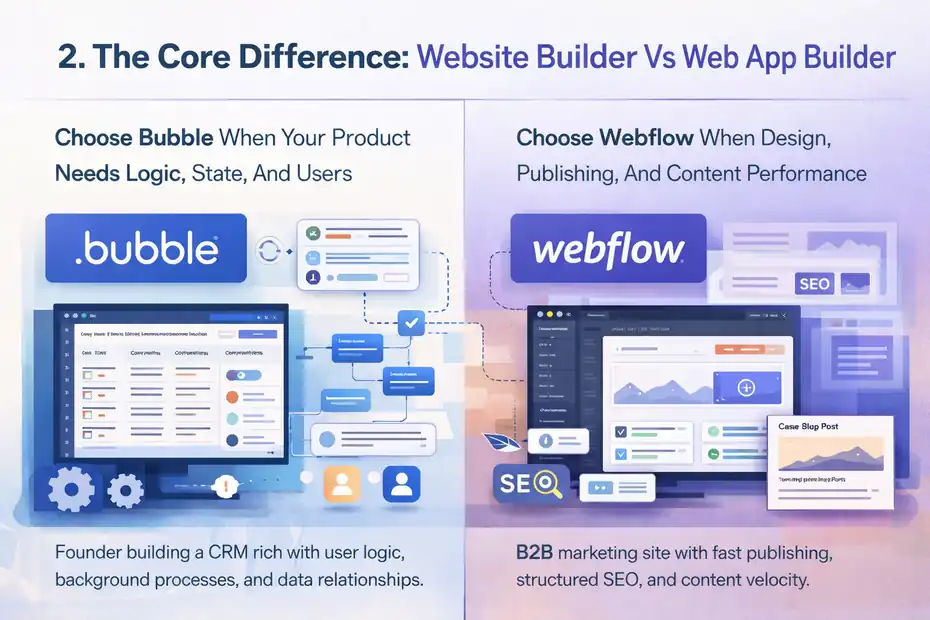
Choose Bubble When Your Product Needs Logic, State, And Users
Bubble wins when your project behaves like software. I suggest thinking in terms of conditions, permissions, workflows, and repeatable actions. Does your product need to create records after a payment? Trigger background events? Show different interfaces based on account type?
Let users create, edit, and manage their own data? If yes, Bubble usually has the edge.
Here is the simplest test I use: If removing the backend would break the product, you are probably in Bubble territory.
For example, a founder building a lightweight CRM needs contacts, companies, notes, reminders, user roles, activity history, and filtered views. A marketing-heavy website might help acquire users, but the product itself lives in the application layer. That is Bubble’s lane.
Another practical sign is data relationships. If records connect to other records in lots of ways, like projects to clients, invoices to subscriptions, or messages to conversations, Bubble becomes much more natural. You are building system behavior, not just presentation.
Choose Webflow When Design, Publishing, And Content Performance Matter More
Webflow wins when the output is primarily a public-facing website and the quality of design, content structure, and publishing speed are central to success. Its CMS plans are built for structured content, and its overall platform messaging is aimed at teams that want to launch pages quickly, manage content visually, and optimize site performance.
This matters more than many people think. A B2B SaaS startup, for example, often does not need its marketing site and product to be built in the same tool. The product may live in Bubble or a coded stack, while the public website, blog, case studies, landing pages, and SEO architecture live in Webflow.
That split can be smart. Your marketers get cleaner control over publishing and design. Your product team keeps app logic where it belongs.
In my experience, Webflow tends to feel better when brand matters, content velocity matters, or you need a polished front-end experience without turning every content change into a product-development task.
Design Flexibility And Front-End Control
A lot of readers care about this first because design is what they can see. But design quality and app capability are not the same thing.
Webflow Usually Wins For Pixel-Precise Marketing Design
If your priority is visual control over a website, Webflow is usually the more comfortable tool. It was built around visual layout systems, interactions, CMS-driven pages, and designer-friendly page building.
Webflow also highlights classic interactions and GSAP-powered interactions as part of its experience stack, which reinforces that visual storytelling is one of its strongest muscles.
That advantage shows up in real work. A homepage with layered sections, scroll effects, sticky elements, CMS-powered testimonial blocks, and polished transitions is generally easier to shape in Webflow than in Bubble. I would not say Bubble cannot do this. It can. But it often feels like you are pushing an app tool toward a marketing-design job.
For agencies and brand teams, that matters. Time spent fighting layout details is time you are not spending on conversion.
A realistic scenario: If you are redesigning a venture-backed startup’s homepage, pricing page, blog, and case-study hub, Webflow is likely to get you to “looks premium” faster.
Bubble Can Look Good, But It Prioritizes Functional Interfaces
Bubble’s editor lets you build your exact interface visually, and it absolutely can support polished products. But the platform’s own value proposition emphasizes full-stack applications, hosting, security, and performance rather than designer-first control. That tells you what kind of problem it was built to solve.
I think Bubble is strongest visually when the interface is product-oriented: dashboards, forms, onboarding flows, account areas, booking interfaces, admin panels, marketplaces, and responsive app screens. These do not need to be ugly. They just need to behave correctly.
That is the tradeoff. Bubble tends to reward builders who care about interface logic and data-driven UX more than animation polish. Webflow tends to reward builders who care about presentation and structured content first.
So if your definition of “good front end” is “beautiful landing page,” Webflow likely wins. If your definition is “usable product interface connected to real logic,” Bubble is usually the better bet.
Database, Workflows, And Backend Power
This section is where the comparison starts to separate sharply. For web apps, backend depth matters more than homepage polish.
Bubble Has Native Database Logic Built In
Bubble’s model revolves around “things” in the database, workflows, privacy rules, and app behavior connected directly to data.
Its docs explain that records are stored as “things,” and privacy rules are configured per data type to control who can view or edit information. That gives you native building blocks for real app behavior.
In practical terms, this means you can build a user system, connect each user to projects, connect projects to tasks, run recurring workflows, trigger events after form submission, restrict data access by role, and expose selected data through APIs without leaving the core platform. Starter plans even include recurring workflows and backend workflows for going live.
That is why Bubble feels like a true application platform. The backend is not an afterthought. It is part of the product model.
The caution, though, is that this power comes with responsibility. Bubble’s docs repeatedly stress understanding privacy rules, and its API security docs warn that some workflow settings can override privacy rules if configured carelessly.
That means Bubble gives you real backend control, but you have to use it deliberately.
Webflow’s Native App Logic Story Changed In 2025 And 2026
This is one of the biggest reasons the 2026 version of this comparison is different from older blog posts. Webflow officially deprecated Logic on June 27, 2025 and User Accounts on January 29, 2026, saying it would rely on ecosystem partners instead.
It specifically points users toward tools like Zapier and Make for logic, and Outseta or Memberstack for membership-style user experiences.
That means a classic web app stack inside Webflow is no longer as native as many people assume. You can still build around Webflow with integrations, Webflow Cloud, APIs, and app tooling.
But if you need authentication, gated experiences, or workflow automation, you are often assembling a system rather than using one deeply integrated core feature set.
I do not say that as a criticism. For some teams, composability is a good thing. But for beginners, it changes cost, troubleshooting, and maintenance. A setup with Webflow plus Memberstack plus Make plus Airtable or an external database can work well, yet it is not the same as Bubble’s “one builder, one app model.”
For web apps specifically, this is where Bubble takes a clear lead.
SEO, Content Marketing, And Visibility
Not every “web app” decision is only about the app. Sometimes the real business engine is organic traffic.
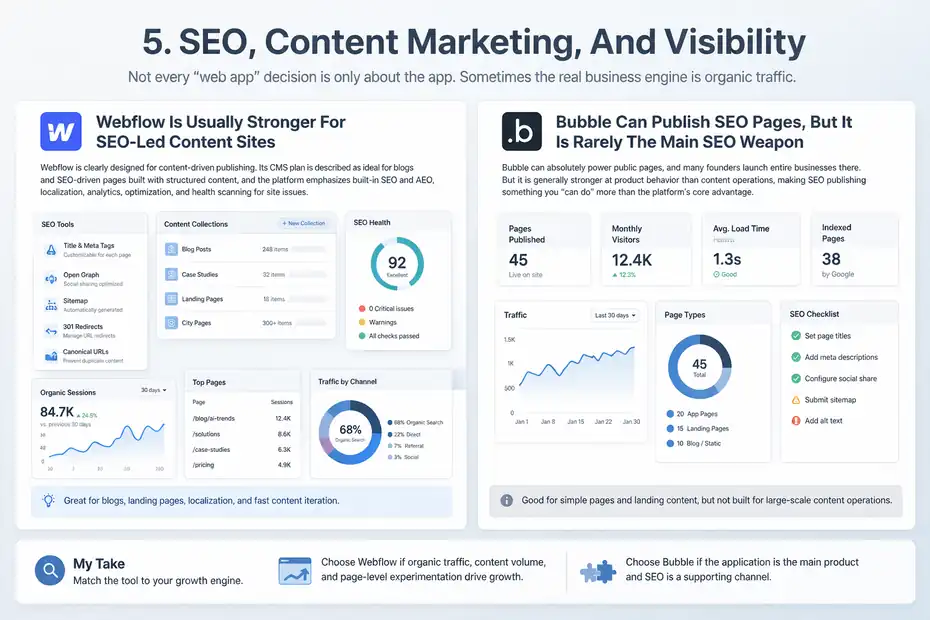
Webflow Is Usually Stronger For SEO-Led Content Sites
Webflow is clearly designed for content-driven publishing. Its CMS plan is described as ideal for blogs and SEO-driven pages built with structured content, and the platform emphasizes built-in SEO and AEO, localization, analytics, optimization, and health scanning for site issues.
That combination makes it attractive for businesses that win through organic traffic and page-level experimentation.
This is why I often recommend Webflow for the marketing layer even when I would not recommend it for the app layer. It is easier to think in collections, templates, landing pages, internal linking, and editorial workflows.
Imagine you are building a legal-tech startup. Your application might need dashboards, document workflows, and role-based access. That screams Bubble. But your acquisition engine might depend on 300 city pages, a content hub, comparison pages, and fast landing page iteration. That screams Webflow.
Splitting those responsibilities is often smarter than forcing one tool to do everything.
Bubble Can Publish SEO Pages, But It Is Rarely The Main SEO Weapon
Bubble can absolutely power public pages, and many founders launch entire businesses there. But I would not usually call it the strongest content marketing platform. Its strength is product behavior. SEO publishing is more often something you “can do” than something the platform is built around as its main advantage.
That difference becomes obvious as content scales. When you need lots of structured pages, cleaner editorial workflows, and fast design changes without touching app logic, a platform centered on publishing usually feels better.
My honest view is this: if SEO content is your main growth channel, Webflow has the more natural advantage. If the product itself is the main growth engine and SEO is secondary, Bubble may still be enough. The right answer depends on whether you are optimizing for content operations or application capability.
Pricing And Total Cost In 2026
Sticker price is only half the story. The real cost is software fees plus complexity plus the price of fixing the wrong architecture later.
Bubble Pricing Favors All-In-One App Building, But Usage Matters
Bubble’s official pricing shows a Starter plan at $59 per month billed annually, Growth at $209, and Team at $549 for web and mobile.
The Starter tier includes recurring workflows, basic version control, a live website, custom domain, and 175K workload units per month. Bubble’s docs also explain that plans are chosen at the project level and can cover web, mobile, or both in one project.
That structure can be cost-effective when you actually need app infrastructure. Instead of paying separately for the website shell, backend automation, user system, and core database, you are buying one platform that already thinks like an app platform.
But workload-based pricing means you cannot ignore usage. Busy workflows, inefficient searches, and heavy app behavior can increase cost over time.
In my experience, Bubble rewards good architecture more than casual building. A sloppy app can become expensive faster than a disciplined one.
Webflow Looks Cheaper At First, But App-Like Stacks Add Up
Webflow’s official site plans are cheaper at the entry level: Basic is $14 per month billed yearly, CMS is $23, and Business is $39. Those plans include things like 10GB, 50GB, and higher bandwidth levels, with Web app hosting included across plans.
Webflow Cloud also has request and CPU usage limits by plan, with overages on Business.
For a marketing site, that pricing can be excellent. A polished brochure site or content hub on a $23 or $39 plan is a very different budget conversation from a full app platform.
The catch is this: once you try to make Webflow behave like an app, you often need additional paid tools for memberships, auth, automations, or external data handling because native Logic and User Accounts are gone.
So the cheapest-looking setup is not always the cheapest real setup.
A simple rule I use: Bubble usually costs more upfront but may cost less than a stitched-together “Webflow plus five tools” stack for real applications. Webflow usually costs less for content-heavy sites where app logic is light or offloaded elsewhere.
Setup Paths For Different Project Types
This is where I think the decision becomes easy. Match the platform to the project, not to the hype.
Best Choice For SaaS, Marketplaces, And Internal Tools
For SaaS products, client portals, marketplaces, dashboards, and internal operations tools, I recommend Bubble more often. These products depend on data relationships, user states, permissions, recurring workflows, and logic that changes what each person sees. Bubble is built around exactly that.
A few practical matches:
- SaaS MVP: Bubble is a strong fit because you can launch signup, onboarding, billing flows, dashboard views, and core workflows in one place.
- Marketplace: Bubble usually fits because buyers, sellers, listings, messages, and transactions all rely on connected records.
- Internal tool: Bubble is often faster because the product is mainly workflow and permissions, not pixel-perfect public design.
I believe this is where Bubble delivers the clearest return. It lets non-technical founders validate products without first assembling a complex stack.
Best Choice For Marketing Sites, SEO Hubs, And Brand-Led Websites
For marketing websites, Webflow is usually the safer recommendation. It shines where structure, speed, content, presentation, and collaboration matter more than deep app logic.
Common good fits:
- Startup marketing site: Webflow works well for homepage, feature pages, pricing, docs-lite pages, and lead capture.
- SEO content hub: The CMS plan exists for exactly this kind of structured publishing.
- Agency or portfolio site: Webflow generally feels more natural for polished visual storytelling.
There is also a strong hybrid pattern here: build the acquisition site in Webflow, then send logged-in users into a separate Bubble app. That is not always necessary, but in many businesses it is the cleanest architecture.
Common Mistakes People Make When Choosing Between Them
This is the section I wish more comparison posts included, because most platform regret starts with a bad assumption.
Mistake One: Picking Webflow For A Real App Because The Front End Looks Better
I understand the temptation. Webflow’s visual polish is appealing, and many founders assume they can just “add the app stuff later.” But later usually means more tools, more syncing, more edge cases, and more maintenance.
Once you need login, permissions, dynamic user states, and backend processes, the missing native app layer becomes very noticeable.
The result is often a product that looks better in screenshots than it works in real usage.
Mistake Two: Picking Bubble For A Content Business That Really Needs Publishing Speed
The opposite mistake happens too. Founders build everything in Bubble because they want one platform, then months later realize their marketing team cannot move fast, their content workflow is clunky, and every site change feels more technical than it should.
I suggest being honest about your primary business engine. If 80 percent of success comes from ranking pages, publishing content, and iterating landing pages, you should not force an app-first platform to carry the whole business.
Mistake Three: Comparing Monthly Price Instead Of Total System Cost
A $23 Webflow CMS plan looks cheaper than Bubble Starter at $59. That comparison is fair only if your project is actually a CMS-driven site. The minute you add third-party memberships, automation, and external data layers, the math changes.
Likewise, Bubble can look economical until poor architecture drives unnecessary workload usage.
What matters is total cost of ownership, not entry price alone.
Which Platform Wins For Different Kinds Of Builders
There is no universal winner, but there is usually a correct winner for a specific builder.
Bubble Wins For Product Builders And Founders Testing Real Software
If you are building a product people log into, manage data inside, and return to repeatedly, Bubble usually wins this bubble vs webflow comparison. It is closer to a real application builder, and in 2026 that matters even more because Webflow no longer offers native Logic and User Accounts.
I would choose Bubble for:
- Founders validating a SaaS idea
- Teams building dashboards or portals
- Marketplaces and booking systems
- Internal tools with approvals and workflows
- Products that need one visual platform for logic plus UI
Its biggest downside is complexity. You need to think structurally. But that is also why it can do more.
Webflow Wins For Marketers, Designers, And Content-Led Teams
If the goal is a website that needs to look excellent, publish efficiently, support SEO growth, and help teams ship pages without developer bottlenecks, Webflow usually wins. Its messaging, pricing structure, CMS focus, optimization products, and visual design system all point in that direction.
I would choose Webflow for:
- Brand-led company sites
- Content-heavy SEO programs
- Landing page systems
- Agencies serving marketing teams
- Public websites where polish and publishing matter most
The downside is that once your “site” starts behaving like software, you may outgrow the native platform model faster than expected.
Final Verdict: Which Wins For Web Apps?
Here is my honest answer: Bubble wins for web apps. Webflow wins for websites.
That sounds simple, but it is the cleanest conclusion after looking at what each platform actually emphasizes in 2026. Bubble gives you a more native full-stack app environment with shared database, workflows, user systems, privacy controls, and app-oriented infrastructure.
Webflow gives you a stronger website, CMS, design, and optimization platform, with web app hosting now available but native app logic and native user accounts no longer part of the core platform.
So if your question is literally “which wins for web apps,” I would give Bubble the edge without much hesitation.
My recommendation is straightforward:
- Choose Bubble when the product needs logic, users, workflows, and database relationships.
- Choose Webflow when the project is mainly a public-facing website or SEO engine.
- Use both when your business needs a serious app and a serious marketing site.
That hybrid approach is not overkill. In many cases, it is the grown-up answer.
And honestly, that is the real lesson behind a smart bubble vs webflow comparison. The winner is not the platform with more hype. It is the platform that matches the job.
FAQ
What is the main difference in a bubble vs webflow comparison?
The main difference is that Bubble is a full-stack web app builder with built-in database and workflows, while Webflow is primarily a website builder focused on design, CMS, and SEO. Bubble is better for app functionality, while Webflow excels at creating high-performing marketing websites.
Is Bubble better than Webflow for building web apps?
Yes, Bubble is generally better for web apps because it includes native backend logic, user authentication, and database management. Webflow requires external tools for these features, making Bubble a more complete solution for building scalable, interactive applications.
Can you build a SaaS product with Webflow instead of Bubble?
You can build parts of a SaaS product with Webflow, but you will need external tools for backend logic, user accounts, and workflows. Bubble allows you to build the entire SaaS product in one platform, which simplifies development and reduces integration complexity.
Which is better for SEO: Bubble or Webflow?
Webflow is better for SEO because it offers a structured CMS, faster content publishing, and built-in optimization tools. Bubble can support SEO pages, but it is not designed specifically for content-driven growth or large-scale publishing strategies.
Should I use both Bubble and Webflow together?
In many cases, using both is the best approach. You can build your marketing website and SEO content in Webflow, while using Bubble to power the core web application. This setup allows you to optimize both user experience and product functionality.

I’m Juxhin, the voice behind The Justifiable.
I’ve spent 6+ years building blogs, managing affiliate campaigns, and testing the messy world of online business. Here, I cut the fluff and share the strategies that actually move the needle — so you can build income that’s sustainable, not speculative.