Table of Contents
Some links on The Justifiable are affiliate links, meaning we may earn a small commission at no extra cost to you. Read full disclaimer.
When you first create affiliate links, it’s easy to assume that adding them to your blog or social post is enough to earn clicks.
But as I’ve learned over time, the real magic happens when you understand why people click—and how to make those links feel irresistible instead of pushy.
In this guide, we’ll walk through practical ways to design, write, and position affiliate links that actually drive engagement and revenue, not just impressions.
Understand What Makes People Click on Affiliate Links
Creating affiliate links that actually get clicks starts with understanding why people click in the first place. It’s not luck—it’s about psychology, timing, and relevance.
Study Real User Behavior and Intent
Before adding a single affiliate link, you need to understand how your readers behave. Every click is a decision driven by context—what the user came for, what problem they’re trying to solve, and what emotional state they’re in.
When you look at analytics (like heatmaps or scroll-depth reports), patterns emerge. For example, you might find that users scroll faster on “how-to” pages but spend more time reading product comparisons. That tells you where they’re in buying mode.
Here’s how to study this effectively:
- Use behavior analytics tools like Hotjar or Microsoft Clarity to see where users hover, pause, or drop off.
- Segment traffic by intent. Visitors from Google searches like “best running shoes for beginners” are already primed to click—while those reading “how to start running” may need more nurturing before they convert.
- Ask your audience directly. Sometimes a one-question survey (“What type of tools or products do you find most useful?”) reveals more than data alone.
In my experience, most clicks come when you match intent perfectly—not when you plaster links everywhere.
Learn to Match the Link’s Promise With the Content
Every affiliate link carries a silent promise: “Click here, and you’ll find what you’re looking for.” If the content doesn’t deliver on that promise, you lose trust—and once that’s gone, clicks drop.
A simple rule I follow: the closer the link aligns with the reader’s current thought, the higher the chance they’ll click.
Example:
If your article teaches “How to build a personal website,” the link shouldn’t just say “Try this hosting service.” Instead, it could say:
“Once your domain is ready, you’ll need hosting—Awin’s partner Bluehost makes setup easy with one-click WordPress installs.”
Notice how the link fits the flow of action rather than interrupting it.
Identify Emotional Triggers That Drive Clicks
Emotion beats logic almost every time. The reason people click isn’t just information—it’s curiosity, urgency, or the hope for a better outcome.
Here are common emotional triggers that boost affiliate link clicks:
- Curiosity: “See how this tool doubled my newsletter growth.”
- Fear of missing out: “Limited-time pricing—grab it before it’s gone.”
- Relief or simplicity: “Finally, an easy way to organize your projects.”
- Trust: “I personally use this tool for every campaign I run.”
In other words, connect emotionally before you convert logically. When your words make people feel something, the click naturally follows.
Choose the Right Affiliate Products and Networks
Even the best-placed link won’t convert if the product isn’t a genuine fit. The right affiliate products align perfectly with your audience’s goals, budget, and trust level.
Focus on Products That Align With Your Audience’s Needs
Think of your affiliate strategy as matchmaking—you’re connecting a reader’s need with a product’s solution.
Start by listing your audience’s key pain points. What do they struggle with daily? What tools or services could make that easier?
A few practical tips:
- Only promote what you’d actually use. Authenticity builds long-term credibility.
- Test the product first. You can’t explain benefits deeply unless you’ve experienced them.
- Align pricing tiers. If your readers are beginners, a $500 software tool probably won’t convert. A $15/month option might.
I’ve seen creators triple their conversion rate simply by switching from broad, high-ticket offers to smaller, ultra-relevant products.
Use Trusted Networks Like Awin for Reliable Programs
When selecting where to find affiliate offers, skip outdated or discontinued platforms. For instance, ShareASale has now merged into Awin, which is currently one of the most trusted global affiliate networks.
Here’s why I recommend Awin:
- Large network with thousands of vetted merchants across niches.
- Real-time reporting to track performance transparently.
- Easy approval process and fast payouts.
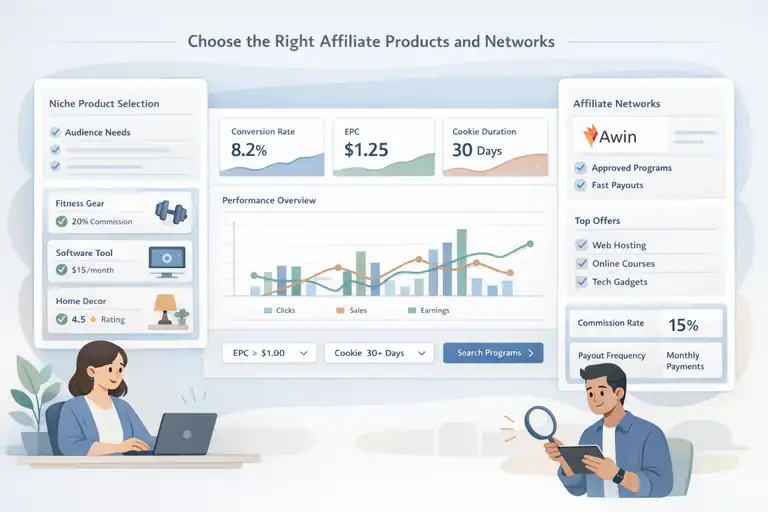
If you’re new, sign up for Awin and start by browsing programs related to your niche—whether that’s web hosting, fitness, software, or home décor.
Pro tip: Filter programs by EPC (Earnings Per Click) and conversion rate to identify high-performing partnerships quickly.
Review Commission Rates and Cookie Duration Before Joining
Two numbers often overlooked by beginners are commission rate and cookie duration.
- Commission rate: The percentage you earn per sale. A 10% commission on a $100 product equals $10 per conversion.
- Cookie duration: The number of days you’re credited for a purchase after a user clicks your link. For example, a 30-day cookie means if someone buys within 30 days, you still earn the commission.
When comparing programs:
| Metric | Why It Matters | Ideal Benchmark |
| Commission Rate | Determines your revenue per sale | 10–30% for digital products |
| Cookie Duration | Extends earning potential per click | 30+ days preferred |
| Payout Frequency | Impacts your cash flow | Monthly or bi-weekly |
Always check these details before joining—small differences here can significantly affect your income over time.
Write Compelling Anchor Text That Sparks Curiosity
Even a great product and placement can fall flat if your anchor text feels dull. The way you phrase your link directly affects whether readers decide to click or scroll past.
Replace Generic Phrases With Action-Oriented Wording
You’ve seen it a hundred times: “Click here.” “Learn more.” “Buy now.” These phrases are lifeless.
Instead, create action phrases that show what the user gets after clicking.
Examples:
- Instead of “Click here to learn about Awin,” try “Discover how Awin helps creators earn faster.”
- Replace “Buy now” with “Start your free trial today—it takes 60 seconds.”
- Turn “More info” into “See the latest version in action.”
Actionable wording gives readers a reason to click—it connects the benefit to the action.
Use Natural Placement Within Sentences for Higher CTR
Links that interrupt reading tend to feel forced. Links that flow naturally within sentences feel like a logical next step.
Try this simple structure:
“If you’re serious about improving conversions, you can explore Awin’s affiliate dashboard to see what programs perform best.”
Notice how the link fits the rhythm of the sentence—it’s part of the message, not an add-on.
A quick way to test placement: read your paragraph aloud. If the link feels like a pause or distraction, rephrase the sentence so it feels conversational.
Test Variations of Call-to-Action Phrases for Engagement
Every audience responds differently. What works for one blog may not work for another. That’s where A/B testing comes in.
Tools like VWO or Optimizely help you test multiple versions of anchor text.
For example:
- Version A: “Check out this free email marketing tool.”
- Version B: “Start building your list today with Kit—it’s free to try.”
Track which one earns more clicks. Over time, small tweaks in tone and placement can double your CTR.
You can also test link density—some pages perform better with one link per section, while others do better with several contextual mentions.
Design Affiliate Links That Blend Seamlessly Into Content
Affiliate links work best when they don’t feel like ads. Readers should see them as helpful, natural parts of your content—not interruptions.
The goal is to make them feel like friendly recommendations instead of sales pitches.
Avoid Overly Promotional Formatting That Feels Spammy
You’ve probably seen those bright, underlined, flashing-blue affiliate links that scream “click me.” The problem is—they look desperate. Today’s readers are smarter and can spot a hard sell instantly.
Instead, aim for subtlety and flow. Let the link feel like a natural part of the sentence. For example, instead of:
“CLICK HERE TO BUY THE BEST HOSTING DEAL EVER!!!”
Try something conversational like:
“If you’re setting up your first website, Awin’s Bluehost program offers a one-click WordPress install that saves hours.”
Here’s a quick checklist for avoiding spammy formatting:
- Don’t overuse caps or exclamation marks.
- Limit hyperlinks to a few per section—quality beats quantity.
- Keep link color subtle and consistent with your brand theme.
Think of affiliate links as whispers, not shouts. You’re guiding readers, not pushing them.
Use Consistent Colors and Styles That Match Your Brand
Consistency builds trust, and trust builds clicks. When your affiliate links follow your brand’s look and feel, they appear legitimate.
For instance, if your website uses calm tones like navy blue and gray, stick with a simple blue underline for links—not neon green or orange. Visual harmony subconsciously tells readers, “This is safe and professional.”
You can also use small design tweaks to make links stand out elegantly:
- Underline links only on hover. This keeps your page clean.
- Match button colors to your brand’s main accent shade.
- Keep font size consistent with surrounding text—don’t enlarge links to grab attention.
If you use WordPress, tools like Pretty Links help you stylize affiliate URLs so they look clean and branded (e.g., yourdomain.com/recommends/hosting).
Embed Links Within Visual Elements Like Buttons or Graphics
Sometimes, visuals outperform plain text. Buttons or graphic CTAs (call-to-action areas) can guide clicks more effectively—especially for mobile readers.
For example, instead of linking a text phrase like “Try Kit for free,” you could use a small button that says: [Start Free Trial →]
If you’re designing in WordPress or Elementor:
- Add a button block.
- Insert your affiliate link under “Link URL.”
- Choose a color that matches your brand palette.
- Keep the text short—2–4 words max.
Graphics can also work well for product mentions. For instance, adding a small product image with a caption like “I use this mic setup for all my videos – check it out here” feels personal, not promotional.
The key is balance: visual elements should support the reader’s journey, not dominate it.
Build Context Around Links to Increase Trust
Affiliate marketing is really a trust game. If readers trust your advice, they’ll trust your links.
Adding context before each link is one of the most underrated ways to boost clicks and credibility.
Add Short Explanations Before the Link to Establish Relevance
Never drop a link out of nowhere. Instead, tell readers why you’re recommending it. A simple one-sentence lead-in can make all the difference.
For example:
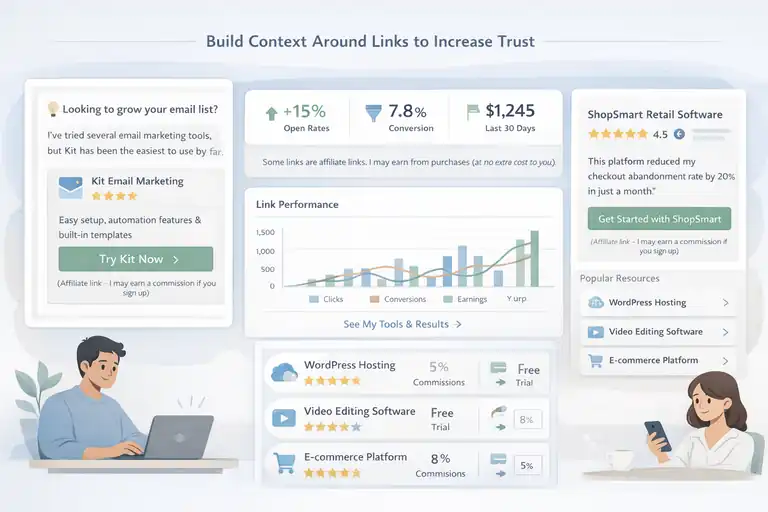
- “I’ve tried three different email tools, but Kit was the easiest to set up.”
- “This tool helped me reduce my checkout abandonment rate by 20%.”
Notice how each explanation adds context before the link—it answers the reader’s silent question: “Why should I care?”
This approach also signals authenticity. You’re not selling; you’re sharing.
Share Personal Experiences or Results for Authenticity
People trust real experiences over sales language. If you’ve used the product, talk about it like you would to a friend.
You might say: “When I first switched to Awin’s affiliate dashboard, I was overwhelmed. But once I set up tracking for a single program, I realized how intuitive it was. Now I can see which links perform best in real-time.”
Adding personal insights makes your link feel grounded and human. Readers sense when you’re genuinely recommending something you use—and that authenticity turns hesitation into clicks.
A short case-style mention can work wonders: “After switching from a generic email platform to Kit, my open rates jumped 15% in two weeks.”
These small, specific details are what make affiliate content feel alive, not robotic.
Include Disclaimers Transparently Without Breaking Flow
Affiliate disclaimers are required, but they don’t have to feel awkward. A simple, conversational tone works better than legal jargon.
For example: “Quick note: Some of the links here are affiliate links, which means I may earn a small commission—at no extra cost to you. I only recommend tools I personally use and love.”
Place it near the first affiliate mention or at the end of the article. Transparency not only keeps you compliant—it actually builds trust. Readers appreciate honesty.
You can also add a small italic note beneath buttons or graphics: (Affiliate link – I may earn a commission if you purchase.)
When readers see that you’re open about your partnerships, they’re more likely to believe your recommendations are genuine.
Optimize Placement for Maximum Visibility and Clicks
Affiliate links don’t just need to be well-written—they need to be well-placed.
Where you position them has a direct impact on visibility, click-through rate (CTR), and conversions.
Position Links in High-Attention Areas Like Introductions or Conclusions
Readers’ attention peaks at two points: when they first land on your page and right before they leave. That’s why introductions and conclusions are goldmines for affiliate link placement.
- In the introduction, lightly mention your affiliate product as a “helpful tool” that will be explained later.
- In the conclusion, summarize your recommendation naturally, reminding readers of its main benefit.
Example: “If you’re serious about earning from affiliate marketing, Awin’s network gives you reliable programs and simple tracking tools to start fast.”
Avoid dumping links in the middle of long paragraphs—people often skim those areas.
Add In-Content Links Naturally Within Tutorials or Lists
When you write how-to guides or lists, those are perfect moments to place links contextually.
For instance:
“Next, open your email tool—if you don’t have one, Kit is free to start and integrates easily with WordPress.”
The link feels like part of the process, not an ad. Tutorials, resource roundups, and comparison posts tend to perform best for this type of natural linking.
A few good practices:
- Limit yourself to 1–2 links per 300 words.
- Ensure each link matches the user’s current action.
- Avoid back-to-back affiliate links—it looks cluttered.
Track Click Data to Identify Top-Performing Link Positions
You can’t improve what you don’t measure. Tracking link clicks helps you find where your audience engages most.
Tools like ThirstyAffiliates or Awin’s reporting dashboard show click frequency, conversion rate, and revenue by link or page.
Here’s how to interpret your data:
- High clicks, low conversions: The offer or landing page might not align with reader intent.
- Low clicks, high conversions: The link is trusted but underexposed—move it higher on the page.
- No clicks: The link may be too hidden or irrelevant to the content.
I usually create a monthly report to identify my top three performing links, then experiment with small changes—like moving one to the introduction or tweaking its anchor text. Over time, that iterative process compounds into major performance gains.
Use SEO to Drive Organic Traffic to Affiliate Pages
Creating affiliate links that actually get clicks isn’t just about placement or copywriting—it’s also about visibility.
SEO helps you bring consistent, targeted traffic to your affiliate pages, ensuring the right people see your links at the right time.
Target Long-Tail Keywords With High Buyer Intent
Long-tail keywords are specific search phrases—usually three or more words—that signal clear purchase intent.
For example, “best podcast mic for beginners” or “affordable SEO tool for small businesses.” These keywords attract users who are much closer to making a decision.
Here’s how to find and use them effectively:
- Start with real search behavior. Use tools like Google’s “People Also Ask,” AnswerThePublic, or Ahrefs’ Keyword Explorer. Look for phrases that include words like “best,” “review,” “comparison,” or “how to.”
- Check intent carefully. A keyword like “best camera for YouTube beginners” has strong buying intent, while “how to film YouTube videos” is more informational. The first one is ideal for affiliate content.
- Naturally integrate the phrase. Include your long-tail keyword in your H2s, intro, and one or two body paragraphs—never force it.
Example: If your focus keyword is create affiliate links, a long-tail variation might be how to create affiliate links that convert fast. Writing around these variations builds topical depth and attracts searchers ready to take action.
In my experience, these specific phrases drive fewer visitors but far more conversions—sometimes 3–5 times higher than broad keywords.
Optimize Meta Titles and Descriptions for Higher CTR
Even if your page ranks well, people still need a reason to click. That’s where your meta title and description come in—they’re your digital “first impression.”
A few proven tweaks can boost your click-through rate (CTR):
- Meta title tip: Keep it under 60 characters and include your main keyword once.
- Example: How to Create Affiliate Links That Actually Get Clicks.
- Meta description tip: Use 150–160 characters, focusing on benefit-driven copy.
- Example: Learn how to write, design, and position affiliate links that attract real clicks and conversions.
- Add emotional or action words like “discover,” “simple,” or “step-by-step.”
You can also test variations over time. If one description consistently underperforms, rewrite it using different emotional triggers or clarity-focused phrasing.
Google’s search snippets are often what convinces someone to visit your site—so treat them like micro-ads for your content.
Include Internal Links to Strengthen Page Authority
Internal links not only help with SEO—they also gently guide readers toward your affiliate pages. When used correctly, they improve engagement and keep visitors exploring your site longer.
Here’s how to do it right:
- Link from high-traffic pages. Identify your top-performing posts (use Google Analytics or Awin’s dashboard for referral insights) and insert relevant internal links to your affiliate content.
- Use descriptive anchor text. Instead of “click here,” use phrases like “learn how to create affiliate links that convert.”
- Connect related content. If you’ve written about email marketing tools, link to your affiliate post about Kit.
I recommend reviewing your internal link map quarterly. It’s a simple but powerful way to increase organic visibility and help your affiliate posts climb in search rankings.
A/B Test and Improve Your Affiliate Links Over Time
Even the most carefully written affiliate links can perform differently than expected.
That’s why ongoing A/B testing is key to improving click-through and conversion rates over time.
Use Tools Like VWO or Optimizely for Split Testing
Tools such as VWO and Optimizely make it easy to run experiments without heavy coding. You can test headlines, button colors, or link placement and track which version drives more clicks.
Here’s a simple path:
- Create two variations of your affiliate page.
- Change one element—like the position of the first affiliate link.
- Run the test for at least one week (or until you have 500+ visits).
- Compare click and conversion data.
The key is isolation—only change one element at a time. That way, you can be confident about what’s driving improvements.
I’ve personally seen small tweaks like changing an anchor phrase from “see pricing” to “try it free” increase clicks by 28%.
Compare Click Performance Across Different Anchor Styles
Your anchor text is often the difference between “ignored” and “clicked.” A/B testing different anchor formats helps you understand what resonates best with your readers.
Try testing:
- Plain text links vs. button-style CTAs.
- Short anchors (like “Try Kit free”) vs. longer, descriptive ones (“Start your first newsletter free with Kit”).
- Links placed mid-sentence vs. those in standalone lines.
If your platform allows, heatmap tools like Hotjar or Microsoft Clarity can visualize where users are clicking most. You might be surprised—sometimes links in unexpected places outperform your main CTA.
Iterate Based on Data, Not Assumptions
The biggest mistake I see affiliates make is assuming what works. Instead, let data tell the story.
Once you’ve collected a few weeks of testing results, analyze them to identify trends:
- High clicks, low conversions: The product page may not deliver what readers expect.
- Low clicks, high conversions: Move that link higher—it’s clearly converting.
- Balanced performance: Maintain placement but experiment with new wording.
Keep a simple spreadsheet tracking your test dates, variables, and results. Over months, you’ll develop a personalized formula for what converts best on your site.
Affiliate marketing isn’t static—it’s an evolving, data-driven process. Treat every test as a step toward higher efficiency.
Enhance Performance With Smart Link Management Tools
If you’re serious about scaling your affiliate marketing, you’ll quickly realize manual tracking is messy. Smart link management tools help you organize, analyze, and protect your affiliate links in one place.
Use Platforms Like ThirstyAffiliates or Pretty Links for Tracking
Plugins like ThirstyAffiliates and Pretty Links simplify link management directly from your WordPress dashboard. They let you track clicks, cloak URLs, and categorize affiliate links neatly.
For example, instead of showing a long, intimidating URL like: https://awin.com/affiliate/merchant/12345/product/abc
You can shorten it to something like: yourdomain.com/go/hosting
Benefits include:
- Cleaner, more professional-looking links.
- Easier tracking for performance metrics.
- The ability to update or replace broken links site-wide in seconds.
In Pretty Links, just open your WordPress sidebar, select Pretty Links → Add New, paste your affiliate link, and create a simple redirect.
Shorten and Cloak Links to Make Them Look Clean
Long affiliate URLs can scare off readers. Cloaking makes them friendlier and brand-aligned without changing their function.
However, it’s important to be transparent—always disclose affiliate relationships clearly. Cloaking should improve aesthetics and manageability, not deceive users.
When shortening, use meaningful slugs like /go/toolname instead of random letters or numbers. This keeps your links easy to remember and maintain.
A neat, trustworthy URL can increase CTR by 10–15%, especially in email or social campaigns.
Monitor Broken Links to Maintain SEO and Credibility
Few things hurt credibility faster than a broken link. Not only does it frustrate readers, but it also harms SEO and affiliate revenue.
Make link audits part of your monthly routine:
- Use tools like Broken Link Checker or Ahrefs Site Audit to find dead links.
- Replace outdated offers or redirect them to current programs (for example, switch any old ShareASale links to Awin, which is now its active parent network).
- Review performance reports to spot inactive merchants.
Think of it as digital housekeeping—keeping your affiliate ecosystem clean ensures you never lose income due to technical issues.
Combine Email and Content Strategies for More Clicks
If you really want to make your affiliate links work long-term, you can’t just rely on blog traffic alone. Email marketing and content should work hand in hand.
When done right, your emails can warm readers up, build trust, and gently nudge them toward clicking your affiliate links—without ever feeling salesy.
Embed Affiliate Links Naturally in Your Email Newsletters Using Kit
If you’re using Kit (formerly ConvertKit), you already have an incredible advantage. Kit makes it simple to insert affiliate links right into your newsletters while keeping them personal and natural.
Here’s how I do it:
- Choose context over clutter. Don’t just drop links randomly—explain why you’re recommending something. For example:
“A few of you asked how I track my affiliate sales—here’s the dashboard I use inside Awin.” - Use short, conversational CTAs. Instead of “Buy here,” try “See the tool I mentioned” or “Check it out here.”
- Keep visuals minimal. Text-based newsletters often perform better than image-heavy ones. They feel more personal and direct.
Inside Kit’s email editor, you can highlight a phrase, click the link icon, and paste your affiliate URL. You can even tag subscribers who click, allowing you to send them more targeted follow-ups later.
I’ve noticed that when affiliate links are placed near genuine stories—like a personal tip or quick tutorial—clicks increase by up to 30%. People respond better when it feels like friendly advice, not a sales pitch.
Create Lead Magnets That Funnel Users to Affiliate Pages
A great way to grow your affiliate income is by using lead magnets—free, high-value resources that naturally lead readers to affiliate content.
For example:
- A “Beginner’s SEO Toolkit” PDF that includes affiliate links to your favorite keyword tools.
- A “Start a Blog Checklist” that links to hosting or design products on Awin.
- A “Weekly Email Planning Template” that recommends Kit for automation.
When someone downloads your lead magnet, they’ve already shown interest in your topic. You can then guide them with follow-up emails that expand on the topic—and include your affiliate recommendations naturally.
If you want to simplify this workflow in Kit:
- Go to Automations → Create New Sequence.
- Add a short welcome email with a helpful tip.
- Introduce one affiliate resource in each email that directly relates to the problem they want to solve.
This strategy builds both your list and your affiliate revenue—without feeling forced.
Segment Your List for Personalized Affiliate Recommendations
One of the biggest affiliate mistakes I see is treating all subscribers the same. The truth is, not everyone on your list needs or wants the same products.
Segmentation solves this. It means dividing your audience into smaller groups based on what they’ve clicked, downloaded, or shown interest in.
Inside Kit, you can:
- Create tags for specific behaviors (like “Clicked affiliate link: hosting”).
- Send tailored emails to each segment. For example, readers tagged as “Beginner Bloggers” might get affiliate links for Awin’s beginner-friendly programs, while “Email Marketers” might receive recommendations for Kit’s advanced features.
This simple adjustment makes a huge difference. When readers receive affiliate suggestions that feel handpicked for them, clicks naturally go up—sometimes doubling your conversion rate.
Avoid Common Mistakes That Reduce Affiliate Clicks
Even the best affiliates make simple mistakes that quietly kill clicks and conversions. Most of these come down to over-promotion, poor relevance, or outdated tools.
Don’t Overload Pages With Too Many Links
It’s tempting to sprinkle affiliate links everywhere, thinking more links mean more chances to earn. But in reality, too many links overwhelm readers and lower trust.
Instead, focus on quality placement.
For instance:
- Limit yourself to 2–3 affiliate links per 1,000 words.
- Use one strong call-to-action (CTA) per section instead of several scattered ones.
- Keep one primary offer per page whenever possible.
I once ran a test on a tutorial post: one version had eight affiliate links, the other had just three. The leaner version got 42% more clicks because it felt clearer and more intentional.
Avoid Linking to Irrelevant or Low-Quality Products
Every affiliate link you share is a reflection of your credibility. If readers click something that doesn’t deliver, they lose trust in you, not the merchant.
Before adding any affiliate link:
- Test the product personally whenever possible.
- Check reviews and refund rates on the network (Awin provides this data in most programs).
- Make sure it truly fits your audience’s needs.
For example, if you teach blogging, linking to random crypto products might confuse or frustrate your readers. Stay tightly aligned with your niche—relevance builds reliability.
Never Use Outdated Tools Like Google Optimize
Affiliate and marketing tools change constantly, and using discontinued ones can harm your reputation. Google Optimize is one such example—it’s been officially terminated.
Instead, use modern alternatives like VWO, Optimizely, or Convert for A/B testing. They’re actively supported and better suited for affiliates who need reliable tracking and analytics.
Also, make sure to use updated tools for email and automation—Sendinblue, for instance, has now rebranded to Brevo, and ConvertKit is now Kit. Keeping your recommendations current shows professionalism and earns reader trust.
Track, Analyze, and Refine for Consistent Growth
Affiliate marketing isn’t a one-time setup—it’s a continuous process of learning, testing, and optimizing. Consistent tracking and analysis help you scale your income sustainably.
Use Analytics Tools to Monitor CTR and Conversion Rate
The two most important metrics to track are:
- CTR (Click-Through Rate): The percentage of people who click your affiliate links.
- Conversion Rate: The percentage of those clicks that result in a purchase.
You can track these easily in:
- Awin’s dashboard for link-specific performance.
- Google Analytics for traffic patterns.
- Pretty Links or ThirstyAffiliates for on-site tracking.
For example, if your CTR is high but conversions are low, it might mean your content is strong but the landing page isn’t convincing enough. Conversely, if conversions are high but clicks are few, your links may need better visibility or placement.
Identify Underperforming Pages and Reoptimize Them
Not every article will perform equally. Some posts might rank well but bring little affiliate income. That’s where reoptimization comes in.
Here’s a simple process I use monthly:
- Open Google Analytics or Search Console.
- Identify pages with steady traffic but low affiliate clicks.
- Update those posts with clearer CTAs, better product positioning, or stronger link anchor text.
Even a small update—like moving one link higher or rewriting a heading—can improve clicks significantly.
I once updated an old “resources” post by switching generic anchor text (“learn more”) to a benefit-driven one (“see how this tool simplifies SEO”). CTR jumped from 1.2% to 3.8% in a week.
Develop a Monthly Review Routine for Continuous Improvement
Consistency is everything. Instead of random tweaks, create a review routine to analyze your performance every month.
Here’s a simple template:
- Week 1: Review Awin dashboard and top 10 links by clicks.
- Week 2: Identify underperforming content in Google Analytics.
- Week 3: Update or test one element (CTA, placement, design).
- Week 4: Document results and plan next steps.
By following this cycle, you’ll steadily refine your strategy, uncover patterns, and build a repeatable process that compounds over time.
Affiliate success isn’t about guessing—it’s about measuring, adjusting, and growing through intention. Small, consistent improvements often outperform one big overhaul.
FAQ
How do I create affiliate links that actually get clicks?
To create affiliate links that get clicks, focus on relevance, placement, and trust. Use natural anchor text, add brief context before the link, and recommend products you personally use.
Where should I place affiliate links for the best results?
Place affiliate links in high-visibility areas like introductions, conclusions, and within helpful sections of your content. Test different placements to see where users engage most.
What tools can help me manage affiliate links effectively?
Tools like Awin for tracking, Pretty Links for link cloaking, and VWO for A/B testing help optimize and manage affiliate links efficiently.

I’m Juxhin, the voice behind The Justifiable.
I’ve spent 6+ years building blogs, managing affiliate campaigns, and testing the messy world of online business. Here, I cut the fluff and share the strategies that actually move the needle — so you can build income that’s sustainable, not speculative.