
Table of Contents
Some links on The Justifiable are affiliate links, meaning we may earn a small commission at no extra cost to you. Read full disclaimer.
Creating an online store and getting first customers feels simple when you watch polished YouTube success stories. In real life, it is usually messier. You choose a platform, upload products, tweak your design, and then realize traffic does not magically appear.
I have seen this happen again and again. The good news is that you do not need a huge budget or a massive audience to make progress. You need the right sequence.
In this guide, I will walk you through what actually works from zero, from picking the right store setup to landing those first sales without wasting months on fluff.
Start With The Right Business Foundations
Before you touch themes, logos, or ad campaigns, you need a store concept that gives people a clear reason to buy. This is where most first-time founders either build momentum fast or quietly stall.
Choose A Small, Specific Offer Instead Of A “General Store”
A lot of beginners launch broad stores because they want more chances to sell. I understand the logic, but in practice, broad stores usually make you look replaceable. If you sell phone cases, kitchen tools, pet toys, and hoodies all in one place, a new visitor has no idea why your store exists.
A tighter offer works better because it helps with trust, messaging, and traffic acquisition.
- Better positioning: A store focused on minimalist desk accessories, dog travel gear, or postpartum self-care products is easier to remember.
- Cleaner marketing: Your product pages, homepage copy, and social content all speak to the same type of buyer.
- Faster learning: When one audience keeps visiting, you notice patterns faster and improve faster.
Imagine you are starting from zero with a limited budget. A store selling “everything for everyone” forces you to compete on convenience and price. That is hard. A store selling “compact gear for apartment coffee lovers” gives you a real angle. Now your homepage, product bundles, and first content can all support one promise.
I suggest writing one sentence before you build anything: “We help [specific person] get [specific result] with [specific product category].” If that sentence feels vague, your store probably is too.
Validate Demand Before You Spend Time On Design
You do not need a full market research team to validate an idea. You need signals. Good signals tell you people already care, search, compare, and buy in this category.
Here is a simple validation process I recommend:
- Check search behavior: Look for product-category searches, problem-aware searches, and comparison searches.
- Study marketplaces: Browse Etsy and Amazon to see how similar products are positioned, reviewed, and priced.
- Read review language: Pay attention to the words buyers use when they explain why they bought, what disappointed them, and what they wish was better.
- Look for repeat pain points: Repeated complaints often reveal your angle. Better sizing guidance, faster setup, clearer instructions, or improved packaging can become part of your offer.
This does not mean you must invent a brand-new product. In many cases, a familiar product with a better buying experience wins. That could mean simpler bundles, stronger educational content, or better product photography.
I believe new store owners obsess too much over “finding a winning product” and not enough over making the product easier to understand, trust, and buy.
If you can explain why your store is easier to buy from than five similar options, you are already thinking like a merchant instead of a hobbyist.
Set A Simple Revenue Goal For Your First 30 Days
Your first goal should not be “build a six-figure brand.” That sounds exciting, but it is too vague to guide daily decisions. A better target is something like this: get 100 qualified visitors, collect 20 email subscribers, generate 3 to 10 orders, and learn what blocks conversions.
That kind of goal changes your behavior. You stop polishing things that do not matter and start measuring things that do.
Use these early metrics:
- Traffic quality: Are the right people landing on your store?
- Email capture rate: Are visitors interested enough to stay connected?
- Add-to-cart rate: Does your offer create buying intent?
- Checkout completion rate: Are people dropping off because of friction?
- First-order feedback: What did buyers say before and after buying?
Current ecommerce benchmarks still show that conversion rates are usually modest for newer stores, while cart abandonment remains high. That means your job is not to expect perfect numbers. Your job is to remove friction step by step and keep learning.
For many of us, the first sales are less about profit and more about proof. Proof that the offer resonates. Proof that your positioning works. Proof that your first acquisition channel is worth doubling down on.
Pick A Platform That Matches Your Starting Point
Your platform matters, but not in the way most people think. The wrong platform can slow you down, yet the right one is usually the one that helps you launch quickly, manage easily, and stay focused on selling.
Compare Platforms Based On Speed, Control, And Complexity
If you are starting your first store, you do not need the “best platform on earth.” You need the platform that fits your technical comfort level and business model.
Here is a simple comparison:
| Platform | Best For | Strength | Watch Out For |
|---|---|---|---|
| Shopify | Beginners and growing brands | Fast setup, strong app ecosystem, easy checkout | Monthly costs can rise with apps |
| WooCommerce | WordPress users wanting more control | Flexible, customizable, content-friendly | More setup and maintenance |
| Wix | Simpler small-store launches | Easy design experience | Can feel limiting at scale |
| Square Online | Sellers with offline and online needs | Good for local businesses and simple catalogs | Less depth for complex ecommerce |
| Ecwid | Adding ecommerce to an existing site | Quick integration into current web presence | Not always the best long-term core store |
In my experience, most first-time store owners do better with the platform that removes technical friction. If you are not deeply technical, Shopify is usually the easiest route to launch fast. If your strategy leans heavily into content marketing and you already know WordPress, WooCommerce can make a lot of sense.
The key question is simple: will this platform help you go live and sell within days, not months?
Set Up Payments, Shipping, And Taxes Early
Nothing kills early momentum like realizing your checkout is half-configured after traffic starts landing. Before you promote your store, set up the basics properly.
Start with payment methods your buyers already trust. For many new stores, that means offering card payments through Stripe and a familiar fallback like PayPal. Trust matters here more than people realize. A shopper may like your product and still hesitate if checkout feels unfamiliar.
Then handle your operational basics:
- Shipping rules: Be clear about rates, delivery windows, and tracking expectations.
- Return policy: Keep it understandable, not legalistic.
- Tax settings: Configure them correctly based on where you sell.
- Contact details: Add a visible email address or support option so your store feels real.
I suggest testing checkout yourself from a customer perspective. Add a product to cart. Enter shipping details. Review the order summary. Ask: does anything feel confusing, expensive, or unfinished?
That small exercise often reveals issues that would otherwise cost you your first orders.
Keep Your Store Structure Small On Purpose
You do not need 47 categories, a giant mega menu, and twelve homepage sections to start. You need a store that helps one visitor understand three things quickly: what you sell, who it is for, and why they should trust you.
A simple starter structure usually looks like this:
- Home
- Shop or Collection Page
- Product Pages
- About
- FAQ
- Shipping and Returns
- Contact
That is enough.
One of the most common beginner mistakes is building for imaginary future scale. They create complex navigation for products they do not even have yet. Keep it lean. A smaller structure improves clarity, speeds up decisions, and makes your analytics easier to read.
I would rather see a tight store with five excellent products than a chaotic store with fifty average listings and unclear positioning.
Build A Store That Actually Converts
A store can look clean and still fail to sell. The missing piece is usually not “better branding.” It is conversion clarity. Your pages need to answer hesitation before it becomes abandonment.
Write Product Pages For Doubt, Not Just Description
Most product pages talk too much about the item and not enough about the buyer’s concerns. A good product page does both. It explains what the product is, but more importantly, it reduces uncertainty.
Your product page should answer these questions fast:
- What problem does this solve?
- Who is it for?
- What makes it different?
- What is included?
- How does sizing, setup, or usage work?
- What happens after I order?
A useful structure looks like this:
- Headline: Clear product name plus what it helps with.
- Opening summary: One or two lines about the main benefit.
- Visual proof: Images showing scale, use, and close-up detail.
- Practical details: Materials, dimensions, compatibility, care, or setup.
- Objection handling: Shipping timing, returns, guarantees, and FAQs.
Imagine you sell a posture-friendly laptop stand. “Aluminum foldable stand” is descriptive, but weak. “Foldable Laptop Stand For Better Desk Posture In Small Workspaces” is much more buyer-aware. It speaks to a use case, not just an object.
I recommend writing product pages like a helpful salesperson, not a manufacturer’s spreadsheet.
Use Images And Layout To Remove Friction
If your visuals are unclear, your visitor has to do mental work. That is dangerous. People buy faster when they can instantly picture how a product fits into their life.
Focus on these visual essentials:
- Context shots: Show the product being used in a realistic setting.
- Scale shots: Help buyers understand size.
- Detail shots: Materials, texture, finish, and important features.
- Simple layout: Keep spacing generous and avoid clutter around the buy box.
You do not need a giant photography budget on day one. Many of us can start with a smartphone, natural light, and clean composition. What matters is clarity.
For supporting design tasks, Canva can help you produce simple comparison graphics, size charts, or announcement banners without overcomplicating your workflow. Just do not let graphics become decoration. Every visual should answer a buying question.
The best-performing early stores often look simpler than expected. Not cheap. Just clear. That difference matters.
Add Trust Signals Before You Try To Scale Traffic
You can drive traffic with content, social posts, or ads, but traffic alone does not create sales. People need enough trust to move forward.
Early trust signals include:
- Clear policies: Shipping, returns, and contact info
- Realistic delivery messaging: Do not overpromise
- Customer reviews or early testimonials: Even a few can help
- Founder story or brand purpose: Especially useful for newer brands
- Secure checkout familiarity: Recognizable payment options help
This is also where microcopy matters. Small phrases near checkout, shipping, or returns can reduce hesitation. “Tracked shipping,” “easy returns,” or “responds within 24 hours” may look minor, but they can make a store feel more legitimate.
A lot of first-time founders wait to add trust until after they get traffic. I think that is backwards. Add trust first, then earn the click.
Get Your First Customers Without Overcomplicating It
This stage matters more than people think. Your first customers are not just revenue. They are feedback, proof, testimonials, and data. You do not need every channel.
You need one or two that fit your product and strengths.
Start With Warm And Reachable Traffic Sources
If your store has zero brand recognition, start where attention is easiest to win. That usually means channels where discovery is possible without a huge budget.
Good starting points include:
- Personal network: Friends, colleagues, past customers, and niche communities
- Short-form content: Product demos, before-and-after clips, packing videos, or use-case videos
- Relevant groups and communities: Places where your audience already discusses the problem
- Marketplace exposure: In some cases, cross-listing select items on Etsy or Amazon can create early demand signals while your own store grows
The goal is not “go viral.” The goal is to create enough targeted visibility to learn who responds.
Imagine you sell planner inserts for overwhelmed freelancers. A slick ad campaign might work later, but your first customers may come faster from short educational videos, a useful lead magnet, and direct outreach in communities where freelancers already share productivity struggles.
I recommend asking yourself one honest question: where can I get my first 100 qualified visitors with the least resistance? Start there.
Use Content That Demonstrates The Product In Real Life
Early content should reduce doubt and create familiarity. People are much more likely to buy when they can see how a product works in normal life.
Content ideas that work well for new stores:
- Problem-solution videos: Show the frustration first, then the fix
- Comparison content: Old way versus new way
- Setup or unboxing content: Removes uncertainty
- Founder explanations: Why you made this product and who it helps
- Customer use scenarios: Even hypothetical ones can clarify value
A simple example: If you sell travel organizers, do not just post polished product images. Show someone packing for a weekend trip, separating cables, fitting toiletries, and saving space in a carry-on. That kind of content sells the outcome.
This is where beginners often get stuck trying to appear like a huge brand. You do not need that. You need believable demonstrations, consistent messaging, and enough repetition for people to remember you.
Use Low-Budget Outreach Before You Rely On Paid Ads
Paid ads can work, but I do not love them as a first move for completely new stores unless you already have strong margins and a validated offer. Cold traffic is unforgiving when your site, messaging, and product pages are still unproven.
Before spending heavily, try:
- Micro-influencer seeding: Send products to smaller creators with engaged audiences.
- Manual outreach: Contact potential partners, niche pages, or complementary brands.
- Founder-led promotion: Post consistently from your own account with genuine context.
- Email waitlist or launch list: Build interest before your full push.
This approach is slower, but it teaches you more. You hear objections directly. You see which hooks spark replies. You learn whether your price point feels fair.
When you do test ads later, your creative and copy will be sharper because you already know what resonates.
I suggest treating paid ads like fuel, not magic. If the offer and page are weak, ads just help you lose money faster.
Turn Visitors Into Buyers And Buyers Into Momentum
Traffic is only half the game. Your early growth depends on what happens after someone lands on the store.
The stores that survive usually get better at follow-up faster than the stores that only chase more clicks.
Build An Email Capture System From Day One
Not everyone buys on the first visit. That is normal. Email gives you a second chance, and often a third or fourth one too.
A simple early email system should include:
- Welcome offer or lead magnet: A discount, guide, checklist, or product quiz
- Welcome sequence: A short set of emails introducing the product, benefits, and trust signals
- Cart recovery emails: Remind shoppers to return and complete checkout
- Post-purchase follow-up: Ask for feedback, reviews, and future purchases
For implementation, Mailchimp works for straightforward beginner email flows, while Klaviyo is often stronger when you want more advanced ecommerce segmentation and automation.
Recent ecommerce email benchmarks still show that email remains one of the highest-leverage owned channels, especially when you use it to recover intent rather than blast generic promotions.
If you only build one backend system in your first month, make it this one.
Recover Abandoned Carts With Better Messaging
Cart abandonment is normal in ecommerce. High abandonment does not automatically mean your store is broken. It often means people need another nudge, a little more trust, or more time.
Your recovery flow should do three things:
- Remind: Show the item they left behind
- Reassure: Mention returns, shipping clarity, or product benefits
- Reduce friction: Bring them back to a clean checkout path
A practical abandoned-cart flow might look like this:
- Email 1: Sent within a few hours, friendly reminder
- Email 2: Sent next day, answers common objections
- Email 3: Sent later, adds urgency or a small incentive if margins allow
Do not jump straight to discounts unless necessary. Sometimes better clarity converts more profitably than a coupon.
I have seen stores recover meaningful revenue simply by rewriting cart emails in plain English. Less “you left items behind.” More “still deciding? here’s what customers usually want to know before ordering.”
That sounds subtle, but it changes the tone from robotic to helpful.
Improve Conversion With Offers, Bundles, And Clarity
Once traffic starts arriving, your next job is improving how much value each visitor generates. This is where smart offers beat random discounting.
Test options like:
- Bundles: Pair related products into a simpler buying decision
- Quantity breaks: Great for consumables or giftable products
- Starter kits: Reduce overwhelm for first-time buyers
- Threshold offers: Free shipping above a clear spend amount
Here is a useful way to think about it: many people do not actually want more choice. They want easier choice.
If you sell skincare tools, a starter routine bundle may outperform separate single-product listings because it removes guesswork. If you sell office products, a desk reset kit may help buyers justify a higher order value because it feels complete.
Keep your offers tied to buyer logic. Do not add bundles just because ecommerce blogs say you should.
Fix The Mistakes That Keep New Stores Stuck
When a new store struggles, the issue is usually not one dramatic flaw. It is usually a pile of smaller problems. Once you know what to look for, these become easier to fix.
Stop Copying Big Brands Too Early
Big brands can get away with vague messaging because people already know them. A new store cannot. If your homepage says things like “elevate your lifestyle” or “premium essentials for modern living,” that may sound polished, but it does not help a stranger understand what you sell.
New stores need explicit clarity:
- What is this product?
- Who is it for?
- Why is it useful?
- Why should I trust this store?
I believe this is one of the biggest hidden reasons new stores underperform. Founders are trying to look established instead of trying to be understood.
A clear, slightly less glamorous homepage usually beats a beautiful but abstract one. Especially when you are trying to get first customers from zero.
Do Not Launch Without Basic Analytics
You cannot improve what you cannot see. Even if you hate dashboards, you still need basic tracking from day one.
At minimum, track:
- Sessions
- Traffic source
- Product page views
- Add-to-cart events
- Checkout starts
- Purchases
- Email signups
For search and market research, Semrush and Ahrefs can help you identify how people search for product categories, questions, and comparisons. They are especially useful once you want to build organic traffic around informational content and commercial-intent pages.
But do not let tools become procrastination. The purpose of analytics is not to admire charts. It is to answer simple questions like, “Are people interested but confused?” or “Is one traffic source sending visitors who actually buy?”
That is where growth starts.
Avoid Premature Scaling
A lot of new stores get one or two sales and instantly start thinking about automation, wider catalogs, or aggressive ad spend. I understand the excitement, but early success is fragile.
Before scaling, make sure you can answer these questions:
- Which product or collection converts best?
- Which traffic source brings the most qualified visitors?
- What objections keep showing up?
- What percentage of visitors add to cart?
- What content angle gets the strongest response?
If you cannot answer those yet, scaling will probably magnify confusion rather than results.
I suggest earning the right to scale. Improve the basics first. Then invest harder in what already shows signs of working.
Optimize What Works And Build A Store That Lasts
Once you have first customers, the game changes. You are no longer guessing from zero. Now you are refining. This stage is where simple stores start turning into real businesses.
Turn First Customer Feedback Into Better Conversion Assets
Your earliest customers are incredibly valuable because they reveal how buyers actually think, not how you imagined they would think.
Use customer feedback to improve:
- Product page wording
- FAQ sections
- Ad angles
- Email subject lines
- Bundle ideas
- Review requests
- Content topics
For example, if buyers keep saying, “I bought this because it was easier to understand than the other options,” then clarity is a real selling point. Put that language on your product page. If they say shipping felt faster than expected, highlight that in your recovery emails and FAQs.
This is one reason first customers matter so much. They help you write better than any brainstorming session can.
Build A Repeatable Customer Acquisition Loop
The strongest stores stop treating marketing like random acts of hustle. They build loops.
A basic loop looks like this:
- Create useful or persuasive content
- Drive visitors to product pages or email capture
- Convert a portion into buyers or subscribers
- Follow up with email and remarketing
- Use feedback and performance data to improve the next round
That loop is not glamorous, but it is reliable.
A new store does not need ten acquisition channels. One working loop is enough. Maybe it is SEO content plus email. Maybe it is creator seeding plus short-form video. Maybe it is local community outreach plus repeat bundles.
In most cases, the businesses that win are not doing magical things. They are repeating good things consistently.
Know When To Expand Catalog, Content, Or Paid Spend
Expansion should happen after proof, not before it.
Here is a simple rule:
- Expand catalog when existing customers ask for adjacent products
- Expand content when you know which questions and use cases drive qualified traffic
- Expand paid spend when your conversion path is stable and your margins can support testing
A healthy growth path often looks like this: one strong offer, one or two validated channels, one clear email system, then controlled expansion.
If you jump into too many products too soon, your store loses focus. If you publish content before you understand search intent, you create noise. If you spend aggressively on ads before your pages convert, you buy expensive lessons.
From what I’ve seen, patient operators usually outperform frantic ones.
A Practical 30-Day Plan To Get From Zero To First Sales
You do not need a perfect master plan. You need a focused month of execution. Here is a simple way to approach it.
Week 1: Validate, Position, And Set Up
Your only goal this week is to create a tight offer and launchable store foundation.
- Day 1–2: Validate demand, study reviews, and define your niche angle
- Day 3: Choose your platform and basic store structure
- Day 4: Configure payments, shipping, policies, and contact details
- Day 5–7: Build your homepage, collection pages, and first product pages
Keep the catalog small. One to five products is enough if the positioning is clear.
Week 2: Improve Product Pages And Launch Your Store
This week is about conversion basics, not perfection.
- Write product pages around buyer doubts and use cases
- Add trust signals including shipping details, returns, and FAQs
- Create content assets such as short demos, visuals, or founder explainers
- Set up email capture and a basic welcome sequence
Launch quietly if needed. A soft launch is fine. You are not trying to impress the internet. You are trying to learn.
Week 3: Drive Targeted Traffic And Watch Behavior
Now begin sending real visitors.
- Post consistently using short, useful content
- Reach out manually to potential partners, communities, or small creators
- Share with warm audiences who fit the niche
- Track behavior inside your store and note where users drop off
This week is where the truth shows up. Messaging problems, pricing concerns, and weak product pages become visible.
Week 4: Optimize Based On Real Data
Once traffic comes in, use it.
- Improve weak pages with clearer copy and visuals
- Refine offers with bundles, shipping thresholds, or starter kits
- Tighten email flows for welcome and cart recovery
- Ask early customers questions and turn their words into better copy
By the end of 30 days, the real win is not just a few sales. It is knowing what is starting to work.
Final Thoughts
Creating an online store and getting first customers is not about finding one secret hack. It is about reducing uncertainty at every step. Pick a clear niche. Launch with a simple structure. Write pages that answer doubt. Drive traffic from reachable channels. Follow up with email. Improve what real buyers respond to.
If I could give you one final piece of advice, it would be this: do not wait until everything feels polished. Start with a store that is clear, trustworthy, and useful. Then let customer behavior shape the next version. That is usually how real ecommerce growth begins.

I’m Juxhin, the voice behind The Justifiable.
I’ve spent 6+ years building blogs, managing affiliate campaigns, and testing the messy world of online business. Here, I cut the fluff and share the strategies that actually move the needle — so you can build income that’s sustainable, not speculative.
Related posts:
 Should I Start Creating An Online Store? 9 Honest Signs You’re Ready
 Advantages of a Dropshipping Company: Genuine Business Knowledge
 Ecommerce Strategy Boost: 8 Simple Steps to Increase Profits
 10 Proven Dropshipping Marketing Tactics to Boost Sales
 Online Dropshipping Explained: How It Really Works
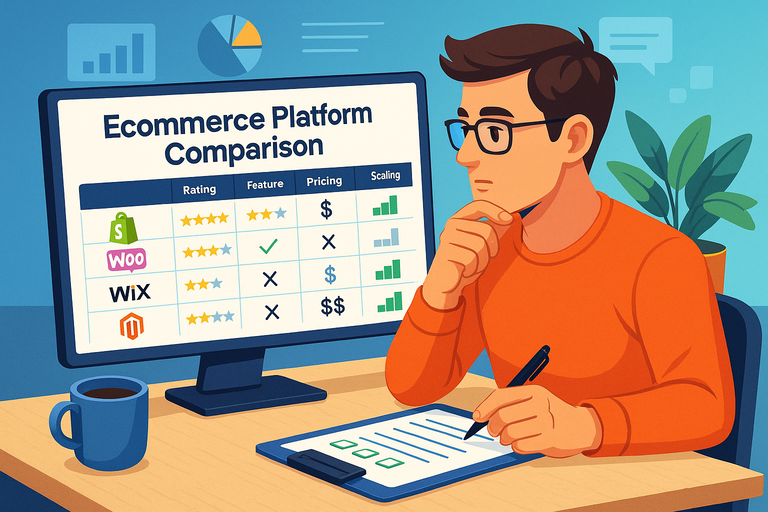 Ecommerce Platform Comparison: Which One Fits Your Brand?