
Table of Contents
Some links on The Justifiable are affiliate links, meaning we may earn a small commission at no extra cost to you. Read full disclaimer.
Debutify theme review for Shopify gets interesting the moment you stop asking, “Is it pretty?” and start asking, “Will it help me sell without stacking five extra apps?” That’s really where Debutify lives.
It positions itself as a conversion-focused Shopify theme with built-in sales widgets, no-code customization, AI elements, and support resources outside the Shopify Theme Store. On paper, that sounds ideal.
In practice, there are real wins, a few trade-offs, and some buyer-fit questions you should answer before committing. Here’s the honest breakdown of where Debutify shines, where it disappoints, and who should actually use it.
What Debutify Is Really Trying To Be
Debutify is not trying to be a purely aesthetic “designer” theme first.
It is trying to be a revenue-first store framework for Shopify merchants who care about speed to launch, conversion helpers, and reducing app clutter.
Debutify Is A Conversion Theme First, A Design Theme Second
If you look at how Debutify describes itself, the positioning is very clear: it pushes “high-converting,” “AI-powered,” “mobile-first UX,” built-in widgets, and no-code customization much harder than it pushes editorial design or niche-specific visual identity.
The homepage also frames the product around revenue growth, conversion-first UX, and lowering dependence on third-party apps.
That matters because a lot of Shopify store owners buy a theme for the wrong reason. They pick something that looks polished in the demo, then realize later they still need separate tools for urgency, upsells, trust-building, review collection, banners, and merchandising tweaks.
Debutify’s pitch is basically the opposite: start with conversion mechanics and then customize the storefront around them.
In my experience, that approach makes sense for founders who care more about launching a functional store this month than winning a design award next quarter.
If you are running a dropshipping store, a lean DTC brand, or a catalog that needs practical merchandising features fast, that’s appealing.
If you want a heavily art-directed luxury storefront with deep visual storytelling out of the box, Debutify may feel more utilitarian than inspiring. That is one of the hidden truths behind this theme: its strongest value is operational, not emotional.
The Big Promise Is “Fewer Apps, More Revenue Control”
Debutify says its theme includes an extensive library of upsell and cross-sell features and markets itself as a way to replace extra apps. Its homepage also claims 100+ widgets, while related official pages repeatedly highlight built-in conversion tools and free apps that support merchandising and urgency.
This promise is a big reason people search for a debutify theme review for Shopify in the first place. Shopify merchants get app fatigue fast.
One app handles countdowns, one handles badges, one handles popups, one handles cross-sells, one handles review requests, and suddenly the monthly software bill becomes its own business expense. Debutify is trying to collapse some of that stack.
That can genuinely help if your current store is overloaded. Imagine you are paying for a popup tool, a trust badge add-on, an upsell widget, and a simple urgency timer.
Even if each tool is cheap, the combined script load, support overhead, and compatibility risk can become annoying. A theme that consolidates part of that logic can simplify your stack.
The caution, though, is simple: “fewer apps” does not always mean “better performance.” A feature-rich theme can still become heavy if you enable too many widgets or load too many moving parts on the same page.
Debutify’s strength and risk come from the same place: it gives you a lot.
Who Debutify Fits Best

Before you compare screenshots or pricing, you need to know whether the theme matches your business model.
Debutify is not a universal best choice. It is a good fit for certain merchant types and a weaker fit for others.
Best For Newer Merchants, Lean Teams, And Conversion-Focused Stores
Debutify is strongest for merchants who want to launch fast and improve average order value and trust signals without relying on a developer for every little adjustment.
The official site emphasizes no-code customization, conversion-ready templates, and expert support, while the help center shows extensive onboarding, update, template, and troubleshooting documentation.
That usually describes three groups well. First, newer store owners who need structure. Second, solo founders or small teams who do not have a designer and developer on standby. Third, performance-minded operators who care more about product page conversion than visual experimentation.
A realistic example: Say you run a one-product supplement store or a beauty brand with a handful of SKUs. You probably want a strong product page, trust-building elements, cart nudges, and a clean mobile flow more than you want a cinematic brand experience. Debutify tends to support that type of store well.
I also think it can make sense for migration projects where the old Shopify store is messy. If your current theme has become a patchwork of apps, code snippets, and half-working design choices, moving to a more structured conversion-oriented theme can create breathing room.
Less Ideal For Brands That Want Pure Design Freedom Or Shopify Theme Store Support
Here is one hidden flaw many reviews gloss over: Debutify is not listed on the Shopify Theme Store, and Shopify staff have explicitly noted that because it is not a Theme Store theme, Shopify cannot speak to its support options the way it can for themes in the official store.
Shopify also points merchants toward Online Store 2.0 themes in the Theme Store for supported options.
That does not automatically make Debutify bad. But it does change your support and trust equation.
For some merchants, buying a theme through the Shopify Theme Store feels safer because the review environment, listing standards, and support expectations are more familiar. If you are the kind of store owner who wants maximum comfort with Shopify-native theme marketplace norms, this can be a real consideration.
I would also be careful if your brand depends on an unusually custom visual identity. Debutify offers customization, and its own review content says layouts, fonts, product pages, and homepage blocks are adjustable, but its core DNA still leans performance-first.
So the fit question is not “Is Debutify good?” It is “Do you want a conversion operating system or a visual canvas?” Those are not the same purchase.
Core Features That Actually Matter
A long feature list is easy to sell. The smarter question is which Debutify features matter in real store operations and which ones are mostly marketing decoration.
Built-In Sales Widgets Are The Real Headline Feature
Debutify’s most meaningful differentiator is its library of built-in sales and merchandising widgets.
Official materials specifically call out tools like cart countdown, stock countdown, and sales notifications, while the help center shows support content for trust badges, recently viewed, delivery time, featured product sections, comparison tables, cart upsells, cart savings, minimum order prompts, and other conversion-focused elements.
This is where the theme can create genuine leverage. A theme is not just a skin. On Shopify, it shapes how quickly you can publish merchandising ideas without code or app negotiations.
If you can add urgency, social proof, cart incentives, FAQ-like structure, and product comparison blocks inside your theme ecosystem, your testing loop gets faster.
Here is the practical upside: You do not need every feature to justify the theme. You only need enough of them to replace tools you would otherwise pay for or manually configure.
For many stores, that could be cart upsells, trust-building badges, a delivery estimate, and a simple “recently viewed” recovery path.
The downside is that merchants often get overexcited and turn everything on. That usually hurts more than it helps.
If a product page is firing sales pop notifications, countdown timers, savings badges, sticky elements, and cross-sells all at once, the shopper can feel manipulated. Debutify works best when you treat its widget library like a toolbox, not a buffet.
Help Documentation And Update Paths Are Better Than Many People Expect
One thing I genuinely like from the research side is that Debutify’s help center is not thin.
It includes onboarding guides, install docs, update instructions, template creation, troubleshooting articles, and guidance for common problems such as missing sections, cart behavior, item add-to-cart issues, price display problems, blurry logos, and upgrade popups.
There are also release notes for newer theme versions, including the 8.8 release.
That may sound boring, but it matters. Theme support is often where merchants lose time and money. A strong documentation layer reduces friction when you are customizing templates, updating versions, or fixing page-specific issues.
This also suggests Debutify is not a “launch it and forget it” product. It is being actively iterated, which is a positive sign if you want a theme that evolves with Shopify’s ecosystem.
Still, updates cut both ways. In my experience, feature-rich themes can require more careful update discipline because custom edits and app interactions can become fragile over time.
So yes, regular updates are a win. But you should always duplicate the theme before major changes and test core flows like add-to-cart, cart drawer, variant selection, and mobile layout after each update.
Debutify’s Hidden Wins
These are the advantages that do not always show up in flashy demos but matter once your store is live and handling real traffic.
It Can Lower Your Total App Dependence
Debutify repeatedly positions itself around replacing extra apps or reducing the need for them, and official comparison content says paid plans start around $15.60 per month while the platform argues that replacing multiple apps can save merchants meaningful recurring costs over time.
The pricing page also shows a free plan, a 14-day free trial path, and highlights additional free apps.
I would not blindly accept every “save thousands” claim from vendor marketing, but the broader point is valid. On Shopify, total cost of ownership matters more than sticker price.
A cheap theme plus four mediocre apps often becomes more expensive than a better theme with built-in functionality.
Let me make that concrete. Imagine you currently pay for:
- a countdown or urgency app
- a cart upsell app
- a simple trust badge or benefits bar tool
- a popup capture tool
You are not just paying in subscription cost. You are also paying in script load, compatibility risk, support tickets, and mental clutter. If Debutify replaces even part of that stack cleanly, it may create a better operating environment.
That is one of Debutify’s hidden wins: not glamour, but simplification.
It Seems Built For Faster Merchandising Decisions
Debutify’s official materials consistently emphasize no-code customization, conversion-ready layouts, and flexible sections and widgets, while its help center shows template and section-level control built into the ecosystem.
What that means in plain English is this: the theme is designed to help merchants test store improvements without turning every change into a mini project.
For example, if you want to create a comparison-heavy product page, tighten a cart incentive, build a FAQ-style reassurance section, or add recently viewed products, you can often move faster when the theme already expects those use cases.
That speed matters more than people realize. Most stores do not fail because the owner lacked ideas. They fail because implementing simple improvements is too slow. A theme that shortens that gap between “I should test this” and “it’s live” can quietly improve store performance over months.
This is especially useful for founders who are still learning conversion rate optimization. You do not need to know advanced CRO theory to benefit from practical merchandising blocks that are already available in your theme environment.
Debutify’s Hidden Flaws
This is the section people usually want most, because every theme looks strong on its own sales page. The real question is where friction shows up later.
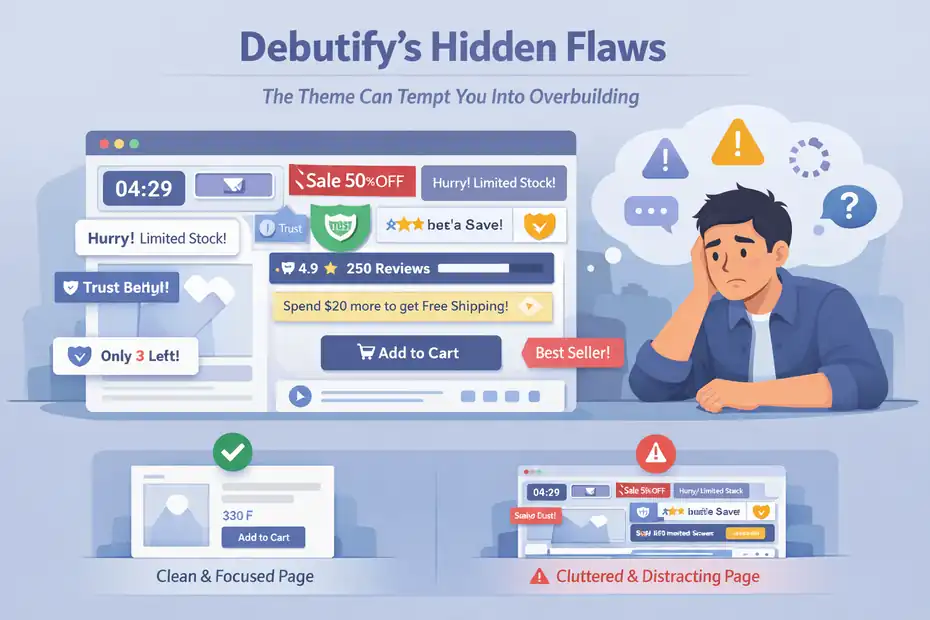
The Theme Can Tempt You Into Overbuilding
The same feature density that makes Debutify useful can also make it messy. Debutify promotes a large widget ecosystem, sales-focused add-ons, and engagement elements. That is helpful, but it also creates a common trap: too many conversion gadgets on the page at once.
I have seen this with many conversion-focused Shopify setups. A merchant starts with a clean product page, then adds urgency, a sticky add-to-cart, trust badges, comparison icons, a bundle offer, a countdown, testimonials, shipping notices, and a cart goal bar. Individually, each feature has logic. Together, they can overwhelm the page.
That is not Debutify’s fault alone, but it is a real product risk. The theme gives you enough tools to hurt your own clarity.
My advice is simple: Only enable a widget when it serves a measurable job. Ask, “Does this reduce doubt, increase cart value, or help navigation?” If the answer is no, leave it off. The best Debutify stores will usually be more selective than the average Debutify demo.
Support Expectations Are Different Than Theme Store Themes
Because Debutify is not in the Shopify Theme Store, the support dynamic is not the same as buying an official marketplace theme. Shopify staff have plainly noted that they cannot speak to Debutify’s support options in the same way they can for Theme Store products.
That does not mean support is weak. In fact, Debutify highlights expert support, and the help center content depth suggests a serious support operation. Some Shopify App Store reviews for Debutify’s review product also praise support responsiveness.
But the hidden flaw is trust architecture, not just support quality. Some merchants simply prefer the clarity of buying from the Theme Store because they understand the marketplace context better. If that is you, Debutify’s off-store model may create hesitation.
I think this matters most for non-technical store owners who want low-surprise infrastructure. If you are comfortable working with third-party Shopify ecosystem products outside the Theme Store, it may not bother you. If you are risk-averse, it probably will.
Debutify Vs Dawn: The Real Comparison Most Merchants Need
A Debutify review is incomplete without comparing it to Dawn, because that is the most common alternative for budget-conscious Shopify merchants.
Dawn Wins On Simplicity And Native Comfort
Dawn is Shopify’s free flagship theme and is described as a minimalist theme that lets product imagery take center stage. It is also in the official Shopify Theme Store, which means the marketplace context is more familiar for many merchants.
Dawn is often the better pick if you want a clean starting point, fewer built-in persuasion mechanics, and a more native-feeling Shopify baseline. It is easier to recommend to merchants who want simplicity and who do not yet know which conversion features they truly need.
I usually think of Dawn as a strong “clarity-first” option. It gives you less out of the box in terms of built-in sales widgets, but that restraint can actually help some stores stay cleaner. If your products are visually strong and your merchandising strategy is straightforward, Dawn may be enough.
There is also a psychological benefit to using a simple official theme: you avoid solving problems you do not have yet.
Debutify Wins When You Need Built-In Merchandising Power
Where Debutify can beat Dawn is in operational leverage. Debutify specifically markets conversion widgets, built-in upsell and cross-sell functionality, mobile-first conversion UX, and no-code customization designed to reduce app dependence.
Official Debutify comparison content even argues it offers stronger built-in conversion support than Dawn.
This is where I think the decision gets simple.
Choose Dawn if your priority is a lightweight, minimal Shopify-native starting point and you do not mind adding features later.
Choose Debutify if your priority is launching a more conversion-assisted storefront faster, especially when you know you will want urgency, upsell, trust, or merchandising elements from day one.
Neither is “best” in a vacuum. The better theme is the one that matches your actual business stage.
Setup, Optimization, And Real-World Use
A theme review should help you make decisions after purchase too. Here is how I would approach Debutify if I were launching with it today.
How I Would Set Up Debutify Without Making The Store Feel Spammy
After installing the theme and going through onboarding, I would build in layers. Debutify’s help center documents installation, onboarding, templates, and widget usage, so the setup path is clearly meant to be structured.
Step 1: Start with the essentials only. Build your homepage, collection pages, product template, cart flow, and navigation before touching any urgency or social-proof extras.
Step 2: Add only three conversion helpers at first. I would usually pick one trust feature, one cart-value feature, and one navigation or reassurance feature. For example, trust badges, cart upsell, and recently viewed products.
Step 3: Check mobile before desktop polish. Debutify markets itself as mobile-first, but your own store content can still break the experience if product images, icon rows, or benefit blocks become too dense.
Step 4: Watch behavior, not just aesthetics. Use Shopify analytics and your session recording tool of choice to see if shoppers hesitate at product pages or abandon the cart drawer. The theme is only useful if it changes behavior.
That last point is where many people waste money. They judge a theme by how “professional” it looks, not whether it helps buyers move.
The Best Optimization Strategy Is Selective Feature Testing
Debutify gives you enough conversion-oriented components that optimization should feel like curation, not decoration. The help center and theme materials show a wide range of possible widgets and sections, from cart-oriented tools to product-focused content blocks.
Here is the test framework I recommend:
- Test one friction reducer at a time. That might be delivery estimates, benefit bullets, or clearer comparison content.
- Test one value increaser at a time. That might be cart upsells or bundle-style offers.
- Test one trust element at a time. That might be testimonials, review content, or badges.
Do not launch six changes together and then claim the theme improved conversion.
A realistic example: Imagine your add-to-cart rate is decent, but checkout completion is weak. In that case, adding more homepage features is not your priority. You would look at cart clarity, reassurance, shipping communication, and cart upsell logic. Debutify can support that kind of focused iteration well if you stay disciplined.
Final Verdict: Is Debutify Worth It?
This final verdict comes down to business fit, not hype. Debutify has meaningful strengths, but they only matter if they solve the right problems for your store.
The Honest Bottom Line On Debutify
Debutify is worth serious consideration if you want a Shopify theme that leans hard into conversion support, no-code customization, built-in merchandising widgets, and the possibility of reducing app sprawl. Its official materials emphasize those strengths consistently, and the support/help infrastructure appears more mature than many merchants might assume at first glance.
Its hidden wins are practical: faster launch structure, fewer separate tools for basic CRO functions, and a merchant-friendly approach to testing common ecommerce improvements.
Its hidden flaws are also practical: it is easy to overdo the widgets, the theme lives outside the Shopify Theme Store, and stores that need heavily art-directed design freedom may find its conversion-first DNA a bit limiting.
I would recommend Debutify to:
- newer Shopify merchants who want a stronger built-in conversion setup
- lean teams trying to reduce app overhead
- performance-focused brands that care more about sales flow than design experimentation
I would be more cautious with Debutify if:
- you want the reassurance of Theme Store-native purchasing
- your brand depends on highly custom editorial design
- you already have a lightweight high-performing stack and do not need more built-in features
My Recommendation In One Sentence
If you want my plain-English answer, here it is: Debutify is a smart buy for Shopify merchants who want a revenue-oriented theme framework and have the discipline to use its features selectively, but it is not the automatic best choice for stores that value minimalism, official Theme Store comfort, or highly bespoke visual branding above all else.
That is the most honest outcome of this debutify theme review for Shopify. It is not a miracle theme. It is a strong operator’s theme. And for the right merchant, that is actually better.
FAQ
What is Debutify theme for Shopify?
Debutify is a Shopify theme designed to improve conversions by including built-in sales features like upsells, trust badges, and urgency tools. It focuses on reducing the need for multiple apps while helping store owners launch faster and optimize their store without needing advanced coding skills.
Is Debutify theme free to use?
Debutify offers a free plan with basic features, but most advanced conversion tools and add-ons are available through paid plans. While the free version is useful for beginners, scaling stores typically need premium features to fully benefit from its conversion-focused capabilities.
Does Debutify replace Shopify apps?
Debutify can replace some Shopify apps by offering built-in features like cart upsells, countdown timers, and trust badges. However, it may not completely eliminate all apps, especially for advanced marketing, analytics, or highly customized functionality that goes beyond standard ecommerce needs.
Is Debutify better than Dawn theme?
Debutify is better for conversion-focused stores that want built-in sales tools, while Dawn is better for simplicity and a clean, lightweight design. The right choice depends on whether you prioritize built-in marketing features or a minimal, flexible starting point for customization.
Is Debutify good for beginners?
Debutify is beginner-friendly because it includes ready-to-use templates, no-code customization, and built-in conversion tools. It helps new store owners avoid complex setups and reduces reliance on multiple apps, making it easier to launch and start optimizing a Shopify store quickly.

I’m Juxhin, the voice behind The Justifiable.
I’ve spent 6+ years building blogs, managing affiliate campaigns, and testing the messy world of online business. Here, I cut the fluff and share the strategies that actually move the needle — so you can build income that’s sustainable, not speculative.
Related posts:
 How to Build a Dropshipping Store That Actually Converts
 How to Make Money Dropshipping: 7 Secrets to a $10K/Month
 Dropshipping Guide: Build a Store That Actually Sells
 Ecommerce Marketing Guide: Turn Traffic Into Sales
 Ecommerce Platform Comparison: Which One Fits Your Brand?
 Why the Salehoo Wholesale Directory Helps You Scale