
Table of Contents
Some links on The Justifiable are affiliate links, meaning we may earn a small commission at no extra cost to you. Read full disclaimer.
When I first started digging into an envato elements review for creators, I wasn’t just looking for another asset library—I wanted something that could actually simplify my workflow without cutting corners on quality.
If you’ve ever juggled multiple tools just to finish one project, you probably know how frustrating that gets. Envato Elements promises a different approach: one subscription, millions of assets, and now even built-in AI tools.
But here’s the real question—does it actually deliver hidden value, or just look good on paper?
Let’s break it down together and see what really matters.
What Envato Elements Really Is For Creators
Envato Elements is no longer just a giant stock asset vault. In 2026, it sits in a more interesting position: part subscription library, part AI-assisted creative workspace, and part licensing shortcut for people who need to move fast without creating every asset from scratch.
Envato says subscribers get unlimited downloads from a catalog of more than 26–27 million assets, plus access to AI tools that now vary by plan.
What You Actually Get Inside The Subscription
For many creators, the real question is not “What is Envato Elements?” It is “What will I actually use every week?” That is where the platform starts to make sense.
- Core Library: Photos, videos, music, sound effects, graphics, fonts, presentation templates, mockups, 3D assets, Lottie animations, LUTs, and design templates are all included in the main subscription catalog.
- AI Layer: Envato now bundles tools like ImageGen, ImageEdit, VideoGen, VoiceGen, MusicGen, GraphicsGen, SoundGen, and MockUpGen, though access depends on your plan.
- Commercial Use: The platform uses one broad commercial license model for stock assets, which is a bigger deal than it sounds when you work with client projects.
I believe this is the first hidden win most creators overlook: Envato is less about getting “unlimited downloads” and more about reducing decision friction. Instead of juggling a font site, a stock music site, a template site, and a mockup site, you can often stay inside one ecosystem.
Imagine you are a freelance designer building a landing page, a sales deck, three ad creatives, and a promo reel for one client. In one afternoon, you could pull brand fonts, mockups, stock motion backgrounds, icons, presentation templates, and music cues from the same subscription.
That kind of workflow compression is where the value shows up.
Why It Feels Different From Buying Assets One By One
Buying single assets still makes sense sometimes, especially when you need one very specific premium file. But Envato Elements is built around volume, iteration, and convenience.
- Single-Purchase Platforms: Better when you want one standout item and will use it heavily.
- Subscription Platforms Like Envato: Better when you test ideas often, produce content weekly, or need lots of support assets around a main project.
In my experience, creators underestimate how much money they waste not on assets, but on time. Searching five websites for a “perfect” cinematic track or social media template sounds smart until you lose two hours and still end up compromising.
Envato’s model works because it assumes your creative process is messy. You try three fonts. You test two mockups. You scrap one video template. You download ten moodboard images and only keep four.
Because stock asset downloads remain unlimited, that experimentation feels normal instead of expensive. AI generations, however, are now tiered, so the old “everything unlimited” story is no longer fully true if AI is central to your workflow.
That distinction matters. If you are reviewing Envato Elements as a creator in 2026, you should think of it as unlimited stock plus plan-based AI, not unlimited everything.
Pricing, Plans, And What They Mean In Real Life
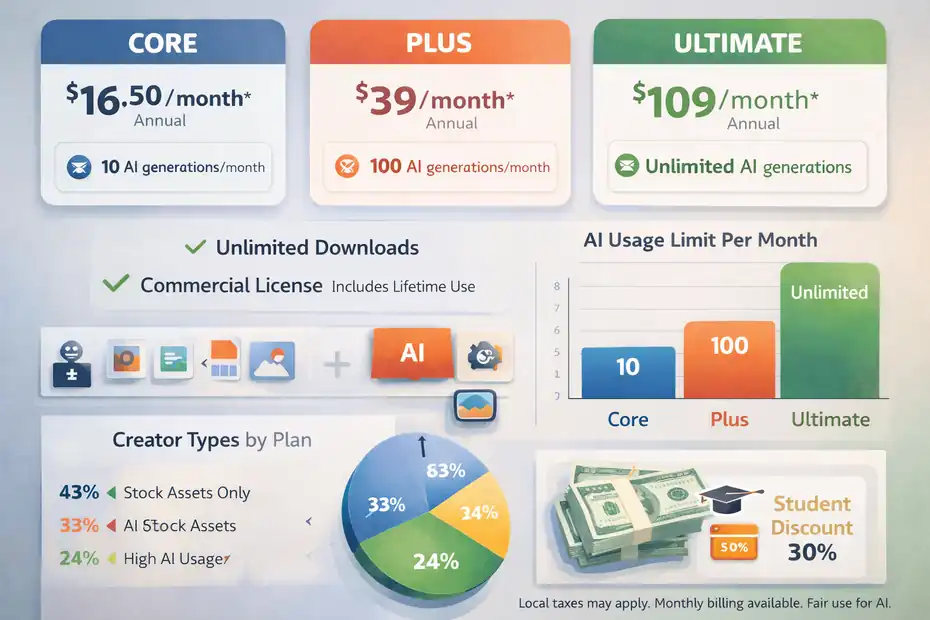
The biggest recent shift is pricing structure. Envato now separates plans mostly by AI usage, while keeping unlimited stock downloads across tiers.
That sounds simple, but it changes who gets the best deal.
Core, Plus, And Ultimate Explained Without Marketing Fluff
Envato’s official pricing update says all plans include unlimited stock downloads and lifetime commercial licensing, while AI generation limits differ by tier.
Core starts at US$16.50 per month billed annually, Plus starts at US$39, and Ultimate starts at US$109. Monthly billing is also available, and local taxes may apply.
Here is the practical breakdown:
- Core: Best for creators who mostly want stock assets and only occasionally touch AI. It includes 10 AI generations per month.
- Plus: Better for creators using AI regularly in thumbnails, concept drafts, mockups, music tests, or voiceovers. It includes 100 AI generations per month.
- Ultimate: Built for high-volume AI use, with unlimited AI generations subject to fair use rules.
I suggest most creators ignore Ultimate unless AI is part of your daily production pipeline. The jump from Core to Plus is the real decision point. If your workflow is still asset-heavy and AI-light, Core likely covers you. If you create content for multiple channels every week, Plus starts to look more sensible.
The hidden win here is that Envato did not lock the main asset library behind higher tiers. Even the lowest tier still gives you the full stock catalog.
Which Plan Fits Which Type Of Creator
Let me break this down the way most people actually buy subscriptions.
- YouTube Creator Or Solo Video Editor: Core can work if you mainly need music, B-roll, titles, fonts, and motion assets, but Plus becomes worthwhile once you start using AI image or video tools regularly.
- Freelance Designer: Core is often enough because templates, fonts, mockups, and graphics do most of the heavy lifting.
- Agency Or High-Output Content Team: Plus or Ultimate makes more sense because AI-assisted variation generation saves real production hours.
- Student Creator: Envato offers the Core plan at a 30% discount for eligible students, which is one of the more practical budget options if you qualify.
A realistic example: If you run a small e-commerce brand and publish four product videos, eight ad creatives, a weekly email banner, and two landing page refreshes each month, the stock catalog alone may justify Core. Once you add AI mockups, AI image edits, and quick-generated sound or voice elements, Plus becomes easier to defend.
That is why I would not call Envato “cheap” or “expensive” in isolation. I would call it efficient when you use several content formats at once. If you only need one occasional template, the subscription can feel wasteful. If you produce constantly, it can quietly replace multiple smaller subscriptions.
The Hidden Wins Most Reviews Miss
A lot of reviews stop at “unlimited downloads” and “good for templates.” That is true, but it barely scratches the surface. The actual hidden wins are operational.
They show up in speed, confidence, and creative momentum more than in flashy features.
Hidden Win 1: Licensing Is Simpler Than Most Creators Expect
Envato’s license is one of its strongest practical advantages. All stock items use the same simple license framework, and each download creates an ongoing license for one specified use.
If you want to reuse the item for another project, you generate a new license by downloading it again. Registered uses remain covered even after your subscription ends.
That matters more than most creators realize.
- Client Safety: You can hand off completed work with more confidence because licensed uses remain covered.
- Less Legal Guessing: You are not constantly checking a different license type for every asset source.
- Faster Production: You spend less time second-guessing whether a track, font, or template is safe for monetized or client work.
I have seen creators burn serious energy on licensing anxiety. They know how to design or edit, but they are never fully sure whether an asset can be used in an ad, a paid client deck, or a monetized channel. Envato’s broad commercial approach lowers that stress.
Now, it is not permission to do anything. Envato still bans resale, redistribution, many on-demand uses, and straightforward merchandising uses without added value. Music also has extra restrictions in some contexts. But compared with piecing together assets across multiple vendors, the license model is refreshingly manageable.
Hidden Win 2: It Is Better For “Support Assets” Than Hero Assets
This is probably my most honest opinion in the whole review.
Envato Elements is often strongest when you use it for the 70% of assets around the main creative idea, not necessarily the single centerpiece that defines the whole campaign.
Think about these support assets:
- Presentation decks
- Mockups
- Social templates
- Background music
- Icons and UI graphics
- Section dividers
- Lottie animations
- Font pairings
- B-roll fillers
These are the pieces that make projects feel finished, yet they are the exact pieces people hate sourcing one by one. Envato shines here because you can build polished systems fast.
For example, a creator launching a mini course may not use Envato for the logo itself. But they might use it for the promo video opener, workbook icons, lesson thumbnails, presentation slides, lesson music beds, and mockup scenes for the sales page. That is where the subscription suddenly looks brilliant.
So the hidden win is not always “best individual asset quality.” It is “best all-around production support per dollar” for creators who make lots of connected content.
Where Envato Elements Performs Best
Every platform has sweet spots. Envato is not equally strong for every creative discipline.
Knowing where it performs best helps you decide whether it fits your workflow or just looks useful on paper.
Best For Designers, Content Marketers, And Fast-Moving Brand Work
Envato is especially strong for creators who need polished output quickly across multiple formats.
- Designers: Fonts, presentation templates, mockups, icons, graphics, and social kits make the platform immediately useful.
- Content Marketers: Ad templates, promo visuals, motion graphics, and stock support faster campaign production.
- Social Media Teams: Reusable design systems matter more than one-off masterpieces, and Envato has a lot of those system-friendly assets.
- Solo Operators: The “one subscription, many asset types” model is a relief when you are doing design, editing, and publishing yourself.
In my experience, the value gets stronger when one person wears several hats. A marketer who also edits reels, builds decks, and updates landing pages will usually get more from Envato than a specialist illustrator who creates almost everything from scratch.
A simple scenario: You run a consultancy and need a webinar slide deck, lead magnet PDF, YouTube intro, newsletter header image, and short promo clips in one week. Envato can shorten every stage because the visual building blocks are already there.
That is why I see it as a “creative acceleration” platform more than a pure asset marketplace. The more formats you publish in, the more sense it makes.
Best For Video Creators Who Need Speed More Than Custom Perfection
Video creators can get a lot out of Envato, especially if they care about volume and consistency.
The platform’s catalog includes video footage, motion graphics, video templates, LUTs, music, sound effects, and presentation assets that can support editing workflows. It also includes AI video and audio-related tools on qualifying plans.
Here is where I think it works best:
- YouTube intros and lower thirds
- Corporate promo edits
- Podcast clips
- Product demo videos
- Reel and short-form video batches
- Client explainer content
Where it works less well is when you need highly original cinematic identity. If you are directing a premium brand film and want every motion element to feel custom, you will probably outgrow many templated assets quickly.
Still, most creators are not making a Super Bowl ad. They are trying to publish consistently without making every sequence from zero. For that reality, Envato performs well.
The hidden advantage for editors is that you can test options without cost anxiety. Swap the soundtrack. Try a second title pack. Replace a background clip. That kind of iteration makes edits stronger, and on a pay-per-asset platform, people often avoid it because every new test costs money.
The Weaknesses And Tradeoffs You Should Know
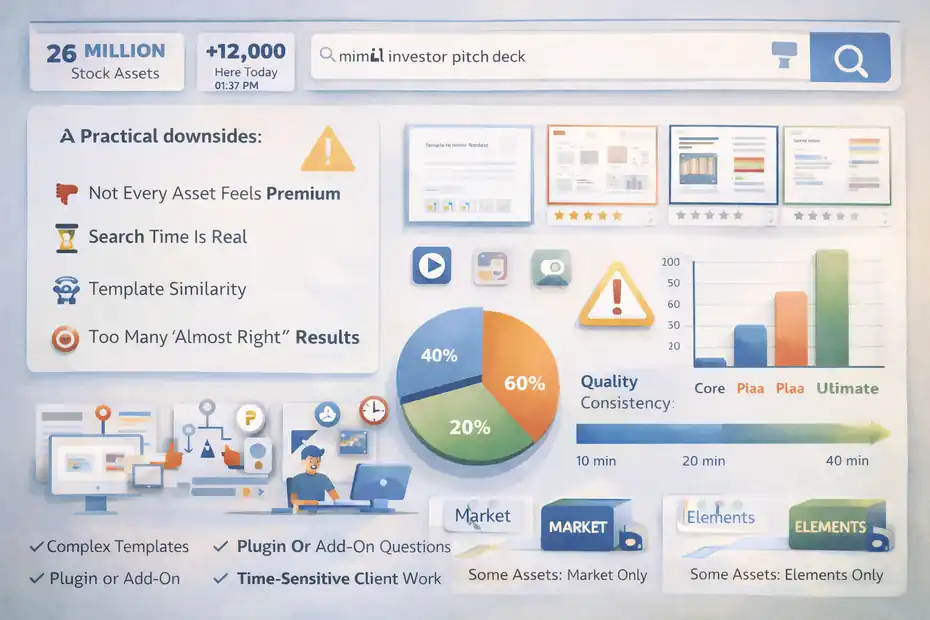
A real envato elements review for creators should not pretend the platform is flawless. It has obvious strengths, but there are also tradeoffs that matter once you actually use it for client work or serious publishing.
Quality Can Be Uneven, And Search Still Requires Judgment
This is the most common real-world frustration: the library is massive, but massive catalogs create noise.
Envato officially highlights the scale of its catalog, with more than 26–27 million assets and new items added daily. That scale is impressive, but it also means search results can feel broad, repetitive, or overly template-heavy depending on what you need.
A few practical downsides:
- Not Every Asset Feels Premium: Some files look current and polished. Others feel dated.
- Search Time Is Real: Unlimited access does not help if you spend 40 minutes scrolling.
- Template Similarity: In crowded categories, many assets can start to look interchangeable.
- Too Many “Almost Right” Results: This is helpful for ideation but annoying when you need one exact thing.
I suggest using the platform with a curator mindset, not a collector mindset. Build your own shortlist habits. Save creators or styles you trust. Search by use case, not vague adjectives. “Minimal investor pitch deck” usually works better than “clean business slides.”
So yes, the catalog size is a strength, but it also creates sorting fatigue. That is one of the platform’s quiet costs, even though it does not show up on the invoice.
Item Support Is Limited, And That Matters More Than People Admit
Envato states that the subscription does not provide direct item support for assets in the library, though downloaded files may include documentation or author-provided resources.
That matters in a few situations:
- Complex Templates: A presentation, motion graphic, or website template might look great in preview but require some technical comfort.
- Plugin Or Add-On Questions: You may not get the hand-holding some premium standalone products offer.
- Time-Sensitive Client Work: If something breaks right before delivery, limited support can feel painful.
This is why I recommend Envato most for creators who are comfortable adapting files independently. If you need premium-level support on every purchase, a one-off marketplace purchase from a seller with active support can be a better fit.
Another tradeoff is that Envato Elements is separate from Envato Market. An Elements subscription does not let you download or buy Market items, and some assets are exclusive to one platform or the other.
That can frustrate people who assume the whole Envato universe is included. It is not. So before subscribing for one specific item, check that the item actually exists inside the subscription catalog.
How To Use Envato Elements Well As A Creator
A good subscription can still be a bad investment if you use it badly. The creators who get the most from Envato usually have a system for it.
They do not just download random assets. They build repeatable workflows around it.
Build A Reusable Asset Workflow Instead Of Browsing From Scratch
Here is the smartest way I know to use Envato: stop treating it like a giant shop and start treating it like your internal creative supply cabinet.
- Step 1: Define Your Core Output Types. Think in formats: YouTube videos, sales decks, social ads, client proposals, course materials, product pages.
- Step 2: Build Category Packs. Save favorite fonts, mockups, transitions, icon styles, and soundtrack types for each format.
- Step 3: Standardize Visual Direction. Reuse a small set of asset styles so your work stays consistent.
- Step 4: License Cleanly Per Project. Since licenses are project-specific, make that part of your workflow instead of an afterthought.
I suggest creating a simple spreadsheet or notion board with columns like asset type, brand fit, project use, and replacement options. It sounds boring, but it saves a surprising amount of time.
For example, if you create client decks regularly, you do not want to search “presentation template” every Monday morning. You want three dependable styles already chosen: corporate, startup, and minimalist editorial. Same idea for thumbnail fonts, ad mockups, and intro music beds.
The hidden win here is compounding. Once you know the library and your preferred asset styles, the subscription becomes more valuable every month because your sourcing time drops.
Use AI As A Drafting Tool, Not A Creativity Replacement
Envato’s AI suite can now generate or edit images, video, voice, music, graphics, mockups, and sound effects, but the smart move is to use these tools for acceleration rather than full creative replacement.
Here is where AI inside Envato can be genuinely useful:
- Quick concept directions
- Mockup variations
- Fast social visual drafts
- Voiceover prototypes
- Rough motion or image ideation
- Sound effect generation for lightweight content
What I would not do is rely on it blindly for brand-defining final outputs. That is where human editing, judgment, and taste still matter most.
A realistic workflow looks like this: generate a rough promotional image concept, refine it with ImageEdit, pair it with stock textures or templates from the library, then finish the final piece manually. That is a strong use of AI. It saves setup time without flattening originality.
Also, keep the plan limits in mind. Core only gives 10 AI generations per month, Plus gives 100, and Ultimate removes the hard cap under fair use rules. So if AI experimentation is central to how you work, choosing the wrong tier will make the experience feel artificially cramped.
Common Mistakes Creators Make With Envato
Most disappointment with Envato does not come from the product being bad. It comes from mismatched expectations. People subscribe for the wrong reason, use it without a process, or misunderstand the license.
Mistake 1: Joining For One Specific Asset Instead Of A Workflow
This is the easiest mistake to make.
A creator sees a great mockup or video template, subscribes, downloads it, and then realizes they do not actually need a broad creative subscription. At that point, even a fairly affordable plan feels wasteful.
I recommend asking yourself one question before subscribing: “Will I use at least three asset categories every month?” If the answer is yes, Envato is much easier to justify. If the answer is no, you may be better off buying one-off assets elsewhere.
Some categories where Envato tends to stack value well are:
- Fonts + Mockups + Presentation Templates
- Music + Sound Effects + Video Templates
- Icons + Graphics + Social Media Kits
- Photos + Background Video + Ad Design Elements
The creators who win with Envato usually build bundles of usage. The creators who regret it often came in hunting one file.
That is why I believe the subscription works best when you see it as a toolkit, not a treasure hunt.
Mistake 2: Misunderstanding Licensing Reuse
Envato’s license is simple compared with many competitors, but simple does not mean “ignore it.” The crucial point is that each item download is licensed for one specified use, and you need a new license if you use that same asset in a different project. Registered uses stay covered after cancellation, but new uses require an active subscription.
Common issues happen when people do this:
- Reuse the same asset across several client projects without relicensing
- Assume canceled subscriptions cover future new work
- Forget restrictions around resale, redistribution, merchandising, or on-demand services
A simple example: if you use one stock photo in Client A’s ad campaign and later want the same image in Client B’s brochure, that is a separate use. You should create a new license for the second project.
This is not unusually restrictive. It is actually pretty standard. But it is easy to get sloppy when downloads feel unlimited.
My advice is simple: make licensing part of project setup. Do not leave it to memory. That one habit removes most risk.
Final Verdict: Is Envato Elements Worth It For Creators?
Envato Elements is worth it for creators who publish often, work across multiple content formats, and care more about production speed than owning one perfect premium asset at a time. Its strongest advantages are its broad stock catalog, comparatively straightforward commercial licensing, and the convenience of keeping templates, media, graphics, and AI tools inside one subscription.
Who Should Buy It, And Who Should Skip It
Here is my honest breakdown.
- Buy It If: You create client work, videos, decks, social content, digital products, or branded assets every month and want one place to source supporting creative materials.
- Buy It If: You value workflow speed, experimentation, and having multiple asset categories available at once.
- Skip It If: You only need one occasional premium file.
- Skip It If: You expect every asset to feel elite or fully custom.
- Skip It If: You need intensive hands-on support for every template you use.
For most creators, I think the biggest hidden win is not the download count. It is momentum. Envato helps you keep projects moving. That matters a lot when deadlines are tight and your bottleneck is not talent, but time.
The biggest hidden downside is that the sheer size of the library can create search fatigue, and the AI value now depends much more on which plan you choose. So you need to subscribe with intention.
My Bottom-Line Opinion On Envato Elements In 2026
If you want my plain answer, here it is: Envato Elements is not magic, but it is genuinely useful.
I would recommend it to freelancers, content marketers, solo brand builders, YouTube creators, and lean teams who need fast access to templates, graphics, media, and design support assets. I would be more cautious recommending it to creators whose work depends on highly original flagship visuals every single time.
In 2026, the platform feels strongest as an all-in-one creative production layer. The new pricing structure makes that clearer: unlimited stock for everyone, AI scaled by usage. That is actually a sensible direction, even if it means some people will need to think harder about tier choice than before.
So my final take is this: If your creative business runs on output, variety, and speed, Envato Elements can be one of those subscriptions that quietly pays for itself. If your work is highly bespoke and low-volume, the hidden wins may stay hidden because you will never use enough of the platform to feel them.
FAQ
Is Envato Elements worth it for creators in 2026?
Envato Elements is worth it for creators who produce content regularly across multiple formats. It offers unlimited stock assets and scalable AI tools, which can significantly reduce production time. If you rely on templates, media, and design support assets, the value compounds quickly over time.
What does Envato Elements include in its subscription?
Envato Elements includes access to millions of assets like videos, music, templates, fonts, graphics, and photos. It also offers AI tools depending on your plan. All assets come with a commercial license, making it suitable for client work, marketing materials, and monetized content.
Can you use Envato Elements assets for client projects?
Yes, Envato Elements allows you to use assets for client projects under its commercial license. Each use must be registered to a specific project, but once registered, the usage remains valid even if you cancel your subscription later.
What are the downsides of Envato Elements?
The main downsides include inconsistent asset quality and limited support for individual items. The large library can also make searching time-consuming. Additionally, AI usage is now limited by plan tiers, which may restrict heavy users on lower plans.
Which Envato Elements plan is best for creators?
The best plan depends on your workflow. Core works well for creators focused on stock assets, while Plus is better for those using AI tools regularly. Ultimate is suited for high-volume creators who rely heavily on AI for content production.

I’m Juxhin, the voice behind The Justifiable.
I’ve spent 6+ years building blogs, managing affiliate campaigns, and testing the messy world of online business. Here, I cut the fluff and share the strategies that actually move the needle — so you can build income that’s sustainable, not speculative.
Related posts:
 Envato Elements Pros And Cons For Designers: Truth
 Envato Elements Pricing Explained: Plans Decoded
 Envato Elements Vs Creative Market Comparison: Which Wins?
 10 Similar Sites To Apollo IO Every Marketer Should Try
 LearnWorlds Shopify Setup: What Works, What Fails
 Why CallRail Cost Might Be Worth the Investment