
Table of Contents
Some links on The Justifiable are affiliate links, meaning we may earn a small commission at no extra cost to you. Read full disclaimer.
Elementor honest review for ecommerce beginners is really a question about fit: not whether Elementor is “good,” but whether it is the right kind of good for the way you want to build your first online store.
If you want strong visual control inside WordPress and WooCommerce, Elementor can feel empowering fast. If you mainly want the simplest route to launching products and taking payments, it can also feel like a lot.
In this review, I’ll walk you through what Elementor does well, where beginners get stuck, what it really costs, and whether it is smart for your first ecommerce site.
What Elementor Actually Is For Ecommerce Beginners
If you are brand new, this is the first thing to get straight: Elementor is not your store platform by itself.
It is the visual builder layer you use on top of WordPress, and ecommerce usually comes from WooCommerce.
Elementor Is A Visual Builder, Not A Complete Store Engine
Elementor is a drag-and-drop website builder for WordPress. In plain English, that means you design pages visually instead of editing templates or writing code
WooCommerce is the ecommerce engine that handles products, carts, checkout logic, and store data inside WordPress. Elementor then helps you control how much of that store looks and feels.
This distinction matters because many beginners buy a page builder thinking they bought “an online store solution.” You did not. You bought design flexibility. I believe that is both Elementor’s biggest strength and the reason some beginners feel disappointed later.
If you expect Shopify-style all-in-one simplicity, Elementor will feel heavier. If you expect WordPress-level freedom, it starts to make a lot more sense.
In practical terms, Elementor can help you design product pages, shop archives, promotional sections, landing pages, popups, lead forms, and broader site templates. That is powerful because ecommerce is not only about listing products. It is also about trust, navigation, upsells, email capture, and the overall buying experience.
For many first-time store owners, the real value is not “can it build a store?” It is “can it help me create a store that does not look like every other template site?” On that front, Elementor absolutely can.
Why Beginners Get Interested In Elementor So Quickly
Most beginners land on Elementor for one of three reasons. First, they are already using WordPress and want visual control. Second, they want WooCommerce without touching code. Third, they hate the default look of many WordPress themes and want something more custom.
Elementor’s appeal is easy to understand. The company says its builder is designed for no-code use, includes a visual editor, and supports building online stores with WooCommerce.
It also positions its platform around drag-and-drop editing, templates, AI-assisted planning and content tools, forms, popups, and WooCommerce Builder features in higher tiers.
That sounds great on paper, and honestly, for the right person it is. When you are starting ecommerce, confidence matters. Being able to see your homepage, product grid, hero section, FAQ blocks, and trust badges live on screen is less intimidating than managing template files and hooks.
The trap is that visual ease can hide strategic complexity. A beginner can build a beautiful store that still converts badly, loads slowly, or feels confusing on mobile.
Elementor helps you build faster, but it does not automatically make smart ecommerce decisions for you. That is why an honest review has to separate “easy to use” from “easy to use well.”
How Elementor Works With WooCommerce
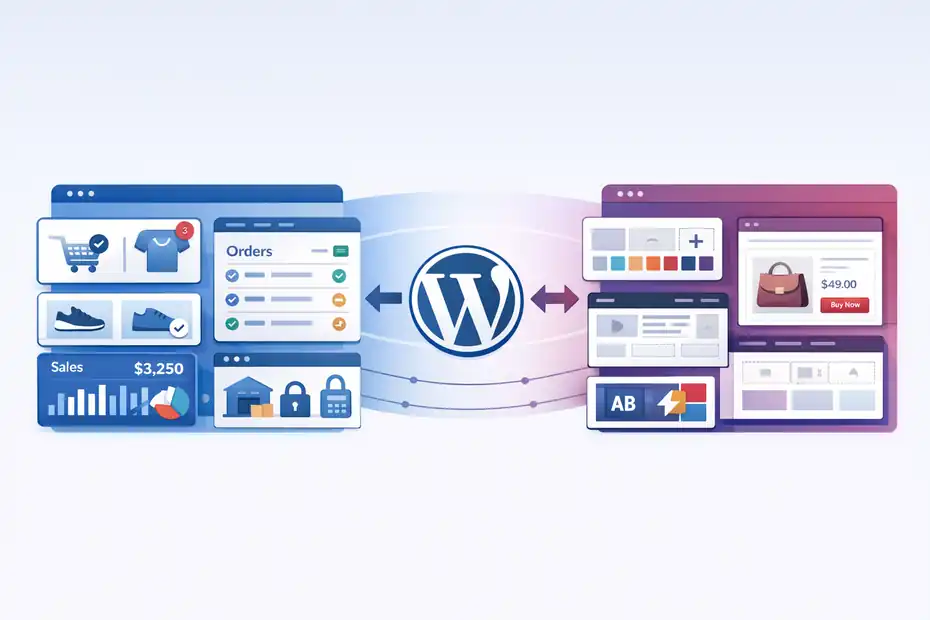
This is where the decision becomes more practical. If you plan to sell with WordPress, WooCommerce is the natural pairing, and Elementor is one of the main tools people consider for custom design.
WooCommerce Does The Selling, Elementor Shapes The Experience
WooCommerce is the open-source ecommerce platform for WordPress, and its core plugin is free. It gives you product management, store data ownership, order handling, and the flexibility that comes with the wider WordPress ecosystem.
WordPress itself still dominates CMS usage on the web, with W3Techs reporting it powers 42.5% of all websites and 59.8% of websites whose CMS is known as of March 31, 2026.
What Elementor adds is layout control. With the right plan, Elementor includes WooCommerce Builder, Theme Builder, dynamic content support, and related design features that let you customize more than simple pages.
According to Elementor’s pricing materials, WooCommerce Builder is included in advanced plans, while the more basic Essential tier does not include ecommerce features.
That is important for beginners because the free version of Elementor is often enough to design a homepage or about page, but not enough to fully customize ecommerce templates.
If your goal is “I want a nice store homepage,” free Elementor may be enough for a while. If your goal is “I want custom product templates and a more branded shopping flow,” you will almost certainly end up in paid territory.
I usually frame it like this: WooCommerce gives you the store engine; Elementor gives you more control over the storefront.
The Real Beginner Workflow Feels More Layered Than Advertisements Suggest
In theory, the setup looks simple: install WordPress, add WooCommerce, add Elementor, pick a theme, then start customizing. In reality, beginners also need to think about hosting, payments, shipping, tax settings, product photography, page speed, mobile layouts, plugins, and legal pages.
Elementor does not create that complexity, but it does sit inside it. That means the beginner experience depends on how well you understand the stack around it.
The smoother your hosting, theme, and plugin choices are, the more Elementor feels empowering. The messier your setup is, the more Elementor can feel like one more moving part.
This is why some reviews call Elementor “easy” and others call it “bloated” or “overkill.” Both can be true depending on the store owner. Imagine you are launching a five-product handmade candle store. You might only need a clean theme, a solid product page, and basic email capture.
Elementor may still help, but you could also get away without a heavy custom build. Now imagine you are selling skincare with bundles, education content, landing pages, upsells, and seasonal campaigns. Elementor starts looking much more useful.
That is the core pattern throughout this review: Elementor becomes more valuable as design complexity and marketing complexity rise.
The Biggest Advantages Elementor Gives Beginners
There is a reason Elementor keeps showing up in WordPress ecommerce conversations. It solves some very real frustrations for non-technical store owners.
You Get Strong Design Control Without Learning Code First
The best thing about Elementor for ecommerce beginners is that it lowers the barrier to making your store feel like your brand. You can move sections visually, test layouts, add trust-building blocks, and build landing pages without opening template files.
Elementor also highlights broad support for templates, responsive editing, mobile customization, forms, and theme-building tools in Pro tiers.
I recommend not underestimating this advantage. Design confidence affects momentum. When beginners can actually build pages they are proud of, they are more likely to publish, test, and improve instead of stalling for weeks.
This matters even more in ecommerce because small layout decisions can influence trust. Moving reviews higher on the page, clarifying shipping info, improving product imagery spacing, or simplifying a bundle section can all make a store feel more credible. Elementor gives you direct control over these presentation details.
In my experience, that is where Elementor earns its keep. It shortens the gap between “I have a store idea” and “I have something real I can show people.”
It Helps You Build More Than Just Product Pages
A beginner store usually needs more than a catalog. You may need a homepage, category pages, seasonal promo pages, FAQs, lead magnets, about pages, announcement bars, and email signup popups.
Elementor’s higher plans include Form Builder, Popup Builder, and various marketing-oriented widgets, which can reduce the need for extra design plugins in some setups.
That broader toolkit is one reason Elementor can make sense for ecommerce. A store that only focuses on products often feels thin. A store that explains why the product matters, who it helps, and what reduces purchase anxiety tends to feel more complete.
For example, imagine a beginner selling printable planners. The default WooCommerce setup can list products just fine. But Elementor can help create a cleaner lead magnet page, a better “start here” section, comparison blocks between planner bundles, and a promotional popup for first-time buyers. That is not just cosmetic. It supports conversion.
The key is to use that flexibility strategically. More widgets do not automatically mean a better site. But more control, used carefully, can absolutely improve the shopping experience.
Where Elementor Feels Heavy Or Frustrating For Beginners
This is the part many glowing reviews avoid. Elementor can be very good and still be the wrong choice for some beginners.
The Learning Curve Is Friendly At First, Then Suddenly Gets Real
The first hour in Elementor often feels smooth. Drag a section here, change a font there, drop in a button, and you feel productive. The harder part comes later, when you need consistency across templates, mobile adjustments, spacing systems, product archives, dynamic fields, and clean design logic.
That is the honest beginner experience: the editor itself is approachable, but building a polished ecommerce site still requires judgment. You need to understand hierarchy, user flow, whitespace, typography, image ratios, and what shoppers actually need to see before they buy.
I think that surprises a lot of people. They assume page builders remove complexity. What they really do is move complexity from code into choices. You are no longer stuck writing PHP or CSS, but now you are responsible for making hundreds of design and UX decisions.
That can be freeing. It can also be exhausting if you mainly wanted a simple store.
Too Much Freedom Can Lead To Messy Stores Fast
Elementor gives beginners enough flexibility to make mistakes quickly. I do not say that as an insult. It is just true. When every section is customizable, it becomes easy to create inconsistent padding, oversized headings, duplicate calls-to-action, weak mobile layouts, and slow pages loaded with decorative extras.
A common beginner pattern looks like this: homepage hero, three announcement bars, animated counters, testimonial sliders, giant icons, a popup on entry, another popup on exit, and a product page that still does not answer the basic shipping question. The site feels “built,” but not actually shopper-friendly.
This is where Elementor can feel like overkill. Not because the tool is bad, but because it offers more surface area than many new sellers can use effectively on day one.
My opinion is simple: If you choose Elementor, treat restraint as a feature. The best Elementor stores usually do less, not more.
Pricing, Hidden Costs, And Budget Reality
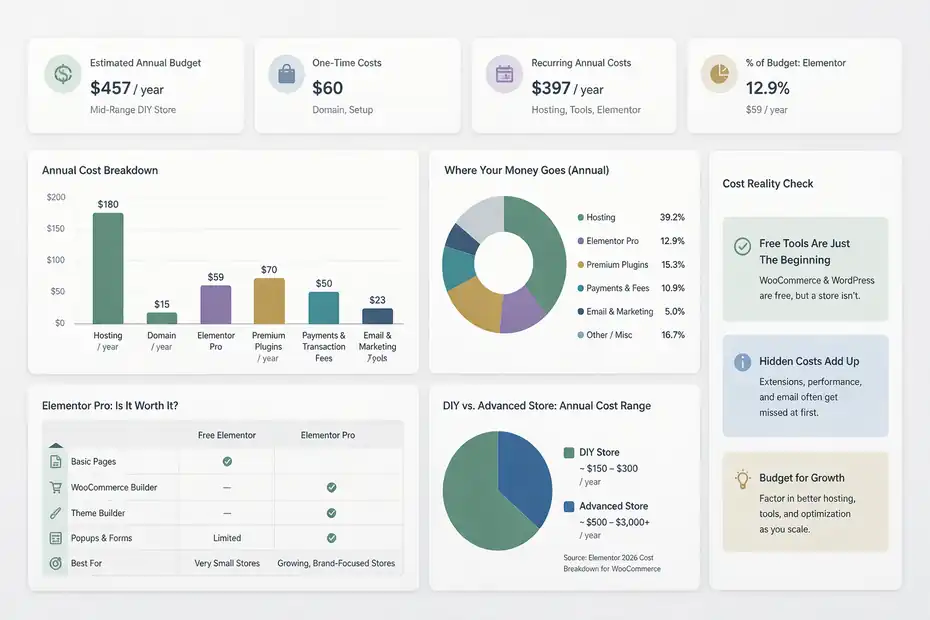
This is where “honest review” matters most, because beginners often compare free WooCommerce and free Elementor to all-in-one platforms and miss the full cost picture.
Elementor Is Not The Only Cost In Your Store Stack
WooCommerce core is free, and WordPress software itself is free, but a real store is not free. You still need hosting, a domain, and often premium tools or services around design, payments, security, and performance.
Elementor’s own 2026 cost breakdown for WooCommerce says a DIY store can start around $150 per year, while more advanced or professionally developed builds can go far beyond that. Elementor also notes that hosting can range from low-cost shared plans to higher-end managed ecommerce hosting.
That does not mean Elementor is overpriced. It means the builder is only one line item in a bigger budget.
For beginners, the bigger financial risk is not buying Elementor. It is underestimating everything else: better hosting once traffic rises, paid extensions, image optimization, premium checkout features, transactional email, and the time cost of assembling everything.
So when you ask “Is Elementor worth it?” the better question is “Is design flexibility worth paying for in my first store budget?”
Paid Elementor Starts Making Sense Only When You Use The Right Features
Elementor’s public pricing materials show multiple plan tiers. Their blog states Elementor Pro starts at $59 per year for one site in current pricing materials, while the pricing page shows that advanced plans include WooCommerce Builder and other stronger marketing and theme-building features.
For a beginner, the trap is paying for Pro and then using it like a prettier free builder. If you only build a homepage and a contact page, you may not be getting enough value from it.
Paid Elementor makes much more sense when you actually use the features that reduce friction elsewhere, such as custom templates, popups, forms, stronger WooCommerce design controls, and a more unified visual workflow.
I suggest thinking in scenarios:
- Lean starter store: Free Elementor or even no builder may be enough.
- Brand-focused starter store: Paid Elementor can justify itself quickly.
- Content-heavy ecommerce store: Elementor becomes more attractive because landing pages, blog content, lead capture, and product storytelling matter more.
That is why pricing is never just pricing. It is about whether the tool replaces effort, plugin sprawl, or design compromises you would otherwise accept.
Setup Experience For A True Beginner
A lot of reviews skip this and jump into features. But beginner experience is really about setup friction.
The Basic Launch Process Is Manageable, But Not Fully Beginner-Proof
A realistic Elementor ecommerce setup usually means choosing hosting, installing WordPress, adding WooCommerce, installing Elementor, selecting a compatible theme, configuring products, and then customizing store pages.
Elementor emphasizes compatibility with WordPress and the wider plugin ecosystem, including support for integrations across a very large WordPress plugin landscape.
That flexibility is great, but it also means there is no single “default best setup” for everyone. Beginners often expect a guided one-path experience. WordPress rarely works that way. You need to make a series of okay-to-good decisions rather than follow one locked-in system.
Here is the honest version: If you are comfortable learning as you go, the setup is manageable. If you want everything tightly packaged and almost impossible to misconfigure, WordPress plus WooCommerce plus Elementor may feel more technical than you hoped.
That does not make it bad. It just means it rewards a different personality type: someone who wants control and can tolerate a little assembly.
Theme Choice And Plugin Discipline Matter More Than Most Beginners Realize
One of the fastest ways to ruin the Elementor experience is stacking too many overlapping tools. A heavy theme, multiple design plugins, too many marketing add-ons, and poorly optimized images can make your store feel clunky before you even start selling.
Elementor itself promotes a builder-plus-theme workflow and offers its own Hello theme and broader theme-builder capabilities. The practical takeaway is that you want a clean base, not a crowded one.
I recommend beginners keep the stack boring at first. Use a lightweight theme. Add only necessary plugins. Get the homepage, shop page, product page, cart, checkout, and key trust pages working. Then improve conversion paths gradually.
The reason is simple: Every extra plugin creates more settings, more compatibility risk, and more performance overhead. Elementor works best when it is part of a deliberate system, not a plugin junk drawer.
Performance, Mobile UX, And Conversion Reality
This is the section that separates pretty stores from profitable ones.
Elementor Can Look Great, But Performance Still Depends On How You Build
Elementor talks heavily about performance features, including image optimization, lazy loading, optimized widgets, and broader performance tools in its ecosystem. It also references WebP and AVIF image support in its optimization stack.
That is helpful, but no builder magically saves a store with oversized images, too many scripts, flashy animations, and bloated add-ons. Performance in WordPress is shared responsibility. Your host, theme, plugins, media habits, and page design all matter.
For beginners, I suggest a simple rule: Every section on a page should earn its place. A cleaner product page with clear value props, fast images, and a calm layout usually beats a “designed” page filled with effects.
This is especially true on mobile, where most beginners underestimate how cramped or distracting their layouts become. Elementor gives responsive controls, but you still need to use them. That means checking spacing, button size, text length, image cropping, and sticky elements on actual phone screens.
A store that feels premium on desktop but frustrating on mobile will leak sales quietly.
Good Design Is Not The Same As Good Ecommerce UX
One of Elementor’s risks is that it can pull beginners toward visual polish over buying clarity. A beautiful homepage does not fix weak product messaging. Fancy sections do not replace trust. And no amount of movement compensates for confusing shipping, returns, sizing, or product differentiation.
I have seen beginner stores spend days tweaking headline spacing while ignoring the questions that actually stop purchases: What does this product solve? Why this version? When will it arrive? Can I trust the quality? What if it does not work for me?
Elementor can absolutely help surface those answers more effectively. But it will not force you to prioritize them.
That is why I would judge your Elementor store less by how impressive it looks and more by whether a new visitor can understand, trust, and buy within a few minutes.
When Elementor Is Worth It And When It Is Overkill
At this point, the answer is not universal. It depends on your store model, your patience, and your growth goals.
Elementor Is Worth It For Brand-Led Stores And Content-Led Stores
If your products need explanation, storytelling, education, upsells, or stronger branding, Elementor becomes much easier to justify.
This includes niches like skincare, supplements with careful compliance, digital products, specialty fashion, handmade goods, or home products that sell better with styled merchandising and content.
It is also a strong fit when content matters. If your ecommerce strategy includes SEO pages, buying guides, comparison pages, seasonal landing pages, or email capture funnels, Elementor can help connect those assets into one visual system.
WordPress remains dominant as a CMS, which is part of why this stack stays attractive for content-heavy ecommerce operations.
In those cases, Elementor is not just a page builder. It becomes part of how you tell the story that gets the sale.
I would also say it is worth it if you care a lot about having a store that does not feel template-generic. That emotional factor matters more than some people admit. When you are proud of your store, you market it harder.
Elementor Is Overkill For Very Simple Stores That Just Need To Launch
If you are selling a handful of products, do not care much about custom layout control yet, and mainly want to validate demand, Elementor can be more than you need.
A beginner testing one product category with simple pages may be better served by a cleaner, lower-decision setup. The danger is spending weeks customizing before you have learned whether the offer, pricing, and messaging even work.
I suggest being brutally honest here. Are you building a store, or are you decorating a store? Those are not the same activity.
If speed to launch matters more than deep customization, Elementor may feel like too much tool too early. In that case, using a simple theme and adding Elementor later can be the smarter move.
Honest Verdict For Ecommerce Beginners
Let me put it plainly: Elementor is good for ecommerce beginners, but it is not automatically beginner-simple.
My Real Recommendation In One Sentence
I recommend Elementor for ecommerce beginners who want control, branding flexibility, and room to grow inside WordPress, but I would not recommend it to someone who wants the fastest, lowest-decision route to launching a first store.
That is the honest middle ground. It is neither hype nor hate.
Elementor’s ecosystem clearly supports visual building, WooCommerce integration in advanced tiers, forms, popups, dynamic design, and broader site-building flexibility.
WooCommerce remains a strong open-source ecommerce base, and WordPress continues to have unmatched CMS reach. Those are real strengths.
But beginners still need to respect the tradeoff. More freedom means more decisions. More customization means more responsibility. More tools means more chances to overbuild.
The Final “Good Or Overkill?” Answer
For the right beginner, Elementor is good. For the wrong beginner, it is overkill.
It is good when:
- You want your store to look distinct.
- You are comfortable learning WordPress.
- You expect to build landing pages, blog content, and branded campaigns.
- You want WooCommerce with stronger visual control.
It is overkill when:
- You mostly need a basic catalog and checkout.
- You get overwhelmed by too many settings and design choices.
- You are still validating whether the product idea works.
- You care more about fast launch than custom presentation.
My honest opinion is that Elementor shines most once a beginner becomes a little less of a beginner. It can absolutely help you start, but its real advantage appears when you begin optimizing, testing, and expanding rather than just installing your first store pages.
So if you are asking whether Elementor is “too much,” the answer is: only if your business still needs simplicity more than flexibility. If your next year likely includes better branding, SEO content, promotional pages, upsells, and conversion testing, Elementor starts looking much less like overkill and much more like a smart long-term choice.
FAQ
What is Elementor and how does it work for ecommerce beginners?
Elementor is a visual page builder for WordPress that lets beginners design ecommerce pages without coding. When combined with WooCommerce, it helps you customize product pages, layouts, and store design while WooCommerce handles payments, products, and checkout functionality behind the scenes.
Is Elementor good for ecommerce beginners?
Elementor is good for ecommerce beginners who want design flexibility and control over their store layout. It allows you to create custom pages visually, but it may feel overwhelming if you prefer a simple, ready-to-launch solution with minimal setup and fewer design decisions.
Do I need Elementor Pro for ecommerce?
Yes, most ecommerce features like custom product templates and WooCommerce builder tools require Elementor Pro. The free version is useful for basic pages, but beginners who want a fully customized store experience will typically need the paid version for better control.
Is Elementor better than Shopify for beginners?
Elementor offers more design flexibility within WordPress, while Shopify is easier for beginners who want an all-in-one ecommerce solution. Elementor requires more setup but gives you greater customization, whereas Shopify focuses on simplicity and faster store launches.
Can Elementor slow down my ecommerce website?
Elementor can affect performance if your site uses too many widgets, animations, or heavy images. However, with proper optimization like clean design, optimized media, and good hosting, beginners can still build fast and responsive ecommerce stores using Elementor.

I’m Juxhin, the voice behind The Justifiable.
I’ve spent 6+ years building blogs, managing affiliate campaigns, and testing the messy world of online business. Here, I cut the fluff and share the strategies that actually move the needle — so you can build income that’s sustainable, not speculative.
Related posts:
 Inside Freshworks Inc: Products, Vision, and Growth Story
 Omnisend for WooCommerce: Boost Store Sales Instantly
 Why Businesses Love Freshworks Freshdesk for Service
 How Automated Marketing Solutions Save Time and Increase Revenue
 10 Website Marketing Solutions To Boost Traffic Instantly
 How To Choose the Right Account Based Marketing Solutions for You