
Table of Contents
Some links on The Justifiable are affiliate links, meaning we may earn a small commission at no extra cost to you. Read full disclaimer.
If you’ve been searching for a free QuillBot alternative that actually helps you write faster and sound sharper, you’re not alone.
QuillBot’s rewriting tool is great, but what if you could get the same level of quality—or even better—without paying for premium features? Which tools give you that kind of power for free?
That’s exactly what we’ll uncover here, exploring the most reliable and effective AI writing tools that rival QuillBot in performance, accuracy, and creative assistance.
Best Free QuillBot Alternative For Paraphrasing
Finding the best free QuillBot alternative for paraphrasing really depends on what kind of writer you are. Some tools focus on creative rewriting, others on clarity, and some on SEO optimization.
Below are a few options that consistently deliver quality, accuracy, and usability without requiring a paid upgrade.
Grammarly’s AI Rewriter And Sentence Enhancer
Grammarly’s AI rewriting tool, built into its free plan, goes far beyond grammar correction. It helps you restructure sentences for better flow and readability.
When you hover over a suggestion, Grammarly often shows a Rewrite Sentence option that rephrases your sentence in a smoother, more natural way.
Here’s how I typically use it: I paste a rough paragraph into Grammarly’s web editor, click the underlined suggestions, and test the alternative phrasing.
For example, if I write “The product performs exceptionally well when used correctly,” Grammarly might suggest “The product works best when used properly.” The tone feels more natural and concise.
While the free version doesn’t give you full AI-powered rewrite customization, it’s reliable for improving clarity and style without distorting meaning.
Pro tip: Grammarly’s Chrome extension lets you rewrite sentences directly inside Google Docs or email drafts—making it a powerful, real-time paraphrasing companion.
Paraphraser.io For Quick Content Rewording
Paraphraser.io is a lightweight, no-login-needed tool perfect for quick rewrites. It’s particularly useful for freelancers and students who want to refresh text without creating new accounts or paying for subscriptions.
What makes it stand out is its multi-mode paraphrasing system—Fluency, Standard, and Creative modes. The free plan limits word count, but you can easily paraphrase sections in batches.
For instance, when I input a blog paragraph, Paraphraser.io tends to simplify overly complex sentences, making them more digestible. It’s not perfect for nuanced or technical writing, but for basic blog posts or descriptions, it gets the job done fast.
The interface is simple: Paste your text → choose a mode → hit Paraphrase Now. The results appear side by side with your original text, so you can easily compare changes.
Wordtune’s Free Plan For Contextual Rewriting
Wordtune focuses on tone and context—a major edge over traditional rewording tools. It doesn’t just replace words; it adjusts phrasing based on the intent of your sentence.
When using the free Chrome extension, simply highlight a sentence on any website or document, and Wordtune pops up suggestions like “Make it formal,” “Make it shorter,” or “Rewrite for clarity.”
For example, if you write “I’ll get back to you soon,” it might suggest “I’ll follow up with you shortly.” It sounds slightly more professional yet natural.
While the free plan limits the number of rewrites per day, it’s great for writers who care about voice and tone consistency. I often use it for refining email sequences or improving headlines that need a specific emotional punch.
Rephrase.info For SEO-Friendly Paraphrasing
Rephrase.info is one of the most reliable free QuillBot alternatives if you’re writing SEO content. It offers a SEO mode that subtly integrates keywords into the rewritten text without sounding robotic.
When I tested it for blog rewrites, it maintained keyword placement while rephrasing around it—something most free tools struggle with. It supports multiple languages, which is handy for multilingual sites.
You can choose from several rewriting options like Standard, Fluency, and Creative. Its SEO mode is particularly useful for content marketers trying to avoid keyword stuffing penalties while keeping readability high.
Tip: Combine Rephrase.info with Grammarly to polish grammar after rewriting. This two-step process gives you content that’s both optimized and human-sounding.
Free QuillBot Alternatives For Grammar And Style Fixes
If your main goal isn’t paraphrasing but improving writing accuracy and readability, there are a few free tools that can rival QuillBot’s grammar and tone capabilities.
These AI-powered editors analyze your style, rhythm, and structure—helping you polish drafts without losing your personal voice.
Ginger Software’s AI Writing Assistant
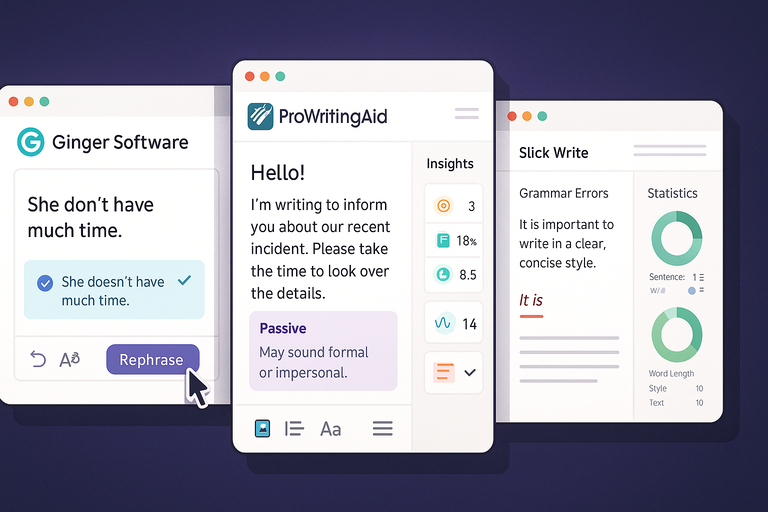
Ginger’s free version shines when you’re editing content in real time. It integrates directly into browsers and text fields (like Gmail or WordPress), catching grammatical mistakes, misused phrases, and awkward structures.
Its rephrasing function is simple but effective: highlight a sentence → click Rephrase → choose a suggested version. Ginger often suggests smoother transitions, which is particularly helpful when editing long-form blog posts.
I recommend it for users who want quick grammar and sentence-level fixes without switching between multiple tools. It’s not as visually sleek as Grammarly, but it’s lightweight and runs smoothly on older devices.
Example: If you write “She don’t have much time,” Ginger immediately flags it and rewrites it to “She doesn’t have much time.” It’s basic, but it keeps your content clean.
ProWritingAid’s Free Grammar And Tone Checker
ProWritingAid combines grammar correction with style improvement—something QuillBot doesn’t focus on deeply. The free plan includes checks for sentence length, readability, passive voice, and repetitive phrasing.
When I use it for editing long-form articles, I appreciate the Insights section, which visualizes how balanced your writing is. It might show, for instance, that 18% of your sentences are passive, helping you see patterns instead of just fixing errors.
Although the free version limits the number of checks per day, it’s perfect for bloggers, authors, or students who want depth of analysis over speed.
Pro tip: Use the Style and Overused Words reports to make your writing more concise—especially if you’re editing content for SEO readability.
Slick Write For Speedy Grammar Corrections
Slick Write is a fast, browser-based grammar checker that doesn’t require an account. It’s ideal for people who prefer minimal, distraction-free editing.
Paste your text into its editor, and within seconds it highlights grammar, structure, and flow issues. What I love is its Statistics panel, which breaks down sentence variety and word usage frequency—excellent for improving rhythm and tone.
It’s not as advanced in AI-driven rewrites as Grammarly or ProWritingAid, but it’s unbeatable in speed. For instance, when I run a 2,000-word blog post through Slick Write, it completes analysis in under five seconds.
Suggested combo: Use Slick Write first for quick cleanup, then Wordtune for fine-tuned contextual improvements. This workflow keeps editing efficient and stylistically balanced.
AI Tools For Expanding And Shortening Content
Sometimes you need more words to fully express an idea; other times, you just need to tighten things up for clarity. The right AI tools can help you do both—expanding content without losing context and summarizing long text while keeping the meaning intact.
Here’s how the top free QuillBot alternatives handle that balance.
ChatGPT Free Plan For Creative Expansion
The free version of ChatGPT is surprisingly powerful for expanding ideas. You can feed it a short paragraph, and it will naturally elaborate, offering examples, transitions, or even persuasive phrasing.
For instance, if I paste: “AI tools help writers save time,” and ask, “Can you expand this for a blog post intro?” ChatGPT might respond with something like: “AI writing tools allow creators to focus on strategy while automating repetitive editing tasks.” It adds depth, emotion, and clarity in seconds.
What makes ChatGPT’s free plan stand out is its conversational nature. You can guide it—ask for a casual tone, an academic rewrite, or a punchier blog-style version. I recommend keeping prompts specific, such as: “Expand this paragraph for an SEO blog using simple, friendly language.”
Practical shortcut: Type your base draft in ChatGPT → ask it to expand key sections → then paste the improved text into Grammarly for quick polish.
WriteSonic’s Free Rephraser For Summarizing Text
WriteSonic offers a built-in Paraphraser and Summarizer in its free tier, which works perfectly for condensing long-form content. It’s particularly handy for marketers or bloggers who want to repurpose existing posts into concise summaries for newsletters or social media.
You can find this feature under AI Article Tools → Paraphraser/Summarizer. Paste your text, choose the tone (Professional, Friendly, or Casual), and click Generate. Within seconds, WriteSonic rewrites the paragraph while retaining the central idea.
In my experience, WriteSonic shines when summarizing marketing-style content—like turning a 300-word product description into a 100-word version without losing sales tone.
Pro tip: Combine WriteSonic’s summarizer with ChatGPT’s expander for a “tighten and expand” workflow—perfect for refreshing older blog posts while maintaining readability.
Rytr’s AI Text Expander For Bloggers And Copywriters
Rytr is one of the most efficient free AI tools for bloggers who need to expand or rephrase content quickly. It provides multiple Use Cases like Blog Section Writing, Content Expansion, and Rewording.
To use it, go to the dashboard → select Use Case: Expand → paste your sentence or paragraph → and click Ryte for me. Rytr generates 2–3 rewritten or expanded versions instantly.
When I tested it for blog outlines, Rytr added supporting examples, synonyms, and logical connectors without overcomplicating the tone. For example, it might turn “Email marketing helps increase conversions” into “Effective email marketing nurtures relationships and drives repeat conversions by keeping your audience engaged.”
Rytr’s free plan allows up to 10,000 characters monthly, which is enough for light rewriting and short blog expansions.
Personal insight: I suggest using Rytr for idea generation when you’re stuck mid-draft—it gives you quick, fresh phrasing that fits your voice.
Best Tools For Non-English Paraphrasing And Translation
Writing or paraphrasing in multiple languages is tricky, especially if you want to preserve nuance and tone.
These free QuillBot alternatives for multilingual editing can help you rewrite naturally across different languages without sounding mechanical.
DeepL Write For Grammar And Multilingual Editing
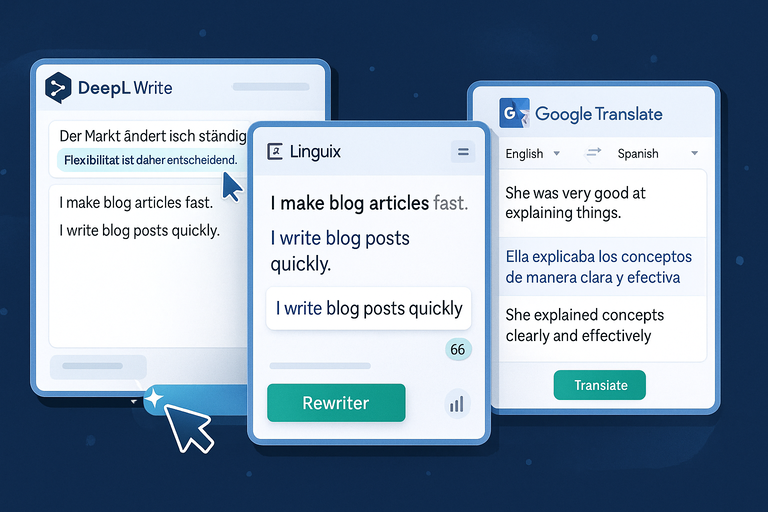
DeepL Write, an extension of DeepL Translator, offers one of the most natural rewriters for non-English languages. It goes beyond translation—it refines sentence structure, grammar, and tone.
When you paste a paragraph into DeepL Write, it automatically detects the language and suggests improvements in real time. I’ve used it for editing German and Spanish blog posts, and the results sound like a native speaker wrote them.
Its rewrite suggestions feature mirrors Grammarly but in multiple languages, making it perfect for international brands.
Example UI path: Visit deepl.com/write → paste your text → choose your target language → review suggested rewrites on the right-hand panel.
Practical insight: DeepL Write is ideal for improving bilingual blog posts or LinkedIn content aimed at multilingual audiences.
Linguix For Language Adaptation And Readability
Linguix focuses on clarity and tone, making it a great free QuillBot alternative for non-native English writers. It doesn’t just correct grammar; it adapts sentences to sound more natural and fluent.
Its Rewriter feature lets you highlight text and instantly generate alternative phrasings. For example, if you write “I make blog articles fast,” Linguix might suggest “I write blog posts quickly,” which reads more naturally to English audiences.
I recommend Linguix’s Chrome extension—it works seamlessly in Google Docs and email drafts. It also provides readability scores and a shortcut library for frequently used phrases, helping streamline editing.
Pro tip: Use Linguix before publishing translated content to ensure tone and idiomatic flow feel authentic in English.
Google Translate’s Contextual Rewrite Trick
While not traditionally a paraphrasing tool, Google Translate can be surprisingly effective for rewriting text across languages. The trick is to use it as a round-trip paraphraser.
Here’s how:
- Paste your original sentence in English.
- Translate it to another language (like Spanish).
- Copy the translated version and translate it back to English.
This process subtly rewrites the text, often improving flow or removing awkward phrasing. For example, “She was very good at explaining things” might return as “She explained concepts clearly and effectively.”
Warning: Always proofread the result or run it through Grammarly, since idiomatic meanings can shift slightly. Still, for a zero-cost rewrite solution, it’s surprisingly efficient.
Free AI Tools For Academic And Research Writing
Academic writing demands precision, clarity, and a professional tone.
The tools below are designed to help students, researchers, and technical writers refine papers, summaries, and drafts while maintaining academic integrity.
Scholarcy For Summarizing Research Papers
Scholarcy is one of my go-to tools for condensing long academic papers into digestible summaries. Upload a PDF or paste a journal link, and it automatically generates a summary that includes key points, references, and methodology highlights.
It’s particularly valuable for literature reviews—you can process multiple studies quickly to identify recurring insights. In one test, a 12-page neuroscience paper was summarized into a concise 300-word version, complete with cited sources.
How to use: Go to scholarcy.com → upload your document → view the summary panel for structured sections like “Key Findings” and “Limitations.”
I advise using it to review papers before writing your own; it saves hours of reading time.
Paperpal For Academic Language Polishing
Paperpal focuses on improving the tone, clarity, and grammar of academic manuscripts. Unlike general AI editors, it’s trained specifically on scholarly writing, which means it recognizes technical phrasing and citation-heavy sentences.
Its Instant Rewrite feature refines academic tone—changing informal phrases like “a lot of research shows” to “numerous studies indicate.” The free version works directly within your browser, and you can upload text snippets up to a few hundred words.
For research professionals or students writing dissertations, Paperpal’s suggestions strike the right balance between academic rigor and readability.
Quick example: When editing a biology abstract, Paperpal adjusted passive voice frequency and improved word precision without losing the author’s intended meaning.
Jenni AI’s Limited Free Plan For Research Drafts
Jenni AI combines citation-aware rewriting with AI text generation. The free plan offers limited daily credits but includes research-focused tools like Auto-Cite, which pulls references from Google Scholar.
You can start by pasting your draft into Jenni’s editor → click Rewrite Sentence → or use Summarize Paragraph to make dense academic writing more digestible.
What I like most is its integration with inline citations. For instance, when expanding a section about climate change, Jenni can automatically insert supporting sources like (Smith et al., 2023) while maintaining a formal tone.
It’s perfect for students, researchers, or content creators handling data-driven articles who want both speed and reliability.
Pro tip: Pair Jenni AI with Paperpal—use Jenni for structure and references, and Paperpal for tone refinement. This workflow delivers near-publication-level polish even in free mode.
Browser-Based Free QuillBot Alternatives
If you spend most of your time writing in a browser—whether it’s Google Docs, WordPress, or Gmail—you’ll want tools that integrate directly into your workspace.
These browser-based free QuillBot alternatives save you from constant tab switching and editing delays while improving grammar, tone, and readability right where you write.
LanguageTool Chrome Extension For Instant Fixes
LanguageTool is a clean, multilingual writing assistant that catches grammar, punctuation, and style issues as you type. It’s a great free QuillBot alternative for those who prefer subtle yet accurate corrections.
Once installed via the Chrome Web Store, it works across apps like Google Docs, Gmail, and even Notion. You’ll see small underlines indicating issues—hovering reveals grammar or tone suggestions.
The Rewrite feature offers paraphrased alternatives, similar to QuillBot, but integrated directly into your browser.
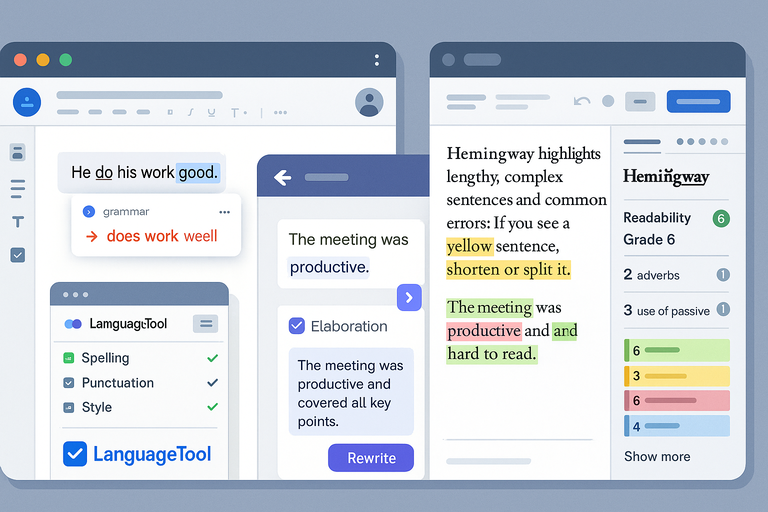
For example, if you write “He do his work good,” LanguageTool might suggest “He does his work well.” The difference seems small, but it drastically improves fluency.
I recommend using LanguageTool’s Style Guide (in the sidebar) to enforce consistent voice across all your writing. It’s especially useful for teams managing brand tone or freelancers juggling different clients.
Pro tip: You can set custom rules for phrases or style preferences, which helps maintain a unified tone across multiple projects.
Outwrite’s Browser Plugin For On-The-Go Editing
Outwrite combines real-time grammar correction with a smart rewriting feature—perfect for editing on the fly. Once you install the Chrome extension, it automatically checks your writing across web apps like Gmail, Facebook, or LinkedIn.
What I like about Outwrite is its Rewrite and Elaborate modes. The Rewrite mode shortens or restructures sentences, while Elaborate expands them with more descriptive language. For instance, “The meeting was good” becomes “The meeting was productive and covered all key points.”
Outwrite’s free version includes grammar and style suggestions, but upgrading unlocks advanced rewrites. Still, even in the free tier, it’s a time-saver for quick edits without copy-pasting text between tools.
Shortcut: Highlight a sentence → click the purple Outwrite icon → select Rewrite or Elaborate. The rewritten version appears instantly.
I suggest pairing it with Grammarly or LanguageTool if you want deeper grammar checks combined with Outwrite’s tone improvement.
Hemingway Editor For Offline Style Enhancement
Hemingway Editor is one of my favorite tools for polishing style and readability, especially when I’m writing offline or need a distraction-free environment.
Unlike typical grammar checkers, Hemingway focuses on readability. It highlights long, complex sentences, passive voice, and unnecessary adverbs. The color-coded interface makes it easy to spot issues—yellow means “too wordy,” red means “hard to read.”
When I ran a 1,000-word blog post through Hemingway, my readability score improved from Grade 11 to Grade 8, making it more accessible and fluid. That’s the kind of tangible improvement many AI tools miss.
You can use it directly in your browser at hemingwayapp.com or download the desktop version for offline editing.
Pro tip: Aim for a readability grade between 6 and 8 for blog or marketing content. It’s readable yet professional—a sweet spot for most audiences.
Mobile-Friendly Free QuillBot Alternatives
Writing doesn’t always happen behind a desk. Sometimes, you’re drafting ideas on your phone while commuting or editing social media captions on the go. These mobile-friendly free QuillBot alternatives help you maintain writing quality no matter where inspiration strikes.
Grammarly Keyboard App For Real-Time Writing Help
The Grammarly Keyboard App brings the platform’s AI-powered corrections to your smartphone. Once installed (available on both iOS and Android), it replaces your regular keyboard, instantly offering suggestions as you type—whether you’re emailing, texting, or updating LinkedIn.
For example, typing “I look forward to hear from you” immediately triggers a correction to “I look forward to hearing from you.” It’s like having a professional editor inside your keyboard.
Beyond grammar, the app checks tone and clarity. I often use it to draft emails or social posts quickly while ensuring they sound confident yet polite.
Setup path: Download from App Store or Google Play → enable Grammarly Keyboard → switch input method in settings → start typing.
Personal suggestion: Use Grammarly’s tone detector when messaging clients. It helps avoid misinterpretations that sometimes happen with short mobile responses.
Simplified AI Writer App For Portable Editing
Simplified’s mobile AI Writer offers robust content creation tools packed into a clean app interface. It’s not just a rewriter—it also includes templates for blog intros, captions, and emails.
After logging in, tap AI Writer → Paraphraser to rewrite any sentence or paragraph. You can select tones like Friendly, Professional, or Empathetic—helpful when tailoring content for different audiences.
For example, when I rephrased a promotional line “Sign up for our newsletter today,” the Friendly Tone version became “Join our community for weekly updates and ideas.” Small change, big impact.
Simplified syncs across devices, meaning you can start on mobile and finish on desktop.
Personal note: I use Simplified when brainstorming captions while traveling—it gives fast, creative alternatives that fit perfectly for social platforms.
Best Free QuillBot Alternative For SEO Writers

If you write for SEO, you need more than clean grammar—you need AI tools that understand keyword placement, tone optimization, and search intent.
These free QuillBot alternatives for SEO writers help fine-tune your content to rank higher while sounding natural.
Scalenut’s Free AI Writing Tools
Scalenut’s free plan gives access to powerful SEO-focused tools, including AI Rewriter, Keyword Planner, and Content Optimizer.
Inside the dashboard, you can input your topic and target keyword. Scalenut then analyzes top-ranking pages and offers content structure suggestions. Its Rephrase Tool works well for improving keyword density without overstuffing.
For example, when rewriting an article on “email marketing automation,” Scalenut suggested semantically related terms like “workflow,” “customer journey,” and “trigger-based emails.” It helped improve topical depth while keeping the article reader-friendly.
Shortcut: Go to AI Tools → Rephrase → Paste text → Select SEO Tone.
I suggest using Scalenut when you’re optimizing articles for both clarity and ranking. It bridges the gap between creative writing and technical SEO.
Frase.io’s Limited Free Optimization Plan
Frase.io stands out as a data-driven content assistant that goes beyond rewriting—it helps you structure content that ranks.
Even with the free version, you can run Content Briefs that show keyword frequency, related terms, and average article length from competitors. Its Rewrite Tool uses this data to refine sections for SEO without compromising tone.
For instance, Frase might flag that competitors use the keyword “best AI rewriter” 5–7 times in a 1,500-word article. You can then adjust your draft accordingly.
I often use Frase to identify missing subtopics that improve authority and semantic coverage—an SEO must-have.
Pro tip: Combine Frase’s outline builder with ChatGPT to expand sections naturally around recommended keywords.
NeuralText For Keyword-Based Rewrites
NeuralText offers an AI Writer and Keyword Tool built specifically for content optimization. It helps writers paraphrase sentences while keeping primary and secondary keywords intact—a key feature for SEO professionals.
When rewriting, NeuralText provides keyword usage metrics next to each paragraph. If you’re targeting “AI content rewriter,” it’ll suggest related phrases like “AI paraphrasing tool” or “AI-powered writing software.”
I’ve used it to rewrite meta descriptions and product summaries—it shortens and optimizes them for higher click-through rates.
Usage path: Login → select Content Optimizer → Paste your draft → Use Rewrite Suggestions.
Personal suggestion: Use NeuralText’s keyword scoring system before publishing—it helps balance optimization and readability, something many SEO writers overlook.
AI Tools That Combine Rewriting With Idea Generation
Some free QuillBot alternatives go beyond paraphrasing — they help you brainstorm, rewrite, and create fresh ideas from scratch.
If you often face writer’s block or want to turn a single thought into multiple content angles, these tools can make the creative process faster and smarter.
Copy.ai’s Free Plan For Creative Prompts
Copy.ai is built for creators who want both rewriting and idea generation in one place. Its free plan gives you access to over 90 templates for blogs, ads, and emails, plus a smart rewriter that reshapes your sentences based on tone and purpose.
I often use the Blog Post Wizard to turn a single topic into a full outline. For instance, typing “how to grow a blog with AI tools” instantly generates a title, intro, and section ideas.
You can then click Rewrite on any sentence to see multiple phrasing options — perfect for testing variations that sound more conversational or SEO-friendly.
The best part is Copy.ai’s Prompt Library. It includes ready-made commands like “Rewrite this paragraph in a friendlier tone” or “Expand this idea into three marketing hooks.” That saves time when you’re stuck thinking of new ways to say the same thing.
Pro tip: Use Copy.ai for first drafts, then polish with Grammarly or LanguageTool. This combo ensures your ideas stay creative while the final text reads clean and professional.
Notion AI For Brainstorming And Rewording
Notion AI transforms how you ideate and refine content directly inside your workspace. If you already use Notion for organizing notes or blog outlines, this feature feels natural.
Inside any Notion page, you can type /AI and choose options like Brainstorm ideas, Rewrite paragraph, or Make shorter. It’s great for expanding half-written thoughts or condensing long explanations without losing tone.
When I’m planning content calendars, I use Notion AI to generate five or six blog headline ideas per topic. Then, I select Rewrite to improve clarity for each draft paragraph. The AI keeps the context of your notes, which makes its rewrites more relevant than generic paraphrasers.
Example path: Open Notion page → type /Ask AI → choose “Rewrite” or “Brainstorm” → edit inline.
I suggest using Notion AI as your creative co-pilot — it’s not just a rewriter, but an idea expander that keeps your workflow focused and fluid.
HyperWrite For Context-Aware Editing
HyperWrite is ideal when you need AI that understands context deeply. Its free version includes Rewrite, Continue Writing, and Smart Compose — features that adapt to your tone and prior text.
For example, if you’re writing a product description and highlight a sentence like “This laptop is fast and reliable,” HyperWrite might suggest “Experience blazing speed and dependable performance designed for everyday work.” It rewrites while maintaining flow and intent.
It also learns from your writing style over time. When you use it inside your browser (via its Chrome extension), HyperWrite suggests completions as you type in Gmail, Docs, or Notion — almost like having a personalized writing assistant.
I’ve found it especially useful when editing marketing copy. It refines long paragraphs into snappier versions that match your tone instead of rewriting blindly.
Pro tip: Combine HyperWrite with a tone analyzer (like Grammarly) to balance creativity with professionalism.
How To Choose The Right Free QuillBot Alternative
With so many options available, picking the best free QuillBot alternative depends on your workflow, writing goals, and content type.
Here’s how to make a confident choice that fits your writing style.
Match Tool Features To Your Writing Goals
Every AI tool excels at something different. Before choosing, identify what you need most:
- Clarity and grammar: Grammarly, LanguageTool
- Idea expansion: ChatGPT, Copy.ai, Notion AI
- SEO optimization: Scalenut, NeuralText, Frase.io
- Tone and readability: Hemingway Editor, Outwrite
For example, if you’re a blogger focused on speed, choose a tool like Rytr or Copy.ai that can generate and rephrase content quickly. But if you’re crafting detailed research content, Scholarcy or Paperpal will be more reliable.
I recommend testing one writing goal per tool — don’t overload your stack with features you’ll rarely use.
Test Each Tool’s Output Quality With Real Examples
Never rely solely on marketing claims. The best way to judge an AI writing tool is by testing how it handles your own writing.
Take a short paragraph from your latest article and:
- Run it through three tools (for instance, Copy.ai, Grammarly, and Scalenut).
- Compare the rewrites based on clarity, tone, and meaning retention.
- Check if any tool changes the intent or adds unnecessary fluff.
In my experience, some tools (like Wordtune or HyperWrite) prioritize tone accuracy, while others (like Paraphraser.io) focus on structural variation. It’s about finding the right balance, not just chasing the flashiest interface.
Combine Multiple Tools For Maximum Efficiency
Sometimes, one tool isn’t enough. Combining a few focused ones creates a smoother, higher-quality workflow.
Here’s a setup I’ve used effectively:
- Use ChatGPT or Copy.ai for idea generation and first drafts.
- Run drafts through Grammarly or LanguageTool for grammar and readability.
- Polish tone and flow using Hemingway Editor or Wordtune.
- Optimize keywords with Scalenut or Frase.io.
Each stage improves your content incrementally without overwhelming you. It’s like building a mini writing ecosystem where each AI tool handles its specialty.
Expert Tip: Combine Tools For A Powerful Writing Workflow
If you want consistently high-quality content, learning to integrate multiple free QuillBot alternatives is the smartest move. This not only saves time but ensures every piece of content you create feels balanced, natural, and search-ready.
Use A Rephraser With A Grammar Checker
Pairing a paraphraser (like Paraphraser.io or Wordtune) with a grammar checker (like Grammarly or LanguageTool) gives you the best of both worlds — creativity plus accuracy.
Example workflow: Paste your draft into Paraphraser.io for structure improvement → run the output through Grammarly → approve tone suggestions.
This workflow ensures your sentences sound human while maintaining grammatical integrity.
Add A Style Editor For Tone Consistency
Once your grammar is fixed, style editors like Hemingway or Outwrite help refine rhythm and readability. Hemingway highlights long or complex sentences so you can simplify them for easier reading.
If you’re writing blog content, aim for Grade 7–9 readability — that’s ideal for keeping audiences engaged while still sounding professional.
I recommend doing a final “style pass” in Hemingway before publishing, especially if your article is long or keyword-heavy.
Sync AI Tools With Your Content Management System
To streamline your process, connect these AI tools with your CMS.
For example:
- Install Grammarly for WordPress or LanguageTool for Chrome to edit live in your CMS.
- Use Notion AI or Copy.ai integrations to draft directly inside your workspace.
- Sync Frase.io or NeuralText with your SEO dashboard for content optimization.
This setup keeps you from switching tabs constantly and helps maintain focus during editing.Personal suggestion: Start small — integrate one AI tool into your CMS workflow first, then gradually add more as you refine your routine.

I’m Juxhin, the voice behind The Justifiable.
I’ve spent 6+ years building blogs, managing affiliate campaigns, and testing the messy world of online business. Here, I cut the fluff and share the strategies that actually move the needle — so you can build income that’s sustainable, not speculative.
Related posts:
 Top Tools QuillBot Similar For Rewriting And Grammar Fixing
 Free QuillBot Review: Is It Worth Using For Writing Help?
 Quillbot Alternative Review: Top 5 Choices
 Best Alternative Of QuillBot That Writers Actually Use
 The QuillBot Review: Is This AI Writing Tool Worth It?
 How To Use QuillBot Tool To Rewrite Like A Pro