
Table of Contents
Some links on The Justifiable are affiliate links, meaning we may earn a small commission at no extra cost to you. Read full disclaimer.
Becoming a freelance CAD designer can open doors to flexible work, high-paying clients, and the freedom to design from anywhere.
But how do you actually land your first clients and turn your skills into a steady income?
This guide breaks down each step—from building a strong portfolio to finding legitimate freelance platforms—so you can confidently launch and grow your freelance CAD career.
Understand What a Freelance CAD Designer Does
Freelance CAD designers use software to transform concepts into detailed 2D or 3D technical drawings.
Whether you’re sketching a mechanical part or designing a modern office floor plan, your job is to visualize ideas that engineers, architects, or manufacturers can build from.
Learn the Core Responsibilities of a CAD Designer
A freelance CAD designer is responsible for creating precise, computer-generated drawings used in product development, architecture, or engineering. These digital blueprints often become the foundation for manufacturing or construction.
You’ll typically:
- Convert client sketches or concepts into 2D drafts or 3D models.
- Collaborate remotely with engineers or architects to ensure design feasibility.
- Update designs based on client feedback or new measurements.
- Ensure compliance with industry standards and file formats (for example, .DWG or .STL).
I recommend using platforms like AutoCAD for drafting and Fusion 360 for prototyping since both are widely accepted and have robust file-sharing capabilities.
Differentiate Between CAD Specialties (Architectural, Mechanical, Electrical)
Each CAD specialty demands a different focus and toolset.
- Architectural CAD Designers work on buildings, layouts, and interior plans. They often use Revit or SketchUp to model spaces and visualize dimensions.
- Mechanical CAD Designers specialize in parts and assemblies, using SolidWorks or AutoDesk Inventor for 3D precision.
- Electrical CAD Designers draft circuit diagrams, wiring layouts, and schematics. Software like AutoCAD Electrical or EPLAN helps automate repetitive wiring tasks.
I suggest exploring one niche deeply rather than dabbling in all. Clients tend to prefer freelancers who are “experts in one lane” rather than generalists.
Explore the Skills Needed to Work Independently
As a freelancer, you’re both the designer and the business.
Beyond software mastery, you’ll need:
- Client communication skills: to interpret project briefs correctly.
- Project management: using tools like Notion or Trello for deadlines.
- File organization: naming conventions like “Project_ClientName_Rev01” help avoid confusion.
- Self-marketing: creating visibility on LinkedIn, CAD forums, and portfolio platforms.
I’ve noticed that freelancers who can clearly explain their design logic often get repeat clients — not necessarily the most advanced modelers, but the best communicators.
Identify the Industries That Hire Freelance CAD Designers
CAD designers are in high demand across:
- Architecture and construction: for 3D building models.
- Automotive and aerospace: for part prototyping and design optimization.
- Manufacturing: for tool and component modeling.
- Product design and consumer electronics: for conceptual modeling and render visualization.
If you’re just starting, focus on industries you already understand — it makes client conversations easier and your work more valuable.
Build and Strengthen Your CAD Design Skills
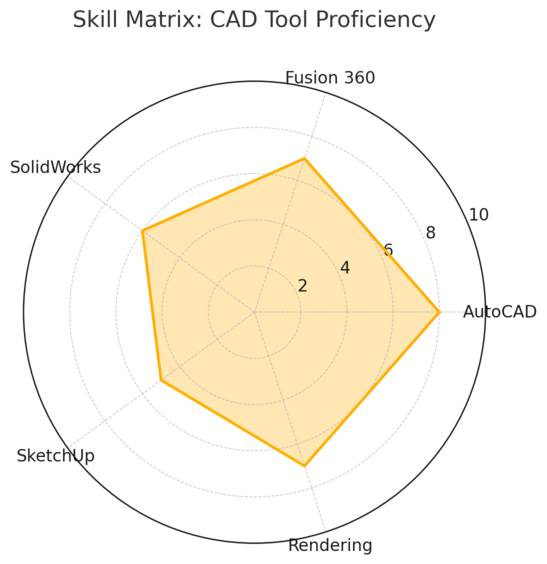
Every successful freelance CAD designer treats skill-building like a lifelong project.
Technology changes fast, and staying ahead means learning both the tools and the techniques that clients demand.
Master Industry-Standard CAD Software Tools
You don’t need to learn every tool. Focus on those that match your niche.
- AutoCAD – best for 2D drafting and architectural layouts.
- SolidWorks – preferred in mechanical and manufacturing design.
- Fusion 360 – ideal for freelancers since it combines CAD, CAM, and CAE.
- SketchUp – a great choice for quick architectural visualization.
In my experience, learning shortcut keys saves hours weekly. For example, in AutoCAD, “L” starts a line, and “M” moves objects — simple but powerful habits that boost productivity.
Learn 3D Modeling and Drafting Techniques for Real Projects
3D modeling is more than just shapes; it’s about translating intent into geometry. Start with projects like furniture design, product enclosures, or small mechanical assemblies.
Practice these:
- Parametric modeling: where dimensions can be adjusted later (Fusion 360 excels at this).
- Rendering basics: using KeyShot or Blender for realistic visuals.
- Tolerance design: ensuring parts fit together perfectly in real life.
I advise new freelancers to recreate an existing product you own — a chair, a phone case — to test your modeling and accuracy. You’ll learn fast from real-world constraints.
Improve Technical Drawing Accuracy and Attention to Detail
Clients expect clean, detailed, and standardized drawings. Learn to use layers, line weights, and dimension styles properly.
Key habits:
- Double-check units before starting (metric vs. imperial).
- Use title blocks for consistency.
- Review drawings from the client’s perspective — can they build from it?
Precision builds trust. I’ve seen freelancers lose clients simply because of mislabeled layers or off-scale prints. Small errors can create big problems on site.
Stay Updated with CAD Software Trends and Certifications
Software updates often bring workflow-changing tools. Subscribing to official newsletters or YouTube channels (like Autodesk’s Learning Hub) helps you stay ahead.
Consider certifications such as Autodesk Certified Professional or SolidWorks Professional (CSWP). These credentials signal credibility and can justify higher rates.
In freelancing platforms, verified skills or badges often push your profile higher in search results — giving you a visibility advantage.
Create a Professional Freelance CAD Portfolio
Your portfolio is your silent salesperson. It should communicate your capabilities faster than any proposal or resume ever could.
Choose Your Best Projects That Highlight Skill Variety
Show projects that demonstrate versatility and expertise. Mix small, detailed tasks with large-scale designs to showcase range.
For example:
- A complex mechanical part with tolerance specifications.
- An architectural 3D layout rendered for presentation.
- A product prototype from sketch to 3D model.
If you lack client work, create concept projects. What matters most is your ability to show skill depth and problem-solving.
Include Before-and-After Project Visuals and Renderings
Clients love seeing transformation. Show your initial sketches or drafts next to finished renderings. This tells a story of progress and shows your process.
Use Fusion 360 or Blender to create photorealistic visuals. Lighting and texture add life to models and help clients visualize outcomes more clearly.
A simple layout:
- Initial sketch or 2D plan.
- Wireframe 3D model.
- Final rendered output.
It’s worth investing time here — renderings can increase your perceived skill value instantly.
Write Short Project Summaries to Show Problem-Solving
A strong portfolio doesn’t just display visuals — it explains your thinking.
Write 2–3 short sentences for each project:
- What problem was being solved?
- What tools or methods did you use?
- What was the outcome or client feedback?
Example: “Designed a modular office desk using Fusion 360. Focused on reducing material waste by 15% through optimized component nesting.”
This storytelling builds confidence and helps clients see you as a problem-solver, not just a draftsman.
Use Platforms Like Behance or a Personal Website to Host Your Portfolio
Hosting your portfolio on Behance, Dribbble, or a personal website adds professionalism and visibility.
- Behance is great for design exposure and networking.
- WordPress or Wix lets you control branding and SEO.
- LinkedIn can feature projects directly on your profile.
Include your contact form, pricing guide, and testimonials. I suggest embedding short videos walking through 3D models — clients appreciate seeing designs in motion.
Pro Tip: Treat your portfolio as a living project. Update it after every significant job or certification. Clients often browse it before contacting you, so it should reflect your current skill level and professional growth.
Set Up Your Freelance CAD Designer Profile
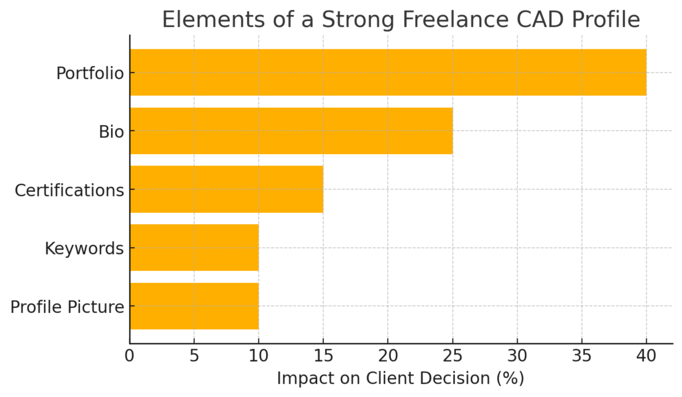
Your profile is your first impression—it’s often the only thing standing between you and a new client.
A polished, keyword-optimized profile not only builds trust but also helps you get discovered in search results on freelance platforms.
Craft a Compelling Freelancer Bio That Sells Your Expertise
Your bio is the story behind your skills. It should quickly tell potential clients who you are, what you do, and how you can solve their problems. Think of it as your elevator pitch—but written for someone scrolling fast.
Here’s a simple structure I recommend:
- Start with what you do: “I’m a freelance CAD designer specializing in 3D modeling and mechanical drafting.”
- Add your niche or focus area: “I help product developers and manufacturers turn sketches into production-ready CAD files.”
- End with a result-oriented statement: “My designs have helped reduce prototyping errors and speed up product launches.”
Keep your tone confident but not boastful. Clients respond to clarity, not overhype. I suggest writing it in the first person—it feels authentic and approachable.
Include Keywords Clients Search For (CAD, 3D Design, Drafting)
Freelance platforms like Upwork and Fiverr rely heavily on keyword-based search. Using the right phrases helps your profile appear when clients look for skills like CAD design, 3D modeling, or technical drafting.
A few natural ways to integrate them:
- “I provide 2D drafting and 3D design services using AutoCAD and Fusion 360.”
- “I specialize in mechanical and architectural CAD drawings for manufacturing and construction projects.”
Don’t overstuff keywords. Sprinkle them where they make sense—in your title, bio, and service tags. The goal is readability and discoverability.
Add Certifications, Testimonials, and Software Skills
Certifications and testimonials build instant credibility. If you’re certified in AutoDesk AutoCAD or SolidWorks Professional (CSWP), mention it clearly in your profile headline or description.
For example: “Autodesk Certified Professional | 5+ Years Experience in 3D Mechanical Design”
Also, include testimonials—even short ones. If you’re new, ask previous employers, classmates, or collaborators to provide feedback about your work ethic or design precision.
Then, list specific software you use:
- AutoCAD (2D & 3D Drafting)
- SolidWorks (Parametric Modeling)
- Fusion 360 (Product Design)
- SketchUp (Architectural Design)
Clients often filter search results by software, so this section helps you appear in more relevant searches.
Use Professional Photos and a Consistent Brand Identity
Your photo should look approachable and trustworthy. A neutral background, good lighting, and a natural smile go a long way. Avoid over-editing—it’s better to appear genuine than perfect.
Keep your visual identity consistent:
- Use similar colors and fonts across your profiles and portfolio.
- Add a clean logo or watermark if you have one.
- Match your username and profile name for easier recognition (e.g., “JuxhinCADDesign” on all platforms).
Consistency builds memory. When clients see your name multiple times, they’re more likely to remember—and hire—you.
Find Freelance CAD Design Jobs Online
Getting hired as a freelance CAD designer starts with being visible in the right places.
The best platforms balance opportunity, credibility, and control over your rates.
Use Top Platforms Like Upwork, Fiverr, and Freelancer
General freelancing platforms have thousands of active job postings daily, but competition is fierce.
Still, they’re excellent places to start.
- Upwork: Ideal for long-term, high-paying projects. Optimize your title and tags (“Freelance CAD Designer | 3D Modeling & Technical Drafting”) to appear in searches.
- Fiverr: Great for smaller, quick-turnaround gigs. Offer packages like “2D Floor Plan Drafting” or “3D Product Modeling.”
- Freelancer: Focus on bidding for projects with clear descriptions. Look for employers with verified payment histories.
Tip: Start small to build reviews. Even a few $50 projects can help you earn credibility and higher-paying clients later.
Explore Niche Job Boards Like CAD Crowd and GrabCAD
Niche platforms focus solely on CAD and engineering design, making them goldmines for specialized freelancers.
- CAD Crowd: Connects freelance CAD designers with engineering firms and inventors. You can join design contests to prove your skills and attract clients.
- GrabCAD: A community-driven platform for sharing 3D models and connecting with engineers. Upload your projects here—it builds both reputation and portfolio visibility.
These platforms attract serious clients who understand design complexity, not just bargain hunters. I suggest setting up profiles here even if you already use general sites.
Network in LinkedIn Groups and Design Communities
LinkedIn is still one of the best places to find high-value clients for CAD work. Join groups like Mechanical Design Engineers or AutoCAD Professionals, and engage in discussions.
Simple steps that work:
- Comment insightfully on posts instead of promoting your services directly.
- Publish short posts showing before-and-after CAD renderings.
- Send personalized connection requests (avoid copy-paste messages).
Over time, your network becomes your client base. I’ve seen freelancers land multi-thousand-dollar projects just through consistent LinkedIn engagement.
Learn How to Spot Real Jobs and Avoid Scams
Freelancing attracts both genuine clients and opportunists.
To stay safe:
- Avoid clients asking to move communication off-platform early.
- Watch out for vague job descriptions or unrealistic pay offers.
- Always request milestone-based payments before sharing final files.
Legit clients are usually transparent about deliverables, timelines, and payment. Trust your instincts—if something feels off, it probably is.
Price Your CAD Design Services Competitively
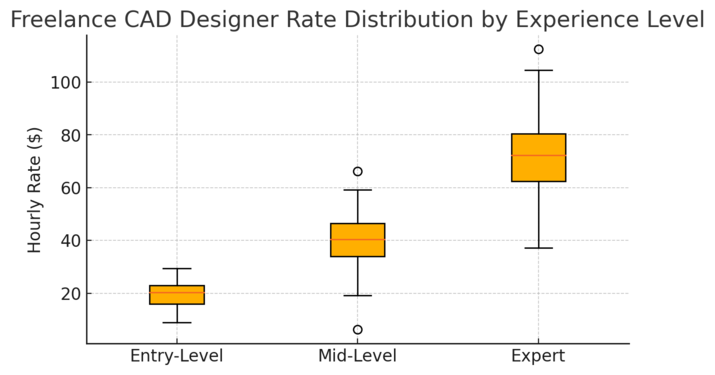
Pricing your freelance CAD work is both art and strategy. Set rates too low, and you undervalue your skill; too high, and you scare off potential clients.
The sweet spot comes from research and confidence in your expertise.
Research Market Rates Based on Experience and Niche
Before setting prices, browse active listings on Upwork, CAD Crowd, and PeoplePerHour. Compare rates from freelancers with similar experience, location, and specialization.
For context:
- Entry-level CAD designers often charge $15–$25/hour.
- Mid-level freelancers charge $30–$60/hour.
- Experienced specialists (mechanical, aerospace, architectural) command $75–$120/hour or more.
If you’re unsure where to start, begin slightly below market average to attract initial clients, then increase rates gradually as your portfolio grows.
Choose Between Hourly or Project-Based Pricing
Each model fits different types of work:
- Hourly pricing is ideal for open-ended projects like revisions or iterative design. It ensures you’re paid for every minute worked.
- Project-based pricing works better for defined deliverables (e.g., “Design a 3D model of a product casing for $400”).
I suggest using project-based pricing when you can clearly estimate time and effort—it’s easier for clients to budget, and for you to avoid scope creep.
Offer Tiered Packages to Attract Different Client Types
Packages make your pricing clear and flexible.
For example:
- Basic: 2D drafting with one revision – $100
- Standard: 3D modeling + renderings – $250
- Premium: Full CAD package with revisions and source files – $500
This approach works especially well on Fiverr or your personal website. It helps clients choose based on their budget while making you appear professional and organized.
Use Pricing Tools or Calculators to Stay Competitive
Platforms like Glassdoor, Upwork Rate Calculator, or Bonsai Pricing Tools give you benchmarks for hourly and project-based rates.
Also, track your time using Clockify or Toggl for a few projects to see how long tasks actually take. You might find that a “2-hour job” is really a 5-hour one—data like this helps you price smarter.
Remember: pricing isn’t permanent. As you gain testimonials, certifications, or a stronger portfolio, your rates should evolve with your value.
Pro Tip: Confident freelancers attract confident clients. Clearly list your rates on your website or portfolio. It filters out low-budget projects and signals professionalism before the first message even arrives.
Pitch and Win Clients as a Freelance CAD Designer
Getting hired as a freelance CAD designer isn’t just about having great design skills—it’s about communicating those skills clearly and confidently.
A good pitch shows clients that you understand their needs, not just that you can use AutoCAD or Fusion 360.
Write Clear, Customized Proposals for Each Client
Every client wants to feel that you’re focused on their project. A generic copy-paste proposal won’t cut it. I suggest writing each proposal as if it’s a mini case study showing how you’ll solve their specific problem.
Here’s a simple structure you can follow:
- Open with understanding: “I see you’re looking for a CAD designer to create mechanical parts for your product line.”
- Share relevant experience: “I’ve worked on similar designs using SolidWorks, where precision and tolerances were key.”
- Explain your process briefly: “I start with initial sketches and deliver 3D models in STEP or STL formats for easy prototyping.”
- End with clarity: “I can deliver the first draft in 3 days and provide up to two revisions if needed.”
Short, clear, and specific always beats long and vague. Clients often scan dozens of proposals—your clarity is what gets noticed.
Demonstrate Understanding of the Project Scope and Goals
Clients want proof that you’ve read their brief carefully. Restate their requirements in your own words to show alignment. For example:
“You mentioned you need 3D models optimized for injection molding. I can ensure draft angles and part thickness meet manufacturability standards.”
This shows you’re not just responding automatically—you’re already thinking like part of their team. I often say this: If you make the client feel understood, you’re halfway to being hired.
Include Visual Samples or Quick Sketches in Proposals
Visuals are your strongest selling tool. A quick 3D sketch, even if rough, can instantly communicate competence.
You can:
- Include snapshots of similar past projects.
- Attach simple line drafts (non-client work) to demonstrate approach.
- Share a link to your Behance or GrabCAD profile.
For example, when pitching for a furniture design project, I once attached a 10-minute mockup made in Fusion 360.
The client said that sketch alone convinced them I understood the design intent better than others. Small visuals make a big difference.
Follow Up Professionally Without Sounding Pushy
If you haven’t heard back after a few days, a short, polite follow-up keeps you top of mind without being intrusive. Try something like:
“Hi [Client Name], I just wanted to check if you had a chance to review my proposal. I’d love to clarify any details or adjust the scope to better fit your needs.”
Avoid sounding desperate. Follow up once, then move on. Consistency matters more than chasing every lead.
Deliver Quality Work and Build Long-Term Relationships
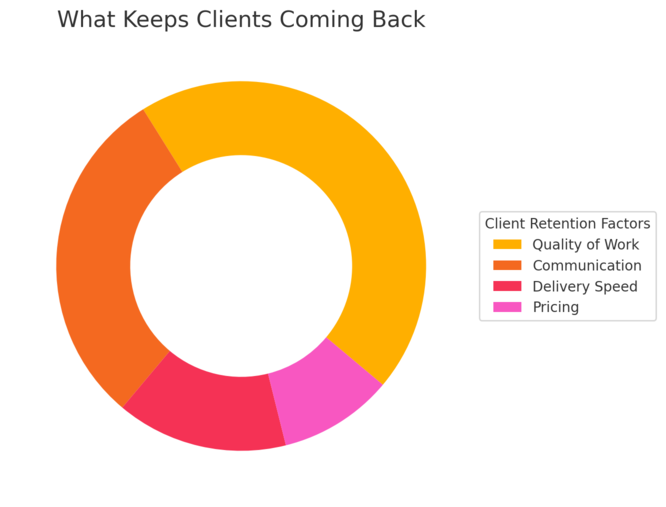
Your first project with a client is really a test run for future work.
Delivering great results, clear communication, and reliability often leads to repeat contracts and referrals—where the best freelance income truly lies.
Communicate Clearly About Deadlines and Expectations
Before starting, confirm every key detail: scope, format, deadlines, and revision limits. I recommend using a shared project document (Google Docs or Notion) so both sides can reference it.
If something unexpected happens—software bugs, design changes, or client delays—communicate early. Clients value honesty more than excuses.
A short status update like, “I’m finalizing the 3D renderings today; expect files by tomorrow noon,” shows professionalism and builds trust.
Use Revisions Strategically to Improve Client Satisfaction
Revisions are part of the job, not a nuisance. Handle them as a collaboration, not a correction.
Here’s what works:
- Limit revisions in your proposal to 1–2 rounds to prevent scope creep.
- Ask for consolidated feedback instead of piecemeal notes.
- Show small progress updates before final delivery.
I suggest using comments in PDFs or screenshots—clients find it easier to mark feedback visually, and you save time deciphering vague requests.
Maintain Consistent File Naming and Documentation Standards
Good organization makes you look like a pro. Keep your files clean and well-structured so clients can navigate them easily.
A simple naming structure: ClientName_ProjectName_Rev01.dwg
Project_3DModel_Final.stl
Store supporting documents (dimensions, references, render images) in separate folders. I’ve had clients rehire me just because they appreciated my file discipline—it saves them time and confusion later.
Ask for Feedback and Referrals After Each Project
Once a project wraps up successfully, ask for feedback while the positive experience is fresh. A simple message like:
- “I’d love to know how everything worked for you—your feedback helps me keep improving.”
You can also politely request a testimonial or referral. Clients often know others in the same field who need CAD design help, and personal recommendations are powerful.
Manage Your Freelance Business Like a Pro
Freelancing isn’t just design—it’s business. Managing finances, projects, and time efficiently allows you to scale beyond one-off gigs into a sustainable career.
Track Projects, Invoices, and Payments Efficiently
Tracking your work keeps you accountable and ensures no payment slips through the cracks.
Tools I recommend:
- Clockify or Toggl for tracking hours.
- Wave or QuickBooks Self-Employed for invoicing and bookkeeping.
- Google Sheets for a simple earnings log if you’re just starting.
Always include detailed invoices listing hours worked, tasks completed, and file deliverables. Professional invoices reflect reliability.
Use Tools Like QuickBooks, Notion, or Trello to Stay Organized
Organization tools save mental bandwidth.
- QuickBooks helps you handle taxes, expenses, and profit tracking automatically.
- Notion is perfect for managing project details, client notes, and file links in one dashboard.
- Trello lets you track design stages visually (Draft → Review → Approved).
In my own workflow, Notion acts as my “command center.” Every client, deliverable, and deadline lives there—it’s a game-changer for clarity.
Understand Taxes and Legal Requirements for Freelancers
Freelancing means handling your own taxes, and rules vary by country. Keep a portion (typically 25–30%) of your earnings aside for tax season.
I also recommend:
- Registering as a legal business entity once your income grows.
- Using contracts for every project (even short ones) to protect yourself.
- Keeping digital copies of receipts and invoices for record-keeping.
You can find freelancer-friendly tax calculators online, such as Bonsai Tax or QuickBooks Self-Employed, to estimate your quarterly payments easily.
Plan for Downtime and Long-Term Career Growth
Freelance work naturally fluctuates. Plan ahead by saving for slow months and using downtime to learn new tools or improve your portfolio.
A good rhythm:
- Busy season = Deliver and document projects.
- Quiet season = Learn, build, and promote your brand.
Think long-term. The best freelancers treat their career as an evolving business, not a series of gigs.
Keep Improving and Expanding Your Opportunities
The freelance CAD industry evolves constantly. Staying adaptable is what separates those who survive from those who thrive.
Join CAD Design Competitions to Build Recognition
Competitions on platforms like GrabCAD or CAD Crowd are excellent for exposure. They let you test your skills against others, earn badges, and get noticed by serious clients.
Even if you don’t win, sharing your entry builds credibility. It shows initiative and adds to your portfolio.
Learn Adjacent Skills Like Rendering or 3D Animation
Adding complementary skills increases your project scope and earning potential. Learning rendering (using KeyShot or Blender) or simple animations can turn static CAD models into client-ready visual presentations.
I recommend mastering one complementary skill deeply—it’ll make your services more complete and justify higher rates.
Attend Industry Events or Webinars to Network
Events like Autodesk University or SOLIDWORKS World connect you with peers, potential clients, and industry updates.
If you prefer online options, look for CAD-focused webinars or workshops. Active participation often leads to collaboration opportunities or client referrals.
Networking isn’t about selling yourself—it’s about sharing knowledge and building relationships over time.
Experiment with Passive Income Streams (Courses, Templates)
Once you’ve built experience, consider creating passive income streams:
- Sell 3D model templates or engineering parts on TurboSquid or CGTrader.
- Record short CAD tutorials on YouTube.
- Create paid courses teaching CAD design basics or advanced modeling.
Passive income provides financial stability during slow client periods and builds your authority as an expert.
Pro Tip: The best freelance CAD designers are lifelong learners. Keep experimenting with new tools, stay active in communities, and never stop refining your craft. Every new skill you add increases both your confidence and your market value.

I’m Juxhin, the voice behind The Justifiable.
I’ve spent 6+ years building blogs, managing affiliate campaigns, and testing the messy world of online business. Here, I cut the fluff and share the strategies that actually move the needle — so you can build income that’s sustainable, not speculative.
Related posts:
 Python Freelance Jobs Where to Land High-Paying Projects
 Freelance Developer: How to Find the Perfect Fit for Your Project
 WordPress Freelancer: How to Hire Experts Without Overpaying
 Upwork Freelancer Tips to Avoid Scams and Wasted Money
 Freelance Data Entry Jobs You Can Start From Home Today
 How to Set Up a Freelancer Home Office That Actually Works