
Table of Contents
Some links on The Justifiable are affiliate links, meaning we may earn a small commission at no extra cost to you. Read full disclaimer.
Freshsales CRM is designed to help sales teams close deals faster, smarter, and with less manual effort.
But what exactly makes Freshsales CRM stand out in a crowded marketplace of sales tools? And how can its AI-driven features, automation, and pipeline management actually speed up your sales cycle?
This guide breaks it all down—step by step—so you can see how Freshsales transforms leads into loyal customers more efficiently than ever.
Understanding Freshsales CRM and Its Core Capabilities
Freshsales CRM is built to make your sales process faster, smarter, and easier to manage—from lead capture to deal closure.
I’ve worked with multiple CRMs, but Freshsales always stands out because it combines automation, AI insights, and real-time collaboration in a single, intuitive interface.
What Makes Freshsales CRM Different From Other Sales Tools
Most CRMs focus heavily on data storage and tracking. Freshsales, however, emphasizes actionable intelligence.
Instead of just collecting contact details, it tells you which leads to focus on and why.
Here’s what sets Freshsales apart:
- Unified sales view: Everything—contacts, deals, emails, calls, and activities—is accessible from a single screen. You don’t have to bounce between tabs or tools.
- AI-powered automation: Freddy AI (Freshsales’ built-in assistant) helps sales reps identify hot leads, predict conversions, and automate repetitive tasks.
- No-code customization: You can easily modify fields, layouts, and workflows without needing IT support.
For example, if you’re managing multiple sales reps, you can automatically assign leads based on geography or product line using Settings → Admin Settings → Workflows → Assignment Rules.
In essence, Freshsales isn’t just a CRM—it’s a productivity engine designed for growing teams that value time and clarity.
How Freshsales Simplifies Lead and Deal Management
Managing leads can feel chaotic when your data lives across spreadsheets, emails, and sticky notes.
Freshsales brings everything into a structured process that helps you move leads from contacted to closed without missing a beat.
- Lead Capture: Freshsales automatically imports leads from your website forms, chat widgets, and marketing campaigns.
- Lifecycle Tracking: Each contact is tagged with a lifecycle stage (Lead, Contact, Account, or Deal), giving your team full visibility into where prospects stand.
- Contextual Timeline: You can view every interaction—calls, emails, meetings, and notes—on a single contact timeline.
From what I’ve seen, this drastically cuts down on confusion between sales reps. No one wastes time wondering if a lead has already been followed up.
The Role of AI in Freshsales CRM’s Sales Acceleration
Freddy AI is the secret sauce behind Freshsales’ speed. Instead of manually digging through data, you can rely on AI insights that predict outcomes and recommend actions.
Here’s how it helps:
- Lead scoring: Freddy AI analyzes past interactions and engagement to assign a score to each lead. The higher the score, the higher the likelihood of conversion.
- Deal insights: It highlights at-risk deals and suggests next steps—like sending a follow-up email or scheduling a call.
- Email optimization: Freddy can rephrase, expand, or fine-tune your sales messages so they sound more persuasive and natural.
Imagine you’re juggling 100 leads. Instead of manually guessing who’s most likely to buy, Freddy tells you, “Focus on these five—they’re ready to convert.” That’s how teams close faster with less effort.
Streamlining Lead Management With AI-Powered Insights
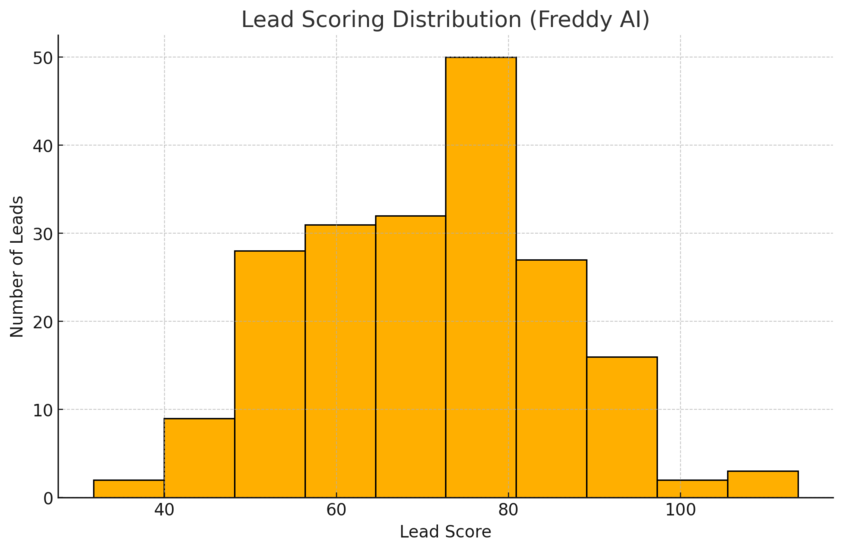
Freshsales CRM turns lead management into a guided process rather than a guessing game.
The AI capabilities help prioritize the right prospects, personalize outreach, and shorten decision-making cycles.
How Freddy AI Scores and Prioritizes Leads Automatically
Freddy AI doesn’t just assign random numbers—it looks at actual behavioral data.
Factors include:
- Email open and reply rates
- Website visits and time spent on key pages
- Engagement history with campaigns and calls
Each lead gets a predictive score based on these metrics. Leads with higher scores automatically move up in your sales queue, ensuring your reps spend time where it counts.
I recommend enabling Lead Scoring → Freddy AI → Configure Scoring Criteria from the admin settings to tailor the scoring to your business model.
For instance, if demo sign-ups are a strong buying signal, you can assign a higher score weight to that action.
Turning Data Into Action: Predictive Contact Insights
It’s one thing to have lead data—it’s another to know what to do with it. Freshsales’ predictive insights bridge that gap.
Freddy AI identifies key trends, such as which lead sources are converting fastest or which campaigns generate the most valuable customers. These insights show up directly in your Contacts Dashboard.
Here’s how it drives better decisions:
- You’ll know which marketing channels are worth investing in.
- You can spot leads that are “cooling off” before they go cold.
- Your follow-up strategy becomes data-backed instead of intuition-driven.
In short, it’s like having a sales analyst working alongside you in real time.
Using Custom Fields to Personalize Every Sales Conversation
Custom fields are where Freshsales really flexes its adaptability.
You can create specific fields—like “Product Interest,” “Budget Range,” or “Preferred Communication Channel”—that tailor your approach for each customer.
Here’s how to use them effectively:
- Go to Settings → Admin Settings → Contacts → Add Custom Field.
- Choose the data type (text, dropdown, date, etc.).
- Segment leads based on these fields for targeted communication.
I find that teams using custom fields for personalization typically see higher response rates. When your outreach aligns with what prospects care about, the entire conversation changes—from cold selling to genuine advising.
Managing Your Sales Pipeline Efficiently
A healthy sales pipeline is like a well-tuned engine—it keeps your business running smoothly.
Freshsales CRM provides visual, flexible tools that make it easy to track, adjust, and forecast deals at every stage.
How the Kanban View Simplifies Deal Tracking
The Kanban view in Freshsales displays your deals as cards in different stages (e.g., “Contacted,” “Demo Scheduled,” “Negotiation,” “Won”). You can drag and drop deals across stages to update progress instantly.
I suggest using this view during team meetings—it’s far more intuitive than static spreadsheets. You can also click into any deal card to view associated tasks, notes, and call logs without leaving the board.
Bonus tip: Enable Pipeline → Kanban View → Filters to view deals by owner, territory, or source for laser-focused reviews.
Creating Multiple Pipelines for Different Products or Markets
If your company sells multiple products or serves various markets, a single pipeline won’t cut it.
Freshsales allows you to create multiple sales pipelines, each with its own stages and automation rules.
For example:
- A SaaS company might have separate pipelines for SMB and Enterprise clients.
- A real estate firm could have pipelines for “Residential” and “Commercial” deals.
You can create them by going to Admin Settings → Sales Pipeline → Add Pipeline. From there, customize the stages, probability percentages, and automation triggers.
This segmentation ensures clarity for your team and helps management forecast more accurately.
Monitoring Sales Performance With Real-Time Dashboards
Dashboards are where Freshsales ties everything together. The system offers pre-built reports and widgets that display metrics like conversion rate, deal velocity, and revenue forecast.
Here’s why I rely on dashboards daily:
- They’re updated in real time, so you always know where your team stands.
- You can create role-based dashboards—sales reps see their deals, while managers see team performance.
- Reports can be exported or shared instantly through Slack or email.
To customize, head to Analytics → Dashboards → Create Custom Dashboard. Add widgets for KPIs that matter most—like “Leads Added This Week” or “Deals Closed per Rep.”
With these tools, Freshsales transforms data into decisions. Every dashboard view tells a story about your sales momentum—and helps you steer it faster toward success.
Enhancing Sales Productivity Through Automation
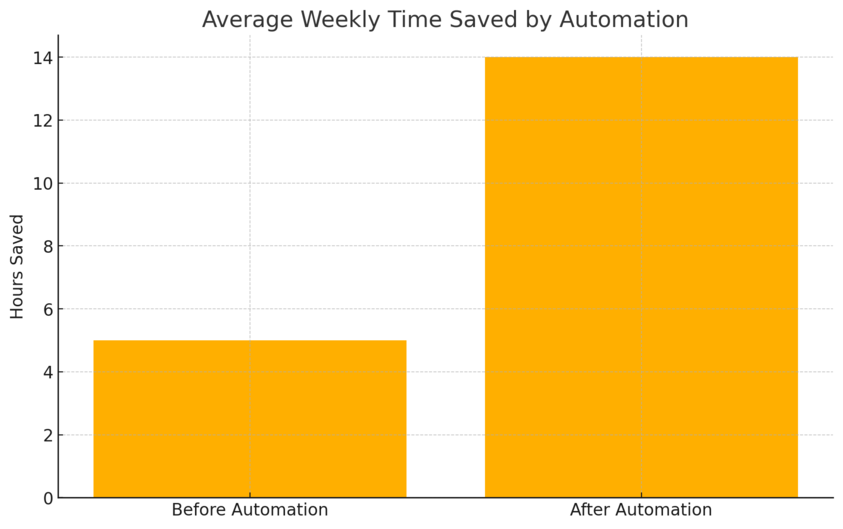
Automation inside Freshsales CRM is like having an extra teammate who never sleeps, never forgets a task, and never misroutes a lead.
It’s designed to handle the small, repetitive processes so you can focus on what actually closes deals—talking to people.
Setting Up Auto-Assignment Rules for Instant Lead Routing
Manually assigning leads is not just slow—it’s risky. Leads can easily slip through the cracks. Freshsales fixes that through Auto-Assignment Rules.
These rules instantly route incoming leads to the right sales rep based on conditions you set, like geography, industry, or product interest.
Here’s a quick path: Admin Settings → Workflows & Automation → Assignment Rules.
You can:
- Define criteria (for example: “Location = California” or “Source = Website Form”).
- Choose an assignment method such as round-robin (equal distribution) or territory-based.
- Automate follow-up notifications so reps are alerted as soon as they get a new lead.
I suggest keeping your rules simple at first. Complex logic can confuse your team.
A good rule of thumb—each lead should be assigned within 10 seconds of arrival. That quick response time can increase conversion rates by nearly 40%, according to InsideSales data.
Building Sales Sequences That Nurture Prospects Automatically
A sales sequence is a structured set of actions—emails, calls, tasks, or reminders—triggered automatically after a lead enters the system. It’s Freshsales’ way of making sure no one forgets to follow up.
To create one: Go to Sales Sequences → Create New Sequence. You can define the time intervals and content for each step.
For example:
- Day 1: Send a personalized welcome email.
- Day 3: Follow up with a product benefits message.
- Day 7: Schedule a demo call automatically.
Freshsales also lets you pause sequences when leads respond, avoiding awkward overlaps like sending a “just checking in” email after a prospect already booked a meeting.
I’ve seen companies cut manual follow-up time by 60% using this feature. It’s like turning your sales outreach into a rhythm machine—consistent, personal, and perfectly timed.
Simplifying Daily Workflows With Predefined Automation Templates
Freshsales offers pre-built workflow templates for common sales processes—like lead scoring updates, deal stage transitions, or welcome emails.
These templates are editable, so you can adapt them to your exact flow.
You’ll find them under Admin Settings → Workflows & Automation → Templates.
Examples include:
- Updating deal status when a quote is sent.
- Sending reminders when deals stay idle for too long.
- Auto-creating follow-up tasks when a lead changes stage.
I recommend starting with templates instead of building from scratch—they’re tested, efficient, and save hours.
Once you’ve customized them to fit your business, you’ll notice your day gets a lot lighter and your team becomes more consistent without added micromanagement.
Improving Communication With Multichannel Engagement
Freshsales CRM unifies every communication channel—email, chat, phone, WhatsApp, and social media—into a single workspace.
That means no more tab-hopping or missed follow-ups. You see everything that’s been said to a contact, across every platform, in one timeline.
Integrating Email, Chat, and Phone in One Unified Workspace
Freshsales gives you a 360-degree communication view. Every email, call, and chat message is logged automatically under the contact record.
You can connect your channels easily:
- Email: Sync Gmail or Outlook directly from Settings → Integrations → Email Sync.
- Chat: Enable Freshchat for instant website and in-app communication.
- Phone: Use Freshcaller (or integrate your carrier) for one-click calling and recording.
I’ve found that this unified setup cuts response time by half since you don’t need to chase context. You can call, email, or chat right from the contact view, and the CRM keeps the conversation history organized for everyone.
It’s like turning your CRM into your central sales cockpit—you can manage everything without leaving the dashboard.
How WhatsApp and SMS Integration Speeds Up Customer Responses
When prospects want quick answers, email isn’t always the best medium. Freshsales’ WhatsApp and SMS integrations let you reach leads instantly.
Here’s why it’s powerful:
- You can send personalized messages directly from the CRM.
- Conversations are stored in the contact timeline, so you always know what’s been discussed.
- Templates help you send faster, consistent replies (like confirmations or follow-ups).
Setup path: Settings → Channels → WhatsApp/SMS Integration.
I suggest using WhatsApp for real-time engagement (e.g., confirming demo times) and SMS for timely reminders or thank-you messages.
These quick touches can increase your reply rate by up to 45%.
Syncing Social Media Campaigns to Drive Faster Conversions
Freshsales connects with Freshmarketer to sync your social campaigns with your CRM contacts. You can track which leads come from Facebook, LinkedIn, or Instagram and follow up directly within the CRM.
For example, when someone clicks on a Facebook ad and fills out a form, they instantly appear in your Freshsales lead list, complete with source tracking.
Advantages:
- Faster lead capture (no manual imports).
- Better ROI tracking from ad spend to closed deals.
- Real-time engagement insights to guide your next campaign.
You can enable this by going to Freshmarketer → Integrations → Social Channels → Connect Accounts.
This tight connection between marketing and sales means leads don’t go cold. You meet prospects right where they interact most—on social platforms—and move them seamlessly into your sales pipeline.
Leveraging Freddy AI for Smarter Selling
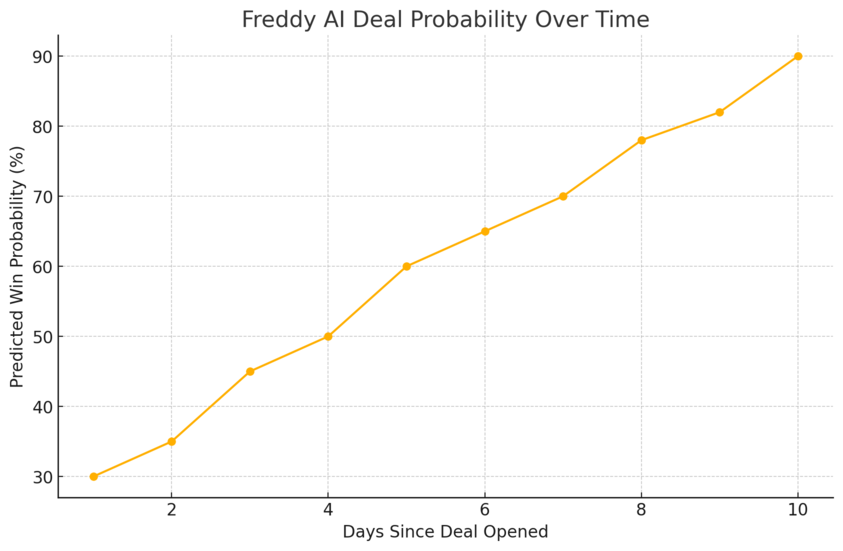
Freddy AI isn’t just a shiny add-on—it’s the intelligence core of Freshsales CRM.
It studies data patterns across your interactions, learns what works, and then guides you toward more successful actions.
Using AI To Rephrase, Expand, and Optimize Sales Emails
Freddy’s Email Assist feature is like having a personal writing coach. When you compose an email in Freshsales, it can automatically suggest rephrasing, expansion, or tone adjustments.
Why this matters:
- It saves time writing personalized emails.
- It improves engagement through better phrasing.
- It ensures consistent professionalism across your team.
You can find this under your email composer as “Freddy Suggestions.”
For instance, if your original message says, “Just checking in,” Freddy might suggest “I wanted to follow up to ensure you received our proposal”—a more proactive and professional phrasing.
It’s a small touch, but those tone shifts often make the difference between ignored emails and actual replies.
Generating Deal Insights for Better Forecasting
Freddy continuously scans your deals and identifies which ones are at risk or likely to close.
You’ll see Deal Insights appear directly on your deal cards, often with action suggestions like “Follow up with contact” or “Add next step.”
The system uses:
- Email response times
- Stage duration (how long a deal stays idle)
- Previous conversion data
This helps you make quick, confident decisions. I personally rely on these insights for pipeline reviews—it’s like having a silent analyst who spots patterns humans miss.
You can view these under Deals → Insights by Freddy AI.
Predicting Sales Outcomes With AI-Driven Analytics
Forecasting used to be guesswork. With Freddy AI, it becomes data-driven. It analyzes your pipeline trends, rep performance, and conversion patterns to predict future revenue.
Under Analytics → Forecasts → Freddy AI Predictions, you can see a clear revenue estimate for the month or quarter.
Freddy considers variables like:
- Lead scoring and deal stage progression.
- Seasonality and historical patterns.
- Rep activity levels.
I believe this feature alone justifies using Freshsales CRM—it keeps your strategy proactive instead of reactive. You don’t wait for bad quarters to surprise you; you see them coming and adjust in time.
Customizing Freshsales CRM for Your Business Needs
Every business has its quirks—and Freshsales CRM is built to adapt to them. Instead of forcing your team to fit into a rigid system, it allows you to shape the CRM around your workflows.
Whether it’s custom dashboards, modules, or marketplace integrations, you can tailor everything to match your sales reality.
Creating Custom Reports and Dashboards for Smarter Insights
Reports are where Freshsales transforms data into decisions. You don’t just see what’s happening—you understand why.
I often recommend starting with custom dashboards, because they visually bring together everything from deal progress to conversion rates.
Here’s how to create one:
- Go to Analytics → Dashboards → Create Custom Dashboard.
- Choose the metrics you care about—deals won, average sales cycle, or calls per rep.
- Add widgets like bar graphs or trend lines to make patterns easier to spot.
Freshsales also lets you build custom reports with filters and grouping options. For example, you can create a report showing “Top 10 sources of high-value leads” or “Deals stuck in negotiation for more than 15 days.”
I suggest setting automated report emails every Monday morning. This small routine gives your sales team a quick pulse check and helps management spot red flags early—before they turn into revenue leaks.
Adding Custom Modules To Match Unique Sales Processes
If your sales process doesn’t fit neatly into standard CRM modules (like Leads, Deals, or Contacts), you can create your own Custom Modules in Freshsales. Think of these as tailor-made data structures that mirror your business flow.
For instance, a construction firm might create a module for “Projects,” while a legal firm could build one for “Cases.”
To set one up:
- Navigate to Admin Settings → Custom Modules → Create New Module.
- Define the fields (like project name, value, start date).
- Link it to existing modules (e.g., associate a project with specific deals or clients).
I believe this flexibility is where Freshsales shines. Instead of bending your operations to fit the software, you make the software fit you. It feels natural, not forced—and that’s what keeps adoption high across teams.
Integrating With Freshworks Marketplace To Extend Capabilities
Freshsales’ true power unfolds when you connect it with tools you already love.
The Freshworks Marketplace offers over 1,200 integrations, from payment gateways and chatbots to analytics and marketing automation apps.
You can access it directly via Admin Settings → Marketplace → Browse Apps.
Some practical examples:
- Slack integration: Get real-time deal updates in your sales channel.
- Zapier: Automate tasks between Freshsales and 5,000+ other tools.
- QuickBooks: Sync invoices and financials directly with customer records.
I recommend starting with integrations that eliminate double data entry—that’s usually where most inefficiencies hide.
Once you automate those handoffs, your CRM becomes a true ecosystem rather than a standalone tool.
Aligning Sales and Marketing With Freshsales Suite
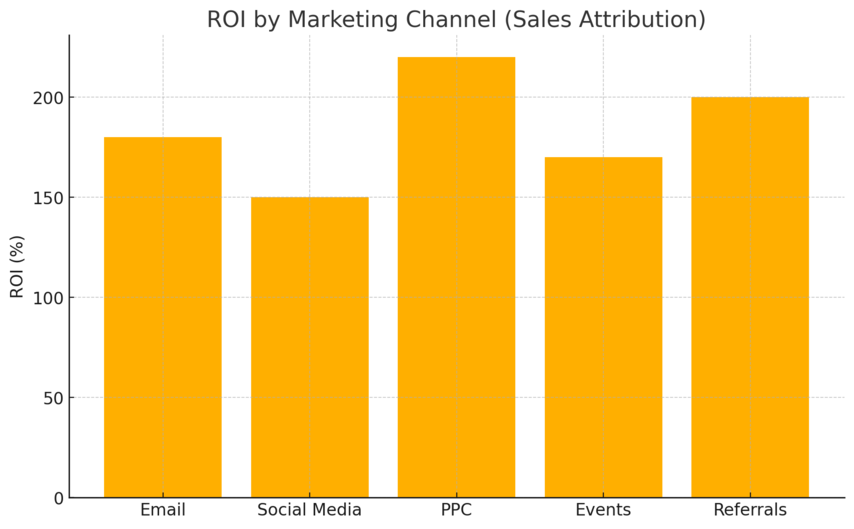
The Freshsales Suite bridges the age-old gap between sales and marketing.
It combines Freshsales CRM with Freshmarketer, allowing your teams to share insights, track campaign results, and move leads smoothly through the funnel.
How Freshsales and Freshmarketer Work Seamlessly Together
Freshsales handles your leads and deals, while Freshmarketer focuses on engagement and automation. When these two tools sync, every marketing activity is tied directly to sales results.
For example:
- A lead clicks a campaign email → Freshmarketer scores and tags the lead.
- That score is instantly reflected in Freshsales → the rep knows who to prioritize.
To connect them, go to Freshsales Suite → Integrations → Freshmarketer Sync. Once active, data like lead scores, campaign responses, and website activity flows automatically between both platforms.
In my experience, this alignment cuts response delays by nearly 30%. Sales knows what marketing’s doing, and marketing finally sees which campaigns actually drive revenue.
Tracking Multichannel Campaign Performance in One View
One of the most impressive parts of the Freshsales Suite is how it consolidates multichannel data—email, social, ads, and chat—into a single campaign performance dashboard.
You can view:
- Which campaigns generated the most leads.
- How quickly those leads moved into deals.
- Which channels (like email or WhatsApp) contributed the most conversions.
Path: Marketing Automation → Campaigns → Analytics View.
I advise using this to reallocate your marketing spend. Instead of spreading budgets thin across platforms, focus on what’s actually driving results. Freshsales’ analytics make that painfully clear in the best way possible.
Converting Marketing Leads to Sales Opportunities Faster
Once a lead qualifies in Freshmarketer—based on engagement or behavior—it’s automatically pushed into Freshsales as a hot lead.
Example: A user downloads a whitepaper and interacts with three follow-up emails. Freddy AI assigns a high engagement score. That contact is then handed over to the sales team instantly, no manual transfer needed.
Benefits you’ll notice:
- Faster lead-to-contact transitions.
- No duplicate data entry.
- More accurate sales forecasting.
I recommend setting a rule in Freddy Scoring → Trigger → Send to CRM when score > X. This ensures sales teams always get leads that are ready for conversion, not cold prospects.
Mobile CRM: Closing Deals on the Go
The Freshsales mobile app brings your CRM to your pocket. Whether you’re traveling or meeting clients on-site, you can access everything—contacts, deals, activities—right from your phone.
Managing Contacts and Deals From the Freshsales Mobile App
The app interface mirrors the desktop experience, so you won’t feel lost. From the main dashboard, you can:
- View your deal pipeline using the same Kanban-style view.
- Access contact details and communication history instantly.
- Add notes, update deal stages, or log calls on the spot.
Path example: Deals → Pipeline View → Select Deal → Update Stage.
I find this especially useful when you need to update deal statuses immediately after a client meeting. Those real-time updates ensure the rest of your team always sees the latest information—no “who followed up last?” confusion.
Receiving Instant Deal Notifications and Updates
The Freshsales app sends push notifications for new leads, deal stage changes, and upcoming tasks. This keeps you proactive, not reactive.
Notifications appear under Settings → Alerts & Notifications, where you can toggle exactly what you want to be notified about.
I advise enabling real-time updates for:
- Lead assignments (so you can follow up instantly).
- Deal stage changes (to react quickly if something’s stuck).
- Reminders for scheduled calls or meetings.
It’s like having a personal assistant that whispers, “Hey, this lead just opened your email—call them now.”
Syncing Notes and Calls in Real-Time for Field Sales Teams
Field sales reps thrive on mobility, and Freshsales makes sure no detail gets lost between office and client visits. Every note, call log, and email syncs automatically to the web app.
You can:
- Log calls directly after ending them through the call screen.
- Add notes using voice-to-text while traveling.
- Sync meeting outcomes instantly with the rest of your team.
All data updates in real-time once your phone reconnects to the internet, meaning no manual re-entry later.
I’ve seen teams close deals on the way back from meetings simply because they could respond faster than competitors. With Freshsales mobile CRM, you’re never tied to a desk—you’re always ready to move deals forward.
Reporting and Analytics That Drive Revenue Decisions
The power of Freshsales CRM isn’t just in managing deals—it’s in helping you understand what drives them.
With detailed reporting, live dashboards, and predictive analytics, you get a full view of your team’s performance and where to focus next to grow revenue faster.
Tracking Conversion Rates and Sales Velocity in Real-Time
Freshsales tracks your conversion rate (how many leads become deals) and sales velocity (how quickly deals move through your pipeline) automatically.
This data is updated in real time on your dashboards, so you can make quick, informed decisions.
Here’s how to access it:
- Go to Analytics → Reports → Sales Performance.
- Add metrics like “Deal Created Date” and “Closed-Won Date.”
- View the average number of days deals stay in each stage.
You can even segment by rep, territory, or source. I suggest keeping an eye on sales velocity especially—it tells you how efficiently your team turns opportunities into revenue.
If deals linger too long, it’s a signal that your follow-up process or stage definitions need tightening.
Small optimization example: A SaaS firm using Freshsales reduced deal closure time by 25% after analyzing velocity and automating their proposal follow-up stage. That’s the kind of improvement these insights make possible.
Using Custom Dashboards To Measure Sales Performance
Dashboards in Freshsales are like a command center. They give you a visual snapshot of your most critical KPIs at a glance—no more exporting to spreadsheets.
To build one:
- Navigate to Analytics → Dashboards → Create Custom Dashboard.
- Select widgets such as Revenue by Rep, Win Rate by Source, or Deals by Stage.
- Drag and drop to customize layout and color for clarity.
You can even schedule reports to land in your inbox automatically. I recommend creating separate dashboards for individual reps and managers—this keeps everyone accountable and reduces meeting prep time.
A quick pro tip: Pair the dashboard view with Freddy Insights to get AI-generated commentary. It explains why certain numbers moved up or down—so instead of just seeing data, you understand its story.
How Advanced Forecasting Tools Help Predict Revenue
Forecasting used to be a guessing game. In Freshsales CRM, it’s precise, dynamic, and AI-backed. Freddy AI analyzes your deal pipeline, rep performance, and seasonality patterns to generate realistic revenue forecasts.
You’ll find this feature under Analytics → Forecasts → Freddy AI Predictions.
What makes it powerful is that it adjusts automatically when new deals enter or old ones are lost. You can view forecasts by month, quarter, or rep and track progress against quotas in real time.
From what I’ve seen, companies using AI forecasting often achieve 20–30% better accuracy compared to manual methods. It’s not about predicting the future perfectly—it’s about spotting trends early enough to act.
Collaboration Tools That Keep Teams Connected
Sales thrives on collaboration. Freshsales ensures everyone—whether in marketing, sales, or support—has access to the same information and context, right where they work.
Using Slack Integration for Contextual Collaboration
The Slack integration turns Freshsales into a live communication hub. Whenever a deal is updated, a message can be automatically sent to a Slack channel or rep directly.
Set it up via Admin Settings → Integrations → Slack → Connect Account.
Example use cases:
- Notify #sales-team when a deal moves to “Negotiation.”
- Post alerts when a new high-value lead is assigned.
- Celebrate wins automatically when deals close.
I suggest creating different channels by pipeline or region so updates stay relevant. It keeps energy high, reduces internal emails, and ensures no deal slips past unnoticed.
Sharing Notes and Updates Within Deals and Contacts
Inside Freshsales, every deal or contact card includes a space for notes, files, and activity logs. This keeps your entire team in sync without hunting for email threads or chat messages.
I often recommend using structured notes—for example:
- Meeting summary
- Next steps
- Key decision maker details
You can tag teammates using “@mention” within notes to assign follow-up actions. This simple workflow builds accountability and ensures smooth handoffs between SDRs, AEs, and account managers.
Teams that log notes consistently often report fewer communication errors and faster deal closures—it’s a small discipline with big results.
Keeping Everyone Aligned With Centralized Communication
Centralization is where Freshsales quietly excels. Every interaction—calls, emails, meetings, and notes—gets stored in one unified timeline under each contact or deal.
Here’s what that means in practice:
- A rep can review a customer’s entire history before calling.
- Managers can see where deals stall without asking for updates.
- Marketing can understand which messages triggered engagement.
I believe this single-view approach is what makes Freshsales feel natural. You’re not “managing data”; you’re managing relationships—with all the context you need right in front of you.
Pricing Plans Tailored to Every Business Size
Freshsales offers flexible pricing tiers, making it scalable for startups, growing companies, and large enterprises alike.
Each plan builds on the previous one, adding advanced automation, analytics, and AI tools.
Overview of Growth, Pro, and Enterprise Plans
- Growth ($9/user/month, billed annually): Ideal for startups and small teams. Includes contact management, email, chat, and basic workflows.
- Pro ($39/user/month, billed annually): Designed for mid-sized businesses. Adds AI scoring, multiple pipelines, sales sequences, and advanced workflows.
- Enterprise ($59/user/month, billed annually): Built for large teams needing customization. Includes forecasting insights, field-level permissions, and sandbox environments.
I like that all plans include 24×5 support and a free mobile app—it’s a simple but critical touch for smaller teams scaling quickly.
Which Freshsales Plan Offers the Best Value for Your Team
If you’re just starting out, the Growth plan is more than enough. It gives you all the essentials to organize leads and automate simple tasks without complexity.
For fast-scaling teams, I recommend the Pro plan. It’s where you unlock Freddy AI, multiple pipelines, and custom workflows—features that genuinely move the needle.
The Enterprise plan is best when your team requires strict data governance or complex reporting.
For example, a large financial services firm might choose this plan for its audit logs and advanced permission controls.
Think of it like this: Choose the plan that fits your next 12 months, not just your current size.
How the 21-Day Free Trial Helps You Test Before You Commit
Freshsales offers a 21-day free trial—no credit card required—which I think is perfect for hands-on exploration.
You can test all premium features like AI scoring, sequences, and custom reports without any restrictions.
During your trial, try these three steps:
- Create a sample pipeline and move a few mock deals through it.
- Build one automation workflow (like an auto email follow-up).
- Test Freddy AI’s lead scoring and forecasting insights.
This short trial gives you a clear sense of what’s possible—and whether your team can see value quickly.
Expert Tip: Maximizing ROI From Freshsales CRM
Getting value from Freshsales CRM isn’t just about using it—it’s about using it right. With a structured setup and consistent review process, you’ll see returns within weeks.
Setting Up a Streamlined Onboarding Process for Your Team
Start with a clean foundation. Import your data properly using Admin Settings → Data Import → CSV Upload.
Train your team on:
- Updating deal stages correctly.
- Logging activities (calls, notes, tasks).
- Using Freddy AI insights before outreach.
I advise assigning one “CRM champion” in your team to monitor adoption during the first month. Having a go-to person accelerates onboarding and keeps everyone aligned.
Measuring Key Metrics To Continuously Improve Sales Performance
Regular review is where you turn insights into growth.
Focus on three key metrics:
- Lead-to-deal conversion rate – Are your leads qualified enough?
- Sales velocity – How fast are deals closing?
- Average deal value – Are you upselling effectively?
Use dashboards to track these weekly. I’ve found teams that hold 15-minute Friday review sessions using their Freshsales reports consistently outperform those who don’t—it builds awareness and accountability.
Leveraging AI Insights To Optimize Every Stage of the Pipeline
Freddy AI should be part of your daily rhythm. It not only scores leads but also predicts which deals need attention and when to reach out.
Try enabling:
- Deal Insights – For real-time nudges when a deal slows down.
- Email Intelligence – To optimize message timing and phrasing.
- Forecasting Predictions – To anticipate next-quarter performance.
When you trust AI to handle data-driven suggestions, you free yourself to focus on what humans do best—building relationships and closing with empathy.

I’m Juxhin, the voice behind The Justifiable.
I’ve spent 6+ years building blogs, managing affiliate campaigns, and testing the messy world of online business. Here, I cut the fluff and share the strategies that actually move the needle — so you can build income that’s sustainable, not speculative.
Related posts:
 Why CRM Freshworks Stands Out From Other Platforms
 What Is Freshworks CRM and How Does It Simplify Sales?
 Freshsales Pricing Breakdown: Which Plan Is Best for You?
 Freshworks Sales Tools That Boost Your Revenue Fast
 Freshworks CRM Pricing: Real Costs & Hidden Value
 Social Media Marketing for Small Business – Best Tips